
CVE-2026-50746 is a critical vulnerability in Ubiquiti’s UniFi Connect Application. The public CVE record describes it as an Improper Access Control flaw that a malicious actor with network access could exploit to execute command injection on the host device. That short description carries more weight than it may first appear to. UniFi Connect is not a disposable web app at the edge of a lab network. It is a management application for connected building systems, digital displays, lighting, A/V devices, EV charging, and automation workflows. When software in that position has a network-reachable command-injection path, the operational question is not only “what version is vulnerable?” It is also “who could reach the management plane before the patch, and what authority does that host have over the environment?” (جيثب)
The confirmed public facts are narrow but serious. The CVE record was published on July 2, 2026, with HackerOne as the CNA source. The affected product is listed as Ubiquiti Inc UniFi Connect Application, with versions lower than 3.4.20 marked affected in the CVE List data. The CNA CVSS v3.1 score is 10.0 Critical, with the vector AV:N/AC:L/PR:N/UI:N/S:C/C:H/I:H/A:H. The listed weakness is CWE-284, Improper Access Control. NVD’s page showed the record as still undergoing enrichment and had not yet supplied its own NVD CVSS assessment at the time reviewed, while displaying the CNA score and vector. CISA ADP enrichment in the CVE record listed exploitation as “none,” automatable as “yes,” and technical impact as “total.” (جيثب)
Those details are enough to justify urgent action, but not enough to justify made-up exploit details. Public sources reviewed here do not disclose a working CVE-2026-50746 exploit chain, a real UniFi Connect endpoint, a safe vendor-provided detection probe, or evidence of active exploitation in the wild. The right defensive posture is therefore precise: patch the affected UniFi Connect application, reduce management-plane reachability, validate versions and exposure through authorized checks, and investigate any environment where the vulnerable management interface was reachable before remediation.
CVE-2026-50746 at a glance
| الحقل | Current public information | Defender meaning |
|---|---|---|
| مكافحة التطرف العنيف | CVE-2026-50746 | Track this separately from other UniFi issues in the same advisory batch. |
| Vendor | Ubiquiti Inc | Verify through Ubiquiti’s advisory and local UniFi update controls. |
| المنتج | UniFi Connect Application | Focus on Connect, not only UniFi Network or UniFi OS. |
| الإصدارات المتأثرة | Versions below 3.4.20 in the CVE List affected data | Inventory every Connect deployment and confirm the running version. |
| Public fix target | Public summaries and the CVE record point defenders to fixed Connect builds at or beyond the affected range | Use the latest Ubiquiti advisory and Update Manager for the exact deployment path. |
| الضعف | CWE-284, Improper Access Control | A restricted operation may become reachable across an authorization boundary. |
| Impact described | Command injection on the host device | Treat as possible host-level compromise if exploitation is confirmed. |
| CVSS v3.1 CNA score | 10.0 Critical | CNA score, not yet NVD’s own enriched score in the reviewed NVD page. |
| CVSS vector | AV:N/AC:L/PR:N/UI:N/S:C/C:H/I:H/A:H | Network reachable, low complexity, no privileges, no user interaction, changed scope, high CIA impact. |
| CISA ADP SSVC | Exploitation none, automatable yes, technical impact total | No public CISA ADP confirmation of exploitation in the record, but automation and impact are severe. |
| Public exploit detail | No reliable public exploit chain reviewed | Do not run random PoCs. Validate through version, exposure, logs, and vendor guidance. |
| إجراء فوري | Update, restrict reachability, review exposure window | Patch first, then investigate whether the management plane was reachable. |
The table also shows why a single sentence like “network access required” is not enough context. Many real enterprise intrusions already include some form of network access: a VPN foothold, compromised contractor laptop, flat internal subnet, exposed admin interface, jump host, MSP tool, reverse proxy, or routed management VLAN. A bug does not need to be globally internet-exploitable to become urgent. It only needs to be reachable from a path an attacker can realistically touch.
What UniFi Connect controls, and why that matters
Ubiquiti describes UniFi Connect as a modern “Enterprise of Things” platform covering professional audio/visual products, lighting, and electric vehicle charging stations. Its Connect Web Application is the centralized management platform for a UniFi Connect deployment and runs on compatible UniFi Consoles. The same official help page describes management from a single Connect Display to campus-wide lighting, EV charging, and dynamic displays. (Ubiquiti Help Center)
That product role changes the risk model. A vulnerability in an ordinary marketing site may expose a database, a few user accounts, or application data. A vulnerability in a management plane can affect the systems that administrators use to control devices, change configuration, push content, enable automation, manage access modes, and maintain operational state. In a school, office building, retail site, campus, hotel, warehouse, or multi-tenant facility, that may include public displays, lighting behavior, charging infrastructure, and the console that ties those systems together.
UniFi Connect also sits in an awkward security zone. It may not be part of the classic server fleet watched by the application security team. It may not be part of the network firewall estate watched by the network team. It may live in facilities, physical security, IT operations, or a managed service provider’s support model. That creates a common failure mode: everyone assumes someone else has patched it. CVE-2026-50746 should be used as a forcing function to identify exactly who owns Connect, where it runs, how it is updated, and which networks can reach it.
The most important word in the CVE description is not only “Command Injection.” It is also “host device.” Command execution against the host that runs the management application is qualitatively different from a bug that only changes UI state. Depending on how the service is deployed and what privileges it has, host-level command execution may create opportunities to read local configuration, alter service behavior, disrupt management availability, tamper with logs, reach adjacent services, or use the management host as a pivot point. The public record does not prove all of those outcomes for every deployment, but the CVSS vector’s high confidentiality, integrity, and availability impact explains why defenders should treat the possibility seriously. (جيثب)
Ubiquiti’s local-management documentation is also relevant to exposure analysis. It states that UniFi Local Management is used when customers need to manage a deployment locally or prefer an air-gapped setup, and that local management requires connecting to the local network where UniFi is running. That does not make the system safe by default. It tells defenders where to look: local networks, management subnets, remote-access paths, VPN routes, and any cloud or Site Manager path that could eventually reach local administration. (Ubiquiti Help Center)
What is confirmed, and what should not be overclaimed
The confirmed description for CVE-2026-50746 is concise: a malicious actor with access to the network could exploit an Improper Access Control vulnerability in UniFi Connect Application to execute command injection on the host device. The CVE List record names the vendor and product, lists affected versions lower than 3.4.20, assigns CWE-284, and shows the CNA CVSS 10.0 vector. NVD displays the same description, reference to Ubiquiti’s Security Advisory Bulletin 066, and HackerOne CNA scoring, while noting that the NVD assessment was not yet provided in the reviewed page. (جيثب)
The CISA ADP enrichment is particularly useful because it separates two ideas that defenders often collapse into one. In the CVE record, CISA ADP lists exploitation as “none,” which should be read as no public CISA ADP confirmation of exploitation in that enrichment field, not as proof that no attacker anywhere has attempted it. The same enrichment marks the issue as automatable and gives it total technical impact. In practical terms, public exploitation evidence may be absent while the vulnerability’s shape is still dangerous enough to treat as urgent. (جيثب)
Public security coverage has described CVE-2026-50746 as the highest-severity issue in Ubiquiti’s SAB-066 set, and The Hacker News summarized the broader advisory as covering multiple critical UniFi flaws across Connect, Talk, Access, Protect, and UniFi OS. Its list describes CVE-2026-50746 as an improper access control vulnerability in UniFi Connect Application that could allow command injection on the host device, with CVSS 10.0, affected versions reported as 3.4.16 and earlier, and fixed version reported as 3.4.20. The CVE List’s machine-readable affected data uses the broader less-than-3.4.20 range, so defenders should use the vendor’s latest advisory and local Update Manager as the final operational source for their deployment while treating anything below the fixed branch as needing remediation. (أخبار القراصنة)
There are also things a responsible write-up should not pretend to know. Public sources do not disclose the vulnerable function name, request path, parameter name, patch diff, privilege level of the affected service, exploit reliability, post-exploitation behavior, or real-world attacker telemetry for CVE-2026-50746. That matters. Saying “command injection on the host device” is accurate because the CVE record says it. Publishing a fake endpoint, an invented payload, or a speculative exploit chain would be worse than useless because it would mislead defenders and might create unsafe testing behavior.
A good internal advisory for this vulnerability should therefore use careful language. “CVE-2026-50746 allows command injection on vulnerable UniFi Connect hosts when reachable by a malicious actor with network access” is supported. “All internet-facing UniFi devices are compromised” is not supported. “There is no risk because exploitation is not confirmed in KEV” is also not supported. The best security decisions live between those two lazy extremes.
Why an access-control bug can become command injection
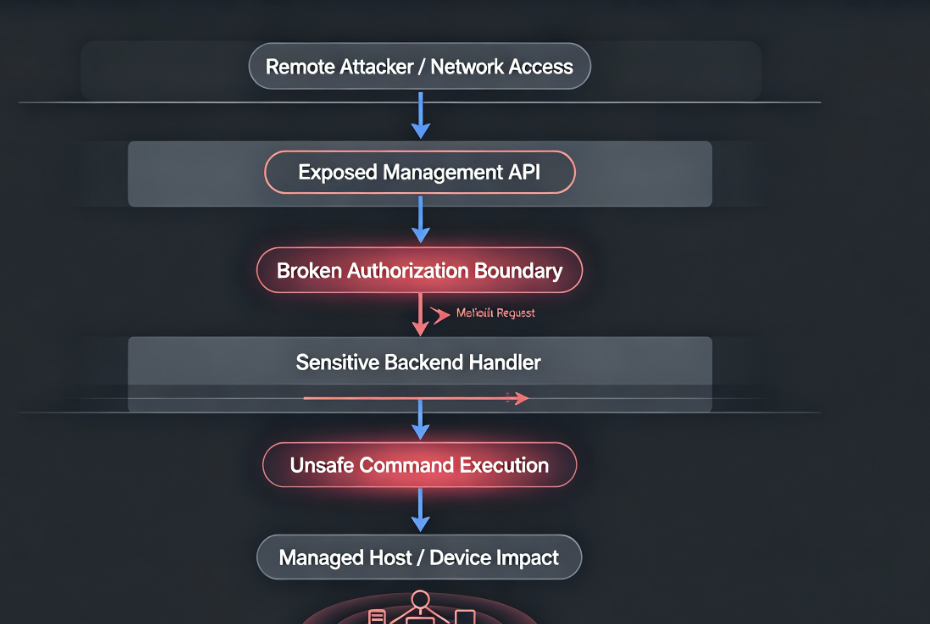
CVE-2026-50746 is described through two concepts that are often treated separately: improper access control and command injection. That combination is not unusual in management software. The access-control failure explains how a request reaches a restricted operation. The command-injection impact explains what can happen once that operation processes attacker-influenced input unsafely.
A simplified model looks like this. A management application has an internal operation that performs a maintenance task. The task may install or update a component, process media, trigger device control, call a local service, generate a diagnostic bundle, run a health check, or invoke a platform helper. The operation is supposed to be reachable only by an administrator or a trusted internal service. If access control is incorrectly enforced, a network-reachable actor may be able to invoke that operation without the intended authorization. If the operation then builds an operating-system command by concatenating request-controlled data into a shell string, the bug crosses from authorization failure into command injection.
That is the key defensive lesson. Command injection is not only a string-sanitization problem. It is also an authorization-boundary problem. The safest command-building code can still be abused if anyone can invoke sensitive operations. The strictest access-control layer can still fail catastrophically if the operation behind it passes untrusted input into a shell. Mature defenses require both: correct authorization before sensitive actions and safe process execution inside those actions.
CWE-284 is a broad category. MITRE uses it for cases where software does not restrict or incorrectly restricts access to a resource from an unauthorized actor. That breadth is useful at the database level, but it is too generic for remediation on its own. For CVE-2026-50746, the practical remediation questions are more concrete: which UniFi Connect routes or operations were reachable, which version fixed the boundary, whether any exposed systems were reachable during the vulnerable window, and whether host-level indicators show command execution or suspicious process creation. The public CVE record does not answer all of those questions, so defenders must combine patching with asset and log review rather than waiting for perfect exploit detail. (جيثب)
The attack preconditions in the CVSS vector deserve plain-English translation. أ:ن means exploitation is network-based. ت: ل means the attack complexity is low from the scorer’s perspective. PR:N means no privileges are required. UI:N means no user interaction is required. S:C means the vulnerable component’s compromise can affect resources beyond its own security scope. C:H/I:H/A:H means high confidentiality, integrity, and availability impact. Those metrics explain why the score reaches 10.0. They also explain why “behind the firewall” is not a sufficient mitigation if the interface is reachable from networks that users, vendors, VPN clients, or compromised endpoints can access. (جيثب)
Realistic abuse scenarios without inventing a public exploit
A safe risk discussion should avoid fake exploit steps but still describe how defenders should think. The first scenario is internal network reachability. An attacker compromises a workstation on a corporate LAN or joins a network segment through weak Wi-Fi, stolen VPN credentials, a vendor tunnel, or an exposed jump box. If the UniFi Connect management application is reachable from that segment and still vulnerable, the attacker may not need a valid UniFi administrator account to attempt the vulnerable path. The CVSS vector’s PR:N و UI:N make that possibility operationally important. (جيثب)
The second scenario is management network sprawl. Many organizations intend management planes to live on restricted networks but gradually add exceptions: monitoring systems, MSP access, help desk tools, reverse proxies, automation scripts, remote support, and break-glass paths. Over time, “management only” becomes reachable from far more places than the firewall diagram claims. A CVE like CVE-2026-50746 should trigger a reachability review, not only a version check.
The third scenario is internet exposure. Public reporting cited Censys tracking more than 100,000 internet-exposed UniFi OS instances in the context of the broader Ubiquiti advisory wave, while also cautioning that this does not say how many are patched or honeypots. That statistic is about UniFi OS exposure broadly, not a precise count of vulnerable UniFi Connect hosts. Still, it reinforces a recurring problem: UniFi management surfaces are frequently discoverable, and security teams should verify their own exposure rather than assume these systems are private. (كمبيوتر نائم)
The fourth scenario is post-compromise pivoting. If command injection succeeds on a management host, the attacker’s next move depends on local privileges, accessible files, network routes, stored tokens, service accounts, update mechanisms, and reachable devices. The public CVE-2026-50746 record does not prove root access or a specific secret-theft path. But a host running a management application is rarely isolated in a meaningful sense. It may hold credentials, API tokens, device trust relationships, logs, configuration, or network paths that make it more valuable than an ordinary application server.
The fifth scenario is operational disruption. UniFi Connect is used for lighting, A/V, displays, EV charging, and automation. Disruption could therefore affect not only IT confidentiality but also visible business operations. A compromised or unstable management application may break display content, device schedules, charging behavior, automation routines, or administrative visibility. Even if no data is stolen, availability and integrity can still matter.
Why the broader SAB-066 batch changes remediation priority
CVE-2026-50746 was disclosed as part of a broader Ubiquiti security advisory set. The Hacker News summarized multiple critical flaws in UniFi Connect, Talk, Access, Protect, and UniFi OS, including command injection, improper access control, SQL injection, SSRF, and privilege escalation issues. This matters because teams often patch the headline CVE and miss the rest of the management ecosystem. The attacker does not care which product name appears in the dashboard. The attacker cares which reachable path gives control. (أخبار القراصنة)
| مكافحة التطرف العنيف | Product area in public reporting | Weakness or impact summary | Why it belongs in the same response plan |
|---|---|---|---|
| CVE-2026-50746 | UniFi Connect Application | Improper access control leading to command injection on the host device | Primary focus; CVSS 10.0; affects the Connect management application. |
| CVE-2026-50747 | UniFi Talk Application | Authenticated SQL injection series that could escalate privileges on the host device | Shows that UniFi application-layer bugs in the same advisory can affect host privilege and data integrity. |
| CVE-2026-50748 | UniFi Access Application | Improper input validation leading to command injection | Same command-execution risk class in a physical-access management product. |
| CVE-2026-54400 | UniFi Access Application | Improper access control leading to privilege escalation | Relevant because Access may control doors and physical-security workflows. |
| CVE-2026-55115 | UniFi Protect Application | SSRF that could escalate privileges on the host device | Protect often touches cameras and surveillance infrastructure, increasing blast-radius concerns. |
| CVE-2026-54402 | UniFi OS | Improper input validation leading to command injection | Affects the underlying UniFi OS control plane, not just one app. |
| CVE-2026-55116 | UniFi OS | Improper access control allowing unauthorized changes to certain devices | Reinforces that device-management authority is part of the risk, not an afterthought. |
The table should push defenders toward platform-level remediation. If the environment runs multiple UniFi applications on the same console or across the same management network, do not handle CVE-2026-50746 as a one-line ticket. Build a complete UniFi inventory, update every affected application and console, review exposure across the entire management plane, and confirm that critical adjacent applications are not still sitting on vulnerable versions.
This is also where historical UniFi exploitation becomes relevant. In June 2026, CISA added three UniFi OS vulnerabilities, CVE-2026-34908, CVE-2026-34909, and CVE-2026-34910, to its Known Exploited Vulnerabilities catalog based on evidence of active exploitation. Those are separate from CVE-2026-50746, but they are highly relevant to risk prioritization because they involve the same vendor ecosystem and the same broad management-plane theme. (CISA)
Bishop Fox’s public analysis of the earlier UniFi OS Server chain is especially useful for defenders because it shows how access-control and routing issues can lead to command execution in real systems. Their research describes an unauthenticated RCE chain against UniFi OS Server, involving an authentication gateway bypass and a command-injection sink, and states that they validated the chain against UniFi OS Server 5.0.6 and confirmed the fix on 5.0.8. That is not a proof of exploitability for CVE-2026-50746, but it is a strong reminder that management-plane parsing, authorization, and command execution bugs are not theoretical in the UniFi ecosystem. (بيشوب فوكس)
Penligent has also published a technical analysis of CVE-2026-34908 that treats the earlier UniFi OS issue as an access-control failure in a control plane rather than a generic “critical CVE” headline. That is the right analytical frame for CVE-2026-50746 as well: the priority is not only the score, but also reachability, management-plane authority, evidence collection, and safe validation. (بنليجنت)
Exposure triage for defenders
Start with ownership. Identify who owns UniFi Connect in your organization. It may sit under IT, networking, facilities, physical security, retail operations, campus operations, or an MSP. If the owner is unclear, assume the patching process is also unclear. Assign one technical owner and one business owner before the incident response conversation drifts into “not our system.”
Next, identify every UniFi console or host that may run the Connect Application. Ubiquiti’s documentation states that the UniFi Connect application runs on compatible UniFi Consoles and that Connect devices must be adopted to the console’s Connect application for management. That means asset discovery should not stop at devices labeled “Connect.” Look for consoles, CloudKeys, Dream Machine deployments, Cloud Gateways, Network Video Recorder systems, and any host that administrators use to reach Connect. (Ubiquiti Help Center)
Then validate the version. Do not rely only on old spreadsheets, DNS names, or vulnerability-scanner banners. Confirm through the UniFi UI, Update Manager, package state, or vendor-supported management tooling. The CVE record lists versions below 3.4.20 as affected, but Ubiquiti release naming and advisory pages may present fixed builds through the product’s own update channels. The safest operational wording is: identify every UniFi Connect deployment and update to the vendor-recommended fixed release for that deployment, with special attention to any build below the affected threshold in the CVE record. (جيثب)
After version validation, map reachability. A vulnerable system unreachable by any attacker-controlled path is lower risk than a vulnerable system exposed to the internet, a guest network, a broad VPN group, or a flat internal LAN. But do not let that become an excuse for delay. Reachability often changes faster than patch state. A temporary firewall rule, VPN exception, NAT change, remote support session, or reverse proxy can turn a “private” management console into an exposed one.
Use a simple exposure table for each asset:
| سؤال | Evidence to collect | Risk interpretation |
|---|---|---|
| Is UniFi Connect installed or enabled? | UI screenshot, package list, console application list | Confirms whether CVE-2026-50746 is relevant. |
| What version was running before remediation? | Update history, package metadata, change logs | Determines whether the system was in the affected range. |
| What version is running now? | Post-update screenshot, CLI output, management export | Confirms remediation state. |
| Which networks could reach it? | Firewall rules, VPN routes, reverse proxy configs, scan results from authorized segments | Determines practical attack surface. |
| Was it reachable from the internet? | External asset inventory, DNS, cloud firewall, Censys/Shodan-style internal review, perimeter logs | Escalates priority and incident-response depth. |
| Was it reachable from user networks? | VLAN ACLs, routing tables, EDR network telemetry | Important because compromised endpoints often provide internal reachability. |
| Are logs available for the exposure window? | Web access logs, application logs, SIEM retention | Determines whether exploitation review is possible. |
| Were admin or remote-access settings changed? | UniFi audit logs, account exports, configuration diffs | Helps detect post-exploitation impact. |
This table is intentionally evidence-based. It avoids the common trap of writing “not vulnerable” because a scanner did not recognize the product. For management-plane software, absence of a scanner finding is not evidence of safety. Evidence of safety is a confirmed product version, confirmed patch state, confirmed restricted reachability, and reviewed logs for the period when the system may have been vulnerable.
Safe validation workflow
Validation for CVE-2026-50746 should begin with authorization and stop before exploit behavior. There is no public vendor-safe detection endpoint or Bishop Fox-style non-destructive detector for this specific CVE in the sources reviewed here. That means defenders should not attempt to “prove” command injection by sending shell metacharacters to production systems. Version validation, reachability validation, and log review are the safe path.
A basic authorized asset list can be maintained as structured data:
[
  {
    "asset": "hq-unifi-console-01",
    "owner": "network-ops",
    "environment": "headquarters",
    "connect_installed": true,
    "pre_patch_version": "3.4.16",
    "current_version": "3.4.20-or-later-confirmed",
    "management_networks": ["10.20.0.0/24"],
    "internet_exposed": false,
    "vpn_reachable": true,
    "log_review_status": "pending"
  },
  {
    "asset": "retail-site-12-console",
    "owner": "msp",
    "environment": "branch",
    "connect_installed": "unknown",
    "pre_patch_version": "unknown",
    "current_version": "unknown",
    "management_networks": ["unknown"],
    "internet_exposed": "needs-check",
    "vpn_reachable": "needs-check",
    "log_review_status": "not-started"
  }
]
You can extract the systems that still need action with jq:
jq -r '
  .[]
  | select(
      .connect_installed == "unknown"
      or .current_version == "unknown"
      or .internet_exposed == "needs-check"
      or .log_review_status != "complete"
    )
  | [.asset, .owner, .connect_installed, .current_version, .internet_exposed, .log_review_status]
  | @tsv
' unifi-connect-assets.json
For network reachability, use only authorized internal ranges and known assets. Do not scan the internet for UniFi devices. Do not test third-party customer systems unless written authorization covers those assets. A safe reachability check can confirm whether a management interface is reachable from a specific approved segment without sending exploit payloads:
# Authorized internal validation only.
# Replace the target with an asset you own or are explicitly approved to test.

TARGET="https://unifi-console.example.internal"

curl -skI --connect-timeout 5 "$TARGET" | sed -n '1,12p'
For a small internal list, keep the check narrow and auditable:
while read -r target; do
  [ -z "$target" ] && continue
  printf '%s\t' "$target"
  curl -skI --connect-timeout 5 "$target" 2>/dev/null | awk 'NR==1 {print $0}'
done < authorized-unifi-targets.txt
This is not a vulnerability test. It is a reachability check. Its value is in showing which management interfaces are reachable from the test location. The result should be combined with local version confirmation, not interpreted as vulnerable or safe by itself.
If your SIEM has web access logs from reverse proxies or management gateways, search for unusual requests to UniFi Connect or UniFi console paths during the exposure window. Because public sources do not disclose the vulnerable CVE-2026-50746 path, the safest queries should look for suspicious patterns rather than exact exploit strings. For example, in a Splunk-like syntax:
index=network OR index=proxy OR index=unifi
(host="unifi*" OR uri_path="*connect*" OR sourcetype="reverse_proxy")
(status>=400 OR status=200)
| stats count values(uri_path) values(user_agent) by src_ip, dest_host
| sort - count
For encoded traversal and shell-metacharacter hunting across management logs, keep the query broad and use it as a triage signal, not proof:
index=proxy OR index=web
(dest_host="*unifi*" OR uri="*unifi*" OR uri="*connect*")
("%2f" OR "%2e" OR ".." OR ";" OR "%3b" OR "$(" OR "%24%28" OR "|" OR "%7c")
| table _time src_ip dest_host method uri status user_agent
That query can produce false positives. Encoded characters and punctuation appear in normal web traffic. The point is to find requests worth reviewing, especially when they hit management interfaces before patching.
On Linux hosts or self-managed systems where logs are available, a local review might include process and service anomalies. The exact paths vary by deployment, so treat the following as a pattern, not a product-specific command:
# Review service logs and reverse-proxy logs around the exposure window.
# Replace paths with the actual log locations for your deployment.

sudo grep -RIE 'connect|unifi|error|unauthorized|forbidden|command|shell|exec' \
  /var/log 2>/dev/null | tail -n 200
For EDR or host telemetry, prioritize unexpected child processes from UniFi-related services. A management web application spawning sh, باش, الضفيرة, wget, nc, بايثون, بيرل, or package-management commands outside update windows should be reviewed quickly. That is not unique to CVE-2026-50746; it is a general detection principle for command injection in management applications.
A safe toy PoC for the vulnerability class
The following PoC is not an exploit for CVE-2026-50746. It does not target UniFi Connect, does not use a real UniFi endpoint, does not scan a network, and does not prove that a specific UniFi version is exploitable. It is a local educational demonstration of the dangerous pattern described by the CVE category: an access-control failure allows an untrusted caller to trigger a sensitive operation, and that operation builds a shell command using untrusted input.
Run it only on your own local machine in a throwaway directory. The unsafe example prints a harmless marker. It is included to help defenders and developers recognize why access control and command execution must be fixed together.
#!/usr/bin/env python3
"""
Local toy demo only.

This is NOT a UniFi Connect exploit.
It does not contact any network service.
It demonstrates a dangerous programming pattern:
1. a sensitive operation lacks a real authorization gate;
2. user-controlled input is concatenated into a shell command.

Run locally:
    python3 toy_access_control_command_injection_demo.py
"""

import shlex
import subprocess


def unsafe_admin_operation(caller_role: str, package_name: str) -> None:
    # Access-control bug:
    # The operation should require caller_role == "admin",
    # but the check is missing or incorrectly placed.
    #
    # Command-injection bug:
    # The package_name is inserted into a shell string.
    command = f"echo Checking package: {package_name}"
    subprocess.run(command, shell=True, check=False)


def safer_admin_operation(caller_role: str, package_name: str) -> None:
    # Correct authorization boundary:
    if caller_role != "admin":
        raise PermissionError("admin role required")

    # Safer process execution:
    # No shell=True, arguments are passed as a list.
    subprocess.run(
        ["echo", "Checking package:", package_name],
        shell=False,
        check=False,
    )


if __name__ == "__main__":
    print("[unsafe demo] A non-admin caller reaches a sensitive operation.")
    unsafe_admin_operation(
        caller_role="guest",
        package_name="demo-package; echo TOY_INJECTION_MARKER"
    )

    print("\n[safer demo] The same non-admin caller is blocked before execution.")
    try:
        safer_admin_operation(
            caller_role="guest",
            package_name="demo-package; echo TOY_INJECTION_MARKER"
        )
    except PermissionError as exc:
        print(f"blocked: {exc}")

    print("\n[developer note] If a shell is unavoidable, quote inputs defensively.")
    print("quoted example:", shlex.quote("demo-package; echo TOY_INJECTION_MARKER"))
The unsafe function demonstrates why a bug can be described as both improper access control and command injection. A non-admin caller reaches an operation that should be protected. The operation then sends untrusted input through a shell. The safer function fixes both layers: it blocks unauthorized callers before the sensitive operation and passes arguments without shell=True.
This toy example should not be turned into a scanner. It intentionally omits network code, real endpoints, real payloads, authentication bypass logic, and product-specific behavior. Its defensive value is conceptual: when reviewing management software, look for restricted operations that spawn local commands, especially update handlers, diagnostics, backup routines, device control tasks, media processors, package installers, and automation hooks. Then verify both the access-control boundary and the command-execution boundary.
Detection and investigation after patching
Patching closes the known software flaw. It does not automatically answer whether a reachable vulnerable system was touched before the patch. For CVE-2026-50746, the depth of investigation should depend on the asset’s exposure and business role. An isolated lab console that was never reachable outside a locked management subnet may need version documentation and standard log review. A production console reachable from a broad VPN pool or the internet deserves a deeper investigation.
Start with timeline reconstruction. Identify when the affected version was installed, when the advisory became available, when the system was updated, and which networks could reach the service during that interval. If logs are retained, preserve them before rotation. If logs are already centralized, mark the exposure window in the case management system so analysts can search consistently.
Review application and web access logs for unusual request patterns. Because no public CVE-2026-50746 exploit path is available in reliable sources reviewed here, do not search only for a single string. Look for unauthenticated requests to management paths, strange 4xx and 5xx bursts, encoded characters, unexpected methods, suspicious user agents, and requests from networks that should not administer UniFi Connect.
Review host telemetry for suspicious process behavior. Command injection frequently leaves child-process traces when logging and EDR visibility are intact. A management application unexpectedly launching shells, interpreters, download tools, archive utilities, package managers, or network clients should be treated as high signal. The same applies to odd outbound connections shortly after suspicious HTTP requests.
Review administrative state. Look for new users, role changes, remote-management changes, MFA changes, SSH enablement, API token creation, unexpected device adoption or removal, automation changes, and configuration edits. The absence of failed login attempts does not prove safety when a vulnerability’s public vector says no privileges and no user interaction are required. (جيثب)
Review network egress. A successful command injection may create outbound traffic from the management host. Check DNS logs, firewall logs, proxy logs, and EDR network events for connections to unknown destinations, especially shortly after suspicious inbound requests. Also check lateral movement indicators from the UniFi host toward internal services that it normally does not access.
| الإشارة | ما أهمية ذلك | Common false positives | Follow-up |
|---|---|---|---|
| UniFi management interface reachable from broad VPN or user VLAN | Increases practical exploitability after any internal foothold | Temporary admin testing, MSP maintenance | Restrict ACLs, document approved source networks. |
| Requests with encoded traversal or shell metacharacters | May indicate probing for parser or injection bugs | Normal encoded URLs, broken clients, scanners | Correlate with target path, status code, source, timing. |
| Connect or UniFi service spawning shell processes | Strong command-injection signal when outside expected maintenance | Legitimate updates, diagnostics | Compare to update window, command line, parent process. |
| Unknown outbound connection from UniFi host | Possible payload retrieval, callback, or exfiltration | Vendor update checks, telemetry | Resolve destination, inspect timing and process owner. |
| New admin or role change after suspicious traffic | Possible post-exploitation persistence | Legitimate onboarding | Verify change ticket and actor identity. |
| SSH enabled unexpectedly | Can outlive web-layer patching as persistence | Support troubleshooting | Review auth logs, disable if not required, rotate credentials. |
| Logs missing during exposure window | May indicate normal retention or tampering | Short retention policy | Use upstream proxy, firewall, EDR, and backups. |
If exploitation is plausible but not proven, apply proportional containment. Rotate credentials used by the UniFi environment, review API tokens, restrict management access, force reauthentication for admin users, and verify configuration integrity. If exploitation is confirmed, do not treat patching alone as remediation. Rebuild from a known-good image or vendor-supported recovery path, rotate secrets, review managed devices, and preserve forensic artifacts.
Remediation and hardening
The primary fix is to update UniFi Connect Application to a vendor-fixed version. The CVE record lists affected versions lower than 3.4.20, while public release and advisory reporting around SAB-066 points administrators to fixed Connect updates. Use Ubiquiti’s own Update Manager and Security Advisory Bulletin 066 as the operational source for your exact console, branch, and deployment type. Document the version before and after the update. (جيثب)
Do not stop at Connect. The same advisory batch includes critical issues across UniFi Talk, Access, Protect, and UniFi OS. The Hacker News summary lists multiple vulnerabilities with CVSS scores from 9.0 to 10.0, including command injection, SSRF, SQL injection, and improper access control. If your console runs multiple UniFi applications, patch the platform as a unit. A fully patched Connect application does not compensate for a vulnerable UniFi OS or Access component on the same reachable management plane. (أخبار القراصنة)
Restrict reachability. Management interfaces should not be reachable from the public internet unless there is an unavoidable, documented, compensated business need. They should not be reachable from guest networks, broad user networks, or large VPN groups by default. Use management VLANs, firewall ACLs, jump hosts, device posture checks, and explicit admin source groups. The goal is not obscurity. The goal is to make “network access” a real control rather than a phrase in a policy.
A simplified firewall policy might look like this in intent, not vendor syntax:
Policy: UniFi management access

Allow:
  Source: approved-admin-jump-hosts
  Destination: unifi-management-hosts
  Service: HTTPS management ports required by deployment
  Logging: enabled

Allow:
  Source: monitoring-system
  Destination: unifi-management-hosts
  Service: approved monitoring checks only
  Logging: enabled

Deny:
  Source: user VLANs, guest VLANs, contractor VLANs, internet
  Destination: unifi-management-hosts
  Service: any
  Logging: enabled for denied management attempts
For VPN access, separate administrators from general users. Do not put every remote employee in a group that can reach management planes. Require MFA, device posture where available, and separate approvals for emergency access. Review stale VPN groups after every major vulnerability wave.
Centralize logs. A management host that keeps logs only locally can lose the most important evidence if the host is compromised or rebuilt. Forward reverse-proxy logs, application logs, authentication logs, and host telemetry into a SIEM or log platform with retention long enough to cover advisory-to-patch windows. For critical management planes, 30 days is often too short.
Add patch verification to the change process. A ticket that says “updated UniFi” is not evidence. A good patch record includes the asset name, old version, new version, update time, administrator, screenshot or export, reachability state before and after, and any log-review result. That evidence makes vulnerability management defensible when leadership asks whether the risk is closed.
For multi-site environments, controlled automation can help when it preserves scope and evidence rather than turning into blind exploitation. Penligent describes agentic AI penetration-testing workflows around authorized targets, controlled validation, evidence capture, and reporting. For a CVE like CVE-2026-50746, the useful pattern is not autonomous payload firing; it is keeping the target list, version evidence, reachability checks, log artifacts, retest results, and remediation notes tied to an approved workflow. (بنليجنت)
Common mistakes to avoid
The first mistake is treating CVE-2026-50746 as a normal application bug. It affects a management application for connected physical and operational systems. Even if the vulnerable code path is inside software, the business impact can extend into facilities, device control, and operational continuity.
The second mistake is relying only on the CVSS score. A 10.0 score is important, but it is not a substitute for exposure analysis. Two assets on the same vulnerable version can have different urgency if one is internet-facing and the other is reachable only from a tightly controlled management jump host. Patch both, but investigate them differently.
The third mistake is dismissing the issue because CISA ADP lists exploitation as “none” in the CVE record. That field does not mean the bug is safe. The same ADP record marks the vulnerability automatable with total technical impact. Absence of public exploitation confirmation should reduce unsupported claims, not reduce patch urgency. (جيثب)
The fourth mistake is running random proof-of-concept code from social media. For a command-injection vulnerability in a management plane, an untrusted PoC may be more dangerous than the vulnerability itself. It may execute real commands, damage a console, create logs that look like compromise, leak credentials, or install malware. Use vendor updates, version checks, non-destructive validation, and trusted research only.
The fifth mistake is patching one component while ignoring the advisory batch. SAB-066 includes multiple critical issues across the UniFi ecosystem. If you operate Connect, Access, Protect, Talk, and UniFi OS together, the patch plan should cover the full platform, not the single CVE that appeared in the headline. (أخبار القراصنة)
The sixth mistake is assuming “local management” means “not exposed.” Local management still means reachable from some local network. If that network includes user workstations, contractor laptops, unmanaged devices, or broad VPN access, a network-reachable vulnerability remains relevant. (Ubiquiti Help Center)
The seventh mistake is stopping after the version changes. If the system was reachable while vulnerable, review the exposure window. Patching closes the door; it does not prove nobody entered before it closed.
How CVE-2026-50746 differs from the UniFi OS CVE-2026-34908 chain
CVE-2026-50746 affects UniFi Connect Application. CVE-2026-34908 affects UniFi OS. They are not the same bug. They should not be merged in vulnerability records, reports, or executive summaries. The first is the Connect command-injection issue disclosed in SAB-066. The second is an earlier UniFi OS improper access-control issue that CISA added to KEV as part of a three-CVE actively exploited chain involving CVE-2026-34908, CVE-2026-34909, and CVE-2026-34910. (جيثب)
They are related at the operational level because both sit in the UniFi management ecosystem, both involve access-control boundaries, and both should push defenders to examine management-plane reachability. Bishop Fox’s analysis of the earlier UniFi OS chain showed how parser, gateway, and backend command-execution behavior can combine into unauthenticated root-level impact on UniFi OS Server. That research should not be copied onto CVE-2026-50746 as if it were the same exploit. It should be used as a warning about the class of risk: when management-plane software mishandles authorization and command execution, the blast radius can extend far beyond the vulnerable function. (بيشوب فوكس)
That distinction is important for credibility. Security teams lose trust when they call every critical UniFi CVE “the same unauthenticated RCE chain.” CVE-2026-50746 deserves urgent treatment on its own facts: UniFi Connect, improper access control, command injection on the host device, affected versions below 3.4.20 in the CVE record, CNA CVSS 10.0, and no public CISA ADP exploitation confirmation in the reviewed CVE enrichment. (جيثب)
A practical response checklist
Use this checklist for production environments that run UniFi Connect or may run it.
| الخطوة | سؤال | الأدلة |
|---|---|---|
| تحديد | Do we run UniFi Connect anywhere? | Console inventory, application list, owner confirmation |
| Version | Was any instance below the fixed threshold? | Pre-patch version, current version, update history |
| Patch | Has the vendor-recommended update been applied? | Update Manager record, change ticket, screenshot |
| النطاق | Which sites and consoles are included? | Asset list, MSP inventory, CMDB |
| Reachability | Who could reach the management interface? | Firewall rules, VPN groups, VLAN ACLs, external exposure checks |
| Logs | Do we have logs for the vulnerable window? | SIEM retention, proxy logs, app logs, EDR telemetry |
| Hunt | Did suspicious requests or process events occur? | SIEM query results, EDR process tree, network egress review |
| Account review | Did admin users, roles, MFA, SSH, or tokens change? | Audit logs, account export, remote-management state |
| Contain | If suspicious, did we rotate secrets and isolate the host? | Rotation records, firewall changes, incident ticket |
| Recover | If exploited, did we rebuild from known-good media? | Rebuild notes, backup provenance, post-rebuild validation |
| Retest | Did post-patch validation confirm closure? | Version proof, reachability proof, safe validation notes |
| تقرير | Can leadership understand current residual risk? | One-page summary with affected assets, actions, evidence |
A good response is boring in the best way. It gives a clear answer for every system: not applicable, updated and restricted, updated but previously exposed and reviewed, or suspected compromise requiring incident response. Anything else is unfinished.
الأسئلة الشائعة
What is CVE-2026-50746?
- CVE-2026-50746 is a critical vulnerability in Ubiquiti UniFi Connect Application.
- The public CVE record describes it as Improper Access Control that can allow command injection on the host device.
- The CNA CVSS v3.1 score is 10.0 Critical with network attack vector, low complexity, no privileges required, and no user interaction required.
- The listed CWE is CWE-284, Improper Access Control. (جيثب)
Which UniFi Connect versions are affected?
- The CVE List record marks UniFi Connect Application versions lower than 3.4.20 as affected.
- Public reporting around Ubiquiti SAB-066 also points administrators toward fixed Connect builds at or beyond the affected range.
- Defenders should verify the exact update path in Ubiquiti’s advisory and local UniFi Update Manager because deployment branches and release labels can differ.
- Any Connect deployment below the fixed branch should be treated as needing urgent remediation. (جيثب)
Is CVE-2026-50746 being exploited in the wild?
- The reviewed CVE record’s CISA ADP enrichment lists exploitation as “none.”
- That should not be read as proof that exploitation is impossible or that no probing has occurred.
- The same CISA ADP enrichment marks the vulnerability automatable and gives it total technical impact.
- Public sources reviewed here do not provide a reliable confirmed in-the-wild exploitation report for CVE-2026-50746.
- The safest position is to patch urgently and review logs where vulnerable systems were reachable. (جيثب)
Does “network access required” make this lower risk?
- No, not by itself.
- Network access can include internet exposure, VPN access, MSP access, a compromised internal workstation, a flat user VLAN, or a routed management network.
- The CVSS vector lists no privileges and no user interaction required, which increases urgency when the service is reachable.
- The key question is not whether the attacker is “on the network” in the abstract; it is which real networks can reach the UniFi Connect management application. (جيثب)
How should defenders safely verify exposure?
- Confirm whether UniFi Connect is installed or enabled.
- Confirm the running version through the UniFi UI, Update Manager, package metadata, or vendor-supported management tooling.
- Map which networks can reach the management interface.
- Avoid sending exploit payloads or shell metacharacters to production systems.
- Use non-destructive checks, logs, version evidence, and vendor guidance rather than random public PoCs.
What should be checked after patching?
- Review the time window when a vulnerable version may have been reachable.
- Search web, proxy, and application logs for suspicious requests to management paths.
- Review host telemetry for unexpected child processes from UniFi-related services.
- Check admin users, role changes, MFA settings, SSH state, remote-management settings, and API tokens.
- Review outbound network connections from the UniFi host.
- If exploitation is suspected or confirmed, rotate secrets and consider rebuild from known-good media rather than patching only.
How is this different from the UniFi OS CVE-2026-34908 chain?
- CVE-2026-50746 affects UniFi Connect Application.
- CVE-2026-34908 affects UniFi OS and is part of a separate publicly analyzed chain with CVE-2026-34909 and CVE-2026-34910.
- CISA added the CVE-2026-34908, CVE-2026-34909, and CVE-2026-34910 UniFi OS vulnerabilities to KEV based on active exploitation; that does not automatically mean CVE-2026-50746 is known exploited.
- The operational lesson is shared: UniFi management-plane reachability, access control, command execution, patching, and evidence review must be handled together. (CISA)
Closing judgment
CVE-2026-50746 should be handled as a high-priority management-plane vulnerability, not as a routine application patch. The public record supports a clear response: update UniFi Connect to the vendor-fixed branch, verify every deployment, restrict management-plane reachability, review the exposure window, and investigate any suspicious host, account, or network activity. The lack of a public exploit chain should keep defenders precise, not passive. The combination of improper access control, command injection, no required privileges, no user interaction, automatable assessment, and total technical impact is enough to justify immediate action.
 Arabic
  English
  German
  French
  Spanish
  Portuguese
  Japanese
  Korean
  Hindi
Hindi  Turkish
  Hebrew