
CVE-2021-38759 concerns legacy Raspberry Pi OS installations that retain the default pi account with the password raspberry. The NVD record describes the resulting administrator-access risk if those credentials are not changed and assigns a CVSS 3.1 score of 9.8. This is a default-credential problem, not evidence of a new memory-corruption exploit against every current Raspberry Pi.
The current-image distinction dates to 2022. Raspberry Pi announced on April 7, 2022 that newly flashed Raspberry Pi OS images would create a user during setup instead of shipping with the pre-created pi user. The change is documented in the Raspberry Pi OS Bullseye update announcement. Existing devices, old images, and locally maintained clones still need an account-state review.
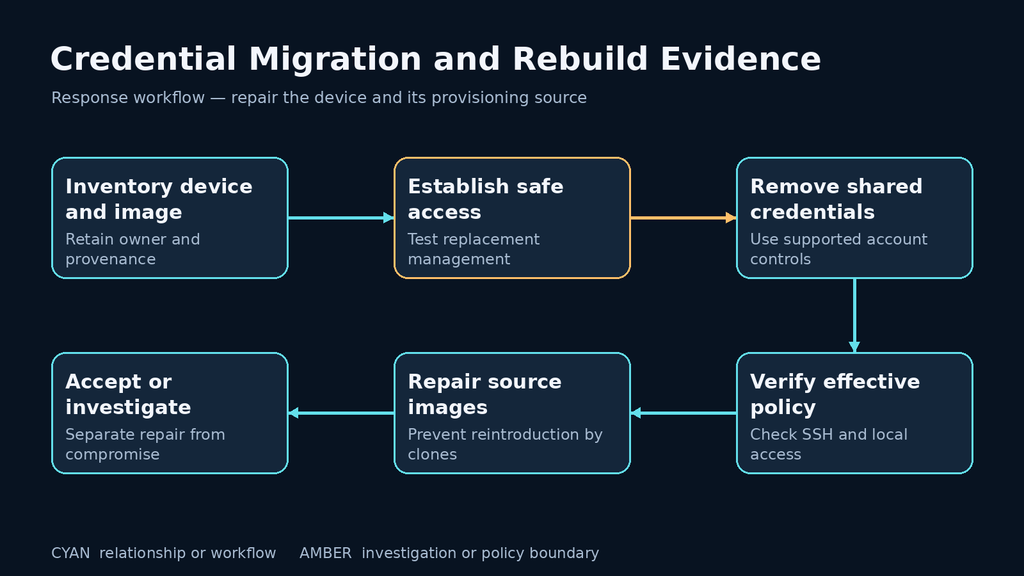
The durable repair addresses both the running device and the provisioning source that can recreate the credential. Replacing a password on one board while retaining an unsafe deployment image leaves the next installation with the same unfinished problem.
What the CVE establishes and what its version wording leaves open
The published CVE record uses the phrase “Raspberry Pi OS through 5.10.” It does not provide a complete, reliable release-by-release affected-version table. Do not turn that phrase into a kernel-version rule for credential exposure. A kernel revision cannot establish a user’s current password, remote-login policy, or granted privileges.
This changes how to handle an automated finding. A scanner that sees a Raspberry Pi platform or a particular kernel may have found a reason to investigate. It has not thereby demonstrated that a default password still works. Conversely, upgrading the kernel does not prove that an existing account’s credential was changed.
The record’s historical publication date and high score also do not establish a new exploitation campaign. This assessment, checked October 28, 2026, focuses on the deployment conditions an administrator can verify now. No claim of current campaign activity is needed to justify removing shared administrative credentials from a reachable device.
Evaluate account, credential, login path, and privilege together
Four conditions determine the practical risk. An applicable account must exist. A known or shared credential must remain usable. A login path must allow that credential to be presented. The resulting identity must have capabilities that matter on the device. Establish these conditions separately rather than treating the username as the finding.
| Observation | What it establishes | What remains unresolved |
|---|---|---|
| A local account named pi exists | The username is present | Credential quality, permitted login methods, and privileges |
| SSH is listening | A local service accepts connections on an interface | End-to-end reachability and successful authentication |
| Password login is disabled for a tested SSH context | That authentication method is restricted in that context | Other methods, other services, and other contexts |
| The account has administrative authorization | Potential consequences after access | Whether unauthorized access occurred |
| A new provisioning policy creates unique credentials | The intended configuration for new deployments | Whether existing devices and old templates were repaired |
Consider two hypothetical devices. One retains the username for application compatibility but has a managed unique credential and a restricted administration path. Another uses a renamed account but shares its password across every cloned image. Renaming improves neither the latter credential nor the consequences of its reuse. The security decision should follow the conditions, not the appearance of the account name.
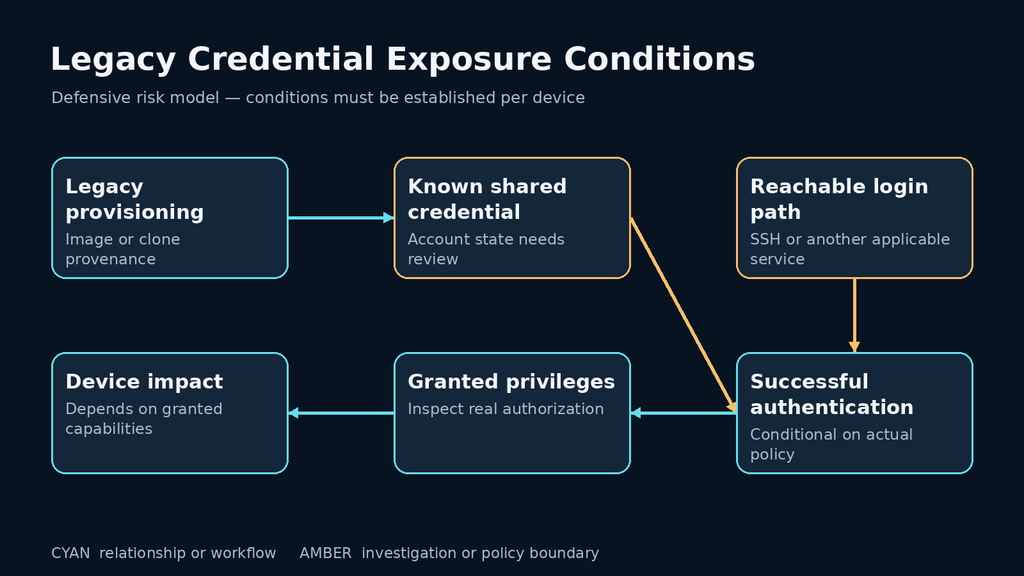
Reachability also needs a real path. A host-only listener, a service reachable from a management segment, and an Internet-exposed login have different exposure. A firewall claim should identify the enforcement point and permitted sources; a local listening-socket list cannot establish those network controls by itself.
Inspect an owned device without collecting password hashes
Use an existing authorized administrative session. These local, read-only commands help establish account presence, group membership, password status, and configured sudo authorization:
getent passwd pi
id pi
sudo passwd -S pi
sudo -l -U pi
Interpret each output within the installed operating system’s account tools. Password status can identify a locked or password-bearing account; it does not tell you whether a password is the historical default or whether it is unique. Group membership and sudo policy are evidence about permissions, not proof that an attacker has exercised them.
Do not export /etc/shadow, collect private keys, or copy stored credentials into the assessment report. The owner can rotate an uncertain credential through the supported account-management process. The completion record needs the action, affected account, verification result, and owner rather than the secret itself.
Also inspect the device’s purpose. A kiosk, laboratory controller, monitoring node, and personal development board may have different availability and management requirements. Before retiring an account, identify services, file ownership, scheduled work, and support procedures that depend on it. That dependency review prevents a security change from silently breaking the device’s intended function.
Inspect effective SSH policy rather than one configuration line
On a device with OpenSSH server installed, a local inspection can show listening sockets and the policy resolved for a synthetic loopback context:
ss -lnt
sudo /usr/sbin/sshd -t
sudo /usr/sbin/sshd -T -C user=pi,host=localhost,addr=127.0.0.1
The OpenSSH daemon manual documents syntax testing, effective-configuration testing, and connection parameters for applying conditional rules. The supplied address describes only this example context. It does not represent an actual remote administrator’s path or prove what a different Match block would permit.
Review password, public-key, keyboard-interactive, and applicable authentication-method settings together. The sshd_config reference explains those separate controls. A disabled password-authentication setting must not be interpreted as disabling every authentication route that might use a password or an external authentication system.
Preserve the relevant conditional scope in the evidence. A setting applied to one user, source address, or service context cannot automatically be credited to all accounts and paths. Use the installed version’s manual when its supported options or defaults differ from the current upstream documentation.
No default-password login attempt is required for this inventory. If an owner needs a live authentication acceptance test, define the exact owned device, designated account, expected result, and attempt limit separately. Routine assessment should not turn into a credential sweep across a network.
Change credentials without losing the management path
First establish a tested replacement administrative path with an identified owner and a recovery option. Verify the intended public key or unique credential in a separate session while the existing authorized session remains available. Check necessary administrative capability as well as ordinary login.
Then rotate or retire the legacy credential through supported account controls. A retained pi username may be a compatibility decision, but a known shared password should not remain part of the access plan. Where an account is retired, review its authorized keys and dependent services rather than assuming a password change removes every route to that identity.
Raspberry Pi’s operational security documentation recommends managing user permissions, keeping the system maintained, and using key-based SSH authentication. Apply those controls to the actual deployment. A shared private key copied into every board creates another shared secret even if password login is disabled.
Validate proposed SSH changes before applying them, retain an approved fallback, and test the resulting effective policy for the required contexts. Confirm that legitimate administration still works and that the retired route behaves as intended. Avoid broad changes to every authentication method at once when no recovery path has been tested.
Finally, review the active sessions and application-level credentials relevant to the account. Credential rotation is a current access-control change. It does not establish that every existing session has ended or that previously obtained data has been recovered.
Repair the image that can recreate the account
The 2022 vendor change concerns the setup of new images. It should not be used as evidence that a long-running installation or a privately maintained clone has been repaired. The same announcement describes user creation during setup and headless provisioning through Raspberry Pi Imager; retain the distinction between the supplied image and the organization’s resulting configuration.
Inventory golden images, removable-media masters, emergency recovery cards, and automated provisioning inputs. Identify which artifacts can create an administrative account and who approves their credential policy. Where a template contains credentials, replace the process with a managed per-device setup and verify a representative new deployment.
Give each provisioning artifact a meaningful identity. An image filename such as “latest” is weak evidence when it can be overwritten. A controlled build identifier, creation record, approved configuration, and deployment mapping make it possible to determine which devices need review after a template changes.
Include restore paths. A device repaired today can return to an unsafe state when an older storage image is restored during an outage. The recovery procedure should either use a repaired image or require the account and access-policy checks before the device returns to its normal network.
An offline check for provisioning decisions
This original Python example evaluates synthetic provisioning metadata. It reads no device, password, hash, or SSH configuration. A “review” result is deliberately different from a failed credential policy and from a verified administrative decision.
def review_provisioning(record):
    if record.get("credential_policy") == "shared-default":
        return "reject-provisioning-policy"
    if record.get("credential_policy") != "unique-per-device":
        return "review-credential-policy"
    if record.get("access_verified") is not True:
        return "review-effective-access"
    if record.get("owner_assigned") is not True:
        return "review-account-ownership"
    return "accept-recorded-policy"


assert review_provisioning({
    "credential_policy": "shared-default"
}) == "reject-provisioning-policy"
assert review_provisioning({}) == "review-credential-policy"
assert review_provisioning({
    "credential_policy": "unique-per-device"
}) == "review-effective-access"
assert review_provisioning({
    "credential_policy": "unique-per-device",
    "access_verified": True,
    "owner_assigned": True
}) == "accept-recorded-policy"
print("Synthetic provisioning checks passed")
The final status accepts the recorded policy, not the security of a real device. A production workflow must establish how those fields were collected and verified. A template declaring unique credentials is insufficient if its implementation secretly reuses the same value or if its evidence predates the current image.
Separate credential remediation from compromise recovery
If there is evidence that an untrusted party accessed the device, changing the password does not establish that the installation is trustworthy. Preserve relevant observations through the incident process, assess which data and credentials the account could access, and determine whether the system should be rebuilt from a trusted source.
Review unexpected logins, account changes, unfamiliar authorized keys, and unexplained services as investigation leads. These are general observations to examine, not CVE-specific indicators proving exploitation. Missing historical logs should be reported as a coverage limit rather than interpreted as proof of a clean history.
For a planned rebuild, document the required application state and recovery procedure before replacing storage. Use maintained software and a reviewed provisioning process, then restore only the data and configuration approved by the recovery owner. Reintroducing an old full-device image without reviewing its accounts would undo the credential repair.
Close the configuration finding when the owner can show the device’s account disposition, effective access policy, required administrative functionality, and repaired provisioning source. Close any incident investigation through its own evidence and recovery decision. These two records answer different questions.
Frequently asked questions
Does every current Raspberry Pi OS image still use pi and raspberry?
- No. The vendor changed new-image account setup in 2022. Inspect legacy installations and local images rather than applying the old credential description to all current systems.
Does an account named pi prove that CVE-2021-38759 is exploitable?
- No. Establish the actual credential, permitted login path, and granted privileges. The username alone is not the finding.
Will a kernel update fix the account?
- A kernel revision does not establish credential state. Verify the account-management action separately from package maintenance.
Is disabling SSH enough?
- It may remove one remote path when effective and appropriate, but it does not repair the credential or assess other access routes. Preserve required management and recovery capability.
Can I verify exposure without trying the default password?
- Yes. Review account and provisioning evidence, rotate uncertain credentials under owner control, and verify the resulting policy without collecting secrets or sweeping login attempts.
What if the device was already accessed by someone else?
- Use the incident and recovery process. A credential change is insufficient evidence that a previously compromised installation is clean.
The lasting fix is an accountable provisioning and access process: a named owner, appropriate per-device credentials, a verified management path, and recovery artifacts that preserve those decisions. That addresses the condition behind the old CVE without misrepresenting the behavior of newly configured systems.

 English
  German
  French
  Spanish
  Portuguese
  Japanese
  Korean
  Hindi
Hindi  Arabic
  Turkish
  Hebrew