
CVE-2026-118306 is a critical memory-corruption vulnerability in Chrome’s FileSystem component. Google fixed it in the desktop Stable channel released on October 27, 2026. The CVE Record states that Chrome versions before 156.0.8078.73 are affected and that a remote attacker could potentially execute arbitrary code outside the sandbox by persuading a user to open crafted HTML.
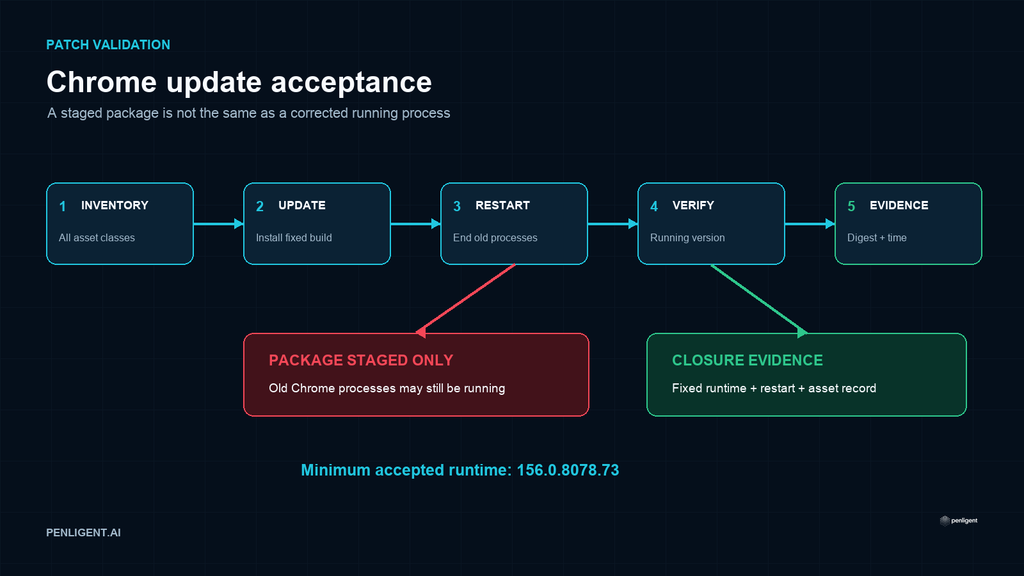
The immediate enterprise task is not to reproduce the memory corruption. It is to identify every managed Chrome or Chromium-derived runtime that falls below the vendor boundary, complete the update, restart the browser processes, and preserve evidence that the running version—not only the downloaded package—is corrected.
CVE-2026-118306 quick answer
| Question | Confirmed answer |
|---|---|
| Affected product | Google Chrome desktop before 156.0.8078.73 |
| Vulnerability class | Memory corruption in FileSystem, CWE-119 |
| Vendor severity | Critical |
| Attack path | Remote delivery through crafted HTML with user interaction |
| Potential impact | Arbitrary code execution outside the sandbox |
| Known exploitation | The cited CISA enrichment recorded no known exploitation as of October 28, 2026 |
Google’s release post lists 156.0.8078.73/.74 for Windows and macOS and 156.0.8078.73 for Linux. The slash reflects platform build delivery, not two different vulnerability thresholds. Use the release actually offered to the managed platform, but do not accept any running build below 156.0.8078.73.
What is confirmed—and what remains undisclosed
The public sources identify the affected component, severity, version boundary, delivery condition, and possible impact. They do not publish a complete root-cause analysis or a safe universal crash case. That restraint is normal while a security update is rolling out.
Do not convert the words memory corruption into a more specific claim such as use-after-free, heap overflow, or type confusion unless Google later publishes that detail. Likewise, a critical rating and sandbox-related impact do not prove active exploitation. Current demand for the CVE is a reason to prioritize verification, not evidence of an attack campaign.
Assets that belong in the inventory
A browser inventory often misses more than employee laptops. Include persistent desktops, virtual desktop images, privileged administrator workstations, kiosk devices, CI runners that launch Chrome, browser-testing containers, golden images, and automation hosts. Where another Chromium-based browser is present, use that vendor’s advisory and build mapping rather than assuming the Chrome version number applies directly.
| Asset type | Evidence to collect | Common failure |
|---|---|---|
| Managed Windows or macOS endpoint | Running Chrome version, update policy status, process restart time | The updater staged a build but old browser processes remained open |
| Linux workstation or server | Repository package version and running browser version | Package pinning or a stale repository mirror blocked the corrected build |
| Container or CI image | Image digest, installed browser build, rebuild timestamp | A new package existed upstream but the immutable image was not rebuilt |
| Golden image or VDI pool | Base-image version and active-session version | The base image was updated while long-lived sessions continued using old processes |
Explore Penligent for authorized security testing.
Safe version verification
On an interactive system, open chrome://settings/help or chrome://version and record the complete running version. In centrally managed environments, pair browser telemetry with a small sample of endpoint checks. Management dashboards can lag, and a package inventory may report the staged file rather than the active process.
For authorized Linux hosts, the following read-only examples can help establish package state. Package names vary by distribution and channel.
google-chrome --version
google-chrome-stable --version

# Debian or Ubuntu package evidence
dpkg-query -W -f='${Package} ${Version}\n' google-chrome-stable

# RPM-based package evidence
rpm -q google-chrome-stable
For browser automation images, run the version command inside the exact image digest used by the pipeline. Do not validate only the developer’s local browser. Record the image digest before and after remediation so the result can be tied to a deployable artifact.
Why a browser restart is part of remediation
Chrome can download an update while existing processes continue executing the previous build. A defensible acceptance test therefore requires both a corrected installation and a process transition. Close all browser windows, confirm the process tree has exited, relaunch, and capture the new version. For kiosk and VDI environments, schedule a controlled session restart rather than relying on users to close the browser.
If an endpoint cannot restart immediately, treat it as not yet remediated. The presence of corrected files on disk is useful deployment evidence, but it is not proof that vulnerable code is no longer running.
Temporary risk reduction
Patch deployment is the primary control. Until it completes, browser isolation, reduced use of privileged browsing sessions, URL filtering, attachment detonation, and stricter web-access policy can reduce exposure to untrusted content. These measures do not repair FileSystem memory handling and should not be recorded as equivalent remediation.
Prioritize endpoints used for administration, code signing, cloud consoles, production access, and secrets management. A browser compromise on a privileged workstation can turn a client-side flaw into a broader identity and infrastructure incident even when the initial delivery requires a user to open a page.
Detection and incident review
There is no reliable public universal exploit signature in the cited sources. Browser crashes, renderer instability, unusual child processes, or endpoint alerts near suspicious web activity are investigation leads rather than proof of CVE-2026-118306 exploitation.
If a high-value endpoint ran an affected build and generated relevant security alerts, preserve browser and endpoint telemetry, visited-domain evidence where policy permits, process trees, downloaded artifacts, and identity-provider activity. Upgrade and restart the browser, but retain volatile evidence before destructive cleanup when an incident is suspected.
Remediation acceptance checklist
- Inventory managed Chrome installations, automation images, VDI pools, kiosks, and golden images.
- Deploy the current vendor-supported Stable channel build, at minimum 156.0.8078.73.
- Restart all Chrome processes or the affected session.
- Verify the complete running version on each platform class.
- Rebuild immutable images and record their new digests.
- Investigate update failures, pinned packages, stale mirrors, and unmanaged installations.
- Retain rollout, restart, and runtime evidence for vulnerability-management closure.
Conclusion
CVE-2026-118306 warrants urgent browser rollout because Google classifies it as Critical and the public record describes potential code execution outside the sandbox. The October 28, 2026 enrichment cited above does not establish active exploitation; check subsequent vendor advisories before making a current exploitation claim. The correct operational response is precise: update Chrome to the corrected channel, restart the processes, verify the running version across every asset class, and retain evidence that the vulnerable runtime has actually left the environment.
Watch the Penligent workflow
This general product overview shows the Penligent workflow; it is not a demonstration of exploiting the vulnerabilities discussed above.
 English
 German
 French
 Spanish
 Portuguese
 Japanese
 Korean
 Hindi
 Arabic
 Turkish
 Hebrew