
For decades, defenders treated Notepad as background noise. It was the kind of application nobody put in a threat model because it did not seem to do much beyond opening text. CVE-2026-20841 changed that assumption. In Microsoft’s February 2026 security updates, the company fixed a high-severity Windows Notepad App vulnerability tracked as CVE-2026-20841. NVD maps it to CWE-77, gives it a CVSS v3.1 score of 8.8, and records that the flaw affects Windows Notepad App versions from 11.0.0 before 11.2510. Microsoft’s public classification is remote code execution in Patch Tuesday coverage, while NVD’s later modification also reflects local execution wording. Either way, the operational message is the same: a trusted text editor became part of an execution chain. (NVD)
The public reporting converged very quickly on the practical exploitation story. A victim opens a crafted Markdown file in the modern Notepad app, interacts with a malicious link, and Notepad can hand that link off in a way that launches an untrusted protocol or downstream content. That is why nearly every mainstream summary uses some combination of “Notepad,” “Markdown,” “RCE,” “malicious links,” and “remote code execution” in the headline. Those recurring headline patterns are the closest public proxy for what readers were most eager to click and understand, and they reveal the core search questions behind this CVE: What is affected, how does the click become execution, which versions are vulnerable, and how do defenders detect exploitation in the real world. (Hilfe zur Netzsicherheit)
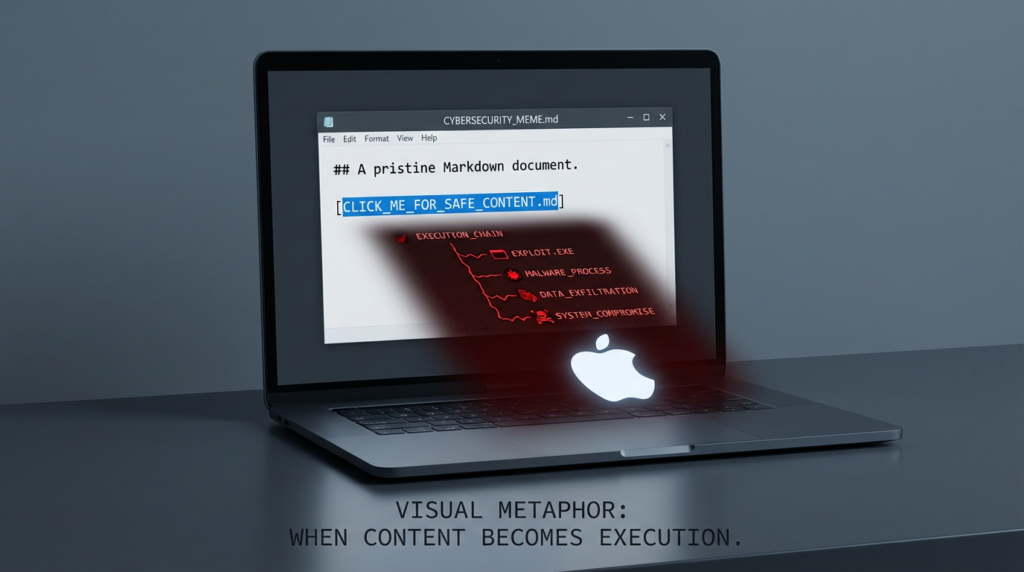
That framing matters because CVE-2026-20841 is easy to misunderstand. This is not the old story of a text editor parsing malformed binary data and crashing into a memory corruption exploit. It is more interesting and, in many enterprise environments, more realistic. The risky transition happens when content that looks like text is allowed to become an action. A Markdown link is not just displayed. It can become a launch point into the operating system, which means the real security boundary is no longer “the file opened in Notepad.” The real boundary is the point where Notepad decides that content is allowed to trigger something else. (Hilfe zur Netzsicherheit)
What changed in Notepad before this CVE mattered
The background to this bug is Microsoft’s transformation of Notepad from a plain text utility into a lightweight editor with richer formatting behavior. In May 2025, Microsoft began rolling out text formatting in Notepad to Windows Insiders, including bold, italic, hyperlinks, lists, headings, and Markdown-style support. Later Insider updates added table support in version 11.2510.6.0. Microsoft and follow-on coverage also noted that formatting could be disabled, which is useful context because it confirms the feature surface was configurable rather than purely cosmetic. In other words, by the time CVE-2026-20841 arrived, Notepad was no longer “just Notepad” in the old sense. It had already crossed into rendering and interacting with structured content. (Windows Blog)
Security teams should care about that product evolution far more than the branding. The exact feature list is less important than the pattern: when a legacy utility becomes a content renderer with links, formatting, and richer UI behavior, its threat model changes even if the executable name does not. A user still sees a familiar icon and assumes low risk. An attacker sees a newly expanded parser, new interaction paths, and a trusted application in the endpoint estate. That mismatch between user expectation and actual capability is where this vulnerability became dangerous. (Windows Blog)
What CVE-2026-20841 actually is
The most conservative description comes from NVD and Microsoft-linked Patch Tuesday coverage. NVD describes CVE-2026-20841 as improper neutralization of special elements used in a command in the Windows Notepad App, mapped to CWE-77. Public reporting and vendor coverage describe it as a Windows Notepad App remote code execution issue tied to malicious Markdown links and unsafe handling of protocols or remote content. Rapid7’s February 2026 Patch Tuesday roundup lists it as “Windows Notepad App Remote Code Execution Vulnerability,” CVSS 8.8, not publicly disclosed at the time, and “Exploitation Less Likely.” ZDI later published a dedicated write-up under the title “Arbitrary Code Execution in the Windows Notepad.” These descriptions vary in style, but they all point to the same security reality: user interaction with a crafted link inside Notepad can cross into code execution territory. (NVD)
The version boundary is also clearer now than it was in the first wave of news coverage. The CVE.org record says the flaw affects Windows Notepad App from 11.0.0 before 11.2510. Tenable’s plugin guidance says to upgrade to app version 11.2510 or later, and third-party Patch Tuesday coverage agrees that the vulnerable target is the modern Store-based Notepad app rather than the old legacy bundled executable. That distinction matters operationally because many organizations patch Windows but forget that Store-delivered components may have their own version lifecycle, visibility gaps, and update delays. (CVE)
Why the bug is more important than the product name
The reason this CVE resonated so widely is not that Notepad suddenly became a top-tier offensive target. It is that the bug illustrates a pattern defenders keep seeing across Windows ecosystems: content becomes control. A document, shortcut, preview, link, or embedded reference is presented to the user as passive material. Under the hood, however, the operating system or application treats it as an instruction that can launch protocol handlers, fetch remote resources, cross trust zones, or invoke local binaries. Once you start modeling risk that way, CVE-2026-20841 stops looking like an odd Notepad story and starts looking like part of a broader Windows attack grammar. (Cisco Talos Blog)
That broader pattern is why this CVE is valuable for both red teams and blue teams. Red teams get a reminder that “default and boring” software can become an unexpectedly strong phishing or execution primitive when its functionality expands. Blue teams get a reminder that patching by vendor family is not enough. They need to understand execution boundaries, protocol launches, and process ancestry. If the mental model remains “Notepad is harmless,” then logging, allow-listing, and hunting rules will lag behind the product’s actual behavior. (Das Register)
How a realistic attack chain would work
The cleanest exploitation story is social-engineering driven. An attacker delivers a Markdown file through email, chat, a project repository, a downloaded note, or an internal knowledge-sharing workflow. The file appears harmless because .md is commonly associated with documentation and engineering notes. The victim opens it in Notepad, which now understands Markdown-style content. Somewhere in the document is a link that looks routine enough to click during normal work. When the victim interacts with it, Notepad passes it onward in a way that can launch an unsafe protocol handler or remote payload chain. Public reporting repeatedly describes the outcome as remote code execution or arbitrary code execution with the privileges of the current user. (Hilfe zur Netzsicherheit)
That user-interaction requirement lowers the hype but should not lower the priority. Enterprise attacks routinely rely on one click. Many successful intrusion chains do not require memory corruption and do not begin with an exploit kit. They begin with a trusted workflow and a manipulated transition. In the case of CVE-2026-20841, the trust anchor is especially strong because users do not think of opening a Markdown file in Notepad as crossing into a risky application domain. The user is not opening an executable, not enabling a macro, and not running a script directly. They are reading what appears to be text. That is precisely why this class of bug is effective in practice. (Das Register)
A stripped-down representation of the chain looks like this:
Attacker crafts .md file
        ↓
Victim receives file through email, chat, repo, or download
        ↓
Victim opens file in modern Windows Notepad
        ↓
Victim clicks malicious Markdown link
        ↓
Notepad hands link to protocol / shell / system handler
        ↓
Remote content or local command path is triggered
        ↓
Payload execution under victim context
This is one reason the CVE’s “command injection” classification can feel slightly abstract to practitioners. The security problem is not merely that a dangerous string exists. The practical problem is that a content-rendering feature participates in command or handler invocation when it should not. The effect is an execution path hidden inside an everyday content flow. (NVD)
Root cause, in defender language
Public proof-of-concept repositories and technical summaries describe the Markdown engine as insufficiently restricting URL protocols, allowing arbitrary protocol handlers to be triggered from clickable links. Security coverage also notes that some dangerous protocols or remote file-loading behaviors could occur without the warning flow defenders would expect from obviously risky file execution. ZDI’s title choice, “Arbitrary Code Execution in the Windows Notepad,” also reflects that the exploitation consequence is more than a cosmetic parsing flaw. (GitHub)
From a defender’s perspective, the root cause can be summarized more usefully as a trust-boundary failure between rendering and execution. Markdown support made Notepad treat links as interactive. The vulnerable behavior allowed some of those interactions to reach protocol or shell handling pathways that should have been constrained, sanitized, or blocked. That is why the bug belongs in the same conceptual family as other Windows issues where file-like or link-like content causes the system to do more than the user believes it is doing. (NVD)

Affected systems, severity, and exploitation status
The table below summarizes the key facts security teams need on day one.
| Feld | Verified detail |
|---|---|
| CVE | CVE-2026-20841 |
| Produkt | Windows Notepad App |
| Klasse | Command injection, mapped to CWE-77 |
| Schweregrad | CVSS v3.1 8.8 High |
| Betroffene Versionen | 11.0.0 before 11.2510 |
| Fix guidance | Upgrade to 11.2510 or later |
| Public framing | Remote code execution through malicious Markdown link handling |
| User interaction | Required |
| Public disclosure status at Patch Tuesday | Reported as not publicly disclosed |
| Microsoft exploitability assessment in Patch Tuesday coverage | Exploitation Less Likely |
These facts come from NVD, CVE.org, Tenable, and Rapid7’s Patch Tuesday review. The most important operational nuance is that the vulnerable component is the modern Notepad App, which means asset and patch validation may need to look beyond normal OS KB inventory and into app version telemetry. (NVD)
Why engineers and security teams should not dismiss the click requirement
There is a persistent tendency in vulnerability triage to downgrade anything that requires user interaction. That instinct can be expensive. The attack surface around links, shortcuts, previews, and content handlers is exactly where social engineering and productivity software meet. Those are high-volume, high-trust workflows. The best enterprise phishing campaigns do not ask the victim to do something that feels obviously dangerous. They ask the victim to do something ordinary in the wrong context. Opening a note and clicking a link inside a Markdown document is ordinary. That is what makes this bug useful to an attacker. (The Verge)
The other reason not to dismiss it is privilege reality. News coverage repeatedly notes that the attacker may gain the same permissions as the current user. In organizations where developers, analysts, or administrators still have elevated local rights, “same permissions as the user” can still mean meaningful lateral movement, persistence staging, credential access, or secondary tool execution. In that sense, a so-called one-click app bug can become the first stage of a much larger incident. (The Verge)
Detection, what to hunt on endpoints right now
Elastic has already published a detection rule specifically for “Potential Notepad Markdown RCE Exploitation.” The rule focuses on process creation where notepad.exe starts child processes after opening a Markdown file, and Elastic recommends isolating affected endpoints, terminating suspicious descendants of notepad.exe, and preserving the triggering file for forensics. This is exactly the right mindset. For this CVE, the most durable detection point is not the Markdown syntax itself. It is the downstream process tree. (Elastic)
The highest-priority hunt question is simple: should Notepad be spawning anything at all in your environment? In many enterprises, the normal answer is no. That makes the process ancestry extremely valuable. Start by reviewing any event where notepad.exe is the parent of cmd.exe, powershell.exe, wscript.exe, cscript.exe, mshta.exe, rundll32.exe, msiexec.exe, regsvr32.exe, or browser-to-installer patterns shortly after a Markdown file is opened. Correlate command lines, the source path of the .md file, download telemetry, and user context. (Elastic)
A practical Sigma-style starting point could look like this:
title: Suspicious Child Process Spawned by Notepad
id: 7f38d0dd-2f2d-4d61-9f77-notepad-md-rce
status: experimental
logsource:
  product: windows
  category: process_creation
detection:
  parent:
    ParentImage|endswith: '\\notepad.exe'
  child:
    Image|endswith:
      - '\\cmd.exe'
      - '\\powershell.exe'
      - '\\pwsh.exe'
      - '\\wscript.exe'
      - '\\cscript.exe'
      - '\\mshta.exe'
      - '\\rundll32.exe'
      - '\\msiexec.exe'
      - '\\regsvr32.exe'
  condition: parent and child
falsepositives:
  - Rare automation workflows that deliberately launch tools from Notepad context
level: high
If your telemetry includes command line, add a second layer that flags suspicious protocol or file-launch behavior. In a tuned environment, you should also enrich this with recent .md file opens, browser download history, MOTW presence, or email attachment metadata. The goal is not only to catch CVE-2026-20841 specifically, but also to catch the broader primitive: content in a low-risk application leading to an unexpected execution chain. (Elastic)
For Microsoft Defender XDR or similar platforms, a KQL-style hunt can start here:
DeviceProcessEvents
| where InitiatingProcessFileName =~ "notepad.exe"
| where FileName in~ ("cmd.exe","powershell.exe","pwsh.exe","wscript.exe","cscript.exe","mshta.exe","rundll32.exe","msiexec.exe","regsvr32.exe")
| project Timestamp, DeviceName, AccountName, InitiatingProcessFileName, InitiatingProcessCommandLine, FileName, ProcessCommandLine, FolderPath, SHA1
| order by Timestamp desc
That query will not prove exploitation by itself, but it is the right first pivot. Once you identify suspicious descendants, pivot into file creation, network connections, downloaded payloads, and the original .md artifact. If you have Sysmon, look at Event ID 1 for process creation, Event ID 11 for file creation, and Event ID 3 for network connections in the same timeline. (Elastic)
Patching and mitigation, what actually reduces risk
The first step is obvious but still often missed: verify that the modern Notepad App is updated to 11.2510 or later. Because this is an app-version issue rather than only a classic Windows KB story, organizations should not assume that a standard operating system patch dashboard fully reflects exposure. Confirm store-app version inventory on real endpoints, especially in VDI pools, developer workstations, lab machines, jump boxes, and systems where Store updates are restricted or delayed. (CVE)
The second step is to reduce dangerous handler transitions. If your environment does not need broad protocol-handler behavior from user workstations, restrict it. Review what custom URL schemes are installed, what application handlers are registered, and whether software distribution or browser helper tools can be triggered from low-trust content contexts. In practical terms, the safest environment is one where a text editor cannot become a launcher for scripting hosts, installers, or unusual protocols. CVE-2026-20841 is one example of why protocol governance is not a niche hardening task. It is endpoint risk reduction. (Cisco Talos Blog)
The third step is to tighten execution policy around what happens after the click. WDAC, AppLocker, Attack Surface Reduction rules, and reduction of local admin rights all matter here because they constrain blast radius even when the initial content-to-action transition occurs. If Notepad can be tricked into launching a child process, application control can still decide whether that child process is allowed to do anything useful. Defense should focus on that downstream choke point rather than hoping users will never click. (Elastic)
The fourth step is to treat Markdown attachments and downloaded .md files as more than documentation. This does not mean blocking all Markdown. It means making sure email gateways, collaboration tools, browser download controls, and endpoint analytics do not treat .md as automatically benign. Engineering-heavy organizations often exchange Markdown constantly, which makes it a better social-engineering container than many classic file formats. That makes visibility and user education more important, not less. (Hilfe zur Netzsicherheit)
Safe validation ideas for internal testing
For approved internal validation, the right goal is not to recreate a weaponized payload. The right goal is to verify that your environment no longer permits the risky transition. On patched systems, your test should confirm that clicking a deliberately controlled Markdown link does not trigger unsafe protocol behavior or spawn forbidden child processes. On detection engineering systems, your test should confirm that any attempt by notepad.exe to launch suspicious descendants is surfaced, correlated, and triaged correctly. (Elastic)
A safe internal checklist looks like this:
1. Identify endpoints still running Notepad App < 11.2510
2. Open controlled .md test files in a lab environment
3. Confirm whether interactive links still trigger risky handler behavior
4. Verify that notepad.exe child-process telemetry is collected
5. Validate Sigma / KQL / EDR alerts against controlled benign simulations
6. Patch, retest, and archive evidence
The important thing is that “patched” should not be the end state. “Patched and behaviorally verified” should be. This CVE is a clean case study in why version management, application control, and detection engineering have to work together. (Tenable®)
Verwandte CVEs, die helfen, das größere Muster zu erklären
CVE-2026-20841 makes more sense when placed next to other Windows issues where content, links, or trust indicators fail to hold their boundary.
CVE-2024-21412, Outlook Moniker Link
CVE-2024-21412 is recorded by NVD as an Internet Shortcut Files Security Feature Bypass Vulnerability, with Microsoft assigning it a high severity rating. Trend Micro documented exploitation by Water Hydra in campaigns targeting traders, and broader security write-ups described how crafted links and moniker-based behavior could leak NTLM material and contribute to code-execution pathways in Microsoft ecosystems. The exact mechanics differ from Notepad, but the strategic lesson is the same: a user thinks they are interacting with a link-like object, while the platform interprets that interaction as permission to do more than the user expects. (NVD)
CVE-2023-36025, SmartScreen bypass
CVE-2023-36025 is a Windows SmartScreen Security Feature Bypass vulnerability that NVD explicitly notes is in CISA’s Known Exploited Vulnerabilities Catalog. Huntress and other vendors describe it as a flaw in how Windows handled specially crafted .url files, allowing attackers to bypass expected web-origin warning flows. Again, the shared theme is not identical code. The shared theme is boundary confusion. Something that should have been treated as higher risk was rendered with fewer protections than defenders or users assumed. (NVD)
CVE-2024-43461, MSHTML spoofing
CVE-2024-43461 is a Windows MSHTML Platform Spoofing Vulnerability, and later coverage reported active exploitation before disclosure. This is a useful adjacent case because spoofing bugs often seem less dramatic than RCE, yet in real intrusion chains they can be the trust-lowering step that makes later content-to-execution transitions succeed. Once the user’s perception of what they are opening is manipulated, the rest of the chain becomes much easier to sell. CVE-2026-20841 should be understood in that same family of trust-boundary failures. (NVD)
Taken together, these CVEs show why defenders should stop separating link issues, shortcut issues, preview issues, spoofing issues, and app-launch issues into isolated categories owned by different teams. On the endpoint, users experience them as one thing: “I clicked something that looked normal.” Security engineering should model them the same way. (NVD)
What this CVE means for penetration testing and validation workflows
For security engineers, the hardest part of this class of bug is usually not reading the advisory. It is proving whether the risk still exists in a live environment. Do you know which endpoints still have a vulnerable Notepad App version? Do you know whether your collaboration and email flows deliver Markdown files into user space without scrutiny? Do you know whether notepad.exe spawning a child process would be detected today, on the systems that matter most? And can you package that validation into evidence that engineering leadership, IT operations, and auditors will actually trust? Those are the practical questions that matter after the news cycle ends. (Tenable®)
This is the narrow context where a platform like Penligent can be mentioned naturally. A vulnerability like CVE-2026-20841 is not just a patching event. It is a verification problem. Teams need a repeatable way to scope exposure, validate whether risky execution paths still exist on approved targets, retest after remediation, and produce a report that captures versions, controls, detections, and residual risk. That is exactly the kind of workflow where an AI-assisted penetration testing and verification platform can be useful, not because it replaces engineering judgment, but because it makes the “discover, verify, retest, document” loop faster and more consistent. (Sträflich)
The defensible way to use automation here is simple. Let it help you enumerate versions, check configuration drift, validate controls, and standardize evidence collection. Do not reduce the problem to “scan once, patch once, move on.” CVE-2026-20841 is a reminder that endpoint risk now lives in the space between content, UI, trust, and execution. The organizations that respond best are the ones that can test those transitions repeatedly, not just the ones that read advisories quickly. (Sträflich)

The real lesson, content is now part of the execution surface
The mistake would be to treat this as a quirky Notepad incident and move on. The real lesson is larger. As vendors add Markdown, AI assistance, previews, formatting, protocol awareness, and richer interaction into historically simple tools, the boundary between “content viewer” and “execution broker” gets thinner. Attackers do not need every one of those features to be dangerous. They need only one transition that is trusted enough, common enough, and weakly constrained enough to slip through. CVE-2026-20841 is what happens when that transition is exposed in an application almost everybody thought was harmless. (The Verge)
That is why the correct response is broader than “install the update.” Patch the app, yes. But also inventory Store-delivered utilities, govern protocol handlers, tighten application control, hunt for suspicious child-process ancestry, and treat Markdown as a real content carrier rather than a safe developer shorthand. If your internal process can do all of that and leave behind clear evidence, then this CVE has improved your security posture instead of merely consuming a week of attention. (Tenable®)
References and further reading
NVD, CVE-2026-20841 detail — official vulnerability record with CWE-77 mapping, CVSS, and Microsoft reference. (NVD)
CVE.org, CVE-2026-20841 record — version range showing affected Windows Notepad App versions from 11.0.0 before 11.2510. (CVE)
Zero Day Initiative, CVE-2026-20841: Arbitrary Code Execution in the Windows Notepad — concise technical framing from a major vulnerability research program. (Zero Day Initiative)
Rapid7, February 2026 Patch Tuesday — useful context on severity, disclosure status, and Microsoft exploitability assessment. (Schnell7)
Elastic, Potential Notepad Markdown RCE Exploitation — practical detection logic for process-based hunting and triage. (Elastic)
Windows Insider Blog, Text Formatting in Notepad begin rolling out to Windows Insiders — primary source on Markdown-style formatting and hyperlinks landing in Notepad. (Windows Blog)
Windows Insider Blog, Notepad update begins rolling out to Windows Insiders — primary source on later table support in the 11.2510 branch. (Windows Blog)
The Verge, Microsoft fixes Notepad flaw that could trick users into clicking malicious Markdown links — mainstream summary of the vulnerability’s practical risk. (The Verge)
BleepingComputer, Windows 11 Notepad flaw let files execute silently via Markdown links — useful reporting on the exploitation path and user interaction angle. (BleepingComputer)
Penligent, CVE-2026-20841 — When Markdown in Windows Notepad Becomes an Execution Path — English supporting article aligned with this topic. (Sträflich)
Penligent, CVE-2026-20841 — When Windows Notepad Turned Markdown Into an Execution Boundary — English related article focused on boundary analysis. (Sträflich)
Penligent, CVE-2026-20841 PoC — When Just a Text Editor Becomes a Link to Code Execution Primitive — English related article on verification and proof concepts. (Sträflich)
Penligent, CVE-2024-6387 regreSSHion — Why It’s Trending Again and What Security Teams Should Do Right Now — relevant comparative reading on turning CVE response into repeatable verification. (Sträflich)


 German
  English
  French
  Spanish
  Portuguese
  Japanese
  Korean
  Hindi
Hindi  Arabic
  Turkish
  Hebrew