
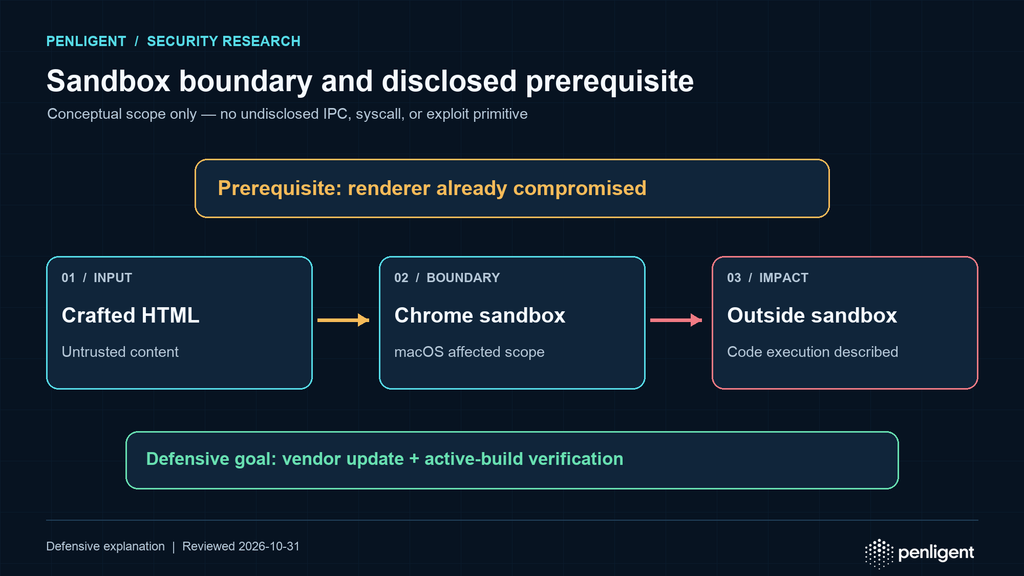
CVE-2026-106378 is a privilege-elevation vulnerability in the Chrome sandbox on macOS. Its published description has an important prerequisite: an attacker must already have compromised the renderer process. A crafted HTML page can then be used to execute code outside the sandbox. This is a serious boundary failure, but the available description does not establish a complete attack that starts with an ordinary page visit and independently compromises the renderer. Security teams should patch promptly while preserving that distinction in risk reports.
Chrome macOS patch verification at a glance
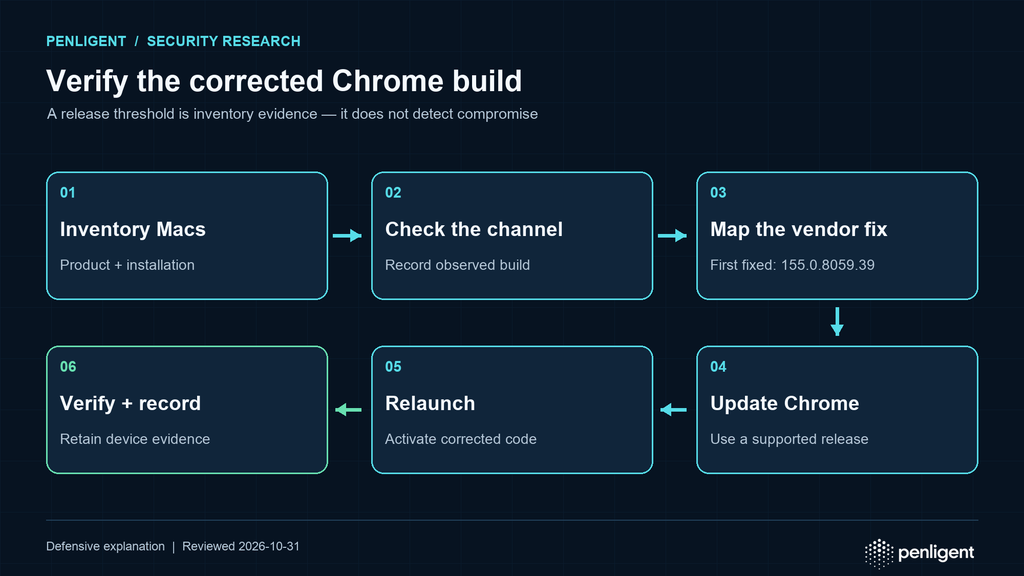
The fixed-version question has two parts: whether the installation uses a vendor-corrected release and whether that corrected browser has become the active application. The CVE record lists Chrome on Mac before 155.0.8059.39 and requires prior renderer compromise. That number is the historical first-fixed threshold; use the current supported release for the applicable channel rather than downgrading a newer installation.
- Confirm the product is Google Chrome on macOS and record its channel and observed release.
- Use the applicable vendor-supported corrected release and retain the installed artifact’s identity.
- Complete the required relaunch, then verify the active browser through the approved endpoint workflow.
- Keep offline devices, alternate installations, and unresolved release formats visible until their evidence is complete.
Version evidence cannot detect prior compromise, and a successful update cannot establish whether an earlier incident occurred. Jump to affected platform scope, safe patch verification, oder reader questions for the detailed checks below.
Die official CVE List record identifies Chrome on Mac versions before 155.0.8059.39 as affected and classifies the issue as CWE-250, execution with unnecessary privileges. Google’s October 6, 2026 Stable Channel update announced desktop builds 155.0.8059.39/.40 for Windows and Mac and 155.0.8059.39 for Linux. That release announcement covers Chrome desktop updates generally; the CVE’s affected-product statement specifically identifies Mac. Do not infer that Windows or Linux are affected by this CVE merely because their Chrome builds share the release number.
This distinction matters operationally. Browser fleets often span macOS, Windows, Linux, managed endpoints, virtual desktops, and personal devices. A version inventory must therefore join the CVE’s platform scope to the actual product channel and installed build. A green status in a generic browser dashboard is useful only if the dashboard reports the affected Mac installation, not just an organization-wide average.
What CVE-2026-106378 says and what it does not
Die CVE record’s description is the primary boundary for claims in this article: privilege elevation in the Chrome sandbox on Mac before 155.0.8059.39; a remote attacker who has compromised the renderer; a crafted HTML page; and execution outside the sandbox. It does not name a specific system call, IPC message, kernel interface, entitlement, or exploit primitive. The record’s classification as CWE-250 is a broad weakness category, not a technical root-cause analysis. This review is dated October 31, 2026. The first fixed release is a historical remediation baseline, not a recommendation to downgrade a newer installation or install an obsolete build instead of the current supported release for its channel.
Use the phrase “sandbox privilege elevation after renderer compromise” rather than “Chrome zero-click RCE” unless a separate, credible source establishes that broader chain. A browser’s renderer handles web content and is intentionally constrained. If the renderer is compromised, the sandbox is meant to limit what the compromised process can do. A sandbox escape or privilege elevation weakens that containment boundary. It can materially increase impact, but it is conceptually downstream from the renderer compromise described in the CVE record.
The CVE record also includes enrichment metadata. Enrichment is useful context, but it should not be confused with a Chrome vendor statement. In particular, a CISA ADP assessment snapshot that reports an exploitation field is not, by itself, proof of observed in-the-wild exploitation or CISA KEV inclusion. Check the live KEV feed and vendor communications before making either claim. The public material reviewed here does not establish active exploitation of CVE-2026-106378. Absence from the feed is not proof that exploitation has never occurred.
How a browser sandbox fits into the threat model
Chromium’s multi-process architecture documentation describes processes with different responsibilities. A renderer processes page content, while browser and operating-system components provide privileged services through controlled interfaces. The sandbox attempts to limit the renderer’s access to resources outside its permitted role. This architecture does not make renderer bugs harmless. Instead, it creates layers: a content-processing flaw may compromise a renderer, while a separate boundary weakness may let an attacker cross into a more privileged context.
For CVE-2026-106378, the public description situates the weakness at that containment boundary. It does not supply enough detail to draw a source-backed, step-by-step exploit diagram. The useful defensive model is therefore a trust-boundary model rather than a speculative exploit chain:
| Bühne | Security role | What defenders can conclude |
|---|---|---|
| Web content | Untrusted input processed by the browser | A crafted HTML page is part of the CVE description; this alone does not prove the renderer is compromised. |
| Renderer process | Processes page content under restricted privileges | The CVE description assumes this process has already been compromised. |
| Sandbox boundary | Constrains renderer capabilities | The issue permits privilege elevation outside the sandbox in the described conditions. |
| Host context | Operating-system resources beyond renderer confinement | Potential impact is greater after boundary crossing; the record does not specify a universal payload or host action. |
Chromium’s sandbox design documentation describes confinement as a way to limit the impact of compromised processes. Apple’s Gatekeeper and runtime protection documentation for Mac explains separate operating-system controls. These sources help explain the defense-in-depth context; neither should be misrepresented as a technical root-cause disclosure for this CVE. Browser sandbox design varies by platform, and a statement about one operating system’s process controls should not be copied onto another platform.
Affected versions and platform scope
The version threshold recorded for the affected product is Chrome on Mac before 155.0.8059.39. The fixed threshold should be checked against the official release notes and the actual managed deployment channel. Chrome updates can be staged, and a device may have downloaded an update without all browser processes having restarted into the new build. Device inventory should distinguish installed application version from the version of the process currently handling browsing activity.
| Plattform | Public CVE scope | Defensive action |
|---|---|---|
| macOS | Chrome versions earlier than 155.0.8059.39 are listed as affected | Update through the approved channel; verify the running Chrome build and relaunch state. |
| Windows | Not identified as affected in the CVE record’s affected-product entry | Maintain normal Chrome patching; do not label Windows affected based only on the desktop release announcement. |
| Linux | Not identified as affected in the CVE record’s affected-product entry | Maintain normal Chrome patching; do not infer exposure from a shared version string. |
“Not identified as affected” is deliberately narrower than “proven unaffected.” It reports the current public scope in the CVE record. If Google later updates the affected-product matrix, a managed-service provider supplies different guidance, or a downstream Chromium browser publishes its own advisory, reassess that product independently. Chromium-based browsers may share code while having separate release, backport, and support processes. Chrome’s version table is not automatically a fixed-version table for every browser derived from Chromium.
What the Chrome 155 release means
Google’s October 6 Stable Channel announcement states that Chrome 155.0.8059.39/.40 for Windows and Mac and 155.0.8059.39 for Linux were rolling out over the coming days and weeks. The announcement includes a security-fixes list identifying CVE-2026-106378 as privilege elevation in Sandbox. This is evidence of a release, not proof that every endpoint received it on the announcement date. Enterprise rollout controls, update policies, devices that are offline, frozen images, and application compatibility holds can all delay activation.
For the Mac-specific CVE, prioritize checking managed Mac endpoints below the threshold. A version that appears in the application bundle may not be enough if an older process remains open. Where Chrome’s update workflow requires relaunch, record that relaunch occurred and verify the active browser process after the maintenance action. If Chrome is installed through a managed package or device-management service, retain both the package deployment evidence and endpoint-level version evidence.
The Chrome release announcement may include vulnerabilities unrelated to CVE-2026-106378. The fact that a release fixes multiple issues is not a reason to combine all of them into one impact statement. Likewise, the CVE’s medium Chromium security severity and a separate enrichment CVSS score are assessments made under different schemas. Report the metric and source explicitly rather than presenting a bare number as universal truth.
Prioritizing the update across an enterprise fleet
Start by identifying the population that matches the affected platform and product. On macOS, enumerate managed workstations, shared devices, virtual desktops, build agents, kiosk systems, and devices used for privileged administration. A single installation may be missed if inventory collection only captures the primary user’s laptop or only devices that checked in during the latest cycle.
Then identify the installed Chrome channel and build. Stable, Extended Stable, Beta, Dev, and organization-managed variants may have different update cadence. Consult the Chrome Enterprise release notes for channel context. The public fixed build is a baseline to compare with vendor-specific release guidance, not a substitute for reading the applicable channel advisory. If a vendor has backported the correction into a differently numbered build, use that vendor’s evidence. Do not assume that every version string lower than the Stable threshold is vulnerable in a downstream build, or that every higher-looking version in a fork contains the fix.
Prioritize devices based on exposure and consequence without inventing exploit status. High-value user populations include administrators, developers, finance teams, identity operators, and personnel with access to sensitive data. Shared workstations and persistent virtual desktops deserve attention because old processes or user sessions can remain active for long periods. Internet access alone does not establish that a device has been attacked, but routine web exposure makes browser patch latency operationally relevant.
Safe patch verification
Verification should establish four separate facts: the device is in the relevant platform scope; the installed product has the vendor-fixed build; the browser process has activated that build; and the device appears in the final compliance report. These facts are related but not interchangeable. A package-management console can show deployment intent while an endpoint is offline. A browser UI can show the new version while another profile or process remains on an older binary. A fleet percentage can hide a small number of unpatched high-risk devices.
On a Mac you administer, follow Google’s Chrome update instructions to inspect the About page and complete any required relaunch. For a local shell check, inspect the application bundle without launching a browser or visiting a URL. The exact application path varies by packaging and management tooling. The following illustrative command checks a common system-wide location and reports the short version string if present:
APP="/Applications/Google Chrome.app"
if [ -d "$APP" ]; then
  /usr/libexec/PlistBuddy -c 'Print :CFBundleShortVersionString' \
    "$APP/Contents/Info.plist"
else
  printf '%s\n' "Chrome not found at the illustrative system path"
fi
This is a local inventory example, not an exploit test. It may miss per-user installations, alternate channels, managed application containers, or browsers installed at another path. Run it only on a device you own or administer, adapt the path to your fleet, and do not treat “not found” as proof that no Chrome installation exists.
After the update, restart Chrome according to your organization’s policy, verify the running build, and test normal business workflows. Record device identifier, platform, Chrome channel, installed version, active process version when available, update source, relaunch time, and verification result. Keep exception records tied to an owner and expiration date. If an endpoint cannot be updated, document its containment and reassessment plan instead of silently excluding it from the denominator.
Safe validation example
The following Python snippet compares a supplied version string to the minimum threshold. It performs no network access and does not test the vulnerability. It is an educational example for adapting a local inventory export, not a replacement for Chromium’s channel-specific version semantics or a vendor advisory. The example intentionally scopes the decision to macOS Chrome and labels all other cases for review.
import re

FIXED_MAC = (155, 0, 8059, 39)

def parse_chrome_version(value):
    if not re.fullmatch(r"[0-9]+(?:\.[0-9]+){3}", value):
        return None
    return tuple(map(int, value.split(".")))

def classify(platform, product, version):
    if platform.lower() != "macos" or product.lower() != "chrome":
        return "outside the CVE record's stated affected-product scope; verify vendor guidance"
    parsed = parse_chrome_version(version)
    if parsed is None:
        return "unknown: version could not be parsed"
    if parsed < FIXED_MAC:
        return "review: below the published macOS Chrome threshold"
    return "at or above the published threshold; confirm channel advisory and active process"

print(classify("macOS", "Chrome", "155.0.8059.39"))
The snippet has intentional limits. It does not determine whether a downstream browser backported a patch, whether the build is authentic, whether an update is pending a relaunch, or whether a device is compromised. Its parser accepts only four-component numeric release strings and sends every other format to review. Use the vendor’s own comparison or a tested fleet-management rule for production reporting. A scanner that says “fixed” should be traceable to the relevant platform, channel, and advisory.
Containment and incident response
If an endpoint is below the fixed threshold, update it promptly and reduce avoidable exposure during the update window. Apply organizational browser controls, limit high-risk browsing from privileged sessions, and avoid using an at-risk browser profile for administrative work when practical. These are temporary risk-reduction steps, not repairs to the underlying code. Do not disable unrelated security features or install unofficial builds as a workaround.
If there is credible evidence that a renderer compromise or sandbox escape occurred, preserve endpoint telemetry before reimaging. Review browser crash and security events, endpoint detection alerts, process lineage, suspicious child processes, persistence signals, and access to sensitive local material. The public CVE description does not provide a distinctive event signature, so absence of a single indicator cannot rule out exploitation. Follow the incident response plan and vendor guidance; avoid searching for or executing public exploit payloads on production devices.
Distinguish patching from compromise assessment. Installing the fixed version reduces future exposure to this vulnerability but does not establish that prior access did not occur. Similarly, a suspicious browser event does not by itself prove this CVE was the cause. Keep the vulnerability remediation ticket and any incident investigation linked but separately evidenced.
Browser security controls that complement patching
Prompt patching remains the primary action. Additional controls can reduce the chance that a renderer compromise leads to broader harm or can improve detection. Keep endpoint protection current, restrict local administrator privileges, protect browser profiles and stored credentials, isolate high-risk browsing, and apply supported macOS security updates. Use centrally managed browser policies to control extensions and update behavior. These measures do not neutralize a vulnerable sandbox, and they should not be used to defer the Chrome update.
Extensions deserve a separate review because they can expand browser capabilities and access to user data. Maintain an allowlist or approval process appropriate to the organization, remove unused extensions, and investigate unexpected installation changes. Do not claim that extensions caused CVE-2026-106378; the CVE record does not say that. Their governance is a general defense-in-depth measure for browser compromise scenarios.
For sensitive operations, consider separating identities and browsing contexts. A user who handles privileged administration should not routinely browse untrusted content in the same session used for cloud consoles, production credentials, or code-signing workflows. This does not prevent all browser attacks, but it can limit what a compromised user context can immediately reach. Ensure that the separation is practical and supported by the organization’s identity and device controls.
Separate page isolation, renderer confinement, and host privilege
Three boundaries can appear in the same browser incident and still require different explanations. First, the browser separates content from different sites according to its process and isolation policies. Second, the operating system and browser sandbox constrain what a renderer may request or access. Third, operating-system account and privilege controls determine what processes outside that confinement can do. Crossing one boundary does not automatically establish that every other boundary has also failed.
Chromium’s Site Isolation documentation explains the relationship between isolating sites and defending against a compromised renderer. Site Isolation and sandboxing solve related but different problems. A site-isolation policy can help protect other sites’ data while a renderer remains compromised. A sandbox restricts that renderer’s interaction with the wider machine. Neither concept is interchangeable with a universal guarantee that every process running under the user’s account has no access to sensitive information.
For CVE-2026-106378, keep the explanation at the boundary actually disclosed. The public record concerns escape from renderer confinement on Mac after renderer compromise. It does not specify access to a particular website session, the user’s entire home directory, a password manager, the kernel, or a root account. Those outcomes require additional evidence about the execution context, operating-system protections, and subsequent attacker actions. An investigator should collect that evidence rather than deriving it from the phrase privilege elevation.
This helps avoid two practical mistakes. The first is downgrading urgency because a sandbox flaw requires an earlier compromise: containment still matters precisely when the first layer has failed. The second is describing every sandbox escape as an immediate system administrator compromise. A precise incident report says which boundary failed, what the attacker could access afterward, and which parts of that conclusion are observed, inferred, or still unknown.
Build an evidence timeline before comparing device compliance
At least five times belong in a browser remediation record: when the vendor published the fix, when the organization approved the deployment, when the device downloaded or installed it, when the user activated it, and when the security team verified the result. A vulnerability ticket that records only the vendor’s announcement date cannot distinguish a slow rollout from a delayed relaunch. The difference matters when explaining a gap or deciding whether a device was exposed during an incident window.
Use October 6, 2026 as the date of the cited Chrome desktop announcement. Use October 31, 2026 as the date of this review. Do not describe the original disclosure as occurring today merely because a search query is rising today. A renewed query can reflect research, patch guidance, enterprise compliance work, or news coverage. It does not establish a new release, a new exploit, or a change in the affected-product scope.
A useful fleet timeline attaches each state change to an evidence source. The deployment platform records distribution. An endpoint query records the observed application bundle. The browser update workflow or endpoint telemetry records activation. A subsequent compliance query records whether the endpoint remains in the expected state. Preserve the time zone and collection time with every observation; a delayed device check-in should not overwrite the time at which the evidence was actually collected.
When these records disagree, investigate the identity mapping before assuming patch failure. Device names can be reused, virtual machines can be restored, and a management agent can report a different user session from the one under investigation. Resolve a stable asset identifier, installation path, and channel. An administrative explanation should show why the records refer to the same installation, not simply place two unrelated version numbers next to each other.
Use a small but complete fleet inventory schema
An inventory spreadsheet should answer decisions, not just collect strings. The minimum useful row for this vulnerability connects one installation to one affected-platform determination and one activation check. Start with asset identifier, owner, operating system, browser product, channel, installation path, observed installed version, observation time, and update source. Add the active-build evidence your management platform supports and an explicit field for unresolved cases. Avoid collecting complete browser histories, cookies, credential databases, or arbitrary environment variables; those are unnecessary for this patch inventory.
| Inventory field | Decision it supports | Failure it prevents |
|---|---|---|
| Stable asset ID and owner | Assign remediation and follow-up | Unpatched devices disappear behind renamed hosts |
| OS, product, and channel | Apply the appropriate vendor scope | Chrome on another platform is labeled affected without evidence |
| Installation path and publisher | Identify the actual application | An alternate installation is confused with the managed one |
| Installed version and timestamp | Check delivery against the advisory | An old or stale inventory result is treated as current |
| Activation or relaunch evidence | Confirm the corrected application is serving the session | Downloaded updates are reported as active protection |
| Exception owner and review date | Keep unresolved risk actionable | Temporary exceptions become permanent exclusions |
Keep three outcomes distinct: confirmed applicable and below the remediation baseline; confirmed at a vendor-corrected build with activation evidence; and unresolved. An unknown state includes absent telemetry, an unsupported version format, a nonstandard application location, and a device that has not checked in. It should not default to either vulnerable or fixed merely to simplify a chart.
For product forks and repackaged applications, add a separate vendor determination. The correct question is whether that product contains the affected code and the vendor’s correction, not whether its display version resembles Google Chrome. A claim of a backport needs an advisory or other reliable release mapping. Without that mapping, the honest state is unresolved.
Distinguish the installed bundle from the active session
A filesystem check reports an object on disk. It does not establish what code every existing process has already loaded. Browser updates and relaunch behavior need to be interpreted using the supported product workflow. Google’s update instructions are therefore more useful than a rule that closes every finding as soon as a package manager finishes. The patch-verification question is whether the user’s active browser session is running the corrected build.
Where an endpoint platform can connect a process to an executable path and application version, collect that narrow relationship. Where it cannot, use the documented browser relaunch procedure and a fresh browser version observation as the available evidence, then state the limitation. Do not invent a universal command that proves loaded code for every Chrome process on every Mac. Multiple user sessions, helper processes, application translocation, channel-specific bundles, and management products can make naive process-name matching unreliable.
The same caution applies to browser automation. A test job may launch an application at a different path from the user-facing browser. A successful update of the interactive application does not tell you which executable a scheduled job selected. Conversely, an older development artifact on disk may not be the installation used for normal browsing. Use the configured executable path, job definition, and actual launch record to determine relevance.
Never use browser inspection as an excuse to collect sensitive session data. A patch task normally needs product identity, version, path, process linkage, and time. It does not require opening private tabs or exporting authentication material. If separate incident evidence makes deeper collection necessary, use the organization’s incident procedures and access controls rather than expanding a routine fleet query.
Review managed update controls without disabling protections
Managed browser updates can fail because policy and operational assumptions drift. A deployment team may believe automatic updates are enabled while a device has a version pin, a maintenance restriction, an inaccessible update service, or a policy that requires a user action that never occurred. Review the effective update configuration using Google’s Chrome update management guidance for Mac. Match the documented policy behavior to the management mechanism actually used by the organization.
Do not copy a policy from an online example directly into production. First identify whether the environment uses the policy, whether the setting is still supported, and what its interaction is with the device-management profile. A browser that ignores an obsolete setting can look configured in a configuration repository while behaving differently on the endpoint. Policy intent and effective state should be retained separately when investigating update failures.
For a patch campaign, useful questions are concrete: can the device contact its approved update source, is the channel supported, is an explicit target version preventing progress, does the update need a relaunch, and who owns a failed update? Each answer should produce an action or an exception. If the organization allows a compatibility hold, tie it to the affected application, a test result, an owner, and a bounded review period. Avoid open-ended browser freezes.
Do not weaken the sandbox, disable security checking, or use unofficial binary distribution as a workaround for a stalled updater. The objective is to restore a supported, verifiable update path. A temporary restriction on high-risk use can reduce exposure while that path is repaired, but it should remain visibly temporary and should not be reported as equivalent to the code fix.
Roll out the patch through decisions you can reverse
A staged rollout is useful when each stage resolves a meaningful uncertainty. Start with a small set of representative Mac devices that cover the organization’s browser channel, authentication workflow, critical applications, and device-management configuration. Validate installation, relaunch, normal browsing, and the workflows that are genuinely sensitive to the update. A clean test on a personal laptop does not replace representative enterprise testing.
Expand the rollout when the evidence supports it. Track failure types separately: download failure, installation failure, relaunch pending, version mismatch, and application compatibility regression. Combining them into a single failed state obscures the owner. Network or management teams may handle delivery, desktop support may handle activation, and application owners may need to investigate a compatibility issue. Clear categories shorten the time between observing a problem and assigning the correct action.
A rollback decision needs to account for the security correction. Reverting to a release that lacks the fix can restore the vulnerability. If a critical workflow fails, assess whether a supported newer build, a configuration change within vendor guidance, or an alternate maintained workflow resolves the issue. Record the security exposure of any temporary rollback and apply an explicit exception process. Do not describe rollback as harmless because the failure was operational rather than security-related.
After broad deployment, query the population again. A campaign is not complete when the rollout tool stops sending packages; it is complete when the relevant devices reach a verified state or have visible exceptions. Reintroduced virtual machine snapshots, restored devices, and newly enrolled machines can re-create older installations. Include those sources in routine compliance checks so that a one-time repair becomes a maintained property.
Handle offline devices and unmanaged installations explicitly
Offline devices are a common source of false confidence. A console can show a successful rollout to every reachable device while the estate still includes unobserved laptops. Define a collection window and keep devices outside that window in a separate pending state. On reconnection, their first management actions should include checking the applicable browser policy, installing approved updates, and verifying activation before they resume sensitive work under normal access rules.
Unmanaged or personally installed Chrome creates a different problem. The organization may control a work account but not the operating system, installation path, or update policy. Treat that as a visibility and responsibility issue. Determine what access conditions the organization can legitimately enforce, what evidence users can provide, and which workflows require managed devices. Avoid marking an unmanaged Mac safe merely because the organization’s managed fleet is compliant.
A second installation can also appear on a managed device. The system-wide bundle and a user-scoped bundle may coexist, or a developer may use another channel for testing. Inventory the application identities your policy permits and the paths used for privileged workflows. The presence of a secondary browser is not automatically an incident, but it can create a patch blind spot if the dashboard only recognizes one bundle identifier or location.
Keep exception language useful. Instead of “device excluded,” record “Mac unavailable since the last check; owner contacted; update and relaunch required before privileged browsing.” This statement preserves the uncertainty and the next action. An exclusion that removes the asset from the report removes management visibility without changing its actual exposure.
Check reproducible images and automated browser environments
Developer and test infrastructure can preserve browser versions longer than ordinary desktops. An application-testing image, a virtual machine template, or a build process that downloads a pinned browser may recreate the same old application on every run. Repairing one running machine does not change that source. Review owned job definitions and image pipelines that select Google Chrome on macOS, and identify the artifact from which future instances are created.
Separate the distribution of an image from the activation of an instance. A template can contain the corrected bundle while long-lived workers still run old sessions. A worker can be repaired while the image builder continues producing outdated replacements. Maintain a record for both: the approved artifact identity and the runtime evidence from representative active instances. Include persistent workers and unusual fallback pools rather than checking only the busiest queue.
Do not generalize the Mac CVE into a claim that every headless browser on Linux is vulnerable. An automation inventory is useful for locating relevant product deployments, but applicability still depends on platform and vendor. Other Chrome vulnerabilities may require those environments to update; cite their own advisories for that conclusion. One patch campaign can address several findings while each finding retains an accurate scope.
A normal compatibility check should be small and controlled. Launch the approved browser through the existing owned test framework, verify its reported version, load an organization-controlled harmless page, and complete the authentication or rendering checks that matter to the job. Do not introduce a browser exploit into a shared test worker to prove that the release is fixed. Vendor-backed version evidence and a benign compatibility test answer different questions and should be recorded separately.
A local capability-boundary exercise
The following offline exercise demonstrates why a privileged service should not trust a renderer’s self-declared role. It is a toy policy model using in-memory strings and dictionaries. It does not emulate Chrome, use Chromium IPC, trigger CVE-2026-106378, access a file, or ask the operating system to grant privileges. The public CVE record does not identify this as the actual root cause; the exercise illustrates a general boundary principle relevant to containment.
ALLOWED = {
    "renderer": {"paint_preview"},
    "browser": {"paint_preview", "read_demo_settings"},
}

def unsafe_demo(request):
    # Deliberately incorrect: trust a role supplied inside the message.
    claimed_role = request.get("claimed_role", "renderer")
    return request["operation"] in ALLOWED.get(claimed_role, set())

def constrained_demo(attested_role, request):
    # The trusted caller identity is separate from untrusted message fields.
    return request["operation"] in ALLOWED.get(attested_role, set())

message = {"claimed_role": "browser", "operation": "read_demo_settings"}
assert unsafe_demo(message) is True
assert constrained_demo("renderer", message) is False
assert constrained_demo("renderer", {"operation": "paint_preview"}) is True
print("Toy result: renderer request denied; permitted preview still works")
The useful result is the contrast between the two policies. In the unsafe model, untrusted message content selects the privilege. In the constrained model, trusted caller identity determines the permitted operation, and the message remains data. The model also checks that a permitted operation still succeeds. A security rule that denies everything can look safe while breaking the application; a meaningful boundary test includes both authorized and unauthorized cases.
This exercise does not show how Chrome authenticates a process, which services its renderer may call, or where the disclosed flaw resides. Those details require the actual implementation and a validated disclosure. Use the exercise for developer education and policy-review habits. Use the Chrome vendor advisory, supported release, and deployment evidence for remediation. Passing the toy assertions cannot establish that a browser is safe or that a particular sandbox escape has been reproduced.
Detection evidence should preserve process context
Detection begins with the telemetry your organization actually collects. Browser crashes, unexpected process relationships, endpoint alerts, and unusual access to local resources can be investigation leads. None of those observations is a CVE-specific signature by itself. The public record provides a boundary and prerequisite, not a complete indicator set that can be translated into a guaranteed detection rule. A useful investigation retains the reason the event was suspicious and the context needed to test alternative explanations.
| Observation | Useful follow-up | Unsupported conclusion to avoid |
|---|---|---|
| Repeated browser renderer crashes | Check affected installation, crash timing, and related endpoint alerts | Every renderer crash is an attempted sandbox escape |
| Unexpected browser-related child process | Review executable identity, signing, parent context, and expected workflow | The process alone identifies CVE-2026-106378 |
| Unusual local resource access after browsing | Correlate identity, process, time, and access outcome | All such access proves operating-system administrator privilege |
| Browser updated after an alert | Preserve historical version and incident evidence | A successful patch disproves prior compromise |
| No retained event data | Document the collection and retention gap | No telemetry means no incident |
Make event times comparable before joining them. A browser log, an endpoint platform, and an identity service may report different time zones or ingestion delays. Preserve original timestamps and convert deliberately. Distinguish the time an action occurred from the time a collector received it. A chronological narrative built from ingestion times alone can put the update before the suspected activity even when the endpoint’s own records indicate the opposite.
Data minimization remains important. Retain what the investigation requires under the organization’s policy, protect the collected artifacts, and avoid placing browser session material in a patch ticket. A version report can usually be shared much more broadly than incident evidence. Keep those audiences and storage locations separate so that a routine remediation workflow does not become a secondary source of sensitive data exposure.
Preserve uncertainty when investigating a potentially affected Mac
A report that a device ran an affected version proves an exposure condition, not exploitation. A report that an alert occurred after visiting a page establishes temporal proximity, not the missing causal chain. Investigators should document what they know about the browser installation, renderer state, process behavior, and subsequent access. They should also record which evidence is unavailable. This is more useful than forcing every finding into a binary compromised-or-clean answer before the relevant evidence exists.
When containment is necessary, use the established incident process. Coordinate with endpoint owners before shutting down or erasing a device if that action would destroy evidence needed by the investigation. Conversely, do not delay a necessary protective action solely to collect ideal telemetry. The correct balance depends on the observed threat and business context; the CVE description alone cannot make that decision for an organization.
Keep a link between the patch case and the incident case without merging their closure criteria. The patch case asks whether all applicable installations now use vendor-corrected code. The incident case asks what occurred before or during remediation and whether related access needs to be contained or reversed. Credential rotation, account review, or device rebuilding may be appropriate based on evidence, but those actions should not be prescribed as mandatory consequences of every inventory match.
A responsible final investigation statement can be conditional: the device was in the affected-product scope; the corrected browser was activated at a recorded time; suspicious activity was or was not found in a defined set of available data; and certain historical evidence was unavailable. That statement is precise, reviewable, and less likely to conceal residual risk than an unsupported declaration that the vulnerability was never exploited.
Use downstream browser advisories rather than transplanting a Chrome version
Chromium is a codebase used by multiple products. A shared engine does not establish identical packaging, operating-system integration, version numbering, patch timing, or exploitability. If a fleet contains another Chromium-based browser, review that vendor’s advisory and supported release. A Chrome security issue is a reason to ask the applicability question; it is not enough to answer it for another product.
For each downstream product, record the vendor, platform, channel, release identifier, and the source that maps the CVE to that release. If the vendor supplies a fix without referencing the CVE, retain the vendor confirmation or code-level mapping used in the decision. If no reliable mapping exists, report that status as unresolved. Avoid mechanically comparing a product’s marketing version with Google’s four-component browser version.
The same principle applies to embedded web components. An application that renders HTML is not necessarily Chrome, and a macOS application containing web content is not automatically covered by this CVE record. Determine the implementation and its update owner. Some applications receive engine updates with an operating-system update; others bundle their engine and require a full application update. Make that classification from the application’s documentation rather than from its appearance.
This boundary protects the remediation team from both over-scoping and under-scoping. Over-scoping wastes effort on products for which no affected mapping is established. Under-scoping misses products whose vendor has explicitly confirmed an inherited issue. A small product-by-product applicability matrix is more defensible than either “all Chromium products are affected” or “only the exact Google Chrome name matters.”
Keep the severity assessment attached to its source
The published CVE List record separates vendor information from additional enrichment and cross-references; those contributor fields are not a substitute for the Chrome product advisory. The vendor’s Chromium severity label, a CVSS score from another contributor, and an organization’s own risk rating can differ because they answer different questions. Always name the source and the metric version when reporting a number. Do not select the largest number merely because it makes a stronger headline.
An internal priority can still be high when the public vendor label is not the highest category. For example, a large population of unpatched Macs used for privileged work can justify a rapid rollout. That priority comes from the organization’s exposure, consequence, and patch latency. It does not require rewriting the public vulnerability description or claiming that exploitation is widespread.
Likewise, a prerequisite does not eliminate risk. Renderer compromise is an explicit condition, and maintaining containment after that condition is a central purpose of sandboxing. The presence of that prerequisite should shape the description and help evaluate an exploit chain. It should not be turned into a reason to leave the affected browser unchanged indefinitely.
Record the rationale for remediation ordering in operational terms: affected product confirmed, relevant devices identified, vendor fix available, privileged user populations present, update exceptions bounded, and activation measurable. This makes the decision resilient if a score later changes. A score revision can prompt reassessment without invalidating the underlying asset and deployment evidence.
Define closure criteria before the rollout finishes
Closing criteria should be established while the affected population is still visible. For a managed Mac deployment, require a verified product and channel match, a vendor-corrected supported release, activation evidence, and either a completed normal-workflow check or a documented reason it is unnecessary for that deployment. Do not add an exploit reproduction requirement: a production exploit attempt is neither necessary nor an appropriate default way to verify a browser update.
Keep the evidence record compact enough to be maintained. A useful record identifies the asset, installation, advisory, previous observed build, corrected build, rollout method, verification time, and owner. Link the change record or device-management result rather than copying a large log into every row. If the browser was already corrected when inspected, record the observed build and date without inventing a prior vulnerable state.
Exceptions need equally clear criteria. An offline device remains pending until it returns and is verified. An unsupported platform or product is outside the stated CVE scope only after that identity is known. An unusual release format is unresolved until a vendor mapping exists. A failed compatibility test remains an operational issue with a security consequence if it blocks the update. Those categories should not collapse into a single green status.
Schedule the next normal compliance check through the organization’s existing management process. This does not require keeping a dedicated vulnerability campaign open forever. It requires making sure new enrollments, restored systems, and rebuilt templates inherit the approved baseline. A maintained deployment policy is what prevents remediation from being undone by the next routine provisioning operation.
Use a bounded verification drill to test the workflow
A safe rehearsal can evaluate the patch process without exposing anyone to a browser exploit. Prepare a small synthetic inventory containing an affected Mac Chrome release, the fixed threshold, a newer build, an unknown version string, a Windows installation, and an alternate product. Use these records to test applicability, parsing, exception handling, and report presentation. Synthetic records should be labeled and kept separate from the real fleet export.
The expected outcomes are deliberately specific. The older Mac Chrome record should request review and remediation. The threshold and newer releases should request activation and channel confirmation rather than declaring universal safety. The malformed string should stay unknown. Other products and platforms should route to their own vendor guidance. These outcomes test whether the workflow preserves scope and uncertainty instead of forcing every row into a numerical comparison.
Then exercise the human handoff. Ask whether desktop support can identify the failed stage, whether the device owner knows a relaunch is required, whether an offline asset remains visible, and whether the final reviewer can locate the evidence that supports closure. These questions reveal process problems that a version-comparison script cannot find. They also reduce the temptation to use a security exploit as a substitute for ordinary deployment validation.
Finally, retain the limits of the drill next to its result. Passing synthetic cases demonstrates that the chosen logic handles those inputs. It does not prove complete device discovery, correct telemetry, an authentic browser binary, or absence of compromise. A sound verification workflow combines tested classification rules with trustworthy collection and an accurate vendor mapping.
Communicate the Mac-specific risk to device owners
A device-owner notice should make the action and the reason clear in a few sentences. Identify Google Chrome on macOS, request the approved update, explain that a relaunch may be required, and tell the user how the organization will verify completion. If the organization manages the update automatically, state what the user still needs to do. Avoid sending users to an unofficial download page or asking them to disable enterprise policy to complete the update.
Preserve the disclosed prerequisite in technical communication without making the user diagnose it. The device owner should not have to determine whether a renderer was compromised before accepting the update. That prerequisite belongs in the explanation of the vulnerability and in incident reasoning. The operational instruction remains to activate the supported corrected browser and report any failure through the normal support channel.
For executive reporting, distinguish affected population, corrected population, and unresolved devices. Add a short explanation of important exceptions, such as offline laptops or a pinned test environment, with named operational ownership where the organization normally uses it. Do not use rising search interest as a substitute for the organization’s exposure data. The useful management question is whether applicable installations have corrected, active code.
For a later audit, retain the dated vendor source and the basis for your applicability rule. If new facts change the scope or exploitation assessment, update that rule and explain the change. A dated, source-backed statement can be revised cleanly. An exaggerated headline that promised universal exploitability is much harder to correct and gives administrators less useful guidance from the beginning.
Common reporting mistakes
| Overstatement | More accurate wording |
|---|---|
| “Any Chrome user can be hacked by opening a page.” | The published description requires a compromised renderer before the sandbox privilege elevation path. |
| “All Chrome platforms are vulnerable.” | The CVE record identifies Chrome on Mac; verify other products and platforms against their own vendor advisories. |
| “155.0.8059.39 fixed every desktop platform.” | The release announcement lists platform build numbers; the vulnerability’s stated product scope remains Mac. |
| “The trend spike proves exploitation.” | Search interest is not telemetry, incident evidence, or KEV status. |
| “The update dashboard says deployed, so the device is fixed.” | Confirm the endpoint installed and activated the fixed build, including any required relaunch. |
| “No alert means no compromise.” | The public record does not define a complete detection signature; assess telemetry coverage and investigate credible evidence. |
Questions about CVE-2026-106378
What is CVE-2026-106378?
- A privilege-elevation vulnerability in Chrome’s macOS sandbox. The published description says a remote attacker who has compromised the renderer could use crafted HTML to execute code outside the sandbox.
Which Chrome versions are affected?
- The CVE record lists Chrome on Mac before 155.0.8059.39. Check Google’s current release information for the applicable channel and any later changes.
Does this mean opening a webpage is enough to escape the sandbox?
- The CVE description states that renderer compromise is a prerequisite. It does not, by itself, document a complete chain from an ordinary visit through renderer compromise and sandbox escape.
Are Windows and Linux Chrome affected?
- They are not listed in the CVE record’s affected-product entry cited here. Keep them patched normally and follow any separate vendor advisory rather than inferring scope from a shared release number.
How should an organization verify remediation?
- Inventory managed Macs, check the installed Chrome channel and version, ensure the updated process is active after any required relaunch, and preserve device-level evidence.
Is CVE-2026-106378 known to be exploited in the wild?
- The reviewed public material does not establish active exploitation. Recheck CISA KEV and Google’s advisory before publishing or acting on a later status change.
Can endpoint protection replace the Chrome update?
- No. Endpoint controls can add defense in depth, but they do not repair the browser sandbox vulnerability.
For this CVE, the practical response is platform-specific and evidence-driven: update Chrome on managed Macs to the vendor-fixed build, confirm the browser process has activated it, and keep unsupported or offline devices visible until verified. Preserve the renderer-compromise prerequisite in risk communications, and do not turn search interest into an exploitation claim.

 German
  English
  French
  Spanish
  Portuguese
  Japanese
  Korean
  Hindi
Hindi  Arabic
  Turkish
  Hebrew