
MCP security testing should verify every delegation boundary between the user, AI client, MCP server, authorization service, tool and downstream system. A server can implement the protocol correctly and still expose excessive tools, accept over-broad tokens or let untrusted content influence privileged actions.
Map the trust chain
| Boundary | Failure to test | Required evidence |
|---|---|---|
| User to client | The client misrepresents which action will occur | User intent, displayed approval and exact tool request |
| Client to server | A token or session is accepted for the wrong audience | Issuer, audience, scopes and server decision |
| Server to tool | The server exposes a tool beyond the authorized task | Tool allowlist, arguments and policy result |
| Tool to downstream API | The tool trusts model-supplied object identifiers | Principal, resource ownership and downstream authorization |
| Content to model | Documents or tool output inject instructions | Content provenance and resulting plan change |
| Run to audit trail | Investigators cannot reconstruct delegated actions | Correlated identities, approvals, calls and results |
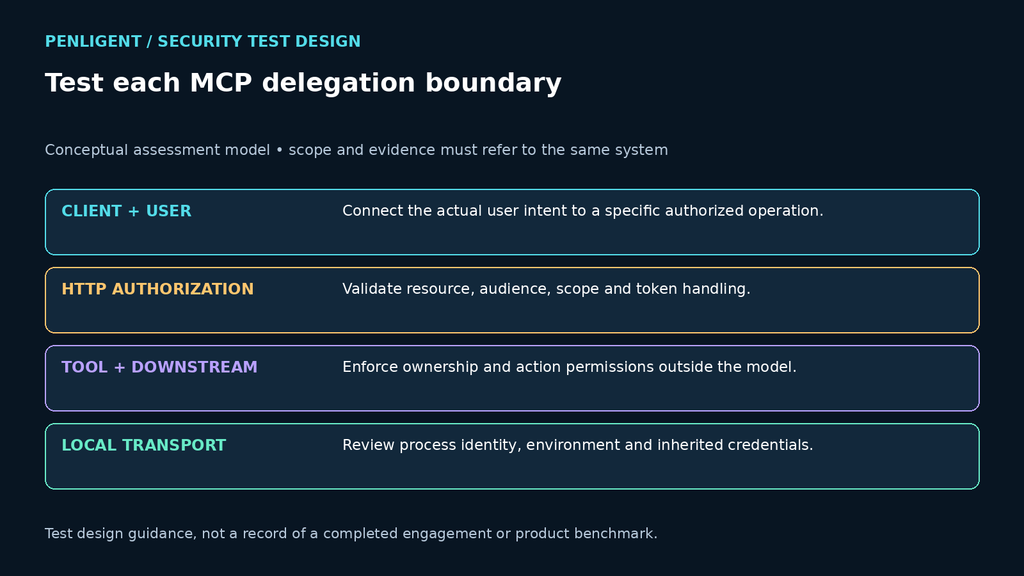
Verwenden Sie die MCP specification and its authorization guidance as protocol references, then test the actual deployment. Product-specific proxies, local transports, identity brokers and tool wrappers can create security behavior outside the core specification.
The linked authorization specification addresses HTTP-based transports; it does not prescribe the same OAuth flow for STDIO. For a local STDIO server, assess process identity, inherited environment credentials and the caller’s operating-system permissions. Bind every test to the transport and specification version actually deployed.
Audit MCP server provenance before security testing begins
An MCP test inventory should record more than server names, tools and permissions. It should also establish where each server came from, whether the suggested package is still maintained, and whether an official successor has replaced it.
Glow Labs used the name MCPhantom for a failure mode described on a page displaying November 2 and November 3, 2026 dates. In the sessions the researchers reviewed, AI coding agents recommended or installed deprecated or no-longer-maintained MCP servers, with the historical GitHub MCP server used as a central example. The result should not be generalized to every agent, model or prompt: recommendations can change with product versions, network access, registry integration and date. The durable lesson is that an AI-generated installation command is not proof of current stewardship.
Add source and lifecycle fields to the inventory
| Inventory field | What to verify | Evidence to retain |
|---|---|---|
| Package identity | The package name, repository, publisher and project website refer to the same implementation. | Exact names, URLs, publisher and review date |
| Recommendation source | The server came from current vendor documentation, the official MCP Registry, a package page, a search result or untraceable model memory. | Original agent output, cited source, product or model context and timestamp |
| Lifecycle | The package is active, deprecated, archived or apparently unmaintained; any official successor has been identified. | Deprecation notice, archive status, release history and migration link |
| Version provenance | The reviewed server is pinned to a reproducible release or commit rather than a mutable branch or unbounded install. | Version, commit, lockfile and integrity data |
| Effective authority | The server’s token scopes, file access, network destinations and subprocess capabilities match the stated task. | Approved scopes, launch configuration, egress policy and tool schema |
| Approval and expiry | A named owner accepted the dependency and knows when lifecycle and permissions must be reviewed again. | Owner, decision, exception if any, and next review date |
Keep the terms precise. Deprecated means a maintainer or registry recommends migration. Archived means the repository is read-only. Unmaintained describes an absence of credible maintenance signals. None of those states alone proves that a package is malicious, but each changes the risk and ownership decision.
Verify an AI-recommended server before connection
- Capture the untouched recommendation. Save the package, repository, version, command, prompt context and date before correcting it.
- Resolve authoritative identity. Cross-check current vendor documentation, the official MCP Registry, the package registry and repository ownership.
- Check deprecation and successor notices. Start from the successor’s current documentation instead of adapting a historical command by guesswork.
- Pin the review target. Use an inspectable release or commit, retain the lockfile and record integrity information supported by the ecosystem.
- Review behavior before credentials. Inspect the launch command, tools and schemas, file boundaries, network destinations, environment variables and subprocess behavior.
- Test in isolation. Use synthetic data, a restricted working directory, controlled egress and revocable credentials rather than production secrets.
- Record approval and retest triggers. Recheck the server when its publisher, lifecycle, version, tool schema or requested permissions change.
The old GitHub MCP server demonstrates the migration issue. Documentation in the archived Model Context Protocol servers repository states that @modelcontextprotocol/server-github moved to GitHub’s official github/github-mcp-server repository. That is a trustworthy successor signal, but the replacement still requires a new review of installation, toolsets, authentication and GitHub permissions. Do not copy long-lived personal access tokens into committed or shareable configuration.
Provenance review complements the runtime tests in this guide. A maintained official server can still be overprivileged or deployed incorrectly. Continue to enforce MCP’s prohibition on token passthrough, use least-privilege scopes, protect against confused-deputy conditions, and give users visibility and meaningful confirmation for sensitive tool calls.
For the complete source-and-lifecycle decision matrix, see MCPhantom and deprecated MCP servers.
Authorization tests
- Use a token issued for another resource or audience and confirm rejection.
- Remove a required scope and verify that discovery and execution are both constrained.
- Change the user or tenant while reusing client state and confirm isolation.
- Revoke authorization and verify that cached sessions and long-running tasks stop.
- Test redirect and callback handling with pre-registered safe values.
- Confirm that the server does not forward a client token to an unrelated downstream service.
Authorization should be evaluated at the resource server and again at the downstream object or action. Tool names and natural-language descriptions are not access controls.
Tool permission tests
| Tool class | Risiko | Acceptance condition |
|---|---|---|
| Read-only search | Cross-tenant or overly broad retrieval | Results are filtered by trusted identity and policy |
| File access | Path traversal, secret access or unintended workspace scope | Resolved paths remain inside explicit roots |
| Befehlsausführung | Argument injection or privilege inheritance | Allowlisted operations run in isolated, least-privilege contexts |
| Messaging and tickets | Unapproved external side effects | The exact recipient and content require visible approval |
| Cloud administration | Broad credentials turn planning mistakes into infrastructure changes | Short-lived task-bound permissions and independent policy checks |
| Database action | Model-provided identifiers bypass row or tenant controls | Queries are parameterized and authorization is data-aware |
Prompt injection and confused-deputy testing
Place synthetic instructions in documents, issue descriptions, web pages and tool output. Observe whether the client changes its plan, requests new tools or attempts to disclose data. The important result is not that the model repeated the text; it is whether an unauthorized resource or action became reachable.
Die OWASP LLM Top 10 provides relevant risk categories, but each MCP finding should identify the concrete authority that was misused.
Secrets and local-server risks
Inspect environment variables, configuration files, logs, crash reports, command history and child processes. Confirm that a local MCP server cannot silently inherit unrelated developer credentials. Separate tools into dedicated workers when their permissions differ materially.
Test install and update provenance for servers and dependencies. A convenient one-line installation can introduce a supply-chain and credential boundary that deserves the same review as any other privileged developer tool.
Approval and stop behavior
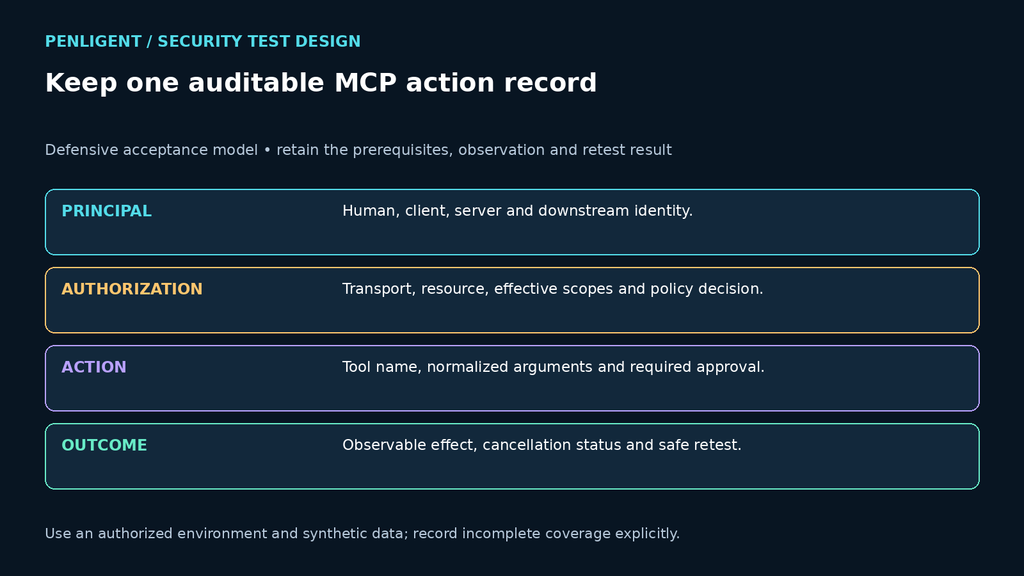
For state-changing actions, the approval should show the exact operation, target, identity and material arguments. A generic approval to “continue” should not authorize a later email, cloud change or command. Cancel an active run and verify that queued tool calls, subprocesses and callbacks terminate.
Logging requirements
- human user and client identity;
- MCP server and tool version;
- authorization issuer, audience and effective scopes;
- tool name, normalized arguments and approval event;
- downstream principal, resource and result;
- redacted error and policy decisions;
- cancellation, timeout and retry behavior.
Engagement acceptance test
Build a synthetic MCP environment with two tenants, a read tool, a state-changing tool and a decoy secret. Seed one excessive-permission condition and one indirect prompt injection. The tester should find the real authorization path, avoid accessing unrelated data, preserve an auditable chain and demonstrate a safe remediation retest.
Make the purchase measurable
MCP is an integration layer, so its security cannot be assessed by protocol parsing alone. Test delegated identity, resource authorization, tool permissions, content provenance, approvals and downstream effects as one chain. AI security teams can apply the same evidence model when evaluating Penligent or another testing provider.
The following Penligent overview introduces a general authorized testing workflow. It does not demonstrate that every assessment capability discussed in this guide is included in a particular product plan.
MCP security audit: separate authentication from operation permission
A useful MCP security audit records four distinct boundaries: where the server package came from, how the client authenticates, which tool operations the subject may execute, and which downstream objects those operations may access. Passing one boundary does not establish the others.
| Boundary | Required check | Closure evidence |
|---|---|---|
| Server provenance | Match the running server to the reviewed publisher and revision | Package or image identity, source and update record |
| Remote HTTP authorization | Reject a staging credential for the wrong resource or issuer | Validation category and no protected execution |
| Tool permissions | A read-only subject attempts a controlled write | Server-side denial and unchanged fixture |
| Object permission | Use the same tool against allowed and forbidden test objects | Subject, object owner and policy result |
| Local stdio execution | Inspect effective process, filesystem and credential access | Host capability contract and observed limits |
Die MCP security guidance treats token passthrough, confused deputy behavior, local server compromise and scope minimization as separate problems. A single successful OAuth login cannot close that list. Nor does hiding a tool from discovery replace execution-time authorization.
For the protocol-specific cases, use the dedicated MCP OAuth security testing guide. It defines audience, scope, delegation, redirect and lifecycle checks without duplicating this article’s broader inventory. Record whether revocation means refresh-token removal, access-token invalidation or application permission withdrawal; test the deployment’s actual propagation contract.
Require an allowed baseline before every rejection claim. If a staging write fails because the downstream service is offline, the result is inconclusive. If the operation occurred before an error response, it is a failed boundary. Retain request IDs and token metadata, with raw bearer tokens excluded from the evidence packet.
 German
 English
 French
 Spanish
 Portuguese
 Japanese
 Korean
 Hindi
 Arabic
 Turkish
 Hebrew