
The Nuclei vulnerability scanner runs repeatable security checks defined in templates. A template describes what to request and what response should count as a match. That makes Nuclei useful for checking known conditions across an approved asset set, but the meaning of a finding depends on the rule that produced it. A version banner, an exposed configuration marker, and a demonstrated security impact are different kinds of evidence.
ProjectDiscovery describes Nuclei as a customizable, YAML-template-driven scanner. The practical question is whether your chosen templates reach the relevant application state and test a condition that matters. Start with a small, explicit template set, validate both positive and negative cases, and keep enough evidence to repeat the result after a fix.
What Nuclei does well
Nuclei is most useful when the check can be expressed clearly and repeated consistently: look for a specific exposure, test a known vulnerability condition, or turn a previously confirmed defect into a regression check. A template makes that procedure inspectable. A reviewer can examine the request, prerequisites, matching logic, and expected response instead of relying on a scanner label alone.
| Assessment question | Useful Nuclei role | Additional work needed |
|---|---|---|
| Does this known condition exist on these approved services? | Run a reviewed template against the explicit asset list. | Check applicability and reproduce representative matches. |
| Did a specific fix remove the observed behavior? | Rerun the same check with a known positive control. | Confirm the endpoint and authentication still work. |
| Can one user access another user’s object? | Automate a narrowly defined, already understood test. | Establish two identities, object ownership, and the expected authorization policy. |
| Is the application secure overall? | Contribute evidence from selected checks. | Assess workflows, roles, state, and surfaces outside those checks. |
The last two rows are assessment judgments, not claims that Nuclei cannot send a particular request. A scanner can execute a technically correct check while the assessment still misses an important user role or business transition. Record those gaps explicitly rather than presenting a clean result file as complete coverage.
Install Nuclei and preserve the test inputs
Use an installation route in the official installation guide, such as the release binary for your operating system or the documented Go command below. The Go route requires the Go version supported by the current project. Check the installed version before following an older tutorial.
go install -v github.com/projectdiscovery/nuclei/v3/cmd/nuclei@latest
nuclei -version
nuclei -h
The command above is a convenient initial installation, not a reproducibility policy. For a repeatable assessment, retain the approved engine version, template files or repository revision, target list, configuration, scan time, and identity used. Hash custom templates when they form part of the evidence package. Updating the engine and updating templates are separate changes; review both before comparing runs.
Avoid starting a production assessment with an unrestricted default scan. Pick reviewed template paths and read their requests first. A high-severity label describes the condition being checked; it does not tell you whether a request is suitable for a sensitive service. Scope should specify the allowed targets, identities, test window, and permitted request behavior.
How a template turns a response into a finding
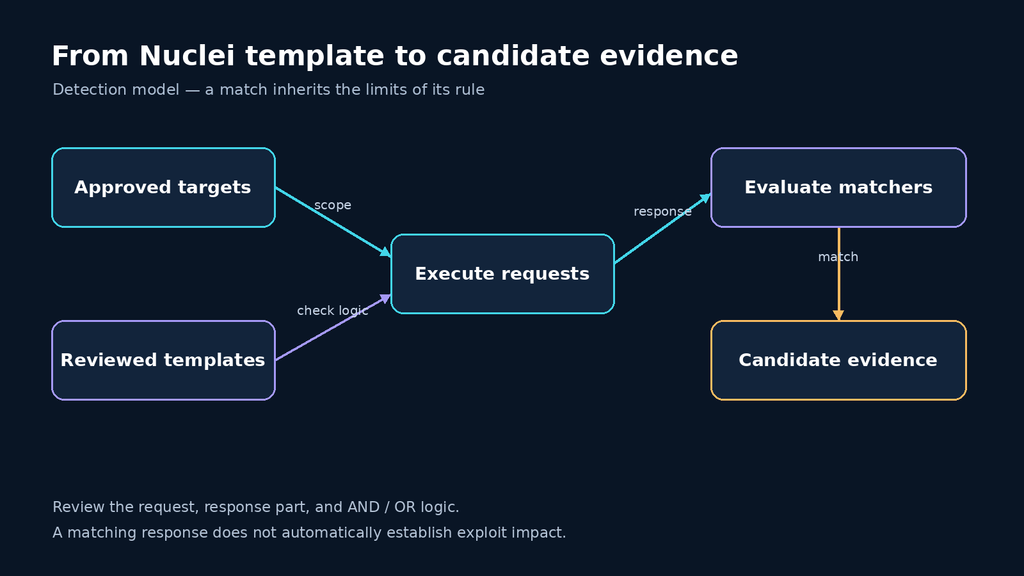
Die template structure documentation separates the template ID and informational metadata from requests and matchers. The ID identifies the check. The info section supplies fields such as its name, author, and severity. Protocol sections define the actual operations and their response tests.
The most consequential detail is the logic connecting matchers. According to the official matcher reference, multiple matchers use OR unless you specify matchers-condition: and. A list of words inside one word matcher also defaults to OR unless its own condition is changed. These are two separate levels of logic. Requiring a status code, a header, and a body marker needs the outer AND; otherwise an ordinary HTTP 200 response could satisfy only the status matcher.
Read the exact part being matched. A body word, response header, and status code answer different questions. An error page can contain a product name, and a generic application fallback can return HTTP 200 for nonexistent paths. Stronger matching combines evidence tied to the intended condition and uses negative controls to expose accidental matches.
A localhost lab for testing matcher quality
This lab uses synthetic markers, not a real vulnerability or exploit. It starts three HTTP services bound only to 127.0.0.1. The first returns the expected debug marker, the second models a fixed response, and the third deliberately returns a misleading body string without the identifying header. Run it on your own machine. If a port is occupied, change that port consistently in the fixture and commands.
Save the following as lab_server.py, then run python3 lab_server.py in a terminal. Leave that terminal open during the checks; press Ctrl+C to stop it afterward.
"""Local synthetic detection fixture. No real vulnerability or exploit."""
from http.server import BaseHTTPRequestHandler, ThreadingHTTPServer
from threading import Thread, Event


def handler_for(mode):
    class Handler(BaseHTTPRequestHandler):
        def do_GET(self):
            self.send_response(200)
            self.send_header("Content-Type", "text/plain; charset=utf-8")
            is_lab = self.path == "/debug" and mode != "decoy"
            if is_lab:
                self.send_header("X-Penligent-Lab", "true")
            self.end_headers()
            if is_lab:
                enabled = 1 if mode == "open" else 0
                body = f"LAB_DEBUG_ENABLED={enabled}\n"
            else:
                body = "Generic fallback: LAB_DEBUG_ENABLED=1\n"
            self.wfile.write(body.encode())
    return Handler


if __name__ == "__main__":
    servers = []
    for port, mode in [(8000, "open"), (8001, "patched"), (8002, "decoy")]:
        server = ThreadingHTTPServer(("127.0.0.1", port), handler_for(mode))
        Thread(target=server.serve_forever, daemon=True).start()
        servers.append(server)
        print(f"{mode}: http://127.0.0.1:{port}", flush=True)
    try:
        Event().wait()
    except KeyboardInterrupt:
        for server in servers:
            server.shutdown()
            server.server_close()
Save this template separately as lab-debug-marker.yaml. The informational severity is deliberate: a made-up debug marker has no established vulnerability impact. The rule requires all three conditions, so the response body alone cannot trigger it.
id: penligent-local-debug-marker

info:
  name: Penligent Local Debug Marker
  author: penligent
  severity: info
  description: Synthetic localhost fixture; not a real vulnerability.
  tags: lab,regression

http:
  - method: GET
    path:
      - "{{BaseURL}}/debug"
    matchers-condition: and
    matchers:
      - type: status
        status:
          - 200
      - type: word
        part: header
        case-insensitive: true
        words:
          - "X-Penligent-Lab: true"
      - type: word
        part: body
        words:
          - "LAB_DEBUG_ENABLED=1"
The request uses {{BaseURL}} to append /debug to the supplied target. This behavior follows the HTTP template documentation. Use only the origin URLs shown below; adding an existing path to the target changes the constructed request path. This fixture needs no redirects, credentials, external callback service, or privileged execution.
nuclei -validate -t lab-debug-marker.yaml

nuclei -u http://127.0.0.1:8000 -t lab-debug-marker.yaml \
  -rate-limit 2 -concurrency 1 -jsonl -o lab-open.jsonl

nuclei -u http://127.0.0.1:8001 -t lab-debug-marker.yaml \
  -rate-limit 2 -concurrency 1 -jsonl -o lab-patched.jsonl

nuclei -u http://127.0.0.1:8002 -t lab-debug-marker.yaml \
-rate-limit 2 -concurrency 1 -jsonl -o lab-decoy.jsonl| Local service | Observed fixture response | Expected template outcome |
|---|---|---|
| 127.0.0.1:8000/debug | 200, identifying header, marker set to 1 | Match |
| 127.0.0.1:8001/debug | 200, identifying header, marker set to 0 | No match |
| 127.0.0.1:8002/debug | 200, no identifying header, misleading marker set to 1 | No match |
The fixture’s HTTP responses and the three-condition truth table were checked for this article. The Nuclei executable was not available in the authoring environment, so the scanner commands and expected outcomes above are a reproducible exercise, not a claimed scanner execution transcript. Validate the YAML with your installed Nuclei version and inspect its logs before interpreting the result.
As an additional control, request an unknown path on the first service. It returns a generic fallback body containing the positive marker but lacks the identifying header. That is the failure mode a body-only test would miss. If you deliberately weaken the template to body-only matching, keep that change in a separate lab file so it cannot enter your approved scan set.
Validate the finding before assigning impact
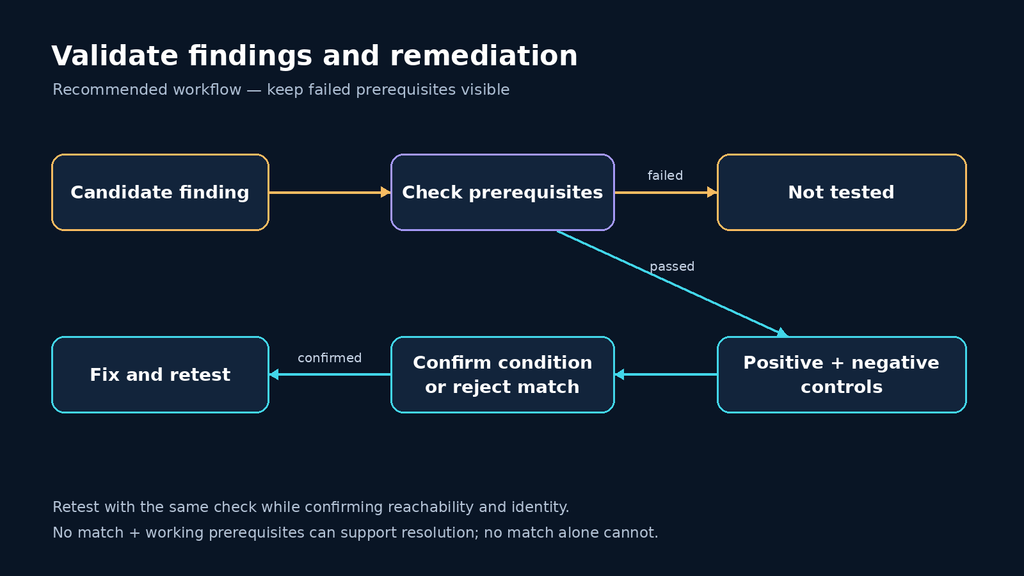
A useful finding should survive an attempt to disprove it. Capture the specific template revision, matched URL, execution identity, relevant request and response, and the reason those observations establish the condition. Redact credentials and unrelated personal data before sharing the evidence. The report should distinguish what was observed from what remains an impact hypothesis.
For a real CVE check, inspect whether the matcher proves vulnerable behavior or only identifies a potentially affected product or version. Compare the observation with the vendor advisory and deployment configuration. A backported fix can complicate a version-only conclusion, while an inaccessible route can hide an affected component. Neither case is resolved by changing the label in the report.
Retest after remediation with the original check and an independent reachability or authentication check. A missing match may mean the fix worked, but it may also mean the service is down, a session expired, or a proxy blocked the request. Preserve those distinctions. Use “not tested” when the prerequisite failed; reserve “resolved” for evidence that the vulnerable condition is gone while the relevant test still works.
Run controlled scans and interpret empty results
Die Nuclei CLI documentation definiert -rate-limit as a request-rate cap and -concurrency as the number of templates executed in parallel. They control different dimensions of a run. Start conservatively, watch the application’s error rate and latency, and adjust within the agreed test window. No single rate is safe for every service.
For sensitive environments, use an explicit reviewed template directory and an approved target file. Keep findings separate from diagnostic logs. JSONL makes findings easier to process, but an empty findings file is not a scan-completion record. Check validation errors, skipped templates, connection failures, and authentication success before reporting a negative result.
nuclei -l approved-targets.txt -t ./reviewed-templates/ \
  -rate-limit 5 -concurrency 1 -jsonl -o findings.jsonl \
  2>scan.log
The rate in this example is illustrative. Do not reuse it as a capacity guarantee. In a larger assessment, divide services into groups with comparable constraints and keep a coverage record for each group: intended endpoints, selected checks, reached states, completed checks, and unresolved prerequisites. That record makes a later coverage discussion concrete.
Authentication changes the reachable surface. ProjectDiscovery’s authenticated scanning documentation describes secret files and domain scoping for credentials. Scope each secret to its intended targets rather than applying one global authorization header to a mixed list. Check an authenticated response before the scan and during long runs. Separate identities are still needed when the assessment question depends on role or object ownership.
Treat templates as a software supply chain
Review third-party templates before execution, including helper files, network destinations, and protocol requirements. A template’s published name is not a security review. Keep unreviewed downloads outside the approved scan directory and avoid adding powerful execution options simply to clear a warning.
Template signing provides authenticity and integrity checks using an author’s key. It does not establish that the detection logic is correct or that every operation is appropriate for your environment. A signed template can still be too broad for the assessment question; negative controls and request review remain necessary.
There is also a version-specific documentation trap. The general signing page describes signing as optional outside the code protocol, but the later Nuclei v3.11.0 release notes require custom templates using the javascript: protocol to be signed. Unsigned JavaScript templates are skipped, including references from workflows. The release notes say official templates are already signed; templates using only flow: without the JavaScript protocol are unaffected by this change. Use the release-specific requirement when checking an upgraded runner.
The HTTP-only lab above does not depend on the JavaScript or code protocols. For a real pipeline, record skipped checks as a coverage issue and investigate the cause. Suppressing a warning without restoring the intended check creates a misleadingly quiet report.
Turn confirmed checks into regression tests
Die official CI/CD guide supports staging scans, template-based regression checks, and SARIF output. Begin with a check whose meaning your team understands. Keep the fixture, template, and expected outcomes together, and review changes to the engine or template set as code changes.
A useful release gate separates confirmed regressions from execution failures. A deterministic match for a previously fixed issue may block a release. A login failure should mark the security check incomplete and trigger investigation. New or broad detection templates can start in a review queue until the team has measured their behavior against representative services.
The same discipline applies when evaluating an agent-assisted assessment workflow such as Penligent. Give it defined acceptance cases, require evidence for each conclusion, and compare retest behavior under the same identities and service conditions. An automated narrative should preserve the boundary between a scanner observation, a confirmed defect, and an untested hypothesis.
Nuclei vulnerability scanner FAQ
Does a Nuclei finding prove exploitation?
Only when the particular check and retained evidence establish that outcome. Read the template’s requests and matchers. A technology fingerprint, an affected-version observation, and a demonstrated impact should be reported with different wording.
Does no output mean the target is safe?
No. Check whether the intended templates loaded, the requests reached the right endpoints, and the required identity remained valid. Negative output has meaning only within that tested scope.
Should I enable every template and protocol?
Choose checks based on the assessment question and approved behavior. A larger run can increase traffic and review effort without improving coverage of the workflows that matter. Add capabilities deliberately after inspecting the relevant templates.
What should I save for a useful retest?
Retain the engine version, exact template revision, target and identity, configuration, relevant response evidence, and the expected post-fix behavior. Recheck prerequisites alongside the original condition so an unavailable endpoint cannot masquerade as a successful fix.
Start with one reviewed template and one known positive and negative pair. Once that check is trustworthy, expand the approved target set and preserve the evidence boundary. Repeatability becomes valuable when the team can explain exactly what each result means.
 German
 English
 French
 Spanish
 Portuguese
 Japanese
 Korean
 Hindi
 Arabic
 Turkish
 Hebrew