
A VMware CVE can describe anything from a narrowly constrained information disclosure in a desktop hypervisor to an unauthenticated code-execution flaw in the management plane controlling hundreds of hosts. Treating those findings as interchangeable rows in a scanner dashboard creates the wrong patch order.
The practical question is not simply, “What is the CVSS score?” It is:
- Which trust boundary does the vulnerability cross?
- What privileges does the attacker need before exploitation?
- Can the vulnerable interface be reached from an untrusted network?
- Does exploitation affect one developer laptop, one ESXi host, or an entire virtual infrastructure?
- Has Broadcom reported exploitation?
- Is the CVE listed in the CISA Known Exploited Vulnerabilities catalog?
- Does the official VMware Security Advisory provide a fixed build, a limited workaround, or no workaround at all?
- Can the organization prove that every affected instance is running the corrected build?
Those questions form the basis of a useful VMware CVE hub. A vulnerability list is only the starting point. The real operational product is a defensible queue that connects each advisory to a known asset, a verified build, an attack path, a patch decision, and evidence of remediation.
VMware products create different security boundaries
vCenter Server, ESXi, Workstation, and Fusion all belong to the VMware ecosystem, but they occupy very different positions in an attack model.
vCenter is a centralized control plane. ESXi is a virtualization and workload-isolation boundary. Workstation and Fusion place virtualization services on user endpoints. VMware Tools runs inside guest operating systems and can enable management functions that cross between guest and virtualization layers.
The same severity label therefore has different operational meaning across products.
| Product or component | Primary security boundary | Common attacker starting point | Potential blast radius | Factors that increase priority |
|---|---|---|---|---|
| vCenter Server | Centralized management, identity, cluster, host, virtual machine, network, and storage control | Network access to management services, stolen administrative credentials, or a delegated role | Multiple clusters, hosts, workloads, snapshots, permissions, and connected services | Broad management-plane reachability, unauthenticated attack paths, high-privilege service compromise, no workaround |
| ESXi | Guest isolation, VMX sandbox, hypervisor kernel, virtual devices, and host management | Guest administrator, compromised virtual machine, management-plane access, or identity integration abuse | Every virtual machine on the host and, in some incidents, connected storage or adjacent hosts | Untrusted guests, multi-tenant workloads, ransomware activity, guest-to-host chains, domain integration |
| Workstation | Local guest-to-host boundary on Windows or Linux | A malicious or compromised virtual machine, local user, or imported image | Developer workstation, local credentials, source code, browser sessions, cloud tokens, and connected corporate resources | Security research images, malware labs, untrusted appliances, privileged developer accounts |
| Fusion | Local guest-to-host boundary on macOS | A malicious guest, local user, or vulnerable privileged helper | Mac host, local secrets, developer credentials, source repositories, and corporate sessions | Shared Macs, untrusted guests, local privilege escalation, high-value engineering endpoints |
| VMware Tools | Guest management and integration layer | Local guest user, management workflow, or vulnerable Tools service | The affected guest and any workflow that relies on guest operations | Outdated Tools versions, privileged guest services, Aria integration, broad guest-operations permissions |
| vSphere Lifecycle Manager | Desired state and patch orchestration for ESXi clusters | Administrative access or an incorrect image and remediation plan | Multiple hosts in a cluster | Incomplete image compliance, unsupported add-ons, firmware dependencies, failed remediation, insufficient capacity |
This distinction matters when two advisories arrive together. A moderate local denial-of-service flaw on an isolated analyst workstation may tolerate a normal desktop update cycle. A critical vCenter vulnerability reachable from an administrative network shared with compromised endpoints may require immediate isolation and emergency patching.
CVSS remains useful, but it represents properties of the vulnerability rather than the full risk of a specific deployment. The organization must add topology, identity, workload trust, exploitation evidence, recovery readiness, and business impact.
CVE, VMSA, NVD, and CISA KEV answer different questions
A CVE identifier gives a vulnerability a stable public name. It allows vendors, scanners, incident responders, security researchers, and asset owners to discuss the same issue without relying on inconsistent vulnerability titles.
The CVE record and NVD can provide a general description, references, weakness classifications, and scoring information. They do not replace product-specific remediation instructions.
For VMware products, the VMware Security Advisory is the principal operational source for affected products, severity, known attack vectors, fixed releases, workarounds, and vendor statements about exploitation. Broadcom’s published vulnerability response policy maps Critical severity to CVSS 9.0 through 10.0, Important to 7.0 through 8.9, Moderate to 4.0 through 6.9, and Low to 0.1 through 3.9. The policy also describes the types of remediation, attack-vector, workaround, and exploitation information that may appear in a VMSA. (Broadcom)
The VMSA portal moved into the Broadcom Support Portal in May 2026. That migration makes it especially important for security teams to update bookmarks, ingestion jobs, and internal runbooks rather than assuming older VMware URLs will remain the canonical access path. Broadcom describes VMSAs as the mechanism used to document remediation for vulnerabilities in VMware products. (Unterstützungsportal)
CISA’s Known Exploited Vulnerabilities catalog answers another question: is there reliable evidence that attackers have exploited the vulnerability in the wild? CISA recommends using the catalog as an input to vulnerability-management prioritization rather than treating every published CVE as equally urgent. (CISA)
A mature triage process uses all four layers:
- CVE identity establishes which vulnerability is being discussed.
- VMSA product mapping determines whether a VMware product and release are affected and which build fixes the issue.
- NVD and CVE metadata provide broader technical context and references.
- CISA KEV and vendor exploitation notes change the urgency when exploitation is known or suspected.
A scanner can help locate candidates, but it should not make the final affected-or-fixed decision. Scanner plugins may rely on version banners, credentials with limited visibility, stale feeds, package metadata, or inferred version ranges. The VMSA response matrix and authenticated build evidence should resolve disagreements.
Read the advisory as a living operational document
A VMware Security Advisory should not be treated as a static vulnerability announcement that is read once and archived. Some advisories are revised after publication to add fixed builds, clarify affected products, report exploitation, replace incomplete patches, or update workaround guidance.
The following fields deserve explicit review.
| VMSA element | Operational question | Häufiger Fehler |
|---|---|---|
| Initial publication date | When did defenders first receive actionable notice? | Measuring response time only from the date a scanner created a ticket |
| Last updated date | Has Broadcom changed the remediation or exploitation information? | Assuming the original PDF, email, or cached page is still current |
| Affected products | Which product families and editions are in scope? | Applying a vCenter conclusion to ESXi, Workstation, or Fusion |
| Affected and fixed release matrix | Which exact release and build resolve the CVE? | Checking only a major version such as 8.0 |
| CVSS and severity | How technically severe is the vulnerability under the stated assumptions? | Converting the score directly into a patch SLA |
| Angriffsvektor | Does exploitation require network access, guest administration, host access, or a specific role? | Treating every “authenticated” condition as low risk |
| Auswirkungen | Is the result code execution, host escape, privilege escalation, information disclosure, or denial of service? | Grouping all critical findings under one generic risk statement |
| Workaround | Can exposure be reduced without installing the fixed build? | Treating a partial mitigation as equivalent to remediation |
| Exploitation note | Has Broadcom reported exploitation or potential exploitation? | Ignoring a later advisory update that changes urgency |
| Revision history | What changed, and does that invalidate earlier work? | Closing the ticket after installing a superseded patch |
CVE-2024-38812 demonstrates why revision tracking matters. VMSA-2024-0019 initially addressed a critical vCenter Server DCERPC heap-overflow vulnerability. Broadcom later stated that the original patches did not fully address the issue and revised the response matrix. The vendor subsequently reported exploitation in the wild, and the vulnerability entered CISA’s KEV catalog. An organization that recorded only the September 2024 patch event could have believed it was protected while still running a build that did not completely remediate the flaw. (Unterstützungsportal)
CVE-2024-37079 illustrates a different revision pattern. The vCenter DCERPC heap-overflow vulnerability was disclosed in VMSA-2024-0012 in June 2024. Broadcom updated the advisory in January 2026 to say it had information suggesting exploitation in the wild. CISA added the CVE to KEV on January 23, 2026. The technical vulnerability did not suddenly appear in 2026, but the threat evidence changed the patch priority for any remaining exposed installation. (Unterstützungsportal)
For every material VMware advisory, preserve at least:
- The VMSA identifier.
- Initial publication date.
- Last reviewed or updated date.
- CVE identifiers.
- The response-matrix version used for the decision.
- Affected product and branch.
- Observed asset build.
- Required fixed build.
- Workaround status.
- KEV status.
- Vendor exploitation statement.
- Date and source of the asset evidence.
That record allows an auditor or incident responder to reconstruct why a vulnerability was assigned a particular priority and whether later advisory revisions require the ticket to be reopened.
A VMware CVE priority model that reflects real exposure
No single formula can fully describe infrastructure risk, but a consistent model prevents urgent issues from being buried under large scanner exports.
A practical VMware prioritization model should consider five dimensions.
Exploitation evidence
Move a vulnerability toward the top of the queue when:
- It appears in CISA KEV.
- Broadcom confirms exploitation in the wild.
- Broadcom reports suspected or potential exploitation.
- Credible incident reporting links the CVE to ransomware or targeted intrusion activity.
Known exploitation should not be treated as a small numerical adjustment. It changes the question from “Could an attacker develop an exploit?” to “Can the organization tolerate remaining exposed while attackers already use this weakness?”
Attack path
Distinguish at least these paths:
- Unauthenticated network access to vCenter.
- Authenticated access with a narrowly delegated vCenter permission.
- ESXi management access.
- Active Directory integration abuse.
- Guest administrator to the VMX process.
- VMX process to hypervisor kernel.
- Non-administrative guest user to host denial of service.
- Local host user to root or system privileges.
- Cross-guest network interference.
- Information disclosure limited to one process or virtual machine.
“Local” is not automatically low risk. A guest-local flaw can be highly important when the guest is intentionally untrusted. A local host privilege escalation can be serious on a shared development Mac. An authenticated vCenter flaw can be critical if the required permission is widely delegated or obtainable through a compromised automation account.
Asset context
Raise priority when the affected asset:
- Controls multiple clusters.
- Hosts identity, security, payment, manufacturing, or customer-facing systems.
- Runs third-party or untrusted virtual machines.
- Supports malware analysis or exploit-development workloads.
- Is reachable from broad corporate networks.
- Uses shared administrative credentials.
- Has weak segmentation between user endpoints and the management plane.
- Cannot be restored quickly.
- Is running an unsupported release.
Lower priority only when the reducing conditions are verified rather than assumed. For example, “not internet-facing” does not mean “not reachable by an attacker.” Many destructive infrastructure incidents begin after a workstation, VPN credential, or directory identity is compromised.
Remediation conditions
Priority should increase when:
- The VMSA says no workaround is available.
- The only mitigation materially disrupts operations.
- The current product branch has no planned patch.
- The organization lacks spare cluster capacity for rolling maintenance.
- A fixed release requires a major upgrade rather than a routine patch.
- The initial patch was superseded.
- The vulnerability remains after a partial remediation.
Priority may be managed differently when a tested, vendor-supported workaround reliably removes the attack path. Even then, the workaround needs an owner, expiration date, monitoring rule, and plan for permanent remediation.
Recovery and detection confidence
An exposed system with weak logging and untested restoration deserves greater urgency than an equally exposed system with centralized logs, validated backups, and a practiced recovery process.
Risk grows when the team cannot answer:
- Would we know if vCenter administrative roles changed?
- Are ESXi authentication and shell logs sent off-host?
- Can we identify creation or re-creation of the
ESX Adminsgroup? - Can we restore vCenter from a file-based backup?
- Can we recover virtual machines if a datastore is encrypted?
- Can we prove which build was active at the time of suspected exploitation?
Example priority bands
The following bands are an internal policy example, not Broadcom service levels.
| Priorität | Typical conditions | Example operational target |
|---|---|---|
| P0 emergency | KEV-listed control-plane flaw, vendor-confirmed exploitation, unauthenticated vCenter RCE, or an actively exposed guest-to-host chain in a high-risk environment | Isolate immediately where feasible, begin emergency change process, patch or remove the attack path the same day |
| P1 urgent | Critical guest-to-host issue with untrusted guests, high-impact authenticated vCenter command execution, ESXi authentication bypass, or a critical issue without a workaround | Remediate within a tightly controlled emergency window, commonly within 72 hours |
| P2 accelerated | Important local privilege escalation, constrained denial of service on critical infrastructure, or a critical issue with strong compensating controls | Patch in the next accelerated maintenance cycle, commonly within 7 to 14 days |
| P3 scheduled | Narrow information disclosure or denial of service with difficult prerequisites and strong isolation | Track through normal patch management with an explicit due date |
The timing must reflect the organization’s operating model. A hospital, exchange, cloud provider, software laboratory, and small internal development team will not share the same maintenance constraints. What should remain consistent is the relationship between evidence, attack path, asset context, and decision.
Representative VMware CVEs and what they teach defenders
The following vulnerabilities show why VMware CVE prioritization cannot be reduced to a descending score.
| CVE | Product and boundary | Attack condition | Material impact | Priority lesson |
|---|---|---|---|---|
| CVE-2024-37079 | vCenter Server management plane | Network access and a crafted DCERPC packet | Potential remote code execution | A 2024 disclosure became more urgent after Broadcom reported exploitation information and CISA added it to KEV in January 2026. (Unterstützungsportal) |
| CVE-2024-38812 | vCenter Server DCERPC service | Network access and a crafted packet | Potential remote code execution | Installing the first available patch was not enough because Broadcom later stated that the initial update did not fully resolve the flaw. (Unterstützungsportal) |
| CVE-2025-41225 | vCenter Server alarm and script functionality | Authenticated actor with privileges to create or modify alarms and run script actions | Arbitrary command execution on vCenter | “Authenticated” can still represent major control-plane risk when the required privilege exists in delegated or compromised accounts. (Unterstützungsportal) |
| CVE-2024-37085 | ESXi Active Directory integration | Sufficient AD permissions to recreate the configured administrative group | Full ESXi administrative access | Identity integration can become a hypervisor compromise path; Microsoft observed ransomware actors using the weakness. (Unterstützungsportal) |
| CVE-2025-22224 | ESXi, Workstation, Fusion, and related products | Local administrative privileges in a virtual machine | Code execution as the VMX process on the host | Guest administration is an expected attacker position in sandbox, research, and multi-tenant environments. Broadcom reported exploitation in the wild. (Unterstützungsportal) |
| CVE-2025-22225 | ESXi | Privileges within the VMX process | Arbitrary write in the ESXi kernel and sandbox escape | Chained vulnerabilities can cross more than one isolation boundary even when each stage has a different prerequisite. (Unterstützungsportal) |
| CVE-2025-22226 | ESXi, Workstation, Fusion, and related products | Administrative access in the guest | Information disclosure from the VMX process | Memory disclosure may support a broader chain even when it is not independently equivalent to code execution. (Unterstützungsportal) |
| CVE-2025-41236 | ESXi, Workstation, Fusion, and related products | Guest administration and use of VMXNET3 | Host-side code-execution risk under stated conditions | Virtual device configuration determines exposure; inventory must record more than product version. (Unterstützungsportal) |
| CVE-2025-41237 | ESXi, Workstation, and Fusion | Guest administration and VMCI access | VMX sandbox impact on ESXi and potential host code execution on desktop products | The same vulnerable component can have different consequences because ESXi and desktop hypervisors enforce different containment boundaries. (Unterstützungsportal) |
| CVE-2025-41238 | ESXi, Workstation, and Fusion | Guest administration and PVSCSI-related conditions | Out-of-bounds write, with product-specific containment | Unsupported configurations can still exist in real environments and should be detected rather than assumed absent. (Unterstützungsportal) |
| CVE-2025-41239 | ESXi, Workstation, and Fusion | Guest administration and vSockets interaction | Information disclosure | Medium or important disclosures can become chain-enabling weaknesses. (Unterstützungsportal) |
| CVE-2026-41702 | Fusion | Local non-administrative access to the Mac host | Privilege escalation to root through a SETUID operation flaw | Desktop virtualization must be included in privileged endpoint patching, not managed only as developer software. (Unterstützungsportal) |
| CVE-2026-22715 | Workstation and Fusion | Administrative access in a guest using affected NAT behavior | Interruption or interception of connections involving other guests | A moderate score may matter in shared labs or systems where multiple guests have different trust levels. (Unterstützungsportal) |
These cases expose four recurring VMware security themes.
First, the management plane is a concentration of privilege. A vCenter flaw can affect the administration of many downstream systems.
Second, virtual devices are attack surfaces. Network adapters, storage controllers, guest communication channels, shared folders, and socket mechanisms process data originating from a guest that may already be compromised.
Third, identity integration can erase expected boundaries. CVE-2024-37085 showed how an Active Directory group-name behavior could become a path to full ESXi administration.
Fourth, remediation status can change after the original disclosure. A patch-management system that does not monitor VMSA revisions is incomplete.
Prioritize vCenter as a control plane, not another server
vCenter Server should normally be placed in a dedicated control-plane risk category. Its importance does not come only from the operating system or services running on the appliance. It comes from the authority vCenter has over connected infrastructure.
Depending on deployment and permissions, vCenter can control:
- ESXi hosts.
- Clusters and resource pools.
- Virtual machine power and lifecycle operations.
- Templates and cloning.
- Snapshots.
- Virtual networking.
- Datastores.
- Roles and permissions.
- Certificates and trust relationships.
- Automation and API integrations.
- Backup, monitoring, and orchestration connections.
A remote code-execution vulnerability in vCenter is therefore not equivalent to code execution on an isolated application server. The attacker may obtain access to a system positioned to manage a much larger collection of assets.
Unauthenticated vCenter vulnerabilities
Unauthenticated network-reachable vulnerabilities deserve immediate review even when the interface is not directly exposed to the internet. Administrative networks are frequently reachable from VPN users, privileged access workstations, backup servers, monitoring systems, jump hosts, or general corporate segments that were intended to be trusted.
CVE-2024-37079 and CVE-2024-38812 were both critical vCenter DCERPC heap-overflow vulnerabilities associated with potential remote code execution. Neither should be triaged solely by asking whether TCP ports were exposed publicly. The correct questions include:
- Which networks can reach the affected service?
- Can a compromised employee endpoint route to it?
- Can a compromised backup or monitoring server reach it?
- Are firewall rules based on broad internal ranges?
- Is vCenter reachable from a shared administration VLAN?
- Are there stale network paths left from migrations?
- Does an external support provider have access?
CVE-2024-38812 adds another control: confirm that the installed update belongs to the revised response matrix, not merely the first patch released in September 2024. (Unterstützungsportal)
Authenticated command execution still requires serious treatment
CVE-2025-41225 required an authenticated actor with privileges to create or modify alarms and run script actions. Broadcom rated the vulnerability Important with a CVSS score of 8.8 and stated that successful exploitation could allow arbitrary commands to run on vCenter. The advisory listed no workaround. (Unterstützungsportal)
The word “authenticated” does not tell defenders how likely the prerequisite is. Review:
- Which roles can create or modify alarms?
- Which identities can configure script actions?
- Are automation accounts assigned broad roles?
- Are inherited permissions creating unexpected access?
- Can a help-desk or monitoring role reach the vulnerable function?
- Are service-account credentials stored in scripts, pipelines, or password managers?
- Is multifactor authentication enforced for every applicable administrative path?
- Are inactive accounts and obsolete group memberships removed?
A delegated permission may be common even when full vCenter administration is rare. If the required privilege is widely assigned, the practical attack barrier may be much lower than the summary suggests.
Establish authoritative vCenter version evidence
Do not record only “vCenter 8.” The fixed status usually depends on an exact release and build.
A useful evidence record includes:
Asset: vcsa-prod-01.example.internal
Product: VMware vCenter Server
Observed version: 8.0.x
Observed build: exact build returned by the appliance
Evidence source: VAMI or authenticated API
Evidence timestamp: 2026-07-30T02:15:00Z
VMSA reviewed: VMSA-YYYY-NNNN
Required fixed release: value from current VMSA response matrix
Decision: affected, not affected, or remediated
Reviewer: named owner
The evidence timestamp matters. A version obtained before a failed update, rollback, restoration, or appliance replacement may no longer describe the running system.
Back up before patching, but understand what the backup proves
Broadcom’s vCenter patching guidance recommends proper backups and describes the vCenter Server Appliance Management Interface, commonly reached on port 5480, as a supported update path. The guidance also recommends file-based appliance backups and discusses snapshots as part of patch preparation.
A snapshot is not a complete resilience strategy. It may help with a controlled rollback, but it does not replace:
- Tested file-based backups.
- Independent backup storage.
- Documentation of external dependencies.
- Recovery credentials.
- Certificate and DNS validation.
- A rehearsed restoration process.
- Verification that connected hosts can be recovered or managed if vCenter is unavailable.
Before patching, establish a rollback decision. For example:
- If core vCenter services fail to start within the approved validation period, stop further cluster changes.
- If the database health check fails, escalate before attempting repeated restarts.
- If host connectivity is lost, verify certificates, DNS, time synchronization, and service health before reverting.
- If the appliance must be restored, preserve logs and failed-update evidence first.
Validate more than the login page
A successful vSphere Client login confirms only a small portion of the system.
Post-patch validation should include:
- VCSA version and build.
- Health of core services.
- Authentication through expected identity providers.
- Administrative role behavior.
- ESXi host connection state.
- Cluster status.
- vSphere Distributed Switch visibility where applicable.
- Datastore visibility.
- Virtual machine inventory.
- Alarm execution behavior.
- API authentication for approved automation.
- Backup integration.
- Monitoring integration.
- Certificate status.
- Time synchronization.
- Log forwarding.
- The absence of failed or pending update states.
Record both successful and failed checks. A clean audit trail should show what was tested, by whom, using which account, and at what time.
Prioritize ESXi according to guest trust and management exposure
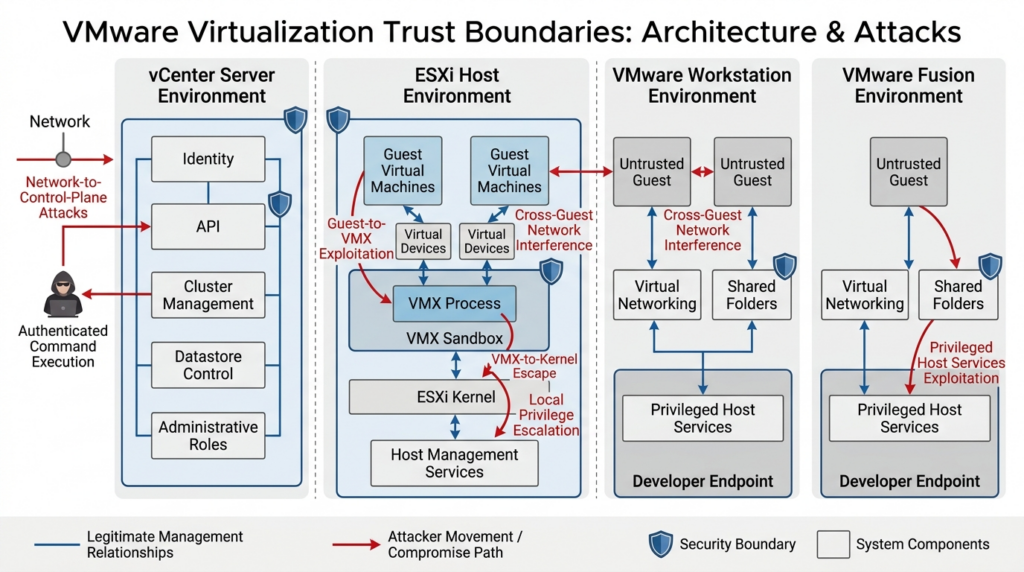
ESXi creates one of the most valuable trust boundaries in enterprise infrastructure: a large number of workloads rely on the hypervisor to keep one virtual machine from controlling another or the host.
A conventional server vulnerability often begins with network access to a service. ESXi vulnerabilities may begin from either direction:
- Outside the host, through management services or identity integrations.
- Inside a guest, through a virtual device or guest-to-host communication mechanism.
That dual exposure requires two separate inventories: management-plane reachability and guest trust.
Guest administrator is not always a strong prerequisite
Broadcom described CVE-2025-22224 as a time-of-check to time-of-use issue leading to an out-of-bounds write. A malicious actor with local administrative privileges inside a virtual machine could potentially execute code as the VMX process on the host. CVE-2025-22225 could allow an actor with VMX-process privileges to perform an arbitrary write in the ESXi kernel and escape the sandbox. Broadcom stated that exploitation had occurred in the wild, and CISA added the vulnerabilities to KEV in March 2025. (Unterstützungsportal)
In many environments, guest administrator privileges are not difficult for an attacker to obtain:
- A public application server may already be compromised.
- A customer may control its own virtual machine.
- A developer may intentionally run an untrusted operating-system image.
- A security team may detonate malware.
- A training platform may provide users with administrator access.
- A third-party appliance may ship with privileged access.
- A red-team or laboratory environment may execute exploit code by design.
For these environments, “requires guest administrator” describes the attacker’s starting point, not a reliable compensating control.
Model chained boundary crossings
The CVE-2025-22224 and CVE-2025-22225 relationship shows why triage should preserve attack-stage information.
A simplified defensive model is:
Compromised or attacker-controlled guest
        |
        | Guest administrator privileges
        v
Virtual device or VMX processing flaw
        |
        | Code execution in VMX context
        v
VMX sandbox boundary
        |
        | Kernel memory corruption or arbitrary write
        v
ESXi host compromise
This is not an exploit recipe. It is a trust-boundary model.
The first stage and second stage may have different CVSS scores, affected products, and prerequisites. A scanner that creates unrelated tickets can hide the combined risk. A useful VMware CVE hub should link findings that form a plausible chain.
Virtual-device configuration matters
VMSA-2025-0013 addressed multiple vulnerabilities involving VMXNET3, VMCI, PVSCSI, and vSockets.
CVE-2025-41236 involved an integer overflow in VMXNET3. Broadcom stated that an actor with administrative privileges in a guest using a VMXNET3 adapter could potentially execute code on the host, while guests using other virtual network adapters were not affected by that specific vulnerability. CVE-2025-41237 involved VMCI, and CVE-2025-41238 involved PVSCSI. Broadcom described different containment outcomes for ESXi and the desktop products. (Unterstützungsportal)
This means product and version inventory alone may be insufficient. For some CVEs, defenders also need:
- Virtual network-adapter type.
- Virtual storage-controller type.
- Whether VMCI or vSockets functionality is available.
- Whether shared-folder functionality is enabled.
- Virtual hardware version.
- Unsupported or legacy configuration settings.
- Guest administrative ownership.
- Source and trust level of the virtual machine image.
A team that cannot query these properties may need to prioritize the entire affected host group conservatively until exposure is resolved.
Identity integration is part of the hypervisor attack surface
CVE-2024-37085 affected ESXi Active Directory integration. Broadcom described an authentication-bypass condition involving re-creation of a configured Active Directory group, ESX Admins by default, after deletion. Microsoft reported observing ransomware operators exploit the vulnerability to obtain full ESXi administrative privileges. Microsoft associated observed activity with multiple threat actors and described incidents that led to deployment of ransomware against ESXi-hosted virtual machines. CISA added the vulnerability to KEV in July 2024. (Unterstützungsportal)
This case should change how organizations monitor virtualization identity.
Rückblick:
- Whether ESXi hosts are joined to Active Directory.
- Which group is configured for administrative access.
- Whether the default
ESX Adminsname is still used. - Who can create, delete, or re-create that group.
- Whether group creation is monitored.
- Whether nested groups create indirect membership.
- Whether privileged group changes are forwarded to a SIEM.
- Whether ESXi local accounts provide an uncontrolled alternate path.
- Whether service accounts have unnecessary domain privileges.
- Whether domain compromise procedures explicitly include ESXi isolation.
An ESXi patch does not remove the need for identity hardening. Conversely, changing the group or monitoring directory events should not be treated as a substitute for installing the fixed ESXi release when one is available.
Use cluster context to plan remediation
ESXi updates may require cluster-level sequencing rather than host-by-host improvisation.
vSphere Lifecycle Manager introduced image-based, declarative lifecycle management in vSphere 7. Broadcom documentation describes a desired image that can include the ESXi version, vendor add-ons, firmware and drivers, and additional components. Broadcom also indicates that image-based lifecycle management is the strategic direction over legacy baselines.
Before remediation, confirm:
- The cluster has enough spare capacity to evacuate a host.
- DRS and vMotion behavior are understood.
- Affinity and anti-affinity rules will not block evacuation.
- Virtual machines with attached local devices are identified.
- Fault-tolerance, vSAN, networking, and storage requirements are satisfied.
- Hardware firmware and driver compatibility have been checked.
- Third-party VIBs are represented in the desired image.
- The remediation image contains the fixed ESXi build.
- Maintenance mode will not violate service-level requirements.
- Backup and recovery systems remain available while hosts are updated.
Broadcom documents live patching for specific ESXi 8.0 Update 3 and later conditions, including use of a single vSphere Lifecycle Manager image and other cluster requirements. Live patching is available only for eligible patches and should not be assumed to eliminate maintenance planning for every VMware CVE.
After remediation, verify every host. A cluster is not remediated because the first host succeeded.
Useful post-update checks include:
vmware -vl
esxcli software profile get
esxcli software vib list
Run commands only on systems you are authorized to administer. Preserve command output with the host name, timestamp, and operator identity. Compare the resulting build or image profile with the current VMSA response matrix and the organization’s approved cluster image.
Workstation and Fusion belong in endpoint security
VMware Workstation and Fusion are often managed as developer utilities rather than privileged system software. That classification is dangerous.
Desktop hypervisors process data from guest operating systems while running on endpoints that may hold:
- Source code.
- SSH keys.
- Browser sessions.
- Cloud credentials.
- Package-signing credentials.
- Corporate VPN access.
- Password-manager sessions.
- Production support tools.
- Security-research data.
- Customer information.
A guest-to-host vulnerability can therefore move an attacker from a disposable virtual machine into a much more valuable endpoint.
Rank guest-to-host flaws by guest provenance
The most useful Workstation and Fusion inventory field may be the source of each guest image.
Beispiele hierfür sind:
- Internally built development image.
- Vendor-supplied virtual appliance.
- Downloaded training image.
- Malware-analysis image.
- Capture-the-flag image.
- Customer-provided image.
- Legacy system image.
- Internet-downloaded operating-system image.
- Image built from an unknown template.
An endpoint running only a tightly controlled corporate guest has a different risk profile from a researcher’s laptop that opens arbitrary samples and third-party appliances.
For CVE-2025-22224, CVE-2025-41236, CVE-2025-41237, and CVE-2025-41238, the guest-side prerequisite should raise rather than lower priority on systems that intentionally run untrusted code. (Unterstützungsportal)
Treat local privilege escalation as an endpoint-control issue
CVE-2026-41702 affected VMware Fusion through a time-of-check to time-of-use weakness in a SETUID operation. Broadcom stated that a local non-administrative user could potentially escalate privileges to root on the Mac host. The advisory identified Fusion 26H1 as the fixed release and listed no workaround. (Unterstützungsportal)
The practical priority depends on:
- Whether multiple people use the Mac.
- Whether untrusted code runs under a standard user.
- Whether the user already has local administrator rights.
- Whether an attacker could obtain a standard shell through another vulnerability.
- Whether endpoint detection is active and tamper-resistant.
- Whether the Mac holds privileged development or production credentials.
- Whether Fusion can be upgraded centrally through device management.
A local privilege escalation is rarely the attacker’s first step. It often converts an existing foothold into durable control. On a privileged developer workstation, that conversion can have consequences far beyond the laptop.
Moderate cross-guest issues can matter in shared environments
CVE-2026-22715 involved a NAT logic flaw in Workstation and Fusion. Broadcom stated that an actor with administrative access in a guest could potentially interrupt or intercept connections involving other guests. The CVSS score was 5.9. (Unterstützungsportal)
A score of 5.9 may justify routine patching on a single-user laptop with one trusted guest. It may deserve faster treatment on:
- Shared training hosts.
- Automated test systems running multiple security zones.
- Labs where customer images coexist.
- Build systems using isolated guests for different projects.
- Malware-analysis hosts.
- Demonstration environments with unknown participants.
- Research systems where one guest is assumed hostile.
The relevant security property is not merely “NAT is enabled.” It is whether different guests depend on the virtual network boundary for confidentiality or availability.
Centralize desktop hypervisor inventory
Workstation and Fusion versions should be collected through the same endpoint inventory used for browsers, operating systems, endpoint agents, and developer tools.
Record:
- Product name.
- Exact release.
- Build where available.
- Host operating system.
- Device owner.
- Privilege level.
- Guest-image trust category.
- Last guest execution time.
- Shared-folder use.
- Network mode.
- Corporate credential exposure.
- Update-management method.
- End-of-life status.
Do not depend on employees to notice advisory emails and update manually. A desktop hypervisor runs privileged host components and should have an accountable software owner.
VMware Tools creates another patch plane
VMware Tools is easy to overlook because it runs inside the guest while the virtualization team often owns the host.
That split creates several failure patterns:
- ESXi is patched but guest Tools remain outdated.
- Guest owners assume the infrastructure team updates Tools automatically.
- Infrastructure teams lack permission to update application servers.
- A Tools update is postponed because it may change drivers.
- Powered-off templates retain old components and reintroduce them later.
- Backup or guest-operation workflows depend on Tools functionality that has not been risk-reviewed.
VMSA-2025-0015 addressed CVE-2025-41244, a local privilege-escalation vulnerability involving VMware Tools in virtual machines managed by Aria Operations with Service Discovery Management Pack functionality enabled. Broadcom stated that a local non-administrative user could potentially obtain root privileges in the affected virtual machine and noted suspected exploitation. (Unterstützungsportal)
The lesson is broader than one CVE. The VMware patch inventory should include:
- Hypervisor build.
- vCenter build.
- Virtual hardware version.
- VMware Tools version.
- Guest-operations configuration.
- Management integrations.
- Templates and golden images.
- Powered-off virtual machines.
- Disaster-recovery replicas.
A repaired production guest can be replaced by a vulnerable template during scaling or recovery. Remediation must reach the source image.
Build an inventory that can answer the advisory
An inventory is useful only when it contains the attributes required to make the vulnerability decision.
For VMware CVEs, the minimum data set should include:
Asset identifier
Product family
Product edition
Version
Build
Deployment role
Cluster or host relationship
Management-plane network exposure
Internet exposure
Identity integration
Guest trust category
Virtual-device configuration where relevant
VMware Tools version
Business criticality
Technical owner
Business owner
Lifecycle status
Last evidence timestamp
Evidence source
Collect vCenter and ESXi information with read-only access
PowerCLI can collect version and build evidence from an authorized vCenter environment.
# Use an approved administrative workstation and a read-only account where possible.
Connect-VIServer vcsa.example.internal

Get-VMHost |
    Select-Object `
        Name,
        Version,
        Build,
        ConnectionState,
        @{Name = "Cluster"; Expression = { $_.Parent.Name }} |
    Sort-Object Cluster, Name

$about = (Get-View ServiceInstance).Content.About
$about |
    Select-Object Name, Version, Build, FullName

Disconnect-VIServer vcsa.example.internal -Confirm:$false
This command does not determine vulnerability status by itself. Its purpose is to obtain authenticated product evidence. The resulting build must be compared with the relevant VMSA response matrix.
Exporting the result improves traceability:
$timestamp = Get-Date -Format "yyyyMMdd-HHmmss"

Get-VMHost |
    Select-Object `
        Name,
        Version,
        Build,
        ConnectionState,
        @{Name = "Cluster"; Expression = { $_.Parent.Name }} |
    Export-Csv `
        -Path "./esxi-inventory-$timestamp.csv" `
        -NoTypeInformation
Protect the export. Infrastructure names, versions, cluster relationships, and operational status are sensitive information.
Add exposure and ownership context
Technical discovery cannot reliably infer every risk factor. Enrich the inventory with data from:
- Network configuration management.
- Firewall rules.
- Identity and access management.
- Endpoint management.
- Configuration management databases.
- Cloud and data-center ownership records.
- Business continuity plans.
- Backup systems.
- Virtual machine metadata.
- Security architecture reviews.
A version-only record may tell the team that an ESXi host is affected. It cannot tell the team whether the host runs untrusted appliances, whether it can be evacuated, or whether its outage would stop a manufacturing line.
Preserve unknown values
Do not silently convert missing data into favorable assumptions.
Use explicit states:
Internet exposure: false
Management reachability: restricted
Guest trust: mixed
AD integration: true
Fixed-build status: confirmed
Workaround status: not applicable
Backup restoration test: unknown
“Unknown” should normally increase the need for investigation. It should not automatically produce the highest possible priority, but the team must not lower risk based on evidence it does not have.
Safe PoC: an offline VMware CVE prioritizer
The following proof of concept is intentionally non-exploitative.
It:
- Does not connect to vCenter or ESXi.
- Does not scan a network.
- Does not send packets.
- Does not test vulnerable services.
- Does not execute a VMware exploit.
- Does not infer affected versions.
- Uses fictional assets.
- Requires the user to enter the affected status only after checking the official VMSA response matrix.
Its purpose is to demonstrate how technical severity, exploitation evidence, trust boundaries, and business context can be converted into a reviewable patch queue.
Fictional asset data
Create assets.json:
[
  {
    "asset_id": "lab-vcenter-01",
    "product": "vCenter Server",
    "criticality": 5,
    "internet_exposed": false,
    "management_exposure": "shared-admin-network",
    "untrusted_guests": false,
    "owner": "Virtualization Team"
  },
  {
    "asset_id": "lab-esxi-01",
    "product": "ESXi",
    "criticality": 5,
    "internet_exposed": false,
    "management_exposure": "restricted-admin-network",
    "untrusted_guests": true,
    "owner": "Virtualization Team"
  },
  {
    "asset_id": "dev-mac-01",
    "product": "Fusion",
    "criticality": 3,
    "internet_exposed": false,
    "management_exposure": "local",
    "untrusted_guests": true,
    "owner": "Engineering"
  },
  {
    "asset_id": "training-pc-01",
    "product": "Workstation",
    "criticality": 2,
    "internet_exposed": false,
    "management_exposure": "local",
    "untrusted_guests": true,
    "owner": "Security Training"
  }
]
These records are fictional. The criticality field ranges from one to five and represents an organization-specific business assessment.
Fictional finding data
Create findings.json:
[
  {
    "asset_id": "lab-vcenter-01",
    "cve": "CVE-2024-37079",
    "cvss": 9.8,
    "affected": true,
    "kev": true,
    "vendor_exploitation": true,
    "attack_path": "network-to-control-plane",
    "no_workaround": true,
    "evidence": "Fictional lab result entered after manual VMSA review"
  },
  {
    "asset_id": "lab-esxi-01",
    "cve": "CVE-2025-22224",
    "cvss": 9.3,
    "affected": true,
    "kev": true,
    "vendor_exploitation": true,
    "attack_path": "guest-to-host",
    "no_workaround": true,
    "evidence": "Fictional lab result entered after manual VMSA review"
  },
  {
    "asset_id": "dev-mac-01",
    "cve": "CVE-2026-41702",
    "cvss": 7.8,
    "affected": true,
    "kev": false,
    "vendor_exploitation": false,
    "attack_path": "local-privilege-escalation",
    "no_workaround": true,
    "evidence": "Fictional lab result entered after manual VMSA review"
  },
  {
    "asset_id": "training-pc-01",
    "cve": "CVE-2026-22715",
    "cvss": 5.9,
    "affected": true,
    "kev": false,
    "vendor_exploitation": false,
    "attack_path": "cross-guest-network",
    "no_workaround": true,
    "evidence": "Fictional lab result entered after manual VMSA review"
  }
]
The real VMSAs support the general vulnerability properties represented here, but the asset mappings and affected decisions are fictional. (Unterstützungsportal)
Offline prioritization code
Create prioritize_vmware.py:
from __future__ import annotations

import csv
import json
from dataclasses import dataclass
from pathlib import Path
from typing import Any


@dataclass(frozen=True)
class Asset:
    asset_id: str
    product: str
    criticality: int
    internet_exposed: bool product: str
    criticality: int
    internet_exposed: bool
    management_exposure: str
    untrusted_guests: bool
    owner: str


@dataclass(frozen=True)
class Finding:
    asset_id: str
    cve: str
    cvss: float
    affected: bool
    kev: bool
    vendor_exploitation: bool
    attack_path: str
    no_workaround: bool
    evidence: str


def load_json(path: Path) -> list[dict[str, Any]]:
    try:
        data = json.loads(path.read_text(encoding="utf-8"))
    except FileNotFoundError as exc:
        raise SystemExit(f"Missing input file: {path}") from exc
    except json.JSONDecodeError as exc:
        raise SystemExit(f"Invalid JSON in {path}: {exc}") from exc

    if not isinstance(data, list):
        raise SystemExit(f"{path} must contain a JSON array")

    return data


def validate_criticality(value: int) -> int:
    if not 1 <= value <= 5:
        raise ValueError("criticality must be between 1 and 5")
    return value


def calculate_score(asset: Asset, finding: Finding) -> int:
    """
    Example internal scoring policy.

    This is not a Broadcom, VMware, CISA, CVSS, or NVD scoring method.
    It must not be used to determine whether a product is affected.
    """

    if not finding.affected:
        return 0

    score = finding.cvss * 5
    score += asset.criticality * 4

    if finding.kev:
        score += 22

    if finding.vendor_exploitation:
        score += 15

    if asset.internet_exposed:
        score += 15

    if finding.attack_path == "network-to-control-plane":
        score += 12

    if finding.attack_path == "guest-to-host" and asset.untrusted_guests:
        score += 10

    if finding.attack_path == "cross-guest-network" and asset.untrusted_guests:
        score += 6

    if finding.attack_path == "local-privilege-escalation":
        score += 5

    if asset.management_exposure == "shared-admin-network":
        score += 8

    if finding.no_workaround:
        score += 5

    return min(round(score), 100)


def assign_priority(asset: Asset, finding: Finding, score: int) -> str:
    if not finding.affected:
        return "Not affected"

    if finding.kev and finding.attack_path == "network-to-control-plane":
        return "P0"

    if (
        finding.vendor_exploitation
        and asset.criticality >= 4
        and finding.attack_path in {"network-to-control-plane", "guest-to-host"}
    ):
        return "P0"

    if score >= 85:
        return "P1"

    if score >= 65:
        return "P2"

    return "P3"


def main() -> None:
    asset_rows = load_json(Path("assets.json"))
    finding_rows = load_json(Path("findings.json"))

    assets: dict[str, Asset] = {}

    for row in asset_rows:
        asset = Asset(
            asset_id=str(row["asset_id"]),
            product=str(row["product"]),
            criticality=validate_criticality(int(row["criticality"])),
            internet_exposed=bool(row["internet_exposed"]),
            management_exposure=str(row["management_exposure"]),
            untrusted_guests=bool(row["untrusted_guests"]),
            owner=str(row["owner"]),
        )
        assets[asset.asset_id] = asset

    results: list[dict[str, Any]] = []

    for row in finding_rows:
        finding = Finding(
            asset_id=str(row["asset_id"]),
            cve=str(row["cve"]),
            cvss=float(row["cvss"]),
            affected=bool(row["affected"]),
            kev=bool(row["kev"]),
            vendor_exploitation=bool(row["vendor_exploitation"]),
            attack_path=str(row["attack_path"]),
            no_workaround=bool(row["no_workaround"]),
            evidence=str(row["evidence"]),
        )

        asset = assets.get(finding.asset_id)
        if asset is None:
            raise SystemExit(
                f"Finding {finding.cve} references unknown asset "
                f"{finding.asset_id}"
            )

        score = calculate_score(asset, finding)
        priority = assign_priority(asset, finding, score)

        results.append(
            {
                "priority": priority,
                "score": score,
                "asset_id": asset.asset_id,
                "product": asset.product,
                "cve": finding.cve,
                "attack_path": finding.attack_path,
                "kev": finding.kev,
                "vendor_exploitation": finding.vendor_exploitation,
                "criticality": asset.criticality,
                "owner": asset.owner,
                "evidence": finding.evidence,
            }
        )

    priority_order = {
        "P0": 0,
        "P1": 1,
        "P2": 2,
        "P3": 3,
        "Not affected": 4,
    }

    results.sort(
        key=lambda item: (
            priority_order[item["priority"]],
            -item["score"],
            item["asset_id"],
            item["cve"],
        )
    )

    fieldnames = [
        "priority",
        "score",
        "asset_id",
        "product",
        "cve",
        "attack_path",
        "kev",
        "vendor_exploitation",
        "criticality",
        "owner",
        "evidence",
    ]

    with Path("vmware-priority-queue.csv").open(
        "w",
        newline="",
        encoding="utf-8",
    ) as handle:
        writer = csv.DictWriter(handle, fieldnames=fieldnames)
        writer.writeheader()
        writer.writerows(results)

    print(
        f"{'Priority':<10}"
        f"{'Score':<8}"
        f"{'Asset':<22}"
        f"{'CVE':<20}"
        f"{'Attack path'}"
    )
    print("-" * 90)

    for item in results:
        print(
            f"{item['priority']:<10}"
            f"{item['score']:<8}"
            f"{item['asset_id']:<22}"
            f"{item['cve']:<20}"
            f"{item['attack_path']}"
        )

    print("\nWrote vmware-priority-queue.csv")


if __name__ == "__main__":
    main()
Run it locally:
python3 prioritize_vmware.py
A possible result from the fictional data is:
Priority  Score   Asset                 CVE                 Attack path
------------------------------------------------------------------------------------------
P0        100     lab-esxi-01           CVE-2025-22224      guest-to-host
P0        100     lab-vcenter-01        CVE-2024-37079      network-to-control-plane
P2        73      dev-mac-01            CVE-2026-41702      local-privilege-escalation
P3        59      training-pc-01        CVE-2026-22715      cross-guest-network
The numbers are not vulnerability truth. They represent one policy.
The script deliberately separates two decisions:
- Affected status, which must come from the VMSA response matrix and authenticated asset evidence.
- Operational priority, which combines the confirmed vulnerability with asset and threat context.
Do not modify the script to guess affected status from loose string comparisons such as:
if version < "8.0.3":
    affected = True
Lexicographic version comparisons are unreliable, VMware releases may have multiple fixed branches and builds, and VMSAs can be revised. A false “not affected” result is worse than an explicit unknown.
A production implementation should add:
- Signed advisory-source records.
- Schema validation.
- Evidence expiration.
- VMSA revision monitoring.
- Separate confidence fields.
- Approval history.
- Exception expiration dates.
- Change-ticket references.
- Build-to-advisory mapping tests.
- Detection of conflicting scanner and VMSA results.
- Role-based access controls.
- Immutable audit logging.
The safe PoC helps defenders understand prioritization logic without exercising a vulnerable interface or producing an exploit.
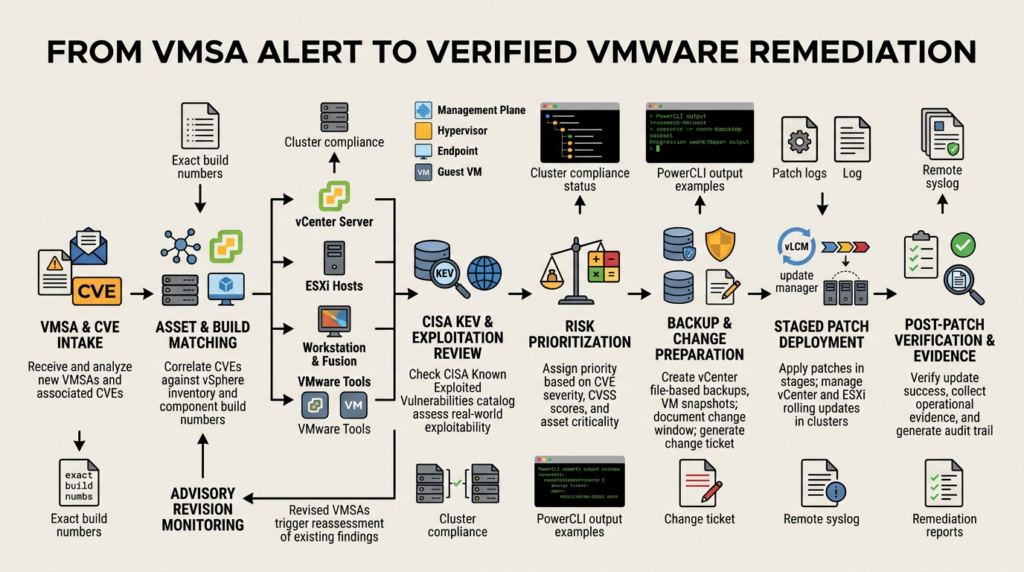
Move from advisory publication to verified closure
A reliable VMware vulnerability workflow has four phases: intake, decision, change, and verification.
Intake
When a new VMSA appears:
- Record the VMSA identifier and publication time.
- Extract all CVEs and affected product families.
- Record the advisory revision.
- Check whether Broadcom mentions exploitation.
- Check CISA KEV.
- identify whether the advisory replaces or updates an earlier remediation.
- Preserve a copy or structured representation of the response matrix.
- Notify the technical product owner.
Do not wait for the next scheduled scanner cycle when the advisory describes known exploitation or critical management-plane exposure.
Asset matching
Match the VMSA to:
- vCenter appliances.
- Standalone ESXi hosts.
- Clustered ESXi hosts.
- VMware Cloud Foundation components where applicable.
- Workstation endpoints.
- Fusion endpoints.
- VMware Tools installations.
- Templates.
- Powered-off systems.
- Disaster-recovery systems.
- Laboratory and training infrastructure.
Classify each result as:
Affected
Not affected
Remediated
Potentially affected
Unknown
Exception approved
Compensating control active
“Potentially affected” and “unknown” must remain visible. They are investigation states, not closure states.
Remediation design
Choose among:
- Install the fixed release.
- Move to a supported branch.
- Apply a vendor-documented workaround.
- Remove the vulnerable feature.
- Isolate the management interface.
- Stop using the affected product.
- Shut down the asset.
- Accept a time-limited exception.
Every workaround should have:
- A precise technical description.
- An owner.
- An implementation timestamp.
- Validation evidence.
- Monitoring.
- An expiration date.
- A permanent patch plan.
- A rollback method.
If a VMSA says no workaround is available, do not replace that statement with an internally invented mitigation claim. Segmentation or access restrictions may reduce exposure, but they do not change the underlying affected status.
Change preparation
For vCenter:
- Validate file-based backup.
- Confirm recovery credentials.
- Confirm DNS and time dependencies.
- Review appliance health.
- Check free space.
- Record current build.
- Review connected-host state.
- Verify the update source.
- Prepare service validation.
- Define rollback conditions.
For ESXi:
- Validate cluster capacity.
- Confirm vMotion and DRS readiness.
- Review image compliance.
- Check hardware compatibility.
- Identify non-migratable virtual machines.
- Verify storage and networking health.
- Record current build and image.
- Confirm remote management access.
- Define host-specific rollback or recovery procedures.
For Workstation and Fusion:
- Test the release on representative endpoint configurations.
- Preserve critical virtual machines.
- Check virtual-network behavior.
- Validate shared folders and device access.
- Confirm endpoint-management packaging.
- Define a deadline for user-managed exceptions.
- Block vulnerable versions when policy allows.
Staged deployment
A safe sequence commonly looks like:
Representative non-production system
        |
        v
Small production canary group
        |
        v
One cluster or endpoint cohort
        |
        v
Remaining affected systems
        |
        v
Exception and failure queue
The canary group must resemble production. A test vCenter with no identity provider, backup integration, distributed networking, or automation cannot validate those dependencies.
For critical, exploited vulnerabilities, staging should be compressed but not abandoned. Emergency patching still requires evidence and rollback decisions.
Überprüfung
Use at least three forms of proof:
- Configuration evidence
The running version and build meet the current response matrix. - Operational evidence
Required services, hosts, clusters, workloads, identity integrations, and management functions operate normally. - Security evidence
The vulnerable attack path is removed, temporary controls remain active where needed, and detection coverage is functioning.
A scanner rescan can provide additional confirmation, but it should not be the only evidence.
Reopen on advisory change
Create a revision-monitoring condition:
If VMSA last-updated timestamp changes
or fixed-build matrix changes
or exploitation status changes
or workaround guidance changes
then reopen all related findings for revi:contentReference[oaicite:31]{index=31}ontrol is necessary. citeturn796551view3turn677352search9
## Detection and threat hunting around VMware infrastructure
Patching reduces exposure, but organizations also need to investigate whether exploitation occurred before remediation.
A vulnerability ticket and an incident hypothesis are different. A vulnerable build does not prove compromise. A patched build does not prove the system was never compromised.
### ESXi logs
Broadcom documents several important ESXi log files under `/var/run/log`, including:
- `auth.log` for authentication activity.
- `esxupdate.log` for update and patch installation.
- `hostd.log` for host-management events and operations.
- `vpxa.log` for communication between the host and vCenter.
- `shell.log` for ESXi Shell command activity.
Broadcom also documents correl:contentReference[oaicite:32]{index=32}ting shell access. citeturn445203search1turn445203search3
| Log or data source | Defensive use | Example questions |
|---|---|---|
| `auth.log` | Authentication and shell-access review | Were there unusual successful logins, failed attempts, or activity from unexpected sources? |
| `shell.log` | Command-history review for ESXi Shell | Were commands executed during an unexplained window, and which session or process identifiers are associated with them? |
| `hostd.log` | Host-management and virtual-machine operations | Were virtual machines unexpectedly powered off, reconfigured, snapshotted, or removed? |
| `vpxa.log` | Host-to-vCenter communication | Did the host disconnect, reconnect, or receive unexpected management activity? |
| `esxupdate.log` | Patch and update verification | Did remediation complete successfully, fail, or roll back? |
| vCenter service logs | Authentication, service, API, and management investigation | Were there abnormal logins, service failures, permission changes, or API operations? |
| Active Directory logs | Detection of group creation and privileged membership changes | Was `ESX Admins` or the configured administrative group created, deleted, or modified? |
| Network telemetry | Reachability and exploitation-window review | Which systems connected to the vulnerable service before patching? |
| Backup and datastore logs | Destructive-activity review | Were backups disabled, snapshots deleted, or datastore files modified unexpectedly? |
Send logs to a remote system. If an attacker compromises the hypervisor or management appliance, local logs may be altered, lost, or made unavailable.
### vCenter logging limitations
Broadcom documents vCenter logs under `/var/log/vmware` by service. It also notes that vCenter records authentication-related events but does not, by default, maintain a complete a:contentReference[oaicite:33]{index=33}e appliance shell. citeturn445203search0turn445203search7
That limitation affects incident confidence.
Supplement vCenter logs with:
- Remote syslog.
- Operating-system auditing where supported and appropriately configured.
- Privileged access management logs.
- SSH gateway logs.
- Identity-provider events.
- API client logs.
- Network connection records.
- Change-management records.
- Administrative workstation telemetry.
Do not claim “no suspicious commands were run” merely because a default vCenter log search found no command history.
### Hunt for control-plane abuse
After discovering an exposed or previously vulnerable vCenter instance, review:
- New or modified administrative accounts.
- Unexpected role assignments.
- Permission inheritance changes.
- Alarm definitions and script actions.
- New API clients.
- Authentication from unusual endpoints.
- Authentication outside maintenance windows.
- Changes to certificates.
- Host additions or removals.
- Virtual-machine export, clone, snapshot, or power operations.
- Changes to logging destinations.
- Disabled monitoring or backup jobs.
- Service restarts without a change record.
- Network connections to vulnerable services during the exposure window.
For CVE-2025-41225, alarm and script permissions deserve specific scrutiny because the vulnerability’s prerequisite involved th:contentReference[oaicite:34]{index=34} modify alarms and run script actions. citeturn807420view0
### Hunt for ESXi identity abuse
For environments using Active Directory integration, investigate:
- Creation of the configured ESXi administrative group.
- Deletion and later re-creation of that group.
- Changes in group membership.
- Nested-group additions.
- Administrative logins from newly added identities.
- Host access following directory changes.
- Virtual-machine encryption or mass shutdown activity.
- Changes to local ESXi accounts.
- Attempts to disable or redirect logging.
Microsoft’s reporting on CVE-2024-37085 makes directory telemetry essential to the h:contentReference[oaicite:35]{index=35}n, not an optional identity-team task. citeturn881840view3
### Investigate the exposure window
Define the exposure window as:
```text
Earliest plausible vulnerable deployment date
through
Verified fixed-build activation time
If the exact deployment date is unknown, use the earliest supported date and document uncertainty.
Review logs and telemetry across the entire window where practical. At minimum, give greater attention to:
- Dates after public disclosure.
- Dates after KEV addition.
- Dates after vendor exploitation statements.
- Periods of suspicious identity activity.
- Periods of unexplained host disconnection.
- Failed patch windows.
- Gaps in logging.
- Backup failures.
- Unusual virtual-machine operations.
The KEV date is not the beginning of exploitation. It is the date CISA added the vulnerability to the catalog. Attack activity may have occurred earlier.
Validate remediation without exploiting production
Production validation should prove that the vulnerable condition is absent without reproducing remote code execution, host escape, kernel corruption, privilege escalation, or destructive denial of service.
Use a hierarchy of evidence.
Level one: authenticated build verification
Confirm the running version and build directly through:
- vCenter VAMI.
- vSphere Client.
- Authenticated API.
- PowerCLI.
- ESXi shell.
- Endpoint-management inventory.
- Application version interface.
Compare the evidence against the current VMSA response matrix.
Level two: desired-state compliance
For ESXi clusters, confirm that:
- The approved image includes the fixed release.
- Every host reports compliance.
- No host remains in maintenance, error, or disconnected state.
- No standalone host was omitted.
- Third-party components did not force a host onto an older image.
- Newly added or recovered hosts inherit the corrected desired state.
Level three: prerequisite removal
For configuration-dependent vulnerabilities, verify the relevant prerequisite.
Beispiele hierfür sind:
- Affected virtual network-adapter type.
- PVSCSI configuration.
- VMCI or vSockets use.
- Shared-folder functionality.
- Active Directory integration.
- Administrative group configuration.
- Guest operations.
- Alarm and script permissions.
- Vulnerable VMware Tools deployment.
This does not replace patching. It helps confirm exposure before remediation and validate compensating controls where the vendor supports them.
Level four: non-destructive service checks
Test normal behavior:
- Login.
- API queries.
- Host connectivity.
- Virtual-machine inventory.
- Controlled power operations on a test VM.
- Snapshot creation and removal on a test workload.
- vMotion of a non-critical test VM.
- Backup job.
- Monitoring collection.
- Log forwarding.
- Endpoint guest startup and shutdown.
- Virtual networking.
- Shared-folder behavior where approved.
Avoid publishing or running exploit payloads against production. The possibility that a public PoC is “only a crash” does not make it safe on a hypervisor carrying critical workloads.
Level five: authorized isolated-lab reproduction
When exploit-level validation is justified, build an isolated laboratory:
- Use non-production hardware or nested virtualization approved for testing.
- Use synthetic data.
- Use a version known to be affected.
- Block outbound access.
- Do not reuse production credentials.
- Record snapshots and restoration procedures.
- Define an explicit stop condition.
- Restrict exploit material.
- Document legal authorization.
- Destroy or sanitize the lab afterward.
The objective should be to understand detection, validate a mitigation, or reproduce a vendor-described boundary—not to produce a general-purpose weaponized tool.
Teams already using AI-assisted penetration-testing workflows can use Sträflich to coordinate authorized checks, preserve command output, and organize retesting evidence. The system of record for affected status should still be the current VMSA response matrix combined with authenticated build data. Automation should make the evidence trail stronger, not replace the vendor source or bypass change control.
Readers examining virtualization trust-boundary research can also review Penligent’s analysis of Pwn2Own Berlin 2026 and its VMware ESXi findings. Research demonstrations help explain why guest-to-host and cross-tenant boundaries require dedicated threat models, but a contest result should not be translated into production exposure without matching the affected product, configuration, and official advisory.
Evidence that supports defensible closure
A remediation ticket should contain enough information for another engineer to reproduce the conclusion.
| Evidence item | Warum das wichtig ist |
|---|---|
| Current VMSA identifier and revision date | Shows which vendor guidance governed the decision |
| CVE identifier | Prevents confusion between multiple issues in one advisory |
| Asset identifier | Connects the finding to a managed system |
| Product, release, and build | Supports the affected or fixed determination |
| Evidence timestamp | Shows when the observation was valid |
| Evidence method | Distinguishes authenticated output from banner inference |
| Required fixed build | Makes the comparison explicit |
| KEV and exploitation status | Preserves the urgency context |
| Exposure classification | Documents reachable networks and attacker prerequisites |
| Business criticality | Explains operational prioritization |
| Change record | Connects the security decision to the approved update |
| Backup and recovery evidence | Demonstrates rollback readiness |
| Post-patch health checks | Shows that the system remained operational |
| Compliance or rescan result | Provides an independent confirmation |
| Exception expiration | Prevents temporary risk acceptance from becoming permanent |
| Reviewer and approver | Establishes accountability |
A strong closure statement is specific:
VMSA-2025-0004 was reviewed using the advisory revision available on
2026-07-30. ESXi host lab-esxi-01 was authenticated through PowerCLI
and reported build X at 2026-07-30T03:18:22Z. The build meets the
fixed-release requirement in the current response matrix. The host
completed cluster remediation, returned to a compliant state, accepted
a controlled vMotion test, forwarded logs, and passed the approved
post-change checks. The related finding is closed.
A weak closure statement is:
Patched. Scanner clean.
The weak statement does not identify the advisory revision, running build, scan time, credential quality, cluster coverage, or operational result.
Common VMware CVE prioritization failures
Sorting only by CVSS
CVSS cannot tell the team whether an asset is internet-reachable, whether a guest is hostile, whether the vulnerability is exploited, whether the initial patch was incomplete, or whether the affected product has reached end of support.
Use CVSS as one input.
Automatically downgrading local vulnerabilities
“Local” may mean:
- A local user on a shared Mac.
- A guest administrator in an attacker-controlled VM.
- A service account with delegated vCenter permissions.
- A local non-administrator on a developer endpoint.
- Code already running inside the VMX process.
Those are different conditions. None should be dismissed without evaluating how the attacker could reach the prerequisite.
Patching vCenter but forgetting ESXi
A vCenter update does not update every host. An ESXi update does not update vCenter. Track both control plane and execution plane.
Patching hosts but forgetting VMware Tools
Guest components may remain vulnerable after the infrastructure maintenance window. Templates and powered-off guests can preserve outdated Tools versions.
Checking only the product version
“8.0” is not enough. Use the exact branch, release, and build required by the current response matrix.
Relying on scanner banners
Banners may be hidden, altered, incomplete, or mapped incorrectly. Prefer authenticated evidence.
Treating patch installation as closure
The update may fail, roll back, remain staged, or apply to only part of a cluster. Confirm the running build and desired-state compliance.
Ignoring VMSA revisions
CVE-2024-38812 is the clearest warning: Broadcom stated that the ini(Unterstützungsportal)e the vulnerability. citeturn796551view3turn677352search9
Treating a workaround as permanent remediation
Workarounds can reduce exposure, but they may introduce operational constraints, depend on configuration that later changes, or cover only one attack path. Track them as expiring controls.
Running public exploits against production
A hypervisor crash, service failure, kernel corruption, or uncontrolled guest escape can affect many workloads. Validate builds and prerequisites in production; reserve exploit reproduction for authorized isolated labs.
Ignoring unsupported versions
When a response matrix says that no patch is planned for a branch, that does not establish safety. It means the organization may need to upgrade, isolate, replace, or retire the affected deployment.
Failing to test recovery
Virtualization concentrates workloads. A backup that has never been restored is weak evidence of recoverability.
Keeping logs only on the affected system
A compromised vCenter or ESXi host may no longer provide trustworthy local evidence. Forward logs off-host and protect the destination.
Operational references worth bookmarking
- Broadcom VMware Security Advisories — The live source for VMSA remediation matrices, affected products, fix(Broadcom)tes, and revisions. citeturn710233search10turn807420view7
- CISA-Katalog bekannter ausgenutzter Sicherheitslücken — A high-value prioritization source for identifyi(CISA)vidence of real-world exploitation. citeturn748378search12
- Broadcom vCenter patching guidance — Operational instructions for preparing backups and updatinupported mechanisms. citeturn779629search4turn807420view6
- Broadcom vSphere Lifecycle Manager documentation — Guidance for declarativemediation planning. citeturn779629search1turn807420view5
Frequently asked questions
What is the difference between a VMware CVE and a VMSA?
- A CVE is an identifier. It gives a publicly disclosed vulnerability a consistent name.
- A VMSA is the vendor’s operational advisory. It maps one or more CVEs to affected VMware products, severity, fixed releases, workarounds, and other remediation information.
- Use both. The CVE helps correlate sources, while the current VMSA response matrix should drive the VMware product and build decision.
- **Do not rely on an old advi(Broadcom)nitial publication. citeturn710233search22turn807420view7
Should vCenter or ESXi be patched first?
- Patch the asset with the more dangerous active attack path first. There is no universal product-only rule.
- vCenter often receives priority when an unauthenticated or broadly reachable management-plane vulnerability can affect multiple hosts.
- ESXi may come first when a known-exploited flaw affects hosts running untrusted guests or when ransomware activity targets the hypervisor.
- Do not create a long gap between the two layers. vCenter and ESXi form a connected control and execution plane.
- Preserve capacity and recovery options. The first patch should not make the remaining remediation impossible.
Does a critical CVSS score always require emergency patching?
- A critical score always requires prompt analysis.
- Emergency priority depends on context, including exploitation evidence, network reachability, prerequisites, asset criticality, and available mitigation.
- Known exploitation can outrank a higher-scoring unexploited issue.
- A critical guest-to-host flaw may be P0 in a malware laboratory and lower priority in an isolated environment with no untrusted guests.
- Document the decision. A lower priority needs evidence, not a general claim that the asset is internal.
How can I verify whether Workstation or Fusion is affected?
- Collect the exact installed release and build through the application interface or endpoint-management inventory.
- Match the product separately. Workstation and Fusion may have different fixed releases even when they share a CVE.
- Read the current VMSA response matrix.
- Check configuration prerequisites, such as guest network mode, virtual adapter, shared folders, or the attacker’s required privilege.
- Record guest provenance. A laptop running untrusted images may need faster remediation than one running a controlled corporate guest.
- Do not test by running a guest-to-host exploit on the employee’s production endpoint.
Can a VMware workaround replace a security update?
- Usually not permanently. A workaround is a temporary risk-control measure unless Broadcom explicitly describes it as a complete resolution.
- Confirm that the workaround applies to the exact product and branch.
- Validate the configuration after implementation.
- Monitor for drift.
- Set an expiration date and patch plan.
- When the VMSA says no workaround exists, do not relabel generic segmentation as a vendor-approved fix.
How can I validate remediation without exploiting production?
- Verify the running version and build through an authenticated source.
- Compare it with the current VMSA response matrix.
- Confirm all cluster nodes or endpoints were updated.
- Check configuration-specific prerequisites.
- Run non-destructive service and management tests.
- Review patch logs and compliance state.
- Use isolated lab systems for exploit-level reproduction.
- Preserve the evidence with timestamps and asset identifiers.
What should I do when an affected VMware version has no planned patch?
- Confirm the response matrix and lifecycle status.
- Determine whether a vendor-supported workaround exists.
- Reduce management-plane reachability and unnecessary functionality.
- Move critical workloads to a supported release or platform.
- Set a time-limited exception if immediate migration is impossible.
- Increase logging and incident monitoring during the transition.
- Do not interpret “no patch planned” as “not vulnerable.”
- Treat continued operation as an explicit business risk with an accountable owner.
Patch the trust boundary, then prove it
A VMware CVE program succeeds when the organization restores confidence in the virtualization boundary, not when it closes the largest number of scanner findings.
Start with exploited management-plane vulnerabilities, unauthenticated vCenter attack paths, ESXi identity bypasses, and guest-to-host chains in environments where virtual machines are not fully trusted. Treat Workstation and Fusion as privileged endpoint software. Track VMware Tools and templates as independent patch planes. Reopen findings when a VMSA changes.
The final decision should be supported by the current advisory, an exact build, a known asset, a documented attack path, a completed change, operational tests, and retained evidence. Anything less leaves a gap between “an update was attempted” and “theVMware vulnerability is no longer exposing the environment.”
 German
  English
  French
  Spanish
  Portuguese
  Japanese
  Korean
  Hindi
Hindi  Arabic
  Turkish
  Hebrew