
CVE-2026-134401 requires a channel-aware Chrome update decision. Google released fixes on November 23, 2026, in desktop Stable, desktop Extended Stable, and Chrome for Android. A fleet rule that treats every version below 158 as vulnerable would incorrectly flag the patched Extended Stable release. The useful closure evidence is the platform, assigned release channel, running version after restart, and the corresponding Google release notice.
The flaw is improper input validation in Chrome’s Variations component. Google classifies it as Critical. The Chrome CNA record says a crafted HTML page could allow a remote attacker to execute arbitrary code outside the sandbox. That describes potential impact; it does not establish that attacks have occurred. This assessment uses primary records checked on November 25, 2026, and makes no claim of exploitation observed or reproduced by Penligent.
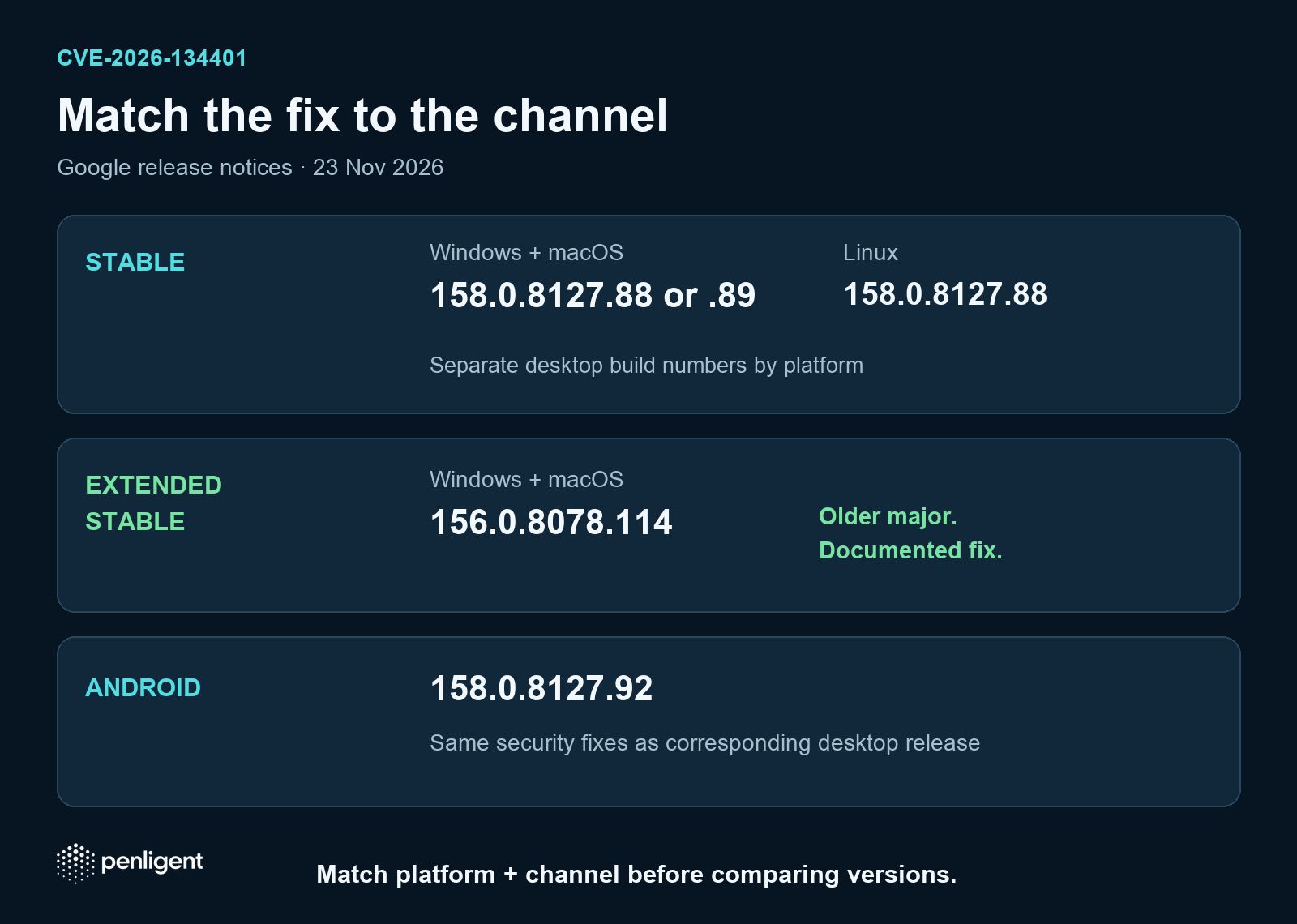
Match the fix to the release channel
The following versions are the fixes announced in the November 23 release notices. They are documented remediation baselines for this vulnerability, not a statement that these are the newest Chrome releases available today.
| Platform and channel | Announced fixed release | Evidence and operational decision |
|---|---|---|
| Windows / macOS, Stable | 158.0.8127.88 / 158.0.8127.89 | En desktop release notice names both builds and this CVE. Match the running build to the deployed Stable package. |
| Linux, Stable | 158.0.8127.88 | The same desktop notice specifies the Linux build. Confirm the running browser after the package update and restart. |
| Windows / macOS, Extended Stable | 156.0.8078.114 | En Extended Stable notice explicitly lists CVE-2026-134401. Do not reject this fix because its major version is 156. |
| Android, Stable | 158.0.8127.92 | En Android notice links its security fixes to the corresponding desktop release. Use the Android build, not the desktop build number. |
| Other products or release channels | Not determined by this matrix | Check the applicable vendor and channel notice. Do not extend these Chrome notices to another browser, WebView, iOS, or ChromeOS by name similarity. |
Google describes desktop rollout as occurring over the coming days or weeks, and Android availability through Google Play over the next few days. Those announcements establish release availability, not successful deployment to every endpoint. A release date alone cannot close a device’s remediation ticket.
Why one version threshold produces the wrong answer
The CNA description identifies Chrome before 158.0.8127.88. Read in isolation, that boundary suggests that the 156 branch remains affected. Google’s separate Extended Stable advisory resolves the apparent conflict: 156.0.8078.114 includes this specific fix. The version string therefore needs its release-channel context before it becomes a remediation decision.
For a managed Windows device reporting 156.0.8078.114, first confirm that Extended Stable is the intended channel. If it is, the release notice supports treating that running build as fixed for this CVE. If the device was supposed to run Stable, record the channel mismatch separately. A device can meet the vulnerability’s documented fix baseline while still failing the organization’s channel policy.
The reverse mistake is accepting any build whose major version is 158. The desktop fix is identified by the complete build number; Android has its own build. For a later supported release, retain the vendor evidence that establishes its fix coverage. Compare versions within the appropriate product and branch, rather than creating a universal numeric threshold from one row.
Verify the browser that is actually running
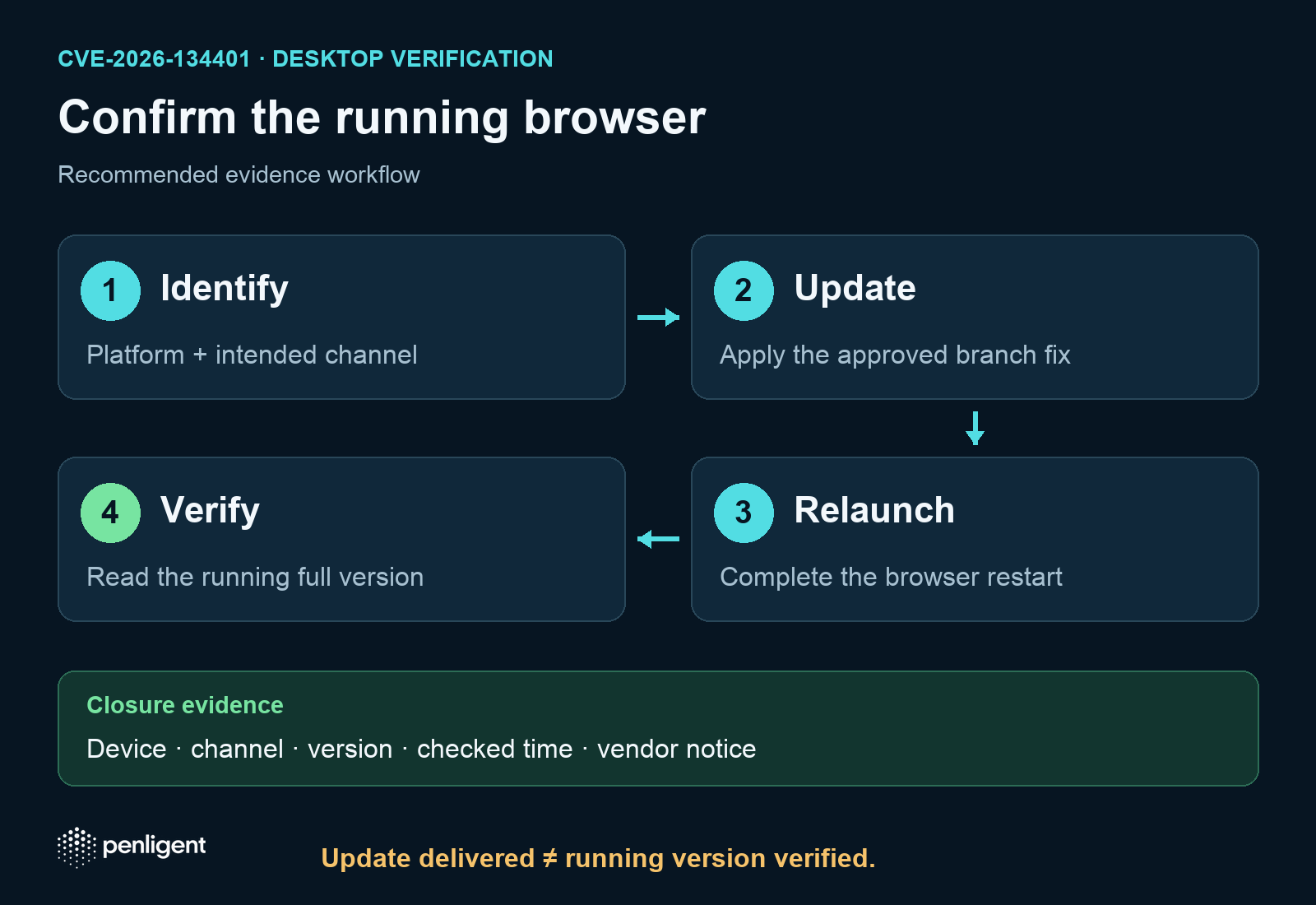
Google’s update instructions distinguish a pending update from an applied update: open Help → About Google Chrome, allow the update check, and select Relaunch when offered. The update applies when Chrome restarts. The same page displays the current version. On Linux, Google directs users to update through their package manager.
- Identify the deployment. Record the device, operating system, intended Chrome channel, and observed complete version. Use the management policy or deployment configuration to establish the intended channel.
- Select the matching release notice. Route desktop Stable, Extended Stable, and Android to their separate baselines. If the channel is unknown, resolve that uncertainty before making a pass/fail decision.
- Apply the approved update. Follow the organization’s deployment mechanism. Treat a downloaded package or successful distribution job as evidence of delivery until application is confirmed.
- Restart and recheck. On desktop, relaunch Chrome and collect the version shown afterward. For Android, verify the installed Chrome app against the Android release baseline using the organization’s device inventory process.
- Close with evidence. Save the observation time, branch, complete version, restart confirmation where applicable, and source notice. Keep policy compliance distinct from CVE fix status.
Assign an honest remediation status
Utilice verified fixed when the observed running release matches the applicable documented fix, or a later supported release whose fix coverage has been confirmed. Use update pending when deployment or restart still needs verification. Use undetermined when the product, channel, or running version is missing. These are proposed operational labels, not states published by Google.
This distinction prevents two reporting errors: marking a patched Extended Stable device vulnerable solely because it runs version 156, and marking an old running browser fixed solely because an update job succeeded. It also gives an analyst a concrete next action for incomplete inventory instead of an unsupported conclusion.
What the public evidence does not establish
The reviewed release notices identify the component, severity, and fixes. They do not establish a reproducible exploit chain or justify describing this issue as an actively exploited zero-day. Google also warns that bug details may remain restricted while users update. Do not substitute a speculative exploit test for the vendor-supported version and channel checks.
Method: This source-based analysis reconciles the Chrome CNA record with Google’s desktop, Extended Stable, Android, and update-support documentation. AI assisted research organization and drafting. No exploit was run, no endpoint was tested, and no human-review claim is made.
The following official Penligent 3.0 video is a general product workflow demonstration. It does not demonstrate exploitation of CVE-2026-134401 or establish that a Chrome deployment is remediated.
 Spanish
 English
 German
 French
 Portuguese
 Japanese
 Korean
 Hindi
 Arabic
 Turkish
 Hebrew