
Si está buscando un "CVE-2026-3909 PoC", la primera corrección útil es la siguiente: el registro público sí confirma un día cero de Chrome explotado activamente en Skia, pero lo hace no le proporcionen una cadena de exploits técnicamente completa y publicada por el proveedor o un reproductor público fiable que pueda tratar simplemente como verdad de base. Google declara públicamente que CVE-2026-3909 es una escritura fuera de los límites de alta gravedad en Skia, reportada el 10 de marzo de 2026, y que existe un exploit en la naturaleza. NVD lo registra como CWE-787 con una puntuación CVSS v3.1 de 8,8. La propia política de seguridad de Chromium también explica por qué el registro público es escaso: el acceso a los bugs está restringido, y los bugs de seguridad corregidos no suelen hacerse públicos hasta pasadas unas 14 semanas. (Lanzamientos de Chrome)
Esta diferencia es importante porque muchos de los escritos sobre vulnerabilidades de los navegadores resumen tres cosas distintas en una sola palabra. Una vulnerabilidad puede ser reconocida públicamente. Puede ser explotada activamente por un actor sofisticado. Y aún puede carecer de un PoC público, auditable y técnicamente útil. CVE-2026-3909 está exactamente en esa categoría. Es real. Es urgente. Es importante desde el punto de vista operativo. Pero no se describe responsablemente como "material de explotación totalmente público" sólo porque la palabra clave "poc" sea popular en los resultados de búsqueda. (nvd.nist.gov)
La segunda corrección se refiere a las versiones. El 12 de marzo de 2026, Google publicó notas estables de escritorio para 146.0.7680.75 y 146.0.7680.75 o .76, pero actualizó esas notas el 13 de marzo para decir que CVE-2026-3909 sería corregido en una futura actualización. La corrección real del escritorio se incluyó en la versión 146.0.7680.80 del 13 de marzo. No se trata de un detalle editorial trivial. Cambia la forma en que los defensores deben validar el estado del parche y explica por qué algunos escritos terminaron repitiendo el límite de la versión equivocada. El propio registro de NVD refleja esta tensión: el campo de descripción todavía dice "anterior a 146.0.7680.75", pero el historial de cambios de NVD y la configuración del software afectado se actualizaron posteriormente a versiones anteriores a 146.0.7680.80, alineándose con la nota de lanzamiento corregida de Google. (Lanzamientos de Chrome)
Esa incoherencia es una de las razones por las que un artículo serio sobre "cve-2026-3909 poc" debería dedicar más tiempo a la calidad de las pruebas que a la teatralidad. Si un equipo ni siquiera puede ponerse de acuerdo sobre qué versión fija es la autoritativa, no tiene por qué afirmar con certeza que se trata de una cadena de explotación privada.
Cronología de CVE-2026-3909, la división del 12 de marzo y el 13 de marzo importa
La línea de tiempo pública comienza el 10 de marzo de 2026, cuando el Grupo de Análisis de Amenazas de Google informó del problema. El 12 de marzo, Google publicó una actualización de escritorio de Chrome que abordaba de forma destacada el CVE-2026-3910, otro día cero activamente explotado en V8. La nota del 12 de marzo se actualizó el 13 de marzo para aclarar que CVE-2026-3909 se había incluido prematuramente y que se corregiría en una versión posterior. El 13 de marzo, Google publicó la versión de escritorio que realmente contenía la corrección de CVE-2026-3909, la 146.0.7680.80, e indicó explícitamente que existía un exploit en estado salvaje. (Lanzamientos de Chrome)
Ese mismo día, CISA añadió CVE-2026-3909 al catálogo de Vulnerabilidades Explotadas Conocidas. NVD muestra la fecha de adición KEV como 13 de marzo de 2026, la fecha de vencimiento para las agencias de la rama ejecutiva civil federal como 27 de marzo de 2026, y la acción requerida como la aplicación de mitigaciones de proveedores o suspender el uso si las mitigaciones no están disponibles. Para los defensores, ese es el punto en el que esto deja de ser un interesante fallo del navegador y se convierte en un problema inmediato de validación de parches. (NVD)
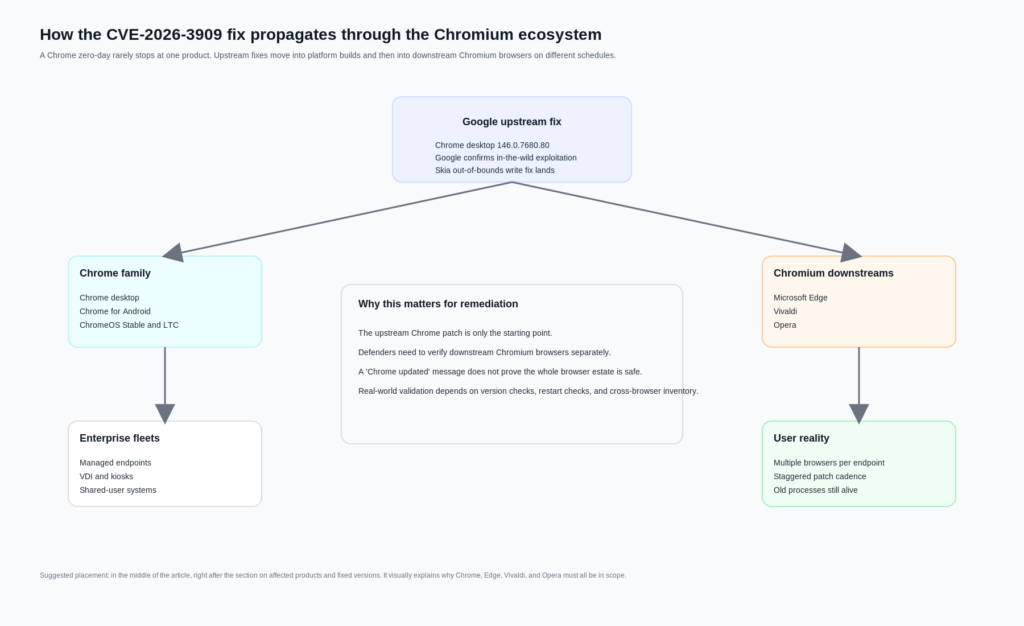
Google también actuó con rapidez en las plataformas adyacentes. La nota de Android publicada el 13 de marzo afirma que Chrome 146.0.76380.119 para Android contiene las mismas correcciones de seguridad que las correspondientes versiones de escritorio, a menos que se indique lo contrario. Las notas estables de ChromeOS publicadas el mismo día muestran CVE-2026-3909 incluido en las correcciones de seguridad para M-145, versión 145.0.7632.216 del navegador. Las notas del canal de soporte a largo plazo de ChromeOS publicadas el 16 de marzo muestran correcciones seleccionadas que incluyen CVE-2026-3909 en la versión 144.0.7559.246. (Lanzamientos de Chrome)
A continuación le siguieron los proveedores de Chromium. Microsoft dice que Edge Stable 146.0.3856.62, publicado el 16 de marzo de 2026, contiene la corrección para CVE-2026-3909 y señala que el equipo de Chromium informó de la explotación en la naturaleza. La actualización de Vivaldi del 13 de marzo dice que ha retrocedido las correcciones de CVE-2026-3909 y CVE-2026-3910 a su rama basada en Chromium 144 ESR. El post de seguridad de Opera del 14 de marzo enumera las versiones parcheadas en Opera One, GX, Air, Neon y Android. Ese es el verdadero radio de explosión operativo: no sólo Chrome, sino los estados de los navegadores que heredan la deuda de seguridad de Chromium en su propia cadencia. (Microsoft Aprende)
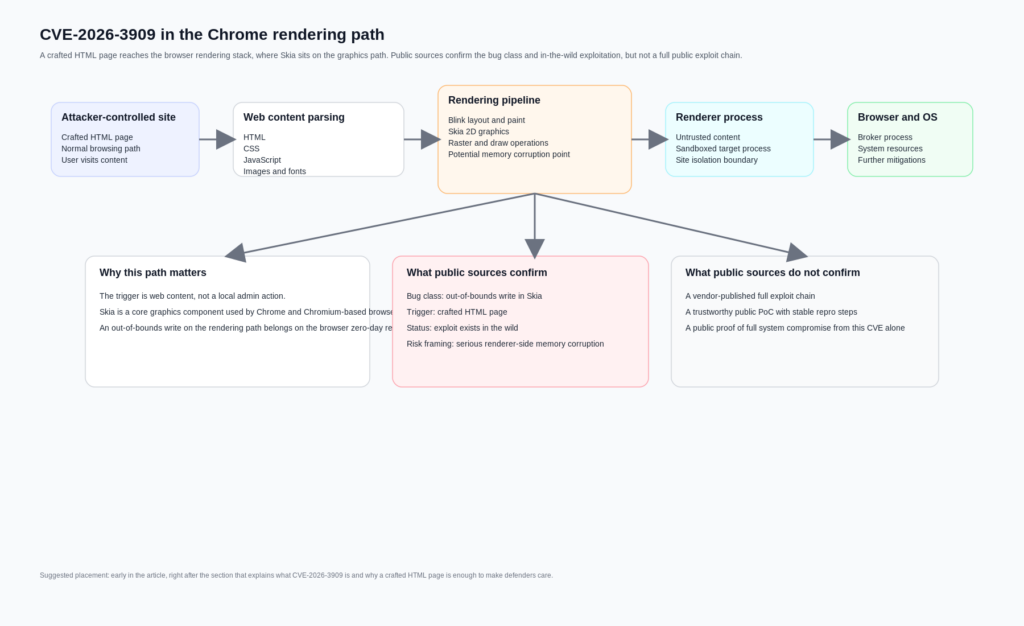
CVE-2026-3909, lo que realmente dice el registro oficial
La descripción oficial de la vulnerabilidad es breve. NVD afirma: "La escritura fuera de límites en Skia en Google Chrome anterior a 146.0.7680.75 permitía a un atacante remoto realizar un acceso a memoria fuera de límites a través de una página HTML crafteada." NVD lo clasifica como CWE-787, Out-of-bounds Write, y le da una puntuación de 8,8 con el vector CVSS:3.1/AV:N/AC:L/PR:N/UI:R/S:U/C:H/I:H/A:H. Ese vector ya dice mucho a un lector experimentado. El fallo es accesible a través de la red. No se necesitan privilegios previos. Se requiere la interacción del usuario, lo que en términos de navegador suele significar que la víctima debe ser conducida a contenidos controlados por el atacante. Los impactos sobre la confidencialidad, la integridad y la disponibilidad se califican como altos. (NVD)
Para qué sirve no es igualmente importante. La descripción oficial no detalla públicamente la función vulnerable exacta, la estructura de entrada malformada, la condición de disposición de memoria necesaria para la corrupción controlada, la ruta gráfica desencadenante o un resultado validado posterior a la corrupción, como la ejecución arbitraria de código nativo fuera del renderizador. Algunos escritos secundarios saltan casualmente de "escritura fuera de límites en una librería gráfica del navegador" a "ejecución remota completa de código". Eso puede ser plausible como modelo de amenaza, pero no es lo que el texto oficial de la CVE demuestra por sí mismo. (nvd.nist.gov)
Ser preciso no es pedantería. Es lo que separa un artículo técnico de una copia de alarma reciclada. En la explotación de navegadores, "página HTML crafteada" es a menudo suficiente para implicar un riesgo serio porque el navegador es un intérprete gigante para la entrada controlada por el atacante. Pero un fallo de corrupción de memoria en el renderizador no es lo mismo que una vulnerabilidad a nivel de sistema con un único CVE. Chrome moderno deliberadamente capas sandboxing y aislamiento de procesos porque esas distinciones importan. (Cromo)
Por qué Skia es importante y por qué un error gráfico no es un error de nicho
Skia no es un oscuro complemento. El propio sitio de Google lo describe como una biblioteca de gráficos 2D de código abierto que sirve como motor gráfico para Google Chrome y ChromeOS, Android, Flutter y muchos otros productos. La documentación de la API de Skia muestra hasta qué punto es fundamental para las operaciones de dibujo: la función SkCanvas aloja llamadas de dibujo como rectángulos, trazados y texto, mientras que el estado de pintura controla cómo se renderizan esas primitivas. En otras palabras, Skia se sitúa en un camino que es a la vez crítico para el rendimiento y muy expuesto a entradas de renderizado complejas. (Skia)
Eso por sí solo no prueba detalles de explotación para CVE-2026-3909, pero sí explica por qué la clase de error es estratégicamente importante. Los errores de seguridad de memoria siguen siendo una categoría dominante en Chrome. El propio artículo GWP-ASan de Chromium dice que, a pesar de las grandes inversiones en prevención y detección, más del 60 por ciento de las vulnerabilidades de Chrome de alta gravedad son errores de seguridad de memoria. Es una frase notable porque procede del material de ingeniería de seguridad de Chrome, no de un vendedor que intenta vender miedo. (cromo.org)
La descripción oficial de CWE de CWE-787 es directa: el producto escribe datos más allá del final, o antes del principio, del búfer previsto. En términos prácticos, eso significa corrupción de memoria. Y la documentación de Site Isolation de Chrome lo aclara aún más, señalando que los fallos de seguridad a menudo se pueden aprovechar y que incluso los desbordamientos de búfer de un byte se pueden convertir en un exploit. Una vez más, esto no es una declaración pública de que CVE-2026-3909 tiene una ruta conocida de desbordamiento de un byte. Es una declaración sobre por qué una escritura fuera de límites en un componente central de renderizado merece atención urgente incluso antes de que se hagan públicos todos los detalles técnicos. (CWE)
El contexto más amplio importa porque muchos lectores llegan a un CVE del navegador esperando un binario claro: o "sólo un fallo" o "toma completa instantánea". Los bugs reales de los navegadores no se comportan así. Viven dentro de una arquitectura diseñada para asumir que los analizadores sintácticos, los motores de diseño, el código gráfico, los motores JavaScript, los códecs y las rutas GPU fallarán ocasionalmente. La cuestión de la seguridad no es si esos componentes son perfectos. Es lo difícil que es convertir un fallo en una capa en algo duradero y de gran impacto en todas las capas. (Cromo)
Página HTML elaborada no significa trivial, pero sí expuesta
Una de las frases más útiles de la descripción pública es también una de las más fáciles de pasar por alto: "a través de una página HTML manipulada". En el lenguaje de las vulnerabilidades de los navegadores, esto significa que el desencadenante controlado por el atacante vive en el contenido web ordinario en lugar de requerir un punto de apoyo local, una extensión maliciosa con permisos elevados o acceso directo de escritura al estado del navegador. La superficie objetivo es la ruta de navegación normal. La entrega del ataque puede variar mucho en la práctica, pero el punto central es que el disparador llega al código vulnerable a través del contenido que el navegador está construido para aceptar. (NVD)
Esto es importante porque el modelo de procesos de Chrome está diseñado en torno a la suposición de que los renderizadores procesan entradas no fiables constantemente. La documentación del modelo de procesos de Chromium afirma que los navegadores modernos utilizan varios procesos del sistema operativo para mejorar la estabilidad, la seguridad y el rendimiento. También señala que Chromium tiene como objetivo utilizar procesos separados para diferentes instancias del sitio y que el aislamiento del sitio, cuando sea factible, permite que cada proceso de renderizado acceda a los datos de un solo sitio. La documentación del sandbox añade que los renderizadores son procesos objetivo que se ejecutan dentro de un entorno restrictivo, mientras que el proceso del navegador actúa como intermediario privilegiado. (Cromo)
Dicho de otro modo, el navegador no bloquea los renderizadores porque las páginas web sean inofensivas. Lo hace porque las páginas web son un formato de entrada controlado por atacantes con una enorme complejidad. El FAQ del sandbox es explícito en que los renderizadores de Chromium son sandbox y que el sandbox existe para limitar la severidad de los bugs en el código que procesa datos no confiables. El mismo documento también advierte que el sandbox no es una bala de plata. Ayuda a prevenir el acceso arbitrario a archivos y el compromiso persistente de los bugs a nivel de renderizador, pero no puede proteger contra cada ruta descendente, y no puede arreglar sistemas ya comprometidos o bugs en componentes inferiores del sistema. (Cromo)
Este es el marco adecuado para CVE-2026-3909. Un desencadenante HTML crafteado en Skia significa que el riesgo inicial pertenece a la ruta de contenido no fiable del navegador. El registro oficial nos dice lo suficiente para justificar una reparación urgente. No nos dice lo suficiente para publicar una narrativa de explotación segura sobre qué subcomponente es corruptible, cómo se logra el control determinista, o si el uso observado en la naturaleza era parte de una cadena mayor. Esa incertidumbre debería reducir las reclamaciones, no la urgencia. (nvd.nist.gov)
CVE-2026-3909 PoC estado, lo que es público y lo que no es
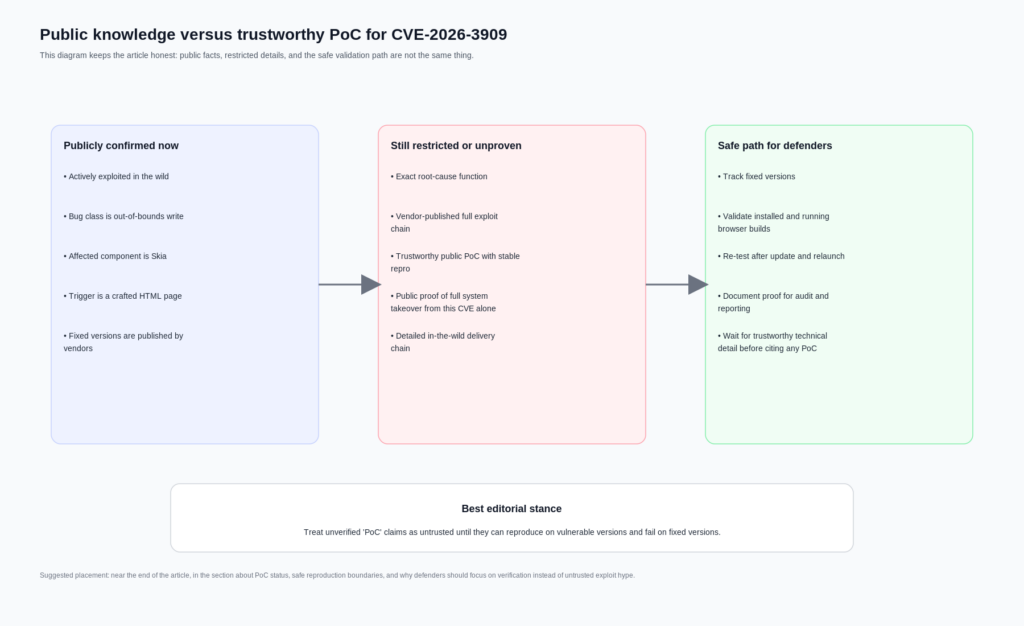
A partir del 11 de abril de 2026, la declaración más defendible es ésta: no hay ninguna fuente pública autorizada de Google, NVD o CISA que proporcione un PoC público detallado para CVE-2026-3909. La nota de publicación de Google confirma la explotación en la naturaleza e identifica la clase de fallo y el componente afectado. NVD registra el CVE, la gravedad y la clasificación de los puntos débiles. CISA registra la explotación conocida y la acción requerida. Pero ninguna de estas fuentes publica un caso de prueba, una muestra maliciosa, una explicación de la causa raíz o un método de reproducción paso a paso. (Lanzamientos de Chrome)
Esto es coherente con el proceso de seguridad de Chromium. La página de seguridad de Chromium dice que el acceso a los fallos de seguridad está restringido y que los fallos corregidos en el gestor de incidencias se hacen públicos automáticamente 14 semanas después de ser corregidos. También dice que la notificación por adelantado de las vulnerabilidades corregidas se limita a las organizaciones que despliegan de forma significativa productos basados en Chromium y que pueden justificar el acceso. En otras palabras, la falta de un seguimiento público detallado de los fallos no es inusual. Es el estado previsto para un navegador de día cero poco después de un parche de emergencia. (cromo.org)
Aquí es donde la palabra clave "PdC" se vuelve peligrosa. En Internet, "PdC" puede referirse a cualquiera de los siguientes elementos:
| Frase que usa la gente | Qué puede significar realmente | ¿Debería confiar en ella como verdad fundamental? |
|---|---|---|
| PdC público | Un repositorio de GitHub con una etiqueta y sin validación real | No |
| Reproductor interno | Una entrada de choque o un arnés de pruebas exclusivo del proveedor | No, a menos que sea liberado |
| Exploit en la naturaleza | Uso ofensivo observado en el mundo real por parte de un atacante | No es lo mismo que un PdC público |
| Reproductor de choque | Una muestra no armada que activa de forma fiable la salida del desinfectante. | Potentially, if independently verifiable |
| Full exploit | A working chain that achieves controlled post-corruption outcomes | Not publicly supported here |
The table above is not a semantic game. It is how good incident responders avoid contaminating their process with untrusted material. A third-party repository titled “CVE-2026-3909-PoC” is not proof that the underlying technique is real, accurate, safe, or even relevant to the shipped patch. Search results can surface GitHub aggregation pages that mention a CVE label, but that alone does not turn the content into a reliable technical reference. Until the Chromium issue opens or a trustworthy researcher publishes a verifiable crash-only reproducer with enough evidence to validate patched versus unpatched behavior, the honest stance is caution. (GitHub)
A practical rule helps here. For a browser zero-day, a useful defensive PoC should do at least three things. It should reproduce in a controlled lab. It should produce a stable and inspectable signal, such as a crash or sanitizer trace, not merely “something weird happened.” And it should cleanly distinguish vulnerable and fixed versions. Without that, it is not a PoC you can responsibly cite in a formal security workflow. It is at best an unverified artifact.
Publicly confirmed facts versus claims that remain unproven
A lot of confusion around CVE-2026-3909 disappears once you separate what official sources confirm from what people infer.
| Reclamación | Supported by official public sources | Situación actual | Operational meaning |
|---|---|---|---|
| CVE-2026-3909 is actively exploited in the wild | Sí | Confirmed by Google, reflected in KEV | Patch and verify immediately |
| The issue is an out-of-bounds write in Skia | Sí | Confirmed | Treat as a serious memory corruption bug |
| A crafted HTML page can trigger it | Sí | Confirmed | Browser exposure is the entry surface |
| Google published a full public PoC | No | No se admite | Do not repeat this as fact |
| The March 12 desktop build fixed CVE-2026-3909 | No | Officially corrected | Validate against March 13 and later fixed versions |
| NVD and Google are perfectly aligned on fixed version wording | No | Description and CPE history differ | Use the corrected release note and updated NVD configuration carefully |
| Chromium-based browsers downstream also had to patch | Sí | Confirmed by vendor advisories | Include Edge, Vivaldi, Opera, and similar browsers in response scope |
| CVE-2026-3909 alone is publicly proven to yield full system compromise | No | No establecido públicamente | Do not overclaim beyond the official record |
The most important row in that table is the fifth one. A surprising amount of bad vulnerability writing comes from copying the first screenshot or first NVD snippet seen in search results. In this case, version accuracy is not optional. It changes who is still exposed and whether your fleet report is honest. (Lanzamientos de Chrome)
Fixed versions that defenders should actually verify
Below is the patch matrix that is operationally useful. It focuses on versions that official vendor materials publicly identify as fixed or incorporating the Chromium fix.
| Producto | Fixed version to verify | Notas |
|---|---|---|
| Google Chrome Desktop, Windows and macOS | 146.0.7680.80 or later | March 13 emergency fix |
| Google Chrome Desktop, Linux | 146.0.7680.80 or later | March 13 emergency fix |
| Chrome for Android | 146.0.76380.119 or later | Same security fixes as corresponding desktop release unless otherwise noted |
| ChromeOS Stable | Browser version 145.0.7632.216 | Security fixes include CVE-2026-3909 |
| ChromeOS LTC | 144.0.7559.246 | Selected security fixes include CVE-2026-3909 |
| Microsoft Edge Stable | 146.0.3856.62 or later | March 16 fix |
| Vivaldi Desktop 7.8 minor update | Chromium 144.0.7559.246 ESR backport | Vendor says it includes fixes for CVE-2026-3909 and CVE-2026-3910 |
| Opera One | 128.0.5807.77 or later | Vendor lists patched version |
| Opera GX | 128.0.5807.78 or later | Vendor lists patched version |
| Opera Air | 128.0.5807.79 or later | Vendor lists patched version |
| Opera Neon | 127.0.5778.126 or later | Vendor lists patched version |
| Opera for Android | 96.2 or later | Vendor lists patched version |
The table above is built from vendor release notes rather than guesswork. Chrome desktop fixed CVE-2026-3909 in 146.0.7680.80 on March 13. Android’s March 13 release states that 146.0.76380.119 carries the same security fixes as the corresponding desktop release unless otherwise noted. ChromeOS stable and LTC notes explicitly include CVE-2026-3909. Microsoft says Edge 146.0.3856.62 contains the Chromium fix. Vivaldi and Opera both published official notes for their downstream patching. (Lanzamientos de Chrome)
One more subtle point matters in enterprise reporting: a machine can have the patched browser package installed and still be risky if the running browser process has not been restarted. Browser zero-day response is one of those domains where “deployed” and “effective” are not synonyms.
Inventory before theory, the defender workflow that actually works
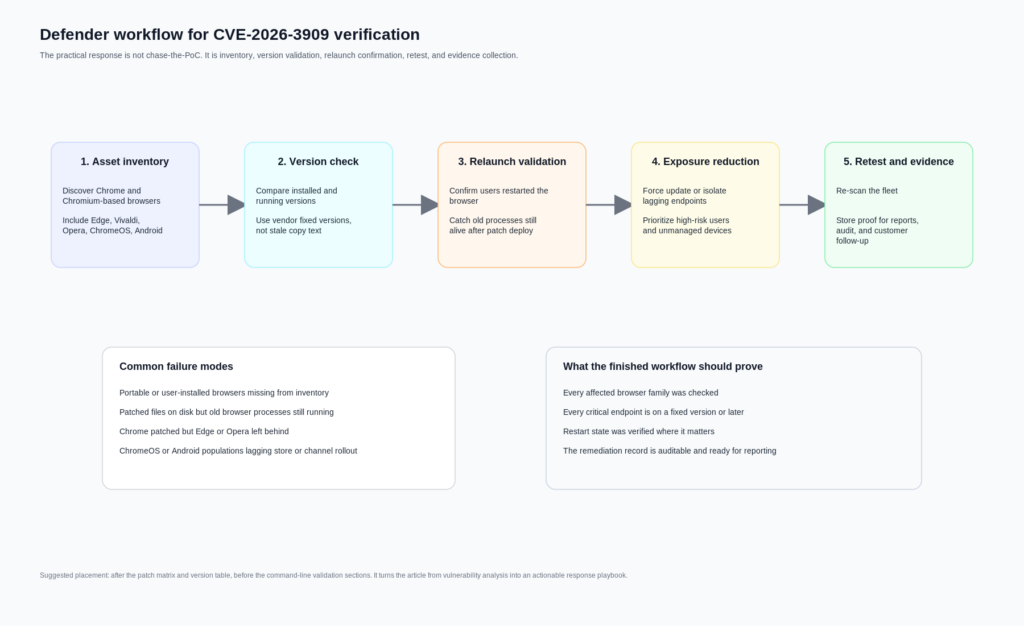
A reliable response to CVE-2026-3909 starts with asset truth, not exploit gossip. Teams usually lose time on browser zero-days because browser reality is messy. Endpoints often have more than one Chromium-based browser. Some users run Chrome and Edge side by side. Developers keep Canary or Beta installed. VDI or gold images lag. Portable or user-scoped installs bypass normal software inventory. Mobile updates depend on store rollout. ChromeOS channel differences complicate version assumptions. All of that is more common than any team likes to admit. (Lanzamientos de Chrome)
The correct sequence is simple, but not easy:
- Enumerate every Chrome and Chromium-based browser in scope.
- Compare installed versions against the vendor-confirmed fixed versions.
- Confirm restart state where relevant.
- Force patch and relaunch on lagging systems.
- Re-scan for stragglers.
- Preserve evidence that the validation really happened.
That last step gets underestimated. Security leaders rarely get challenged on whether they knew about a zero-day. They get challenged on whether they can prove remediation across the actual fleet. This is where workflow tooling matters more than another CVE summary. Penligent’s public material is useful here not because it “explains the bug better,” but because it frames AI-assisted offensive and validation work around asset correlation, candidate-path generation, replay planning, evidence packaging, and retest support. Those are exactly the operational chores that turn zero-day response from an inbox exercise into an auditable remediation cycle. (penligent.ai)
A good browser zero-day response program should be able to answer four questions within hours, not days. Which endpoints are still vulnerable. Which business-critical users are affected. Which downstream Chromium browsers are lagging behind Chrome itself. And which systems were patched but not relaunched. Those questions are mundane, but they matter more than speculative exploit fiction.
Windows version checks for CVE-2026-3909
The fastest Windows workflow is usually a mix of file-version checks and software inventory. The script below checks common installation paths for Chrome and Edge, prints the detected product version, and compares it to the fixed threshold.
$targets = @(
    @{
        Name = "Google Chrome"
        Fixed = [version]"146.0.7680.80"
        Paths = @(
            "$Env:ProgramFiles\Google\Chrome\Application\chrome.exe",
            "$Env:ProgramFiles(x86)\Google\Chrome\Application\chrome.exe",
            "$Env:LocalAppData\Google\Chrome\Application\chrome.exe"
        )
    },
    @{
        Name = "Microsoft Edge"
        Fixed = [version]"146.0.3856.62"
        Paths = @(
            "$Env:ProgramFiles\Microsoft\Edge\Application\msedge.exe",
            "$Env:ProgramFiles(x86)\Microsoft\Edge\Application\msedge.exe",
            "$Env:LocalAppData\Microsoft\Edge\Application\msedge.exe"
        )
    }
)

foreach ($target in $targets) {
    $found = $false

    foreach ($path in $target.Paths) {
        if (Test-Path $path) {
            $found = $true
            $ver = [version](Get-Item $path).VersionInfo.ProductVersion
            $status = if ($ver -ge $target.Fixed) { "PATCHED_OR_NEWER" } else { "VULNERABLE_OR_OLDER" }

            [pscustomobject]@{
                Browser = $target.Name
                Path    = $path
                Version = $ver.ToString()
                Fixed   = $target.Fixed.ToString()
                Status  = $status
            }
        }
    }

    if (-not $found) {
        [pscustomobject]@{
            Browser = $target.Name
            Path    = "Not found in common paths"
            Version = ""
            Fixed   = $target.Fixed.ToString()
            Status  = "NOT_DETECTED"
        }
    }
}
This works well for the common cases, but it has limits. It can miss custom paths, virtualized packages, packaged app variants, or browsers copied outside managed directories. It also tells you the executable’s product version, not whether a user left a pre-patch process alive for days before relaunch. For that, you often want to pair file-version checks with running-process inspection or EDR telemetry.
A second script can inspect process versions directly:
$processNames = @("chrome", "msedge")

Get-Process -Name $processNames -ErrorAction SilentlyContinue | ForEach-Object {
    try {
        $path = $_.Path
        $ver  = (Get-Item $path).VersionInfo.ProductVersion

        [pscustomobject]@{
            ProcessName = $_.ProcessName
            PID         = $_.Id
            Path        = $path
            ProductVersion = $ver
        }
    } catch {
        [pscustomobject]@{
            ProcessName = $_.ProcessName
            PID         = $_.Id
            Path        = "Unavailable"
            ProductVersion = "Unavailable"
        }
    }
}
That script does not solve every edge case either, but it closes one of the biggest operational gaps: machines that received the update on disk but are still running the old image in memory.
If you need a more inventory-oriented approach, checking uninstall registry keys can also help:
$keys = @(
  "HKLM:\Software\Microsoft\Windows\CurrentVersion\Uninstall\*",
  "HKLM:\Software\WOW6432Node\Microsoft\Windows\CurrentVersion\Uninstall\*",
  "HKCU:\Software\Microsoft\Windows\CurrentVersion\Uninstall\*"
)

Get-ItemProperty $keys -ErrorAction SilentlyContinue |
  Where-Object { $_.DisplayName -match "Google Chrome|Microsoft Edge|Vivaldi|Opera" } |
  Select-Object DisplayName, DisplayVersion, InstallLocation
Use the registry view for coverage, and executable inspection for confidence.
macOS and Linux version checks for CVE-2026-3909
On macOS and Linux, direct version commands are often enough to find the laggards quickly.
# macOS common paths
"/Applications/Google Chrome.app/Contents/MacOS/Google Chrome" --version 2>/dev/null
"/Applications/Microsoft Edge.app/Contents/MacOS/Microsoft Edge" --version 2>/dev/null
"/Applications/Vivaldi.app/Contents/MacOS/Vivaldi" --version 2>/dev/null
"/Applications/Opera.app/Contents/MacOS/Opera" --version 2>/dev/null

# Linux common commands
google-chrome --version 2>/dev/null
google-chrome-stable --version 2>/dev/null
chromium --version 2>/dev/null
microsoft-edge --version 2>/dev/null
vivaldi --version 2>/dev/null
opera --version 2>/dev/null
If you want a compact compliance script for Linux or macOS shells, something like this is usually enough for quick field triage:
check_browser () {
  local name="$1"
  local cmd="$2"
  local fixed="$3"

  if command -v "$cmd" >/dev/null 2>&1; then
    local version
    version=$($cmd --version 2>/dev/null | grep -Eo '[0-9]+(\.[0-9]+)+')
    printf "%-20s %-18s fixed >= %s\n" "$name" "$version" "$fixed"
  else
    printf "%-20s not detected\n" "$name"
  fi
}

check_browser "Google Chrome" "google-chrome" "146.0.7680.80"
check_browser "Microsoft Edge" "microsoft-edge" "146.0.3856.62"
check_browser "Vivaldi" "vivaldi" "144.0.7559.246"
check_browser "Opera" "opera" "128.0.5807.77"
For broader fleet coverage, osquery can help normalize software inventory across systems:
SELECT
  name,
  version,
  path
FROM apps
WHERE
  name LIKE '%Chrome%'
  OR name LIKE '%Edge%'
  OR name LIKE '%Vivaldi%'
  OR name LIKE '%Opera%';
On Linux specifically, remember that package-manager state can lie in a very practical way. A package may already be updated while a long-running desktop session still has the old process tree alive. On macOS, the same principle applies when users never fully quit the browser. In both cases, version proof should be paired with relaunch proof for high-priority populations.
Detection for CVE-2026-3909 means exposure detection more than exploit detection
Teams often ask for “detection logic” as if every zero-day comes with a neat string, a stable URL pattern, or a reusable IOC set. That is usually not how browser zero-days work in the early phase. When the vulnerable code path, malicious test case, and in-the-wild delivery details are still restricted, most organizations cannot directly detect “CVE-2026-3909 exploitation” with high confidence. What they can detect is continued exposure. (cromo.org)
That changes how you should structure monitoring. The strongest signals are often these:
Old browser versions still present on endpoints after the patch window.
Running browser processes with pre-fix versions after deployment.
Unmanaged Chromium-based browsers missing from enterprise update policy.
Repeated browser crashes or abnormal restarts on users visiting untrusted sites.
Proxy or gateway data showing sensitive users still on older browser families.
Mobile populations stuck behind app-store lag or delayed MDM enforcement.
None of those proves exploit activity. But each of them proves something a security team can act on immediately. For this class of issue, exposure detection is often more valuable than speculative threat-hunting signatures that create false confidence.
There is also a reporting point here that matters for buyers and operators. Browser zero-day response is a good example of why security teams need more than AI summarization. Public Penligent material explicitly argues that the useful place for AI in security is not just report prose; it is asset correlation, replay planning, evidence collection, and retest support. That framing fits CVE-2026-3909 very well. The core problem is not “How do I describe the Skia bug?” It is “How do I prove that every affected browser path in my environment has been fixed and relaunched?” (penligent.ai)
What a safe, non-weaponized CVE-2026-3909 reproducer should look like later
There is a right way and a wrong way to talk about reproduction in a public article. The wrong way is to pretend there is enough public information today to publish a reliable exploit walk-through. The right way is to define the standard a future defensive reproducer should meet once the Chromium issue opens or enough trustworthy technical detail becomes public.
A useful defensive reproducer for CVE-2026-3909 would probably aim for one of these outcomes:
A stable crash on vulnerable versions.
A sanitizer finding on an instrumented build.
A patched-versus-unpatched behavioral difference.
A narrow, inspectable rendering-path trigger.
What it should no aim for in a public defensive context is post-compromise control, sandbox escape, persistence, or chained offensive use. That is not necessary to validate remediation. It is also not necessary to understand why the bug mattered.
This boundary fits Chromium’s own development and security culture. Google’s release notes repeatedly reference tools such as AddressSanitizer, MemorySanitizer, UndefinedBehaviorSanitizer, libFuzzer, and AFL as part of the way Chrome security bugs are found. Chromium’s GWP-ASan article describes memory safety errors as a leading source of vulnerabilities and notes both the value and the limitations of sanitizer-based approaches. That is the mindset defenders should borrow: crash-focused, evidence-oriented, and careful about what a given signal actually proves. (cromo.org)
If a third-party CVE-2026-3909 sample ever circulates publicly, ask four blunt questions before you trust it:
Can you reproduce it on a vulnerable version?
Can you show that it stops reproducing on a fixed version?
Can you explain the signal beyond “the browser acted strange”?
Can you verify that it is not bundling unrelated behavior or outright malware?
If the answer to any of those is no, it is not a serious research artifact yet.
Why sandbox and Site Isolation change the meaning of “impact”
A common mistake in browser CVE writeups is to treat impact as a single-layer label. Chrome does not work like that. Chromium’s sandbox design describes the browser process as the broker that spawns and supervises sandboxed target processes, while renderer processes host code that runs inside the sandbox. Site Isolation then adds another security boundary by keeping different sites in separate processes where possible and by limiting access to cross-site data. Chromium’s compromised-renderers documentation makes the threat model explicit: if an attacker gets arbitrary native code execution inside a renderer sandbox, Chrome still tries to protect cookies, passwords, extension boundaries, privileged UI, and cross-site data through additional checks and isolation mechanisms. (Cromo)
That is why a browser memory corruption CVE should not be described in one-dimensional language. The direct outcome the public record confirms for CVE-2026-3909 is out-of-bounds memory access through a crafted HTML page. The realistic defender concern is that a memory corruption bug on the renderer side may be a stage in a broader exploitation chain. But Chrome’s architecture exists to make that chain harder. The practical impact on a specific victim therefore depends on whether the attacker can do more than win code execution or corruption inside a sandboxed renderer, whether site isolation reduces cross-site data exposure, whether the platform has further mitigations, and whether the browser is one of the downstream builds that lagged the fix. (nvd.nist.gov)
This also explains why incident-response language should stay disciplined. For example, saying “CVE-2026-3909 can definitely take over the entire system by itself” is too strong for the current public record. Saying “CVE-2026-3909 is a high-severity, actively exploited browser memory corruption issue that belongs on the browser’s untrusted content path and can be serious even without public chain details” is accurate.
Related Chrome CVEs that make CVE-2026-3909 easier to understand
CVE-2026-3909 makes more sense when you see it as part of a pattern rather than an isolated weird rendering bug.
The closest sibling is CVE-2026-3910. Google fixed that V8 issue in the March 12 desktop release and stated that an exploit existed in the wild. Then, one day later, it shipped the separate fix for CVE-2026-3909 in Skia. Operationally, those two dates matter because some organizations will have patched one build and assumed the emergency window was closed when it was not. For defenders, the right lesson is that browser emergency updates can split closely related active-exploitation items across multiple builds. (Lanzamientos de Chrome)
The earlier Chrome zero-day CVE-2026-2441 is also instructive. NVD describes it as a use-after-free in CSS in Google Chrome prior to 145.0.7632.75 that allowed a remote attacker to execute arbitrary code inside a sandbox via a crafted HTML page. Google’s February 13 release note says an exploit for CVE-2026-2441 existed in the wild. That pair of facts is useful because it shows how Chrome sometimes phrases public impact when it is prepared to be more specific about post-trigger behavior. In CVE-2026-2441, the public description explicitly says arbitrary code execution inside the sandbox. In CVE-2026-3909, the public description stops at out-of-bounds memory access. That difference should shape how precisely you write about each bug. (nvd.nist.gov)
Then there is CVE-2026-5281, fixed on March 31 and published by NVD on April 1. NVD describes it as a use-after-free in Dawn in Google Chrome prior to 146.0.7680.178 that allowed a remote attacker who had compromised the renderer process to execute arbitrary code via a crafted HTML page. Google’s March 31 release notes say an exploit for CVE-2026-5281 exists in the wild. That wording is valuable because it makes the stage distinction explicit: the attacker already has renderer compromise and uses Dawn as a later step. This is exactly the kind of nuance that readers need when they try to interpret CVE-2026-3909. Browser exploitation is often layered. One bug may get you into the renderer. Another may deepen control or widen impact. (nvd.nist.gov)
Taken together, CVE-2026-2441, CVE-2026-3909, CVE-2026-3910, and CVE-2026-5281 say something uncomfortable but important about 2026 Chrome security. The pattern is not just “Chrome had bugs.” The pattern is that multiple high-severity browser bugs tied to attacker-controlled HTML and memory safety landed in active-exploitation windows within a short period. That is exactly why version verification, relaunch confirmation, and downstream Chromium coverage deserve more attention than the average browser patch note gets.
Hardening after patch day, what reduces risk beyond a single update
Patch fast is still the first rule, but it should not be the last one. Chrome’s own architecture documents make clear that sandboxing and Site Isolation exist to reduce the damage from renderer compromise and cross-site attacks. Site Isolation documentation says it is enabled at an appropriate level for most users and explains both its protections and some platform limitations, including reduced scope on some Android conditions and lack of support in Android WebView. That means hardening is not abstract. It is a question of whether your environment preserves the browser’s default defensive posture or weakens it through exceptions, unsupported devices, or unmanaged builds. (cromo.org)
A practical hardening checklist after CVE-2026-3909 should include these points.
Keep auto-update enabled and monitored for all Chromium-based browsers, not just Chrome.
Reduce restart lag through policy, especially for high-risk user groups.
Inventory Edge, Opera, Vivaldi, and any developer-installed Chromium variants.
Track browser version compliance centrally instead of relying on user prompts.
Flag devices with stale browser processes even after update deployment.
Review where unmanaged browsers are tolerated on corporate endpoints.
Treat ChromeOS channel diversity, VDI images, and mobile rollout lag as first-class risk factors.
Avoid security-bypass flags or debugging configurations outside isolated test environments.
That list is intentionally boring. Mature security operations are boring in the right places. Browser zero-days reward teams that can do inventory and proof quickly, not teams that can write the most dramatic Slack post.
What to say in a report, and what not to say
By the time a browser zero-day reaches internal reports, executive memos, or customer notifications, inaccurate phrasing tends to harden into institutional myth. CVE-2026-3909 is a good case study in what disciplined reporting looks like.
A strong sentence would read like this:
“CVE-2026-3909 is an actively exploited Chrome zero-day in Skia, classified as an out-of-bounds write, with public vendor guidance confirming reachability through a crafted HTML page and downstream patch obligations for Chromium-based browsers.” (Lanzamientos de Chrome)
A weaker sentence would read like this:
“Google published a full exploit and attackers can trivially get full system RCE through any website.”
That sentence goes well beyond the public record.
Another good reporting practice is to preserve documented ambiguity. For example, it is entirely fair to say that the public version boundary required care because the March 12 note was corrected on March 13 and NVD’s description text did not fully match the later CPE configuration update. That is not nitpicking. It is how you prevent a vulnerable machine from being marked safe because someone trusted the first cached headline. (Lanzamientos de Chrome)
The responsible bottom line on CVE-2026-3909 PoC
The honest answer to the search term “cve-2026-3909 poc” is not a download link. It is a state assessment.
CVE-2026-3909 is a real, high-severity, actively exploited Chrome zero-day. The affected component is Skia, Google’s widely used 2D graphics library. The public trigger condition is a crafted HTML page. The bug class is CWE-787 out-of-bounds write. CISA added it to KEV on March 13, 2026. Google corrected its release notes and shipped the actual desktop fix on March 13 in Chrome 146.0.7680.80, with corresponding platform and downstream vendor updates following. All of that is solid. (nvd.nist.gov)
¿Qué es la no solid in the public record is a vendor-published, technically detailed, trustworthy public PoC. Chromium’s own security model explains why that gap exists. Until the underlying issue opens or a credible researcher publishes a verifiable non-weaponized reproducer, defenders should treat public “PoC” claims with skepticism and focus on what they can prove today: versions, restart state, downstream browser coverage, and evidence-backed remediation. (cromo.org)
That is not a lesser outcome. For most real-world teams, it is the more valuable one. The browser zero-day that hurts you is rarely the one with the most exciting PoC label. It is the one you assumed was patched because somebody copied the wrong version number into a spreadsheet.
Lecturas complementarias y enlaces de referencia
- NVD entry for CVE-2026-3909. (NVD)
- Google Chrome March 12, 2026 desktop release note, later corrected. (Lanzamientos de Chrome)
- Google Chrome March 13, 2026 desktop release note with the actual CVE-2026-3909 fix. (Lanzamientos de Chrome)
- Chrome for Android March 13, 2026 update. (Lanzamientos de Chrome)
- ChromeOS Stable note including CVE-2026-3909. (Lanzamientos de Chrome)
- ChromeOS Long Term Support note including CVE-2026-3909. (Lanzamientos de Chrome)
- Chromium Security overview and bug-visibility policy. (cromo.org)
- Chromium Site Isolation documentation. (cromo.org)
- Chromium sandbox design and renderer model. (Cromo)
- Microsoft Edge security release notes for the CVE-2026-3909 fix. (Microsoft Aprende)
- Vivaldi official downstream patch note. (Vivaldi Browser)
- Opera official downstream patch note. (Opera News)
- Penligent article on CVE-2026-3909. (penligent.ai)
- Penligent article on verified AI pentesting workflows. (penligent.ai)
- Penligent documentation. (penligent.ai)
 Spanish
  English
  German
  French
  Portuguese
  Japanese
  Korean
  Hindi
Hindi  Arabic
  Turkish
  Hebrew