
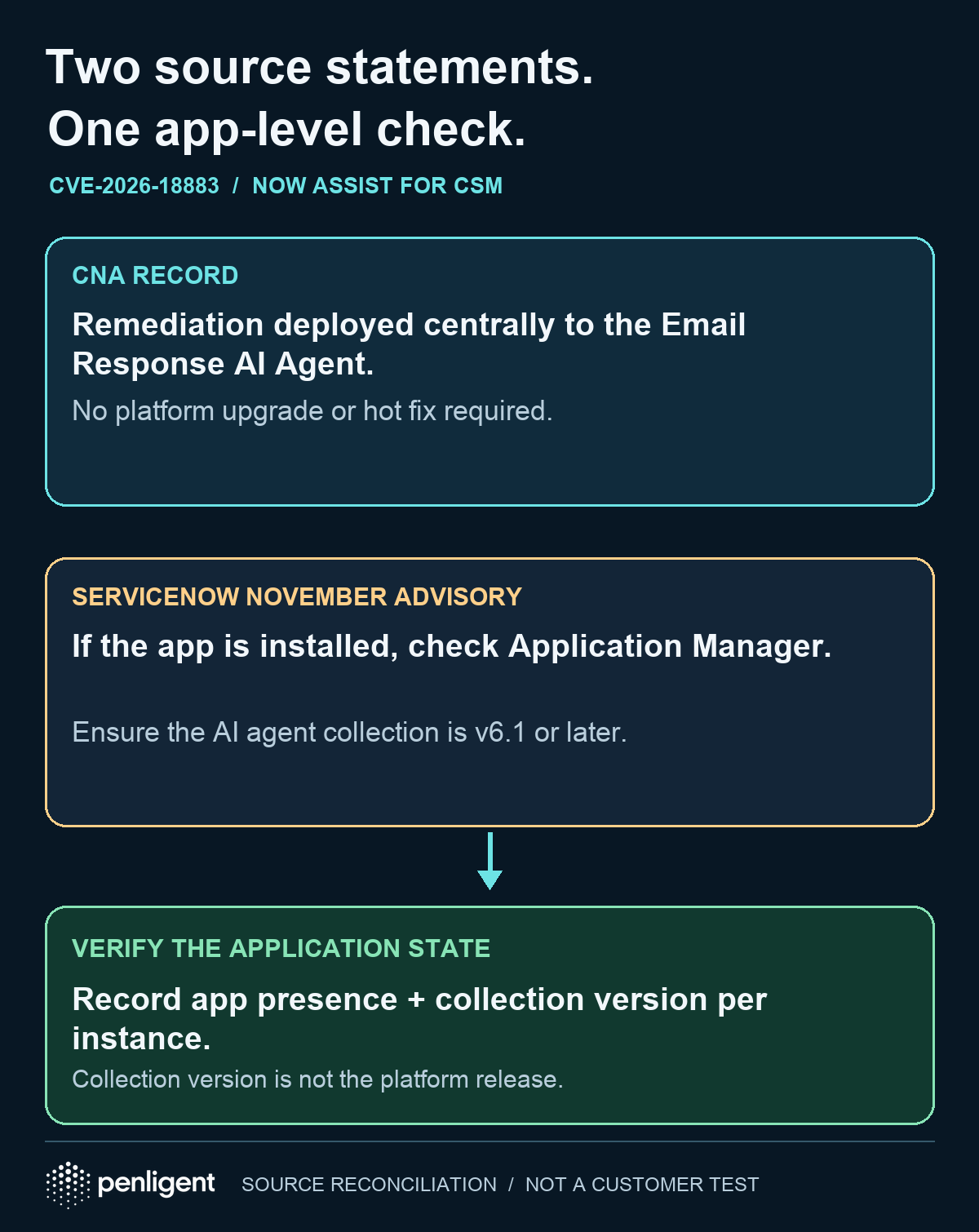
ServiceNow’s CVE-2026-18883 affects the Email Response AI Agent in Now Assist for CSM. The vendor says the remediation was deployed centrally, with no platform upgrade or hot fix required. Its November advisory also tells customers with the app installed to check that the AI agent collection is version 6.1 or later. Those statements describe different parts of the same check: how the vendor delivered remediation, and how an operator can verify the application-level state.
That distinction matters because the advisory covers a second ServiceNow issue with platform release fixes. A platform patch number for CVE-2026-125288 is not a fix version for this AI-agent flaw. Start with the affected app, then verify its collection version in Application Manager.
Scope starts with the Email Response AI Agent
En ServiceNow CNA record describes an indirect prompt-injection issue in the Email Response AI Agent, part of Now Assist for CSM. It assigns CWE-1427 and a CVSS 4.0 score of 7.1 (High). ServiceNow says it is not currently aware of malicious exploitation against ServiceNow instances. That statement reports the vendor’s awareness; it is not proof that every customer environment is unaffected.
The record’s affected-version boundary names “SR – CSM – Customer Service Management AI agent collection v6.1.” The ServiceNow November advisory gives the customer-facing check: if the app is not installed, the instance is not affected; if it is installed, review Application Manager and ensure the plugin is on version 6.1 or higher. The advisory says the associated PRB2137625 is specific to the plugin and does not appear in normal platform release notes.
Reconcile the central fix with the version check
The two official descriptions can be used together. The CNA explains that ServiceNow deployed remediation centrally to this AI agent and that no platform-version upgrade or hot fix is required. The advisory gives an operator a concrete application inventory check: v6.1 or later in Application Manager. The v6.1 reference is the collection version, not the ServiceNow platform release.
For an installed app, record the exact collection name and version shown for the instance, along with the check date and the person or system that captured it. A platform family or patch number alone does not answer the plugin-version question. Conversely, do not schedule a platform upgrade solely because this CVE appears in the November bulletin: the CNA explicitly says one is not required for this remediation.
For example, suppose an inventory export records an Australia platform patch but contains no AI agent collection entry. That export leaves the 18883 check unresolved; it is not evidence that the collection is absent or current. Ask the application owner for the relevant inventory evidence before classifying the instance. If a scanner or ticket uses a generic ServiceNow product label, attach the exact app and collection identity so the platform team can act on the correct object.
| Advisory item | Affected surface | Check described by the sources |
|---|---|---|
| CVE-2026-18883 / PRB2137625 | Email Response AI Agent in Now Assist for CSM | App presence and AI agent collection v6.1 or later in Application Manager |
| CVE-2026-125288 / PRB2098695 | ServiceNow AI Platform template evaluation | Separate platform-release remediation information in the same bulletin |
The distinction is operationally important: the bulletin’s Australia platform patch entries, including Patch 5b W44, refer to CVE-2026-125288. Do not copy those entries into a CVE-2026-18883 remediation record. For 18883, use the app-specific check and ask ServiceNow Support if the collection state is missing, inconsistent, or below the stated threshold. The vendor lists the support-case subject “November 2026 Batched CVE Release.”
A practical, bounded verification record
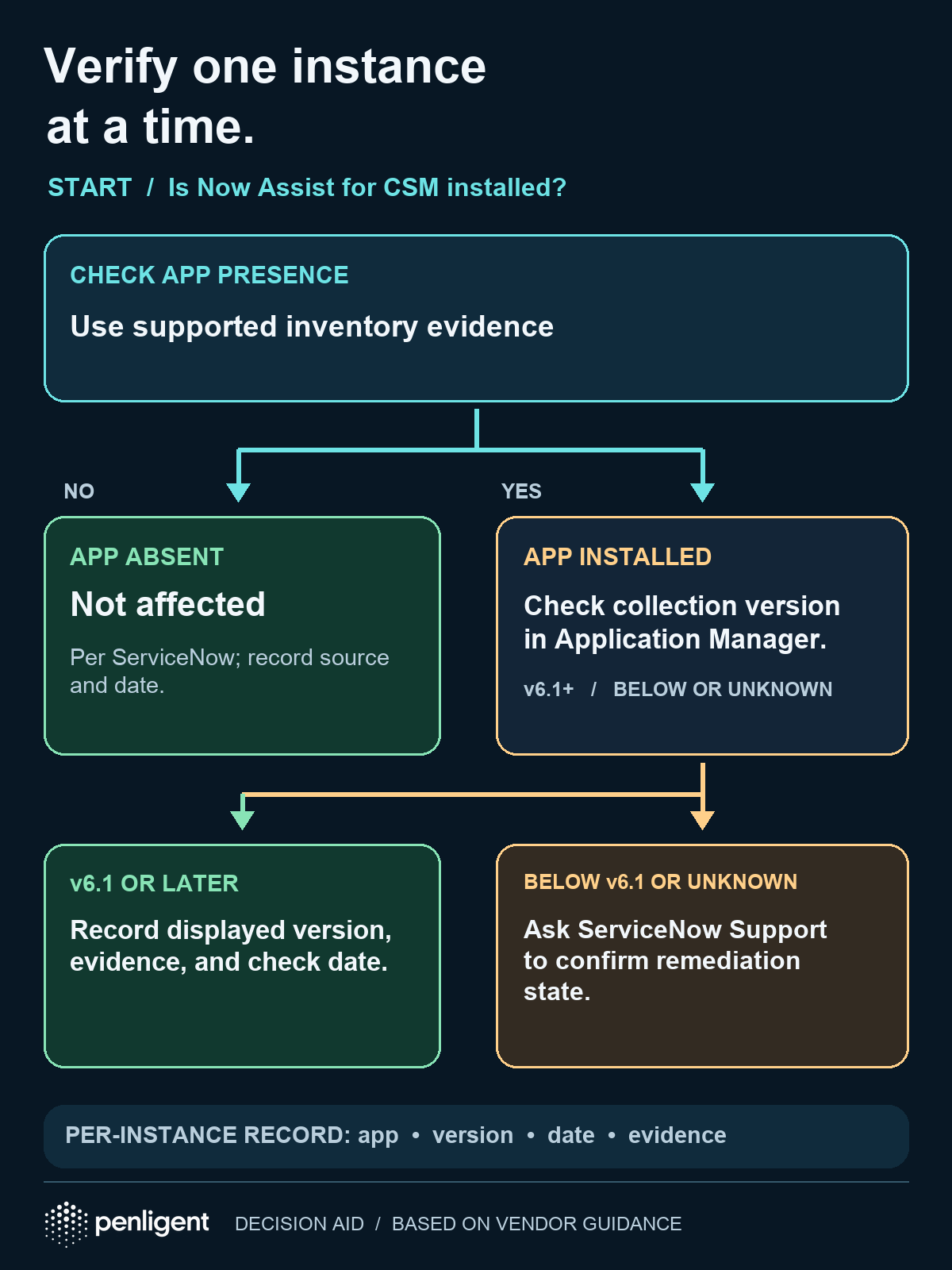
Use one record per instance so that a check on one tenant or environment does not silently stand in for another. The source-backed decision path is short:
- App absent: record the inventory source and check date. ServiceNow says an instance without this app is not affected by CVE-2026-18883.
- App present, collection v6.1 or later: preserve the Application Manager evidence and date as the vendor-recommended version check.
- App present, below v6.1 or version unknown: do not infer that a platform patch resolves it. Ask ServiceNow Support to confirm the instance’s plugin remediation state.
For auditability, capture the instance identifier, app presence, displayed collection version, evidence location, check date, and any support case used to resolve ambiguity. This is a verification workflow based on the published guidance; it is not an independent test of ServiceNow’s hosted remediation service or a claim about an individual customer instance.
Keep the original evidence with the conclusion. A ticket that only says “patched” loses the distinction between the centrally delivered agent remediation and the unrelated platform update. If a support response clarifies an unusual collection label or version display, preserve that response rather than rewriting it into a new universal version rule. Future reviewers should be able to identify what was observed, what came from ServiceNow, and which instance the conclusion covers.
A version check establishes the state visible at the time of review. It does not reconstruct earlier agent behavior or prove that no prompt-injection attempt occurred. The public CVE record and bulletin do not provide a customer-facing detection query, exploit string, or incident indicator, so this article does not invent one. If separate evidence raises an incident concern, preserve the relevant records and use the organization’s established response process.
Teams using Penligente in an authorized assessment can apply the same evidence discipline: state which system and configuration were actually checked and keep inference separate from observed results. The video below is a general Penligent product demonstration; it does not show CVE-2026-18883 or verify ServiceNow remediation.
Methodology: Prepared with AI assistance and checked against ServiceNow’s CNA CVE record and November 2026 security advisory on November 26, 2026. We did not reproduce the issue or test a customer ServiceNow instance.
 Spanish
 English
 German
 French
 Portuguese
 Japanese
 Korean
 Hindi
 Arabic
 Turkish
 Hebrew