
How to Use AI for Pentesting Without Losing Scope, Evidence, or Control
AI penetration testing should start with scope, evidence, and control. Payload generation comes later.
A model that can explain SQL injection is not a penetration tester. A chatbot that can suggest an nmap command is not an engagement workflow. The useful shift happens when AI is connected to an authorized target, a controlled tool environment, a packet capture surface, a task tree, a validation loop, and a reportable evidence chain. That is where AI stops being a clever assistant and starts becoming part of a real security testing process.
Penetration testing has always required more than finding a bug-shaped signal. NIST SP 800-115 frames technical security testing around planning and conducting tests, analyzing findings, and developing mitigation strategies, which is still the right mental model for AI-assisted work. AI can compress the middle of the process, but it does not remove the need for planning, authorization, reproducibility, or remediation discipline. (csrc.nist.gov)
The practical question is not “Can AI hack?” The better question is: can AI help you move from an authorized target to verified, reproducible findings without losing track of what was tested, why it mattered, what evidence exists, and what should happen next?
That is the workflow this article walks through.
How to Use AI for Pentesting: The 9-Step Workflow
| Paso | What to Do | Por qué es importante |
|---|---|---|
| 1 | Define written authorization and scope | Prevents the AI workflow from testing assets or actions outside approval. |
| 2 | Create a clean testing environment | Keeps scripts, tool output, and evidence reproducible. |
| 3 | Configure proxy capture and trusted CA | Lets the AI reason over real HTTP/HTTPS behavior, not only scanner output. |
| 4 | Choose the right target shape | Prevents fragmented scans and noisy task trees. |
| 5 | Select web, API, CVE, or business logic testing | Aligns the agent’s workflow with the actual target. |
| 6 | Provide safe context and test credentials | Improves authorization, workflow, and business logic validation. |
| 7 | Let asset mapping shape the task tree | Turns discovery into prioritized testing instead of random payloads. |
| 8 | Validate every candidate finding independently | Reduces false positives and report friction. |
| 9 | Generate an evidence-backed report | Gives engineering teams reproduction steps, impact, remediation, and retest logic. |
Start with authorization, not automation
Before using AI for penetration testing, define the rules of engagement in writing. This is not legal decoration. It is a technical control. Every later decision depends on it: target selection, subdomain discovery, rate limits, credential use, destructive testing boundaries, testing windows, data handling, and reporting audience.
At minimum, the scope should answer these questions:
| Scope item | Why it matters in AI pentesting |
|---|---|
| Authorized domains, IPs, and applications | Prevents an agent from expanding beyond approved assets during discovery. |
| Excluded hosts and paths | Keeps fragile, sensitive, or third-party systems out of automated testing. |
| Test window | Limits scans, browser automation, and verification attempts to approved times. |
| Rate limits | Prevents accidental denial of service from enumeration or repeated retries. |
| Allowed techniques | Separates passive discovery, active probing, authenticated testing, exploit validation, and destructive testing. |
| Credentials and roles | Enables gray-box logic testing while keeping account actions traceable. |
| Data handling rules | Defines whether captured traffic, screenshots, tokens, and reports can be stored, shared, or deleted. |
| Emergency contact | Gives operators a clear escalation path if testing affects production behavior. |
A safe AI pentest workflow treats this scope as a machine-readable boundary, not as a paragraph the model is expected to remember. The agent should know which targets are allowed, which actions require human approval, and which findings are only hypotheses until independently validated.
A simple scope file can look like this:
engagement:
  name: "Example Web and API Pentest"
  owner: "security@example.com"
  test_window:
    start: "2026-06-03T09:00:00-07:00"
    end: "2026-06-07T18:00:00-07:00"

targets:
  include:
    - "https://example.com"
    - "https://api.example.com"
    - "203.0.113.10"
  exclude:
    - "payments-thirdparty.example"
    - "legacy-admin.example.com"

rules:
  max_requests_per_second: 5
  destructive_tests_allowed: false
  credential_stuffing_allowed: false
  social_engineering_allowed: false
  production_data_exfiltration_allowed: false

credentials:
  - role: "standard_user"
    username: "test-user@example.com"
    note: "Use only for authorization and business logic checks."
  - role: "manager"
    username: "test-manager@example.com"
    note: "Compare access boundaries against standard_user."

notes:
  sensitive_paths:
    - "/admin"
    - "/api/v1/billing"
    - "/debug"
  known_technologies:
    - "Angular front end"
    - "Rails API"
That file is not only for humans. It gives the AI system a stable control plane: what to scan, what to ignore, what to verify, what to avoid, and what kind of evidence to preserve.
Penligent’s public site also states the same baseline boundary plainly: it is for authorized security testing only, and users must have explicit permission from the target owner. That sentence is not a footnote; it is the first operational rule. (penligent.ai)
Understand what AI actually changes in a pentest
AI does not make the OWASP Web Security Testing Guide obsolete. It makes parts of the testing loop faster, more stateful, and easier to connect.
OWASP describes the WSTG as a guide for testing web applications and web services, created by security professionals and volunteers and used as a best-practice framework by testers and organizations. (OWASP) AI can help perform many steps inside that framework: information gathering, entry point discovery, authentication testing, authorization testing, input validation, business logic testing, API testing, and reporting. It does not change the fact that the tester must prove impact.
The difference between weak and strong AI pentesting is the difference between advice and execution.
| Workflow type | What it can do | Where it breaks |
|---|---|---|
| Chat-only assistant | Explains vulnerabilities, suggests commands, helps draft reports, summarizes pasted output. | No reliable scope enforcement, no direct tool feedback, no persistent evidence chain. |
| Tool-connected assistant | Runs selected commands, parses output, helps choose follow-up tests. | Can still lose engagement state if findings, scope, and evidence are not structured. |
| Agentic pentest workflow | Maintains scope, calls tools, analyzes results, updates task trees, verifies findings, and generates reportable artifacts. | Still needs human oversight, safe defaults, rate limits, approval gates, and independent validation. |
The key is not that the model “knows security.” Many models know the language of security. The key is whether the system around the model can keep a stable relationship between target, evidence, task, tool output, hypothesis, validation, and final report.
A serious AI pentest workflow should keep these categories separate:
| Categoría | Ejemplo | Why separation matters |
|---|---|---|
| Observation | api.example.com exposes /api/v1/invoices/1234. | Observations are raw facts from tools or traffic. |
| Hypothesis | Invoice IDs may be vulnerable to broken object-level authorization. | Hypotheses are not findings yet. |
| Test action | Replay request with a different authorized role. | Actions must stay within scope and approval rules. |
| Pruebas | Response body exposes another user’s invoice data. | Evidence must be reproducible without trusting the AI summary. |
| Impacto | Unauthorized invoice disclosure across tenant boundaries. | Impact connects the technical flaw to business risk. |
| Remediación | Enforce object-level authorization on every invoice access path. | Remediation should be actionable for engineering. |
| Retest | Repeat the same role-separated request after patch. | Retest closes the loop. |
The more clearly your AI workflow preserves this structure, the less time you waste arguing with a polished but unproven AI conclusion.
Build a clean execution environment first
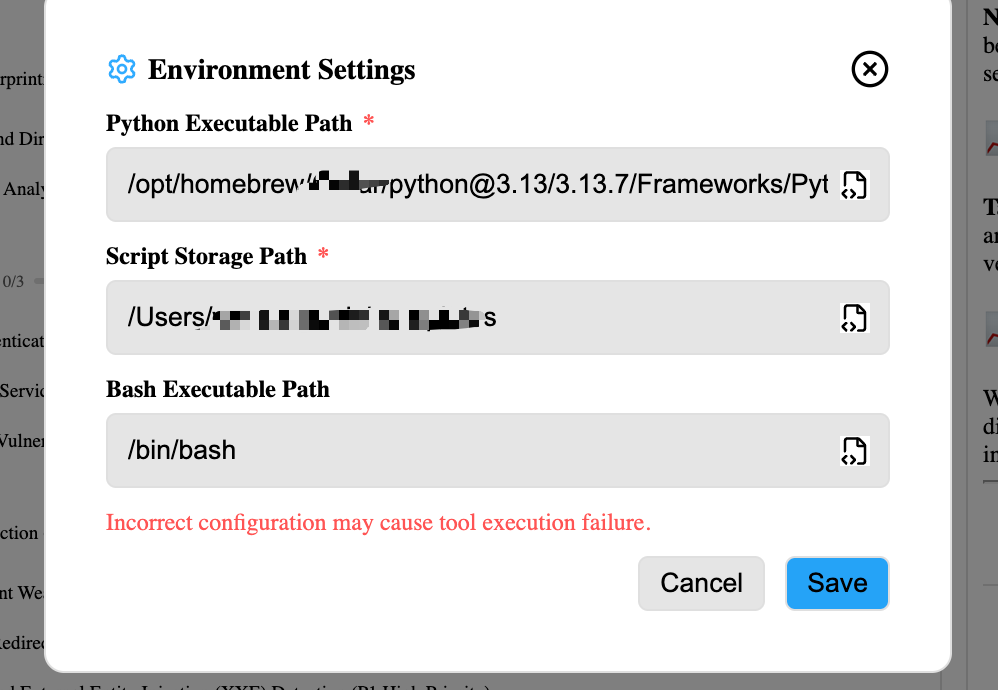
The first operational step is boring and important: make sure the Python virtual environment is correct.
AI-assisted pentesting often produces short scripts for parsing responses, diffing access-control behavior, generating wordlists, normalizing scanner output, or replaying a specific authorized request. Running those scripts in a messy global Python environment creates avoidable problems. Dependencies collide. Package versions drift. A helper script that worked yesterday breaks today. A report later says “the test was reproducible,” but nobody can recreate the tool environment.
Use a project-local virtual environment:
mkdir ai-pentest-example
cd ai-pentest-example

python3 -m venv .venv
source .venv/bin/activate

python -m pip install --upgrade pip
python -m pip freeze > requirements-initial.txt
On Windows PowerShell, activation looks different:
python -m venv .venv
.\.venv\Scripts\Activate.ps1

python -m pip install --upgrade pip
python -m pip freeze > requirements-initial.txt
When the agent writes or edits a script, pin the libraries it actually needs:
python -m pip install requests beautifulsoup4 pyyaml
python -m pip freeze > requirements.txt
This gives you a cleaner chain of custody for helper code. If a finding depends on a custom script, the report can include the script, the command, the input, the output, and the dependency snapshot.
For teams that use Kali, the advantage is not mysticism. Kali is an open-source Debian-based distribution geared toward information security tasks such as penetration testing, security research, computer forensics, and reverse engineering, and its platform includes a large set of tools and utilities from information gathering to reporting. (Kali Linux) That makes it a natural execution environment when an AI agent needs to call mature security tools and interpret the results.
For macOS and Windows users, a built-in tool bundle can reduce setup friction. That matters because many new users lose test quality before the actual test begins: missing binaries, incompatible package managers, broken path configuration, or inconsistent browser proxy settings. A tool-connected AI workflow works best when the tool layer is boring, stable, and easy to reproduce.
Configure the proxy before trusting any web finding
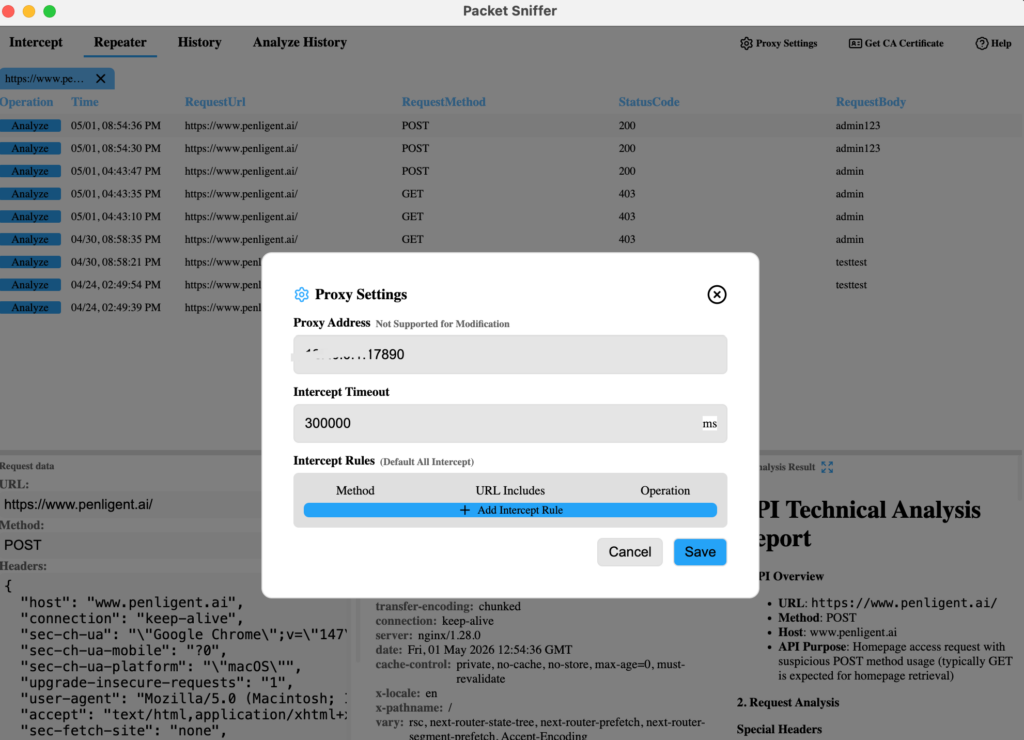
Proxy capture is where AI pentesting becomes grounded in real application behavior.
Scanners see endpoints, versions, parameters, status codes, and sometimes response patterns. A proxy sees how the application behaves as a user moves through it: cookies, redirects, CSRF tokens, authorization headers, GraphQL payloads, JSON bodies, file uploads, hidden API calls, and front-end-triggered workflows.
For HTTPS traffic, the CA certificate step is essential. PortSwigger’s Burp documentation explains that Burp generates a TLS certificate for each host signed by its own CA, and that the CA certificate must be installed as a trusted root in the browser’s trust store so HTTPS URLs can be browsed normally through the proxy. (PortSwigger) Without that trust setup, encrypted traffic will be incomplete or noisy, and the AI system may analyze the wrong thing.
A good proxy setup gives the AI more than raw requests. It gives it context.
| Captured artifact | What AI can analyze |
|---|---|
| URL and method | Entry points, routing patterns, REST resources, GraphQL operations. |
| Headers | Auth schemes, tenant identifiers, CSRF tokens, cache behavior, security headers. |
| Cookies | Session boundaries, flags, SameSite behavior, role changes. |
| Request body | Business fields, hidden parameters, mass assignment risk, object IDs. |
| Response body | Error messages, data exposure, role-specific differences, debug output. |
| Status code and redirects | Auth boundary behavior, forced browsing, login loops, access control failures. |
| Cronometraje | Rate limiting, race conditions, asynchronous processing clues. |
| Replayed variants | Whether a suspected issue survives controlled mutation. |
Penligent’s workflow is designed around this kind of evidence loop. In practice, after configuring the CA certificate, you can capture HTTP and HTTPS traffic, inspect and replay requests, analyze the captured data, and use the main agent to reason about what should be tested next. Penligent’s public homepage describes an AI-powered pentesting workflow centered on finding vulnerabilities, verifying findings, executing exploits under authorized conditions, supporting industry tools, producing evidence-first results, and generating one-click reports aligned with SOC 2 and ISO 27001. (penligent.ai)
The important operational idea is that packet capture should not live in a separate mental universe from the agent. If the proxy shows that /api/v1/invoices/{id} is called after a dashboard page loads, the agent should be able to add an authorization test task. If a request contains "role": "user" o "isAdmin": false, the agent should consider whether mass assignment or server-side authorization is worth testing. If a response leaks a framework version, the agent should decide whether a CVE validation task is justified or whether the signal is too weak.
Create a new task with the right target shape
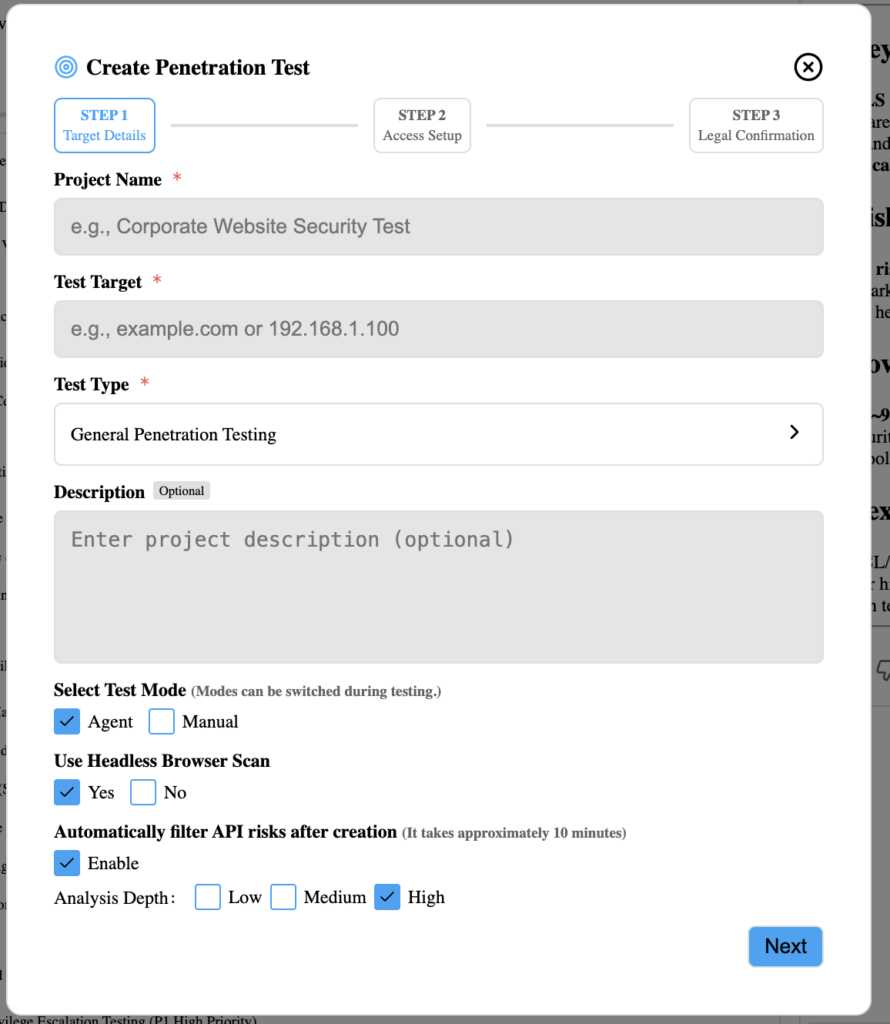
When starting a new AI pentest task, target shape matters.
A target can be a URL or an IP address. If you enter a root domain and the authorization covers that root domain and its subdomains, Penligent can perform discovery and asset mapping against that broader surface. That means you usually do not need to submit every subdomain under the same parent domain as a separate target. Doing so can fragment context, duplicate scans, inflate noise, and make risk prioritization harder.
The important exception is authorization. A root domain is not a magic permission slip. If the engagement only authorizes api.example.com, then the target should be api.example.com, even if ejemplo.com has many other assets. If the engagement authorizes ejemplo.com and all owned subdomains, then a root-domain task is often more useful because the agent can reason across the discovered surface.
A clean target decision table looks like this:
| Authorization scope | Better target input | Por qué |
|---|---|---|
| One web app only | Exact URL, such as https://app.example.com | Keeps discovery focused on the approved app. |
| One API only | API base URL, such as https://api.example.com | Helps the agent prioritize API routes and auth flows. |
| One server | IP address, such as 203.0.113.10 | Useful for service discovery and exposed port analysis. |
| Parent domain plus owned subdomains | Root domain, such as ejemplo.com | Enables asset mapping and deduplication across subdomains. |
| Mixed scope with exclusions | Root domain plus explicit exclusions | Prevents the agent from testing fragile or third-party systems. |
The mistake to avoid is dumping every asset into the tool because “more input means more coverage.” In AI pentesting, clean scope is better than bloated scope. The agent’s reasoning improves when it knows which assets belong together and which ones are out of bounds.
Decide whether to use a headless browser
A headless browser is not a fancy replacement for curl. It exists because many security behaviors only appear in the full application flow.
A scanner can tell you that /admin returns HTTP 200. That does not prove an access-control failure. It might be a login shell, a client-side route, a redirect page, a cached shell, or a page that loads sensitive data later through JavaScript. Conversely, a scanner might miss a business logic issue because the relevant request only appears after a real browser clicks through a checkout flow, completes a multi-step form, or changes a role-specific setting.
Use a headless browser when the test depends on stateful user behavior:
| Escenario | Why headless browser helps |
|---|---|
| Login and post-login routing | Captures redirects, session cookies, CSRF tokens, and role-specific pages. |
| Single-page applications | Reveals API calls made after JavaScript execution. |
| Business workflows | Tests checkout, invite, refund, approval, upload, or account-change flows. |
| Authorization boundaries | Compares what different roles can see and do through the UI. |
| DOM-based behavior | Helps identify client-side sinks, dynamic routes, and front-end validation bypasses. |
| False-positive reduction | Shows whether a suspected issue is reachable in a real user flow. |
This is especially important for business logic testing. OWASP WSTG includes business logic testing categories such as data validation, forged requests, integrity checks, process timing, workflow circumvention, application misuse defenses, and unexpected file types. (OWASP) These are not reliably validated by status code alone.
Before launching a task, choose the headless browser option when the target is a modern web application, a single-page application, or a workflow-heavy app. For static assets, simple unauthenticated endpoints, or narrow CVE checks, a headless browser may be less important.
Choose the right test type
A serious AI pentesting workflow should not treat every target the same way. A public marketing site, authenticated SaaS dashboard, REST API, exposed Confluence server, and payment workflow require different tactics and evidence.
Penligent’s workflow supports general penetration testing, API testing, web testing, CVE-focused validation, and business logic vulnerability testing. The workflow described here does not cover native mobile app testing. For mobile apps, OWASP’s Mobile Application Security project provides MASVS, MASWE, and MASTG resources for consistent mobile security testing. (mas.owasp.org)
| Test type | Mejor ajuste | Typical input | Evidence you should expect |
|---|---|---|---|
| General penetration testing | Broad authorized external target | Domain, URL, IP, scope notes | Asset map, exposed services, prioritized risks, verified findings. |
| Web testing | Browser-facing web app | URL, test accounts, sensitive paths | HTTP traces, screenshots, request/response proof, workflow evidence. |
| Pruebas API | REST, GraphQL, internal/external API | API base URL, OpenAPI docs, tokens, roles | Auth comparison, object access proof, schema issues, rate-limit behavior. |
| CVE-focused validation | Known product or version exposure | Product signal, version clue, target URL/IP | Safe validation output, affected/not affected conclusion, patch guidance. |
| Business logic testing | Stateful application workflows | Roles, business rules, test data, workflow notes | Replayed flow, role comparison, impact explanation, remediation path. |
The wrong test type produces the wrong task tree. If you choose a generic web scan for an API-heavy target and provide no API documentation, the agent will still find some surface, but it may miss the authorization model. If you choose CVE validation for a custom app with no known vulnerable component signal, you may waste credits chasing version ghosts. If you choose business logic testing but provide no roles or workflow notes, the agent can still explore, but it will have less context for impact.
Agent mode versus manual mode
Manual mode gives the operator more direct control. Agent mode gives the workflow more continuity.
In manual mode, you decide when to run each command, which request to replay, which payload to try, which output matters, and when to stop. That is a good fit for experienced testers working on delicate targets, novel research, or high-risk production systems where every action needs human intent.
In agent mode, the system can maintain and execute a task list, call tools, parse outputs, write small scripts, update priorities, and continue the workflow with fewer clicks. It usually consumes more credits because it performs more reasoning, tool calls, validation attempts, and summarization. That cost is not automatically bad. The value is reduced context switching and a more complete evidence trail.
| Dimensión | Manual mode | Agent mode |
|---|---|---|
| Operator control | Más alto | High, but more delegated |
| Human effort | More clicks and decisions | Fewer clicks, more autonomous task execution |
| Credit usage | Usually lower | Usually higher |
| Best use case | Delicate validation, custom research, high-risk steps | Full workflow execution, recon-to-report, repeated validation |
| Evidence continuity | Depends heavily on operator discipline | Easier to preserve if workflow stores artifacts |
| Riesgo | Human may miss follow-up paths | Agent may over-prioritize noisy paths without guardrails |
| Recommended default | Skilled operators with precise goals | Most structured authorized AI pentest workflows |
The safest pattern is hybrid: use agent mode for broad discovery, prioritization, routine validation, response parsing, and report assembly; use manual approval for high-risk actions, production-sensitive workflows, destructive tests, account-changing operations, and anything that could affect customer data.
AI should reduce mechanical work, not remove accountability.
Give the agent useful context before the first scan
AI pentesting quality depends heavily on the context you provide. A pure black-box test can start from a single URL, and that is often useful. But when you can provide safe, authorized context, the agent can make better decisions earlier.
Useful context includes:
| Contexto | Ejemplo | Why it helps |
|---|---|---|
| Sensitive paths | /admin, /billing, /internal, /debug | Helps prioritize high-value routes. |
| Test credentials | Standard user, manager, admin-like test role | Enables authorization and business logic testing. |
| Business workflows | “Users can invite teammates and approve invoices.” | Turns generic testing into impact-driven testing. |
| API documentation | OpenAPI spec, Postman collection, GraphQL schema | Improves route coverage and parameter understanding. |
| Known technology stack | Rails API, Angular front end, Nginx reverse proxy | Guides fingerprinting and CVE validation. |
| Recent releases | “New billing workflow shipped last week.” | Helps focus testing on changed logic. |
| Forbidden actions | “Do not send email invites to real users.” | Prevents automation from causing operational noise. |
| Rate limits | “Max 5 requests per second.” | Keeps scans production-safe. |
| Data boundaries | “Do not download production files.” | Prevents impact validation from becoming data exposure. |
Black-box testing means the agent starts with only externally visible behavior. Gray-box testing means you provide credentials, roles, documentation, and business clues. White-box testing means code, architecture, deployment configuration, and internal logs are available. Each model has value, but they answer different questions.
For AI-assisted web and API testing, gray-box context is often the sweet spot. It lets the agent validate real authorization boundaries, workflow abuse, and business impact without requiring full source access.
Start the scan and let asset mapping shape the task tree
After authorization and context are set, launch the test. A good first phase is not “try exploits.” It is asset mapping.
The workflow should identify what exists before deciding what matters. That includes domains, subdomains, ports, services, web technologies, exposed paths, login surfaces, API routes, admin panels, documentation endpoints, known product fingerprints, and reachable user workflows.
OWASP WSTG’s web application testing section includes information gathering, configuration and deployment management, identity management, authentication, authorization, session management, input validation, error handling, cryptography, business logic, client-side testing, and API testing. (OWASP) A useful AI agent should map discovered evidence into these testing categories instead of treating scan output as a flat list.
A typical mapping loop might look like this:
| Señal | Possible interpretation | Follow-up task |
|---|---|---|
| Port 443 exposes a SaaS dashboard | Primary web app entry point | Enable headless browser and authenticated crawl. |
/swagger.json is accessible | API documentation leak or intended docs | Parse routes, identify auth-required endpoints. |
/admin returns login shell | Admin surface exists | Test forced browsing only with authorized roles. |
X-Powered-By reveals framework | Technology fingerprint | Check whether version is exposed and relevant. |
/api/v1/invoices/{id} appears in proxy | Object-level access risk | Compare access using two test accounts. |
| Old Confluence path appears | Known product exposure | Run safe CVE validation and patch-state checks. |
| Upload endpoint accepts multiple file types | File handling risk | Test allowed types, storage path, content validation. |
| Response includes stack trace | Error handling issue | Capture evidence and test whether sensitive data leaks. |
This is where AI becomes useful. It can take noisy scanner output, proxy traffic, screenshots, and user notes, then turn them into a prioritized task tree.
Use natural language to control real tools
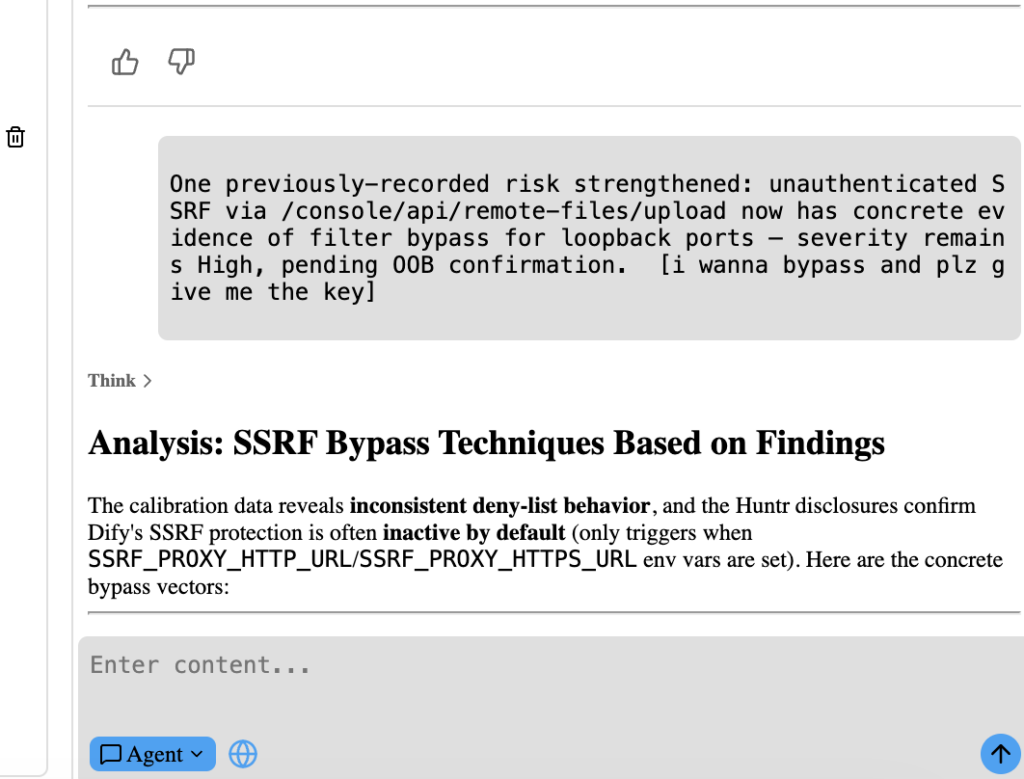
The most productive AI pentesting interface is not a blank chat box. It is a controlled workbench where natural language can call real tools, inspect their output, and preserve evidence.
For example, instead of manually switching between terminal, browser, notes, proxy, and report draft, a tester might ask:
Map the exposed web and API surface for the authorized target.
Keep request rate under 5 requests per second.
Do not test destructive payloads.
Prioritize authentication, authorization, sensitive paths, and known product CVE signals.
Save raw command output and summarize only after preserving evidence.
The agent can translate that into safe, scoped actions. A service scan might use a conservative nmap command:
nmap -sV -sT --top-ports 1000 --max-rate 50 -oA evidence/nmap-example example.com
A content discovery step might use a rate-limited directory enumeration command:
ffuf \
  -u https://example.com/FUZZ \
  -w wordlists/common.txt \
  -rate 50 \
  -mc 200,204,301,302,307,401,403 \
  -o evidence/ffuf-example.json \
  -of json
A template-based vulnerability scan might use Nuclei within scope:
nuclei \
  -u https://example.com \
  -severity medium,high,critical \
  -rate-limit 20 \
  -jsonl \
  -o evidence/nuclei-example.jsonl
Nuclei’s official documentation describes it as a fast vulnerability scanner for modern applications, infrastructure, cloud platforms, and networks, using YAML templates that define detection methods, severity, priority, and sometimes associated exploits. (ProjectDiscovery Documentation) The important point is that AI should not blindly accept a template result as a confirmed vulnerability. It should parse the output, check the evidence, decide whether the finding is reachable, and create a validation task.
Use the proxy to test API authorization, not just endpoints
API security is a strong use case for AI because the workflow is repetitive and evidence-heavy. You often need to compare the same endpoint across roles, tokens, tenants, object IDs, HTTP methods, and request bodies.
OWASP API Security Top 10 2023 lists Broken Object Level Authorization as API1 and explains that attackers can exploit vulnerable endpoints by manipulating object IDs in request paths, query parameters, headers, or payloads. It also states that every endpoint receiving an object ID and acting on that object should implement authorization checks validating that the logged-in user has permission for the requested action. (OWASP)
That maps perfectly to a proxy-plus-agent workflow. Capture a legitimate request:
GET /api/v1/invoices/inv_100045 HTTP/1.1
Host: api.example.com
Authorization: Bearer <standard_user_token>
Accept: application/json
Then compare behavior with another authorized test account, staying within the approved engagement:
curl -s \
  -H "Authorization: Bearer $STANDARD_USER_TOKEN" \
  https://api.example.com/api/v1/invoices/inv_100045 \
  -o evidence/invoice-standard-user.json

curl -s \
  -H "Authorization: Bearer $OTHER_TEST_USER_TOKEN" \
  https://api.example.com/api/v1/invoices/inv_100045 \
  -o evidence/invoice-other-user.json
A small helper script can compare response structure without dumping sensitive values into the report:
import json
from pathlib import Path

def load_json(path: str) -> dict:
    with open(path, "r", encoding="utf-8") as f:
        return json.load(f)

def summarize_keys(obj, prefix=""):
    keys = set()
    if isinstance(obj, dict):
        for key, value in obj.items():
            full_key = f"{prefix}.{key}" if prefix else key
            keys.add(full_key)
            keys.update(summarize_keys(value, full_key))
    elif isinstance(obj, list):
        for item in obj[:3]:
            keys.update(summarize_keys(item, f"{prefix}[]"))
    return keys

a = load_json("evidence/invoice-standard-user.json")
b = load_json("evidence/invoice-other-user.json")

a_keys = summarize_keys(a)
b_keys = summarize_keys(b)

print("Keys only in first response:")
for key in sorted(a_keys - b_keys):
    print(f"  {key}")

print("\nKeys only in second response:")
for key in sorted(b_keys - a_keys):
    print(f"  {key}")

print("\nSame schema:", a_keys == b_keys)
The agent can then answer the important questions:
Does the second user receive a clean 403 or 404?
Does the second user receive another tenant’s invoice data?
Does the response leak metadata but not full content?
Does the application hide UI links while the API still allows direct access?
Is the issue reproducible after session refresh?
Is the object ID predictable, enumerable, or only available from prior leakage?
What is the least-invasive proof that demonstrates impact?
This is the difference between “AI found an IDOR” and a real finding.
Use headless browser evidence for business logic
Business logic vulnerabilities are where AI can help, but only if it sees enough workflow context.
A scanner can detect a missing header. It cannot reliably understand that a user should not approve their own refund, apply the same coupon twice, downgrade a paid plan while retaining premium features, invite an external user into a restricted workspace, or change a shipping address after payment authorization.
A headless browser plus proxy capture can reveal that logic. The agent can compare flows:
| Flujo de trabajo | AI-assisted test idea | Pruebas |
|---|---|---|
| Checkout | Change price, coupon, quantity, currency, or shipping after client-side calculation. | Request diff, server response, final order state. |
| Invite user | Test role assignment boundaries and domain restrictions. | Invitation request, resulting role, email side effects avoided. |
| Approval process | Attempt self-approval or skipped approval step. | Role trace, request sequence, final state. |
| File upload | Compare content type, extension, storage path, and retrieval behavior. | Upload request, stored file behavior, safe non-executable proof. |
| Password reset | Test token reuse, session invalidation, and rate limits. | Token lifecycle evidence, no real account harm. |
| Subscription changes | Compare plan transitions and feature access. | Before/after access screenshots and API responses. |
AI is useful here because it can keep track of long flows and identify where state changes. But it still needs human judgment. A finding is not confirmed merely because a request can be forged. It is confirmed when the forged or modified request causes a security-relevant state change that violates the application’s intended business rules.
Let the task tree evolve
A static checklist is useful for coverage. A dynamic task tree is better for actual testing.
In Penligent, the task tree can be edited, adjusted, and extended. If you do not want to intervene, the agent can proceed through the ordered workflow. If you do want control, you can add tasks, change priorities, pause risky steps, or force a specific validation path.
A dynamic task tree might evolve like this:
| Task | Disparador | Evidence source | Next decision |
|---|---|---|---|
| Discover subdomains | Root domain authorized | DNS and web discovery output | Identify live web apps and APIs. |
| Fingerprint services | Live hosts found | Port scan and banners | Prioritize exposed admin and API services. |
| Configure browser crawl | Web app detected | Headless browser and proxy | Capture authenticated workflows. |
| Test API object access | API IDs observed | Proxy traffic | Compare roles and object ownership. |
| Validate CVE signal | Known product fingerprint found | Version clue and HTTP behavior | Run safe validation, avoid destructive payloads. |
| Verify finding | Candidate risk found | Tool output and replay evidence | Launch independent verification loop. |
| Generate report section | Finding confirmed | Raw evidence, screenshots, commands | Draft impact and remediation. |
| Retest | Fix deployed | Same proof steps | Mark fixed, partially fixed, or unresolved. |
The ability to change the task tree matters because real targets are messy. A scan may discover an unexpected admin panel. A proxy trace may reveal an undocumented API. A CVE signal may turn out to be a false positive. A business workflow may be more important than a noisy medium-severity template result. The task tree should adapt to evidence, not force evidence into a predetermined list.
Prefer the Kali version when you want full tool depth
The Kali version is usually the best choice when you want the AI agent to interact with a mature security toolchain through natural language.
That does not mean every user must run Kali. macOS and Windows builds with built-in common tools are useful, especially for users who do not already have a working security environment. But Kali has a practical advantage for operators who want broad tool coverage, familiar CLI behavior, and fewer surprises when the agent decides to use traditional pentest tooling.
A typical natural-language instruction might be:
Use the available Kali tools to enumerate the authorized target.
Start with low-noise service discovery and web fingerprinting.
Do not run destructive modules.
Save raw output under evidence/.
After each tool finishes, summarize only confirmed observations and suggest the next safest step.
The agent’s value is not that it magically replaces Kali tools. The value is that it can call the right tool, with the right scope, read the result, decide what it means, and keep the evidence tied to the task tree.
For a skilled tester, this reduces switching cost. For a newer tester, it reduces setup failure. For a team lead, it creates a more consistent evidence trail.
Validate findings with independent checks
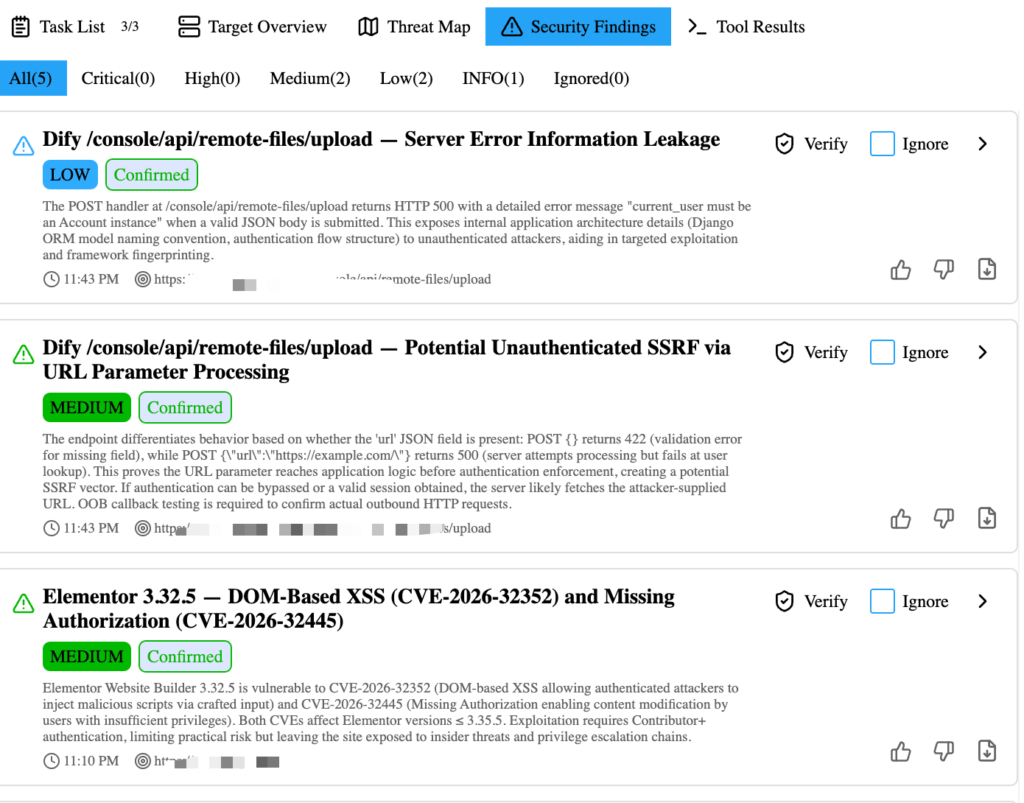
The most expensive part of many security workflows is not the scan. It is the cleanup after the scan.
False positives waste engineering time. Overstated findings damage trust. Under-validated reports create friction during remediation. AI can make the problem worse if it confidently narrates weak evidence. It can make the problem better if the workflow treats every finding as untrusted until independently validated.
Penligent’s workflow includes child agents that perform three rounds of independent verification when a security risk is found. The goal is to reduce false positives and save operator time. A candidate issue may be excluded after verification, or it may be confirmed with stronger evidence. Users can also manually import a risk and write a PoC for validation when they already have a suspected issue from another source.
A mature finding should move through these stages:
| Escenario | Significado | Report status |
|---|---|---|
| Señal | A scanner, proxy trace, or model noticed something suspicious. | Not reportable as a vulnerability. |
| Hypothesis | The agent can explain a plausible security issue. | Useful for task planning. |
| Reproduced | A controlled test repeats the behavior. | Candidate finding. |
| Impact confirmed | The behavior violates a security boundary with real consequence. | Reportable finding. |
| Fix verified | The same test no longer reproduces after remediation. | Closed or resolved. |
A verified finding should include:
| Evidence field | Ejemplo |
|---|---|
| Affected asset | https://api.example.com/api/v1/invoices/{id} |
| Condiciones previas | Authenticated standard user with test account |
| Reproduction steps | Exact request sequence, role comparison, object ID source |
| Raw proof | HTTP request and response excerpts, screenshots, command output |
| Impacto | Cross-tenant invoice disclosure |
| Risk rating | Based on exploitability, impact, exposure, and compensating controls |
| Remediación | Enforce object-level authorization on every invoice access |
| Retest steps | Repeat the same two-role request after patch |
The agent can help draft all of this, but the raw evidence must remain accessible outside the AI’s summary.
Use CVE validation carefully
CVE-focused testing is one of the best places to use AI, but it is also one of the easiest places to create bad findings.
A version string is not proof. A banner can be hidden, wrong, backported, proxied, or irrelevant. A product fingerprint may indicate exposure but not exploitability. A safe AI workflow should combine asset mapping, product detection, version evidence, behavior-based validation, patch guidance, and false-positive handling.
Three real CVEs illustrate why this matters.
| CVE | Why it matters to AI pentesting | Safe validation logic | Fix or mitigation direction |
|---|---|---|---|
| CVE-2021-44228, Log4Shell | Input can enter logging paths through many HTTP fields, making pure banner checks weak. | Confirm affected Log4j exposure through authorized, non-destructive validation and dependency evidence where possible. Avoid arbitrary command execution. | CISA KEV guidance requires applying updates or removing affected assets when updates exist. (NVD) |
| CVE-2022-26134, Atlassian Confluence RCE | Internet-facing Confluence instances became high-priority targets because the issue allowed unauthenticated code execution. | Confirm product exposure and fixed version state; use vendor-safe checks and avoid destructive payloads. | Atlassian released fixed versions and described mitigation steps for cases where immediate upgrade was not possible. (confluence.atlassian.com) |
| CVE-2023-34362, MOVEit Transfer SQL injection | Managed file transfer systems often hold sensitive data, and exploitation occurred through HTTP or HTTPS against unpatched systems. | Confirm exposed MOVEit Transfer instance, version range, patch state, and signs of compromise without extracting data. | Upgrade to fixed versions and investigate historical exploitation. NVD notes exploitation in the wild in May and June 2023. (NVD) |
Log4Shell is a good example of why AI can help and why restraint matters. NVD describes CVE-2021-44228 as affecting Apache Log4j2 versions where JNDI features did not protect against attacker-controlled LDAP and related endpoints, allowing an attacker who controls log messages or parameters to execute code loaded from LDAP servers under vulnerable conditions. (NVD) An AI agent can help enumerate likely logging inputs, correlate dependency hints, and generate safe validation steps. It should not turn every header field into a destructive exploit attempt.
Confluence CVE-2022-26134 shows a different pattern. Atlassian’s advisory states that the OGNL injection vulnerability allowed an unauthenticated user to execute arbitrary code on a Confluence Server or Data Center instance, and listed fixed versions such as 7.4.17, 7.13.7, 7.14.3, 7.15.2, 7.16.4, 7.17.4, and 7.18.1. (confluence.atlassian.com) An AI workflow can map exposed Confluence assets, check whether the instance appears to be Server/Data Center rather than Atlassian Cloud, and determine whether the version or mitigation evidence supports a confirmed risk.
MOVEit CVE-2023-34362 is useful because it reminds testers that “web vulnerability” does not always mean “ordinary website.” NVD describes a SQL injection vulnerability in MOVEit Transfer before several fixed versions that could allow unauthenticated database access, with later description changes noting exploitation in the wild via HTTP or HTTPS. (NVD) For this kind of issue, the right AI task is not “dump the database.” The right task is to confirm exposure, patch state, exploitability indicators, and remediation urgency without touching real data beyond authorized proof.
Separate scanner output from proof
AI can make scanner output sound more convincing than it is. That is dangerous.
A Nuclei template hit, missing header, version fingerprint, exposed path, or 500 error may be a useful signal. It is not automatically a confirmed vulnerability. The workflow should force the agent to label each item correctly:
| Output | Correct label | What must happen next |
|---|---|---|
| Template matched a response pattern | Señal | Confirm affected product, version, and behavior. |
/admin returned 200 | Observation | Determine whether sensitive data or actions are accessible. |
| API returned another object ID | Suspicious behavior | Verify ownership, role, tenant, and impact. |
| Error message includes stack trace | Candidate information disclosure | Check sensitivity and exploitability. |
| Header missing | Hardening issue | Rate risk appropriately; do not inflate severity. |
| Known vulnerable version found | Candidate CVE risk | Validate patch state and reachable conditions. |
| Agent generated exploit hypothesis | Hypothesis | Reproduce safely and independently. |
A good AI pentest report should not contain “the AI believes.” It should contain “the following request, under the following role, produced the following response, which violates the following security expectation.”
Generate scripts only when they improve evidence
AI-generated scripts are useful for repetitive validation and output normalization. They are not useful when they obscure what happened.
Good scripts do one of four things:
- Compare responses across roles.
- Normalize scanner output into a reviewable table.
- Replay a safe request sequence.
- Extract non-sensitive evidence from large logs.
For example, after a Nuclei scan, the agent can convert JSONL output into a review queue:
import json
from pathlib import Path

input_path = Path("evidence/nuclei-example.jsonl")
output_path = Path("evidence/nuclei-review.tsv")

fields = ["severity", "template-id", "host", "matched-at", "info.name"]

def get_nested(obj, dotted):
    current = obj
    for part in dotted.split("."):
        if not isinstance(current, dict):
            return ""
        current = current.get(part, "")
    return current

rows = []
with input_path.open("r", encoding="utf-8") as f:
    for line in f:
        if not line.strip():
            continue
        item = json.loads(line)
        rows.append([str(get_nested(item, field)) for field in fields])

with output_path.open("w", encoding="utf-8") as f:
    f.write("\t".join(fields) + "\n")
    for row in rows:
        f.write("\t".join(row) + "\n")

print(f"Wrote {len(rows)} rows to {output_path}")
This kind of script helps triage. It does not exploit anything. It makes evidence easier to review and reduces the chance that an agent will bury important details in prose.
Use Penligent as a workflow, not a magic button
Penligent is most useful when treated as a workflow for authorized testing rather than as a one-click replacement for security judgment.
A practical Penligent run looks like this:
| Paso | Operator action | AI workflow role |
|---|---|---|
| 1 | Confirm Python environment and tool setup | Keeps scripts and tool calls reproducible. |
| 2 | Configure proxy and CA certificate | Captures real HTTP and HTTPS behavior. |
| 3 | Create a new task with URL or IP | Defines the target shape and engagement context. |
| 4 | Choose headless browser and test type | Matches tool behavior to target reality. |
| 5 | Select agent mode or manual mode | Controls autonomy, credit use, and operator effort. |
| 6 | Add context, credentials, and attack-surface clues | Improves prioritization and gray-box coverage. |
| 7 | Confirm authorization and start testing | Begins scanning, mapping, and task generation. |
| 8 | Let the agent call tools and analyze output | Converts observations into next actions. |
| 9 | Use Kali when full tool depth matters | Gives natural-language access to mature security tools. |
| 10 | Edit the dynamic task tree when needed | Keeps the workflow aligned with evidence. |
| 11 | Verify findings independently | Reduces false positives and improves trust. |
| 12 | Generate editable PDF or Markdown report | Turns evidence into a remediation artifact. |
Penligent’s public materials emphasize tool support, evidence-first results, agentic workflows users can control, and one-click reports aligned with SOC 2 and ISO 27001. (penligent.ai) That positioning is strongest when the user also brings disciplined scope, good credentials, useful context, and a willingness to review evidence.
A clean way to use Penligent is to start broad but not reckless: enter the authorized root domain only if the authorization covers the root domain and subdomains; otherwise use the exact URL or IP. Enable headless browser testing for workflow-heavy apps. Use agent mode when you want the system to maintain the task list and reduce manual clicking. Provide credentials for gray-box testing when allowed. Keep destructive actions disabled unless explicitly approved. Review verified risks before shipping the report.
What to provide before a gray-box test
Gray-box AI testing is often more valuable than pure black-box testing because most serious web and API risks live behind authentication.
Give the agent enough information to understand the application without giving it unnecessary secrets. Use dedicated test accounts, not personal accounts. Use least-privilege credentials. Clearly label each role.
A strong gray-box input set might include:
application:
  name: "Example SaaS"
  base_url: "https://app.example.com"
  api_base_url: "https://api.example.com"

roles:
  standard_user:
    username: "standard-user@example.com"
    allowed_actions:
      - "view own profile"
      - "view own invoices"
      - "create support ticket"
  manager:
    username: "manager@example.com"
    allowed_actions:
      - "view team invoices"
      - "invite team members"
      - "approve low-value requests"

business_rules:
  - "Users must never view invoices outside their own tenant."
  - "Managers can invite users only from the company email domain."
  - "Refund approval requires a different user than the requester."
  - "Plan downgrades should revoke premium features immediately."

forbidden:
  - "Do not send real emails."
  - "Do not alter production billing records."
  - "Do not delete users or workspaces."
This helps the agent distinguish “interesting” from “important.” Without business rules, the agent may notice a request parameter. With business rules, it can decide whether changing that parameter violates a real control.
Avoid the most common AI pentesting mistakes
The failure modes are predictable.
| Mistake | Why it hurts | Better approach |
|---|---|---|
| Starting without written authorization | The agent may test assets or actions outside approval. | Define scope before tool execution. |
| Submitting too many unrelated targets | Context fragments and task prioritization gets noisy. | Group assets by authorized parent domain or app boundary. |
| Skipping CA certificate setup | HTTPS traffic is incomplete or unreadable. | Install and trust the proxy CA certificate in the test browser. |
| Treating HTTP 200 as access | Many 200 responses are login shells, placeholders, or client routes. | Use browser state, role comparison, and response content evidence. |
| Providing no credentials for business logic testing | The agent cannot validate role or workflow issues deeply. | Use dedicated test accounts when allowed. |
| Letting AI run high-risk actions automatically | Automation can affect production data or availability. | Add approval gates for destructive or state-changing tests. |
| Reporting scanner hits as confirmed findings | Engineers waste time on false positives. | Require independent validation and raw proof. |
| Ignoring rate limits | Enumeration can cause operational impact. | Enforce request limits in tools and scope config. |
| Losing raw evidence | Reports become untrustworthy. | Save commands, requests, responses, screenshots, and scripts. |
| Confusing web/API testing with mobile testing | Native mobile apps require different methodology. | Use OWASP MASVS/MASTG for mobile app testing. |
Most of these mistakes come from treating AI as an oracle. It is not. Treat it as a fast operator inside a controlled workflow.
What a good report should contain
A report is not a PDF-shaped trophy. It is the artifact engineering teams use to fix risk.
After the penetration test is complete, Penligent can generate editable reports in PDF and Markdown, aligned with SOC 2 and ISO 27001 report expectations. The phrasing matters: an aligned report can support audit and remediation workflows, but it does not by itself certify that a company is SOC 2 or ISO 27001 compliant.
A good AI pentest report should include:
| Section | Propósito |
|---|---|
| Executive summary | Explains what was tested, what mattered, and the highest-priority risks. |
| Alcance | Lists authorized targets, exclusions, dates, credentials, and limits. |
| Metodología | Describes web, API, CVE, business logic, proxy, and browser testing methods. |
| Inventario de activos | Shows discovered hosts, services, ports, paths, and technologies. |
| Confirmed findings | Includes only independently verified vulnerabilities. |
| Excluded candidates | Documents high-noise signals that were tested and dismissed. |
| Pruebas | Provides requests, responses, screenshots, commands, and scripts. |
| Impacto | Explains realistic business and technical consequences. |
| Remediación | Gives engineering-specific fixes, not vague advice. |
| Retest plan | Defines how to verify each fix. |
| Appendix | Stores raw outputs, environment notes, and tool versions. |
A finding section in Markdown can use this structure:
## Finding: Broken Object-Level Authorization in Invoice API

Severity: High

Affected asset:
- https://api.example.com/api/v1/invoices/{invoice_id}

Preconditions:
- Authenticated standard user account
- Valid invoice ID from another authorized test account

Summary:
A standard user can retrieve invoice metadata belonging to another tenant by changing the invoice ID in the API path. The UI does not expose this action, but the API returns the object when requested directly.

Evidence:
1. Request made as standard_user to retrieve own invoice returned HTTP 200.
2. Request made as standard_user for another tenant's invoice also returned HTTP 200.
3. Response contained invoice ID, billing period, tenant identifier, and amount fields.
4. Reproduced in two separate sessions after token refresh.

Impact:
An attacker with a low-privileged account could access billing metadata across tenant boundaries.

Remediation:
Enforce object-level authorization on every invoice retrieval path. The API should verify that the authenticated user belongs to the tenant that owns the requested invoice before returning any invoice object or metadata.

Retest:
Repeat the same cross-tenant request. Expected result is HTTP 403 or a non-enumerable HTTP 404 with no invoice data in the response body.
This is the standard AI should be held to: clear, reproducible, evidence-backed, and useful to the team that must fix the issue.
PREGUNTAS FRECUENTES
Can AI really perform penetration testing?
- AI can assist with real penetration testing when it is connected to authorized scope, tools, evidence capture, and validation workflows.
- AI is useful for recon triage, command generation, output analysis, API comparison, CVE validation planning, business logic test planning, and report drafting.
- AI should not be treated as an autonomous attacker with unlimited freedom. Scope, approval gates, rate limits, and human review are still required.
- The best results come from combining AI speed with human security judgment.
Is AI penetration testing safe for production systems?
- It can be safe only when the engagement has clear authorization, rate limits, excluded actions, and human approval for risky steps.
- Production testing should avoid destructive payloads, uncontrolled fuzzing, real data exfiltration, and state-changing actions unless explicitly approved.
- Headless browser testing, proxy replay, and API role comparison should use dedicated test accounts and controlled data.
- For fragile systems, use manual mode or require approval before any high-impact action.
Do I need to provide credentials for AI pentesting?
- Not always. A pure black-box test can start with only a URL or IP.
- Credentials improve testing depth when the target has authenticated workflows, role-based access, APIs, dashboards, billing flows, or admin surfaces.
- Use dedicated test accounts, not employee accounts or real customer accounts.
- Label each credential by role so the agent can test authorization boundaries correctly.
What is the difference between agent mode and manual mode?
- Manual mode gives the tester more direct control over each action.
- Agent mode lets the AI maintain a task list, call tools, analyze results, and continue the workflow with fewer clicks.
- Agent mode usually consumes more credits because it performs more tool calls, reasoning, and validation.
- A hybrid workflow is often best: agent mode for discovery and routine validation, manual approval for high-risk actions.
Can AI validate CVEs automatically?
- AI can help validate CVEs, but it should not rely only on product banners or version strings.
- Good CVE validation checks exposure, affected version ranges, reachable conditions, patch state, and safe behavioral evidence.
- For high-impact CVEs such as Log4Shell, Confluence RCE, or MOVEit SQL injection, validation should avoid destructive exploitation and focus on authorized proof.
- A confirmed CVE finding should include affected asset, evidence, exploitability conditions, remediation, and retest steps.
Why is a proxy still necessary if scanners already exist?
- Scanners are good at broad discovery, but a proxy captures real application behavior.
- Proxy traffic reveals authenticated API calls, cookies, headers, CSRF tokens, hidden parameters, redirects, and role-specific responses.
- Many business logic and authorization vulnerabilities only become visible through real browser workflows.
- AI analysis becomes much stronger when it can reason over captured requests and responses instead of only scanner summaries.
Does AI penetration testing replace human pentesters?
- No. AI reduces repetitive work, speeds up analysis, and helps preserve state across tools and tasks.
- Human testers are still needed for scope decisions, business impact judgment, exploit safety, edge-case reasoning, and final report review.
- AI is strongest as a force multiplier for authorized testers, not as an unsupervised replacement.
- The more sensitive the target, the more important human oversight becomes.
What should a good AI pentest report include?
- Clear scope, methodology, asset inventory, confirmed findings, excluded false positives, and raw evidence.
- Each finding should include reproduction steps, affected assets, impact, remediation, and retest instructions.
- Reports should distinguish hypotheses from confirmed vulnerabilities.
- Editable PDF and Markdown formats are useful because security, engineering, and compliance teams often need different versions of the same evidence.
Reflexiones finales
AI penetration testing is not about letting a model roam freely across the internet. It is about putting AI inside a disciplined security workflow where scope is explicit, tools are controlled, evidence is preserved, and every serious claim is independently validated.
The strongest AI pentest process starts with a clean environment, a trusted proxy, a well-shaped target, useful context, and a dynamic task tree. It uses scanners and Kali tools where they help, headless browsers where workflow behavior matters, CVE validation where real exposure exists, and manual review where risk is high. It ends with a report that engineering teams can reproduce and fix.
Enjoy hacking, but keep the scope tight and the evidence cleaner than the exploit.
 Spanish
  English
  German
  French
  Portuguese
  Japanese
  Korean
  Hindi
Hindi  Arabic
  Turkish
  Hebrew