
The October 27 Umbraco security update requires separate checks for CMS, Forms and AI packages. Start by identifying which components each deployed site actually uses, then match the package branch and verify the repaired permissions. A working homepage or a successful CMS upgrade does not establish that an optional Forms or AI component has been updated.
Umbraco’s formal October 27 advisory announces ten fixes across the products, including two High-severity issues. These are unrelated to PHP2Shell. The useful response is a component-specific upgrade and review, rather than treating every Umbraco site as an anonymously exploitable server. This article reviews the published notices; it does not reproduce an exploit or establish compromise of any installation.
Match the patch to the installed component
Les vendor’s patched-version list gives the CMS and Forms releases below. Inventory production, staging and any separately deployed administrative service. Record a package or build identity for each one; a repository edit alone does not tell you what a running instance contains.
| Composant | Branche | Patched release |
|---|---|---|
| Umbraco CMS | 13 / 17 / 18 | 13.16.3 / 17.7.2 / 18.2.2 |
| Umbraco Forms | 13 / 17 / 18 | 13.9.12 / 17.6.2 / 18.2.2 |
There is a CMS 13 documentation discrepancy worth preserving in the change record. The blog’s affected-range text extends through 13.16.3, while its fix list names 13.16.3. The start-node advisory’s version fields specify affected versions through 13.16.2 and patched version 13.16.3. Its prose also retains unfinished placeholders. Use the concrete package fields and current vendor release information, and recheck the notice before deployment if your organization needs a reconciled affected-range statement.
Do not copy the CMS version into an AI package upgrade instruction. Optional components can follow different release lines. Resolve the exact package names and dependencies in the project, then build and test the resulting artifact through the site’s normal maintenance process. Preserve the pre-change artifact and recovery procedure according to your deployment policy.
CMS sign-in exposure depends on the host boundary
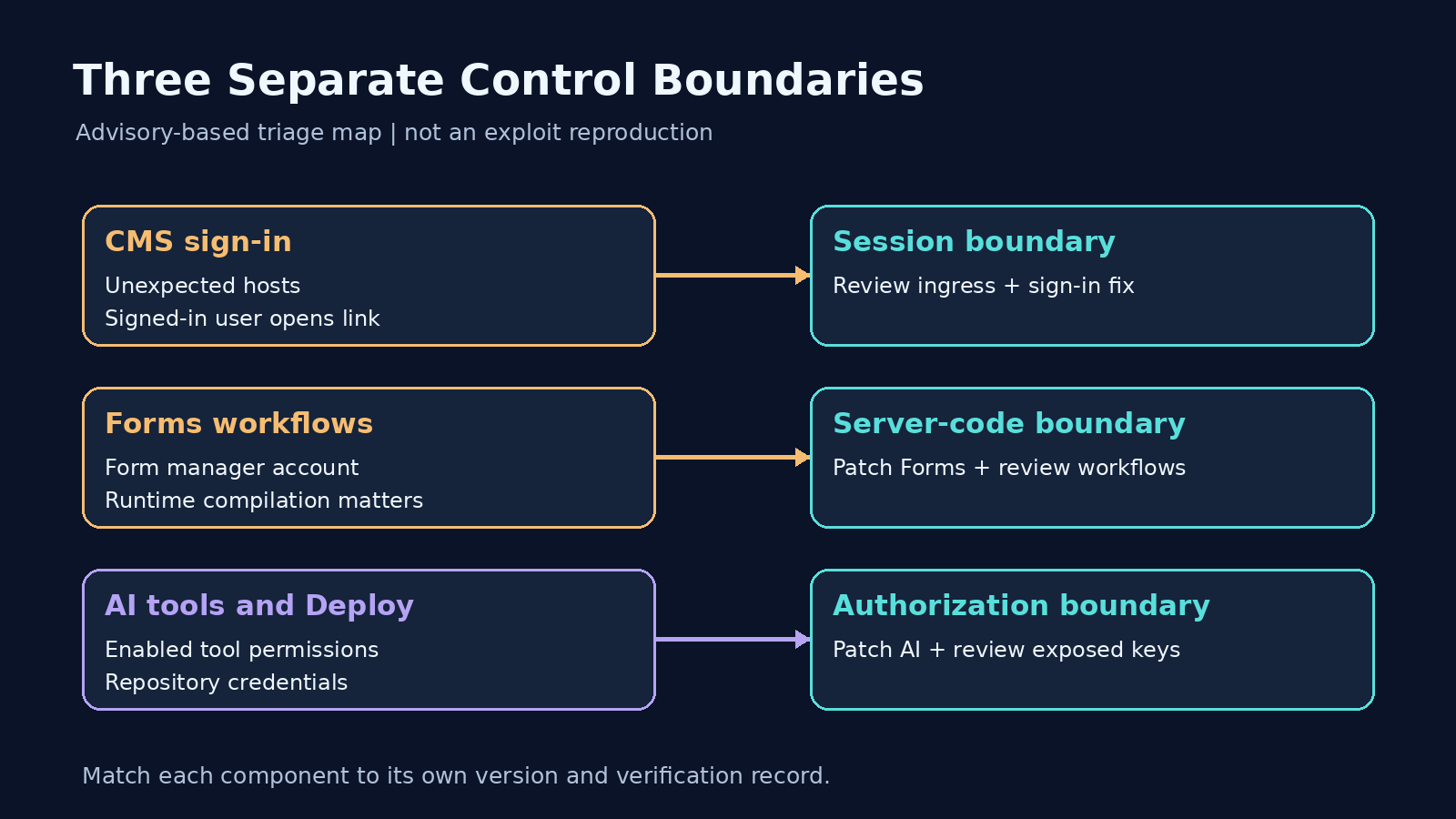
Les back-office sign-in advisory describes session takeover when unrecognized host names reach the application and a signed-in back-office user opens an attacker-supplied link. The resulting session has that user’s privileges. The listed CMS fixes are 17.7.2 and 18.2.2. This is not an interaction-free compromise of every public visitor.
For triage, review the actual route from the public listener through the reverse proxy to the application. Ask which host names each layer accepts and forwards. A hostname restriction in one configuration file is useful only if it governs the traffic path serving that deployment. Record the allowed production names and any legitimate administrative names before tightening the boundary.
As an interim exposure reduction, the same advisory recommends explicit host restrictions and avoiding untrusted back-office links. The patch hardens redirect destinations and sign-in-code handling. It also provides a read-only query for reviewing stored back-office redirect addresses. Preserve unexpected configuration as investigation evidence; do not assume an unfamiliar address proves an attack or erase it before review.
The following is a configuration illustration for an owned staging service, using reserved example domains. It is not an exploit or a complete remediation. Replace the values with approved service names and validate the effective hosting configuration before applying a change.
{
  "AllowedHosts": "cms.example.test;admin.example.test"
}
During an approved staging check, confirm that expected names still serve the intended site and an unapproved name is rejected along the real ingress path. Keep this test separate from the application upgrade. A restricted listener reduces one exposure condition; it is not evidence that every sign-in weakness or another component’s authorization issue has been repaired.
Forms crosses a different permission boundary
Les Forms workflow advisory requires an authenticated user able to manage forms. Workflow configuration can cause submitted material to be written and rendered as server-side code under the application identity. The issue is rated High, CVSS 3.1 8.8. Runtime view compilation is relevant: the default BackofficeDevelopment mode permits execution, while Development and Production modes do not, unless runtime compilation is enabled separately. The insecure file write remains possible in every mode.
Les maintainer’s guidance recommends patched Forms packages and review of existing file-writing and Razor email workflows for unexpected destinations or templates. Restrict form-management authority to users trusted with server-side code while arranging the update. Changing runtime mode is not a complete fix. Do not improvise an execution payload on a live customer site to decide whether it is affected.
Treat form-management access as an explicit item in the inventory. A team may intend an editor to maintain questionnaires while reserving server code changes for developers. Review that intended division with the service owner, then inspect the actual roles and workflows. If unexpected files or workflow changes are found, preserve their identities, timestamps and relevant access records for a separate investigation.
AI packages require permission and credential review
Les Umbraco AI advisory reports authorization gaps in agent tools and plaintext provider credentials in Deploy files. Affected tools could exceed user permissions; deployment could also lose custom-group tool restrictions. These are not anonymous attacks, and the content/media tools are not enabled by default. Inventory enabled tools, repository access and deployment artifacts before assigning exposure.
Les AI package advisory lists these patched releases. Select the appropriate line for each installed package, rather than mixing versions solely because their numbers look similar.
| AI package | 17-line fix | 18-line fix |
|---|---|---|
| Umbraco.AI.Core | 17.6.1 | 18.6.1 |
| Umbraco.AI.Agent | 17.4.1 | 18.4.1 |
| Umbraco.AI.Agent.Deploy | 17.1.1 | 18.1.1 |
| Umbraco.AI.Deploy | 17.3.1 | 18.3.1 |
| Umbraco.AI.Search | 17.0.5 | 18.0.5 |
Where provider credentials reached source control, Umbraco recommends rotating those keys after upgrading. Make credential replacement a separate tracked task. A patched serializer cannot establish who previously read a repository, and deleting a visible file does not establish that an old credential has been revoked.
For an authorized review, identify the repositories and generated artifacts that held the configuration. Limit access to the evidence and avoid copying secrets into the remediation ticket. Record the credential owner, replacement status and the dependent services checked after the change. Where historical access is uncertain, leave that uncertainty visible instead of describing the upgrade as proof that no data was exposed.
Cloud automation does not close the AI work
Les Cloud instructions say CMS and Forms upgrades roll out automatically, while AI add-ons require manual updates. They also direct unsupported CMS and Forms 14, 15 and 16 installations toward a supported major version. A major-version migration needs its own compatibility and rollback plan; do not invent a missing patch release for an unsupported branch.
For a hosted site, obtain the actual upgrade result for the relevant environment, then check the optional packages yourself. For a self-managed site, connect the tested build to the release serving each instance. If traffic can reach multiple instances, include them in the record. A successful deployment to one instance should not silently close work for the others.
Verify permissions with harmless staging records
Build a small assessment around the permissions the organization intends to preserve. Use dedicated accounts and synthetic documents, media and form submissions in an owned staging environment. Give one editor a limited content area and another approved account access to a different area. Document the expected result before testing; an observed denial means little if the account was never meant to use the function at all.
| Review area | Denied case to evaluate | Legitimate control |
|---|---|---|
| CMS content boundary | Limited editor cannot acquire another area through group changes | Permitted content remains manageable |
| Enabled AI tools | Tool action cannot exceed the approved editor scope | Authorized action still works |
| Environment deployment | Restricted account retains intended tool limits after deployment | Approved tool access remains available |
| Forms workflow handling | Untrusted editor cannot cross the intended code-execution boundary | Approved harmless form submission completes |
| Credential lifecycle | Retired credential is no longer accepted by the provider | Replacement integration operates normally |
This is a proposed defensive acceptance matrix, not a reproduction of the advisories. Use vendor-supported checks and harmless fixtures; no shell, sensitive document or live customer submission is needed to demonstrate your intended permission model. Where a behavior cannot be safely tested, retain the configuration and package evidence and identify the untested condition explicitly.
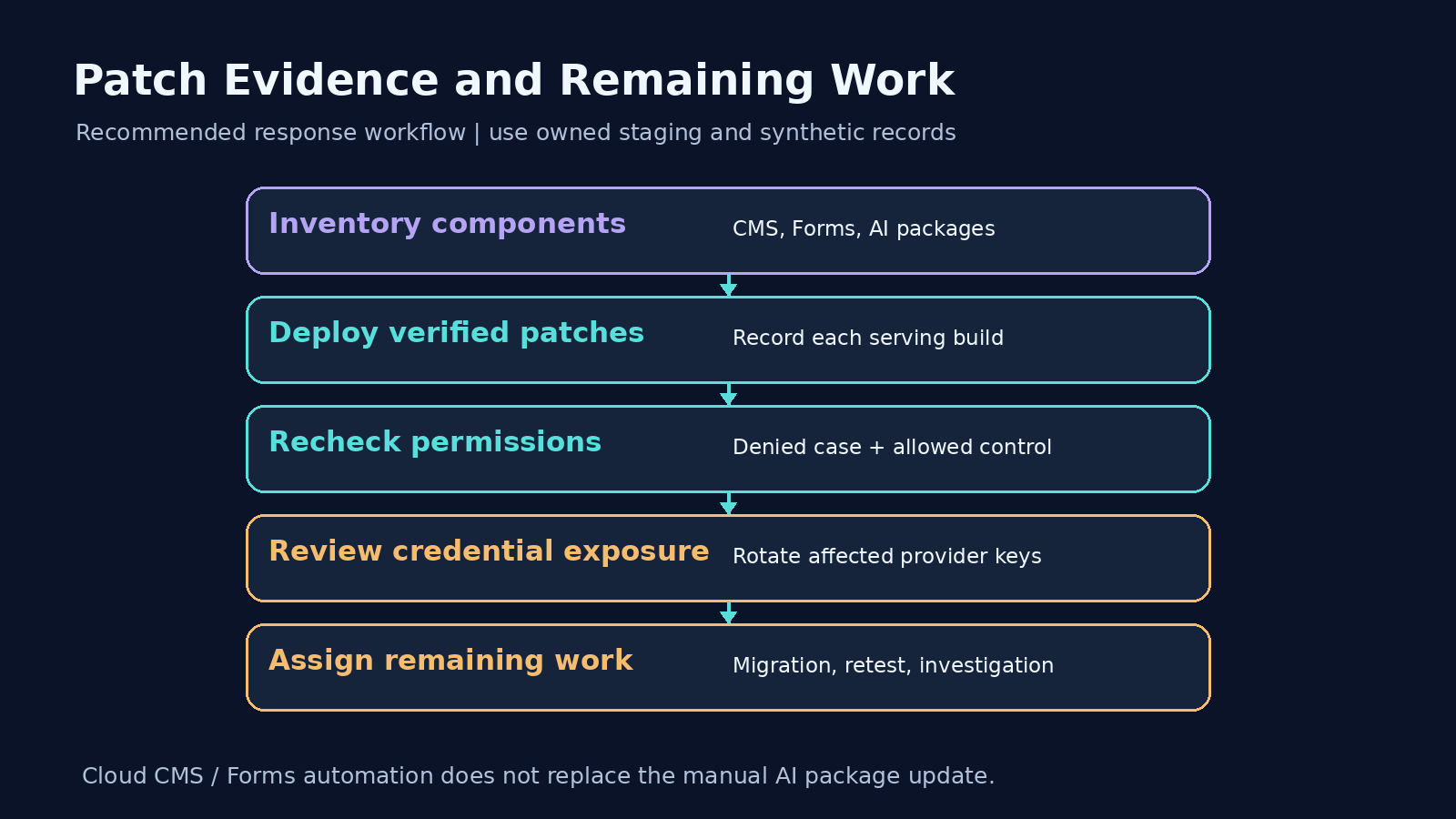
Record the test identity, relevant permissions, environment, deployed artifact, observation and limitation together. Include the approved positive operation alongside the rejected case. If the update breaks normal publishing or form processing, investigate the regression rather than treating loss of functionality as a security success. Keep incident investigation and patch verification as separate work items.
For a broader authorized application assessment, Penligent can be evaluated against a defined scope with dedicated accounts and reviewable evidence. This article does not establish an Umbraco-specific detector, automatic remediation or a successful reproduction by Penligent. Confirm that the chosen workflow can exercise the identities and paths your service owner actually needs to review.
Close maintenance when the component inventory, deployed patch identities and scoped checks agree. Leave the remaining credential, migration or investigation tasks assigned to their owners. That gives the next reviewer a defensible account of what changed without turning a successful upgrade into a claim about every possible attack.
The video below introduces a general Penligent testing workflow. It is not an Umbraco exploit demonstration.
 French
  English
  German
  Spanish
  Portuguese
  Japanese
  Korean
  Hindi
Hindi  Arabic
  Turkish
  Hebrew