
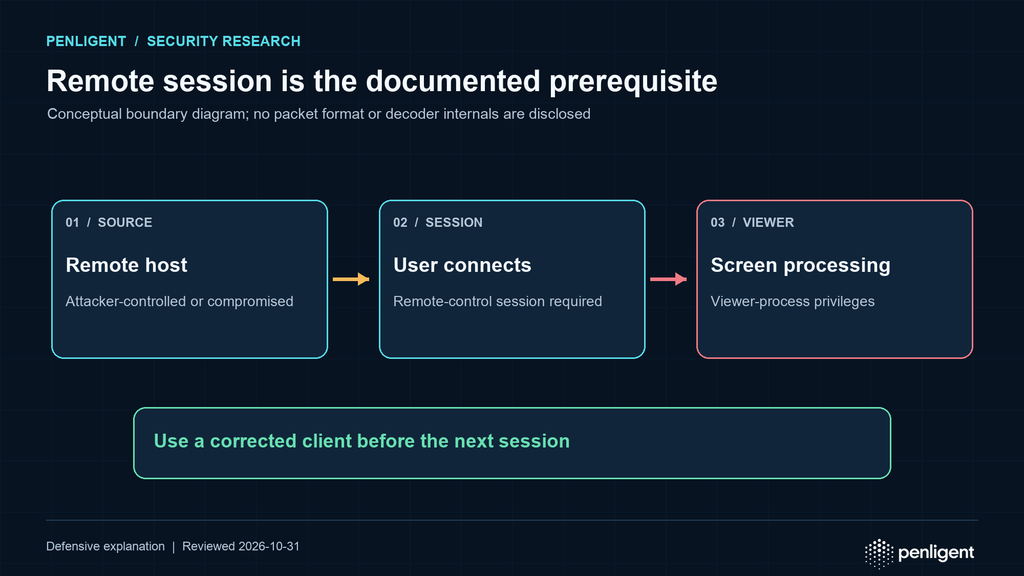
CVE-2026-111585 is an integer-overflow vulnerability in TeamViewer remote-control screen processing. The published description identifies denial of service and, depending on the platform, potential arbitrary code execution with the privileges of the viewer process. Exploitation requires a user to establish a remote-control session to an attacker-controlled or compromised host. The immediate defensive task is to identify affected viewing clients, install the vendor-corrected release for each supported branch, and verify that the corrected application is actually running.
Les official CVE record supplies that prerequisite and product scope. TeamViewer published security bulletin TV-2026-1011 on October 27, 2026, and updated it on October 28. The bulletin identifies 15.83 as the corrected mainline release and provides separate maintenance builds. Its exploitation statement is dated: TeamViewer was not aware of active exploitation at publication. That statement is not a guarantee about every subsequent session or a reason to defer an available update. This review uses public material checked on October 31, 2026.
The viewing client is part of the attack surface
Remote support has two directions that are easy to conflate. The technician initiates a connection and sends control input, but the viewing application also receives data from the remote machine. Screen content has to cross a trust boundary before it becomes a visible desktop. A connection initiated by a trusted employee therefore does not make every byte supplied by the other endpoint trustworthy.
For this CVE, the relevant condition is a viewing session to a malicious or compromised host. An attacker does not have to become a trusted administrator of the technician’s workstation merely to make that remote source untrustworthy. Conversely, the public description does not establish that an arbitrary unauthenticated connection to a listening machine is sufficient. Preserve the distinction between a remote host supplying screen data and a generic internet-facing service accepting traffic.
This changes inventory priorities. A support workstation that regularly opens sessions to customer devices can be relevant even when it does not expose an inbound support service. A server inventory that lists only unattended-access installations can miss the people and machines that act as viewers. Begin with the applications used to view and control remote systems, then map each installation to the vendor’s affected-product statement.
The useful question for an owner is concrete: which executable opens the session, on which operating system, at which build, and when was that executable last replaced and restarted? Session permissions, authentication, network controls, and application updates each address a different part of the workflow. A strong answer in one category does not establish the others.
What is confirmed and what remains undisclosed
The CVE identifies an integer overflow in screen processing, a possible denial of service, and potential execution under the viewer’s privileges. It does not disclose a complete screen-packet format, exact arithmetic expression, allocator layout, exploitation primitive, or reliable production trigger. A defensible technical explanation must stop before those missing details. General memory-safety concepts can explain why a size calculation matters without claiming to reconstruct TeamViewer’s implementation.
| Publicly supported statement | Practical implication | Claim to avoid |
|---|---|---|
| A user establishes a remote-control session to an untrusted host | Inventory viewing applications and their session workflows | No interaction is required |
| Impact can include denial of service or platform-dependent code execution | Apply the vendor fix without assuming identical outcomes everywhere | Every affected platform has a demonstrated reliable exploit |
| Execution would use the viewer process’s privileges | Review the actual process identity and available resources | Every successful attempt automatically obtains root or SYSTEM |
| The vendor supplies corrected mainline and maintenance builds | Use a product, platform, and branch mapping | One numerical comparison covers every supported installation |
The CVSS 3.1 score in the record is 8.8 with user interaction required. Report the score together with its source and metric version. It is a prioritization input, not a percentage probability of compromise. An organization may assign a faster response to highly exposed support teams without changing the published prerequisite or inventing evidence of ongoing exploitation.
Keep the three bulletin vulnerabilities separate
TV-2026-1011 covers multiple vulnerabilities. CVE-2026-92374 concerns a macOS privileged-helper package-handling issue. CVE-2026-92372 concerns a screen-image decoder out-of-bounds write and includes a session-recording scenario. CVE-2026-111585 is the integer-overflow issue discussed here. Sharing an update bulletin does not make their mechanisms, platform scope, or prerequisites interchangeable.
In particular, do not attach the other issue’s specially crafted .tvs recording path to CVE-2026-111585 unless an authoritative source explicitly adds that mapping. Similarly, a root-privilege impact described for the macOS helper issue does not establish root privilege for this screen-processing vulnerability. A vulnerability-management ticket should identify the exact CVE when assigning affected modules and operational tests.
A combined maintenance campaign is still sensible. One approved product update may address several vendor-listed issues. Keep a campaign-level change record for scheduling, and retain separate applicability rows underneath it. This gives administrators the efficiency of one rollout while preserving the distinctions needed for incident review and audit.
When a scanner reports all three identifiers on the same machine, ask whether its evidence identifies the installed component and platform. Do not delete a finding merely because the descriptions differ, and do not accept all findings merely because the brand matches. Resolve each one through the vendor’s product matrix and the observed installation.
Integer overflow explains a size-checking failure class
Machine integers have finite representable ranges. If arithmetic used to describe an allocation or copy exceeds that range, the stored result can differ from the intended mathematical value. For unsigned arithmetic, wraparound can turn a large mathematical result into a smaller value. CWE-190 describes the integer-overflow or wraparound weakness class. The CVE uses that classification, but classification alone does not identify the exact faulty calculation.
A common defensive example is a buffer size derived from several input dimensions. If a program computes the product in a narrow type, allocates using the wrapped result, and later writes according to the original dimensions, the allocation and write expectations can disagree. CWE-680 describes the general chain from integer overflow to buffer overflow. This is an explanation of a failure pattern, not a disclosure of TeamViewer’s actual field layout or decoder algorithm.
The correct defensive invariant is that every accepted operation fits both the arithmetic representation and the permitted resource budget. A type that can hold the product may still permit an allocation too large for the application. A resource limit that looks reasonable can still fail if it is applied after arithmetic has already wrapped. Arithmetic validation and resource policy therefore need separate checks in an implementation review.
For an operator, that concept supports patch urgency and helps interpret technical reports. It does not create a safe substitute for the vendor update. Changing display settings or reducing image quality cannot be called a security workaround for this CVE without a supported advisory that establishes the relevant condition.
Map affected products before comparing versions
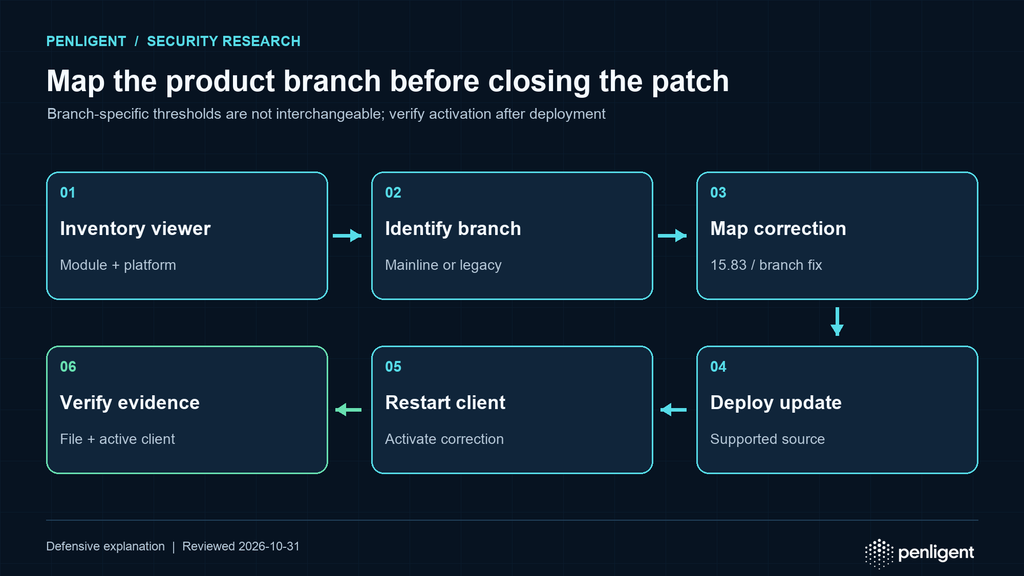
The CVE names TeamViewer Full Client on Windows, Linux, and macOS; Portable on Windows; and Remote Control on Android. The public descriptions refer to corrected mainline version 15.83 and separate maintenance branches. Use these as explicit product mappings. Do not extend the list to every TeamViewer-branded package, an iOS application, a browser interface, or an embedded integration solely because the names resemble one another.
TeamViewer Host appears in the bulletin’s overall update table because the bulletin covers several vulnerabilities. That combined table is not a reason to rewrite the narrower affected-product record for CVE-2026-111585. If inventory contains Host or another module, assess its own bulletin entries and obtain vendor clarification where needed. Updating supported modules is appropriate product maintenance; assigning this particular CVE still needs an evidence-backed match.
Record the module as a first-class field rather than burying it in free-text notes. A portable viewer and an installed Full Client can coexist on the same workstation. A management dashboard may report only the installed application. An employee may still launch an old portable copy from a support toolkit. Both installations require an identity and owner before the workstation’s status can be considered complete.
Also separate product applicability from host importance. A critical server running an unlisted module may require urgent maintenance for another issue. A technician laptop running a listed viewer may be directly relevant to this CVE. Severity and business criticality should guide response after the affected-product match, not replace that match.
Use the corrected build for the actual maintenance branch
The vendor’s corrected-build table distinguishes the mainline release from legacy maintenance releases. These are historical correction thresholds from the October bulletin, not instructions to downgrade an already newer client. Prefer the latest available supported release that applies to the installation and the organization’s deployment policy. For older licensed deployments, use TeamViewer’s official older-version guidance and the current security bulletin together.
| Product branch and platform | Bulletin’s corrected build | Inventory decision |
|---|---|---|
| Current Full Client on Windows, Linux, or macOS | 15.83 | Verify a vendor-supported corrected release and activation |
| Current Portable on Windows | 15.83 | Replace the actual portable artifact used by the operator |
| Remote Control on Android | 15.83 | Verify the deployed application release, not Android OS version |
| Legacy Windows 7 and 8 maintenance line | 15.64.10 | Use its explicit maintenance mapping and assess platform lifecycle separately |
| Full Client 14.7 on Windows, Linux, or macOS | 14.7.48868 | Compare within that maintenance line |
| Full Client 13.2 on Windows | 13.2.36231 | Use the Windows maintenance build |
| Full Client 13.2 on Linux | 13.2.154008 | Use the Linux maintenance build |
| Full Client 13.2 on macOS | 13.2.154007 | Use the macOS maintenance build |
A string comparison across these branches is misleading. A maintenance build beginning with 13 is not necessarily missing the correction simply because 15 is numerically greater. Conversely, an unfamiliar build string should not be marked corrected merely because one component looks large. Preserve the branch, platform, module, and source of the mapping in the same inventory row. Ambiguous or unsupported combinations remain unresolved until reliable evidence exists.
Prioritize people who connect to unfamiliar machines
Begin with help-desk staff, managed-service-provider technicians, incident responders, and administrators who routinely open sessions to systems outside their direct control. Those workflows naturally encounter machines whose condition is uncertain. This does not establish exploitation; it identifies a population whose normal work satisfies an important part of the published prerequisite more often than a machine that never initiates viewing sessions.
Next, identify the privileges and reachable data available to those viewing processes. A technician’s workstation can contain administrative sessions, source repositories, customer documentation, or access to management consoles. Treat those as environment-specific consequences to assess. Do not claim that the CVE automatically steals any of them. The public statement about viewer-process privileges is the starting point for examining what that identity can actually access.
Shared support desktops need special attention. Different technicians can use the same host across shifts, and an old application can remain open after a package update. Virtual desktop pools and remote application hosts may distribute the viewing client from a common image. A template correction prevents future deployments from inheriting an old artifact but does not automatically replace every currently running desktop.
Assign the remediation ticket to the team that controls the viewer installation, not automatically to the owner of the remote host. The remote host may belong to a customer or partner. The local organization can still patch its own client, establish trusted support procedures, and record whether the active viewing process is corrected.
Build an inventory row that can support a decision
A useful inventory record contains enough evidence to distinguish installation, execution, and applicability. Collect device identifier, operating system, module, release branch, observed version, executable or application path, package origin, observation time, and owner. Add update and activation evidence as the rollout progresses. Keep the schema compact so that operators can maintain it consistently rather than abandoning fields halfway through the campaign.
| Evidence field | Pourquoi c'est important | Example limitation |
|---|---|---|
| Module and platform | Selects the relevant vendor product statement | A brand name alone cannot identify Portable versus Full Client |
| Branch and installed build | Selects the applicable correction threshold | A mainline-only rule mishandles maintenance releases |
| Executable or bundle identity | Connects the report to the artifact being used | An old portable file may bypass package inventory |
| Active process observation | Shows which installation serves the current workflow | A file replaced on disk does not establish every process restarted |
| Owner and exception expiry | Prevents unresolved devices from disappearing | An offline device is pending, not corrected |
Avoid putting support passwords, connection tokens, unattended-access secrets, or session codes into this table. They are not needed to establish the installed build. Where incident evidence requires sensitive connection data, collect it through the approved incident process with narrower access and retention. A broadly shared patch report should not become a secondary store of remote-access credentials.
Timestamp every observation. A report collected before deployment can legitimately differ from a file inspection after deployment. Without times, those records look contradictory and encourage administrators to discard useful evidence. Preserve the collection time, update time, and activation time as separate values when the management system provides them.
Read Windows process and executable evidence safely
On a Windows workstation you administer, begin with the organization’s application inventory and the client’s version display. Then tie that identity to a running process where practical. Microsoft’s Get-Process documentation describes local process inspection and file-version information. The following read-only example filters a common product name; it is not a complete discovery method and does not establish whether a particular CVE is exploitable.
Get-Process -Name 'TeamViewer*' -ErrorAction SilentlyContinue |
    Select-Object Id, ProcessName, Path

# Inspect file-version metadata for processes visible to the current account.
Get-Process -Name 'TeamViewer*' -FileVersionInfo -ErrorAction SilentlyContinue |
    Select-Object FileName, FileVersion, ProductVersion
Process visibility depends on permissions, architecture, and the state of the target process. A missing path, denied query, or empty result is an unknown or collection limitation. It is not proof that no installed or portable client exists. A collector can also miss a viewer that was closed during inventory and launched later from another directory. Record the limitation and reconcile with managed application and artifact inventories.
For a specifically identified file, Get-AuthenticodeSignature can provide signature information. Use a literal, verified path selected from the inventory; do not execute the file to learn its version. A valid signature supports provenance and integrity checks. It does not prove that the signed version includes this security correction, and it cannot replace the branch-specific advisory mapping.
Keep file evidence and process evidence distinct. File-version metadata describes the artifact inspected at that path. The complete activation decision also needs a supported restart or replacement process and an observation after maintenance. If a collector cannot establish the active application, label that stage pending rather than presenting a file property as a universal runtime guarantee.
Inspect Linux package identity without confusing the service role
On a Debian-based machine you administer, package metadata can identify an installed package and version. The dpkg-query manual documents the query format. A bounded example for a commonly named package is shown below. Confirm the package name and provenance used by your deployment; alternate packaging or a vendor bundle may require another inventory path.
dpkg-query -W -f='${Package}\t${Version}\t${Architecture}\n' teamviewer

# Inventory running process names without collecting command-line secrets.
ps -eo pid=,comm= | awk 'tolower($2) ~ /teamviewer/ { print }'
Neither command connects to a remote host, changes a package, restarts a service, or tests malformed screen data. A missing package can mean a different module or installation method, not an unaffected machine. Similarly, a process name is only a lead; map it to the approved installed artifact using your endpoint tools and permissions. Avoid a broad process-argument dump when the task only requires identity.
Do not infer the viewing application’s active version solely from the state of a background service. A remote-support product can have several components with different roles. The inventory must establish which module opens the remote-control session and whether that module uses the corrected deployment. Follow the supported maintenance procedure for the installed package and desktop environment rather than guessing a service name and restarting it across a fleet.
When a distribution or enterprise repository repackages a vendor release, retain that provenance and the mapping to the vendor correction. The installed package version may include distribution revisions that are not part of TeamViewer’s version string. A generic comparator should send an unfamiliar format to review instead of stripping characters until the result happens to match an expected threshold.
Verify macOS bundle identity and application activation
On an owned Mac, use the managed application inventory and the TeamViewer version display first. A local bundle inspection can provide another observation without opening a remote session. The example below checks a common application location, which must be adapted if management installs the product elsewhere. It reports a bundle property and does not reproduce the vulnerability.
APP_PATH='/Applications/TeamViewer.app'
if [ -d "$APP_PATH" ]; then
  /usr/libexec/PlistBuddy -c 'Print :CFBundleShortVersionString' \
    "$APP_PATH/Contents/Info.plist"
else
  printf '%s\n' 'No application found at the illustrative path'
fi
The path is illustrative, and the short bundle version may not include all the build detail needed for a maintenance release. Capture the product’s own release information and deployment metadata when that distinction matters. Inventory other approved locations and user-specific installations through the established management process. Do not treat a missing default bundle as a completed applicability decision.
Apple’s macOS code-signing documentation explains why signature integrity and software version are different observations. A correctly signed older application can still need a security update. A signature check helps establish that the artifact has not been changed since signing; the vendor’s advisory determines whether that release contains the correction.
Schedule application replacement and activation in a way that preserves the support team’s access. After maintenance, reopen the approved client and inspect its version. Do not call a successful package deployment sufficient if another user session or copied bundle continues to supply the viewer. When exact active-code evidence is unavailable, document the supported restart procedure and the remaining uncertainty in the compliance record.
Android remediation concerns the application release
The affected-product list includes the TeamViewer Remote Control application on Android. An Android operating-system security level is not the same as the application’s version. Collect the application identity, installed release, approved distribution channel, and device-management status. A device can have a current OS update while retaining an older remote-control application, or an application update can be delayed by enterprise policy.
Google’s instructions for updating Android applications describe application updates through Google Play. Enterprise-managed deployment may use an approved management workflow instead. Follow the channel that owns the installation; do not ask staff to sideload an unofficial package or bypass management controls to obtain a higher-looking version number.
After rollout, verify the application release on the device or in trustworthy management telemetry. Reconcile devices that have not checked in, devices with incompatible platform requirements, and user-managed installations permitted by policy. A queued application assignment is delivery intent, not evidence that every device installed it. Treat rollout delay and failed activation as explicit operational states.
The vendor’s platform-dependent impact wording should remain intact. Inclusion of the Android app in the affected list does not authorize a claim that the same code-execution technique works on every desktop and mobile platform. The appropriate common action is the supported corrected application update; the specific impact and exploitability assessment require evidence for that platform.
Portable copies and shared toolkits need their own owners
A portable executable can fall outside software-deployment inventory because it was copied rather than installed. Ask support teams where their approved toolkit is distributed: a managed file share, an internal portal, a desktop image, a removable support drive, or a downloaded archive. Record the source and the person or team responsible for replacing it. The same operator may have several older copies.
Replace the approved distribution artifact and confirm that technicians use the replacement. Updating a toolkit download does not remove copies already stored on workstations. A useful completion record identifies the distributed artifact and reconciles known local copies through the organization’s endpoint-management process. Where policy permits portable tools, the policy should include version ownership and retirement of obsolete copies.
Use a hash to identify the exact approved file when that is part of the normal release process, but do not invent a global official hash for this article. Hashes vary by platform, build, packaging, and signing. Obtain the artifact through the vendor-supported channel and retain the hash of the actual approved package alongside its provenance. A matching hash without a trusted source proves only consistency with another copy.
Shared desktops and pooled virtual machines need a similar reconciliation. Correct the base image, then address active instances. A user can retain a portable copy in a profile that survives image replacement. The final inventory should explain how both the managed installation and permitted user-held artifacts were accounted for.
Update policy is a delivery control, not endpoint proof
TeamViewer’s update-policy documentation describes settings for checking new versions and installing them automatically. Review the policy actually assigned to the affected group. An intended policy that was never assigned, a device outside the managed group, or an installation that does not use that management path can leave a gap even when the policy itself is correctly configured.
Do not change all update settings blindly during an incident. First identify the deployment owner, current policy, licensing or maintenance branch, and expected restart behavior. Then choose the supported update path that delivers the corrected release. The security outcome is corrected, active code; a particular policy setting is one way to achieve that outcome and may not apply to every module.
Keep three measures visible during rollout: devices targeted, devices reporting installation success, and devices verified after activation. These populations can differ for legitimate reasons. An offline device can remain targeted but uninstalled. An installed update can await a supported restart. A technician can activate a different portable copy than the managed application. Each mismatch calls for a different follow-up.
Retain the before-and-after policy assignment when policy caused the delay. That evidence helps prevent a recurrence without treating the CVE ticket as an excuse to redesign the entire management system. Bound the change to the affected application and groups, validate the result, and route broader policy cleanup through the normal ownership process.
Plan maintenance without losing the recovery path
Remote-support updates can interrupt the very session being used to administer a machine. TeamViewer’s update instructions describe the supported update workflow, including application restart. Read the applicable procedure before scheduling maintenance, especially when a technician depends on the session as the only available access path.
Prepare an approved recovery option appropriate to the environment: an onsite contact, an existing device-management channel, or another established administrative path. Do not create an unmanaged persistent backdoor to make patching easier. Confirm who will observe completion if the session disconnects and how the owner will report a failed update. A small amount of scheduling prevents an uncertain disconnect from becoming an extended outage.
Use a pilot that represents the real platforms, modules, and maintenance branches. Validate ordinary connection establishment, screen viewing, input, and disconnection with an owned, known-good remote endpoint. These are compatibility checks, not security-trigger tests. Do not introduce a public memory-corruption payload into a production support session to prove that the application was patched.
If compatibility fails, retain the failed workflow and its environment. Do not silently return to an affected release and mark the ticket complete. Work with the vendor or deployment owner on a supported corrected configuration. Where a temporary exception is necessary, record its owner, exposure restrictions, expiry, and plan to reach a corrected release.
A branch-aware offline classifier keeps unknowns visible
An inventory export can be checked without contacting any host. A useful rule selects the product and branch first, then compares only a clean numeric version with the threshold for that row. It must not declare an unfamiliar module corrected by default. It must also distinguish a version at the published threshold from proof that the active process contains the update.
Use a separate branch label provided by a verified inventory source. Do not infer that label by truncating the version until it fits a desired rule. The following simplified pseudocode illustrates the order of decisions. Its output is a review status, not an exploitability verdict, and a newer supported release must still be checked against current vendor guidance.
record = read_one_synthetic_inventory_row()
mapping = vendor_matrix.lookup(record.module, record.platform, record.branch)
if mapping is missing:
    return "unresolved product or branch mapping"
version = parse_numeric_release(record.version)
if version is missing:
    return "unresolved version format"
if version is outside mapping.expected_branch:
    return "inconsistent branch metadata"
if version is below mapping.first_corrected_release:
    return "correction required"
return "threshold met; verify provenance, support, and active application"
Keep the rule version and dated advisory with the output. When the vendor changes a maintenance mapping, update the rule and reassess affected rows. Do not edit historical results to imply that the new rule existed earlier. Auditors and incident responders need to know which source and collection time supported a decision when it was made.
Before using a classifier operationally, test older builds, the exact threshold, a later release in the same branch, a malformed value, an unlisted module, and a contradictory platform-and-branch combination. A useful test verifies that unknowns remain unknown. Synthetic tests cannot establish complete discovery, artifact authenticity, or absence of compromise on real machines.
A safe arithmetic demonstration without a TeamViewer payload
The educational model below uses an intentionally tiny eight-bit unsigned range to show how a mathematical product can differ from a wrapped representation. It performs no allocation, decoding, network access, remote-control connection, or interaction with a TeamViewer process. Its numbers and variables are invented for teaching. They are not TeamViewer fields, dimensions, limits, or a reproduction of CVE-2026-111585.
The defensive rule checks the multiplication before it happens and applies a separate resource cap. The SEI CERT INT30-C guidance explains the broader requirement to prevent unsafe unsigned wraparound. A production decoder also has to address language rules, conversions, complete input validation, output bounds, and error handling; this model deliberately leaves those implementation-specific questions outside its scope.
MAX_REPRESENTABLE = 255   # Eight-bit teaching model only.
RESOURCE_CAP = 128

def checked_size(items, unit_bytes):
    if type(items) is not int or type(unit_bytes) is not int:
        raise ValueError("integer inputs required")
    if items <= 0 or unit_bytes <= 0:
        raise ValueError("positive inputs required")
    if items > MAX_REPRESENTABLE or unit_bytes > MAX_REPRESENTABLE:
        raise ValueError("input outside teaching range")
    if items > MAX_REPRESENTABLE // unit_bytes:
        raise ValueError("product would exceed representation")
    exact = items * unit_bytes
    if exact > RESOURCE_CAP:
        raise ValueError("resource policy exceeded")
    return exact

assert checked_size(8, 4) == 32
mathematical = 20 * 20
wrapped = mathematical % (MAX_REPRESENTABLE + 1)
assert mathematical == 400 and wrapped == 144
try:
    checked_size(20, 20)
except ValueError:
    print("Unsafe arithmetic rejected before allocation")
else:
    raise AssertionError("overflow case was accepted")
Python integers themselves are not restricted to eight bits here. The modulo expression explicitly simulates the narrow representation for comparison, while the checked function models a precondition. Passing these assertions demonstrates the toy’s behavior only. It says nothing about whether an installed TeamViewer release is corrected or whether a real remote host can trigger a particular code path.
Test representation limits and resource policy separately
A security review should distinguish arithmetic validity from resource acceptability. In the toy model, a product can fit the eight-bit representation yet exceed the chosen resource cap. That is a different rejection reason from arithmetic wraparound. Keeping the reasons separate helps developers diagnose whether a regression weakened integer checks, memory policy, or normal functionality.
Boundary tests should exercise a valid small input, the maximum accepted policy value, a representable value just over policy, a product exceeding the representation, zero, a negative value, and an invalid type. Test each checked operation, not only the final total. A calculation with several multiplicative factors needs a valid invariant after every step; checking only the first pair leaves later operations exposed.
Also examine conversion boundaries in the implementation language. A value validated in a wide signed type can change meaning when converted to a narrower unsigned type. A negative value may become a large positive value after conversion. This is a general review question, not a statement about the undisclosed TeamViewer root cause. The exact types and conversions require source-backed analysis of the actual product.
A successful rejection test should confirm that the program exits the unsafe path cleanly and that ordinary permitted work still succeeds. A fix that rejects every input avoids one demonstration while breaking the service. The safe outcome is a bounded, validated operation for acceptable input and a controlled failure for invalid input, with no partial state left for later cleanup to misuse.
Decoder reviews need complete lengths and cleanup invariants
Arithmetic correctness is only one layer of a defensive decoder review. The amount of compressed input, the expected decoded output, allocation capacity, row or segment layout, and actual write length must be consistent. A check at an outer boundary does not necessarily protect an inner component if the inner component accepts a different unit or recomputes the size using another representation.
Prefer checks close to the operation whose assumptions they establish. If an allocator receives a checked size but a later writer trusts unvalidated metadata, the chain still has a gap. Conversely, a writer with a length cap cannot correct a corrupted pointer or invalid allocation state created earlier. Review the complete lifecycle of each accepted buffer, including ownership, replacement, and failure cleanup.
Resource exhaustion also needs a controlled outcome. Rejecting an unacceptable size should not leave a half-initialized object that subsequent cleanup assumes is complete. Define which fields are valid after each step and what cleanup may access. This is relevant engineering practice for any untrusted-data processor; the public CVE record does not disclose enough to attribute such a cleanup failure to TeamViewer.
These review principles are useful for developers of remote administration, collaboration, media, and desktop-streaming software. They should not be presented as an unofficial patch for a closed-source affected client. Operators need the vendor release. Developers reviewing their own parsers need explicit invariants, language-appropriate checks, and tests tied to their implementation.
Use ordinary owned sessions for compatibility verification
After activating the corrected client, test a normal session to an endpoint the organization owns and controls. Confirm that the operator can connect through the approved authentication workflow, view the screen, perform permitted input, and end the session. Record only the information necessary to establish that the intended business workflow still functions.
Choose representative environments rather than an exhaustive list of cosmetic variations. Relevant differences can include platform, module, maintenance branch, enterprise policy, and the way the application is launched. If the organization depends on a particular approved support workflow, include it in the pilot. Avoid claiming that a single successful connection proves every future remote host is safe.
Compatibility success and security correction are separate evidence. A vulnerable client can perform normal support successfully. A corrected client can encounter a network outage unrelated to the security fix. The closure decision should combine vendor mapping, observed corrected build, activation evidence, and an appropriate normal-workflow result. No one item can substitute for the entire decision.
Do not ask technicians to connect to a suspicious customer host to validate the patch. That confuses business triage, incident investigation, and update testing. Use a known-good owned endpoint for the test, and handle the suspect machine through the incident process. Keep test session details labeled so they are not mistaken for evidence of malicious activity.
Interpret crashes and endpoint alerts with session context
A client crash during a remote session deserves investigation, especially when the host is untrusted or other endpoint evidence is suspicious. It does not by itself identify this CVE. The public record does not supply a complete detection signature or a unique crash pattern that administrators can use to prove exploitation. Preserve the context and test alternative explanations.
Useful context includes the local application build, process identity, session start and end times, the operational owner of the remote host, relevant endpoint alerts, and the order of observed actions. Collect logs through supported tools and approved procedures. Avoid indiscriminate copying of remote screen content, credentials, or customer data into a vulnerability ticket.
A process event also needs a baseline. A legitimate support workflow can launch approved helper processes. An unexpected executable can be concerning without proving a particular memory-corruption path. Correlate the event with signing, location, parent context, and normal behavior for that deployment. Record what the evidence establishes and what remains inferred.
When the data is insufficient, say so precisely. An affected build plus a session to an untrusted host establishes an exposure condition. A correlated alert establishes an investigation lead. Confirmed code execution requires stronger causal evidence. Keeping those levels distinct helps responders act quickly without overstating the incident.
Patch closure and incident closure answer different questions
The remediation case asks whether applicable clients now use corrected, active code. The incident case asks what occurred before or during that remediation and whether any access or damage requires containment. An update can close the first question while the second remains open. Conversely, an investigation that finds no confirmed malicious activity does not remove the need to update an affected installation.
If credible evidence indicates compromise, preserve relevant artifacts before destructive cleanup when the incident process permits it. Coordinate isolation, application replacement, and evidence collection with the response team. Do not delay an urgent protective action solely to obtain ideal telemetry, but do not erase the only useful evidence during routine package maintenance without considering the consequence.
Credential rotation, device rebuilding, customer notification, or legal escalation may be appropriate based on the investigation. They are not automatic mandatory consequences of every version-inventory match. The CVE description alone cannot determine which accounts or data were accessed. Decisions should follow observed behavior, available evidence, contractual responsibilities, and the organization’s response process.
Use dated conclusions. A report can state that an affected viewer was observed, a vendor-corrected release was activated at a particular time, specified telemetry was reviewed, and some historical evidence was unavailable. That is more useful than declaring a workstation universally clean because an updater succeeded or universally compromised because a search term was trending.
Restrict exposure while an update is pending
The vendor update is the code correction. During a short deployment delay, reduce avoidable connections from affected clients to unfamiliar or suspected-compromised hosts, and route necessary support through an approved corrected client. Make the decision with the support owner so that urgent service needs have a clear path. These measures reduce exposure; they do not repair the underlying arithmetic issue.
Keep remote-support processes under the least privileges needed for the approved work. Review which identity actually runs the viewer and which sensitive resources it can reach. This is defense in depth, not a claim that ordinary-user execution neutralizes the CVE. A user process can still have access to valuable files and sessions, and the public impact statement remains relevant at that privilege level.
Authentication and connection approval remain useful controls. They can help ensure that support sessions have an authorized purpose and a known owner. They do not make a compromised remote endpoint a trustworthy source of screen data. Separate identity approval from data validation when explaining why an updated client is still required.
Avoid unsupported workarounds such as changing undocumented decoder settings, disabling unrelated protections, or installing unofficial modified binaries. If a vendor later publishes a specific mitigation, evaluate it for the exact module, branch, and platform. Until then, describe temporary operational controls honestly and keep a dated plan to activate the supported correction.
Manage contractors and customer boundaries explicitly
Organizations that outsource support should ask which party controls the viewing client. A contractor may use its own workstation and software distribution. The customer can require a supported corrected client for access without pretending to manage the contractor’s whole endpoint. Agree on the evidence needed for the specific support relationship and who receives it.
Request a product, platform, branch, and corrected-build statement with a recent verification date. A generic assurance that remote access is encrypted does not answer whether the viewer application contains the security fix. Likewise, a screenshot of an updater’s download progress does not show activation. Keep the request proportionate and avoid collecting unnecessary personal or operational details.
For managed service providers, distinguish the internal client update from customer endpoint maintenance. The technician’s viewing application may be the directly applicable component for this CVE, while customer machines can have separate vendor issues under the same bulletin. Do not close all customer tickets merely because the internal technician fleet was updated.
Record exceptions in the service workflow so that a corrected client is available when an urgent request arrives. A policy that prohibits the old viewer but leaves no usable alternative encourages bypasses during an outage. Provide an approved path, communicate the branch-specific requirements, and verify that the distribution method used by contractors actually delivers the intended artifact.
Keep restored images and archived installers from undoing the fix
Patch campaigns can regress when a workstation is rebuilt from an older image or a technician downloads a familiar archived installer. Identify the templates, software catalogs, deployment packages, and approved portable archives that can create a new client installation. Give each source an owner and a version baseline. Correcting the current fleet without correcting those sources leaves a predictable recurrence.
Retain old packages only where the organization’s retention policy requires them, and label their intended use clearly. A rollback artifact should not remain the default download for ordinary support. Where a compatibility investigation needs an older package in an isolated lab, separate that purpose from the production catalog. Do not use a security article’s historical threshold as a reason to replace a newer supported release with the first corrected build.
For pooled desktops, validate both the updated base image and a freshly provisioned instance. For persistent desktops, confirm that existing instances received and activated the correction. For user profiles with permitted portable software, reconcile local copies. These are different populations and should remain visible in the rollout report rather than being compressed into one image-compliance percentage.
A later routine compliance check should detect a return to an affected artifact or an unknown branch. This can use the existing endpoint-management schedule; a dedicated permanent vulnerability monitor is not necessary to explain the control. What matters is that new deployments and restored systems inherit the approved software baseline.
Use evidence states instead of a single green checkbox
Simple dashboards often hide the distinction between discovered, applicable, corrected on disk, activated, and verified. Define those states before the campaign starts. A device with an unknown module remains unclassified. A device with a mapped older build requires correction. A device with a new file but no activation evidence remains pending at that stage. This produces a report that operators can act on.
| State | Preuves | Next action |
|---|---|---|
| Unresolved identity | Brand or process lead without a reliable module and branch | Complete inventory or obtain vendor mapping |
| Correction required | Applicable product below its branch’s corrected release | Deploy a supported corrected artifact |
| Installed, activation pending | Corrected artifact observed but old session state unresolved | Complete supported restart and re-observe |
| Verified correction | Supported build, provenance, activation, and required normal-workflow evidence | Close remediation while retaining its evidence |
| Exception | Named owner, constraint, temporary control, expiry, and target action | Review before expiry and complete correction |
Do not remove offline or failed devices from the denominator just to improve the completion rate. Show them as pending or exceptions with ownership. Similarly, do not count an unrelated unlisted product as fixed; record why it is outside this CVE’s current product scope and assess any other relevant advisory separately.
For reporting, include the date and population definition beside any percentage. A corrected percentage of managed viewing installations is more precise than a percentage of all company devices. The reader should be able to see what was measured, which sources supported the classification, and which installations still need attention.
Verify public exploitation claims before repeating them
TeamViewer’s bulletin contains a specific dated statement about the vendor’s knowledge at publication. Retain that attribution when summarizing status. Do not turn it into a claim that exploitation is impossible, that every exploit repository is authentic, or that later reports cannot change the assessment. A public proof of concept, a laboratory demonstration, and a confirmed incident are different kinds of evidence.
Les CISA Known Exploited Vulnerabilities feed is another source to check when prioritizing remediation. Absence from the feed does not prove a vulnerability has never been exploited. Presence requires matching the exact identifier and current feed, not inferring status from a related product’s entry or a screenshot without a date.
Repository claims should be assessed for provenance, matching affected build, correct prerequisite, and a reproducible success condition in an authorized lab. Do not download and run an unknown binary to validate a patch on a technician workstation. Inventory and activation evidence can establish remediation without a security-trigger attempt.
Search interest is demand evidence for public explanation, not endpoint telemetry. A rising identifier does not establish a victim count, exploitation rate, or campaign. Keep those claims out of operational risk reports unless independent evidence supports them. The available vendor fix already provides a concrete action without requiring a sensational exploitation narrative.
Prepare a compact closure record for future review
A closure record should let another engineer reconstruct the decision without repeating the entire investigation. Identify the installation, the dated vendor source, the previous observed release if known, the corrected release, the deployment method, activation evidence, and the person responsible. Include the normal-workflow result or a documented reason it was not required for that deployment.
Attach references to the change system and endpoint report instead of copying large logs into every row. Store sensitive incident artifacts separately. If the application was already corrected when inspected, state the observed version and time; do not invent a previously vulnerable state. If an installation was retired, retain the retirement evidence rather than relabeling it as patched.
A brief final operational statement can be precise: the specified viewing installation uses a vendor-corrected supported build, the approved activation procedure completed, and a normal owned-endpoint support session succeeded. Add any discovery or historical-telemetry limitation. That statement is stronger than a bare scanner screenshot because it explains which boundary was evaluated and which evidence supports it.
Preserve the ability to revise the decision if the vendor changes its product scope, releases another maintenance build, or publishes new exploitation information. A dated applicability rule can be updated cleanly. A claim of universal safety cannot. Good closure records document the current evidence and ownership without promising that no future vulnerability or unrelated compromise can occur.
Questions about CVE-2026-111585
What is CVE-2026-111585?
- It is an integer-overflow issue in TeamViewer remote-control screen processing. The public description identifies denial of service and potential platform-dependent code execution under the viewer process’s privileges.
Does exploitation require a remote-control session?
- Yes. The published prerequisite is a user establishing a session to an attacker-controlled or compromised host. The record does not describe a universal interaction-free attack on every installation.
Which version corrects the issue?
- The bulletin lists mainline 15.83 and separate maintenance builds, including 15.64.10, 14.7.48868, and platform-specific 13.2 releases. Use the current supported vendor release and the exact branch mapping rather than a global string comparison.
Are portable clients and Android applications included?
- The CVE lists Portable on Windows and Remote Control on Android alongside Full Client desktop platforms. Inventory the actual module and deployed artifact, including copies outside normal package management.
Does a signed file or successful normal session prove correction?
- No. Signing supports artifact provenance, and a normal session checks compatibility. Correction requires the vendor-fixed release plus evidence that the intended application activated it.
Is active exploitation confirmed?
- The vendor stated that it was not aware of active exploitation at publication. Recheck dated vendor communications and authoritative exploitation sources before making a later claim. Search growth alone is not exploitation evidence.
Can the offline arithmetic example test my TeamViewer installation?
- No. It demonstrates a general checked-arithmetic principle in a tiny synthetic model. It does not generate TeamViewer data, establish sessions, trigger the CVE, or inspect an installed client.
The practical response is to map viewing clients to their module, platform, and release branch; deploy a supported corrected build; verify activation; and preserve the evidence needed to account for portable copies, offline devices, and maintenance exceptions. Keep the user-session prerequisite and platform-dependent impact intact when communicating risk. A complete update record is useful without turning an incomplete public disclosure into an invented exploit chain.
 French
  English
  German
  Spanish
  Portuguese
  Japanese
  Korean
  Hindi
Hindi  Arabic
  Turkish
  Hebrew