
CVE-2026-114148 is a Linux .NET tarball ownership flaw that can enable local elevation of privilege. The relevant question is how an installation or build workspace inherited its file owners, not simply whether a machine has .NET installed. Microsoft’s October 25 security advisory covers specific ASP.NET Core archives and source-built distributions. Numeric ownership preserved during extraction can leave files under an unintended local account’s control.
For an operator, the practical response has three parts: identify the archive that supplied the files, inspect the resulting ownership boundary, and replace affected installations through a trusted deployment process. A package version, a successful NuGet restore, or a newer SDK elsewhere on the machine cannot answer all three questions. This article provides a bounded inventory and replacement workflow; it does not reproduce an elevation-of-privilege exploit.
Which .NET archives are in scope
Les vendor’s product matrix distinguishes Microsoft-published ASP.NET Core 8 and 9 runtime, composite runtime, and targeting-pack Linux tarballs from source-build engineering archives. Other Microsoft-published .NET 8 and 9 SDK or runtime tarballs are outside that stated scope. Restoring NuGet packages alone does not introduce the archive ownership defect.
| Archive family | Fixed release reference | Review focus |
|---|---|---|
| ASP.NET Core 8 affected Linux tarballs | 8.0.33 | Existing runtime or targeting-pack installation and its consumers |
| ASP.NET Core 9 affected Linux tarballs | 9.0.22 | Existing runtime or targeting-pack installation and its consumers |
| Source-built .NET 8 and 9 distributions | SDK release identifiers 8.0.133 and 9.0.123 | Engineering archive inputs, extracted workspaces, and resulting outputs |
| Source-built .NET 10 and 11 distributions | Use the exact SDK branch identifiers in the linked advisory | Match the source-build branch; do not substitute a runtime version |
Microsoft’s out-of-band release announcement separates this Linux issue from the Brotli vulnerability addressed in the same release. For .NET 10 and 11, the ownership issue concerns source-build tarballs; for .NET 8 and 9, the listed ASP.NET Core tarballs also matter to customers who never build .NET from source. A source-build SDK identifier and a deployed shared-runtime version describe different artifacts.
Keep the original download identity, release branch, architecture, and deployment recipe together in the review. A scanner that sees a framework version may identify a candidate for investigation, but it cannot reconstruct a missing extraction history. If a distribution package or vendor image supplied the runtime, obtain that supplier’s package-specific assessment instead of assuming it used an affected tarball.
Why numeric ownership crosses a trust boundary
An archive’s owner identifiers describe the environment that created it. An installation needs owners appropriate to the environment that will consume it. Those are different contexts. Treating a numeric identifier as authority in the destination can make a packaging detail become an access-control decision.
Imagine an archive entry carrying UID 1001. On one build machine that number may identify a harmless packaging account. On another host it may identify an unrelated local user. This is a conceptual example, not an identifier asserted for the affected Microsoft archives. The security review asks whether the destination grants that user the ability to change files later consumed by a more privileged process.
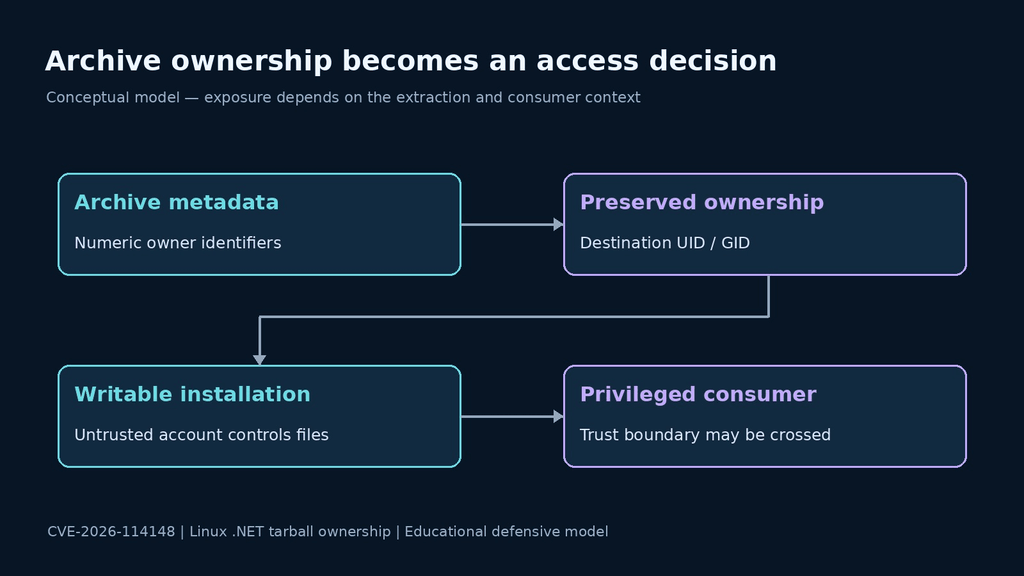
Ownership is only part of effective access. Group write permissions, writable parent directories, and access-control lists can change who can replace a file or directory. Inspect the route to the installation as well as the files inside it. A root-owned executable under a directory that an untrusted account can replace does not establish a protected installation.
The review should also name the consumer. A private development tree used by one account presents a different boundary from a shared runtime selected by privileged services. Record both the writer and the consumer before assigning application-specific impact. Do not turn the existence of a numeric owner in an archive listing into proof that a production system was exploited.
A read-only inventory for an owned Linux installation
Start with the installation record and the service’s configured runtime path. The shell’s default dotnet command may select a different tree. In an owned environment, the following commands collect metadata without extracting an archive, changing permissions, or starting an exploit. Replace both example paths with reviewed local paths.
# Archive metadata only; do not extract an unverified download.
tar --numeric-owner -tvf ./verified-runtime-archive.tar.gz | head -n 40

# Intended installation and its parent directory.
stat -c '%u:%g %a %n' /opt/example-dotnet /opt

# Bounded file and directory sample from an owned installation.
find /opt/example-dotnet -xdev -maxdepth 2 \
  -printf '%U:%G %m %p\n' | head -n 80

# Inventory for the dotnet executable selected in this shell.
dotnet --list-runtimes
This is a sampling aid, not a vulnerability detector. A forty-entry archive listing does not inspect every member; a depth-two filesystem sample does not inspect every nested file. The commands do not evaluate ACLs or prove which runtime a running service loaded. Use the samples to locate the relevant tree and then complete the inventory through your normal administration tooling.
For a shared installation, identify every service, scheduled job, and build task that references the tree. Record the account running each consumer and the intended administrative owner. Keep runtime configuration separate from a developer’s shell configuration. A successful check against one executable should not silently become a statement about every side-by-side installation.
If the evidence suggests files may already have been altered, preserve the relevant records before replacement and involve the established incident-response process. Correcting an owner field does not establish the integrity of an existing executable. The restoration decision and the investigation of past activity need their own evidence.
Replace the installation through a clean trust boundary
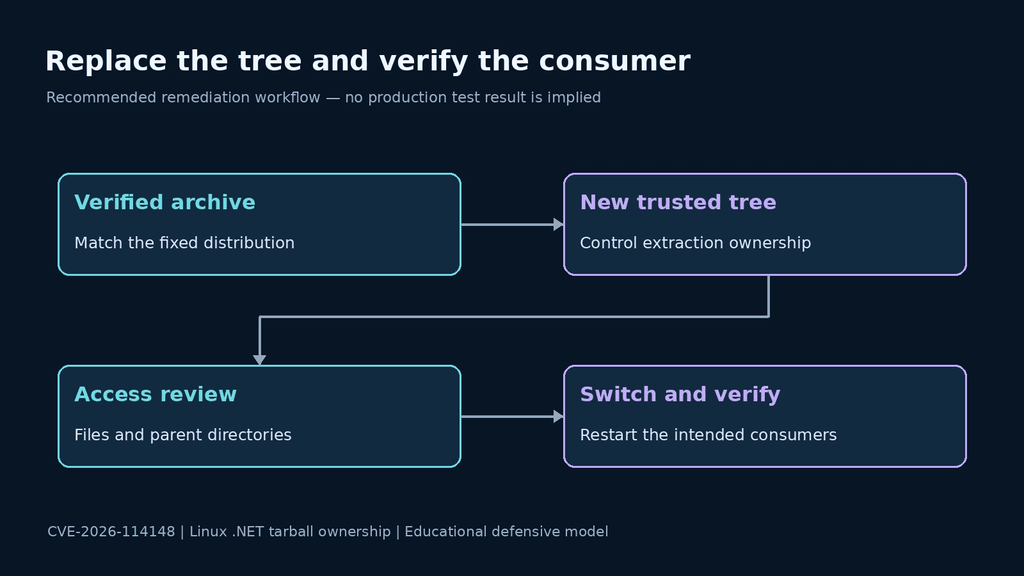
The advisory calls for a clean replacement from the appropriate patched archive, rather than extracting over the affected tree. Follow Microsoft’s manual Linux installation guidance for ownership-controlled extraction. Obtain the archive through the trusted publisher and compare its checksum with the publisher’s release information before installation.
Prepare a new empty installation directory under the intended administrative owner. Its parent directories must also be protected from untrusted modification. Plan the switch with the service owner, including stopping the relevant consumers, preserving necessary evidence, and identifying the exact replacement path. Do not copy old binaries into a clean installation simply to restore a familiar layout.
The following is a deployment template for an authorized administrator, not a command to run against an arbitrary host. The archive and destination variables must already name a verified fixed archive and a new empty trusted directory. It deliberately performs no recursive ownership repair of an existing tree.
# Preconditions: verified patched archive; new empty trusted destination.
# Perform shared installation in the approved administrator context.
(
    umask 022
    tar -xzf "$PATCHED_ARCHIVE" -C "$NEW_DOTNET_ROOT" \
        --no-same-owner --no-same-permissions
)
After extraction, verify the intended owner and effective write access before switching consumers. Then restart the application through its normal deployment process and confirm which runtime it selected. A test that invokes an unrelated executable on PATH does not establish that the service moved to the replacement tree.
Carry the correction into images and engineering inputs
Les .NET deployment overview distinguishes framework-dependent applications from applications that bundle their runtime. Use that inventory distinction to identify the artifact that needs review. A host-runtime change does not replace a separate runtime bundled inside an application. For this ownership issue, establish the archive provenance and resulting access boundary rather than inferring exposure from the deployment label alone.
For a custom container image, inspect the build recipe that introduced the archive. Record the input digest, extraction command, relevant users and groups, and intended final ownership. Rebuild from reviewed inputs when the recipe or artifact needs correction. A permission change made only inside one running container will disappear when an unchanged image creates its replacement.
For engineering workflows, separate the downloaded source-build archive, its extracted workspace, and downstream outputs. Give each a provenance record. A vulnerable input deserves review, but the mere presence of an engineering archive does not prove that a production runtime was installed from it. Trace the transformation before assigning deployment impact.
A practical acceptance test can use a controlled local account that should have no write authority. Confirm that it cannot alter the replacement tree or its parents using your approved permission-audit tooling. Pair that negative check with a normal application smoke test. Record the account, path, expected result, and release artifact so the test remains understandable after the maintenance window.
Questions about CVE-2026-114148
Is this a remote ASP.NET Core request exploit?
- The advisory describes local privilege escalation through file ownership. Do not equate it with the separate Brotli decompression vulnerability released in the same update.
Will upgrading a NuGet reference repair the installation?
- A dependency declaration does not establish the ownership or integrity of an existing runtime tree. Review the installation source and replace affected installations through the documented procedure.
Can a recursive chown close the finding?
- Changing ownership alone does not show whether existing files were altered or whether another service still uses the old tree. Preserve evidence when needed and use a clean replacement with verified inputs.
What should a remediation record retain?
- Retain the archive identity, fixed release mapping, new installation path, intended owner, effective-access results, selected runtime evidence, and affected consumer inventory.
- Keep any incident-investigation conclusion separate from patch completion. A corrected installation does not by itself explain historical activity.
The useful finish line is an installation whose inputs are trusted, ownership is deliberate, and consumers use the corrected tree. Close those three evidence gaps together. A new version string is helpful context, but the security property is who can change the files a privileged process will use.

 French
  English
  German
  Spanish
  Portuguese
  Japanese
  Korean
  Hindi
Hindi  Arabic
  Turkish
  Hebrew