
If you are searching for a “CVE-2026-3909 PoC,” the first useful correction is this: the public record does confirm an actively exploited Chrome zero-day in Skia, but it does pas give you a vendor-published, technically complete exploit chain or a trustworthy public reproducer you can simply treat as ground truth. Google publicly states that CVE-2026-3909 is a high-severity out-of-bounds write in Skia, reported on March 10, 2026, and that an exploit exists in the wild. NVD records it as CWE-787 with a CVSS v3.1 score of 8.8. Chromium’s own security policy also explains why the public record is thin: bug access is restricted, and fixed security bugs are generally made publicly visible only after roughly 14 weeks. (Chrome Releases)
That difference matters because a lot of browser-vulnerability writing collapses three separate things into one word. A vulnerability can be publicly acknowledged. It can be actively exploited by a sophisticated actor. And it can still lack a public, auditable, technically useful PoC. CVE-2026-3909 is in exactly that category. It is real. It is urgent. It is operationally important. But it is not responsibly described as “fully public exploit material” just because the keyword “poc” is popular in search results. (nvd.nist.gov)
The second correction is about versions. On March 12, 2026, Google published desktop stable notes for 146.0.7680.75 and 146.0.7680.75 or .76, but updated those notes on March 13 to say that CVE-2026-3909 would instead be fixed in a future update. The actual desktop fix landed in the March 13 release, version 146.0.7680.80. That is not a trivial editorial detail. It changes how defenders should validate patch state and explains why some writeups ended up repeating the wrong version boundary. NVD’s own record reflects this tension: the description field still says “prior to 146.0.7680.75,” but the NVD change history and affected software configuration were later updated to versions before 146.0.7680.80, aligning with Google’s corrected release note. (Chrome Releases)
That inconsistency is one of the reasons a serious piece on “cve-2026-3909 poc” should spend more time on evidence quality than on theatrics. If a team cannot even agree on which fixed version is authoritative, it has no business claiming certainty about a private exploit chain.
CVE-2026-3909 timeline, the March 12 and March 13 split matters
The clean public timeline starts on March 10, 2026, when Google Threat Analysis Group reported the issue. On March 12, Google pushed a Chrome desktop update that prominently addressed CVE-2026-3910, another actively exploited zero-day in V8. The March 12 note was then updated on March 13 to clarify that CVE-2026-3909 had been listed prematurely and would instead be fixed in a later build. On March 13, Google published the desktop release that actually carried the CVE-2026-3909 fix, version 146.0.7680.80, and explicitly stated that an exploit existed in the wild. (Chrome Releases)
That same day, CISA added CVE-2026-3909 to the Known Exploited Vulnerabilities catalog. NVD shows the KEV addition date as March 13, 2026, the due date for Federal Civilian Executive Branch agencies as March 27, 2026, and the required action as applying vendor mitigations or discontinuing use if mitigations are unavailable. For defenders, that is the point where this stops being an interesting browser bug and becomes an immediate patch-validation problem. (NVD)
Google also moved quickly across adjacent platforms. The Android release published on March 13 states that Chrome 146.0.76380.119 for Android contains the same security fixes as the corresponding desktop releases unless otherwise noted. ChromeOS stable notes published the same day show CVE-2026-3909 included in the security fixes for M-145, browser version 145.0.7632.216. ChromeOS Long Term Support channel notes published on March 16 show selected fixes including CVE-2026-3909 in version 144.0.7559.246. (Chrome Releases)
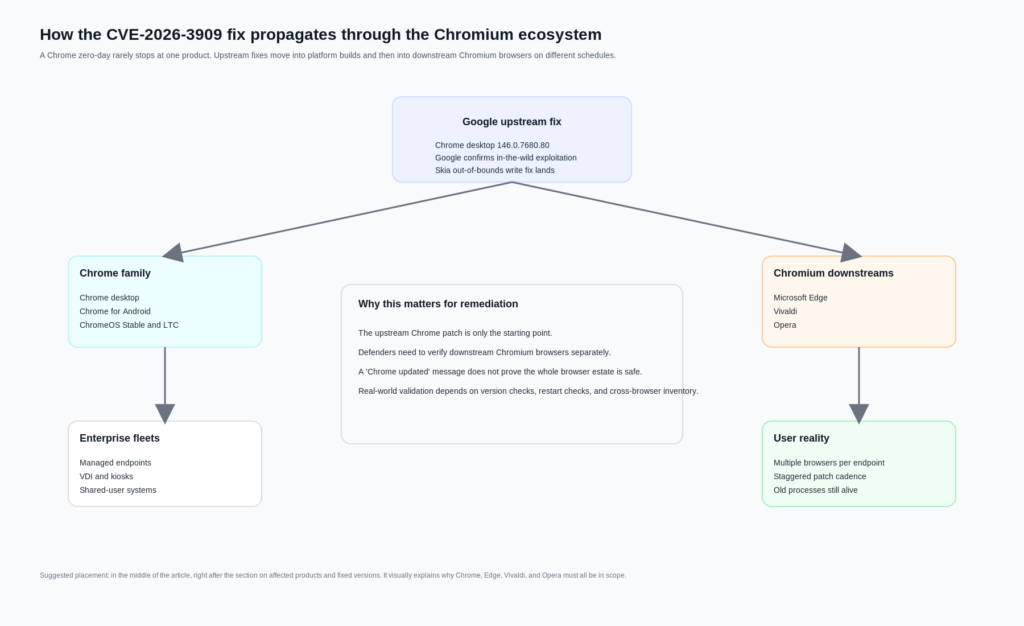
Chromium downstream vendors then followed. Microsoft says Edge Stable 146.0.3856.62, released March 16, 2026, contains the fix for CVE-2026-3909 and notes that the Chromium team reported exploitation in the wild. Vivaldi’s March 13 update says it backported fixes for CVE-2026-3909 and CVE-2026-3910 into its Chromium 144 ESR-based branch. Opera’s March 14 security post lists patched versions across Opera One, GX, Air, Neon, and Android. That is the real operational blast radius: not just Chrome, but browser estates that inherit Chromium security debt on their own cadence. (Microsoft Learn)
CVE-2026-3909, what the official record actually says
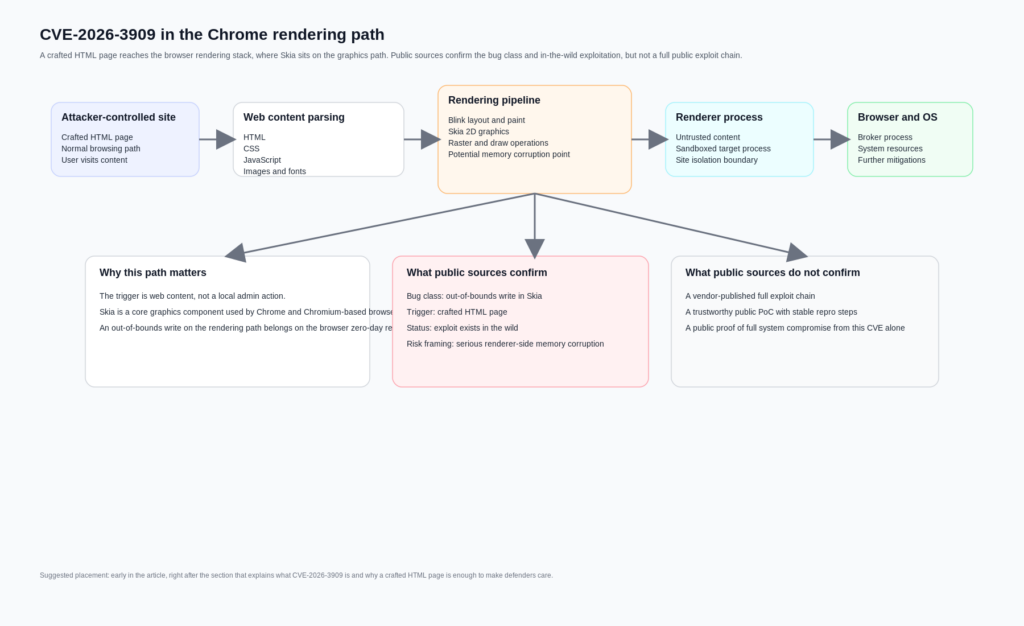
The official vulnerability description is short. NVD states: “Out of bounds write in Skia in Google Chrome prior to 146.0.7680.75 allowed a remote attacker to perform out of bounds memory access via a crafted HTML page.” NVD classifies it as CWE-787, Out-of-bounds Write, and scores it 8.8 with vector CVSS:3.1/AV:N/AC:L/PR:N/UI:R/S:U/C:H/I:H/A:H. That vector already tells an experienced reader a lot. The bug is reachable over the network. No prior privileges are needed. User interaction is required, which in browser terms usually means the victim must be driven to attacker-controlled content. The confidentiality, integrity, and availability impacts are all rated high. (NVD)
What it does pas say is equally important. The official description does not publicly spell out the exact vulnerable function, the malformed input structure, the memory layout condition needed for controlled corruption, the triggering graphics path, or a validated post-corruption outcome such as arbitrary native code execution outside the renderer. Some secondary writeups casually jump from “out-of-bounds write in a browser graphics library” to “full remote code execution.” That may be plausible as a threat model, but it is not what the official CVE text actually proves on its own. (nvd.nist.gov)
Being precise here is not pedantry. It is what separates a technical article from recycled alarm copy. In browser exploitation, “crafted HTML page” is often enough to imply serious risk because the browser is a giant interpreter for attacker-controlled input. But a memory corruption flaw in the renderer is not the same thing as a fully disclosed, single-CVE, system-level compromise. Modern Chrome deliberately layers sandboxing and process isolation because those distinctions matter. (Chromium)
Why Skia matters, and why a graphics bug is not a niche bug
Skia is not an obscure add-on. Google’s own Skia site describes it as an open-source 2D graphics library that serves as the graphics engine for Google Chrome and ChromeOS, Android, Flutter, and many other products. The Skia API documentation shows how central it is to drawing operations: the SkCanvas object hosts drawing calls like rectangles, paths, and text, while paint state controls how those primitives are rendered. In other words, Skia sits on a path that is both performance-critical and heavily exposed to complex rendering inputs. (Skia)
That alone does not prove exploitation details for CVE-2026-3909, but it does explain why the bug class is strategically important. Memory safety errors remain a dominant category in Chrome. Chromium’s own GWP-ASan article says that, despite major investments in prevention and detection, more than 60 percent of high-severity Chrome vulnerabilities are memory safety errors. That is a remarkable sentence because it comes from Chrome’s security engineering material, not from a vendor trying to sell fear. (chromium.org)
CWE’s official description of CWE-787 is direct: the product writes data past the end, or before the beginning, of the intended buffer. In practical terms, that means memory corruption. And Chrome’s Site Isolation documentation makes the point even sharper, noting that security bugs can often be made exploitable and that even one-byte buffer overruns can be turned into an exploit. Again, that is not a public statement that CVE-2026-3909 has a known one-byte overrun path. It is a statement about why a browser out-of-bounds write in a core rendering component deserves urgent attention even before full technical details are public. (CWE)
The broader context matters because many readers come to a browser CVE expecting a clear binary: either “just a crash” or “instant full takeover.” Real browser bugs do not behave like that. They live inside an architecture designed to assume that parsers, layout engines, graphics code, JavaScript engines, codecs, and GPU paths will occasionally fail. The security question is not whether those components are perfect. It is how hard it is to convert a bug in one layer into something durable and high-impact across layers. (Chromium)
Crafted HTML page does not mean trivial, but it does mean exposed
One of the most useful phrases in the public description is also one of the easiest to gloss over: “via a crafted HTML page.” In browser vulnerability language, that means the attacker-controlled trigger lives in ordinary web content rather than requiring a local foothold, a malicious extension with elevated permissions, or direct write access to browser state. The target surface is the normal browsing path. The attack delivery can still vary wildly in practice, but the core point is that the trigger reaches the vulnerable code through content the browser is built to accept. (NVD)
That matters because Chrome’s process model is designed around the assumption that renderers process untrusted input constantly. Chromium’s process-model documentation says modern browsers use multiple operating system processes to improve stability, security, and performance. It also notes that Chromium aims to use separate processes for different site instances and that Site Isolation, where feasible, allows each renderer process to access data from only a single site. The sandbox documentation adds that renderers are target processes running inside a restrictive environment, while the browser process acts as the privileged broker. (Chromium)
Put differently, the browser does not sandbox renderers because web pages are harmless. It sandboxes renderers because web pages are an attacker-controlled input format with enormous complexity. The sandbox FAQ is explicit that Chromium renderers are sandboxed and that the sandbox exists to limit the severity of bugs in code processing untrusted data. The same document also warns that the sandbox is not a silver bullet. It helps prevent arbitrary file access and persistent compromise from renderer-level bugs, but it cannot protect against every downstream path, and it cannot fix already-compromised systems or bugs in lower system components. (Chromium)
This is the right frame for CVE-2026-3909. A crafted HTML trigger in Skia means the initial risk belongs on the browser’s untrusted-content path. The official record tells us enough to justify urgent remediation. It does not tell us enough to publish a confident exploit narrative about which subcomponent is corruptible, how deterministic control is achieved, or whether the observed in-the-wild usage was part of a larger chain. That uncertainty should narrow the claims, not the urgency. (nvd.nist.gov)
CVE-2026-3909 PoC status, what is public and what is not
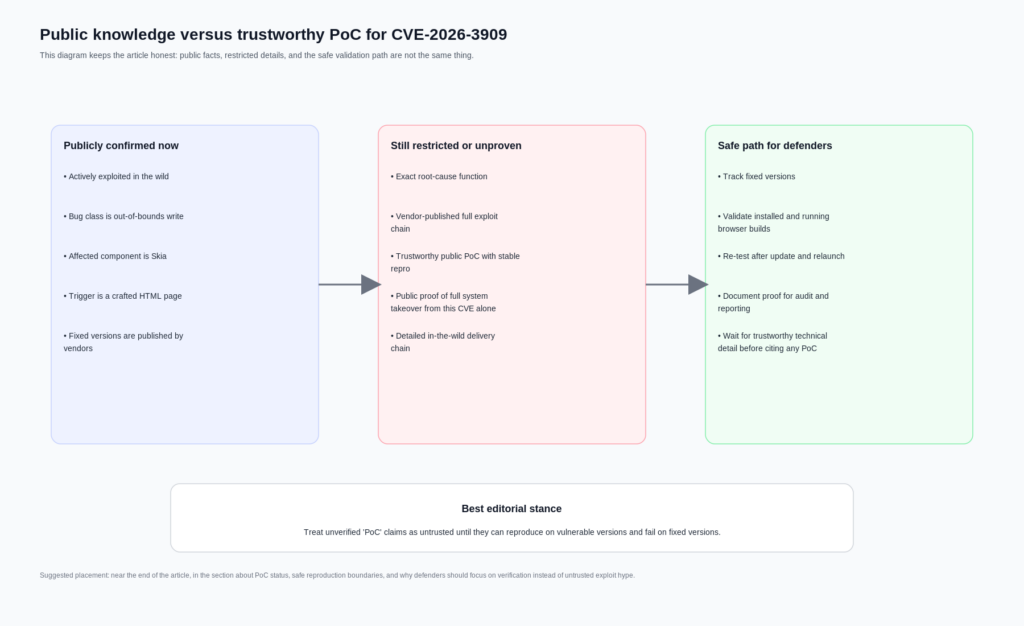
As of April 11, 2026, the most defensible statement is this: there is no authoritative public source from Google, NVD, or CISA that provides a detailed public PoC for CVE-2026-3909. Google’s release note confirms exploitation in the wild and identifies the bug class and affected component. NVD records the CVE, severity, and weakness classification. CISA records known exploitation and required action. But none of those sources publish a test case, a malicious sample, a root-cause diff explanation, or a step-by-step reproducer. (Chrome Releases)
That is consistent with Chromium’s stated security process. Chromium’s security page says access to security bugs is restricted and that fixed bugs in the issue tracker automatically become publicly visible 14 weeks after they are fixed. It also says advance notice of fixed vulnerabilities is limited to organizations that significantly deploy Chromium-based products and can justify the access. In other words, the lack of a detailed public bug trail is not unusual. It is the intended state for a browser zero-day shortly after an emergency patch. (chromium.org)
This is where the keyword “PoC” becomes dangerous. On the open internet, “PoC” may refer to any of the following:
| Phrase people use | What it may actually mean | Should you trust it as ground truth |
|---|---|---|
| Public PoC | A GitHub repo with a label and no real validation | Non |
| Internal reproducer | A vendor-only crash input or test harness | No, not unless released |
| Exploit in the wild | Observed real-world offensive use by an attacker | Not the same as a public PoC |
| Crash reproducer | A non-weaponized sample that reliably triggers sanitizer output | Potentially, if independently verifiable |
| Full exploit | A working chain that achieves controlled post-corruption outcomes | Not publicly supported here |
The table above is not a semantic game. It is how good incident responders avoid contaminating their process with untrusted material. A third-party repository titled “CVE-2026-3909-PoC” is not proof that the underlying technique is real, accurate, safe, or even relevant to the shipped patch. Search results can surface GitHub aggregation pages that mention a CVE label, but that alone does not turn the content into a reliable technical reference. Until the Chromium issue opens or a trustworthy researcher publishes a verifiable crash-only reproducer with enough evidence to validate patched versus unpatched behavior, the honest stance is caution. (GitHub)
A practical rule helps here. For a browser zero-day, a useful defensive PoC should do at least three things. It should reproduce in a controlled lab. It should produce a stable and inspectable signal, such as a crash or sanitizer trace, not merely “something weird happened.” And it should cleanly distinguish vulnerable and fixed versions. Without that, it is not a PoC you can responsibly cite in a formal security workflow. It is at best an unverified artifact.
Publicly confirmed facts versus claims that remain unproven
A lot of confusion around CVE-2026-3909 disappears once you separate what official sources confirm from what people infer.
| Claim | Supported by official public sources | Current status | Operational meaning |
|---|---|---|---|
| CVE-2026-3909 is actively exploited in the wild | Oui | Confirmed by Google, reflected in KEV | Patch and verify immediately |
| The issue is an out-of-bounds write in Skia | Oui | Confirmed | Treat as a serious memory corruption bug |
| A crafted HTML page can trigger it | Oui | Confirmed | Browser exposure is the entry surface |
| Google published a full public PoC | Non | Non pris en charge | Do not repeat this as fact |
| The March 12 desktop build fixed CVE-2026-3909 | Non | Officially corrected | Validate against March 13 and later fixed versions |
| NVD and Google are perfectly aligned on fixed version wording | Non | Description and CPE history differ | Use the corrected release note and updated NVD configuration carefully |
| Chromium-based browsers downstream also had to patch | Oui | Confirmed by vendor advisories | Include Edge, Vivaldi, Opera, and similar browsers in response scope |
| CVE-2026-3909 alone is publicly proven to yield full system compromise | Non | Not publicly established | Do not overclaim beyond the official record |
The most important row in that table is the fifth one. A surprising amount of bad vulnerability writing comes from copying the first screenshot or first NVD snippet seen in search results. In this case, version accuracy is not optional. It changes who is still exposed and whether your fleet report is honest. (Chrome Releases)
Fixed versions that defenders should actually verify
Below is the patch matrix that is operationally useful. It focuses on versions that official vendor materials publicly identify as fixed or incorporating the Chromium fix.
| Produit | Fixed version to verify | Notes |
|---|---|---|
| Google Chrome Desktop, Windows and macOS | 146.0.7680.80 or later | March 13 emergency fix |
| Google Chrome Desktop, Linux | 146.0.7680.80 or later | March 13 emergency fix |
| Chrome for Android | 146.0.76380.119 or later | Same security fixes as corresponding desktop release unless otherwise noted |
| ChromeOS Stable | Browser version 145.0.7632.216 | Security fixes include CVE-2026-3909 |
| ChromeOS LTC | 144.0.7559.246 | Selected security fixes include CVE-2026-3909 |
| Microsoft Edge Stable | 146.0.3856.62 or later | March 16 fix |
| Vivaldi Desktop 7.8 minor update | Chromium 144.0.7559.246 ESR backport | Vendor says it includes fixes for CVE-2026-3909 and CVE-2026-3910 |
| Opera One | 128.0.5807.77 or later | Vendor lists patched version |
| Opera GX | 128.0.5807.78 or later | Vendor lists patched version |
| Opera Air | 128.0.5807.79 or later | Vendor lists patched version |
| Opera Neon | 127.0.5778.126 or later | Vendor lists patched version |
| Opera for Android | 96.2 or later | Vendor lists patched version |
The table above is built from vendor release notes rather than guesswork. Chrome desktop fixed CVE-2026-3909 in 146.0.7680.80 on March 13. Android’s March 13 release states that 146.0.76380.119 carries the same security fixes as the corresponding desktop release unless otherwise noted. ChromeOS stable and LTC notes explicitly include CVE-2026-3909. Microsoft says Edge 146.0.3856.62 contains the Chromium fix. Vivaldi and Opera both published official notes for their downstream patching. (Chrome Releases)
One more subtle point matters in enterprise reporting: a machine can have the patched browser package installed and still be risky if the running browser process has not been restarted. Browser zero-day response is one of those domains where “deployed” and “effective” are not synonyms.
Inventory before theory, the defender workflow that actually works
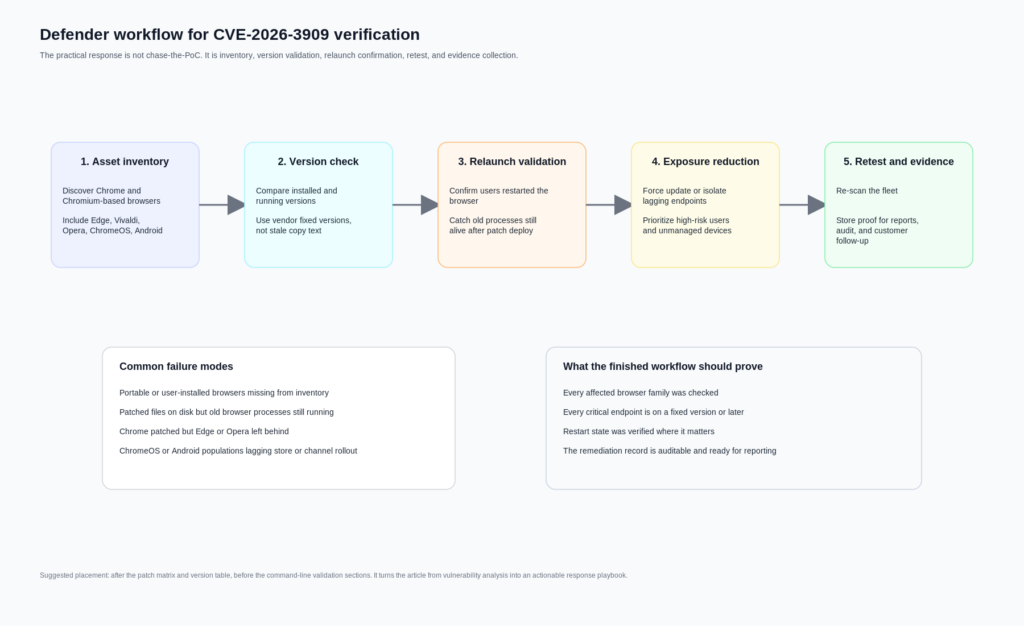
A reliable response to CVE-2026-3909 starts with asset truth, not exploit gossip. Teams usually lose time on browser zero-days because browser reality is messy. Endpoints often have more than one Chromium-based browser. Some users run Chrome and Edge side by side. Developers keep Canary or Beta installed. VDI or gold images lag. Portable or user-scoped installs bypass normal software inventory. Mobile updates depend on store rollout. ChromeOS channel differences complicate version assumptions. All of that is more common than any team likes to admit. (Chrome Releases)
The correct sequence is simple, but not easy:
- Enumerate every Chrome and Chromium-based browser in scope.
- Compare installed versions against the vendor-confirmed fixed versions.
- Confirm restart state where relevant.
- Force patch and relaunch on lagging systems.
- Re-scan for stragglers.
- Preserve evidence that the validation really happened.
That last step gets underestimated. Security leaders rarely get challenged on whether they knew about a zero-day. They get challenged on whether they can prove remediation across the actual fleet. This is where workflow tooling matters more than another CVE summary. Penligent’s public material is useful here not because it “explains the bug better,” but because it frames AI-assisted offensive and validation work around asset correlation, candidate-path generation, replay planning, evidence packaging, and retest support. Those are exactly the operational chores that turn zero-day response from an inbox exercise into an auditable remediation cycle. (penligent.ai)
A good browser zero-day response program should be able to answer four questions within hours, not days. Which endpoints are still vulnerable. Which business-critical users are affected. Which downstream Chromium browsers are lagging behind Chrome itself. And which systems were patched but not relaunched. Those questions are mundane, but they matter more than speculative exploit fiction.
Windows version checks for CVE-2026-3909
The fastest Windows workflow is usually a mix of file-version checks and software inventory. The script below checks common installation paths for Chrome and Edge, prints the detected product version, and compares it to the fixed threshold.
$targets = @(
    @{
        Name = "Google Chrome"
        Fixed = [version]"146.0.7680.80"
        Paths = @(
            "$Env:ProgramFiles\Google\Chrome\Application\chrome.exe",
            "$Env:ProgramFiles(x86)\Google\Chrome\Application\chrome.exe",
            "$Env:LocalAppData\Google\Chrome\Application\chrome.exe"
        )
    },
    @{
        Name = "Microsoft Edge"
        Fixed = [version]"146.0.3856.62"
        Paths = @(
            "$Env:ProgramFiles\Microsoft\Edge\Application\msedge.exe",
            "$Env:ProgramFiles(x86)\Microsoft\Edge\Application\msedge.exe",
            "$Env:LocalAppData\Microsoft\Edge\Application\msedge.exe"
        )
    }
)

foreach ($target in $targets) {
    $found = $false

    foreach ($path in $target.Paths) {
        if (Test-Path $path) {
            $found = $true
            $ver = [version](Get-Item $path).VersionInfo.ProductVersion
            $status = if ($ver -ge $target.Fixed) { "PATCHED_OR_NEWER" } else { "VULNERABLE_OR_OLDER" }

            [pscustomobject]@{
                Browser = $target.Name
                Path    = $path
                Version = $ver.ToString()
                Fixed   = $target.Fixed.ToString()
                Status  = $status
            }
        }
    }

    if (-not $found) {
        [pscustomobject]@{
            Browser = $target.Name
            Path    = "Not found in common paths"
            Version = ""
            Fixed   = $target.Fixed.ToString()
            Status  = "NOT_DETECTED"
        }
    }
}
This works well for the common cases, but it has limits. It can miss custom paths, virtualized packages, packaged app variants, or browsers copied outside managed directories. It also tells you the executable’s product version, not whether a user left a pre-patch process alive for days before relaunch. For that, you often want to pair file-version checks with running-process inspection or EDR telemetry.
A second script can inspect process versions directly:
$processNames = @("chrome", "msedge")

Get-Process -Name $processNames -ErrorAction SilentlyContinue | ForEach-Object {
    try {
        $path = $_.Path
        $ver  = (Get-Item $path).VersionInfo.ProductVersion

        [pscustomobject]@{
            ProcessName = $_.ProcessName
            PID         = $_.Id
            Path        = $path
            ProductVersion = $ver
        }
    } catch {
        [pscustomobject]@{
            ProcessName = $_.ProcessName
            PID         = $_.Id
            Path        = "Unavailable"
            ProductVersion = "Unavailable"
        }
    }
}
That script does not solve every edge case either, but it closes one of the biggest operational gaps: machines that received the update on disk but are still running the old image in memory.
If you need a more inventory-oriented approach, checking uninstall registry keys can also help:
$keys = @(
  "HKLM:\Software\Microsoft\Windows\CurrentVersion\Uninstall\*",
  "HKLM:\Software\WOW6432Node\Microsoft\Windows\CurrentVersion\Uninstall\*",
  "HKCU:\Software\Microsoft\Windows\CurrentVersion\Uninstall\*"
)

Get-ItemProperty $keys -ErrorAction SilentlyContinue |
  Where-Object { $_.DisplayName -match "Google Chrome|Microsoft Edge|Vivaldi|Opera" } |
  Select-Object DisplayName, DisplayVersion, InstallLocation
Use the registry view for coverage, and executable inspection for confidence.
macOS and Linux version checks for CVE-2026-3909
On macOS and Linux, direct version commands are often enough to find the laggards quickly.
# macOS common paths
"/Applications/Google Chrome.app/Contents/MacOS/Google Chrome" --version 2>/dev/null
"/Applications/Microsoft Edge.app/Contents/MacOS/Microsoft Edge" --version 2>/dev/null
"/Applications/Vivaldi.app/Contents/MacOS/Vivaldi" --version 2>/dev/null
"/Applications/Opera.app/Contents/MacOS/Opera" --version 2>/dev/null

# Linux common commands
google-chrome --version 2>/dev/null
google-chrome-stable --version 2>/dev/null
chromium --version 2>/dev/null
microsoft-edge --version 2>/dev/null
vivaldi --version 2>/dev/null
opera --version 2>/dev/null
If you want a compact compliance script for Linux or macOS shells, something like this is usually enough for quick field triage:
check_browser () {
  local name="$1"
  local cmd="$2"
  local fixed="$3"

  if command -v "$cmd" >/dev/null 2>&1; then
    local version
    version=$($cmd --version 2>/dev/null | grep -Eo '[0-9]+(\.[0-9]+)+')
    printf "%-20s %-18s fixed >= %s\n" "$name" "$version" "$fixed"
  else
    printf "%-20s not detected\n" "$name"
  fi
}

check_browser "Google Chrome" "google-chrome" "146.0.7680.80"
check_browser "Microsoft Edge" "microsoft-edge" "146.0.3856.62"
check_browser "Vivaldi" "vivaldi" "144.0.7559.246"
check_browser "Opera" "opera" "128.0.5807.77"
For broader fleet coverage, osquery can help normalize software inventory across systems:
SELECT
  name,
  version,
  path
FROM apps
WHERE
  name LIKE '%Chrome%'
  OR name LIKE '%Edge%'
  OR name LIKE '%Vivaldi%'
  OR name LIKE '%Opera%';
On Linux specifically, remember that package-manager state can lie in a very practical way. A package may already be updated while a long-running desktop session still has the old process tree alive. On macOS, the same principle applies when users never fully quit the browser. In both cases, version proof should be paired with relaunch proof for high-priority populations.
Detection for CVE-2026-3909 means exposure detection more than exploit detection
Teams often ask for “detection logic” as if every zero-day comes with a neat string, a stable URL pattern, or a reusable IOC set. That is usually not how browser zero-days work in the early phase. When the vulnerable code path, malicious test case, and in-the-wild delivery details are still restricted, most organizations cannot directly detect “CVE-2026-3909 exploitation” with high confidence. What they can detect is continued exposure. (chromium.org)
That changes how you should structure monitoring. The strongest signals are often these:
Old browser versions still present on endpoints after the patch window.
Running browser processes with pre-fix versions after deployment.
Unmanaged Chromium-based browsers missing from enterprise update policy.
Repeated browser crashes or abnormal restarts on users visiting untrusted sites.
Proxy or gateway data showing sensitive users still on older browser families.
Mobile populations stuck behind app-store lag or delayed MDM enforcement.
None of those proves exploit activity. But each of them proves something a security team can act on immediately. For this class of issue, exposure detection is often more valuable than speculative threat-hunting signatures that create false confidence.
There is also a reporting point here that matters for buyers and operators. Browser zero-day response is a good example of why security teams need more than AI summarization. Public Penligent material explicitly argues that the useful place for AI in security is not just report prose; it is asset correlation, replay planning, evidence collection, and retest support. That framing fits CVE-2026-3909 very well. The core problem is not “How do I describe the Skia bug?” It is “How do I prove that every affected browser path in my environment has been fixed and relaunched?” (penligent.ai)
What a safe, non-weaponized CVE-2026-3909 reproducer should look like later
There is a right way and a wrong way to talk about reproduction in a public article. The wrong way is to pretend there is enough public information today to publish a reliable exploit walk-through. The right way is to define the standard a future defensive reproducer should meet once the Chromium issue opens or enough trustworthy technical detail becomes public.
A useful defensive reproducer for CVE-2026-3909 would probably aim for one of these outcomes:
A stable crash on vulnerable versions.
A sanitizer finding on an instrumented build.
A patched-versus-unpatched behavioral difference.
A narrow, inspectable rendering-path trigger.
What it should pas aim for in a public defensive context is post-compromise control, sandbox escape, persistence, or chained offensive use. That is not necessary to validate remediation. It is also not necessary to understand why the bug mattered.
This boundary fits Chromium’s own development and security culture. Google’s release notes repeatedly reference tools such as AddressSanitizer, MemorySanitizer, UndefinedBehaviorSanitizer, libFuzzer, and AFL as part of the way Chrome security bugs are found. Chromium’s GWP-ASan article describes memory safety errors as a leading source of vulnerabilities and notes both the value and the limitations of sanitizer-based approaches. That is the mindset defenders should borrow: crash-focused, evidence-oriented, and careful about what a given signal actually proves. (chromium.org)
If a third-party CVE-2026-3909 sample ever circulates publicly, ask four blunt questions before you trust it:
Can you reproduce it on a vulnerable version?
Can you show that it stops reproducing on a fixed version?
Can you explain the signal beyond “the browser acted strange”?
Can you verify that it is not bundling unrelated behavior or outright malware?
If the answer to any of those is no, it is not a serious research artifact yet.
Why sandbox and Site Isolation change the meaning of “impact”
A common mistake in browser CVE writeups is to treat impact as a single-layer label. Chrome does not work like that. Chromium’s sandbox design describes the browser process as the broker that spawns and supervises sandboxed target processes, while renderer processes host code that runs inside the sandbox. Site Isolation then adds another security boundary by keeping different sites in separate processes where possible and by limiting access to cross-site data. Chromium’s compromised-renderers documentation makes the threat model explicit: if an attacker gets arbitrary native code execution inside a renderer sandbox, Chrome still tries to protect cookies, passwords, extension boundaries, privileged UI, and cross-site data through additional checks and isolation mechanisms. (Chromium)
That is why a browser memory corruption CVE should not be described in one-dimensional language. The direct outcome the public record confirms for CVE-2026-3909 is out-of-bounds memory access through a crafted HTML page. The realistic defender concern is that a memory corruption bug on the renderer side may be a stage in a broader exploitation chain. But Chrome’s architecture exists to make that chain harder. The practical impact on a specific victim therefore depends on whether the attacker can do more than win code execution or corruption inside a sandboxed renderer, whether site isolation reduces cross-site data exposure, whether the platform has further mitigations, and whether the browser is one of the downstream builds that lagged the fix. (nvd.nist.gov)
This also explains why incident-response language should stay disciplined. For example, saying “CVE-2026-3909 can definitely take over the entire system by itself” is too strong for the current public record. Saying “CVE-2026-3909 is a high-severity, actively exploited browser memory corruption issue that belongs on the browser’s untrusted content path and can be serious even without public chain details” is accurate.
Related Chrome CVEs that make CVE-2026-3909 easier to understand
CVE-2026-3909 makes more sense when you see it as part of a pattern rather than an isolated weird rendering bug.
The closest sibling is CVE-2026-3910. Google fixed that V8 issue in the March 12 desktop release and stated that an exploit existed in the wild. Then, one day later, it shipped the separate fix for CVE-2026-3909 in Skia. Operationally, those two dates matter because some organizations will have patched one build and assumed the emergency window was closed when it was not. For defenders, the right lesson is that browser emergency updates can split closely related active-exploitation items across multiple builds. (Chrome Releases)
The earlier Chrome zero-day CVE-2026-2441 is also instructive. NVD describes it as a use-after-free in CSS in Google Chrome prior to 145.0.7632.75 that allowed a remote attacker to execute arbitrary code inside a sandbox via a crafted HTML page. Google’s February 13 release note says an exploit for CVE-2026-2441 existed in the wild. That pair of facts is useful because it shows how Chrome sometimes phrases public impact when it is prepared to be more specific about post-trigger behavior. In CVE-2026-2441, the public description explicitly says arbitrary code execution inside the sandbox. In CVE-2026-3909, the public description stops at out-of-bounds memory access. That difference should shape how precisely you write about each bug. (nvd.nist.gov)
Then there is CVE-2026-5281, fixed on March 31 and published by NVD on April 1. NVD describes it as a use-after-free in Dawn in Google Chrome prior to 146.0.7680.178 that allowed a remote attacker who had compromised the renderer process to execute arbitrary code via a crafted HTML page. Google’s March 31 release notes say an exploit for CVE-2026-5281 exists in the wild. That wording is valuable because it makes the stage distinction explicit: the attacker already has renderer compromise and uses Dawn as a later step. This is exactly the kind of nuance that readers need when they try to interpret CVE-2026-3909. Browser exploitation is often layered. One bug may get you into the renderer. Another may deepen control or widen impact. (nvd.nist.gov)
Taken together, CVE-2026-2441, CVE-2026-3909, CVE-2026-3910, and CVE-2026-5281 say something uncomfortable but important about 2026 Chrome security. The pattern is not just “Chrome had bugs.” The pattern is that multiple high-severity browser bugs tied to attacker-controlled HTML and memory safety landed in active-exploitation windows within a short period. That is exactly why version verification, relaunch confirmation, and downstream Chromium coverage deserve more attention than the average browser patch note gets.
Hardening after patch day, what reduces risk beyond a single update
Patch fast is still the first rule, but it should not be the last one. Chrome’s own architecture documents make clear that sandboxing and Site Isolation exist to reduce the damage from renderer compromise and cross-site attacks. Site Isolation documentation says it is enabled at an appropriate level for most users and explains both its protections and some platform limitations, including reduced scope on some Android conditions and lack of support in Android WebView. That means hardening is not abstract. It is a question of whether your environment preserves the browser’s default defensive posture or weakens it through exceptions, unsupported devices, or unmanaged builds. (chromium.org)
A practical hardening checklist after CVE-2026-3909 should include these points.
Keep auto-update enabled and monitored for all Chromium-based browsers, not just Chrome.
Reduce restart lag through policy, especially for high-risk user groups.
Inventory Edge, Opera, Vivaldi, and any developer-installed Chromium variants.
Track browser version compliance centrally instead of relying on user prompts.
Flag devices with stale browser processes even after update deployment.
Review where unmanaged browsers are tolerated on corporate endpoints.
Treat ChromeOS channel diversity, VDI images, and mobile rollout lag as first-class risk factors.
Avoid security-bypass flags or debugging configurations outside isolated test environments.
That list is intentionally boring. Mature security operations are boring in the right places. Browser zero-days reward teams that can do inventory and proof quickly, not teams that can write the most dramatic Slack post.
What to say in a report, and what not to say
By the time a browser zero-day reaches internal reports, executive memos, or customer notifications, inaccurate phrasing tends to harden into institutional myth. CVE-2026-3909 is a good case study in what disciplined reporting looks like.
A strong sentence would read like this:
“CVE-2026-3909 is an actively exploited Chrome zero-day in Skia, classified as an out-of-bounds write, with public vendor guidance confirming reachability through a crafted HTML page and downstream patch obligations for Chromium-based browsers.” (Chrome Releases)
A weaker sentence would read like this:
“Google published a full exploit and attackers can trivially get full system RCE through any website.”
That sentence goes well beyond the public record.
Another good reporting practice is to preserve documented ambiguity. For example, it is entirely fair to say that the public version boundary required care because the March 12 note was corrected on March 13 and NVD’s description text did not fully match the later CPE configuration update. That is not nitpicking. It is how you prevent a vulnerable machine from being marked safe because someone trusted the first cached headline. (Chrome Releases)
The responsible bottom line on CVE-2026-3909 PoC
The honest answer to the search term “cve-2026-3909 poc” is not a download link. It is a state assessment.
CVE-2026-3909 is a real, high-severity, actively exploited Chrome zero-day. The affected component is Skia, Google’s widely used 2D graphics library. The public trigger condition is a crafted HTML page. The bug class is CWE-787 out-of-bounds write. CISA added it to KEV on March 13, 2026. Google corrected its release notes and shipped the actual desktop fix on March 13 in Chrome 146.0.7680.80, with corresponding platform and downstream vendor updates following. All of that is solid. (nvd.nist.gov)
Qu'est-ce que pas solid in the public record is a vendor-published, technically detailed, trustworthy public PoC. Chromium’s own security model explains why that gap exists. Until the underlying issue opens or a credible researcher publishes a verifiable non-weaponized reproducer, defenders should treat public “PoC” claims with skepticism and focus on what they can prove today: versions, restart state, downstream browser coverage, and evidence-backed remediation. (chromium.org)
That is not a lesser outcome. For most real-world teams, it is the more valuable one. The browser zero-day that hurts you is rarely the one with the most exciting PoC label. It is the one you assumed was patched because somebody copied the wrong version number into a spreadsheet.
Further reading and reference links
- NVD entry for CVE-2026-3909. (NVD)
- Google Chrome March 12, 2026 desktop release note, later corrected. (Chrome Releases)
- Google Chrome March 13, 2026 desktop release note with the actual CVE-2026-3909 fix. (Chrome Releases)
- Chrome for Android March 13, 2026 update. (Chrome Releases)
- ChromeOS Stable note including CVE-2026-3909. (Chrome Releases)
- ChromeOS Long Term Support note including CVE-2026-3909. (Chrome Releases)
- Chromium Security overview and bug-visibility policy. (chromium.org)
- Chromium Site Isolation documentation. (chromium.org)
- Chromium sandbox design and renderer model. (Chromium)
- Microsoft Edge security release notes for the CVE-2026-3909 fix. (Microsoft Learn)
- Vivaldi official downstream patch note. (Vivaldi Browser)
- Opera official downstream patch note. (Opera News)
- Penligent article on CVE-2026-3909. (penligent.ai)
- Penligent article on verified AI pentesting workflows. (penligent.ai)
- Penligent documentation. (penligent.ai)


 French
  English
  German
  Spanish
  Portuguese
  Japanese
  Korean
  Hindi
Hindi  Arabic
  Turkish
  Hebrew