
CVE-2026-39919 affects Ghostscript’s JPEG 2000 processing path. The immediate job is to identify which deployed process renders untrusted PDFs, then install a fixed final release or a distribution package carrying the repair. Updating a WordPress plugin or a development workstation does not establish that the document worker was repaired.
VulnCheck’s advisory identifies Ghostscript versions before 10.08.0 as affected and records a CVSS 4.0 score of 9.3. The repair is already available upstream. Choose the appropriate supported package for your environment and verify the actual deployed build.
The processing path determines exposure
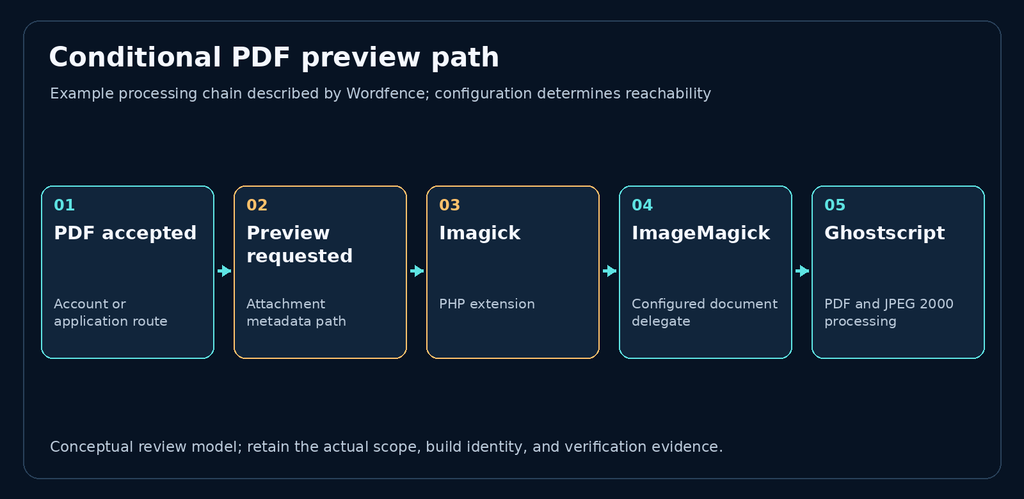
Wordfence’s original research describes code execution on a purpose-built WordPress test site. Its relevant chain was a PDF accepted through an application route, preview generation through Imagick and ImageMagick, and a separate Ghostscript process. Stock WordPress does not provide anonymous Media Library uploads; an exposed route and enabled processing chain must be established separately.
Trace that path in your own service. Does intake merely store the document, or enqueue a preview? Which worker receives the job? Which container and executable does that worker use? An application can accept a PDF without invoking Ghostscript, while an asynchronous preview service can invoke it after the upload request has finished.
These questions change what must be patched. A repaired web container is insufficient when the queue still routes work to an older conversion image. Conversely, an installed Ghostscript package does not by itself prove that an internet-facing application can reach the affected processing path.
What fails inside the adapter
Red Hat’s CVE description identifies a heap overflow in the JPEG 2000 output adapter involving a PDF image whose components use mismatched subsampling factors. Memory corruption can lead to code execution. This is a native processing defect; a successful upload response is not evidence that the renderer handled the file safely.
The severity assessments use different assumptions. VulnCheck records a network-oriented CVSS 4.0 assessment, while Red Hat records CVSS 3.1 7.8 with local processing and required interaction. Assess the actual intake and processing arrangement instead of averaging those scores or treating either score as a measurement of your deployment.
Wordfence’s demonstrated exploits were build-specific. Their limitations do not establish that another affected build is safe, and their lab result does not establish that an arbitrary production site is compromised. The useful defensive evidence is the reachable path, executing build, and applicable repair.
Verify a package repair in the actual worker
Start with the worker’s operating-system package record or image inventory. Match its supplier, full package revision, and advisory. Red Hat’s advisory explains why distribution fixes can be backported: an older upstream version string can belong to a repaired package. Keep the supplier’s fix evidence alongside the installed package identity.
Also distinguish the final upstream release from a release candidate. Wordfence notes that the release candidate it examined reported 10.08.0 while lacking the repair. A banner alone therefore cannot close this case. Record the final package or release provenance.
Connect four records before closing the worker finding:
| Preuves | What to establish |
|---|---|
| Intake and execution | Which approved route or queue reaches which rendering worker |
| Repair identity | Which supported release or vendor package contains the fix |
| Activation | Which replacement process or container is now handling jobs |
| Compatibility | Whether a harmless PDF completes the expected preview flow |
Use a known benign PDF for the compatibility check. Record the job, worker identity, exit result, expected preview, and relevant errors. That demonstrates that the changed processing path still operates; it does not reproduce the vulnerability or independently prove the patch’s internal behavior.
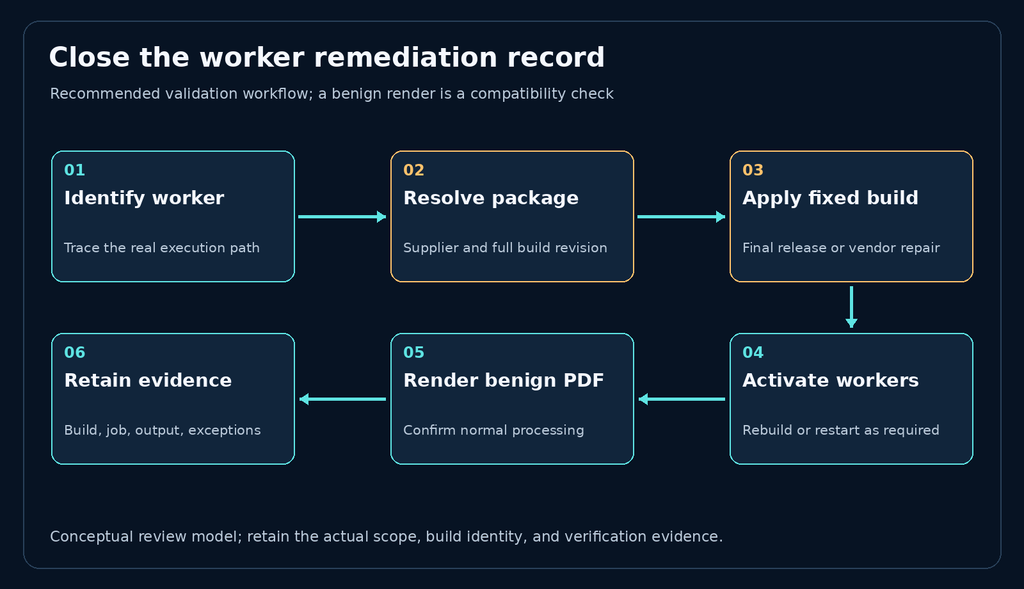
Inspect every relevant replica and queued-worker pool. Record exceptions such as a retired image still receiving jobs or a failed rollout that left an old worker active. Keep those exceptions open until the executing path is accounted for. Tie the deployment record to the worker that handled the verification job; the image tag or requested rollout alone leaves that connection unresolved.
Separate containment from repair
If an affected path cannot be repaired immediately, evaluate whether untrusted document processing can be suspended or restricted without breaking the required service. Make that decision with the service owner and track the operational impact. Isolation and limited worker privileges can reduce consequences, but they do not remove this memory-safety defect.
Preserve evidence and investigate suspicious processing history when warranted. Crashes, unusual child processes, or unexpected outbound activity can justify investigation; none is a standalone compromise verdict. Avoid sending weaponized PDFs into production to make a status dashboard turn green.
Close the finding when the reachable worker uses a supported fixed build, activation is demonstrated, and legitimate processing remains functional. Keep any separate incident investigation visible rather than treating a successful package update as proof that no earlier intrusion occurred.

 French
  English
  German
  Spanish
  Portuguese
  Japanese
  Korean
  Hindi
Hindi  Arabic
  Turkish
  Hebrew