
SCKit forces remote-support teams to recover three kinds of trust: the console that authorizes work, the technician device that carries administrative identity, and the customer endpoint where commands execute. Closing an exposed integration is only the first decision. Before reconnecting systems, responders must establish which administrative authority remains valid and whether a separate route still reaches the endpoint.
ConnectWise’s November 13 ScreenConnect advisory, updated at 21:15 UTC, calls for immediate action in on-premises environments. It separates disabling identified third-party extensions from verifying that every technician client runs ScreenConnect 26.6.5 or later. That update arrived on November 14 in Singapore. This article uses that publication boundary; later vendor updates may change the operational instructions.
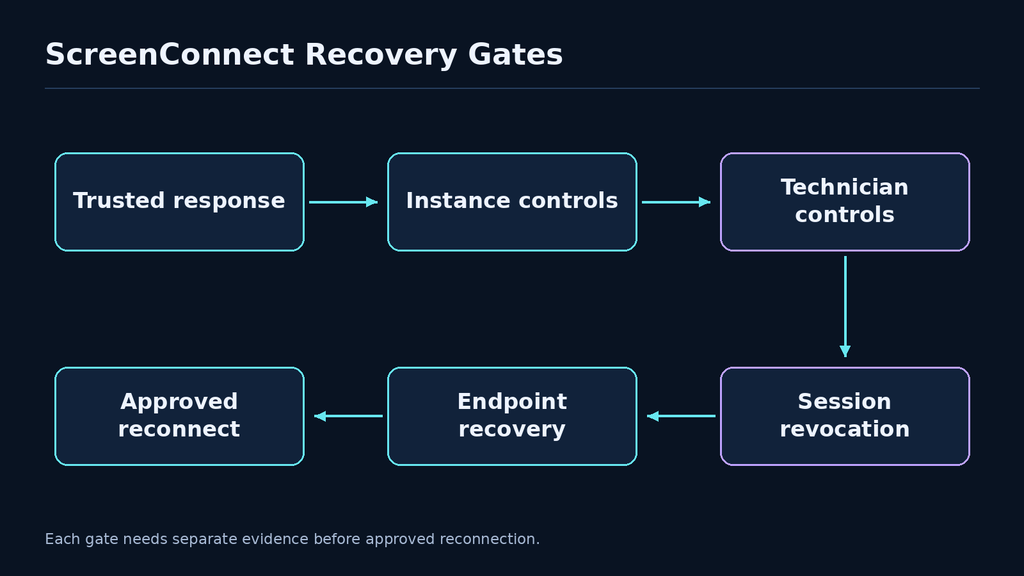
The practical response is to track three workstreams with separate evidence: management-instance protection, technician-client protection, and recovery of affected endpoints and sessions. A green version dashboard answers one question. It cannot establish that an unauthorized remote-access installation disappeared, that an administrator’s browser session was invalidated, or that every customer environment has received the same controls.
The investigation and recovery designs below are defensive recommendations. They do not reproduce the toolkit, contact attacker infrastructure, or supply a working exploit. They are intended for owners of ScreenConnect environments and responders operating with permission from the organizations whose devices and records they handle.
Three operating roles create three different evidence problems
Microsoft’s SCKit analysis distinguishes the management instance, the technician workstation, and the customer endpoint. A command issued through the management console can execute on the customer device without the technician workstation acting as its intermediary. Responders should preserve that distinction when attributing activity.
For an investigation, the console is an authority system. Its records help explain who could request work, what work was requested, and which managed sessions were addressable. The technician workstation is an identity-bearing device. It can hold authenticated browser state and tools used to administer multiple customers. The customer endpoint is an execution environment. It provides evidence about what actually started, which account ran it, and what access remained afterward. These roles can belong to different companies and different evidence custodians.
A useful case record assigns each observation to one of those roles before drawing a conclusion. A console event saying that a command was submitted is different from an endpoint event showing that a process started. A technician’s recollection that they were not using a device does not exclude console-originated execution on that device. Conversely, a process with a remote-support parent does not establish which person requested it. Attribution should follow the available identifiers and timestamps rather than a familiar product name.
| תפקיד | Question to resolve | Evidence to request | Weak substitute to avoid |
|---|---|---|---|
| Management instance | Which authority requested an action? | Account, session, command and configuration records | A screenshot of the current login page |
| Technician workstation | Could an administrative identity or session be reused? | Client inventory, endpoint timeline and identity revocation evidence | A password-reset receipt alone |
| Customer endpoint | What executed and what access remains? | Process, service, persistence and network evidence | The approved remote client still being present |
| Customer relationship | Who may contain or restore the device? | Named owner, authorization and recovery decision | An assumption that the MSP owns every system |
Keep the relationship between these roles in the evidence model. A technician account may administer several instances, while a customer device may have more than one legitimate management channel. One hostname may have changed during a rebuild. One service label may appear on many unrelated installations. Stable device identifiers, installation identities, console ownership, and customer ownership are more useful than trying to join every record on a display name.
For example, consider a fictional MSP with separate consoles for a hospital and a retailer. A technician uses one workstation for both. An alert on a retailer endpoint should trigger a review of the technician’s relevant access, but it does not justify declaring the hospital compromised. The investigation must establish whether the technician’s identity or workstation crossed the boundary. If the answer is unknown, the hospital’s access can be restricted while evidence is collected. That is a containment decision under uncertainty, not an infection count.
This role-based model also changes who participates. Console administrators can export configuration and command history. Endpoint responders can preserve local artifacts and inspect independent remote access. Identity administrators can terminate sessions and review privileges. Customer owners can approve isolation and restoration. Assigning one accountable lead does not remove those distinct technical responsibilities. The lead’s job is to keep the decisions consistent across them.
Separate extension exposure from technician-client exposure
The vendor’s current protective-action list names Labtech Plus, RMM Plus, RMM+, RMM Plus Password Link, and RMM+ Password Link. Its precautionary list also includes ITBoost Integration, RepairShopr Integration, and Guest Session Starter. Cloud-hosted disablement does not perform the same action on an on-premises installation. Follow the current advisory rather than treating this list as a permanent catalog.
These instructions describe a control-plane task: remove or disable a reachable integration capability. The technician-client requirement addresses a different boundary. A server maintenance operation should not be accepted as evidence that a workstation’s installed client has changed. The team responsible for endpoint software needs to verify the software that actually runs on every technician device, including a portable support environment or a device used only during an emergency.
Huntress’s primary investigation distinguishes observed endpoint activity from additional propagation functionality reconstructed from the toolkit. At the time described, it had not observed a successful endpoint-to-technician jump or onward spread. A capability diagram must preserve that limitation. A dashed route can show what defenders need to interrupt without asserting that the route succeeded in every incident.
The distinction matters because the two boundaries demand different owners and different acceptance tests. An instance administrator can confirm that a named extension is absent or disabled across the instances they control. An endpoint administrator can produce the installed version and running-process evidence for each technician workstation. Neither result automatically supplies the other. A combined ticket with a single “patched” checkbox makes it too easy for one group’s completion to hide the other group’s unfinished work.
Use explicit state values. For an extension, record installed, disabled, removed, or unknown, together with the instance and observation time. For a client, record installed version, running version where obtainable, last device check-in, and whether a restart or relaunch remains pending. For a customer endpoint, record investigated, isolated, rebuilt, restored, or awaiting evidence. An “unknown” state should carry an owner and a deadline; otherwise it becomes an informal exemption.
Do not equate the presence of an extension with confirmed compromise. It is an exposure condition that calls for protective action and investigation. Equally, do not equate its removal with proof that no compromise happened. Historical access can produce consequences that remain after the original route closes. The article’s recovery model deliberately treats those propositions as separate: exposure, observed execution, established access, and verified restoration.
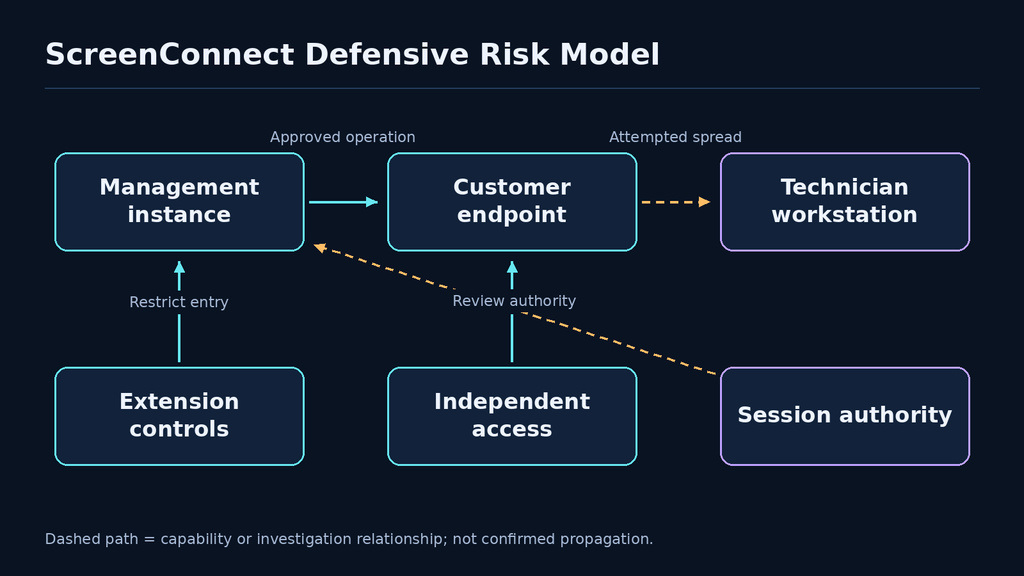
A closure record should allow a reviewer to inspect each boundary independently. “Extensions disabled on all identified instances” is a narrow, testable statement. “All technician devices checked in after the approved client rollout” is another. “All affected customer devices passed the recovery criteria” is a third. They can ultimately support one incident decision, but the evidence should remain separable so that a new finding does not invalidate every completed task.
Establish a trusted response channel before investigating
The most urgent operational decision is how responders will reach a suspicious device. ConnectWise’s investigation guidance says not to use ScreenConnect to investigate or clean a suspected compromised endpoint. Use a trusted endpoint-response or other approved out-of-band route. A remote-support connection should not become the incident team’s default simply because it is familiar and available.
Before touching the endpoint, identify a clean coordination device and a communications channel that does not depend on the suspect administrative session. Assign an incident lead and an evidence custodian. Record the first reliable time of concern, the asset owner, and the control actions already taken. These steps are small, but they prevent the investigation from relying on a browser session or workstation whose trust is the very question under review.
Containment can affect customer operations. Ask the service owner which functions must continue and which management paths can be paused. A workstation used to administer production infrastructure should not remain unrestricted solely because disconnecting it is inconvenient. At the same time, isolation of a business-critical endpoint should follow the organization’s incident procedure and available safety constraints. The objective is to remove unauthorized authority while maintaining a controlled way to operate essential services.
Preserve the minimum evidence needed before destructive cleanup. Capture an endpoint timeline through the approved response system, relevant service and task inventories, process and network observations, and a record of who collected each item. Where memory or disk acquisition is warranted, use the incident team’s established procedure. Do not improvise a collection script that traverses every customer file or uploads sensitive contents to an unrelated analysis service.
A responder should be able to explain every command they execute. Prefer read-only collection and approved tooling initially. If an action changes service state, terminates a process, or removes an installation, document its purpose and time. Those interventions can alter later observations. A clean timeline distinguishes evidence of attacker activity from the response team’s own software deployments, reinstalls, credential changes, and connectivity tests.
Freeze unnecessary administrative changes while the initial scope is uncertain. Emergency response does not require every technician to investigate independently. Uncoordinated reconnections can create new observations without a reliable explanation and expose additional administrative devices to a suspect environment. Establish a small group of authorized responders, a shared task register, and a clear rule for who may approve a restoration connection.
Keep access to the evidence narrower than access to the normal support console. An incident export may contain customer identifiers, command arguments, file paths, or fragments of operational secrets. A shared incident folder should have a named audience, retention period, and redaction process. The working timeline can usually use stable identifiers and hashes rather than full command output. Preserve originals separately when required, and share the minimum material needed for the next decision.
The first response milestone is a trustworthy operating position, not a declaration that cleanup is complete. The team should know which device it trusts for administration, which sessions were invalidated, which customer endpoints are isolated or under observation, and which evidence gaps remain. That position makes the following investigation more reliable because the act of investigating no longer depends on an unexamined access path.
Build an inventory that follows administrative reach
Start the scope inventory with management instances and their owners. Include cloud-hosted and on-premises deployments, subsidiaries, acquired environments, test instances with production access, and emergency support arrangements. For each instance, identify the administrators, technician groups, integrated services, and customer sessions it can reach. The inventory should represent authority, not merely servers with a familiar product label.
Then list technician devices. Include regular workstations, jump hosts, temporary support laptops, virtual desktops, and devices belonging to contractors. Connect each device to the identities used on it and to the instances those identities can administer. An inactive contractor account can still matter if its permissions remain assigned. A device that has not checked in cannot be counted as verified merely because the deployment tool targeted it successfully.
For customer endpoints, reconcile the support inventory with the customer’s own asset register and endpoint-response inventory. Differences deserve investigation rather than automatic normalization. A device may have been retired from one system while a remote-access installation remained. A rebuild may have created a new identity while the old support session stayed listed. Reconciliation should make those exceptions visible and attach an owner to each one.
Add an evidence-coverage column to the scope register. Record the retained interval for console, endpoint, and network observations, together with clock differences and collection outages. This changes the recovery choice: a well-observed device may support a bounded cleanup decision, while an administrative workstation with an unobserved interval may require rebuilding. Neither a blank alert history nor a successful software deployment fills that historical gap.
Use administrative reach to prioritize work. A technician device with access to several sensitive customers may warrant earlier containment than a single-purpose endpoint with restricted permissions. A rarely used on-premises instance can deserve urgent attention if its extension state is unknown and it retains broad endpoint authority. The priority should follow the consequences of an unauthorized action, with business impact and evidence strength recorded alongside it.
Finally, give the inventory a change process. During an incident, devices may be rebuilt, accounts disabled, and consoles reconfigured. Preserve the previous state and record the transition rather than overwriting the row. The incident lead should be able to answer both “what can this account reach now?” and “what could it reach during the suspected interval?” Those are different questions, and only the second one can define the historical investigation scope.
Correlate console intent with endpoint execution
A useful investigation follows an action from the administrative request to the endpoint outcome. Start with a suspicious interval and a small set of stable identifiers. Look for the console identity or session that requested work, the managed session selected, the endpoint receiving it, and the process or installation that followed. Expand the search when those records reveal additional scope. This is more reliable than treating every occurrence of a product name as equally suspicious.
The correlation should preserve timing uncertainty. Normalize timestamps to UTC, retain original time zones, and note ingestion delays. If a console entry and endpoint process differ by several seconds, that may be normal delivery or logging delay; a much larger gap may require a broader window. Do not force an exact match by silently changing the time range until a convenient event appears. Record the matching criteria so another responder can reproduce the join.
Microsoft reports that SCKit deployment can establish a separate remote-access client and persistence on an endpoint. Its technical investigation also describes targeting of authenticated technician browser sessions. Those findings explain why endpoint installation evidence and identity evidence belong in the same case, while remaining distinct observations.
For remote-access software, compare the observed installation identity, destination infrastructure, service path, installation time, signer information, and approved owner with the organization’s baseline. A correctly signed remote-support executable can still connect to an unapproved management instance. Conversely, an unfamiliar installation may be a sanctioned emergency tool. The conclusion should follow ownership and authorization evidence rather than a binary signed-versus-unsigned rule.
Investigate command ancestry and neighboring events. An installer preceded by an administrative console command and followed by a new outbound connection deserves a different interpretation from an installer launched during a documented maintenance window. Collect the surrounding process chain and deployment record. Ask whether the command’s origin, destination, account, and timing agree with the approved change. A plausible filename is not enough to establish legitimacy.
Review persistence through the response platform’s normal collection capabilities. Compare service, scheduled-task, and startup entries against the expected state of the device. A new entry is a lead; an entry linked to an unauthorized process chain is stronger evidence. Preserve the relevant configuration before removing it. Do not run a recovered script to learn what it does on a production machine, even if its filename suggests cleanup or repair.
Network observations need similar care. A connection to an unapproved remote-management destination can justify containment while attribution remains unresolved. Store the destination, process identity, observation time, and asset identifier. Keep indicator matching separate from behavioral conclusions. An address can change ownership, a hostname can resolve differently over time, and a shared hosting address can serve unrelated customers. The strongest assessment combines the network event with endpoint and administrative context.
When logs are incomplete, make the gap explicit. A missing console export does not prove that no command was issued. A quiet endpoint during an unmonitored interval cannot demonstrate a clean history. The team may still restore service, but the restoration decision should state whether it rests on forensic exclusion, a trusted rebuild, or risk acceptance with compensating controls. These are legitimate but different bases for confidence.
End each investigative branch with a disposition: approved activity, confirmed unauthorized activity, unresolved lead, or insufficient evidence. Attach the supporting records and the next owner. This reduces the chance that a large indicator spreadsheet becomes the final deliverable without explaining which devices are safe, which require rebuilding, and which customer relationships remain under investigation.
Recover administrative identity without recycling uncertainty
A technician workstation should return to administrative use only after the organization has established a trusted device state and a trusted identity state. Reusing the same browser profile immediately after a password change can leave the incident team unable to explain which sessions remain valid. Treat device recovery and identity recovery as dependent tasks, with a clean administration environment available before new credentials are introduced.
Build a list of identities used on the workstation during the relevant interval. Include the support console, identity provider, email, password manager, customer portals, cloud consoles, and service credentials that were actually available. This is a scope exercise, not a presumption that every account was stolen. Prioritize identities with administrative reach and record the evidence supporting each inclusion or exclusion.
From a trusted device, follow the service’s supported process to terminate relevant sessions, invalidate tokens where possible, and reset or rotate affected credentials. Verify the result through administrative records and a controlled rejection test. A change confirmation email proves that a change was requested or completed; it does not show which previously authorized sessions were invalidated. The acceptance test should match the authority being removed.
Review role assignments and access grants as well as secrets. If an account received a new administrative role during the incident, rotating its password preserves that role. If an integration identity acquired access to another customer’s environment, a device rebuild does not repair the assignment. Compare current permissions with an approved baseline and investigate unexplained changes before restoring broad administrative access.
Use staged restoration for technicians. A recovered device can first receive access to a low-risk administrative environment, then the minimum customer scope required for assigned work. Observe the relevant activity and verify client state before restoring wider permissions. This approach makes the restoration reversible and exposes failures early. It also avoids using every sensitive customer as the first test of a newly recovered workstation.
Separate emergency credentials from routine credentials. If responders create temporary accounts, document their owners, expiry, permitted systems, and removal criteria. Emergency access often becomes permanent by accident when the incident closes. A restoration review should identify every temporary privilege introduced during response and either remove it or route it through the normal approval process with a clear business justification.
Credential handling inside the incident team matters too. Do not paste session cookies, recovery codes, tokens, or customer passwords into the shared timeline. Use secret-management procedures and refer to opaque identifiers in the case record. When a credential must be examined, record its type, scope, issuance time, and revocation status rather than its value. The evidence package should not become a new collection of reusable administrative authority.
Finally, tell technicians what changed operationally. They need to know which device is approved, which sessions must be re-established, which customer connections remain restricted, and whom to contact when support is blocked. A technically sound identity reset can fail operationally if staff revert to an old laptop or a saved browser session to finish urgent work. Recovery instructions should make the approved path the easiest path to follow.
A safe model shows why closing the entry point is insufficient
The following educational example models an incident as a small graph of authority. It is not ScreenConnect code, a detection signature, or an exploit reproduction. It runs entirely in memory, uses fictional node names, and makes no network requests or filesystem changes. Its purpose is to test a recovery assumption: removing the original entry route does not automatically remove a separate route created earlier.
from collections import defaultdict, deque

def reachable(edges, start):
    graph = defaultdict(list)
    for left, right in edges:
        graph[left].append(right)
    seen, queue = {start}, deque([start])
    while queue:
        for node in graph[queue.popleft()]:
            if node not in seen:
                seen.add(node)
                queue.append(node)
    return seen

edges = {
    ("untrusted_actor", "exposed_integration"),
    ("exposed_integration", "customer_device"),
    ("untrusted_actor", "unapproved_remote_channel"),
    ("unapproved_remote_channel", "customer_device"),
    ("stale_admin_session", "management_authority"),
}

after_entry_fix = {edge for edge in edges
                   if "exposed_integration" not in edge}
assert "customer_device" in reachable(after_entry_fix,
                                       "untrusted_actor")

after_recovery = {edge for edge in after_entry_fix
                  if "unapproved_remote_channel" not in edge
                  and "stale_admin_session" not in edge}
assert "customer_device" not in reachable(after_recovery,
                                           "untrusted_actor")
print("Entry closure and established-access removal are separate checks")
The first assertion remains true after the integration node is removed. That is the failure of a narrow recovery definition. The second assertion becomes true only when the model removes the independent access channel. The session edge is modeled separately to show that identity authority can outlive a local installation. Neither assertion proves anything about a real device; each demonstrates a condition that a real recovery procedure must address with evidence.
Extend the model by adding a second customer device, a technician identity, and an approved support channel. The desired outcome is not an empty graph. Legitimate administration should remain possible through a controlled route while unauthorized paths are absent. A simplistic “disable everything” result can pass a security check while leaving the business unable to operate. A useful recovery test therefore includes both prohibited and permitted outcomes.
For a tabletop exercise, give different teams different edge lists. The console team knows the instance configuration. The endpoint team knows installed clients and services. The identity team knows sessions and role assignments. Ask them to assemble one graph and identify which edges are verified, inferred, or unknown. The exercise exposes ownership gaps without deploying a malicious component or interacting with customer data.
Do not turn this toy into a production scanner by substituting live addresses or credentials. Its value is conceptual: it forces a precise definition of what recovery removes and what restoration preserves. Production validation should use approved platform controls, the organization’s response tooling, and a written test plan with explicit authority, scope, and stopping conditions.
Choose endpoint recovery according to evidence and consequence
Endpoint recovery is a decision about confidence, not just the number of suspicious files found. A responder may be able to identify and remove a narrow unauthorized installation with strong telemetry and a reliable baseline. A device with broad administrative access, missing evidence, and unexplained changes may require a trusted rebuild. State the basis for the chosen path and who accepts the remaining uncertainty.
Before rebuilding, preserve the evidence required by the incident procedure and the customer agreement. Confirm where business data resides, which configuration must be restored, and which credentials must not be copied back. A whole-profile restoration can reintroduce untrusted browser state or configuration. Restore the minimum approved business data and recreate administrative access from a trusted source rather than cloning the suspect environment wholesale.
For a targeted cleanup, define the expected post-cleanup state before beginning. List approved remote-management installations and destinations, expected services and startup mechanisms, authorized accounts, and required security telemetry. The cleanup is complete only when the resulting state matches that expectation and the team has investigated unexplained deviations. Deleting a filename from an indicator list is a much weaker result.
Reintroduce management channels deliberately. Confirm ownership of each remote-access installation, validate the destination instance, and verify that the endpoint appears under the correct customer and device identity. Check that the responder can still use an independent incident-response route if the restored support channel behaves unexpectedly. A restored endpoint should not become unreachable to the team responsible for observing its recovery.
Test business functions with the customer owner. An endpoint can appear healthy while a scheduled operational task, integration, or restricted user workflow fails. Use documented positive tests for the functions that justify returning the system to service. Pair them with negative tests for unauthorized administration. Security and availability evidence should share the same asset identifier and recovery timestamp so the approval is tied to a real system state.
Observe after reconnection using a defined interval appropriate to the environment. The interval should cover normal logon, support activity, scheduled business work, and expected software maintenance where feasible. Do not claim that a short quiet period proves eradication. Observation supplies additional confidence and can reveal restoration mistakes; it does not replace the evidence required for the original recovery decision.
Prepare a fallback if new evidence appears. The restored device’s owner should know who can isolate it, which communication channel to use, and which business function needs an alternative. A reversible restoration is especially useful when telemetry is incomplete. The incident lead can then approve limited operation with documented conditions instead of forcing a false choice between indefinite shutdown and unconditional trust.
Make restoration evidence testable by another responder
A restoration record should contain enough information for a reviewer to repeat the important checks without relying on the original responder’s memory. Record the device, instance, identity, observation time, collection method, expected result, actual result, and evidence location. Where a result depends on a policy or baseline, identify its version. “Checked and clean” is not a repeatable test because it omits both the method and the acceptance condition.
For management instances, the expected result should include the approved extension state, administrative audience, integration ownership, and command permissions. For technician workstations, include the approved installed and running client state, device trust decision, and relevant session revocations. For customer endpoints, include approved management identities, absence of investigated unauthorized access, restored telemetry, and the business owner’s functional acceptance. Keep the evidence scoped to each claim.
| Recovery claim | Positive evidence | Negative check | What remains unproven |
|---|---|---|---|
| Instance protection applied | Current configuration export with owner and time | Disallowed extension remains unavailable | Whether earlier access created endpoint changes |
| Technician client verified | Installed and running client evidence after relaunch | Unapproved older copy is not used for support | Whether historical session material was exposed |
| Identity recovered | Session invalidation and permission review records | Previously revoked test session is rejected | Whether an independent identity was created elsewhere |
| Endpoint restored | Rebuild or documented cleanup evidence and current baseline | Unapproved management route is unavailable | Activities outside retained telemetry |
| Business service restored | Customer-approved functional test | Unauthorized role cannot perform administration | Future resistance to unrelated vulnerabilities |
Negative tests need a safe design. Do not reintroduce a malicious client or replay a stolen session to demonstrate rejection. Use a purpose-created test session, an approved low-privilege account, or a controlled configuration check. The test should demonstrate that the intended policy boundary is enforced without repeating the harmful action that caused the incident. Label simulated evidence clearly so it cannot be mistaken for a recovered attacker artifact.
Positive tests are equally necessary. A technician should be able to perform a permitted task on an approved test endpoint through the restored channel. A customer user should be able to complete the business function that was interrupted. These outcomes demonstrate that the team restored an intentional operating state rather than simply breaking every route. Attach the test account and resource scope to the result so it cannot be generalized to all customers without justification.
Preserve failure evidence when a check does not pass. A failed client rollout, a device that has not checked in, or an instance whose extension configuration cannot be confirmed should remain visible in the recovery register. The appropriate response may be to restrict access until the check can be completed. Hiding exceptions in a footnote makes a fleet-wide “complete” status misleading and deprives the operational team of the information needed to finish the work.
A practical completion metric uses a denominator. Report, for example, verified technician devices out of identified technician devices, investigated affected endpoints out of scoped affected endpoints, and instances with confirmed configuration out of discovered instances. These are case-management metrics, not claims about the global campaign. State how offline devices and newly discovered assets affect the denominator. A percentage without that definition can improve while the actual unknown population grows.
An authorized validation workflow can use a tool such as Penligent to organize scoped checks and evidence for reachable application boundaries. The incident team still needs endpoint-response, identity, and vendor-specific records for conclusions about eradication. A web-facing validation result should be attached to the claim it actually tests, with the remaining recovery work assigned to the systems that can observe it.
Coordinate customers without overstating the incident
An MSP incident has a communications boundary as well as a technical boundary. A customer needs to know whether its devices were exposed, whether unauthorized activity was observed, what containment affects its operations, and which decisions require its approval. It does not need another customer’s identifiers, an unfiltered console export, or a speculative global infection count. Prepare customer-specific evidence from the shared investigation rather than forwarding the working incident folder.
Use a common vocabulary across technical and customer-facing records. “Potentially exposed” means that a relevant condition existed or remains unknown. “Observed unauthorized activity” requires supporting evidence. “Under investigation” should identify the unresolved question. “Restored” should refer to named acceptance criteria and a time. Avoid using “unaffected” when the actual conclusion is that the available records did not show activity during a limited interval.
A concise customer update can contain five elements: the systems in scope, the observation interval, the actions completed, the remaining uncertainty, and the next decision or update time. If support access is restricted, explain the approved alternative. If the customer must restart or reconnect a device, name the approved person and process. This helps prevent a real incident from creating an opening for unrelated impersonation or unauthorized emergency access.
Keep authorization for response actions explicit. The MSP may administer the endpoint under contract, but a rebuild, forensic acquisition, or extended outage can involve additional approval requirements. The incident lead should know who may authorize those actions for each customer. Record approvals in the case system and connect them to the affected asset. A blanket instruction in a group chat is difficult to audit when customer environments have different operational constraints.
Evidence sharing should follow purpose. The customer’s security team may need a detailed process timeline. Its service owner may need a maintenance plan and restoration test. Its privacy lead may need an assessment of what data could have been accessed and what evidence supports that scope. These audiences can receive different views of the same case without creating inconsistent facts. Maintain one authoritative timeline and generate appropriately limited extracts.
Do not infer data access solely from remote-access capability. Capability can justify urgent containment, but a statement that particular records were accessed requires additional evidence. Conversely, lack of a file-read event may reflect logging limits rather than a conclusive exclusion. Explain the difference between confirmed actions, possible consequences, and gaps. The customer can then make its own legal, contractual, and operational decisions using the stated evidence limits.
Where a customer has an independent response provider, agree on collection responsibilities early. Duplicate collection can consume time, change device state, or produce inconsistent asset names. Define who preserves originals, who performs endpoint analysis, who reviews identity activity, and how findings are exchanged. A shared asset identifier and UTC timeline make collaboration easier without requiring either organization to expose unrelated internal records.
At restoration, give the customer a clear handoff. State which management paths are approved, which devices remain restricted, which credentials or sessions were reset, and which monitoring conditions should trigger escalation. Include a route for reporting a device that was offline during the rollout. Customer operations should not have to infer the incident’s current state from a resolved MSP ticket whose internal terminology they cannot see.
Exercise the failure cases before the next support emergency
A tabletop exercise can test whether the recovery procedure works when the inventory is imperfect. Start with a fictional instance whose extension state is unknown, two technician devices with different check-in times, and a customer endpoint with an unapproved remote-management connection. Give each team only the records it normally controls. Ask them to produce a scope decision, a containment plan, and a restoration evidence package within a realistic maintenance constraint.
The first useful failure case is an offline technician laptop. A deployment system reports that the approved client package was assigned, but the laptop has not checked in since before the incident. The correct disposition is not verified. The team should define how that laptop is prevented from resuming sensitive support work until it checks in, receives the approved software, and completes the required device and identity checks.
The second case is a customer endpoint with two remote-support installations, one approved and one unexplained. Give the exercise team a maintenance ticket that accounts for only one installation. The team must obtain ownership evidence for the second route or contain it while investigating. Removing the approved installation first would disrupt the legitimate support path without necessarily removing the unauthorized one. The exercise tests whether responders compare identities and destinations rather than relying on a shared product name.
The third case is a completed password reset with a still-valid test session. The identity team should be able to explain which control invalidates that session and how it verifies the result. If the service has limitations or revocation delays, those should appear in the response plan. The team may need a compensating access restriction during the interval. The lesson is about the service’s authority model, not about treating every password-reset operation as ineffective.
The fourth case is a customer that cannot accept an immediate rebuild. Ask the team to propose a limited operating state with clear restrictions, additional observation, an owner, and an expiry. A risk acceptance should identify the unresolved evidence and the business reason for temporary operation. It should not silently convert “not investigated” into “clean.” The exercise succeeds when the organization can make the tradeoff openly and revisit it at a defined time.
The fifth case is a newly discovered instance after the incident was thought complete. A monotonic recovery process should allow the existing verified work to remain valid while adding the new instance and its reachable assets to scope. The team should not restart the entire investigation without cause, nor should it ignore the new authority path to protect a completion metric. This tests whether the incident record is a living model of administrative reach.
Measure the exercise by decision quality. Could a reviewer identify the evidence supporting each conclusion? Did unknown assets receive owners? Were response actions authorized? Did the team preserve an independent management route? Could it restore an approved business function while rejecting unauthorized administration? These questions reveal weaknesses that an indicator-matching drill may miss, and they can be answered without deploying any component of SCKit.
Close the incident with bounded claims and durable ownership
The final incident decision should name the recovered systems and the acceptance criteria they met. It should also state the investigation interval, the evidence sources used, and the important gaps. This makes the conclusion resilient to later review. A statement that the organization found no further unauthorized activity in a defined set of records is assessable. A statement that every possible consequence has been ruled out usually exceeds the available evidence.
Assign permanent owners to the controls introduced during response. Extension governance needs an approval process and a periodic review. Technician software needs an inventory and a way to handle offline devices. Administrative identities need session and privilege review procedures. Customer endpoints need an approved remote-management baseline. Without ownership, temporary incident measures can decay as staff resume normal support work.
Review the route by which an integration becomes trusted. The organization should know who approves its installation, which permissions it receives, how its authentication is configured, and how it can be disabled during an emergency. This is a governance design task. It should produce a smaller set of intentional capabilities with documented owners, rather than an expanding list of add-ons whose security properties are assumed from their presence in a support workflow.
Keep a record of the trusted administration environment established during response. If it worked well, convert it into a maintained emergency capability with periodic verification. If it caused operational friction, fix the friction while the experience is fresh. A response channel that technically exists but is too difficult to use during an outage is likely to be bypassed. Operational design is part of the security control.
Finally, schedule a review of unresolved exceptions through the normal incident process. Each exception should have a specific missing observation, an accountable owner, a compensating control, and a decision date. The incident can close operationally while a small number of clearly governed follow-up tasks remain. It should not close by relabeling those tasks as completed. Recovery confidence comes from the accuracy of the record as much as the number of green checks.
Retain the evidence that future administrative actions will need
The incident may reveal that the organization can see a command but cannot reliably connect it to an identity and endpoint. Fix that observability gap as a defined engineering task. Begin with the questions the response team could not answer, then identify the smallest set of records needed to answer them next time. Collecting more raw output without a correlation design can increase privacy exposure while leaving the original uncertainty intact.
For an administrative action, a useful normalized record includes a request identifier, requesting identity, instance identifier, customer boundary, target device identifier, requested operation class, authorization result, submission time, delivery result, and endpoint execution reference when available. Keep the original system’s event identifier so analysts can return to the authoritative record. The normalized record should help correlate evidence, not replace the source or imply that an unavailable field was observed.
Classify operation types at a level that supports decisions. Interactive support, background command execution, file transfer, software installation, privilege change, extension configuration, and session administration have different risk and evidence needs. A single “technician activity” category hides those differences. The schema can remain simple while preserving whether an action changed authority, moved data, or executed code on a customer system.
Define how unsuccessful actions are retained. A rejected administrative request may reveal an attempted boundary crossing, while a delivery failure may explain why a suspicious console action has no endpoint counterpart. Do not collapse both into a generic error count. Preserve enough reason information to distinguish authorization denial, unavailable target, validation rejection, and execution failure without recording secrets or full customer command output in the central index.
Retention should follow the investigation horizon and the organization’s privacy and contractual requirements. The incident lead and system owners should agree on which records remain searchable, which originals are archived, and who may retrieve them. A retention plan needs a tested export path. Discovering during an incident that an export excludes a needed field or truncates a time range defeats the purpose of keeping the records.
Test clock and identity consistency with an approved maintenance action on a designated endpoint. Submit a harmless, authorized operation, then trace it through the console and endpoint records. Check that the customer mapping, device identity, actor identity, and timestamps remain intelligible. If the same device appears under different identifiers, document the join logic. This small exercise provides direct evidence that the monitoring design can support the next investigation.
Set alert routing according to authority changes, not only software names. An unapproved remote-management destination, a new broad administrative grant, or a sensitive instance configuration change may deserve investigation even when every executable is signed. An ordinary approved maintenance action should carry enough context to be explained quickly. The goal is to reduce both missed unauthorized authority and time wasted re-investigating known work.
Protect the logging pipeline itself. Assign ownership for export failures, unexpected collection gaps, and changes to retention or access permissions. A log stream that stopped during an incident is an incident fact even when its cause is mundane. Make the health of collection visible alongside the security detections so a quiet dashboard cannot be mistaken for comprehensive observation.
Use a redacted sample case to train the next responder. The sample should show how one console action maps to one endpoint event, how an unexplained installation is assessed, how a session-revocation check is documented, and how uncertainty changes the recovery decision. Remove customer secrets and unnecessary personal information. A compact, reproducible example can preserve institutional knowledge more effectively than a lengthy narrative that no one can turn into a test.
This evidence design is a durable improvement because it survives a change in malware name or remote-support product. The organization still needs to know who could authorize work, where it executed, whether the action was permitted, and what authority remained afterward. Those are the questions that make the current response defensible and the next response faster.
Assign a reviewer outside the original response shift to trace one completed case from its first observation to its restoration decision. If that reviewer cannot reproduce the reasoning from the retained records, repair the evidence package while the relevant people and systems are still available.
Frequently asked questions about SCKit and ScreenConnect
Does an installed third-party extension prove compromise?
- No. It identifies a condition to evaluate against the vendor’s current guidance. Confirm historical activity separately.
- Preserve the distinction between exposure, observed execution, established access, and recovery. Each needs different evidence.
Is updating the management server enough?
- No. Check the management configuration, the actual technician-client state, and affected endpoint recovery independently.
- A successful server change does not supply workstation inventory or identity-revocation evidence.
Has every propagation route been observed succeeding?
- Do not make that claim. The Huntress investigation distinguishes reconstructed propagation capability from observed successful jumps.
- Use capability analysis to prioritize containment, while labeling incident-specific conclusions according to the evidence.
Why investigate a second remote-access installation?
- An independent management route can remain relevant after the legitimate console is secured. Compare installation ownership, destination, timing, and authorization.
- A signed executable or familiar product name does not establish that the route is approved.
Does changing a password finish identity recovery?
- Verify session invalidation, token handling, and role assignments through the affected service’s supported controls.
- Introduce replacement credentials from a trusted device and test the specific authority that should have been removed.
Can a web scanner certify endpoint eradication?
- No. A web-facing test can assess reachable application boundaries within its scope. Endpoint state, persistence, and browser-session recovery require appropriate endpoint and identity evidence.
- Attach each tool’s result to the claim it can actually support.
What should be true before reconnecting a customer device?
- The recovery owner should approve the device state, authorized management routes, identity state, restored telemetry, and business-function test.
- Document remaining uncertainty and a rollback or isolation plan. Reconnection is an evidence-backed operational decision, not a consequence of a quiet alert dashboard.
 Hebrew
 English
 German
 French
 Spanish
 Portuguese
 Japanese
 Korean
 Hindi
 Arabic
 Turkish