
ה Cursor Claude Code extension hack involves a malicious Anthropic.claude-code 2.1.313 package distributed through Cursor’s VS Code extension marketplace. Cursor’s October 29 security notice puts the affected population at no more than 5,000 users and says the malicious build was not developed by Anthropic. The immediate task for developers is to establish whether that package ran on their machines, then check for changes that survive an extension update.
Updating the extension and cleaning the workstation are separate jobs. A clean current version answers what is installed now. It does not establish what executed earlier, what files were changed, or whether an attacker retained another way back in. Keep those questions separate throughout the investigation.
Updated October 30, 2026. This analysis distinguishes vendor-confirmed scope, researchers’ artifact findings, and our defensive recommendations. The local examples below inspect files or synthetic data; they do not execute the malware.
Who is affected by the malicious Claude Code extension?
Cursor identifies an availability window of October 29, 2026, 02:27–13:35 Pacific time, equivalent to 09:27–20:35 UTC. Its notice identifies modified macOS ARM64 and Windows x64 packages. It reports no evidence that other extension versions or the official distribution were affected. Use the vendor’s package scope and indicators as the starting point rather than assuming every Claude installation shares the same exposure.
| Environment or evidence | מה זה אומר | Next action |
|---|---|---|
| Cursor installation history shows the identified 2.1.313 package | Exposure requires investigation; a download alone does not prove every payload step succeeded | Preserve the package and review endpoint evidence |
| Current extension version is 2.1.314 or newer | Current software version only | Check historical installation and execution records |
| Claude Code CLI, another editor, or another marketplace | The Cursor notice alone does not establish compromise of that distribution | Verify the exact artifact, source and any applicable advisory |
| Attacker key, matching persistence or correlated process activity | Evidence goes beyond a suspicious version number | Isolate and begin incident response |
Record the editor, extension ID, version, platform, acquisition channel and installation time together. A version string without its source is an incomplete software inventory entry. In a team using several editors, do not substitute one employee’s current setup for evidence about everyone else’s historical downloads.
The headline population is an upper bound reported by the vendor, not a count of demonstrated remote sessions or stolen repositories. Similarly, a report about a malicious package is not proof that a model was compromised. This distinction changes both technical response and what a company can responsibly tell customers.
How the SSH backdoor attempt worked
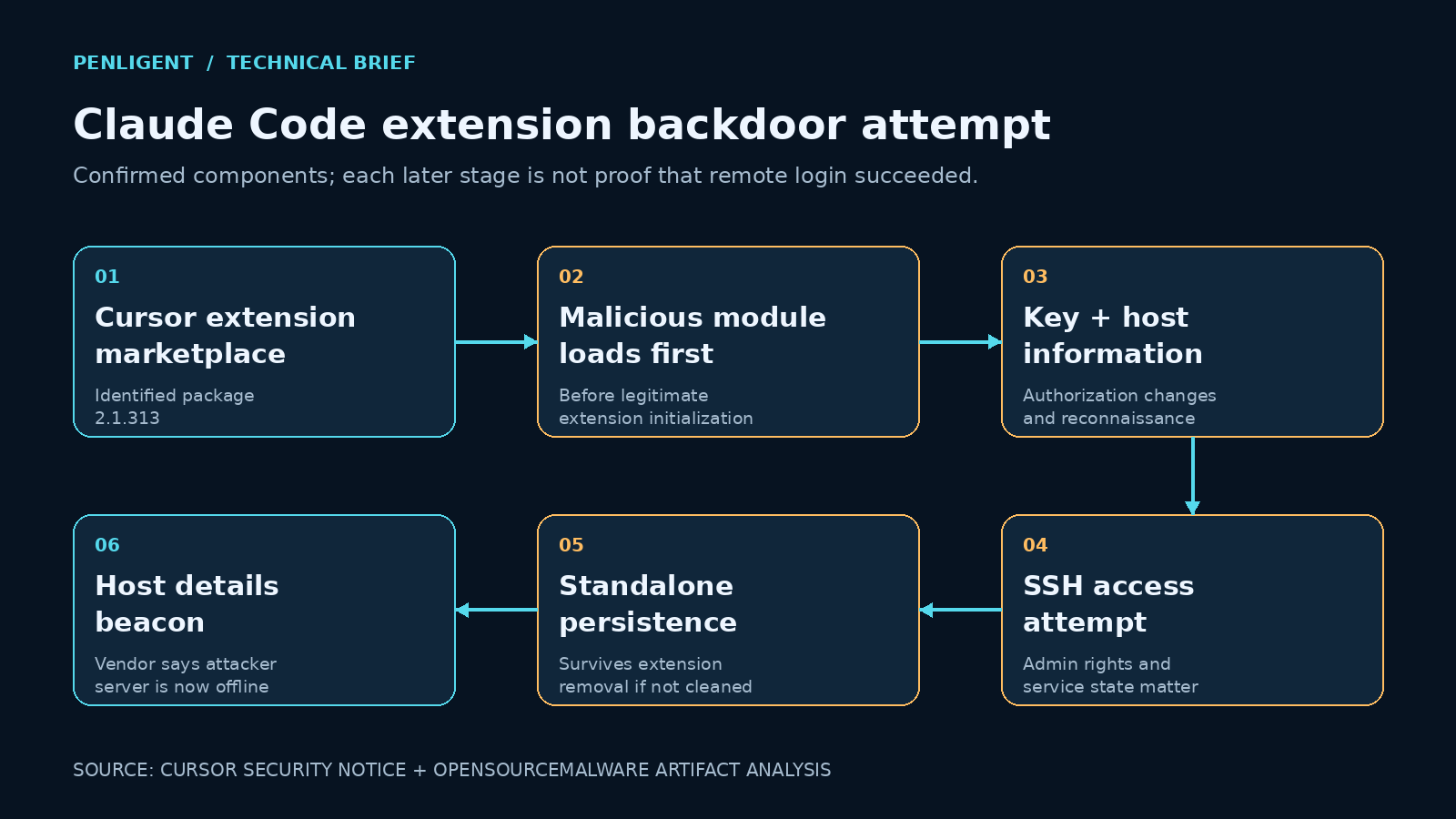
OpenSourceMalware’s artifact analysis describes a loader placed before the legitimate JavaScript bundle. Loading the extension module was sufficient to run it; starting a conversation with Claude was unnecessary. The analysis also cautions that a malicious artifact does not by itself establish compromise of Anthropic’s official release infrastructure.
That placement explains why a normal-looking interface offers little reassurance. The editor can display its expected features after an unwanted operation has already run. A functional test such as opening the assistant panel checks the visible application, while the incident concerns the integrity of the code loaded beneath it.
על פי Cursor’s mechanism description, the package collected host details, inserted an attacker-controlled SSH key, attempted to enable SSH and create a reverse tunnel, and installed persistence. Host details and backdoor status were sent through an HTTP beacon. Cursor says errors and missing administrative rights prevented the SSH-service step on most ordinary macOS and Windows hosts; the key, persistence and reconnaissance still required remediation.
Treat those stages as separate evidence questions. A written key is a change to authorization. A persistence file is an attempt to run again. A network connection is a communication event. None independently proves a successful interactive login, and failure at a later stage does not undo an earlier filesystem change. A useful incident timeline records the outcome of each stage instead of using one binary “hacked” label.
A reverse tunnel is relevant because the connection begins from the workstation. Reviewing only unsolicited inbound traffic can miss the attempted path. For defenders, the practical question is whether the editor or its descendants started unexpected remote-access tooling, then whether that activity corresponded to the package and host indicators.
The security boundary here is software execution on a developer workstation. Reviewing prompt text alone would not address an extension that already runs native processes or modifies user files. Agent prompt controls and extension supply-chain controls therefore need distinct evidence and owners.
Check exposure without running the suspicious package
Start with installation records and endpoint telemetry. Preserve the extension directory and relevant logs before uninstalling or restarting the editor when incident-response procedures permit. Collect the evidence from the affected user profile; a check under a different account may inspect an entirely different home directory. For fleets, record uninspected accounts and offline machines explicitly.
The following read-only macOS check looks for the svc-telemetry key comment listed in Cursor’s indicator set. It deliberately distinguishes an unreadable file from a file with no match. Run it as the user who ran Cursor, using an approved terminal or response tool:
file="$HOME/.ssh/authorized_keys"
if [ ! -e "$file" ]; then
  printf "%s\n" "No authorized_keys file at this user path"
elif [ ! -r "$file" ]; then
  printf "%s\n" "File exists but cannot be read: inspection incomplete"
elif grep -nF "svc-telemetry" "$file"; then
  printf "%s\n" "Indicator found: preserve evidence and investigate"
else
  printf "%s\n" "Comment not found at this path; continue other checks"
fi
A positive result warrants comparing the actual key with the vendor’s published fingerprint. A comment is an investigator-friendly label, not a cryptographic identity. A negative result only describes the file inspected at that moment: deletion, a different profile, incomplete collection or another persistence location can change the interpretation. Do not convert “not found” into a fleet-wide clean bill of health.
On Windows, inspect both the user key file and the administrators key file when readable. This PowerShell example reports its coverage and does not modify either file:
$paths = @(
  (Join-Path $HOME ".ssh\authorized_keys"),
  "C:\ProgramData\ssh\administrators_authorized_keys"
)
foreach ($path in $paths) {
  if (-not (Test-Path -LiteralPath $path)) {
    Write-Output "Absent: $path"
    continue
  }
  try {
    $lines = Get-Content -LiteralPath $path -ErrorAction Stop
    $hits = $lines | Select-String -SimpleMatch "svc-telemetry"
    if ($hits) {
      Write-Output "Indicator found: $path"
      $hits
    } else {
      Write-Output "No comment match: $path; continue other checks"
    }
  } catch {
    Write-Output "Inspection incomplete: $path"
  }
}
These commands are triage aids, not cleanup scripts or proof of a full forensic examination. Do not launch a quarantined extension to see whether it behaves maliciously. If a package remains available on disk, hash and preserve a copy using your organization’s evidence process rather than activating it.
Correlate file, process and network indicators
Cursor publishes platform-specific indicators, including the macOS LaunchAgent com.apple.sysmond.plist, files under ~/.config, the Windows task name SysMon and a startup script. Its listed attacker address is 134[.]209[.]82[.]225. Use these as investigative leads, with package hashes and process ancestry where available.
| Evidence layer | Useful question | Interpretation limit |
|---|---|---|
| Extension inventory | Did this source and platform package exist during the window? | Absence from the current directory does not reconstruct history |
| File changes | Which process wrote the key or persistence file, and when? | A filename or comment alone can collide with unrelated content |
| Process history | Did the extension host spawn SSH or persistence tooling? | An ordinary SSH client is legitimate in many developer workflows |
| Network history | Does an outbound connection align with the process and incident indicators? | A connection attempt is not proof of an authenticated session |
| Identity and repository logs | Was there subsequent unusual access using this workstation’s identities? | Logs may have different retention and collection gaps |
Prefer correlation over one generic process-name alert. A developer running SSH to a known build host is different from an editor-associated process reaching an incident address immediately after an unauthorized key appears. Record timestamps in one time zone and retain original values so another analyst can reproduce the sequence.
A detection rule should also state what data it needs. If file monitoring was absent, a query returning no file writes does not show that no writes occurred. If process history covers only the last hour, it cannot settle yesterday’s exposure. Put those coverage gaps in the case record before deciding whether rebuilding is justified.
A safe local detection exercise
The following Python demonstration checks synthetic records for a key-comment lead, a persistence-file lead and their combination on the same host. It creates no files, opens no network connections, launches no process and uses no attacker key. Save it as a local training script or run it in an isolated notebook. It illustrates evidence correlation; it is not a production SIEM rule or a malware reproduction.
events = [
    {"host": "lab-a", "kind": "key", "value": "svc-telemetry"},
    {"host": "lab-a", "kind": "file",
     "value": "Library/LaunchAgents/com.apple.sysmond.plist"},
    {"host": "lab-b", "kind": "process", "value": "ssh build.example.test"},
]

leads = {}
for event in events:
    found = leads.setdefault(event["host"], set())
    if event["kind"] == "key" and "svc-telemetry" in event["value"]:
        found.add("key-comment")
    if event["kind"] == "file" and event["value"].endswith(
        "Library/LaunchAgents/com.apple.sysmond.plist"
    ):
        found.add("persistence-path")

for host, found in sorted(leads.items()):
    if {"key-comment", "persistence-path"}.issubset(found):
        print(host, "CORRELATED LEADS: preserve evidence and investigate")
    elif found:
        print(host, "SINGLE LEAD: enrich before classification")
    else:
        print(host, "NO DEMO MATCH: no conclusion about host integrity")
Expected output places lab-a in the correlated-leads category. It does not flag lab-b just for using SSH, and it does not call that host clean. In a real deployment, add user identity, event timing, actual key fingerprints and process lineage. Validate both a known positive and an ordinary developer workflow before enabling automated containment.
Remove the backdoor and verify recovery
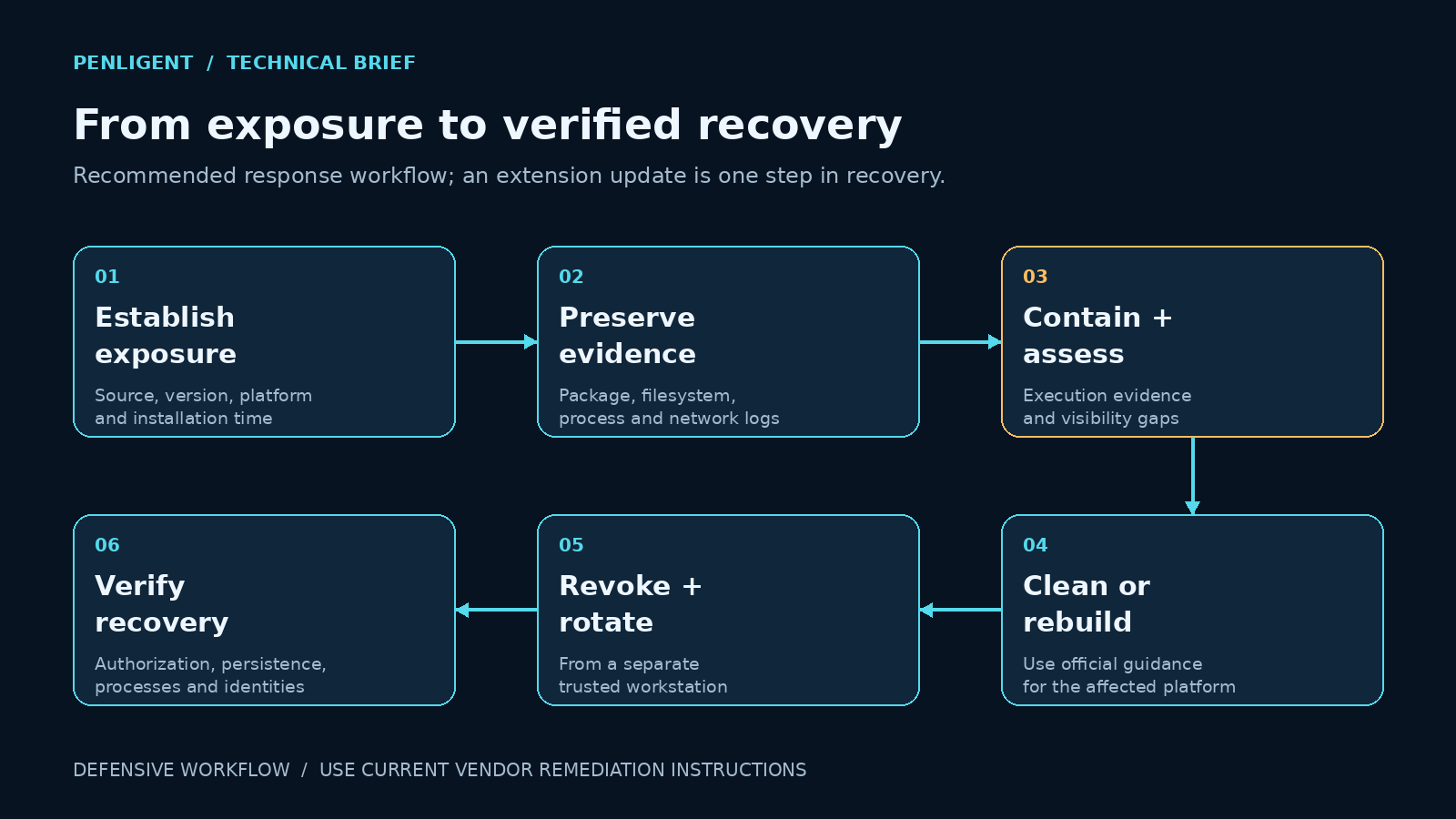
Cursor’s remediation instructions recommend isolation for hosts showing payload execution, removal of the key and persistence, credential rotation from a trusted system, and an assessment of whether to rebuild. The vendor provides macOS and Windows cleanup scripts. Obtain them from the official notice and review the current platform instructions rather than copying an unverified script from a social post.
Use a response sequence with a clear owner for each decision:
- Preserve and contain. Capture the package identity, timeline and available telemetry. Isolate a machine showing execution evidence through the organization’s incident-response process.
- Clean or rebuild. Follow the current vendor instructions for the correct platform, and assess whether the available evidence is sufficient to trust cleanup. Escalate when follow-on activity or major visibility gaps remain.
- Restore trusted software. Replace the malicious extension using a verified distribution channel. Cursor’s public statement directs users to version 2.1.314; verify the currently available trusted release before rollout.
- Revoke and rotate. From a separate trusted machine, address sessions and credentials accessible from the affected account. Prioritize identities with access to source repositories, cloud resources and release pipelines.
- Verify independently. Check that unauthorized authorization entries, persistence and running tunnel processes are gone. Review identity activity and document the observation period before returning the workstation to normal use.
For credential response, distinguish a confirmed theft from a precautionary rotation. Start with what the affected account could actually access, then examine exposure paths such as cached sessions, local configuration and developer tooling. Record each revoked session or replaced credential against an owner. Deleting an old token from a local file does not revoke it at the service that issued it.
Rebuilding is a trust decision rather than a punishment for finding one file. It becomes easier to justify when the investigation cannot bound attacker access, when privileged execution occurred, or when logs needed to assess follow-on changes are missing. Conversely, do not claim a rebuild alone closes the case: credentials copied before the rebuild can remain usable elsewhere until revoked.
What should change in developer and agent security?
Cursor’s extension documentation describes its marketplace proxy and controls including extension allowlists, install cooldowns and signature verification. It also warns that identical extension IDs across registries can refer to different publishers or code. For teams, the actionable inventory unit is the source plus publisher, version and artifact, not the display name alone.
An installation delay can give defenders time to evaluate a short-lived malicious release, but it is not a proof that an older package is safe. An allowlist reduces the set of eligible extensions, while a signature checks an origin claim; neither should be represented as a guarantee that signed or approved code cannot contain a backdoor. Test the exact control you intend to rely on and keep its failure mode in the rollout plan.
Separate routine development from administrative and production access. A workstation that edits code does not need every long-lived deployment credential available to every child process. Favor narrow, short-lived access, controlled release identities and isolated execution environments where practical. Those changes reduce what an extension compromise can reach even when prevention fails.
For authorized security testing, use a separate test environment and evidence-based retesting after remediation. Application testing can help verify relevant exposed services, but it should not be presented as an endpoint-malware clearance certificate. Keep workstation investigation, identity recovery and application validation as distinct acceptance criteria.
Frequently asked questions
Was Claude itself hacked?
- The confirmed incident concerns a modified extension package delivered through Cursor. It does not establish compromise of the Claude model or every Claude Code distribution. Match your environment to the vendor’s identified package before drawing a conclusion.
Does having 2.1.314 installed mean I am safe?
- It establishes a current version, not historical integrity. If the malicious package previously ran, verify that the key, persistence and processes have been addressed and review credentials and sessions.
Did all 5,000 users lose data?
- No such conclusion follows from the published upper bound. Exposure, payload execution, successful remote access and data theft are different findings requiring different evidence.
Do I need to connect to the attacker server to test exposure?
- No. Inspect local and collected telemetry. Deliberately contacting the listed address adds risk and does not prove what happened during the exposure window.
Is uninstalling the extension enough?
- Do not use uninstallation as the recovery criterion. Follow the current vendor remediation instructions and verify changes outside the extension directory, as well as account and session exposure.
Is this prompt injection or a supply-chain attack?
- The identified mechanism is a malicious software package executing in the developer environment. Prompt filtering addresses a different boundary and would not, by itself, validate the integrity of an installed extension.
Close the incident with evidence, not a version screenshot
A useful closure record connects the original installation to execution evidence, containment, removal or rebuilding, identity recovery and independent verification. If one of those links is missing, record the remaining uncertainty and assign the next action. The strongest outcome is a workstation and an access boundary that you can explain and verify, rather than a screenshot showing that the update button was clicked.
The following Penligent product demonstration concerns authorized application testing; it is not a reproduction of the extension incident.


 Hebrew
  English
  German
  French
  Spanish
  Portuguese
  Japanese
  Korean
  Hindi
Hindi  Arabic
  Turkish