
Install Penligent on Kali Linux by selecting the Linux package that matches your Kali guest’s architecture, inspecting the downloaded .deb, installing it and configuring the Python executable used for tools. Check installation, application launch and tool execution separately: a working desktop window does not prove that a test can run.
Check the Kali guest before choosing a download
cat /etc/os-release
dpkg --print-architecture
uname -m
command -v python3
python3 --version
Use the Debian architecture result to choose the package. amd64 needs Linux AMD64; arm64 needs Linux ARM64. Check inside the VM if Kali runs as a guest. The physical host’s processor name alone does not establish the guest package architecture.
ה current Penligent User Guide recommends Kali and offers both Linux architectures. Download through the official site. The guide observed on November 9, 2026 lists 3.0.2 packages; follow the current download at installation time rather than treating that version as a permanent latest release.
Inspect and install the downloaded package
Replace DOWNLOADED_PACKAGE.deb below with the exact file you downloaded. Inspecting metadata does not execute the application:
dpkg-deb --field ./DOWNLOADED_PACKAGE.deb Package Version Architecture
sha256sum ./DOWNLOADED_PACKAGE.deb
sudo dpkg -i ./DOWNLOADED_PACKAGE.deb
Compare the reported architecture with the guest architecture. The SHA-256 value records the file you used; it proves publisher authenticity only if you compare it with a trustworthy publisher-provided digest. Do not describe a locally calculated hash as a verified signature.
dpkg -i is the installation command in Penligent’s guide. If it reports unresolved dependencies, inspect the error and the proposed repair before proceeding. On a normally configured Kali system, sudo apt --fix-broken install can resolve dependency state, but its transaction can install or remove packages. Review that transaction rather than adding an unconditional “yes” flag.
Configure the interpreter that will run the tools
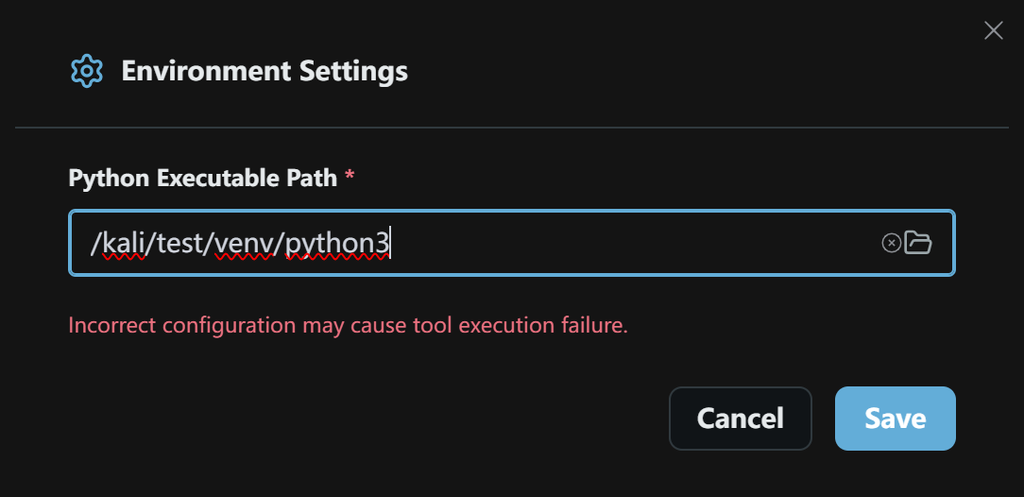
Open the installed application. In the first-use configuration, enter a full path under Python Executable Path, confirm it is the intended environment and click Save. The current guide documents this interpreter setting. Earlier screenshots with additional runtime fields should not be assumed to describe every current release.
/FULL/PATH/TO/python3 --version
/FULL/PATH/TO/python3 -c 'import sys; print(sys.executable)'
Run those checks with the same path you entered. When a task reports a missing Python module, identify the actual interpreter and the required dependency before installing anything. Kali’s externally managed Python guidance recommends distribution packages or isolated environments for the appropriate use case. Avoid a blanket system-wide sudo pip install repair.
Separate launch, login and target connectivity
| תסמין | Check first | What it means for the assessment |
|---|---|---|
| Package architecture error | Guest architecture and .deb metadata. | The application has not been installed correctly. |
| Unresolved dependency message | Exact package error and the proposed package-manager transaction. | Repair the host before retrying launch. |
| Application opens but a tool fails | Configured Python path, command availability and execution error. | The tool’s target check is incomplete. |
| Login does not finish | Browser return flow, account state and network path. | Do not infer that the target application is unavailable. |
| Local service cannot be reached | Where the service and client execute; loopback belongs to each machine. | Confirm VM, host and execution-network boundaries. |
| Report or retest option is unavailable | Current account entitlement and actual UI. | Availability of the application does not grant every paid feature. |
Record the failure before changing system settings. A login or connectivity problem does not justify routinely disabling IPv6, browser protection or network isolation. Use a targeted diagnosis tied to the observed failure.
Finish with one bounded test
Create a project for a target you control, choose the available plan and supply the test context. Inspect the resulting task and command output before trusting a finding. For the next step, follow the Kali assessment walkthrough and its localhost baseline exercise. That exercise checks the evidence workflow without requiring a vulnerable production service.
Keep the installed package version, Kali release, architecture, Python path and initial task result with the project record. Those details make support requests and repeat assessments substantially easier to reproduce.
Prepared with AI-assisted research and drafting from official product and Kali documentation, checked November 9, 2026. Installation and Penligent execution were not performed on a Kali host during preparation.
Watch the official Kali workflow demonstration
This earlier Penligent demonstration shows a Kali-based workflow. Use it to orient yourself to the interaction; follow the current installation instructions above for supported packages and configuration.
 Hebrew
 English
 German
 French
 Spanish
 Portuguese
 Japanese
 Korean
 Hindi
 Arabic
 Turkish