
CVE-2026-19598 is a critical unauthenticated privilege escalation vulnerability in Pods – Custom Content Types and Fields, a widely deployed WordPress plugin used to create custom post types, taxonomies, fields, settings pages, relationships, and other structured content.
The vulnerability is unusually serious because the affected code does not merely expose information or allow a low-privileged WordPress user to perform an additional action. According to Wordfence, an attacker who has no WordPress account at all can bypass the authorization protections surrounding the plugin’s pods_admin AJAX router and reach administrative operations that should only be available to trusted users.
The official CVE record assigns CVSS 3.1 9.8 Critical, using the vector:
CVSS:3.1/AV:N/AC:L/PR:N/UI:N/S:U/C:H/I:H/A:H
Affected releases include Pods 2.8 through 3.3.9 across several maintained version branches. Wordfence states that exploitation can allow an unauthenticated attacker to gain Administrator privileges, overwrite the password of an existing user—including the site owner—or invoke other administrative functionality, potentially resulting in complete WordPress site compromise. (Wordfence)
The vulnerability matters for another reason: it illustrates a particularly dangerous class of authorization failure. Pods did have authentication checks. It had nonce validation. It had capability checks. It even had a method allowlist.
The problem was that failing those checks did not necessarily stop execution.
That distinction is what makes CVE-2026-19598 technically interesting and operationally dangerous.
CVE-2026-19598 at a Glance
| Attribute | विवरण |
|---|---|
| सीवीई | CVE-2026-19598 |
| उत्पाद | Pods – Custom Content Types and Fields |
| Ecosystem | WordPress |
| संवेदनशीलता | Unauthenticated Privilege Escalation / Authorization Bypass |
| सामूहिक रूप से | CWE-863 Incorrect Authorization |
| CVSS 3.1 | 9.8 Critical |
| Attack Vector | Network |
| Authentication Required | नहीं |
| User Interaction | नहीं |
| Affected | Multiple Pods branches through 3.3.9 |
| Latest 3.3.x Fix | 3.3.9.1 |
| Potential Impact | Administrator access, account modification, privileged administrative actions, full site takeover |
| Disclosure | August 2026 |
WordPress.org currently reports 100,000+ active installations for Pods, meaning CVE-2026-19598 affects a plugin with a substantial deployment footprint rather than a niche extension used by a handful of sites. (WordPress.org)
What Is the WordPress Pods Plugin?
Pods is substantially more powerful than a typical presentation-oriented WordPress plugin.
WordPress.org describes Pods as a framework for creating and extending custom content types. Among other capabilities, site owners and developers can use it to create custom post types, taxonomies, custom fields, settings pages, relationships between content, and Advanced Content Types backed by their own tables. Pods can also extend WordPress objects including users and media. (WordPress.org)
That architectural role matters when evaluating CVE-2026-19598.
A vulnerability in a cosmetic frontend plugin might expose a shortcode or permit stored HTML injection in a limited context. A vulnerability in a framework capable of manipulating users, content structures, templates, files, settings, and other administrative resources can expose much more powerful primitives.
The issue therefore sits at an important security boundary:
Internet request → WordPress AJAX → Pods administrative router → privileged internal API
If the authorization boundary at that router fails, the downstream APIs become reachable under assumptions they were never designed to tolerate.
That is essentially what happened.
Affected and Patched Pods Versions
The CVE record does not simply describe every release “below 3.3.9.1” as one continuous range. Pods maintained several branches, and security patches were backported.
Wordfence lists the following affected and patched releases. (Wordfence)
| Pods Branch | Vulnerable Through | Patched Version |
|---|---|---|
| 2.8.x | 2.8.23.3 | 2.8.23.4 |
| 2.9.x | 2.9.19.3 | 2.9.19.4 |
| 3.0.x | 3.0.10.3 | 3.0.10.4 |
| 3.1.x | 3.1.4.1 | 3.1.4.2 |
| 3.2.x | 3.2.8.2 | 3.2.8.3 |
| 3.3.x | 3.3.9 | 3.3.9.1 |
Pods confirmed the coordinated security release on August 14, 2026. The project released 3.3.9.1 as the full current-branch security release while simultaneously publishing backports for the older supported branches. The vendor described the release as major security hardening and recommended that users update as soon as possible. (Pods Framework)
The easiest conclusion for most administrators is therefore:
If you are running Pods 3.3.x, install at least 3.3.9.1.
Organizations intentionally pinned to an older branch should use the corresponding patched backport rather than assuming that simply being below 3.3 avoids the issue.
The Disclosure Timeline
The vulnerability moved unusually quickly from discovery to remediation.
Wordfence reports that the original submission arrived on August 10, 2026. The issue was validated and disclosed to the Pods development team on August 12. The vendor acknowledged the issue the same day, and patched releases were approved and published on August 14. Wordfence’s public technical analysis followed shortly afterward. (Wordfence)
That timeline looks roughly like this:
| Date | Event |
|---|---|
| August 10, 2026 | Vulnerability submitted to Wordfence |
| August 12 | Wordfence validated issue and notified Pods |
| August 12 | Initial firewall protection deployed to certain Wordfence customers |
| August 12 | Pods acknowledged vulnerability |
| August 14 | Patch reviewed and approved |
| August 14 | Pods published 3.3.9.1 and backported fixes |
| August 15 | CVE-2026-19598 publicly published |
| August 21 | Wordfence published detailed technical analysis |
The fast response is important, but it does not eliminate risk. Once detailed vulnerability information becomes public, defenders are effectively competing against automated scanners, exploit developers, botnets, and opportunistic attackers.
For a network-reachable 9.8 vulnerability requiring neither credentials nor user interaction, that patch window can become extremely short.
Understanding the WordPress AJAX Attack Surface
To understand CVE-2026-19598, it helps to understand how AJAX requests reach WordPress plugins.
WordPress routes many asynchronous plugin requests through:
/wp-admin/admin-ajax.php
A request supplies an action parameter. WordPress then determines whether the requester is authenticated.
For authenticated users, WordPress dispatches the request through a hook resembling:
wp_ajax_{action}
For unauthenticated users, it uses:
wp_ajax_nopriv_{action}
The official WordPress developer documentation explicitly describes wp_ajax_nopriv_{$action} as the hook used for AJAX requests from users who are not logged in. (WordPress Developer Resources)
The distinction is security-relevant.
Registering a handler using wp_ajax_nopriv_* is not automatically a vulnerability. Many legitimate frontend features need unauthenticated AJAX—for example, public search, contact forms, filtering, or other anonymous functionality.
But once a plugin deliberately exposes an AJAX router to unauthenticated users, the handler itself becomes responsible for ensuring that privileged operations remain inaccessible.
The current Pods source demonstrates that the project registers both authenticated and unauthenticated handlers for pods_admin:
add_action( 'wp_ajax_pods_admin', ... );
add_action( 'wp_ajax_nopriv_pods_admin', ... );
That architecture means logged-out visitors can reach the router. Authorization therefore has to be enforced correctly inside the request-handling path. (गिटहब)
CVE-2026-19598 broke that boundary.
The Important Detail: Pods Had Security Checks
One of the most misleading ways to describe CVE-2026-19598 would be:
“Pods forgot to check permissions.”
That is not the interesting part of the vulnerability.
Wordfence’s analysis shows that the administrative AJAX router was designed to perform several different checks before dispatching privileged functionality.
Conceptually, its security logic looked something like this:
receive AJAX request
        |
        v
validate requested method
        |
        v
verify authentication / nonce
        |
        v
verify capabilities
        |
        v
dispatch requested Pods API method
That is a reasonable structure.
The problem occurred in the error path.
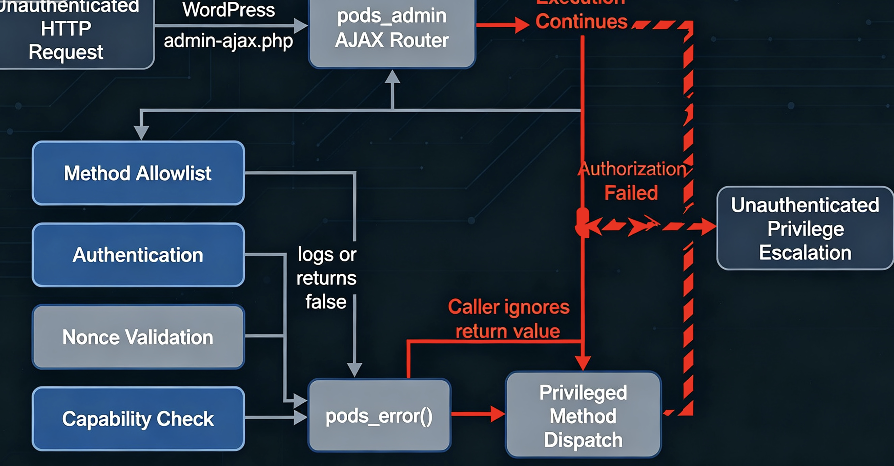
When one of those checks failed, the router relied on the shared pods_error() functionality to report the failure and stop processing.
Under normal assumptions, the intended behavior was essentially:
if ( ! authorized() ) {
    error_and_terminate();
}
The vulnerable behavior was closer to:
if ( ! authorized() ) {
    error_that_may_return();
}

// Execution continues.
perform_privileged_action();
That difference is enormous.
The Root Cause: A Non-Terminating Error Path
According to both the CVE record and Wordfence’s analysis, several important access checks passed their failures through pods_error().
Those checks included:
- the requested method allowlist;
- authentication enforcement;
- nonce verification;
- capability validation.
The vulnerable condition appeared in a JSON compatibility path associated with Pods’ meta-box-loader behavior.
Under that condition, pods_error() could log the error and return false rather than terminating the PHP request.
The router, however, invoked the error function as a statement and did not reliably stop execution after it returned.
So the security logic became:
authorization check fails
          |
          v
pods_error()
          |
          v
error logged
          |
          v
function returns false
          |
          v
caller ignores return value
          |
          v
execution continues
          |
          v
privileged method dispatch
Wordfence specifically identified this as the critical programming mistake: because the return value was discarded rather than returned from the request handler, failed validation did not prevent the router from reaching the next stage. (Wordfence)
The result is a classic fail-open authorization boundary.
Why This Is CWE-863 Incorrect Authorization
CVE-2026-19598 is classified as CWE-863: Incorrect Authorization.
MITRE defines CWE-863 around situations in which software performs an authorization check but does not correctly enforce it. Potential consequences include unauthorized data modification, privilege acquisition, bypassing protection mechanisms, and unauthorized code execution. (सामूहिक रूप से)
That classification fits this vulnerability unusually well.
The application was not completely unaware of authorization.
It knew that access needed to be checked.
It attempted to check access.
The failure happened because the outcome of those checks was not enforced consistently through control flow.
This distinction is useful for security engineers because many static reviews concentrate on questions such as:
- Is
current_user_can()called? - Is a nonce checked?
- Is there an allowlist?
- Is authentication verified?
CVE-2026-19598 demonstrates why that checklist alone is insufficient.
A better question is:
What is mathematically guaranteed to happen after the authorization check returns failure?
If the answer is anything other than “execution cannot reach the privileged sink,” the authorization design remains suspect.
Error Handling Became a Security Primitive
One of the most interesting lessons from CVE-2026-19598 is that a generic error-reporting abstraction effectively became part of the authorization mechanism.
That is dangerous.
Application developers often design helper functions that behave differently depending on execution context. A function may:
- throw an exception;
- call
wp_die(); - return a
WP_Error; - emit JSON;
- print HTML;
- log to PHP;
- return
false.
Those different behaviors may all make sense for user experience or backward compatibility.
They are much more dangerous when another part of the code assumes:
“Calling this function always terminates execution.”
That assumption converts presentation-layer or compatibility behavior into a security boundary.
CVE-2026-19598 shows what can happen when the assumption stops being true in one less-common mode.
The check still runs.
The failure still exists.
An error may even appear in the log.
But the forbidden operation nevertheless executes.
The JSON Compatibility Path
Wordfence’s analysis identifies a particular JSON-handling compatibility condition as the route into the non-terminating behavior.
The vulnerability therefore was not simply:
Anyone can call pods_admin.
The public accessibility of pods_admin was one part of the design.
The exploitable chain instead depended on influencing request handling so that failed security checks flowed through the problematic error mode.
Conceptually:
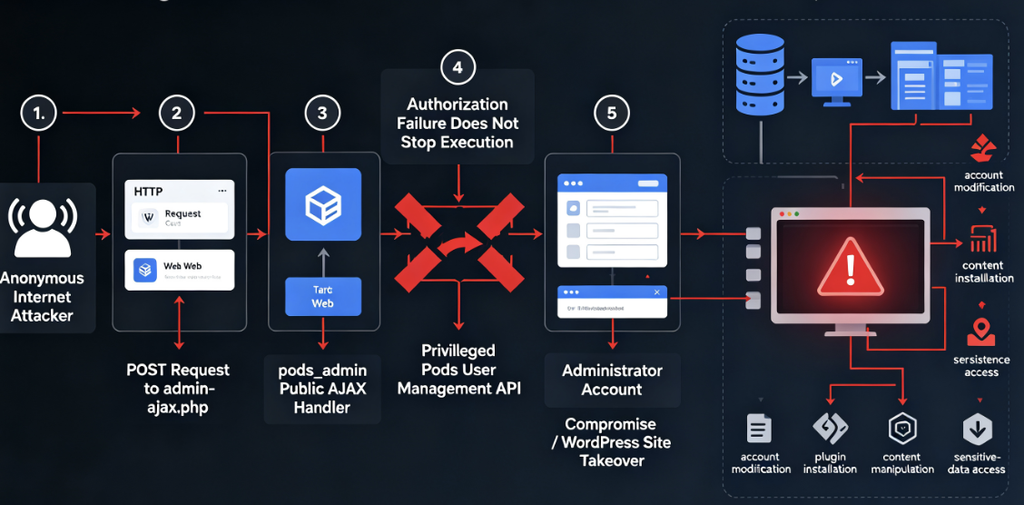
Unauthenticated request
        |
        v
pods_admin public AJAX handler
        |
        v
request enters compatible JSON/error mode
        |
        v
method check fails ───────┐
login check fails ────────┤
nonce check fails ────────┤──> pods_error()
capability check fails ───┘
                              |
                              v
                     does not terminate
                              |
                              v
                       method dispatch
This is important because it shows how state and content-negotiation behavior can unexpectedly affect authorization.
Security properties should generally not depend on whether the response is going to be formatted as HTML, JSON, XML, or something else.
A requester who is unauthorized in HTML mode must still be unauthorized in JSON mode.
Dynamic Method Dispatch Made the Impact Worse
After the guards were bypassed, the attacker reached a powerful design feature of the router: dynamic dispatch into internal Pods administrative methods.
Dynamic dispatch itself is not inherently insecure.
It is common for frameworks to expose one router that maps a method identifier to a collection of internal handlers.
The security risk appears when several conditions occur together:
publicly reachable router
+
attacker-controlled method selection
+
powerful downstream functions
+
central authorization failure
=
large privileged attack surface
Rather than one vulnerable operation, the attacker can potentially reach multiple functions that were designed under the assumption that the router had already performed authorization.
Wordfence’s research identifies save_user as one particularly serious reachable method and notes that other administrator actions were exposed through the same authorization failure. (Wordfence)
This explains why CVE-2026-19598 should be thought of as an authorization-boundary collapse, rather than simply a “password reset bug.”
How the save_user Path Can Lead to Site Takeover
WordPress Administrator accounts are effectively control-plane identities for a traditional WordPress deployment.
An Administrator can typically:
- manage users;
- change site configuration;
- install or activate plugins;
- change themes;
- create privileged accounts;
- manipulate content;
- access sensitive administrative data.
Depending on configuration and hosting restrictions, administrative control can often be extended further into executable PHP or filesystem changes.
Wordfence found that the vulnerable Pods router could reach its user-saving API functionality after bypassing the surrounding authorization checks.
The downstream user-management method did not independently reproduce all of the router’s authentication and authorization requirements.
That is an example of a trust-boundary assumption:
Router:
    "I authenticate and authorize requests."

Internal method:
    "The router only calls me after authorization."
If the router fails, the internal method becomes exposed without its expected prerequisite.
An attacker can consequently interfere with sensitive WordPress user state. Wordfence specifically states that arbitrary user passwords—including that of the site owner—could be overwritten. (Wordfence)
Once an attacker controls an Administrator identity, the incident should normally be treated as a complete WordPress compromise, not merely an isolated account problem.
Why CVE-2026-19598 Scores 9.8
The CVSS vector is:
CVSS:3.1/AV:N/AC:L/PR:N/UI:N/S:U/C:H/I:H/A:H
Each component tells part of the story.
AV:N — Network Attack Vector
The vulnerable functionality is reachable over normal web requests.
An attacker does not require local filesystem access, shell access, SSH, or proximity to the target.
Internet-facing WordPress sites are therefore natural scanning targets.
AC:L — Low Attack Complexity
The vulnerability does not depend on highly unpredictable race conditions or an unusual environmental state according to the CVSS assessment.
That makes automation considerably easier.
PR:N — No Privileges Required
This is perhaps the most significant metric.
The attacker does not need:
- Subscriber access;
- Contributor access;
- Editor access;
- an existing WordPress account;
- stolen credentials.
The vulnerability crosses directly from anonymous Internet access into privileged administrative functionality.
UI:N — No User Interaction
No administrator has to click a phishing link, open an attachment, visit a malicious page, or approve an action.
The attacker communicates directly with the vulnerable application.
That characteristic makes large-scale automated exploitation more realistic.
C:H — High Confidentiality Impact
Administrator-level compromise can expose private posts, user information, configuration data, API keys stored by plugins, application secrets, backups, and potentially other sensitive information reachable through WordPress.
I:H — High Integrity Impact
Attackers may be able to alter:
- user accounts;
- site content;
- settings;
- plugins;
- themes;
- SEO content;
- redirects;
- JavaScript;
- payment or ecommerce configuration.
For many organizations, integrity compromise is the most damaging consequence of WordPress takeover because a trusted domain can subsequently be used for malware distribution, phishing, SEO spam, credential harvesting, or supply-chain-style attacks against visitors.
A:H — High Availability Impact
Administrative compromise may allow destructive changes, plugin removal, configuration corruption, deletion, or other actions capable of making the site unavailable.
Taken together, a 9.8 rating is consistent with the vulnerability’s effective outcome: remote, unauthenticated administrative compromise. (गिटहब)
CVE-2026-19598 Is Not a WordPress Core Vulnerability
This distinction matters.
The vulnerable component is the Pods plugin, not WordPress core.
WordPress is doing what its AJAX architecture is designed to do: when an unauthenticated user submits an AJAX action for which a plugin has registered a wp_ajax_nopriv_* callback, WordPress dispatches the request to that plugin callback. (गिटहब)
The Pods code then becomes responsible for determining which operations the anonymous caller may actually perform.
Therefore:
WordPress admin-ajax.php
        |
        v
correctly dispatches public callback
        |
        v
Pods authorization logic
        |
        X  <-- CVE-2026-19598
        |
        v
privileged Pods functionality
Updating WordPress core without updating Pods does not remediate CVE-2026-19598.
Why a Nonce Was Not Enough
Another common misconception is that WordPress nonces automatically prevent these attacks.
WordPress nonces are useful protections, especially against cross-site request forgery and unauthorized execution of certain actions.
But a nonce is only useful if failure to validate the nonce actually stops the request.
In CVE-2026-19598, nonce validation was one of several checks whose failure could flow through the same non-terminating error mechanism.
So the relevant logic is not:
Does the application check a nonce?
It is:
Can execution reach the sensitive operation after the nonce check fails?
For the vulnerable Pods request path, the answer could be yes.
That is why the existence of security controls in source code is not enough. Enforcement matters.
Why Capability Checks Were Not Enough Either
The same principle applies to WordPress capabilities.
Suppose a handler contains logic equivalent to:
if ( ! current_user_can( 'manage_options' ) ) {
    report_error();
}

perform_sensitive_operation();
अगर report_error() always terminates, the design works.
If one execution mode changes report_error() into:
error_log(...);
return false;
the capability check becomes cosmetic.
The privileged function still executes.
Authorization controls must therefore be coupled to explicit control-flow guarantees.
A safer structure is conceptually:
if ( ! current_user_can( 'manage_options' ) ) {
    return error_response();
}
or:
if ( ! current_user_can( 'manage_options' ) ) {
    throw new AuthorizationException();
}
The exact implementation differs by application, but the rule is universal:
A denied authorization decision must dominate every path to the protected operation.
Real-World Exposure Is Significant
Pods is not an obscure abandoned plugin.
WordPress.org currently lists more than 100,000 active installations. (WordPress.org)
That creates an attractive target population for automated attackers because discovery is comparatively straightforward. Attackers frequently fingerprint WordPress plugins using publicly accessible JavaScript, CSS, plugin directories, metadata, known endpoints, or simply probe known vulnerable routes across large lists of WordPress hosts.
Once a serious WordPress plugin CVE becomes public, exploitation economics strongly favor automation:
scan WordPress hosts
        |
        v
identify likely Pods deployment
        |
        v
test vulnerable behavior
        |
        v
take administrative control
        |
        v
monetize access
Possible monetization paths include SEO spam, malicious redirects, phishing pages, malware delivery, credential theft, affiliate abuse, cryptomining, resale of compromised access, and persistence for later campaigns.
Attack Attempts Are Already Being Observed
There is also an important difference between theoretical exploitability and current threat activity.
At the time this article was researched on August 25, 2026, the Wordfence vulnerability record reported 9,508 attacks targeting CVE-2026-19598 blocked during the preceding 24 hours. (Wordfence)
That number is dynamic and will change over time. It also needs to be interpreted correctly.
It does नहीं mean 9,508 sites were compromised.
It does not prove that every blocked request would have succeeded.
It does, however, demonstrate that requests associated with exploitation of the vulnerability are actively appearing in real-world WordPress traffic.
Public exploit implementations have also surfaced since disclosure, further reducing the amount of original vulnerability research an opportunistic attacker needs to perform. (Mallory)
The practical defensive conclusion is simple:
CVE-2026-19598 should no longer be treated as a vulnerability for which defenders can safely postpone patching until a routine maintenance window.
How to Check Whether Your Site Is Vulnerable
For administrators, determining the installed Pods version is safer and more reliable than sending an exploit request.
Check with WP-CLI
On a WordPress server with WP-CLI:
wp plugin get pods --fields=name,status,version
You can also list plugins and updates:
wp plugin list --fields=name,status,version,update
Compare the reported version with the patched table above.
For the latest 3.3 branch:
3.3.9     -> vulnerable
3.3.9.1   -> patched
Older maintained branches need their corresponding backport.
Check the WordPress Dashboard
Navigate to:
Dashboard
→ Plugins
→ Installed Plugins
→ Pods – Custom Content Types and Fields
Record the version number.
Do not merely check whether WordPress says the plugin is “up to date.” Configuration errors, disabled updates, repository restrictions, managed-hosting behavior, custom packaging, and deployment pipelines can all create discrepancies.
Compare the actual installed version against the official patched versions.
Check the Plugin Files
Where command-line access is available, Pods will normally reside beneath:
wp-content/plugins/pods/
The plugin’s metadata can be inspected directly if WP-CLI is unavailable.
For large fleets, however, querying versions through your WordPress management system, configuration inventory, SBOM, hosting control plane, or WP-CLI automation is preferable.
Do Not Exploit Production Just to Verify the Vulnerability
A critical operational point deserves emphasis.
If your production server is running an affected Pods version, you do not need to exploit it to prove that it is vulnerable.
The vulnerable version itself is sufficient evidence to justify remediation.
Running an active privilege-escalation PoC against production can:
- modify real users;
- change passwords;
- corrupt application state;
- generate misleading incident evidence;
- trigger security controls;
- violate authorization or audit requirements;
- accidentally create persistence;
- make later forensic analysis harder.
Version-based verification is the appropriate first step.
If functional vulnerability validation is required for a penetration test, reproduce the relevant version in an isolated staging or laboratory environment and test authorization boundaries there.
Safe Validation After Patching
After upgrading, security teams can test the authorization property without attempting site takeover.
The property being tested is:
Can an unauthenticated request reach a privileged Pods administrative operation?
A defensive regression test should verify that unauthorized requests are rejected before the protected operation executes.
The expected logical behavior is:
anonymous request
      |
      v
administrative operation requested
      |
      v
authorization / authentication fails
      |
      v
REQUEST TERMINATES
      |
      X
privileged method never executes
Negative authorization tests are particularly valuable here.
Testing only valid administrator workflows would not necessarily reveal CVE-2026-19598 because administrators possess the permissions needed for legitimate requests.
The vulnerability lived in the failure path.
Hunting for Exploitation in Web Access Logs
Patching closes the known vulnerability going forward.
It does not answer the second question:
Was the server compromised before it was patched?
Start with HTTP logs.
A high-level search for traffic to WordPress AJAX might look like:
grep '/wp-admin/admin-ajax.php' access.log
Then look for Pods-related requests where request bodies or query parameters are logged:
grep 'pods_admin' access.log
The usefulness of this approach varies significantly by logging configuration.
Standard Nginx or Apache logs may record:
- URL;
- method;
- status code;
- source IP;
- user agent;
- timestamp.
They usually do नहीं record arbitrary POST bodies.
Since important AJAX parameters may be transmitted in the POST body, absence of pods_admin from a standard access log does not prove that no exploitation attempt occurred.
Reverse proxies, WAFs, application firewalls, CDN security products, or detailed application telemetry may provide better evidence.
Hunt in WAF and Reverse-Proxy Logs
If the environment uses a web application firewall, search for events involving:
/wp-admin/admin-ajax.php
and the Pods AJAX action.
Investigate:
- unusual anonymous POST requests;
- bursts from a single source;
- bursts distributed across many IPs;
- repeated attempts against
admin-ajax.php; - requests that coincide with user-account changes;
- anomalous JSON-oriented requests;
- traffic from known scanner infrastructure;
- requests immediately followed by
/wp-login.phpया/wp-admin/access from the same source.
Be careful with simplistic detection rules.
admin-ajax.php is heavily used by legitimate WordPress functionality. Blocking all access to it is usually impractical and can break normal sites.
Detection should therefore use context rather than treating every AJAX request as malicious.
Audit Administrator Accounts
Because arbitrary user modification is one of the documented consequences, user accounts should be among the first post-exploitation checks.
With WP-CLI:
wp user list \
  --role=administrator \
  --fields=ID,user_login,user_email,user_registered
Compare the result with your expected administrator inventory.
खोजें:
- unknown Administrator accounts;
- recently created privileged users;
- unexpected email-address changes;
- renamed accounts;
- dormant administrator accounts suddenly becoming active;
- administrator accounts whose passwords unexpectedly stopped working.
Do not assume that an attacker must create a new account.
One of the documented consequences of CVE-2026-19598 is modifying an existing user.
An attacker who takes over a legitimate administrator may therefore leave no obvious “new admin” indicator.
Review Authentication Events
If authentication audit logs are available, examine activity around the vulnerable period.
Useful signals include:
password change
→ successful login
→ /wp-admin access
→ plugin/theme changes
or:
unexpected administrator login
→ new administrator created
→ original compromised account restored
Attackers frequently attempt to reduce visibility after gaining access.
A malicious operator might take over an existing account temporarily, create another persistence mechanism, and then restore portions of the original account state.
That is why investigations should correlate identity events with filesystem and application changes.
Look for Malicious Plugins and MU-Plugins
Administrator access can be converted into persistence.
Inspect:
wp-content/plugins/
wp-content/mu-plugins/
wp-content/themes/
wp-content/uploads/
Look for files that:
- appeared during the suspected compromise window;
- have unexpected modification timestamps;
- contain obfuscated PHP;
- invoke
मूल्यांकन,base64_decode,gzinflate, or unusual dynamic execution patterns; - provide undocumented administrative access;
- contact unfamiliar external servers.
Those functions are not inherently malicious—legitimate WordPress software sometimes uses constructs that appear suspicious—so detections must be investigated rather than automatically deleted.
Inspect Recently Modified PHP Files
A simple triage command can help identify recent changes:
find wp-content -type f -name '*.php' -mtime -14 -print
Adjust the time range to the actual exposure period.
A more targeted investigation should compare the filesystem against:
- known-good backups;
- official plugin packages;
- version-control repositories;
- deployment manifests;
- file-integrity monitoring data.
File timestamps alone are weak evidence because attackers can modify them and legitimate updates generate many recent files.
Check for Unexplained Plugin Installation
An attacker with administrative control may install a legitimate-looking plugin that provides persistence or file-management capabilities.
List installed plugins:
wp plugin list
Then compare them with your expected baseline.
Pay special attention to:
- plugins nobody remembers installing;
- plugins installed immediately after suspicious login activity;
- abandoned file-manager plugins;
- plugins loaded from unusual paths;
- modified versions of legitimate plugins.
Do the same for themes:
wp theme list
Review WordPress Configuration and Secrets
If you establish that an attacker obtained Administrator privileges, simply patching Pods is not enough.
Treat sensitive credentials accessible from or through the WordPress environment as potentially exposed.
Depending on the deployment, this may include:
- WordPress Administrator passwords;
- application passwords;
- API tokens stored in plugin configuration;
- SMTP credentials;
- payment-service credentials;
- cloud API keys;
- backup-service tokens;
- database credentials;
- authentication salts;
- hosting-panel credentials if exposed elsewhere.
The exact rotation scope should be based on forensic evidence and environment architecture.
Incident Response for CVE-2026-19598
If there are indications that exploitation succeeded, use an incident-response process rather than treating the event as a normal plugin update.
A reasonable sequence is:
1. Preserve evidence
        ↓
2. Contain exposure
        ↓
3. Patch Pods
        ↓
4. Audit privileged identities
        ↓
5. Investigate filesystem changes
        ↓
6. Investigate persistence
        ↓
7. Rotate affected credentials
        ↓
8. Remove malicious artifacts
        ↓
9. Restore trusted components
        ↓
10. Monitor for re-entry
Preserve Evidence First
Before aggressively deleting suspicious files, retain:
- access logs;
- WAF logs;
- authentication logs;
- filesystem snapshots;
- database backups;
- WordPress audit logs;
- security-plugin telemetry.
Immediate cleanup can destroy the evidence necessary to determine what the attacker actually did.
Patch the Vulnerable Component
Upgrade Pods to the appropriate security release.
Pods officially recommends updating and provides patched releases for all affected branches from 2.8 through 3.3. (Pods Framework)
Re-establish Identity Trust
Reset credentials for affected administrative users.
Review every account with elevated capabilities.
If compromise is confirmed, invalidate existing sessions as part of restoring trust rather than assuming that a password change alone eliminates every authenticated foothold.
Re-establish Application Trust
If an attacker possessed Administrator access, ask whether you can still trust:
- plugin files;
- themes;
- MU-plugins;
- scheduled tasks;
- configuration;
- database-stored options;
- uploaded content.
In a serious compromise, restoring WordPress core and plugins from known-good packages or rebuilding from a trusted deployment pipeline can be safer than deleting only the malicious file you happened to discover.
How to Patch CVE-2026-19598
Pods documents three normal upgrade routes.
WordPress Dashboard
Use:
Dashboard
→ Updates
→ Update Pods
WP-CLI
For environments following the current release channel:
wp plugin update pods
Then verify:
wp plugin get pods --fields=name,status,version
Controlled Deployment
Production environments using Composer, deployment artifacts, immutable containers, Git-based releases, or internal plugin mirrors should update their pinned dependency or artifact and redeploy according to the normal change process.
Do not manually update the production server while leaving the vulnerable package pinned in the deployment repository. The next automated deployment could silently reintroduce it.
Backported Security Releases Matter
One unusually helpful part of the Pods response was the decision to publish patched versions for multiple branches.
The official Pods security announcement lists:
Pods 3.3.x → 3.3.9.1
Pods 3.2.x → 3.2.8.3
Pods 3.1.x → 3.1.4.2
Pods 3.0.x → 3.0.10.4
Pods 2.9.x → 2.9.19.4
Pods 2.8.x → 2.8.23.4
The current 3.3.9.1 release contains the complete security-hardening set, while older branches received backported fixes appropriate to those releases. (Pods Framework)
Organizations should still migrate away from obsolete software over time, but the backports reduce the temptation to leave a critical unauthenticated vulnerability exposed simply because a major upgrade would require additional compatibility testing.
What If You Cannot Patch Immediately?
Patching is the preferred remediation.
If upgrading is temporarily impossible, the safest compensating measure may be to deactivate Pods, assuming the application can tolerate that change.
For many production sites, however, Pods is integral to content structures, meaning deactivation may break functionality.
A carefully designed WAF or reverse-proxy rule can reduce exposure to known exploitation patterns, but it should be treated as a temporary compensating control.
Do not assume:
WAF installed = vulnerability fixed
A WAF may:
- miss a variation;
- be misconfigured;
- run in logging-only mode;
- receive rules later than expected;
- fail behind an alternate origin path;
- be bypassed through unprotected infrastructure.
The vulnerable code remains present until the plugin itself is patched.
Why Blocking admin-ajax.php Is Usually a Bad Fix
A tempting emergency response is:
block /wp-admin/admin-ajax.php
This can break a large amount of legitimate WordPress functionality.
WordPress plugins and themes routinely use admin-ajax.php for both authenticated and unauthenticated features.
A better temporary control is narrowly scoped around the affected action and expected authorization context.
Even then, test carefully.
Security controls that silently break content editing, frontend forms, search, ecommerce operations, or background functionality can introduce significant operational risk.
Forced Updates Reduce but Do Not Eliminate Exposure
Wordfence reported that, because of the vulnerability’s severity, the Pods team worked with WordPress.org on forced updates of affected installations. (Wordfence)
That materially reduces ecosystem exposure.
It does not mean administrators can safely ignore the issue.
Forced or automatic updates may fail because of:
- filesystem permissions;
- disabled automatic updates;
- custom deployment processes;
- disconnected systems;
- managed-hosting restrictions;
- update errors;
- custom plugin packaging;
- intentionally pinned versions.
Security teams should verify actual state rather than assume state.
Lessons for WordPress Plugin Developers
CVE-2026-19598 provides several useful secure-development lessons that extend far beyond Pods.
1. Error Functions Should Not Implicitly Define Authorization Control Flow
This is probably the biggest lesson.
Code like:
if ( ! authorized() ) {
    generic_error(...);
}
is safe only if every possible implementation and execution mode of generic_error() guarantees termination.
That is a fragile contract.
Prefer explicit control flow:
if ( ! authorized() ) {
    return authorization_error();
}
The caller now expresses the security decision directly.
2. Authorization Should Fail Closed
Security decisions should default to rejection.
A useful mental model is:
Unknown state    → deny
Missing nonce    → deny
Invalid session  → deny
Wrong capability → deny
Unexpected mode  → deny
Unknown method   → deny
Formatting differences should happen के बाद the decision:
DENIED
  |
  +→ HTML error
  +→ JSON error
  +→ REST error
Do not let output format influence whether the denial itself is enforced.
3. Authentication, Nonce Validation, and Authorization Are Different Controls
These concepts are often conflated.
Authentication asks:
Who is the requester?
Authorization asks:
Is that requester permitted to perform this operation?
A nonce generally proves something different again—it helps establish request intent/context and is commonly used for CSRF protection.
A secure privileged operation often needs several layers.
But each layer needs enforcement.
Security checks that merely generate warnings provide little protection.
4. Public AJAX Routers Need Extremely Narrow Attack Surfaces
Registering:
wp_ajax_nopriv_*
makes a callback reachable by anonymous users by design.
If the same callback also routes powerful administrative functions, the router becomes a high-value security boundary.
Consider separating public and privileged functionality rather than using one highly capable dispatcher for both.
Architecturally:
Public Router
   |
   +→ narrow public functions
and:
Authenticated Admin Router
   |
   +→ privileged functions
is easier to reason about than:
Public Router
   |
   +→ every operation
          |
          +→ internal authorization rules
Centralization may be elegant, but it can create catastrophic blast radius when the central control fails.
5. Sensitive Sinks Should Defend Themselves
Defense in depth would have reduced CVE-2026-19598’s impact.
The router can perform authorization.
But an especially sensitive function such as user modification should consider whether it can independently enforce relevant security properties.
Conceptually:
Request
  |
  v
Router authorization
  |
  v
Method authorization
  |
  v
Sensitive operation
That way, bypassing one layer does not automatically expose everything beneath it.
6. Negative Tests Are Essential
Developers frequently test:
Administrator sends valid request → success
Security testing must also include:
Anonymous user → denied
Subscriber → denied
Wrong capability → denied
Invalid nonce → denied
Missing nonce → denied
Unknown method → denied
Malformed JSON → denied
Alternative response mode → denied
CVE-2026-19598 is exactly the kind of defect that negative testing can expose.
The interesting condition was not whether a valid request worked.
It was whether an invalid request could nevertheless continue.
Security Testing Should Verify State, Not Just Responses
This vulnerability also illustrates an important penetration-testing principle.
Suppose an unauthorized request produces:
{
  "error": "Permission denied"
}
A scanner might conclude:
Authorization works.
But what if the server generated that response and then continued executing the underlying operation?
A better test verifies the state transition:
unauthorized request
        ↓
error returned
        ↓
did protected state change?
For example, after a negative authorization request:
- Was a user modified?
- Was a setting changed?
- Was a file created?
- Was a record deleted?
- Was a privileged API actually invoked?
Security validation should test effects, not only HTTP status codes or error text.
That insight is especially relevant to agentic and automated penetration testing because an AI or scanner can easily over-trust application responses unless it independently verifies resulting state.
Why Centralized Authorization Can Create Large Blast Radius
Centralized authorization has significant benefits.
It avoids duplicating security logic across dozens of functions.
But it also creates a single point of failure.
Consider:
                 ┌→ update user
                 ├→ delete object
Internet → Guard ├→ import configuration
                 ├→ manipulate file
                 └→ administrative API
If the guard works, everything is protected.
If the guard fails:
                 ┌→ update user
                 ├→ delete object
Internet ────────┼→ import configuration
                 ├→ manipulate file
                 └→ administrative API
The entire downstream surface can become exposed.
Wordfence specifically notes that the impact of CVE-2026-19598 extends beyond one user-management action because multiple administrative methods sit behind the same vulnerable router. (Wordfence)
This is one reason high-value administrative sinks benefit from local authorization checks even when upstream middleware already performs them.
CVE-2026-19598 vs Typical WordPress Privilege Escalation
Not every WordPress privilege-escalation vulnerability has the same operational severity.
Consider three classes:
Contributor-to-Administrator
Attacker already has account
→ obtains higher permissions
Serious, but exploitation requires credentials.
Subscriber-to-Administrator
Low-privileged account
→ authorization bypass
→ Administrator
Often critical in sites where registration is open.
Unauthenticated-to-Administrator
Internet attacker
→ vulnerable endpoint
→ privileged action
→ Administrator
This is the most dangerous pattern for broadly exposed public websites.
CVE-2026-19598 falls into the third category.
The lack of prerequisites explains both the 9.8 CVSS score and the urgency of patching.
Why Plugin Vulnerabilities Can Become Full Server Incidents
It is easy to frame WordPress plugin vulnerabilities as “website problems.”
That underestimates the potential blast radius.
Depending on server architecture, WordPress Administrator compromise may provide a route toward:
WordPress admin
      ↓
plugin installation / modification
      ↓
PHP execution
      ↓
web-server user
      ↓
local secrets
      ↓
database / cloud / internal services
Not every deployment allows every step.
Managed WordPress platforms may restrict file editing. Containers may reduce local access. Immutable infrastructure may constrain persistence.
But defenders should evaluate the actual deployment architecture rather than assume the incident stops at the CMS boundary.
A compromised production WordPress site may have access to third-party systems through API credentials, webhooks, databases, backup systems, or environment secrets.
Agencies and Hosting Providers Should Search Fleet-Wide
CVE-2026-19598 is especially relevant to:
- WordPress agencies;
- managed hosting providers;
- multisite administrators;
- MSPs;
- ecommerce operators;
- organizations maintaining many marketing sites.
Do not assess one site at a time manually if you manage hundreds of installations.
Inventory the plugin centrally.
An abstract fleet workflow is:
enumerate WordPress assets
        ↓
identify Pods installations
        ↓
collect exact version
        ↓
compare against patched branch
        ↓
prioritize public production systems
        ↓
patch
        ↓
verify
        ↓
hunt historical telemetry
This is considerably safer than mass-sending active exploit requests.
Prioritization Guidance
Organizations commonly face dozens or hundreds of WordPress CVEs.
CVE-2026-19598 should sit near the top of the remediation queue because several risk multipliers occur simultaneously:
| Factor | CVE-2026-19598 |
|---|---|
| Internet reachable | Yes |
| Authentication required | नहीं |
| User interaction | नहीं |
| Complexity | कम |
| Privilege gained | Administrator |
| Plugin deployment | 100,000+ installations |
| Public technical details | Yes |
| Real attack requests observed | Yes |
| Patch available | Yes |
The final point matters operationally.
There is little justification for accepting the exposure when a vendor-supported patch already exists.
Frequently Asked Questions
Is Pods 3.3.9 vulnerable to CVE-2026-19598?
Yes.
Wordfence explicitly lists Pods 3.3 through 3.3.9 प्रभावित के रूप में। (Wordfence)
Is Pods 3.3.9.1 patched?
Yes.
Pods 3.3.9.1 is the security release for the 3.3 branch and is listed by both Pods and Wordfence as patched. (Pods Framework)
Do attackers need a WordPress account?
नहीं।
The vulnerability is classified as unauthenticated privilege escalation and carries PR:N in its CVSS vector.
Does an administrator need to click anything?
नहीं।
The CVSS vector includes UI:N, meaning no victim user interaction is required.
Does CVE-2026-19598 affect WordPress core?
नहीं।
It affects the Pods – Custom Content Types and Fields plugin.
Does the vulnerability exist because Pods forgot all authentication checks?
नहीं।
This is the most important technical point.
The router included method, authentication, nonce, and capability checks. The flaw arose because the error-handling path did not reliably terminate execution after those checks failed. (Wordfence)
Can an attacker really become Administrator?
The vulnerability’s official description states that unauthenticated attackers can escalate privileges to Administrator or overwrite the password of arbitrary users, including the site owner. (एनवीडी)
Does installing a WAF mean I do not need to update Pods?
नहीं।
WAF protection is defense in depth.
Update the vulnerable plugin.
If my website was automatically upgraded, am I done?
First verify the actual installed version.
Then determine whether the site was exposed while running a vulnerable release and whether available telemetry shows suspicious activity during that period.
If I see no strange administrator accounts, does that prove I was not compromised?
नहीं।
An attacker can potentially modify an existing account rather than create a new one and can establish other persistence mechanisms after obtaining administrative access.
Should I reset passwords?
If the system ran a vulnerable release during the public exploitation period and you have credible evidence of exploitation—or insufficient telemetry to confidently rule it out—credential rotation should be considered as part of broader incident response.
Do not limit the investigation to a single WordPress password if evidence indicates complete administrative compromise.
Final Assessment
CVE-2026-19598 is a useful reminder that the most dangerous authorization vulnerabilities are not always caused by completely missing security controls.
Pods had an allowlist.
Pods checked authentication.
Pods checked nonces.
Pods checked capabilities.
But those controls converged on an error-handling mechanism whose behavior could change under a specific request path. Once that function stopped terminating execution and simply returned, the surrounding router continued toward privileged functionality.
That is the core vulnerability:
SECURITY CHECK
     ↓
   FAILED
     ↓
 ERROR REPORTED
     ↓
EXECUTION CONTINUED
     ↓
PRIVILEGED ACTION
For defenders, the response is straightforward. Identify Pods deployments, update 3.3.x installations to at least 3.3.9.1 or deploy the corresponding patched backport, and investigate systems that remained vulnerable during the public disclosure period. Pods itself recommends immediate updating and published fixes across all affected supported branches. (Pods Framework)
For developers and security researchers, the deeper lesson is more valuable: authorization is not the presence of a check. Authorization is the guarantee that a failed check makes the protected operation unreachable.
CVE-2026-19598 violated that guarantee, turning a public WordPress AJAX route into a path toward administrative control. With a CVSS score of 9.8, more than 100,000 active Pods installations, public technical details, and real attack traffic already being observed, unpatched installations should be treated as high-priority remediation targets. (Wordfence)
 Hindi
Hindi  English
  German
  French
  Spanish
  Portuguese
  Japanese
  Korean
  Arabic
  Turkish
  Hebrew