
WordPress 7.1.4 is the October 28, 2026 security release addressing an upgrade-process weakness that can lead to remote code execution during the upgrade window, multiple stored cross-site scripting issues, information exposure, an access-control issue, and other security changes. The WordPress project recommends updating sites immediately. Administrators should identify the actual installation serving each site, take a recoverable backup, deploy the appropriate corrected release, and verify both the running deployment and critical business functions. A green update notice is useful evidence, but it is not the entire remediation record.
The official WordPress 7.1.4 announcement is the source for the release date and issue list below. Its descriptions are deliberately concise. They do not provide a complete exploit chain, an exact authentication requirement for every issue, or a CVE mapping for each listed fix. Do not turn the upgrade-window finding into a claim that every WordPress site exposes a reliable unauthenticated remote-code-execution endpoint. Likewise, do not assume every stored XSS item has the same user role, entry point, rendering context, or affected-version range.
For sites on the 7.1 branch, 7.1.4 is the corrected version identified by this announcement. For an older branch, confirm the corresponding security release through the project’s release information and your hosting or distribution channel. The announcement says backports to eligible branches were in progress and would ship when ready; it also says only the most recent version is actively supported. Those statements are not a promise that every older branch already has a downloadable correction. This article uses the October 31, 2026 public-source check and does not claim that 7.1.4 will remain the newest release after that date.
What WordPress 7.1.4 fixes
The release is broader than one XSS finding. Its value to an operator is the combined correction of several trust-boundary failures across upgrade handling, stored content, administrative workflows, and information access. Keep separate entries in the vulnerability record when your scanner provides individual identifiers, while using a coordinated deployment campaign for the common update. The announcement itself should remain the authoritative description until an issue-specific advisory supplies additional details.
| Officially listed change | Operational review | Unsupported inference to avoid |
|---|---|---|
| Upgrade-process weakness that can lead to RCE during the upgrade window | Use a trusted update source, a controlled change window, and post-update file verification | Every request to every old site produces unauthenticated RCE |
| Stored XSS with specially crafted block markup | Check editorial and rendering workflows after patching | All block content is malicious or every author role is equally affected |
| Stored XSS through Privacy Data Removal Requests | Test the relevant privacy-request administration workflow with synthetic data | A specific request parameter or role is established by the release note |
| Multiple stored XSS issues in the Interactivity API | Exercise interactive blocks and custom integrations in staging | Disabling one plugin necessarily removes all core exposure |
| Stored denial of service in the Interactivity API | Monitor page rendering and service stability | The announcement demonstrates a working mass-disruption method |
| Stored XSS in Customizer selective refresh | Check themes and customization previews | Only sites with a particular commercial theme are affected |
| Stored XSS in the Categories block | Verify category-based rendering and navigation | Every category name is an exploit |
| Stored XSS from specially crafted User Logins | Review user-management displays and unexpected account activity | A matching headline elsewhere proves a CVE assignment |
| Discovery of unpublished Customizer changesets by unauthenticated users | Consider whether draft customization data contained sensitive material | All site content or the database was publicly downloadable |
| Stored XSS in Playlist and image blocks | Check media-oriented content and previews | Every uploaded image can execute server-side PHP |
| Stored XSS in next and previous comments-pagination blocks | Test comment navigation and templates | The announcement establishes a specific attack payload |
| Notes readable by privileged users lacking edit access to the attached post | Review post-level permissions and confidentiality of collaboration notes | Every unauthenticated visitor can read all notes |
| Bundled root-certificate update related to the eMudhra revocation | Check outbound TLS-dependent integrations after the change | The certificate change is automatically a new WordPress CVE |
The table describes a release, not a comprehensive exploitability matrix. A site may use only some affected workflows, but lack of obvious use does not establish non-applicability. Administrators should apply the supported core update rather than invent a collection of feature toggles as a substitute. If compatibility blocks deployment, obtain a specific vendor-supported temporary measure and document an expiration date. Do not silently close findings because a feature appears absent from the front page.
Choose a supported correction instead of a familiar number
Version selection begins with the installed branch and the available supported path. An operator already running 7.1 should use 7.1.4 or a later applicable stable security release obtained through a trusted channel. An older installation may need a branch-specific correction or a staged migration. The WordPress release archive records published packages. A package appearing in the archive proves it was released; it does not by itself prove that every issue in this announcement affected or was fixed in every older branch.
The October 28 announcement says security fixes were being backported as a courtesy to eligible branches, currently through 4.7, and explicitly warns that only the most recent version is actively supported. Read the tense carefully: backports in progress are not completed backports. Maintain a row for the specific branch, published correction, package source, and approval date. If a provider supplies a managed update, ask for its exact version and the relevant security statement instead of assuming its internal numbering matches upstream.
The release note also mentions WordPress 7.2 Beta 3 containing applicable fixes. That does not make a beta the default production remediation. A prerelease can be appropriate for testing and development, but a production change should follow the site’s stability policy and a supported stable route. Do not exchange an urgent security problem for an unreviewed platform migration. If a stable correction cannot be deployed directly, involve the hosting provider and application owner in a documented plan.
For a large estate, separate patch selection from change execution. The security team can establish the desired correction and exposure priority, while the service owner validates plugins, themes, scheduled jobs, and business workflows. Keep the release source and evidence attached to both records. Avoid a single spreadsheet column called “updated” that hides whether the site was reviewed, files were installed, the correct deployment became active, or business acceptance was completed.
The upgrade-window RCE statement needs precise handling
The official description identifies a weakness in the upgrade process that can lead to remote code execution during the upgrade window. That is a serious statement and a strong reason to deploy the correction promptly. It is also narrower than a complete exploit narrative. The release note does not establish the exact vulnerable code path, the necessary request sequence, the attacker’s permissions, or a reliable trigger. Those missing details should remain missing in an operator’s summary rather than being filled with a plausible-sounding mechanism.
Upgrades are security-sensitive because files, version metadata, application state, and permissions change during a short interval. General defensive practice is to use trusted packages, avoid concurrent conflicting changes, protect administrative access, and validate the resulting deployment. These are sound operational measures, not a reconstruction of this vulnerability. A maintenance page is an availability aid; it should not be represented as a universal exploit block or an authorization control.
Coordinate the update owner before starting. Two administrators, a hosting automation system, and a deployment pipeline should not all replace core files independently. Decide whether the source of truth is the WordPress dashboard, a provider-managed platform, a package manager, or a versioned application image. Use that approved channel consistently. If the installation is immutable, update the image and deploy it through the normal rollout rather than patching a running container that will be replaced by the old image later.
Keep a trusted backup and an operational rollback plan, but do not interpret rollback as a safe long-term state. Returning to a vulnerable version restores the security exposure. If a regression requires rollback, record it as a temporary exception with compensating controls, a named owner, a deadline, and a plan to apply a supported correction. A successful restore tests recoverability; it does not resolve the vulnerability that prompted the update.
Stored XSS crosses more than one boundary
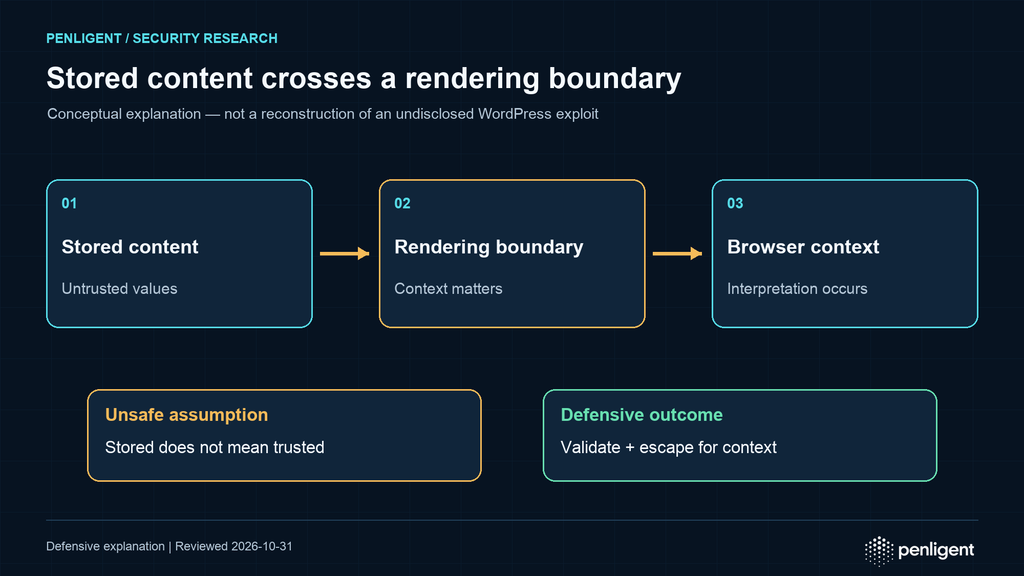
Stored cross-site scripting occurs when untrusted content is retained and later interpreted as active content in a browser context. The delay between input and rendering can make the relevant action hard to recognize: one person creates content, another user or administrator views it later, and a theme or block determines how it appears. Input controls, storage format, output context, user permissions, and browser behavior can all affect the result. The release lists several separate stored-XSS surfaces rather than a single universal payload.
Block-based editing introduces multiple views of the same data: editor state, serialized content, server-rendered output, previews, frontend interactions, and administrative lists. A string treated as data in one view may enter a different context in another. HTML text, an attribute, a URL, JavaScript, and CSS require different handling. A change that safely escapes one context may be insufficient in another. WordPress’s escaping guidance explains context-sensitive output escaping and the importance of applying it at output.
Sanitization and validation have different jobs. Validation checks whether input meets an expected structure or set of allowed values. Sanitization transforms input to remove or normalize unwanted material. Escaping makes a value safe for a particular output context. A plugin should use all three where appropriate rather than treating a generic cleanup function as a complete XSS defense. The official sanitizing guidance और data-validation guidance provide the relevant API concepts.
For the 7.1.4 deployment, test legitimate workflows with safe representative content. Open posts containing Categories, image, Playlist, and comments-pagination blocks. Exercise the Customizer selectively if the theme uses it. Check privacy-request administration only with synthetic records in staging. The purpose is to detect regressions and confirm the new code is serving these workflows. Do not copy an unverified exploit from a public repository into production to prove a patch took effect.
Interactivity API changes deserve a functional test
The release announcement identifies multiple stored-XSS issues and a stored denial-of-service issue in the Interactivity API. It does not say that every interactive component is exploitable or that every plugin using the API contains a separate vulnerability. Map which parts of your site use the API, then test those components under the corrected core. Include custom block libraries and theme code because their compatibility can affect whether a deployment succeeds even when the security fix itself is in core.
A useful test set begins with user-visible behavior: opening menus, filtering a list, moving through comments, updating state, and rendering content after a page transition where applicable. Repeat these tests in the editor and frontend when both are relevant. Include an authenticated role with limited privileges as well as an administrator, because an administrator-only smoke test can miss a broken capability check or a rendering path used by contributors. Use browser console and server logs to investigate errors, while avoiding storage of personal content in a shared test report.
Stored denial of service is an availability issue, not proof of code execution. A rendering failure, resource spike, or repeated application error can be important without being an exploit confirmation. Capture the affected page, request time, error type, and deployed build. If suspicious stored content may be involved, preserve it in a restricted incident workflow rather than repeatedly opening it in a production administrator session. Do not publish potentially harmful content in a public ticket.
Custom integrations should also be reviewed for assumptions that the old behavior was safe. Core hardening can reveal fragile rendering logic, undocumented data formats, or overbroad privileges in extensions. Fix the integration through a supported change; do not revert a core security fix merely to restore a convenience feature. If a provider proposes a workaround, require a clear statement of security consequences and the conditions under which the workaround should be removed.
Information exposure and access control need their own response
The unpublished Customizer changeset issue concerns discoverability by unauthenticated users. Operators should consider what information was placed in unpublished customization work: text, links, layout choices, upcoming campaigns, or other business material. The announcement does not establish wholesale database disclosure. Respond according to the actual sensitive data involved and the available evidence, rather than using an exaggerated “all data leaked” summary.
The Notes issue has a different prerequisite: privileged users could read notes despite lacking edit access to the attached post. That is a resource-level access-control concern. Being authenticated or having some privilege does not establish permission to every post and its associated collaboration data. After patching, test representative roles against posts they may and may not edit. Use harmless notes and test accounts, and confirm that expected access remains available to authorized editors.
WordPress developers should enforce permission checks at the relevant operation and resource. A nonce helps protect against certain request-forgery scenarios but is not authentication or authorization. The official nonce documentation explicitly warns against using nonces as an access-control substitute. Use an appropriate capability check, such as the documented current_user_can function, with the relevant object where required, and validate ownership or application-specific policy as well.
The root-certificate update is another distinct category. The announcement ties it to eMudhra revocation. Treat it as a trust-store maintenance change included in the release, not as evidence that every outbound connection was intercepted or that a new WordPress CVE has been assigned. Check integrations that depend on outbound HTTPS, including update checks, API calls, payment adapters, and email services where relevant. Investigate certificate failures through the provider’s supported diagnostics rather than disabling certificate verification to make a health check pass.
Build the inventory around the actual deployment
A domain is not an installation inventory. One hostname may route to several web nodes, a staging site may share a database with a mistaken configuration, and an old document root may remain reachable through a secondary virtual host. Begin with the hosting account, deployment pipeline, filesystem path, database mapping, public hostnames, and responsible owner. Record whether core is managed through the dashboard, a hosting service, an operating-system package, a source repository, or an application image.
On installations you administer, a read-oriented baseline can include the following commands. Replace the example path with a confirmed WordPress root; do not run them against an unknown directory or through an untrusted WP-CLI installation:
wp --path=/srv/www/owned-wordpress core version --extra
wp --path=/srv/www/owned-wordpress plugin list --format=json
wp --path=/srv/www/owned-wordpress theme list --format=json
wp --path=/srv/www/owned-wordpress core verify-checksums
The core version reference documents version reporting, and the plugin list reference documents plugin inventory. Depending on the command and application bootstrap, WordPress code or extensions can execute while an administrative CLI operation runs. If compromise is suspected, preserve evidence and use a trusted incident-response environment instead of assuming a CLI command is inherently forensic or side-effect free.
Inventory more than active ordinary plugins. Include must-use plugins, drop-ins, themes, custom code, media processing, object caches, scheduled jobs, and integrations outside WordPress. A corrected core does not fix an unrelated vulnerable plugin or an exposed backup file. Conversely, upgrading plugins without upgrading core does not resolve a core finding. Keep separate ownership and status fields so one successful change does not accidentally close the entire site’s security backlog.
Record the access path used by the verification. A CLI check against a mounted release directory may report a new version while a load balancer still sends users to an old node. A filesystem symlink can point to a previous release, and a container platform can replace a manually updated instance with an old image. Tie the result to the actual serving node or image digest and to the rollout controller’s desired state. The inventory should describe what users reach, not only what an administrator edited.
Back up for recovery, not for a checkbox
A usable recovery point includes the database and the files needed to restore the service, with a consistent time relationship. Record the exact core, plugin, theme, and custom-code versions associated with the backup. Include uploads and configuration through a protected process, but do not place database credentials or private keys in a publicly accessible archive. WordPress’s backup guidance explains the need to protect both database and filesystem data.
Consistency matters when a site accepts orders, memberships, comments, or file uploads during backup. A database snapshot from one time and an uploads archive from another may restore an incomplete application. The correct method depends on the hosting platform and business workload. Use the provider’s supported snapshot or application-consistent backup mechanism, or coordinate a short write pause where necessary. Do not improvise a database copy while assuming that an apparently successful file operation guarantees transactional consistency.
Test restoration in a restricted environment before relying on it for an urgent change. Verify that the database imports, the application starts, representative content renders, and required files are present. Disable outbound email, payment transactions, webhooks, indexing, and scheduled tasks that could contact real users or third parties. Staging should use synthetic or minimized data wherever possible. A restored production database contains production secrets and personal data until those have been removed or isolated.
Protect backup retention and access. Encryption, restricted roles, separate storage, and a defined expiration reduce the chance that the recovery mechanism becomes the breach source. Keep at least one recovery copy outside the failure domain of the site being changed when the platform supports it. Record a restoration owner and the practical time needed to recover. Do not claim a recovery-time objective from an untested plan; measure it during an actual rehearsal.
Stage the update with representative business workflows
Create a test environment that matches the production PHP version, database engine, web server behavior, caching layer, and essential extensions as closely as practical. Absolute parity may not be possible, but record differences that could affect the upgrade. A staging test on a different plugin set or an empty database can miss the behavior that matters most. Use the same approved package source and deployment method intended for production.
Prioritize workflows by consequence rather than by visual prominence. A homepage rendering successfully does not prove checkout, login, password reset, media upload, scheduled publishing, webhook delivery, or accessibility behavior works. For editorial sites, include publishing, block previews, category navigation, image and Playlist content, comments pagination, and Customizer usage when present. For commerce or membership sites, include a sandbox payment path, account permissions, transactional messages, and entitlement checks.
Test with multiple roles. An administrator can often see and do more than a contributor, author, editor, subscriber, or a custom role. The access-control fixes make role-based acceptance particularly relevant. Build test cases around operations and resources: who can edit a post, view its notes, manage privacy requests, or create users. Use temporary test accounts and harmless content. Never import a suspected malicious payload merely to make the test feel realistic.
Keep a short acceptance record containing the environment, deployed version, package source, test cases, results, errors, and decision owner. If a case fails, describe the observed behavior rather than guessing at the cause. A browser console error can arise from a plugin conflict, stale assets, a theme, or an application defect; it is not automatically proof that the security patch is broken. Reproduce in staging and escalate to the responsible maintainer with sanitized evidence.
Execute the production change through one approved channel
The official WordPress updating instructions describe dashboard and manual update approaches. Managed hosting may supply a different approved workflow. Choose the channel that matches the deployment model and verify the package provenance. Do not download a convenient archive from a forum, a search advertisement, a mirror of uncertain ownership, or an unsolicited message. If a hosting provider is responsible for core, request its change record and completion evidence.
For an administrator using WP-CLI on an owned 7.1-branch test or approved production installation, the following example shows a specifically pinned release from this announcement. These commands change the site; run them only after backup, compatibility review, and change approval. If a later stable correction is applicable, select that release through the documented maintenance process instead of blindly pinning an old example:
wp --path=/srv/www/owned-wordpress core update --version=7.1.4
wp --path=/srv/www/owned-wordpress core update-db
wp --path=/srv/www/owned-wordpress core version --extra
wp --path=/srv/www/owned-wordpress core verify-checksums
The core update documentation describes package selection and options, while the database update documentation describes schema updates. Do not use options that disable TLS validation as a workaround for download trouble. Investigate certificate, proxy, repository, and system-time issues through the supported channel. A security update fetched through an untrusted connection undermines the purpose of the change.
Watch for incomplete updates and permission failures. A process can stop after replacing only some files, leave maintenance state behind, or fail before the database step. Review the command output and logs, then verify the final state rather than repeatedly pressing update. Do not fix permissions by making the entire web root writable to everyone. Apply the least privilege needed by the selected deployment mechanism and restore the intended ownership afterward.
Coordinate caches and long-running workers with the hosting provider’s guidance. A file replacement does not always mean every process and cache immediately serves the new content. Object caches, page caches, reverse proxies, CDN assets, and PHP opcode caches have different roles. Use targeted invalidation and supported reloads where appropriate; do not flush a shared cache blindly if it affects other applications. The WP-CLI cache flush reference documents its command and cautions relevant to shared caching and multisite.
Verify version, integrity, activation, and behavior separately
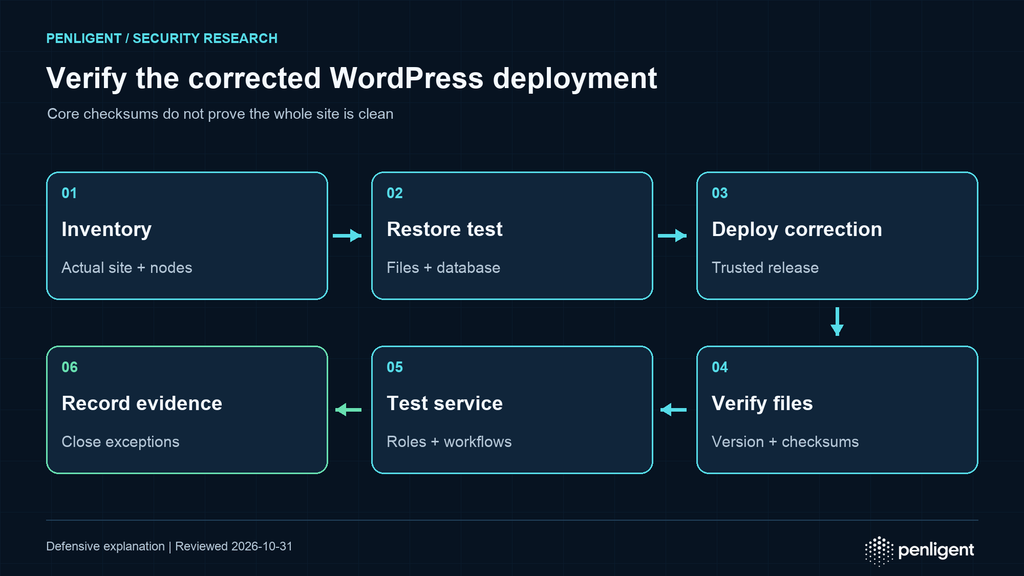
Remediation has several evidence layers. Version reporting identifies the installation’s claimed release. File-integrity verification compares selected files with a known package baseline. Activation verification establishes that requests reach the corrected deployment. Functional checks establish that the service remains usable. Security review asks whether there is evidence of prior compromise or a related unresolved issue. None of these should be collapsed into one “passed” label.
The core verify-checksums documentation explains comparison against WordPress.org checksums. A successful result supports integrity of the covered core files relative to the selected release and locale. It does not validate every plugin, theme, upload, database value, web-server configuration, or external integration. It does not prove that a site has never been compromised. Unexpected files and legitimate local modifications need interpretation through a trusted baseline and an approved change history.
When checksums differ, preserve the result and investigate. Do not immediately overwrite evidence if compromise is suspected. A modification may be a local customization, a damaged update, a hosting integration, or malicious code. Identify which files differ, who or what changed them, and whether the change is expected. A known-clean package can support remediation, but incident response may require capturing the affected instance and logs before replacement. Coordinate that decision with the service owner and response team.
Verify every serving node. Obtain its release or image identifier through the platform’s management plane and confirm that traffic has moved to the intended deployment. Use a controlled internal status method instead of exposing detailed version or path information publicly. Confirm that stale instances are removed from rotation and that autoscaling templates reference the corrected image. A one-time manual patch can disappear at the next restart if the desired-state configuration remains old.
Finally, repeat the critical functional checks in production using safe test data and approved accounts. Review error rate, latency, task queues, outbound integrations, publishing, and role-specific access. Set a short observation period appropriate to the service and name the person who can decide to stop the rollout. Passing these checks supports operational acceptance; it is not a substitute for the vendor’s security mapping or evidence about historical exploitation.
An isolated demonstration of stored-content escaping
The following educational example demonstrates a general defense principle only. It is not a WordPress proof of exploitation, does not reproduce any 7.1.4 issue, and contains no executable browser script or network server. It creates two local HTML files from harmless markup stored in a Python string. One file interprets that markup; the other displays it literally after escaping. Run it in a new empty directory you control, then inspect the files locally.
from html import escape
from pathlib import Path
stored_value = '<strong>Untrusted title</strong>'
root = Path.cwd()
unsafe = root / 'unsafe-markup-demo.html'
safe = root / 'escaped-text-demo.html'
if unsafe.exists() or safe.exists():
raise SystemExit('Use a fresh directory; existing files are preserved')
unsafe.write_text('<!doctype html><meta charset="utf-8"><p>' +
stored_value + '</p>', encoding='utf-8')
safe.write_text('<!doctype html><meta charset="utf-8"><p>' +
escape(stored_value, quote=True) + '</p>', encoding='utf-8')
assert '<strong>' in safe.read_text(encoding='utf-8')
print('Two local examples written; no network requests were made')In the first file, the browser treats the strong element as markup. In the second, it displays angle brackets as text. The example illustrates why stored input must not become trusted merely because it was saved in a database or created by an authenticated user. It deliberately avoids a script payload and makes no claim about the vulnerable WordPress code. Escaping rules still depend on output context; HTML text escaping is not a universal solution for URLs, JavaScript, CSS, or all attributes.
A real WordPress extension should use the appropriate platform APIs, permissions, validation, and escaping for its context. Developers should test both safe display and legitimate content behavior. Overly aggressive transformations can corrupt valid content, while under-escaping can cross a trust boundary. Keep security tests close to the rendering and permission logic, and review custom integrations after core updates change assumptions about accepted input.
Multisite changes the rollout boundary
A WordPress multisite network shares core code, but that does not mean every site has the same theme, plugins, content, roles, domain mapping, or business risk. A core deployment can affect the entire network at once. Identify network administrators, site owners, shared integrations, and representative site classes before changing the common code. A smoke test on the primary site is not sufficient evidence for every customer or department using the network.
The WP-CLI site list documentation provides ways to inventory sites. Treat exported URLs and administrative details as internal operational data. Select representative sites for acceptance testing based on differences in themes, critical blocks, commerce, membership, custom domains, and access-control rules. Record exceptions explicitly. If a dormant site remains reachable, include it in security coverage even when no business owner has recently edited it.
Database updates and cache operations can have network-wide consequences. Consult the documented command behavior and provider guidance before using multisite-related options. Test the process in a matching environment, and schedule the change around shared resources. If a network contains many sites, a staged functional acceptance process can reduce uncertainty even when core files are shared. Keep a communication and escalation route for owners who observe regressions after the central change.
Permissions require particular attention. A network administrator, a site administrator, an editor, and a custom role may have different abilities to install code, edit posts, and read collaboration data. The Notes fix should be evaluated against the relevant resource permissions, not just a broad role name. Review the test matrix with the people who understand the network’s custom capabilities and membership logic.
Containers, high availability, and managed hosts
For an image-based deployment, the corrected release should become part of the build artifact and desired configuration. Record the base image, WordPress package source, plugin lock or inventory, custom-code revision, and final image digest. Scan and test the artifact through the normal pipeline, then deploy it to a canary or staging environment. Do not rely on editing a live pod or container when the next reschedule will restore the vulnerable build.
High-availability sites need file and schema coordination. Confirm whether nodes share a filesystem, use local copies, or mount versioned releases. Avoid a long mixed-version interval in which different nodes serve incompatible assets or application code. The correct rollout sequence depends on the architecture and release requirements; follow the platform’s tested process rather than assuming a generic rolling restart is always safe. Keep database backup and compatibility decisions aligned with the code rollout.
A managed host can reduce administrative work, but responsibility must be explicit. Ask whether core updates are automatic, whether the host has deployed 7.1.4 or a later applicable correction, how it handles backports, what functional checks it performs, and what evidence it can provide. Distinguish provider-managed infrastructure from customer-managed WordPress content and extensions. A hosting dashboard saying “protected” is not the same evidence as an identified corrected core deployment.
If access to the filesystem or CLI is unavailable, request a provider-generated version and integrity report and perform the available application-level checks. Do not attempt to bypass hosting restrictions to obtain administrative access. Document which evidence is provider-attested and which was directly observed. That distinction improves future incident handling and avoids overstating the certainty of a managed-service assessment.
Logs and investigation after patching
Installing a correction prevents the corrected weakness from being used in the same way going forward, but it does not remove every consequence of a previous compromise. An attacker may have created accounts, changed configuration, inserted content, modified plugins, or obtained credentials. If there are credible indicators of compromise, treat the update as one part of incident response. Preserve evidence through a trusted process before rebuilding or deleting suspicious material.
Build a timeline from sources with known coverage and retention. Useful records can include hosting access logs, application error logs, administrator authentication events, user and role changes, plugin installation history, deployment logs, file-change monitoring, and outbound connection telemetry. Not every WordPress installation records these events by default. State the gaps. Absence of an event in an incomplete log is not evidence that the action never occurred.
Prioritize concrete anomalies: unexpected administrator accounts, unknown scheduled tasks, unexplained PHP files, altered core files, unauthorized plugin additions, suspicious redirects, or repeated errors around stored content. These are investigation leads rather than proof that one specific 7.1.4 vulnerability was exploited. Associate a CVE or mechanism only when the evidence supports that attribution. A recent security announcement can attract unrelated scans and false-positive claims.
If compromise is confirmed, coordinate containment, clean restoration or rebuilding, credential rotation, and notification obligations with the response team. Rotate secrets from a clean administrative environment after access paths are secured; changing passwords on an actively compromised host can expose the replacements. Review database credentials, hosting access, administrator accounts, deployment tokens, API keys, and integrations according to actual exposure. Avoid publishing sensitive indicators or customer data in a public support thread.
Temporary measures have an expiration date
Some sites cannot accept a core update immediately because of a critical compatibility issue or a provider-controlled window. Document the blocker and seek a supported resolution. Temporary measures can reduce exposure by limiting administrative access, pausing unnecessary content workflows, removing unneeded accounts, strengthening monitoring, or restricting a specific affected feature when an authoritative advisory supports that action. They do not collectively equal the vendor patch unless the vendor explicitly says so.
A web application firewall can block some known request patterns, but the release note does not establish a universal signature for all the listed issues. Stored content, administrative rendering, resource-specific permissions, and upgrade behavior can evade simplistic path-based rules. Do not publish a guessed regular expression as a complete mitigation. If a security provider supplies a virtual patch, record the rule version, coverage claim, limitations, and testing evidence, while retaining the scheduled core update.
Restricting unnecessary author or administrator privileges is useful general hardening, but do not claim it removes every finding. The Customizer changeset description explicitly mentions unauthenticated discovery, and other listed issues have their own undisclosed prerequisites. Treat each measure according to what it actually controls. WordPress’s hardening guidance covers layered operational defenses that complement patching.
Every exception should identify the owner, affected site, reason, temporary controls, monitoring plan, next action, and expiration. Review it on a short schedule appropriate to the risk. An exception without a deadline tends to become permanent infrastructure. If the site cannot be made supportable, plan migration or retirement through the business owner rather than leaving an unsupported public application indefinitely exposed.
Developer checks after the core update
Core fixes are not a substitute for reviewing custom code that handles similar patterns. Examine extensions that store user-controlled values and later render them in the editor, previews, lists, or frontend. Trace the value through validation, storage, transformation, and output context. Confirm the capability check at the operation rather than assuming the form’s visibility prevents direct access. A hidden button or an editor-only screen is not an authorization boundary.
Pay attention to indirect rendering. A plugin may safely escape a value in its own template but pass the raw value into a core block, a JavaScript state object, an attribute, or a remote service. Review every transition rather than just the original input handler. When output must contain allowed HTML, use the documented allowlist-oriented APIs and explicit policy rather than removing all escaping. Review URL schemes and attribute contexts separately from ordinary text.
Keep tests focused on security properties and intended behavior. A text field should display unsafe markup as text where that is the contract. A restricted note should be unavailable to a user lacking the relevant post permission. A rejected request should not change data. Use harmless test strings and local fixtures, with no external callbacks or production payloads. These tests can demonstrate application boundaries without reproducing a disclosed exploit chain.
Also review extension support status. Abandoned plugins or themes can block core upgrades and create independent exposure. Replace or maintain them through a deliberate plan, preserving content and business requirements. Record compatibility decisions in the repository or deployment documentation so the next security release does not repeat the same investigation from scratch.
Close findings with evidence that survives the change window
A useful closure record contains a site identifier, actual deployment root or image, pre-change version, selected correction, authoritative release reference, package source, backup and restore evidence, deployment time, verification result, functional acceptance, and remaining exceptions. Store sensitive paths and logs in an internal system with appropriate access. A public screenshot does not need to reveal database names, full filesystem layouts, usernames, or credentials.
| Question | प्रमाण | What it does not establish |
|---|---|---|
| Which installation was changed? | Host, deployment, path or image identity | That every other installation was covered |
| Which release is installed? | Version output and deployment record | File integrity or historical safety |
| Do covered core files match the release? | Checksum result and investigated exceptions | Clean plugins, uploads, database, or accounts |
| Is corrected code serving users? | All-node rollout and traffic-routing evidence | Every business function works |
| Did critical workflows pass? | Role-specific acceptance tests | No prior compromise occurred |
| Can the service recover? | Tested restoration with measured results | A vulnerable rollback is an acceptable final state |
When a scanner continues to report the finding, compare its evidence with the verified deployment. It may be observing a stale node, cached response, old backup route, unsupported package mapping, or a real incomplete update. Resolve the discrepancy; do not suppress the result solely because a change ticket says done. If the scanner cannot interpret a supported provider backport, attach the provider’s explicit correction mapping and the observed package evidence.
Separate security remediation from routine cleanup. Removing an unused theme, tightening file permissions, or improving backups can be valuable, but those changes should not obscure whether the specific core correction was deployed. A focused record allows the security team, site owner, and auditor to understand what was fixed, what was tested, and what still needs attention. It also makes the next update faster because the installation and recovery path are already documented.
Three deployment scenarios and their decision points
For a small editorial site on a managed host, begin by confirming the provider’s update status and the actual WordPress version. Obtain a backup through the host, verify that restoration is available, and test the main editorial workflows after the provider applies the correction. Include logins, publishing, image blocks, category navigation, and comments if enabled. If the host reports an older branch, request its exact security-backport mapping rather than comparing only the visible major version.
For a commerce installation with custom extensions, use a representative staging clone with payment and email safely redirected to test services. Rehearse the update, then test checkout, refunds or order management as appropriate, account permissions, background tasks, and outbound APIs. Schedule production deployment with an owner who can halt the change. Maintain transaction consistency during backup and understand how a database rollback would affect orders placed after the recovery point. A simple filesystem rollback may not recover the full business state.
For an agency managing many independent sites, group deployments by architecture and dependency set rather than updating every site simultaneously. Establish a trusted package, select a small representative group, collect version and acceptance evidence, then expand. Track failures individually and avoid marking the whole estate complete from a single sample. Give each site a business owner and a recovery route, including sites that are low-traffic or temporarily inactive but still publicly reachable.
Across all three cases, the decision is the same: proceed when the correction is authoritative, the recovery path is credible, and the deployment owner can observe and validate the result. Pause a rollout when files are inconsistent, critical workflows fail, or compromise evidence requires preservation. Resolve the cause and continue through a supported route. Neither panic-driven changes nor indefinite postponement provides a reliable security outcome.
Automatic updates need an observable outcome
The release announcement says sites supporting automatic background updates will begin the process automatically. That describes expected behavior for eligible installations, not a guarantee for every host. An organization may disable background updates through deployment policy, restrict filesystem writes, delegate updates to a provider, or pin a version in its image. Failures can also occur because of connectivity, permissions, storage pressure, or a conflicting change. Review the actual configuration before assuming that a site has already received the correction.
For an automated estate, define how completion is detected. A provider notification or scheduled job exit code can be an initial signal, but follow it with version, deployment, and functional evidence. Alert when the desired version differs from the active version after the expected window. Keep unsupported or disconnected installations visible rather than dropping them from the compliance denominator. A dashboard reporting ninety percent completion is useful only if the remaining sites have owners and explicit next actions.
Automatic updates and testing can coexist. Use a managed canary group or a documented provider workflow where available, then perform targeted acceptance checks after the update. Do not replace urgent security maintenance with a lengthy feature-release process, but do preserve a credible recovery route. The level of testing should reflect the site’s consequence of failure: a brochure site and a high-volume checkout platform need different operational depth even when they install the same corrected core.
Package identity and locale can affect integrity evidence
Record the package identity that was actually installed, including release, locale when applicable, source, and deployment artifact. Checksum tooling needs a suitable baseline. A mismatch caused by comparing a localized package to the wrong baseline should be investigated as a verification problem, while an unexplained executable-file change remains a security concern. Do not label every warning malicious, and do not dismiss every warning as localization without checking the affected files and trusted package.
Some organizations customize core directly. That makes integrity interpretation and future updates harder because legitimate changes are mixed with vendor files. Preserve the approved change history and plan to move custom behavior into supported extension points where feasible. A security release should not be manually merged by copying only the most obvious changed file unless the provider supplies an explicit supported method. Partial copying can miss related fixes, leave inconsistent code, and make future version evidence misleading.
Use an immutable package or trusted deployment artifact as the comparison anchor for the whole application when the architecture supports it. Core checksums cover one part of that picture; extension inventories, custom-code revisions, configuration management, and image provenance cover others. This layered evidence is especially important after a failed upgrade or suspected compromise, when a reported version number may no longer describe the actual file set.
Privacy workflows should be tested without exposing people
The Privacy Data Removal Requests fix makes privacy-administration testing relevant, but real request records can contain sensitive personal information. Create synthetic records in staging and limit the people who can view the test environment. When investigating an existing request, keep the evidence in the restricted incident or privacy workflow rather than copying its contents into a general change ticket. Security troubleshooting should not create a second disclosure.
Separate functional acceptance from legal completion of a privacy request. A test can establish that the administration page renders correctly and that intended permissions hold; it does not determine whether the organization has met its deletion obligations across backups, external systems, or retained records. Coordinate the application check with the privacy owner. Keep logs and screenshots minimal, redact identities, and expire test exports according to the organization’s normal retention rules.
Questions about the WordPress 7.1.4 security update
What does WordPress 7.1.4 fix?
- The October 28, 2026 announcement lists an upgrade-window RCE risk, several stored-XSS surfaces, Interactivity API denial of service, unpublished Customizer changeset discovery, a Notes permission issue, and a bundled root-certificate update. Use the official announcement for the exact descriptions; it does not assign a CVE to every item.
Does the upgrade issue mean every old WordPress site has unauthenticated RCE?
- No such universal claim follows from the release note. It identifies potential RCE during the upgrade window but does not publish a complete trigger or prerequisite matrix. Apply the correction promptly without inventing exploit details.
Are all older WordPress branches already patched?
- The announcement says backports to eligible branches were in progress and would ship when ready. Confirm the exact published correction for your branch. Courtesy backports do not mean every older branch is actively supported or already fixed.
Can I rely on automatic updates?
- Automatic background updates can deploy the release where supported, but verify completion and the actual serving deployment. Configuration, permissions, hosting policy, or an update failure can prevent the expected result. Review the applicable update mechanism and retain evidence.
Does a passing core checksum check prove the site is clean?
- No. It supports integrity of the covered core files against the chosen baseline. It does not validate all extensions, uploads, database records, users, configuration, or historical activity. Investigate credible compromise indicators separately.
Do I still need to update plugins and themes?
- Yes, maintain them through their own supported security and compatibility process. Core 7.1.4 does not fix unrelated extension vulnerabilities, and an extension update does not replace a core correction. Test critical integrations after both kinds of change.
What if the site was compromised before the update?
- Preserve evidence, contain the incident, rebuild or restore from a trusted state as appropriate, and rotate exposed credentials through a clean environment. Patching the core vulnerability is necessary but does not remove every persistence mechanism or stolen secret.
Verify the correction, then keep the evidence
WordPress 7.1.4 warrants a prompt, controlled deployment because its official announcement combines several meaningful security corrections. The right outcome is a recoverable site running an applicable corrected release, with integrity and functional checks tied to the actual serving deployment. Preserve the distinctions between a release note and an exploit claim, a published backport and a planned one, an installed package and active code, and a checksum match and an incident-response conclusion.
Identify the installation, choose the supported correction, rehearse recovery, update through a trusted channel, verify every serving node, and close the record with scoped evidence. If a compatibility issue or suspected compromise interrupts that path, assign an owner and resolve it explicitly. A security release is most effective when the operational process makes its correction real, observable, and durable.
 Hindi
Hindi  English
  German
  French
  Spanish
  Portuguese
  Japanese
  Korean
  Arabic
  Turkish
  Hebrew