
An AI agent can produce a plausible MCP installation command in seconds. That does not make the referenced server current, official, maintained or appropriate for the permissions the agent will receive.
Explore Penligent for your first authorized test →
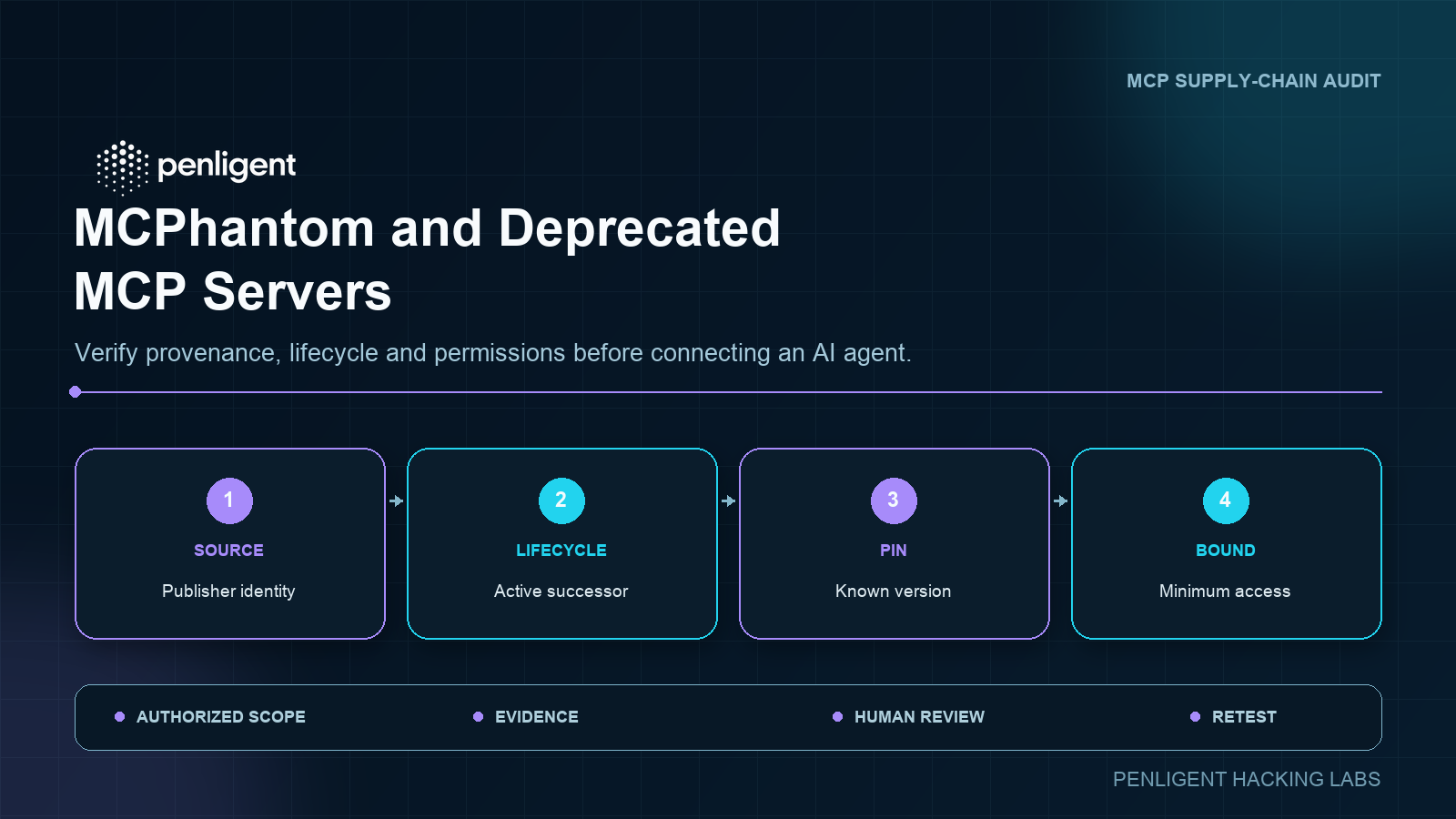
Glow Labs used the name MCPhantom for a failure mode described on a page displaying November 2 and November 3, 2026 dates: in the sessions it reviewed, AI coding agents recommended or installed deprecated or no-longer-maintained Model Context Protocol servers. The operational lesson is broader than any one agent or package. Treat an AI-generated dependency recommendation as untrusted input until its identity, lifecycle, version, permissions and behavior have been reviewed.
This is not evidence that every coding agent will return the same outdated package. Recommendations can change with the model, product version, prompt, network access, registry integration and date. It is evidence that “the agent suggested it” is not a supply-chain control.
What the MCPhantom research does and does not establish
Glow Labs reported reviewing real-world coding-session transcripts involving Claude Code, Cursor, Codex CLI, Claude Cowork and Claude chat, with the historical GitHub MCP server as a central example. According to the researchers, agents could draw on stale installation knowledge and lead users toward software whose lifecycle had changed since that knowledge entered the model or surrounding documentation.
That finding should be read with two boundaries.
First, it is an attributed research result, not a universal benchmark. A recommendation observed on one date with one prompt or model build may not reproduce after a product update, a documentation change or a registry integration.
Second, deprecated does not automatically mean malicious. A deprecated server may still function, and an archived repository may contain useful historical code. The security concern is that a team can connect an agent to code, credentials and network resources without noticing that the project is no longer the supported implementation, no longer receives fixes, or has been replaced by an official successor.
The control objective is therefore not to ban old software by label. It is to make the dependency decision explicit and evidence-based before trust is granted.
Why a correct-looking installation command can still be wrong
Models and agent products learn from or retrieve information created at different times. Package names, repository ownership, official installation paths and security guidance continue to change after that information was written.
An outdated recommendation can remain convincing because several details still look valid:
- the package name exists;
- the command syntax is correct;
- a historical README contains the same configuration;
- the server starts and returns a tool list;
- an old tutorial ranks well or is repeated across documentation;
- the package has many past downloads.
None of those facts establishes current stewardship. A package can be deprecated while remaining installable. A repository can be archived while its releases remain downloadable. A successor can use a different language, authentication path, toolset or deployment model even when it serves a similar purpose.
Network-enabled agents are not automatically immune. Search results can surface copied documentation, cached package pages, unmaintained forks and old examples. Registry discovery improves provenance, but registry presence alone does not prove that a server’s requested privileges or runtime behavior fit a particular environment.
Distinguish deprecated, archived, unmaintained and malicious
These labels describe different decisions and should not be collapsed into a single risk category.
| State | What it means | Security decision |
|---|---|---|
| Deprecated | A maintainer or package registry explicitly recommends that users stop adopting the package or move elsewhere. | Identify the stated successor and plan migration. Do not approve a new deployment only because the old package still runs. |
| Archived | The repository is read-only or retained as history. | Determine whether fixes, releases and support have moved. Treat unresolved defects and dependency drift as ongoing risk. |
| Unmaintained | Maintenance appears inactive, but there may be no formal deprecation notice. | Verify ownership and release activity. Require a named internal owner before accepting the maintenance burden. |
| Malicious or impersonated | The package, publisher or behavior is intentionally harmful or misrepresents its identity. | Block installation, preserve evidence and follow the organization’s incident and supply-chain response process. |
Age is not proof of malice, and popularity is not proof of safety. The decision should follow verifiable identity, stewardship and behavior.
The pre-connection MCP server audit matrix
Before an agent receives a server configuration, token or access to a working directory, answer the following questions.
| Audit area | Questions to answer | Evidence to retain |
|---|---|---|
| पहचान | Do the package, repository, publisher and project website refer to the same project? Is the organization or publisher expected? | Exact package name, repository URL, publisher identity and review date |
| Recommendation source | Did the suggestion come from an official registry, current vendor documentation, a package page, a search result or model memory with no source? | Agent output, cited source, prompt context and timestamp |
| Lifecycle | Is the package deprecated, the repository archived, maintenance inactive, or an official successor available? | Deprecation notice, archive banner, release history and successor link |
| संस्करण | Is the dependency pinned to an inspectable release or commit? Can the installation be reproduced from a lockfile? | Version, commit, lockfile, integrity data and build inputs |
| Permissions | Which token scopes, files, directories, network destinations and subprocess capabilities are requested? | Approved scopes, file boundaries, egress policy and launch configuration |
| Behavior | Which tools, resources and prompts are exposed? Can tool definitions change after connection? | Captured tool schema, configuration, network observations and review notes |
| Isolation | Can the server be installed and exercised without production credentials, sensitive repositories or broad host access? | Test environment, temporary credentials and observed outcomes |
| Accountability | Who approved the server, what assumptions were accepted, and when must it be reviewed again? | Owner, approval record, expiry or review date and retest result |
A blank cell is a finding. If the team cannot identify the publisher, explain why a successor was rejected, or describe the server’s effective permissions, the connection is not ready for approval.
A safe verification workflow
1. Capture the recommendation before changing it
Save the agent’s proposed package name, repository, version, installation command and configuration. Record the agent product, model if known, prompt, date and whether the session could browse the web or consult a registry.
This provides provenance. Without it, the team cannot tell whether a later correction came from the agent, a developer, a package manager or a separate search result.
2. Resolve the authoritative project identity
Check the official MCP Registry, the software vendor’s documentation, the package registry and the repository organization. Confirm that they point to one another and that the publisher has not unexpectedly changed.
The MCP Registry is useful discovery infrastructure, but it should be treated as one input. Review the linked source, release history and publisher rather than assuming that discoverability is an endorsement of every permission or deployment choice.
3. Check lifecycle signals and find the successor
Look for package deprecation notices, repository archive status, maintenance statements and migration links. If a successor is named, start from its current documentation instead of translating the old installation command by guesswork.
If no successor exists, the team must decide whether to own the code, isolate it, replace the integration or reject it. “It still starts” is not a maintenance plan.
4. Pin what will actually run
Avoid unbounded latest-version installs in a sensitive environment. Pin an inspectable release or commit, retain the dependency lockfile and record integrity information supported by the package ecosystem.
Pinning is not a permanent approval. It creates a reproducible review target. The pinned server and its transitive dependencies still need vulnerability monitoring and planned updates.
5. Review the launch path and exposed capabilities
Inspect the command that starts the server and the effective environment it inherits. Review:
- tool names, descriptions and input schemas;
- resources and prompts exposed to the client;
- file and directory access;
- outbound network destinations;
- shell or subprocess execution;
- environment variables and credential sources;
- logs and error paths that may reveal secrets;
- whether the tool list or schema can change during a session.
The MCP tools specification allows clients to discover tool definitions. It also warns that tool annotations are hints and should not be considered trustworthy unless the server is trusted. A friendly description such as “read-only” is not a substitute for verifying the server’s effective behavior and credentials.
6. Install without production secrets
Use a disposable development environment, container or isolated host. Start with synthetic data, a restricted working directory, controlled egress and temporary credentials that can be revoked.
The objective is not to build an exploit. It is to confirm that the package obtained is the package reviewed, that it exposes the expected capabilities, and that its file, network and process behavior matches the approval request.
7. Approve the minimum connection and preserve evidence
Grant only the scopes and resources required for the intended task. Keep the server configuration, source, version, tool schema, approved permissions, test evidence and owner together.
Then apply the broader authorization, tool-permission, command-injection and data-exfiltration checks in an MCP security testing checklist. Provenance review determines whether the component is a defensible candidate; runtime testing determines whether the connected system enforces the intended boundaries.
The GitHub MCP server migration is a useful case
The historical GitHub server illustrates why lifecycle checks must precede installation. The archived Model Context Protocol server documentation for @modelcontextprotocol/server-github states that the project moved to GitHub’s official repository, github/github-mcp-server.
That statement provides a direct migration signal. It does not justify silently replacing one package with another in a production agent configuration.
Treat the official implementation as a new review target:
- Follow the current GitHub-maintained installation documentation.
- Compare the available toolsets with the capabilities actually needed.
- Review the current authentication method and requested GitHub permissions.
- Start with restricted or read-only access where the workflow permits it.
- Verify that old configuration fields, environment variables and launch assumptions are not copied blindly.
- Capture the new server’s version and tool schema, then retest the agent workflow.
The archived README historically showed a personal access token supplied through configuration. Regardless of implementation, long-lived tokens should not be committed to repositories or pasted into shareable agent configuration. Use the current product’s secure credential mechanism and the narrowest practical permissions.
Runtime authorization still matters after provenance is verified
A maintained official server can still be deployed unsafely. MCP’s authorization and security guidance supplies several controls that remain necessary after the lifecycle review.
Do not use token passthrough
MCP security best practices explicitly prohibit token passthrough. A server must not accept a token that was not issued for it and simply forward that token to a downstream API. This undermines audience validation, audit boundaries and least privilege.
Verify which component obtains each token, which resource it is intended for, how it is stored and whether downstream access uses a separate, correctly scoped credential.
Bind authorization to user intent
OAuth flows can create confused-deputy risk when a client, server and downstream resource are not bound to the same user-approved action. Validate redirect URIs, authorization state and the relationship between the requested operation and the scopes granted.
Keep humans aware of tool calls
The MCP tools specification recommends clear visibility into available tools and confirmation for sensitive invocations. The client should show what the tool will do, which server will execute it and which resources it can affect.
Human confirmation is not a cure for misleading tool descriptions. It works only when the interface exposes enough accurate context for a meaningful decision.
Conditions that should block the connection
Do not connect the server to real code, credentials or data when any of the following remains unresolved:
- the package, repository or publisher identity cannot be reconciled;
- the project is deprecated or archived and the team has not evaluated the stated successor;
- the installation depends on an unpinned branch, mutable remote script or irreproducible build;
- the configuration requires a broad, long-lived token without a documented need;
- the server requests unrestricted filesystem, network or command access for a narrow task;
- the exposed tools or schemas cannot be captured and reviewed;
- the server’s observed network, file or process behavior differs from its declared purpose;
- the team cannot test without production secrets;
- no accountable owner accepts maintenance, monitoring and revocation responsibility.
An exception, if one is justified, should be time-limited and documented with compensating controls. It should not turn an unexplained agent suggestion into a permanent dependency.
Make lifecycle review continuous
The approval record should include the server name, package and repository identity, pinned version, source of the recommendation, successor status, approved permissions, owner and next review date.
Recheck the decision when:
- the package or repository changes publisher;
- a deprecation or archive notice appears;
- an official successor is announced;
- the server adds tools or changes schemas;
- required token scopes expand;
- the client changes how it discovers or approves tools;
- the underlying model or agent product is upgraded;
- the server or a material dependency receives a security update.
This turns MCPhantom from a one-time headline into a practical dependency-governance control. The agent’s recommendation remains useful, but it is evidence to investigate—not authority to install.
Teams evaluating agentic testing can also use the AI pentesting cost and trial guide to define a bounded first task, then require the same properties from any security automation: known components, bounded permissions, reviewable evidence and repeatable retesting.
 Hindi
 English
 German
 French
 Spanish
 Portuguese
 Japanese
 Korean
 Arabic
 Turkish
 Hebrew