
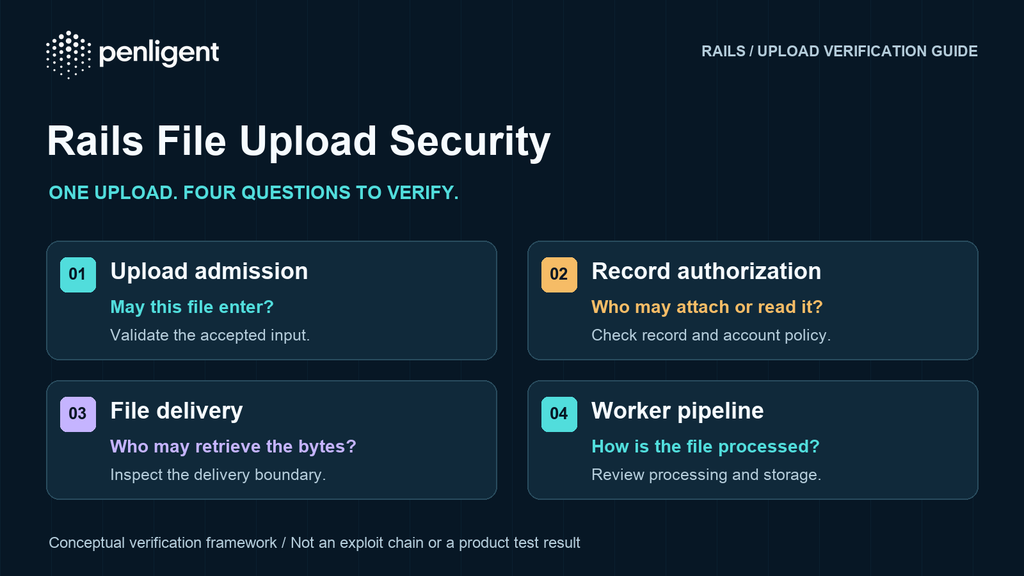
A Rails file-upload security test needs to answer two different questions: is the deployed processing stack patched, and can each user access only the attachments your application policy permits? An upgrade can address a framework vulnerability while leaving an application-level ownership mistake unchanged. A correctly enforced ownership rule cannot compensate for an unsafe media processor.
On November 4, 2026, Rails released 8.0.5.2 and 8.1.4.1 with 21 security fixes. Several affect Active Storage; others concern different framework components. The announcement also states that security support for Rails 8.0 ends on November 7, 2026. Patch the affected branch promptly, then plan a supported upgrade path instead of treating 8.0.5.2 as a long-term destination.
This guide turns those changes into a bounded acceptance plan for an application you own or are authorized to test. It is based on official documentation checked November 6, 2026. No Rails application or Penligent product test was run for this article; the examples are proposed checks with synthetic data.
Identify which upload paths you actually operate
Draw the path of one attachment: browser to application or direct-upload service, blob record, owning record, background analysis, preview or variant, and final download. Add the storage provider, any proxy/CDN and the process that performs media work. A successful browser upload covers only one part of this lifecycle.
Record the deployed Rails, Active Storage and Action Pack versions in both the web and worker environments. Within the deployed application bundle, bundle info rails, bundle info activestorage और bundle info actionpack provide package information. Preserve the build identifier and lockfile revision too. A patched developer checkout does not prove that existing web or job processes loaded the new code.
Capture the configured variant processor, installed media tools, storage service, direct-upload use and public versus authenticated download routes. Treat this inventory as the applicability evidence for the following matrix. The listed fixes are 8.0.5.2 and 8.1.4.1; each advisory remains the authority for its precise affected range.
| Area | Configuration to establish | Safe verification after upgrading |
|---|---|---|
| Image analysis | Untrusted uploads processed with ImageMagick/mini_magick and the effective coder policy | Confirm the shipped policy loads, then process a small permitted image. Check mini_magick compatibility and intentional format restrictions. |
| Audio/video processing | Which analyzers/previewers run, actual FFmpeg build and permitted input formats | Review configuration and dependency inventory; confirm a tiny normal media fixture works. Do not use server-file references or executable formats. |
| GCS direct uploads | Google Cloud Storage, direct upload use and cache_control setting | Check declared-length enforcement, generated upload headers and browser CORS with tiny synthetic objects. |
| Proxy downloads and caching | Drawn proxy routes, streaming service, cookie migration/rotation and shared-cache behavior | Inspect response headers and an isolated streaming-error test; confirm worker resources are released. |
| Filename handling | Database behavior and code that derives a filename base, extension or preview | Run the upstream regression test or a controlled unit test, plus ordinary filename and preview controls. |
Turn the relevant advisories into configuration checks
GHSA-f3w6-w445-fwh9 concerns ImageMagick processing of untrusted attachments under an insufficient policy. Attaching a file can trigger analysis without an explicit preview request. The fix requires mini_magick 5.1 or later when using that processor. Review the advisory’s special handling for custom command environments, GraphicsMagick and affected Disk-service deployments, including its secret-change guidance.
Check the policy through the application’s MiniMagick environment, as documented in the Active Storage guide:
bin/rails runner 'puts MiniMagick.identify { |i| i.list "policy" }'Save the output with the build identifier. A shell-level policy listing can differ from the application’s effective configuration. If a legitimate format stops working, review the exact business requirement before weakening the policy. A passing thumbnail test establishes ordinary functionality; it does not prove every dangerous decoder is unreachable.
GHSA-v924-7rp8-4mxh addresses decoder selection influenced by the uploaded filename extension. Its AviSynth scenario requires a particular FFmpeg build and runtime; absence of that combination does not exclude every ImageMagick or other decoder concern. Separately, GHSA-3f4q-8x5m-76v8 restricts FFmpeg input formats through config.active_storage.ffmpeg_allowed_formats. Review enabled processing paths and the stated prerequisites instead of attempting file disclosure to establish exposure.
For deployments meeting an advisory’s secret-change conditions, follow that guidance after upgrading. This includes affected Disk-service deployments identified by the ImageMagick advisory and deployments meeting the decoder advisory’s AviSynth execution conditions. A patch does not invalidate credentials that may already have been disclosed. Assess the exposure window, rotate applicable secrets through the approved response process, and verify dependent services. A normal thumbnail or preview is not proof that earlier exposure did not occur.
For GCS, distinguish two fixes. GHSA-3w93-6hmw-whh4 applies to direct uploads with cache_control configured and changes the signing behavior. GHSA-hfr4-8rjc-97m2 binds the upload length with x-goog-content-length-range. Its CORS requirement matters operationally: allow that header in the documented GCS configuration, or ordinary browser uploads can fail after patching. Use a tiny declared-size mismatch in an owned test bucket, followed by a correctly sized upload, to check both rejection and availability.
GHSA-x6mj-8jx9-qhqv requires a combination of proxy delivery, cookie rotation or hybrid migration, and a cache that retains Set-Cookie on public responses. Inspect that combination explicitly. The separate streaming-error advisory notes that proxy routes may exist even when proxying is not the default. Reproduce a single storage error with a test double in an isolated test suite, never by flooding downloads or disrupting production storage.
The filename-handling advisory has a database prerequisite: it identifies stores that accept NUL bytes and excludes PostgreSQL because it rejects the row. Preserve that distinction in the assessment. None of these configuration checks is evidence that exploitation occurred; an exposed deployment needs its own incident assessment.
Define attachment policy before testing signed URLs
Rails documents that default Active Storage controllers are publicly accessible. A generated signed blob URL grants access to someone who possesses it; it does not automatically enforce your application’s login or tenant ownership rule. Sensitive attachments may require authenticated controllers and removal of public default routes.
Write down which of two policies your application intends. Under a share-link policy, possession of a valid link may deliberately grant access until its defined expiry or revocation condition. Under a private-record policy, a request must be authorized for the current user and resource. Finding that Account B can open a link deliberately shared by Account A is not, by itself, proof of an ACL bypass.
Separate link issuance from link consumption. Can B obtain a private attachment link through a record API that B should not read? Does an authenticated download controller authorize the owning record? Are thumbnails and previews protected consistently? If the product promises immediate revocation, does an already issued storage URL remain usable for an agreed interval? Record the intended rule and actual URL lifetime before assigning impact.
Run one controlled task with two test accounts
Create Account A and Account B in separate synthetic tenants, with no shared membership unless the scenario requires it. Give each account one tiny attachment containing a different harmless marker. Use a small valid PNG and a short text file; add audio or video only if your real workflow needs it. Keep credentials, real customer documents, malformed parser inputs and large files out of the exercise.
Prepare a task brief listing the exact application origin, allowed routes, test identities, storage destinations, maximum requests and stopping conditions. A cloud-storage hostname or identity provider reached by a redirect is not automatically authorized for broader testing. Keep all actions within the named workflow and confirm where redirects may go.
- Establish positive controls. A uploads, views and downloads A’s file; B does the same for B’s. Record the relevant body marker and identity. An expired session cannot serve as evidence of a working authorization denial.
- Check the application boundary. Using only the two evaluator-owned records, verify whether B can request A’s attachment metadata or invoke A’s authenticated download/preview path. Follow the application’s actual routes; do not invent endpoints or enumerate other users’ records.
- Check the sharing contract. Exercise one intentional share and its removal if supported. Classify direct signed-link access separately from unauthorized link issuance and authenticated-route access.
- Inspect processing and delivery. Confirm expected analysis/preview jobs finish for the tiny allowed fixture. Review errors, response disposition, cache headers and the configured processing policy. Do not inject execution payloads to prove a configuration finding.
- Stop and preserve evidence. Stop for unexpected customer data, a scope change, repeated processing failures or service instability. Record what was blocked or not tested instead of converting it into a clean result.
| Policy or condition | Evidence to retain | Retest acceptance |
|---|---|---|
| Owner may read its attachment | Account/tenant, record ownership, sanitized request, expected marker and build | The same allowed read succeeds after the fix. |
| Other tenant may not obtain a private link | Issuing endpoint, acting identity, returned metadata/link and declared policy | No protected link or data is returned; the owner control still succeeds. |
| Private preview follows record authorization | Original and derived-file routes, each response and redirect chain | Both paths enforce the intended policy; cached copies are assessed separately. |
| Shared link follows its stated lifetime | Issuance context, expiry/revocation rule and observation time | Access changes according to that contract, including any documented residual interval. |
| GCS upload matches declared length | Small fixture sizes, signed headers, response and CORS behavior | Mismatched input fails; the correct browser upload succeeds. |
| Media processing uses the patched configuration | Web/worker versions, processor policy and job outcome | The fixed configuration is loaded and permitted fixtures still process. |
Use the result to decide the next test
A useful finding connects a policy to an observed violation. Keep the actor, owner, operation, expected behavior, actual response and build together. Redact credentials and bearer URLs from reports; preserve a restricted evidence copy if reproduction requires them. A status code alone cannot distinguish a private file from an error document or public placeholder.
Classify configuration exposure, confirmed application behavior and untested hypotheses separately. After a fix, repeat the original case against the deployed build and its allowed control. Include worker restarts, relevant cache behavior and newly generated links in the verification record. Closing one download path does not establish that every preview, export or older link follows the same rule.
To evaluate this workflow, download Penligent and start your first authorized test. Client installation and account registration are required. Follow the documented project-creation workflow to define the authorized target and scope. Bring the task brief and synthetic fixture first. Confirm how the current client accepts your authentication context; if it cannot carry a required identity transition, perform that comparison separately and label the coverage gap.
Review any resulting finding’s evidence before expanding scope; a task may produce no finding, and a completed task does not establish every upload path was tested. No completed report or automated multi-account coverage is promised here. The supplied Penligent workflow video is a general product demonstration, not evidence of a Rails assessment or a result on your application.
Method: AI-assisted, source-based research and an original defensive test plan prepared on November 6, 2026. No Rails deployment, production endpoint or Penligent task was tested for this article.
 Hindi
 English
 German
 French
 Spanish
 Portuguese
 Japanese
 Korean
 Arabic
 Turkish
 Hebrew