
Authenticated web application penetration testing evaluates the application after legitimate access has been established. Supplying credentials is only preparation. A useful assessment must show which role and session reached each workflow, which security expectation was exercised and where authentication failed. A scan that repeatedly receives a login page has not established coverage of the application behind it.
For a buyer, the first decision is whether the requirement is a software-assisted internal assessment, an independently delivered engagement or both. Agree that before purchasing. The workflow below is a planning and acceptance framework, not a claim that a tool automatically handles every SSO, MFA or business process. Reviewed October 25, 2026.
Define coverage in terms of actions and identities
Start with the operations whose misuse would matter: viewing invoices, changing account ownership, inviting staff, exporting records, resetting credentials or administering integrations. Pair each operation with the identities allowed and denied by the product’s policy. This turns “test behind the login” into a bounded assignment that a tester and a buyer can review together.
OWASP’s Web Security Testing Guide recommends tailoring testing to the application and balancing automated breadth with manual and semi-automated investigation. For an authenticated engagement, that means supplying the context needed to judge a business action, not assuming a generic crawler knows the permission policy.
| Test identity | Provide before execution | Evidence to retain |
|---|---|---|
| Unauthenticated visitor | Approved public entry points and forbidden actions | Actual response and whether login was required |
| Standard user A | Dedicated account and synthetic owned records | Successful own-resource path and denied unauthorized path |
| Standard user B | Separate account with distinct ownership | Independent session and contrasting access result |
| Administrator | Explicitly scoped administrative actions | Allowed action without substituting the admin session for user tests |
| Disabled or revoked identity | Approved revocation fixture and timing | Fresh request after the intended policy change |
Use separate browser profiles or another isolation mechanism appropriate to the tool. If a tester logs in as an administrator and then runs the low-privilege test in the same state, an apparently surprising success can simply be a contaminated fixture. A finding should identify the account whose session was actually used, not the account named in the task prompt.
Prepare SSO and MFA without weakening the application
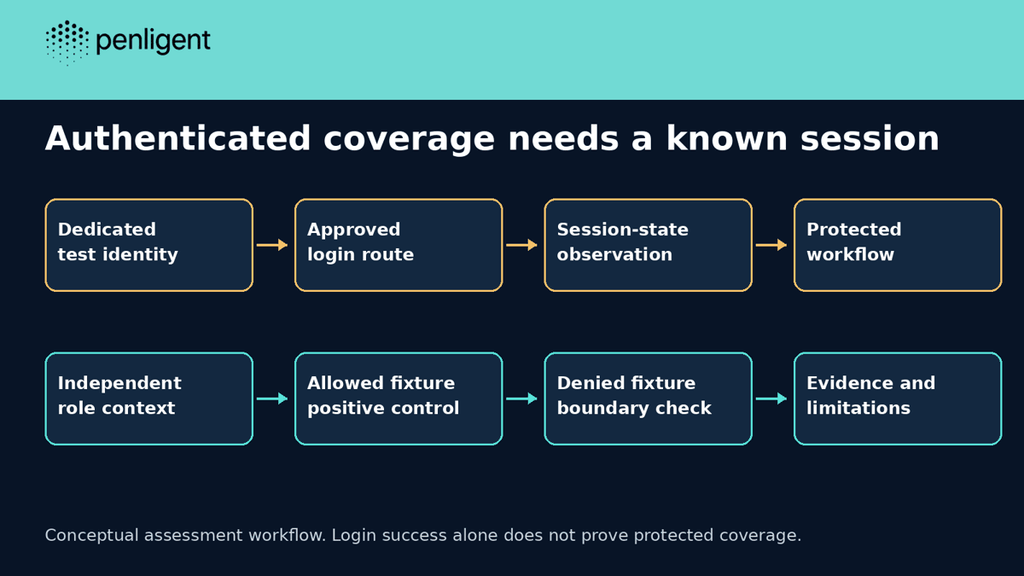
Ask how the chosen workflow establishes, stores, refreshes and discards authenticated state. A session may depend on cookies, CSRF state, an identity-provider redirect and a step-up action. A successful initial login does not establish that a long-running job remains authenticated or that a fresh session can be created after expiration.
For MFA, arrange dedicated test identities and the approved operator interaction. Keep one-time codes, recovery codes and session cookies out of reports and ordinary prompts. If automation cannot complete a required step, record the blocked workflow and use an authorized assisted route. Disabling MFA on the production tenant merely to make a tool proceed changes the system being assessed and may create a new exposure.
Account lockouts, third-party identity services and notification channels belong in the scope discussion. Identify who may reset a test identity and how to stop repeated authentication failures. Avoid testing an identity provider or sending real customer messages unless those actions are expressly included. A login flow can cross organizational boundaries even when its first screen lives on your domain.
Prove the session state before claiming protected coverage
A 200 response can contain a login form, a generic shell or a cached page. Pair status with an application-specific, non-sensitive fixture that establishes the intended identity. An approved test record or account marker is more useful than the page title alone. Keep the marker synthetic; do not retrieve a real customer record merely to prove login worked.
The following offline model shows why status alone is inadequate. It does not parse HTTP, perform a login or test an application. Its markers are assumed inputs; real collection must account for redirects, response content and application behavior. The label authenticated-evidence records a session observation, not a security finding.
# Offline session-state model; no browser, server or credential handling.
def classify(status, login_marker, expected_fixture):
    if status in (401,403) or login_marker:
        return 'blocked'
    if status == 200 and expected_fixture:
        return 'authenticated-evidence'
    return 'inconclusive'
cases=[(200,False,True,'authenticated-evidence'),(200,True,False,'blocked'),(302,False,False,'inconclusive'),(401,False,False,'blocked'),(403,False,False,'blocked'),(200,False,False,'inconclusive')]
for status, login, fixture, expected in cases:
    actual=classify(status,login,fixture)
    assert actual==expected
    print(f'{status} login={login} fixture={fixture}: {actual}')
print(f'{len(cases)}/{len(cases)} expected outcomes')
We ran the model locally with Python’s standard library. All six expected outcomes passed. The 200-with-login-marker case was classified as blocked; a 200 response without either marker remained inconclusive. This is a test of the decision model, not evidence that any commercial product detects those conditions correctly.
For a real engagement, attach the session-state observation to the tested operation and timestamp. If a session expires halfway through a batch, separate completed actions from later blocked ones. Retesting only the last page after logging in again cannot establish what happened to all previous requests.
Distinguish permission failures from normal application behavior
A denied action needs a positive control. If user A cannot export any file, a failed attempt to export user B’s data says little about the ownership boundary. First establish that user A can perform the corresponding permitted operation on an approved fixture. Then compare the unauthorized case under the same role, deployment and feature configuration.
Likewise, an unexpected response is a lead rather than a finished finding. An authorization test must connect the actor, requested resource, applicable policy and observed result. A background job may accept a request and reject it later. An export link can return metadata while withholding the actual file. Review the whole approved action without claiming that one intermediate success demonstrates every downstream consequence.
| Observed result | Reasonable conclusion | Do not infer |
|---|---|---|
| Own fixture succeeds; other fixture is denied | The particular comparison supports the intended boundary | Every object type and endpoint was tested |
| Login page returns HTTP 200 | Authentication may have been lost | Protected functionality was assessed |
| Export request is accepted | Job submission passed this stage | Unauthorized file contents were delivered |
| No issue was reproduced | No confirmed issue in the completed scope | The application is secure or all roles were covered |
Choose between automation, a human engagement and a combined workflow
Automation is useful when the team can provide stable accounts, clear expectations and repeatable fixtures, then review the output. A human-led engagement is especially relevant when the buyer requires an independent assessor or the application depends on complex approvals and business-specific decisions. The purchase should assign ownership of blocked access and ambiguous findings rather than treating them as invisible tool failures.
CYBRI’s published service pricing illustrates why scope matters: its starting web application package is manual-first, covers up to two user roles and starts at $5,000. That is an example from one provider, not a market average or a like-for-like comparison with a software subscription. Additional environments, report requirements and retesting terms can change the deliverable.
Penligent’s product material describes browser-assisted validation, operator intervention and evidence-backed reporting. Evaluate those documented functions against one representative authorized workflow in your installed version. Do not infer universal SSO support, unattended MFA completion or exhaustive role coverage from the presence of a browser or an AI agent.
Buy coverage and evidence you can accept
Before execution, agree the assets, roles, sensitive workflows, prohibited actions, access window and report recipient. Ask whether the quoted work includes setup troubleshooting, manual investigation, reporting and retesting. A lower price is not directly comparable when one proposal assumes working accounts and another includes the work needed to prepare and validate them.
Use a small pilot to answer concrete questions: can the workflow maintain the intended session, reach the important operation, retain useful evidence and distinguish a completed test from blocked access? Record actual consumption and operator time. Do not extrapolate a complete application price from one quick public-page task or a credit allowance advertised beside an approximate target count.
Require a report that exposes its coverage gaps
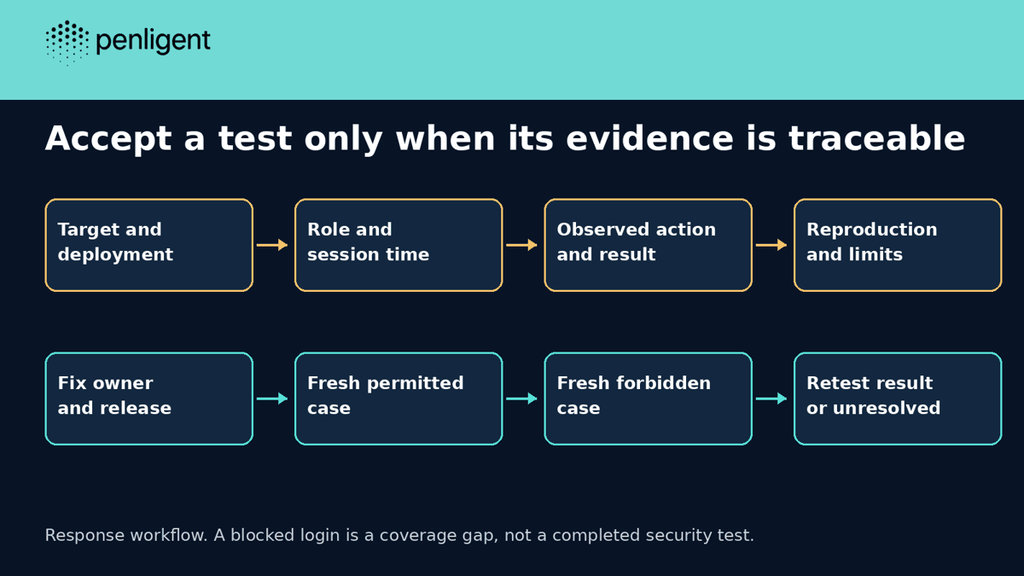
The handoff should name the deployment, test dates, accounts or role identifiers, completed workflows and inaccessible paths. Confirmed findings need reproducible steps, prerequisites and sanitized evidence. Keep suspected issues separate from verified ones, and explain whether an unresolved result reflects an application response, missing access or a test limitation.
After a fix, repeat the relevant allowed and denied cases on the replacement deployment. A new build number establishes a deployment change, not a repaired permission decision. A retest report should identify the original finding and what was actually repeated. If session setup still fails, leave the security verification incomplete.
For a procurement request, ask the customer whether it accepts the proposed assessor and methodology before promising delivery. An editable PDF and a testing subscription do not create independent assurance by themselves. The useful commercial outcome is an assessment the recipient can interpret and engineering can act on.
Questions to settle before an authenticated assessment
Is authenticated testing the same as authentication testing?
No. The former describes testing with access; the latter examines authentication controls. An engagement can include both, but the scope should say so.
Does supplying an admin account cover all roles?
No. Lower-privilege and ownership boundaries need separate identities and expectations. Administrator access can hide a missing control.
Can a tool test behind SSO and MFA?
Verify the exact supported session setup and operator interaction in the installed workflow. Record blocked access rather than assuming every login method works.
Should I disable MFA for the test?
Do not weaken a live system merely to satisfy automation. Arrange an approved test setup or an assisted workflow and document any differences.
Can an automated report replace the report my customer requested?
Only after the recipient accepts the assessor, scope, methodology and deliverable. Confirm those requirements before purchasing.


 Japanese
  English
  German
  French
  Spanish
  Portuguese
  Korean
  Hindi
Hindi  Arabic
  Turkish
  Hebrew