
AWS Continuum for penetration testing is priced at $50 per task-hour, with task time metered by the second, according to the AWS pricing page reviewed October 25, 2026. The unit is cumulative agent work, not the time between pressing Start and receiving a report. Parallel work can finish sooner while consuming more billable task-hours than the elapsed run duration.
That distinction should drive a buying decision. Estimate from the work actually recorded, confirm trial eligibility and set the service’s run-level control before starting. The calculations below are transparent offline examples, not AWS invoices or an independently measured product benchmark.
Which AWS Continuum capability are you buying?
AWS describes Continuum as a broader security offering that includes the agent formerly known as AWS Security Agent. Its product page separates penetration testing from code vulnerabilities, code scanning and threat modeling, with different availability labels. An overall product description should not be treated as evidence that every capability has the same billing unit or release status.
For this purchase, keep the line item narrow: penetration testing task-hours. Do not import the separate code-vulnerability context and inference dimensions into a pentest estimate without establishing that you are also using that capability. Equally, a preview label on one part of the service does not establish that a penetration test is free.
The price and trial terms to verify first
| Pricing item | AWS published position | Buying consequence |
|---|---|---|
| Penetration testing list rate | $50 per cumulative task-hour; per-second metering | Use task consumption rather than elapsed duration. |
| Commitment | Pay as you go; no upfront minimum fee | The run limit discussed below is not a minimum bill. |
| New-customer trial | Two months from the first penetration test; up to 400 task-hours each trial month | Confirm eligibility and period boundaries; do not assume unused allowance carries forward. |
| Revalidation | First three revalidations per finding are not charged; additional revalidations are task-hour based | Do not interpret this as unlimited free full-test reruns. |
The table summarizes the current AWS penetration-testing price and trial terms. Usage beyond the trial allowance and after the trial is subject to standard pricing. Verify the offer that applies to your account before relying on it. The examples in this article deliberately exclude trial benefits, discounts, taxes and other services so the task-time arithmetic remains inspectable.
Ten minutes of waiting is not necessarily ten minutes of billing
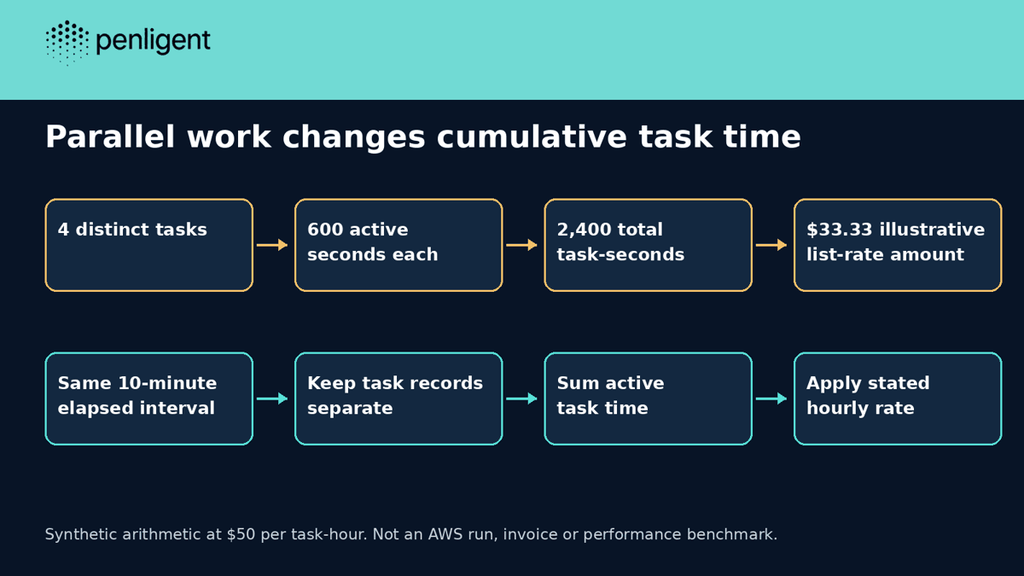
Imagine four synthetic tasks that each record ten minutes of active work during the same ten-minute interval. Elapsed time is ten minutes, while their sum is forty task-minutes. There is no contradiction: one quantity describes the reader’s wait and the other the accumulated work. The example assumes those inputs; it does not predict how many tasks AWS will launch.
| Synthetic workload | Recorded active time | Illustrative list-rate amount |
|---|---|---|
| One task of 600 seconds | 600 task-seconds | $8.33 |
| Two concurrent tasks of 600 seconds each | 1,200 task-seconds | $16.67 |
| Four concurrent tasks of 600 seconds each | 2,400 task-seconds | $33.33 |
For these examples, the calculation is task-seconds ÷ 3,600 × the stated hourly rate, rounded to cents for display. Do not multiply a measured run duration by an assumed concurrency count if the service already supplies actual task-hours. That substitution can count idle time as work or miss tasks that started and ended at different points.
A small calculator with explicit input limits
The following standard-library Python helper accepts synthetic task identifiers and active seconds. It rejects negative durations, non-finite values and duplicate task identifiers. Duplicate protection helps prevent adding the same task twice when assembling an illustrative ledger. This is a local arithmetic check; it does not connect to AWS or read service telemetry.
# Illustrative list-rate arithmetic. No AWS API, account, invoice or scan.
from decimal import Decimal, ROUND_HALF_UP
RATE = Decimal('50.00')
def estimate(rows):
    seen = set()
    seconds = Decimal('0')
    for task_id, active_seconds in rows:
        if task_id in seen:
            raise ValueError('duplicate task identifier')
        seen.add(task_id)
        amount = Decimal(str(active_seconds))
        if not amount.is_finite() or amount < 0:
            raise ValueError('invalid active seconds')
        seconds += amount
    cost = seconds * RATE / Decimal('3600')
    return seconds, cost.quantize(Decimal('0.01'), rounding=ROUND_HALF_UP)
examples = [
 ('single task', [('a', 600)], Decimal('8.33')),
 ('two concurrent tasks', [('a',600),('b',600)], Decimal('16.67')),
 ('four concurrent tasks', [(str(i),600) for i in range(4)], Decimal('33.33')),
 ('fractional second', [('a','0.5')], Decimal('0.01')),
 ('no work recorded', [], Decimal('0.00')),
]
for name, rows, expected in examples:
    seconds, displayed = estimate(rows)
    assert displayed == expected
    print(f'{name}: {seconds} task-seconds -> illustrative ${displayed}')
for invalid in [[('a',-1)],[('a',1),('a',2)]]:
    try: estimate(invalid)
    except ValueError: pass
    else: raise AssertionError('invalid input accepted')
print('7/7 expected outcomes')
We ran this exact helper locally. The five numeric cases and two invalid-input cases all produced their expected outcomes:
single task: 600 task-seconds -> illustrative $8.33
two concurrent tasks: 1200 task-seconds -> illustrative $16.67
four concurrent tasks: 2400 task-seconds -> illustrative $33.33
fractional second: 0.5 task-seconds -> illustrative $0.01
no work recorded: 0 task-seconds -> illustrative $0.00
7/7 expected outcomes
The rounding rule belongs to this helper, not to a claim about invoice reconciliation. Use the actual AWS usage and billing records for financial closeout. A record containing no tasks means this input list contributes zero; it does not establish that an AWS account incurred no charges. The helper also assumes each row represents a distinct complete amount, rather than a cumulative snapshot that has already been counted.
Set the run limit, and understand what Completed means
について test-creation documentation provides a maximum task-hours setting with a minimum configurable limit of 20 hours. It also offers No limit. When the configured maximum is reached, AWS stops the work, preserves the findings and finishes the run with status Completed.
At the stated list rate, 20 task-hours corresponds to $1,000 before applicable trial benefits or adjustments. This is arithmetic for the configured work allowance, not a $1,000 minimum charge. A run using fewer hours is billed for its actual use. Before launching, check the selected value rather than assuming a small target implies a small configured ceiling.
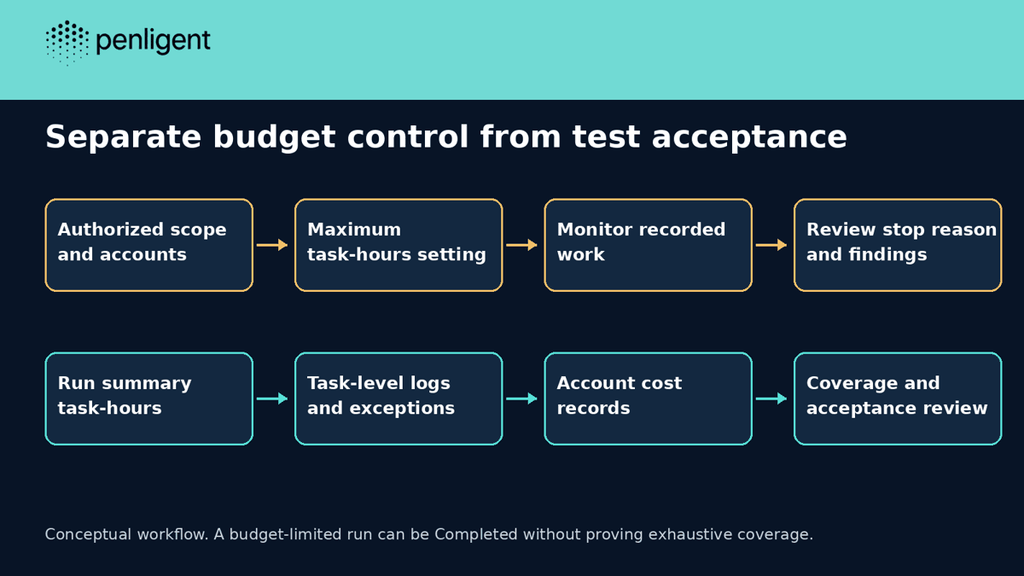
A budget-limited run can therefore be Completed without establishing that every intended workflow received the depth you wanted. Treat the stop reason, remaining scope and findings as separate acceptance questions. A dashboard status can describe a finished job while leaving a security decision unresolved. Do not turn an interrupted coverage plan into a claim that the application has no remaining weaknesses.
If your acceptable experimental spend is lower than the configurable control permits, do not describe an external timer as an equivalent guaranteed cap. Decide whether the available controls fit your budget, review the current account options and use a narrower authorized evaluation where appropriate. A buyer should be able to explain the chosen exposure before starting a billable run.
Quotas, alerts and run controls do different jobs
AWS’s billing documentation distinguishes resource quotas from spend controls. It directs operators to run summaries and task logs for task-hours, Cost Explorer for charges and AWS Budgets for notifications. It also says a stopped run remains billable for work accrued before it stops. A quota or an alert must not be represented as a substitute for the documented run-level maximum.
| Control or observation | Use it for | Do not treat it as |
|---|---|---|
| Maximum task-hours setting | Bounding the configured test’s work under the documented service behavior | Proof that every desired test completed |
| Run summary and task logs | Understanding the work recorded in that run | A universal price per application |
| Cost Explorer | Reviewing account cost records | A replacement for scope and authorization |
| Budget notification | Learning that a configured charge threshold was crossed | A guarantee that execution stopped at the alert threshold |
Keep a small run ledger with the target, approved scope, configuration revision, task-hours limit, recorded usage, stop reason and report review. Compare like configurations first. If the second run adds authenticated roles or another application path, the change in cost may reflect a different assignment rather than a loss of efficiency.
Resolve access problems before repeating a broad evaluation. A task that cannot maintain the intended login state can still consume work without answering the protected-workflow question. Use dedicated test accounts, synthetic records and a known permitted operation to establish the session context. Then review the denied cases and any blocked coverage separately.
Compare the accepted result rather than unrelated billing units
A task-hour, a subscription credit and a consultant day are different units. There is no justified conversion between them without a matched scope and measured consumption. Dividing the cheapest advertised plan by a hypothetical number of targets does not produce a defensible price per completed assessment.
For an alternative software workflow, Penligent describes application testing, evidence review and editable report delivery. Evaluate it with the same authorized target, role fixtures and acceptance questions. This article does not establish that either product finds more vulnerabilities or costs less for your application, and no head-to-head product run was performed.
Before buying either workflow, decide what the recipient needs: reproducible technical findings, internal regression evidence or an independent third-party assessment. Agree the assessor and reporting requirements with a customer who requested the test. An automated report export does not, by itself, establish that the customer accepts the methodology.
A useful pilot ends with a narrow result you can inspect, actual usage you can reconcile and a list of remaining work. Repeatability makes the next budget more credible. A larger trial allowance or a faster-looking progress bar cannot substitute for those observations.
Questions about AWS Continuum pricing
Is the rate charged per elapsed hour?
No. The published unit is cumulative task-hours. Parallel tasks can make total task time exceed elapsed duration.
Does setting a 20-hour limit mean I pay for 20 hours?
No. The documented limit bounds allowed work; actual task consumption drives the charge. It is not a minimum fee.
Are all retests free?
The pricing page specifies the first three revalidations per finding. Do not assume an entire new test or every kind of rerun is included.
Does an AWS service quota cap my pentest spend?
The billing guide says quotas are not spending limits. Review the test’s maximum task-hours control separately.
Was the calculator tested against an AWS invoice?
No. Seven local arithmetic and validation cases passed on synthetic input. No AWS account, target or invoice was accessed.
Does a completed run guarantee complete coverage?
No. The documented task-hours stop can produce Completed status while preserving findings. Review the stop reason and actual coverage.

 Japanese
  English
  German
  French
  Spanish
  Portuguese
  Korean
  Hindi
Hindi  Arabic
  Turkish
  Hebrew