
UEFI, the Unified Extensible Firmware Interface, defines the interface between platform firmware and the software that starts an operating system. UEFI security depends on the implementation, the configured trust policy, and the state that is active on the machine. A UEFI label alone establishes none of those security conclusions. The UEFI Forum’s FAQ explains the interface and the role of its pre-OS security features.
Begin an assessment with three questions: which firmware is running, which boot images that firmware will authorize, and how a supported repair reaches the active platform. These questions require different evidence. A healthy operating system, a downloaded BIOS update, or a Secure Boot checkbox can each be useful without answering all three.
The commands and examples below are designed for inspection. They do not change boot order, delete trust keys, flash a firmware image, or disable a platform protection.
UEFI is an interface, not a single firmware product
について UEFI Forum’s specification catalog publishes the standard. Platform suppliers implement it in firmware, with their own supported configurations and update identities. An implementation defect therefore needs a product and component mapping before it becomes a device-level finding.
Traditional BIOS and UEFI describe different firmware environments; a setup screen may still be called “BIOS” in everyday support language. Record the observed boot environment and manufacturer’s terminology without treating the screen’s name as technical proof. Likewise, an EDK II-based implementation is one implementation path, not a synonym for the entire standard.
GPT is a disk-partitioning format. It is associated with UEFI deployments but is not a security state. Microsoft’s GPT FAQ describes that storage role. Finding a GPT disk does not establish whether Secure Boot is enforced, which keys are trusted, or whether firmware has been updated.
This distinction matters during incident response. A disk inventory, an operating-system version, and a firmware revision describe different layers. Keep their identifiers separate so that a successful change at one layer does not close a finding at another.
Distinguish firmware, boot files, and variable state
The startup environment contains several independently changeable objects. The platform firmware provides the implementation. Boot applications and loaders supply code selected during startup. Persistent variables carry configuration and trust-related state. An investigation that collects only one object can miss the condition that actually changed.
For example, reinstalling an operating system may replace boot files while leaving the platform firmware revision unchanged. Updating a firmware image may preserve or migrate configuration. Restoring a VM can reintroduce an older combination of firmware selection and persistent state. The relevant result must be observed after the supported operation rather than inferred from its name.
Linux exposes EFI variables through efivarfs. The kernel documentation for efivarfs also explains the risk of deleting certain variables and the attribute bytes that precede their data. Treat this filesystem as firmware state, not as a directory to clean up. General inspection should use supported read tools rather than improvised variable editing.
When collecting evidence, retain the collection environment. A host OS, guest OS, rescue environment, and container may expose different views. A missing interface in one environment is a limitation to record, not a reliable declaration that the physical platform lacks UEFI.
What Secure Boot decides
Secure Boot applies an image-authorization policy to relevant firmware drivers and boot applications. The UEFI Secure Boot and Driver Signing chapter defines the trust databases and image-validation rules. The authorized database is commonly called db; the forbidden database is dbx. Platform and key-exchange keys govern aspects of trust-policy management.
The operational question is whether the candidate image is acceptable under the effective policy, including revocations. A valid signature is evidence about integrity and signing authority. It is not a guarantee that the signed program contains no exploitable defect. That is why maintaining the implementation and maintaining image trust are related but distinct work.
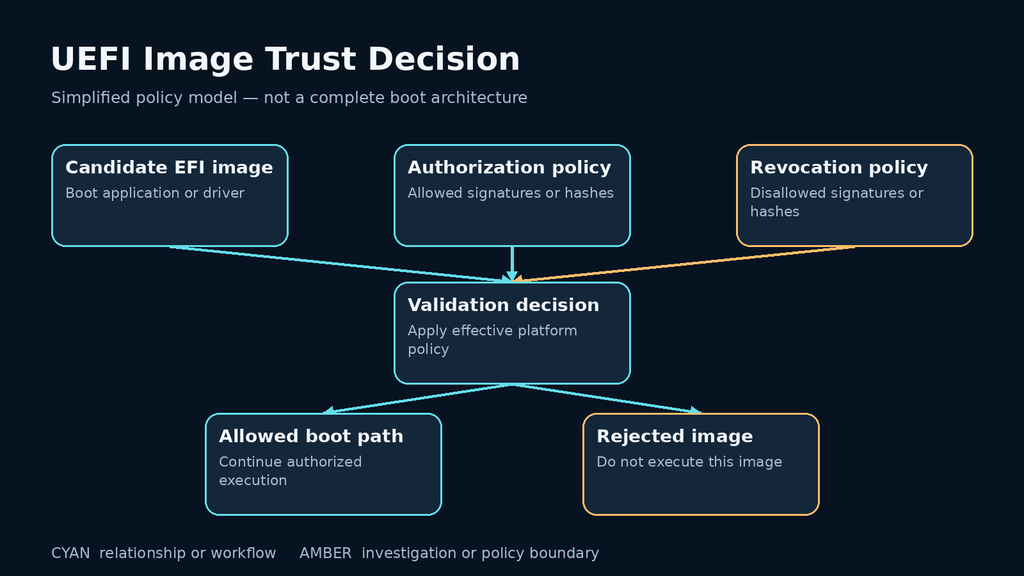
A Secure Boot state check should therefore retain its scope. “Enabled” is useful evidence about the reported state at collection time. It does not establish that every firmware component is current, that every allowed image is appropriate for the organization, or that no earlier compromise occurred.
A management password addresses a different boundary: who may change certain platform settings. Disk encryption addresses access to protected data. Neither should be credited with repairing a firmware parser or replacing the image-authorization decision. During remediation, name the specific step each control constrains.
Secure Boot, Measured Boot, and encryption answer different questions
Secure Boot enforces image-authorization decisions. Measured Boot records evidence about the startup sequence for later evaluation. Microsoft’s device health attestation documentation describes TPM-protected measurements and their assessment by a remote service. Secure Boot itself does not require a TPM; attestation introduces additional platform and service requirements.
| メカニズム | Question it helps answer | What still needs evidence |
|---|---|---|
| Secure Boot | Is this boot image authorized under the active policy? | Implementation integrity, maintenance, and appropriate trust contents |
| Measured Boot | What startup evidence was recorded? | Trusted collection, freshness, interpretation, and a reference policy |
| Attestation | Does the reported evidence satisfy a verifier’s requirements? | Verifier policy and the scope of its conclusion |
| Disk encryption | Is stored data protected under the configured access conditions? | Key handling, recovery readiness, and relevant boot-policy assumptions |
The distinction changes investigation language. An unexpected measurement may identify a boot change worth examining, but it does not explain the cause by itself. An approved firmware update may legitimately alter measurements. Conversely, a familiar measurement is useful only within the guarantees of the measurement and verification process.
Maintain a known, reviewed baseline and document planned changes. When boot behavior differs after maintenance, compare the observed changes to the authorized operation before calling the event an attack or dismissing it as routine.
Collect Windows state with read-only queries
On a Windows system you administer, collect the firmware identity through a local PowerShell session:
Get-CimInstance -ClassName Win32_BIOS |
    Select-Object Manufacturer, SMBIOSBIOSVersion, ReleaseDate

Confirm-SecureBootUEFI
Microsoft documents the inventory pattern in Collecting information about computers and the status query in the Confirm-SecureBootUEFI reference. The latter needs an appropriate elevated session. A supported query returns a Boolean; unsupported-platform or privilege errors must remain errors rather than being converted into “Secure Boot disabled.”
Join the firmware revision to the exact device model and vendor update record. A release date is helpful context, but it is not an affected-version comparison. Vendors may backport a repair, and different model families may use unrelated revision schemes.
For a deeper, authorized review, Get-SecureBootUEFI provides access to Secure Boot-related variables. Reading those values and deciding whether their contents are appropriate are separate tasks. Keep key material and organizational trust-policy details within the designated administrative process.
Collect Linux update evidence without installing anything
Where fwupd is already installed and supported for the platform, these inspection commands show enumerated devices and known update availability:
fwupdmgr get-devices
fwupdmgr get-updates
について fwupdmgr command reference describes these operations. Interpret results in the context of configured metadata, device support, and collection time. An empty update list is not a vulnerability-free verdict. The tool may not manage the relevant firmware, or its available metadata may not resolve the advisory being investigated.
For platforms using UEFI capsule delivery, consult the fwupd UEFI capsule documentation and the manufacturer’s supported procedure. Delivery to the device, a pending activation state, and the revision reported after activation are different checkpoints. Keep the final readback attached to the maintenance record.
Do not install a generic development image because the inventory says “UEFI.” Firmware compatibility and recovery depend on the platform. If a supported update channel cannot identify the correct repair, request a model-specific mapping from the supplier and preserve the asset’s unresolved status.
A local model of authorization and revocation
This original Python example models one simplified policy principle: an explicitly revoked artifact must not pass merely because its signer is otherwise trusted. It does not parse EFI binaries, validate cryptographic signatures, read platform variables, or reproduce the full UEFI image-validation algorithm.
def toy_image_allowed(image, trusted_signers, allowed_ids, revoked_ids):
    if image["id"] in revoked_ids:
        return False
    if image["id"] in allowed_ids:
        return True
    return (
        image["signature_verified"] is True
        and image["signer"] in trusted_signers
    )


trusted = {"lab-release-key"}
current = {"id": "lab-current", "signer": "lab-release-key",
           "signature_verified": True}
retired = {"id": "lab-retired", "signer": "lab-release-key",
           "signature_verified": True}
unknown = {"id": "lab-unknown", "signer": "other-key",
           "signature_verified": False}

assert toy_image_allowed(current, trusted, set(), {"lab-retired"})
assert not toy_image_allowed(retired, trusted, set(), {"lab-retired"})
assert not toy_image_allowed(unknown, trusted, set(), {"lab-retired"})
print("Synthetic image-policy checks passed")
The example makes the evidence limit visible: the value named signature_verified is synthetic input. No real signature check takes place. Passing this model cannot demonstrate that a laptop’s firmware enforces its intended policy. That requires the platform’s supported evidence and, where necessary, separately scoped laboratory validation.
Virtual machines need firmware and state inventory too
A guest can have a UEFI environment even though its firmware arrives from a host package or another managed artifact. Its update responsibility differs from the physical host’s platform firmware. Include both layers when the advisory scope requires them.
libvirt’s Secure Boot guide shows why capable firmware and enrolled keys are distinct, and why persistent variable state matters for existing guests. Collect the chosen firmware and applicable state through approved virtualization tooling. Do not assume that editing a preference has changed the already established guest state.
For managed cloud services, ask for a service-specific responsibility and applicability statement. A guest OS brand is not an inventory of the provider’s host firmware. Keep customer-managed guest configuration separate from provider-managed platform components so that each unresolved question reaches the correct owner.
Verify maintenance as a change to active state
Prepare recovery before maintenance: confirm the authorized operator, supported update, required power and activation conditions, boot and recovery media, and access to any applicable encryption recovery material. Store sensitive recovery information in its designated system rather than copying it into a general vulnerability ticket.
Capture the starting revision and trust state, apply the supported change, complete its required activation, and collect the same observations again. Check ordinary boot, required peripherals and management functions, and the recovery route the organization depends on. Make acceptance criteria specific enough that another engineer can repeat them.
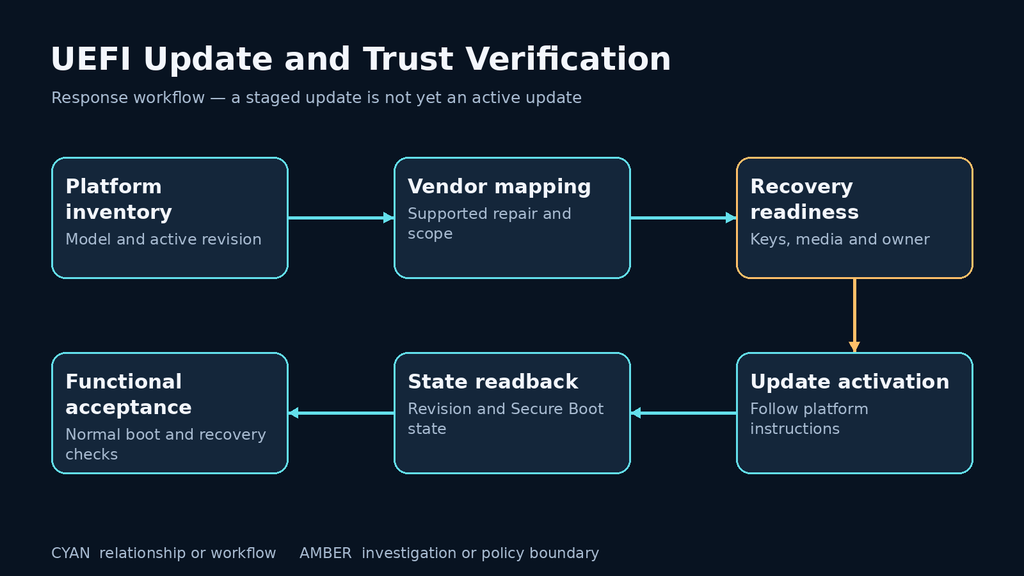
If maintenance changes boot measurements or triggers a recovery workflow, retain the timing and expected change history. If the update fails, preserve the failure state and escalate through the supported recovery process. A fallback that restores availability but reinstalls affected firmware must reopen the corresponding vulnerability disposition.
Historical compromise remains a separate question. A repaired revision establishes a current maintenance result; it does not prove what ran before the repair. Where incident evidence warrants further action, preserve the investigation scope and recovery decision alongside the update record.
Frequently asked questions
Does UEFI mean Secure Boot is enabled?
- No. Confirm the effective state on the particular machine, and preserve query errors as unresolved observations.
Does Secure Boot prevent every firmware exploit?
- No. It addresses image authorization. Evaluate implementation vulnerabilities, platform protections, and update requirements separately.
Will reinstalling Windows or Linux update the motherboard firmware?
- Do not assume so. Identify the supported firmware delivery path and read back the active platform revision after maintenance.
Is a TPM the same thing as Secure Boot?
- No. TPM-backed measurement and attestation add evidence capabilities. They are separate from the firmware’s image-authorization feature.
Should I disable Secure Boot when troubleshooting an advisory?
- Do not use that as a generic vulnerability response. Follow platform-specific supported guidance and assess any proposed policy change as its own decision.
What does a complete UEFI remediation record contain?
- Include platform identity, applicable vendor mapping, starting and active final revisions, effective trust state, activation evidence, functional checks, and unresolved limitations.
A useful UEFI assessment makes implementation, policy, and active state independently inspectable. Once those records are connected, the team can explain what was repaired, what remains protected by configuration, and what still requires evidence before the next boot or recovery event.
 Japanese
  English
  German
  French
  Spanish
  Portuguese
  Korean
  Hindi
Hindi  Arabic
  Turkish
  Hebrew