
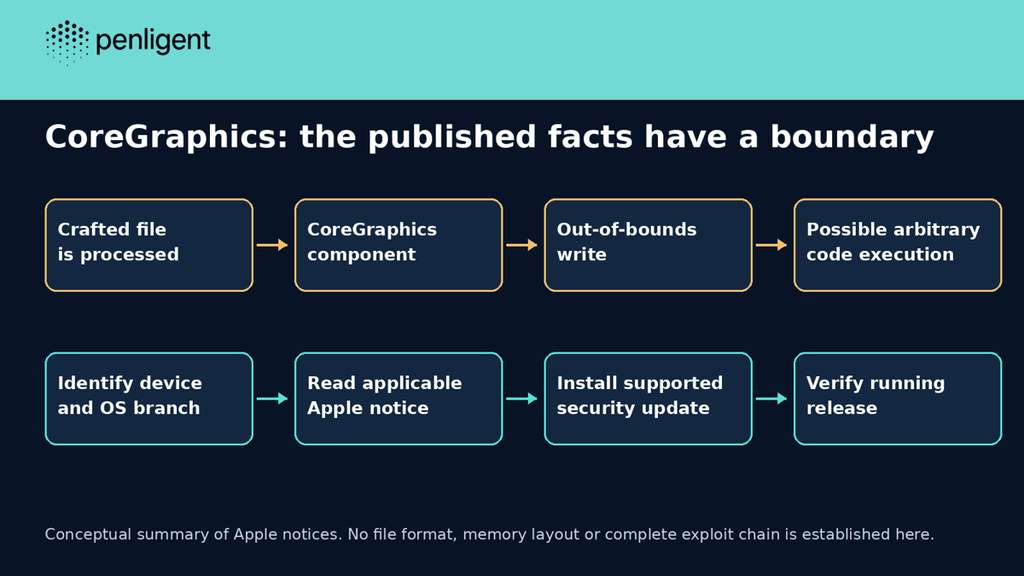
CVE-2026-86950 is an Apple CoreGraphics out-of-bounds write issue for which Apple released security updates on September 28, 2026. Apple’s iOS and iPadOS notice says processing a maliciously crafted file may lead to arbitrary code execution. The immediate task is to identify the device’s operating-system branch, install the applicable supported security update and verify the running version after the change.
Reviewed October 25, 2026. This is a review of an already disclosed issue, not an announcement of a new October 25 vulnerability. The release numbers below are documented repair baselines for the named branches; they are not a recommendation to downgrade a device running a later supported release.

What Apple has confirmed, and what it has not
Apple attributes the report to Meta Product Security and describes improved bounds checking as the repair. It also says it is aware of a report of possible exploitation in an extremely sophisticated attack against specific targeted individuals on iOS versions before iOS 27. Preserve that scope when assessing the warning: it is not evidence that every affected device was attacked.
The public bulletin does not supply an exploit chain, sample file or reliable end-user compromise test. It does not, by itself, establish which delivery channel a particular victim encountered or whether a specific preview, browser or messaging interaction triggers the issue. A graphics component and a malicious-file prerequisite are insufficient grounds to invent those missing steps.
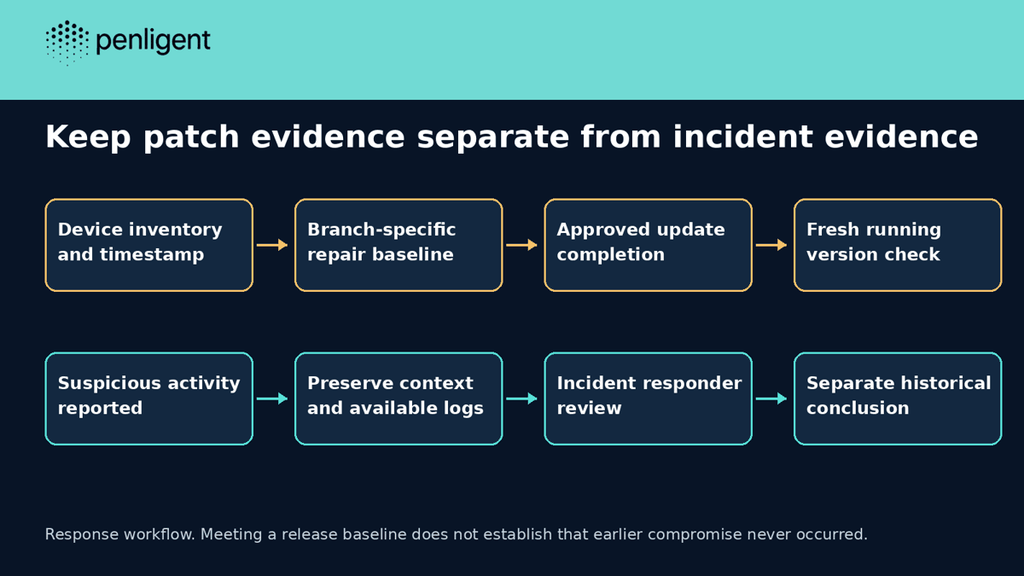
The operational distinction is between potential exposure, installed repair and historical compromise. An affected version is software inventory evidence. A corrected running version is repair evidence. Neither tells you whether an earlier file caused code execution. These questions can belong in the same incident record, but each needs its own evidence.
Match the update to the operating-system branch
Apple publishes separate security notices for macOS Tahoe 26.7.1 そして macOS Sequoia 15.8.1, both listing this CoreGraphics CVE. The iOS/iPadOS 26 notice covers a separate device family. Select the update offered for the actual supported device and branch rather than comparing all Apple version strings as one numeric sequence.
| Product branch | Documented September repair release | Use the evidence correctly |
|---|---|---|
| iOS 26 / iPadOS 26 | 26.7.1 — Apple notice | Check hardware eligibility and the installed version on the device. |
| macOS Tahoe | 26.7.1 — Apple notice | Match the Mac’s actual branch and complete its approved update. |
| macOSセコイア | 15.8.1 — Apple notice | Do not flag a Sequoia build merely because it is numerically below 26.7.1. |
| Other Apple release families | Use their own current vendor notice | This table is deliberately not a complete product matrix. |
について Canadian Cyber Centre’s September 29 advisory lists additional affected Apple product families and reports that CISA added this CVE to its Known Exploited Vulnerabilities catalog that day. Consult the corresponding Apple notice for each family. The narrower table here should not be used to dismiss a watch, headset or a different operating-system generation.
For a managed fleet, retain the device identifier, reported branch, full installed version, observation time and applicable vendor notice. If a management system has not heard from a device since before the update window, mark the record stale. A scheduled update or a downloaded installer is not the same observation as a device reporting the intended running version.
A read-only Mac observation is useful, but narrowly scoped
On a Mac you administer, sw_vers can record the installed operating-system identity. The Apple instructions for finding the macOS version also provide the graphical route through About This Mac. The following command example was not executed on an Apple device for this article; it is an inventory example, not an exploit or compromise detector.
sw_vers -productName
sw_vers -productVersion
sw_vers -buildVersion
Record the output after the approved update has completed. Do not conclude that a remote device is fixed from the version printed on an administrator’s laptop. For mobile devices, use the device’s own software-version view or an authorized management inventory, and include the observation time. Keep personal device identifiers out of public reports.
An offline inventory model that refuses unsupported comparisons
The Python example below performs a small, explicit release-baseline comparison for four named branches. It accepts only three-part numeric versions and sends unsupported branches, unexpected major versions and incomplete records to manual review. Its input cases are synthetic. It does not query a device, inspect CoreGraphics, initialize a file parser or test this vulnerability.
# Offline inventory triage, not a vulnerability or compromise detector.
import re
BASELINES = {'macOS Tahoe': (26, 7, 1), 'macOS Sequoia': (15, 8, 1), 'iOS 26': (26, 7, 1), 'iPadOS 26': (26, 7, 1)}
def classify(branch, version):
    baseline = BASELINES.get(branch)
    if baseline is None or not re.fullmatch(r'\d+\.\d+\.\d+', version):
        return 'manual-review'
    parts = tuple(map(int, version.split('.')))
    if parts[0] != baseline[0]:
        return 'manual-review'
    return 'below-baseline' if parts < baseline else 'meets-release-baseline'
cases = [
 ('macOS Tahoe','26.7.0','below-baseline'),
 ('macOS Tahoe','26.7.1','meets-release-baseline'),
 ('macOS Sequoia','15.8.1','meets-release-baseline'),
 ('iOS 26','26.7.1','meets-release-baseline'),
 ('macOS Tahoe','27.0.1','manual-review'),
 ('unknown','26.7.1','manual-review'),
 ('iOS 26','26.7','manual-review'),
]
for branch, version, expected in cases:
    result = classify(branch, version)
    assert result == expected
    print(f'{branch} {version}: {result}')
print(f'{len(cases)}/{len(cases)} expected outcomes')
We executed this exact model locally with Python’s standard library. All seven expected outcomes passed. In particular, the synthetic Sequoia 15.8.1 case met its own baseline, while a 27.0.1 value labeled as Tahoe required manual review. An incomplete 26.7 value was not silently treated as a complete release.
macOS Sequoia 15.8.1: meets-release-baseline
macOS Tahoe 27.0.1: manual-review
iOS 26 26.7: manual-review
7/7 expected outcomes
The label meets-release-baseline is deliberately limited. It is not “safe,” “unexploitable” or “no compromise.” Before applying the helper to a real inventory, map the device to the correct vendor branch, review later security releases and verify that the reported version describes the active device. Keep vendor-supported exceptions and unknown data visible rather than coercing them into a pass.
Separate the patch rollout from a targeted-device investigation
For routine exposure management, prioritize confirming and updating applicable devices. For an individual with a credible targeted-attack concern, route the matter through the organization’s incident-response process as well. Avoid repeatedly opening a suspicious file to see whether it crashes; that changes the device state and is not a reliable negative test.
Preserve the original report, relevant timestamps and available evidence through an approved channel. Do not upload private messages, documents or suspected samples to an arbitrary online checker. An incident responder may need a preservation plan before routine device cleanup. This article does not supply device-forensic indicators that Apple’s public notice does not provide.
| 状況 | Next decision | Insufficient conclusion |
|---|---|---|
| An applicable older version is observed | Plan the supported update and confirm completion | The device was definitely compromised. |
| A fixed baseline is observed after the update | Retain running-version evidence and check required functions | No attack occurred before the update. |
| A user reports suspicious targeted activity | Preserve context and involve incident response | Every unusual device symptom proves this CVE. |
| The last inventory is stale | Obtain a fresh authorized observation | A scheduled installation means the patch is active. |
Verify the change without creating a new exposure
Close a normal maintenance task when the affected device reports the approved running release, required applications still work and outstanding exceptions have owners. If a device cannot reach a supported update, keep that limitation in the risk decision rather than treating a compatible application update as a replacement for the operating-system repair.
An ordinary image or document opening successfully is a compatibility observation. It does not exercise the undisclosed exploit condition and cannot demonstrate the absence of memory corruption for all inputs. Similarly, a crash can have many causes; without a controlled analysis, do not label it successful exploitation of this CVE.
For a team that also runs Penligent, keep endpoint maintenance separate from authorized application testing. This page does not demonstrate a CoreGraphics-specific Penligent detector, an iPhone forensic function or a product benchmark. The video below introduces a general application-testing workflow, not the Apple exploit.
Questions about CVE-2026-86950
Is this a newly disclosed October 25 zero-day?
No. The cited Apple repair notices are dated September 28, 2026. This page reviews the issue on October 25.
Does the bulletin prove a zero-click delivery chain?
No. The public text cited here identifies malicious-file processing and targeted exploitation reporting, but does not establish a complete delivery chain.
Is every Apple operating system fixed by installing 26.7.1?
No. Use the product- and branch-specific notice. Sequoia’s documented baseline in this article is 15.8.1; other families have their own updates.
Does the Python helper detect vulnerable devices?
No. It checks synthetic version records against a limited baseline map. It neither contacts a device nor tests the CoreGraphics implementation.
Does updating prove that the device was never compromised?
No. It addresses software state. A historical or targeted-compromise concern needs separate investigation and evidence.


 Japanese
  English
  German
  French
  Spanish
  Portuguese
  Korean
  Hindi
Hindi  Arabic
  Turkish
  Hebrew