
Need a repeatable testing workflow for your own environment? Try Penligent for an authorized security test and keep the scope, findings and remediation evidence together. Use the vendor checks below to establish this CVE’s status.
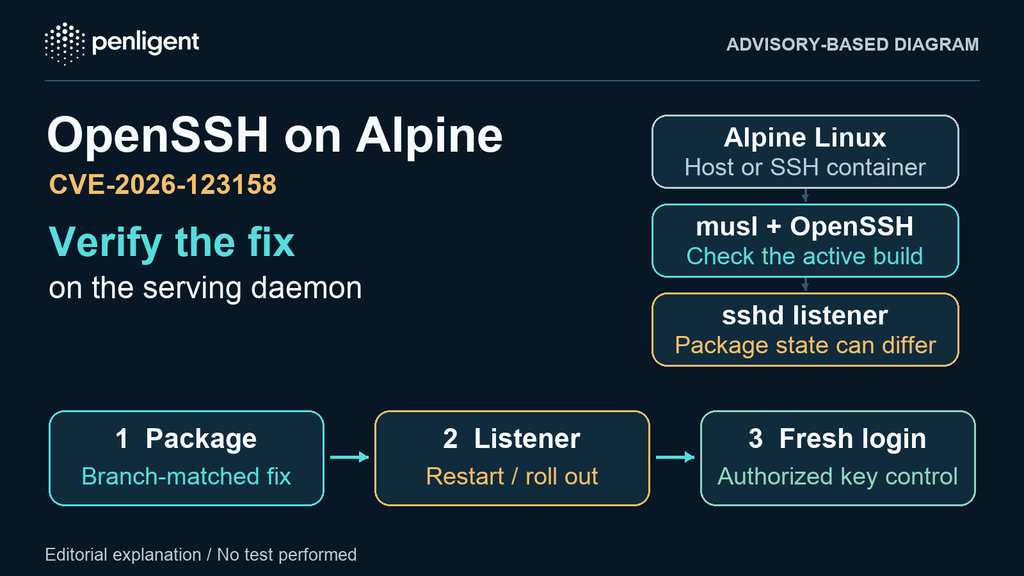
If you run OpenSSH’s server on Alpine Linux, check both the installed package and the daemon accepting new connections. Alpine shipped patched packages for CVE-2026-123158, also searched as SSHole, on November 5, 2026, but upgrading the package does not restart a running エスエスディー. A host can therefore show a fixed version in its package database while an older process still serves SSH. Alpine’s security advisory calls for an upgrade and an explicit restart.
The bypass is narrower than “all OpenSSH servers” or “all Alpine containers.” It concerns a password-authentication path on Linux with musl and PAM disabled, and it requires a particular combination of account states. You do not need to attempt a bypass to triage a host or verify that the vendor fix is running.
How OpenSSH, musl, Alpine Linux and Secure Shell relate
Secure Shell (SSH) is the protocol. OpenSSH supplies an implementation, including the エスエスディー server and ssh client. musl is the C library used by Alpine Linux, a distribution that packages these components. This incident concerns a particular server authentication path across those components; it does not establish a failure in the SSH protocol or every application linked to musl.
Start with the asset that actually accepts connections. An Alpine application container with no SSH daemon is a different scope from an Alpine host running one. A developer’s OpenSSH client version is also different evidence from the server package, its authentication configuration and its running listener.
SSHole exposure checks for Alpine Linux and musl
Portable OpenSSH 10.6p2 adds a workaround in エスエスディー. Alpine explains that musl’s password hashing function can return a failure marker that equals the stored * field of an account with no password set. An affected OpenSSH path could mistake this equality for successful authentication. The published CVE record describes the musl/non-PAM condition. Alpine’s post predates assignment of the CVE; that timing difference does not describe a second vulnerability.
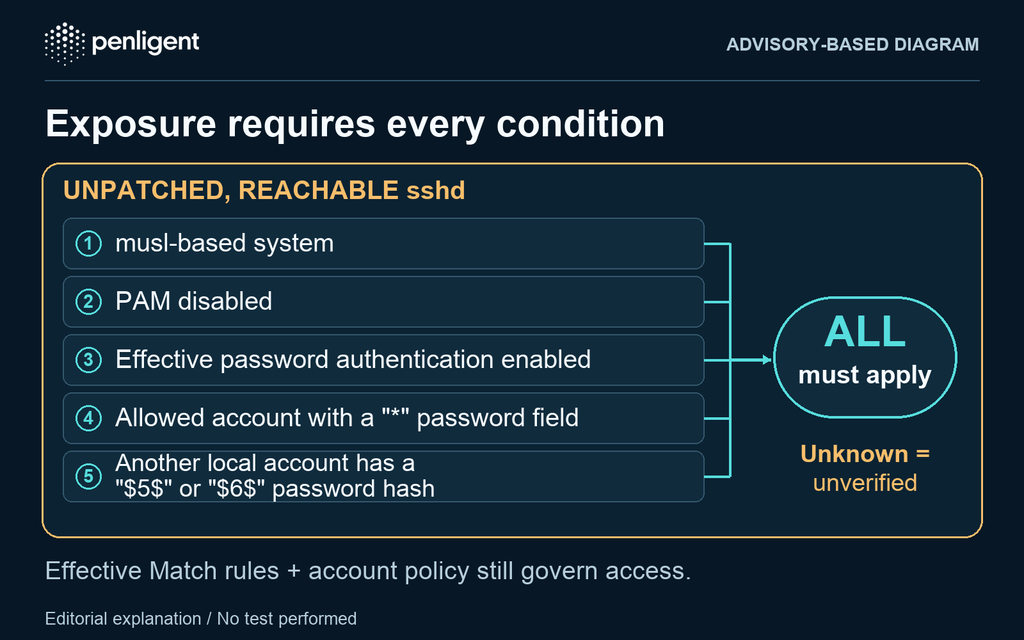
Use this table for unpatched listeners. Evaluate the conditions together for the actual source network and account you are reviewing.
| Condition | What to check | How to interpret the result |
|---|---|---|
| Reachable OpenSSH daemon | Identify the process behind the host, container, bastion, port forward, or load-balanced SSH address. Use owner-approved inventory and firewall rules. | いいえ エスエスディー in an image means no exposure through that image. An SSH listener on the host is a separate asset. Private reachability still matters. |
| musl and non-PAM authentication | Identify the package owning the service binary and the configuration it uses. Alpine’s openssh-server is built without PAM. | Alpine’s openssh-server-pam と UsePAM yes is outside this path; the PAM-capable build with UsePAM no is not. |
| Effective password authentication | チェック PasswordAuthentication for the intended account and source address, including Include files and Match rules. | Effective no closes the described password path. A single no in a file does not prove that it governs every relevant connection. |
Allowed account with a * password field | Check a key-only local or directory-backed account against actual SSH user, group, root, and authentication-method policy. | The account must be usable on the relevant SSH path. A locally locked ! field is not the same as *; changing account state can break legitimate key login. |
Another local account has a $5$ または $6$ ハッシュ | Review account metadata without exporting password hashes. Include admin and console accounts and provisioning-created users. | The account containing the hash need not be the account the attacker would use. A key-only target is not sufficient by itself; a password on a different account can change exposure. |
Default PermitRootLogin prohibit-password blocks password authentication directly as root, but does not protect a different account that can elevate with doas. Conversely, a * field alone is not evidence of a reachable login. Account rules, additional authentication requirements, and the listener’s network scope still apply. Treat unknown conditions as unverified, not as either “safe” or “exploited.”
Start your first authorized test with Penligent.
Check the effective configuration without exposing credentials
On a system you administer, identify the active configuration file and launch flags from the service definition first. These read-only examples assume the default config path; mirror a custom -f path and relevant service overrides if present. Replace the example account, client address and destination with the real authorized scenario. OpenSSH’s daemon manual documents the configuration test modes and connection inputs.
cat /etc/alpine-release
apk info -v | grep -E '^openssh(-|$)'
sshd -t
sshd -T -C 'user=reviewuser,host=admin.example,addr=192.0.2.10,laddr=192.0.2.20,lport=22' \
  | grep -E '^(passwordauthentication|usepam|permitrootlogin|authenticationmethods|pubkeyauthentication|allowusers|denyusers|allowgroups|denygroups) '
Repeat sshd -T -C for applicable Match cases. This evaluates what a new daemon using those inputs would load; it does not read settings out of the currently listening process. A no-PAM build may not expose a useful usepam line, so inspect the installed build rather than inferring PAM mode from an empty grep result.
For a privileged operator reviewing local accounts, the following example prints only counts. It neither prints hashes nor tests any login. It does not enumerate directory-backed identities, identify which accounts can use SSH, or establish exposure by itself.
awk -F: '
  $2 == "*" { star++ }
  $2 ~ /^\$[56]\$/ { sha_crypt++ }
  END { printf "local_star_fields=%d\nlocal_sha_crypt_fields=%d\n", star, sha_crypt }
' /etc/shadow
If the account source is a directory or another identity backend, have its owner validate the relevant account types. Keep shadow-file contents, private keys, and credential material out of tickets and reports.
Alpine fixed package versions
Compare the complete Alpine package revision against the threshold for the asset’s branch. The Alpine advisory lists the following versions; the stable branches have backports, so an upstream banner below 10.6p2 does not by itself mean an Alpine package is vulnerable.
| Alpine branch | Fixed OpenSSH package | Release or maintenance note |
|---|---|---|
| edge | 10.6_p2-r0 | Edge package, not a reason to change a stable host’s repository branch |
| 3.24 | 10.3_p1-r2 | Included in 3.24.4 |
| 3.23 | 10.2_p1-r1 | Included in 3.23.8 |
| 3.22 | 10.0_p1-r11 | Included in 3.22.8 |
| 3.21 | 9.9_p2-r1 | Included in 3.21.10; branch support ended November 1, 2026 |
| 3.20 | 9.7_p1-r6 | Backport for an unsupported branch |
| 3.19 | 9.6_p1-r3 | Backport for an unsupported branch |
| 3.18 | 9.3_p2-r4 | Backport for an unsupported branch |
| 3.17 | 9.1_p1-r7 | Backport for an unsupported branch |
| 3.16 | 9.0_p1-r6 | Backport for an unsupported branch |
について point-release announcement identifies the four new images/releases. A backport for an older branch is an immediate fix for this issue, not a return to supported status. Plan migration separately. For independently built packages or binary copies not managed by Alpine’s repositories, ask the supplier for patch provenance; these revisions are not a lookup table for custom builds.
Cloud images and containers: verify the running asset
Alpine specifically describes its official tiny-cloud qcow2, VHD and AMI images from 3.18.11 through 3.24.3. The default first-boot state is not exposed under the advisory’s conditions, but the images contain an alpine account with a * password field and passwordless doas. Setting a console password or adding a hashed password through provisioning can introduce the missing prerequisite. If the remaining conditions also hold, the resulting access can be more consequential than a low-privilege login.
Inspect what user-data, image customization, or later account changes actually applied. Alpine identifies cloud-init configurations that disable SSH password authentication as outside the described path; verify the effective setting on the running guest. A newly published image fixes future deployments only after you use it. It does not replace packages or processes in existing instances. For a container that intentionally runs エスエスディー, rebuild from a patched base or package set and verify that the old replica no longer receives traffic.
Close the change with package, process, and access evidence
- Prepare recovery before the change. Confirm an authorized fresh key-based login and an out-of-band or console recovery path. Keep the current administrative session open; do not rely on it surviving a restart. Inventory any automation that depends on password authentication.
- Apply the branch-matched fix. Use your approved Alpine update path and record the installed server revision on each asset. Do not use
ssh -Vas server evidence: it reports the client. If an immediate update is not possible, Alpine recommends setting effectivePasswordAuthentication no, validating the intended config and restarting. Treat this as containment, not patch completion. Do not change hash or account states as a substitute for the vendor fix. - Replace the listener. Validate the intended config with
sshd -tbefore restarting. Alpine documentsrc-service sshd restartfor the OpenRC-managed service. Use the real supervisor or rollout mechanism if different. Compare service identity and listener process before and after, and check startup logs and the bound endpoint. For multiple replicas, verify each serving instance, not only a single successful connection. - Prove intended access from a fresh connection. Open a separate authorized connection without reusing an SSH multiplexed session. Check expected key-based access, and capture the effective configuration for applicable identities and source networks. If password auth is intentionally disabled, effective policy evidence plus a valid key control is safer than trying a bypass or guessing passwords. An old session staying connected is not proof that new connections reach the replacement daemon.
A concise change record should contain the asset and branch, package revision, maintenance time, old/new listener identity, config check result, and the timestamp and result of the fresh control login. If mitigation is the only closure available, record it separately and leave the package remediation open. Avoid entering usernames, raw secret material, or unnecessary topology in a broadly shared record.
Review the exposure window separately from patch status
Alpine suggests reviewing エスエスディー authentication logs for successful password logins on accounts that should never use passwords. Check /var/log/messages where applicable and your actual centralized or rotated logs. Correlate account configuration history with doas activity and unexpected changes to users or authorized keys. Preserve evidence and escalate unexplained logins through your incident-response process. A patched listener does not close a historical investigation; an absence of alerts does not establish that earlier activity did not occur.
See a general authorized-testing workflow
The Penligent product demonstration offers general context for teams evaluating an AI-assisted testing workflow. This video is not a recording of the OpenSSH checks above and does not demonstrate this bypass, a server upgrade, or successful remediation. Keep the maintenance decision tied to branch-matched package evidence, the replacement listener and an authorized fresh connection.
Method: AI-assisted review of upstream and distribution advisories, patch evidence, and documentation on November 6, 2026. The checks above are a proposed operator runbook; no host, package installation, or login was tested for this article.
 Japanese
 English
 German
 French
 Spanish
 Portuguese
 Korean
 Hindi
 Arabic
 Turkish
 Hebrew