
CVE-2026-42897 is not a classic Exchange remote code execution bug, and treating it like one will lead to the wrong response. It is also not “just XSS” in the casual sense many teams use when triaging web findings. The public record describes it as improper neutralization of input during web page generation in Microsoft Exchange Server, mapped to CWE-79, with the impact described as spoofing over a network. Microsoft’s public advisory is referenced by NVD, and NVD records the vulnerability as affecting Microsoft Exchange Server with a Microsoft CNA CVSS v3.1 score of 8.1, while NVD’s own current v3.1 enrichment shows 6.1. That scoring split is not a reason to wait; CISA added the issue to its Known Exploited Vulnerabilities catalog on May 15, 2026, with required action due May 29, 2026 for covered federal agencies. (NVD)
The important part is the execution context. Public reporting based on Microsoft’s Exchange Team guidance says an attacker can send a specially crafted email to a user; when that message is opened in Outlook Web Access and certain interaction conditions are met, arbitrary JavaScript can execute in the user’s browser context. Exchange Online is reported as not impacted, while on-premises Exchange Server 2016, Exchange Server 2019, and Exchange Server Subscription Edition are identified as affected product families in Microsoft’s Exchange Team guidance as reported by multiple security outlets. (ハッカーニュース)
That combination creates a very specific risk model. The attacker does not need to begin with shell access on the Exchange host. The first meaningful execution point is the victim’s authenticated OWA session. In a normal website, that would already be serious. In a mail system, it is worse. OWA sits near the organization’s most sensitive human workflow: messages, links, files, calendar invites, identity context, internal names, prior threads, delegated mailboxes, and trusted communications. A browser-context script that runs inside that environment can become a launchpad for deception, session abuse, mailbox reconnaissance, phishing from a trusted interface, and follow-on credential theft.
The current facts
The safest way to reason about CVE-2026-42897 is to separate confirmed public facts from assumptions. The confirmed facts are enough to drive urgent mitigation, but they do not justify invented exploit details.
| Area | Current public fact | なぜそれが重要なのか |
|---|---|---|
| CVE | CVE-2026-42897 | Gives defenders a stable identifier for tracking advisories, tickets, exposure, and remediation evidence. |
| Vendor | マイクロソフト | The vulnerable product family is Microsoft Exchange Server. |
| 脆弱性クラス | Cross-site scripting during web page generation | The root issue is improper neutralization of input that reaches a browser-rendered page. |
| CWE | CWE-79 | NVD lists CWE-79, the standard weakness category for improper neutralization of input during web page generation. (NVD) |
| Microsoft CNA score | CVSS v3.1 8.1 High | Microsoft’s CNA vector is AV:N/AC:L/PR:N/UI:R/S:U/C:H/I:H/A:N. (NVD) |
| NVD current score | CVSS v3.1 6.1 Medium | NVD’s vector currently differs: AV:N/AC:L/PR:N/UI:R/S:C/C:L/I:L/A:N. This reflects a scoring disagreement, not proof of low operational risk. (NVD) |
| Exploitation status | Active exploitation reported | Microsoft tagged exploitation as detected, and CISA added it to KEV. (ハッカーニュース) |
| Main trigger path | Crafted email opened in OWA under certain interaction conditions | The attack begins through content rendered in the webmail client, not through a public unauthenticated server-side RCE primitive. (ハッカーニュース) |
| Immediate mitigation | Exchange Emergency Mitigation Service or Exchange On-premises Mitigation Tool | Microsoft provides temporary mitigation while preparing a permanent fix. (マイクロソフト学習) |
| KEV due date | May 29, 2026 | CISA KEV action requires mitigations per vendor instructions, applicable BOD 22-01 guidance for cloud services, or discontinuing use if mitigations are unavailable. (NVD) |
The strongest operational conclusion is simple: teams running on-premises Exchange should verify mitigation state, inspect exposure, preserve logs, prepare for a permanent security update, and avoid overclaiming what they cannot prove. It is not useful to write incident tickets that say “Exchange RCE confirmed” when public evidence describes OWA XSS and spoofing. It is equally dangerous to downgrade it because the word XSS sounds familiar.
Why an OWA XSS bug is different from ordinary web XSS
Cross-site scripting means the browser runs attacker-controlled script as though it belongs to the trusted site. MDN describes XSS as an attack where a target site executes malicious code as though it were part of that website. In OWA, the trusted site is not a blog, a brochure page, or a low-privilege portal. It is the authenticated browser interface to enterprise email. (MDN ウェブドックス)
That difference changes the threat model in four ways.
First, the attacker’s delivery mechanism is native to the application. A web XSS bug often needs a link, a stored profile field, a comment, or a malicious URL. CVE-2026-42897 is publicly described around a crafted email viewed in OWA. Mail is not adjacent to the product; it is the product’s core data type. A suspicious message can still be dangerous even if no attachment is opened and no external site is visited.
Second, users trust the OWA interface. If malicious JavaScript can alter part of the OWA page, the victim may believe they are interacting with a Microsoft-controlled prompt, an internal workflow, a calendar invitation, a login warning, a document preview, or a message action. That is why the “spoofing” label matters. The attacker’s goal may be to make the browser display something false in a trusted context, not to pop a calculator or run a server command.
Third, the browser session already carries user identity. A script executing in the OWA origin may be able to interact with what the user’s authenticated session can reach, constrained by browser security controls, application design, CSP, SameSite cookie behavior, anti-CSRF controls, and specific implementation details. Defenders should not assume full mailbox takeover from the public description alone, but they also should not assume the blast radius is limited to a visual prank.
Fourth, Exchange is a high-value infrastructure system. Historical Exchange vulnerabilities have repeatedly shown that once attackers obtain a foothold near the mail stack, the path can move toward credential theft, mailbox access, web shells, Active Directory reconnaissance, lateral movement, and ransomware operations. CVE-2026-42897 is not the same class as ProxyLogon or ProxyNotShell, but it lives in the same kind of high-value communications environment.
What the public record does not prove yet
A serious technical write-up should avoid turning uncertainty into false detail. As of the public sources available now, there are important things defenders should not claim unless they have private vendor information, internal telemetry, or an authorized reproduction in their own lab.
There is no public basis to assert a specific vulnerable HTML tag, parser edge case, MIME boundary, attachment type, OWA component, or JavaScript sink. The NVD description gives the weakness class and product. Security reporting describes the trigger as a crafted email opened in OWA under certain interaction conditions. That is enough to justify mitigation, but not enough to publish a payload recipe. (NVD)
There is also no public basis to say the vulnerability gives direct server-side command execution. The impact is described as spoofing, with arbitrary JavaScript in the browser context. That is still significant because the browser context is authenticated and trusted, but it is not the same as SYSTEM-level code execution on the Exchange host.
The phrase “certain interaction conditions” should also be treated carefully. It means defenders should not assume every preview, every OWA view, every mailbox, and every user action triggers the same result. It may involve a specific rendering path, view state, user action, client setting, message format, or interface path. Until Microsoft releases more detail or a patch can be analyzed responsibly, the right defensive move is broad mitigation, not narrow assumptions.
A practical attack model
A safe attack model for defenders can be written without exploit code. It helps incident responders decide what to monitor and helps administrators understand why a mitigation that affects OWA rendering is relevant.
A likely high-level chain looks like this:
| ステージ | Defender-visible question | Possible evidence |
|---|---|---|
| Target selection | Which users are likely to open OWA and receive external mail? | OWA access logs, mailbox role, executive and help desk groups, external exposure records. |
| Delivery | Did a crafted message reach the organization? | Mail gateway logs, Exchange transport logs, unusual MIME structures, sender reputation, attachment and HTML body analysis. |
| Rendering | Was the message opened in OWA by a vulnerable server path? | IIS logs for OWA endpoints, mailbox audit signals, user session activity, unusual read timing. |
| Browser execution | Did the page behave unexpectedly after message view or interaction? | User reports, CSP reports if configured, EDR browser telemetry, abnormal outbound requests. |
| Session abuse | Did the attacker cause mailbox actions or trusted UI deception? | New inbox rules, forwarding rules, OAuth grants, unusual message sends, mailbox search activity, delegated mailbox access. |
| Follow-on activity | Did the incident move beyond OWA? | Identity logs, unusual sign-ins, endpoint alerts, proxy logs, EDR detections, administrative changes. |
This model deliberately avoids payload details. It also avoids false certainty. The point is not to prove exploitation from one log line. The point is to build a chain of evidence that can answer whether the organization was exposed, whether mitigation applied, whether suspicious messages were delivered, whether OWA sessions interacted with them, and whether any mailbox or identity activity followed.
Why the CVSS disagreement should not slow the response
NVD currently shows two CVSS v3.1 views for CVE-2026-42897: NVD’s own 6.1 Medium vector and Microsoft’s CNA 8.1 High vector. The difference appears to come from how the scoring treats scope and impact. Microsoft’s vector lists high confidentiality and integrity impact with unchanged scope. NVD’s vector lists changed scope with lower confidentiality and integrity impact. (NVD)
That disagreement is common enough in vulnerability management to be unsurprising. CVSS is a structured scoring system, but it is not a substitute for environment-specific risk. In this case, the operational context matters more than the decimal.
An actively exploited vulnerability in an internet-facing enterprise mail system should be prioritized even if one scoring source calls it Medium. OWA is often exposed to the internet, used by high-value users, integrated with identity systems, and trusted by employees. CISA’s KEV listing is also a strong prioritization signal because KEV is based on evidence of exploitation, not theoretical severity. NVD records that CVE-2026-42897 is in CISA’s KEV catalog with a required action to apply vendor mitigations or discontinue use if mitigations are unavailable. (NVD)
A better internal priority label would be:
| Internal condition | Suggested priority |
|---|---|
| Internet-facing on-prem Exchange OWA, mitigation not verified | Emergency |
| Internet-facing on-prem Exchange OWA, EEMS applied, logs not reviewed | 高い |
| OWA externally restricted, mitigation applied, monitoring in place | High until permanent patch |
| Exchange Online only, no on-prem OWA | Monitor Microsoft guidance, but not directly affected based on current public reporting |
| Unsupported Exchange 2016 or 2019 outside ESU, internet-facing | Emergency and migration risk |
The goal is not to argue about whether 6.1 or 8.1 is “right.” The goal is to reduce the window where a crafted message can execute script in a trusted webmail session.
Affected environments and edge cases
Current public guidance identifies on-premises Exchange Server as the affected product family, with Exchange Online not impacted. Reporting based on Microsoft’s Exchange Team guidance lists Exchange Server 2016, Exchange Server 2019, and Exchange Server Subscription Edition as affected at any update level. (ハッカーニュース)
The product lifecycle adds another layer. Microsoft’s own roadmap states that support for Exchange Server 2019 and Exchange Server 2016 ended on October 14, 2025, and Microsoft recommends migration to Microsoft 365, Office 365, or Exchange Server Subscription Edition. Microsoft’s build-number page also notes that Exchange 2016 and 2019 are out of support and that only customers enrolled in the Extended Security Update program are eligible for later security updates. (マイクロソフト学習)
| Environment | Current interpretation | 早急な対応 |
|---|---|---|
| Exchange Server SE with OWA exposed | Affected according to public reporting | Verify EEMS or EOMT mitigation, inspect OWA exposure, prepare for permanent update. |
| Exchange Server 2019 with ESU | Affected according to public reporting | Verify mitigation and ESU eligibility for future updates. |
| Exchange Server 2019 without ESU | Affected and lifecycle risk is higher | Apply mitigation if possible, restrict exposure, plan migration or supported upgrade path. |
| Exchange Server 2016 with ESU | Affected according to public reporting | Verify mitigation, confirm ESU process, prepare update path. |
| Exchange Server 2016 without ESU | Affected and high lifecycle risk | Treat as urgent, reduce internet exposure, migrate or replace. |
| Exchange Online only | Reported not impacted | No Exchange Server mitigation needed, but monitor for phishing campaigns abusing the news. |
| Hybrid Exchange | Depends on whether on-prem OWA is present and exposed | Do not assume cloud mailboxes remove on-prem risk; inventory remaining Exchange servers. |
| Edge Transport only | EEMS is not installed on Edge Transport servers per Microsoft’s EM service documentation | Confirm whether mailbox servers exist and whether OWA is exposed. (マイクロソフト学習) |
Hybrid environments deserve special attention. Many organizations moved user mailboxes to Microsoft 365 but kept on-prem Exchange for recipient management, relay, or legacy workflows. Microsoft’s end-of-support roadmap explicitly notes that organizations using Microsoft Entra Connect with on-premises Active Directory may need to keep at least one Exchange server for recipient management scenarios. That remaining server may be treated as “not really used” until a vulnerability forces everyone to rediscover it. (マイクロソフト学習)
The role of Exchange Emergency Mitigation Service
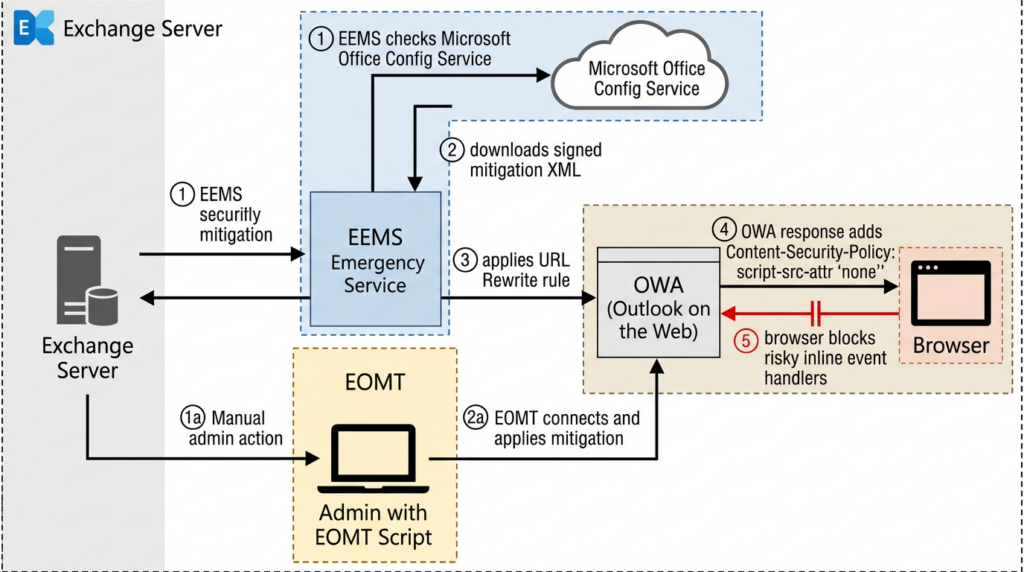
Microsoft’s Exchange Emergency Mitigation service is designed for exactly this kind of gap between vulnerability disclosure and a permanent security update. Microsoft Learn says the EM service helps keep Exchange servers secure by applying mitigations for potential threats, uses the cloud-based Office Config Service to check for and download mitigations, and runs as a Windows service on Exchange Mailbox servers. (マイクロソフト学習)
The key limitation is equally important: Microsoft states that each EM mitigation is a temporary interim fix until a Security Update fixes the vulnerability, and that EM service is not a replacement for Exchange Security Updates. It is the fastest way to mitigate high-risk internet-connected on-prem Exchange servers before updating. (マイクロソフト学習)
For CVE-2026-42897, Microsoft’s EM service page lists mitigation M2 for CVE-2026-42897 via URL Rewrite configuration, applicable to Exchange SE, Exchange 2019, and Exchange 2016. (マイクロソフト学習)
A basic verification flow should start with organization-level and server-level mitigation state:
# Run in Exchange Management Shell

Get-OrganizationConfig | Format-List MitigationsEnabled

Get-ExchangeServer | Format-List Name,ServerRole,MitigationsEnabled,MitigationsApplied,MitigationsBlocked
Then check the Windows service:
Get-Service MSExchangeMitigation | Format-List Name,Status,StartType
If the service is stopped or disabled, that is not just a configuration detail. It may mean the server is not receiving emergency mitigations. Microsoft’s HealthChecker EEMSCheck documentation says the expected Windows service startup type is Automatic and the service status should be Running. (Microsoft GitHub)
Connectivity matters
The EM service needs outbound connectivity to Microsoft’s Office Config Service to download mitigations. Microsoft Learn lists officeclient.microsoft.com/* over port 443 as the required endpoint for the Exchange EM service and warns that SSL inspection can break certificate validation. It also documents proxy configuration through Set-ExchangeServer -InternetWebProxy and WinHTTP proxy settings. (マイクロソフト学習)
That means a server can appear to have EM installed but still fail to receive new mitigations because of network controls, proxy settings, SSL inspection, certificate trust issues, or outdated builds. Microsoft also warned in early 2025 that EEMS running Exchange versions older than March 2023 may not be able to contact OCS for new mitigation definitions. (TECHCOMMUNITY.MICROSOFT.COM)
Use Microsoft’s connectivity test script:
# Path may vary depending on the Exchange install location
cd "C:\Program Files\Microsoft\Exchange Server\V15\Scripts"

.\Test-MitigationServiceConnectivity.ps1
A successful result should indicate that the mitigation service endpoint is accessible. Microsoft Learn documents the success and failure messages for this script and emphasizes that connectivity to OCS is required for the service to function correctly. (マイクロソフト学習)
Checking applied mitigations
Microsoft provides a Get-Mitigations.ps1 script in the Exchange V15\Scripts folder. Microsoft Learn says it displays the ID, type, description, and status of each mitigation, including applied, blocked, or failed mitigations. (マイクロソフト学習)
cd "C:\Program Files\Microsoft\Exchange Server\V15\Scripts"

.\Get-Mitigations.ps1

.\Get-Mitigations.ps1 -ExportCSV "C:\temp\exchange-mitigations.csv"
For CVE-2026-42897, administrators should look for the M2 mitigation entry. Public snippets from Microsoft’s Exchange Team Blog describe the mitigation target as “CVE-2026-42897 – OWA XSS” and say it adds a Content-Security-Policy script-src-attr 'none' directive to OWA HTML responses through outbound URL Rewrite. (TECHCOMMUNITY.MICROSOFT.COM)
Some administrators may see a confusing description field. Public reporting from The Hacker News and BleepingComputer says Microsoft acknowledged a known issue where mitigation details may show “Mitigation invalid for this exchange version,” while the mitigation is still applied successfully if the status is “Applied.” (ハッカーニュース)
The practical rule is:
| フィールド | Interpretation |
|---|---|
| Status shows Applied | Treat as applied, even if the description contains the known cosmetic message. |
| Status shows Failed | Investigate service connectivity, permissions, URL Rewrite prerequisites, and logs. |
| Status shows Blocked | Determine who blocked it and whether the business accepted the risk. |
| No M2 mitigation visible | Check EM service status, OCS connectivity, Exchange build, and whether EOMT was used manually. |
Manual mitigation with EOMT
If EM service is not available or the environment is air-gapped, Microsoft’s published path is the Exchange On-premises Mitigation Tool. BleepingComputer reports Microsoft’s manual commands for CVE-2026-42897 as follows. (ブリーピングコンピューター)
# Single server
.\EOMT.ps1 -CVE "CVE-2026-42897"

# All non-Edge Exchange servers
Get-ExchangeServer | Where-Object { $_.ServerRole -ne "Edge" } | .\EOMT.ps1 -CVE "CVE-2026-42897"
Run this from an elevated Exchange Management Shell and preserve output. Do not run it as an undocumented one-off. Record the server name, time, script version, command output, mitigation status, and any functional impact. If the permanent security update later supersedes the mitigation, that record helps decide what can be safely removed.
Why the mitigation uses CSP
Public information indicates the CVE-2026-42897 mitigation adds a Content-Security-Policy directive, specifically script-src-attr 'none', to OWA HTML responses. MDN documents that script-src-attr controls valid sources for JavaScript inline event handlers, and that script-src-attr 'none' blocks inline event handlers such as an onclick handler. (MDN ウェブドックス)
That is consistent with a mitigation designed to reduce browser-side script execution through inline attributes. It does not mean the vulnerable rendering code is permanently fixed. CSP is a browser-enforced defense layer. It can stop or reduce classes of script execution, but it does not correct the original server-side neutralization error. OWASP describes CSP as a defense-in-depth technique for mitigating risks such as XSS and clickjacking, not as a replacement for fixing unsafe rendering. (オワスプ)
The distinction matters for patch planning. A server with the M2 mitigation applied may be much less exposed to the known attack path, but it should still receive the final Microsoft security update when available. Microsoft’s EM documentation is clear that mitigations are temporary interim fixes and not substitutes for Security Updates. (マイクロソフト学習)
Checking the header safely
A safe external check can look for the relevant CSP behavior without sending a malicious email or trying to trigger XSS. Header behavior may vary because OWA often redirects, requires authentication, uses different virtual directories, and may emit headers only on certain HTML responses. Still, the check is useful as one piece of evidence.
curl -k -I https://mail.example.com/owa/ | grep -i content-security-policy
A PowerShell version:
$response = Invoke-WebRequest -Uri "https://mail.example.com/owa/" -Method Head -UseBasicParsing
$response.Headers["Content-Security-Policy"]
This is not a full exploitability test. A missing header in this simple check does not prove the mitigation failed, because the relevant header may be added to specific OWA HTML responses rather than every unauthenticated redirect. A present script-src-attr 'none' is useful evidence, but the primary source of truth should remain Exchange mitigation state, EOMT output, URL Rewrite configuration, and Microsoft-supported scripts.
Expected side effects
Temporary mitigations often carry user-visible impact. Public reporting based on Microsoft’s guidance says the CVE-2026-42897 mitigation may affect OWA Print Calendar, inline images in the recipient’s OWA reading pane, and OWA Light. BleepingComputer reports Microsoft’s workarounds: copy or screenshot calendar data, use the Outlook desktop client, send images as attachments, or use Outlook desktop. (ブリーピングコンピューター)
These side effects should not be a reason to skip mitigation on an exposed server. They should be handled as a change-management item:
| Side effect | User impact | Practical workaround |
|---|---|---|
| OWA Print Calendar may not work | Users cannot print calendar views normally from OWA | Use Outlook desktop, copy data, or screenshot the calendar view. |
| Inline images may not display correctly in OWA reading pane | Some message content appears broken | Send images as attachments or use Outlook desktop. |
| OWA Light may not work properly | Legacy OWA path may fail | Move users to standard OWA and retire legacy paths. |
| CSP-dependent customizations may behave differently | Custom integrations may break | Test business-critical OWA customizations and document exceptions. |
A good administrator message to users should be short and specific: “We applied a Microsoft-recommended Exchange mitigation for an actively exploited OWA vulnerability. Some OWA calendar printing and inline image behavior may be affected. Use Outlook desktop for those workflows while we prepare for the permanent update.”
Exposure inventory
The first defensive task is not exploit testing. It is knowing where Exchange actually exists.
A basic internal inventory should answer:
| Question | なぜそれが重要なのか |
|---|---|
| Which Exchange servers exist in Active Directory? | Forgotten hybrid or management servers often remain after mailbox migration. |
| Which servers host the Mailbox role? | EM service runs on Mailbox servers, not Edge Transport servers. (マイクロソフト学習) |
| Which servers expose OWA externally? | CVE-2026-42897 is described around OWA rendering. |
| Which servers are Exchange 2016, 2019, or SE? | Product lifecycle and update path differ. |
| Which 2016 or 2019 servers are enrolled in ESU? | Microsoft says 2016 and 2019 are out of support except for eligible ESU customers. (マイクロソフト学習) |
| Is EEMS enabled and connected? | Without connectivity, automatic mitigation may fail. |
| Are any mitigations blocked? | A blocked mitigation can silently leave a server exposed. |
| Are there reverse proxies, load balancers, or WAFs in front of OWA? | They may affect routing, headers, logging, and emergency rule behavior. |
Useful Exchange Management Shell commands:
Get-ExchangeServer | Format-Table Name,Edition,AdminDisplayVersion,ServerRole -Auto

Get-ExchangeServer | Format-List Name,ServerRole,IsMailboxServer,MitigationsEnabled,MitigationsApplied,MitigationsBlocked

Get-OwaVirtualDirectory | Format-Table Server,Name,InternalUrl,ExternalUrl -Auto
Version verification should not rely on banners. Microsoft recommends the Exchange HealthChecker script for build and security hotfix detection, and its build numbers page documents that HealthChecker shows build number and whether an Exchange interim update or security hotfix is detected. (マイクロソフト学習)
What to look for in logs
Because the public description points to browser-context JavaScript execution, defenders should not expect the same artifacts they would expect from a server-side web shell exploit. A successful XSS path may not create a suspicious process on the Exchange server. It may leave evidence across mail logs, OWA access logs, browser telemetry, identity logs, and mailbox audit activity.
Start with IIS logs:
# Common IIS log location
Get-ChildItem "C:\inetpub\logs\LogFiles" -Recurse -Filter "*.log" |
  Where-Object { $_.LastWriteTime -gt (Get-Date).AddDays(-14) } |
  Select-Object FullName,LastWriteTime,Length
Search OWA-related traffic around the disclosure and mitigation window:
Select-String -Path "C:\inetpub\logs\LogFiles\W3SVC*\*.log" `
  -Pattern "/owa/","/ecp/","/owa/auth","layout=light" |
  Select-Object Path,LineNumber,Line |
  Out-File C:\temp\owa-iis-review.txt
This does not prove exploitation. It helps build a timeline of OWA use, client IPs, user agents, and endpoints. Focus on unusual patterns: new IP geographies, rare user agents, abnormal OWA access for high-value users, repeated access to the same message-related views, and OWA Light usage if your organization believes it is deprecated.
Check mitigation service logs. Microsoft Learn says EM service logs details in the \V15\Logging\MitigationService folder under the Exchange installation directory, and logs successful actions such as mitigation application with events from the “MSExchange Mitigation Service” source. (マイクロソフト学習)
Get-ChildItem "C:\Program Files\Microsoft\Exchange Server\V15\Logging\MitigationService" `
  -Recurse -Filter "*.log" |
  Sort-Object LastWriteTime -Descending |
  Select-Object FullName,LastWriteTime,Length -First 20
Windows Application Event Log review:
Get-WinEvent -FilterHashtable @{
  LogName = "Application"
  ProviderName = "MSExchange Mitigation Service"
  StartTime = (Get-Date).AddDays(-14)
} | Select-Object TimeCreated,Id,LevelDisplayName,Message |
    Export-Csv C:\temp\exchange-mitigation-events.csv -NoTypeInformation
Mailbox-level review should include unusual rules and forwarding:
Get-Mailbox -ResultSize Unlimited | ForEach-Object {
  Get-InboxRule -Mailbox $_.Identity -ErrorAction SilentlyContinue |
    Where-Object { $_.ForwardTo -or $_.RedirectTo -or $_.ForwardAsAttachmentTo -or $_.DeleteMessage -eq $true } |
    Select-Object @{Name="Mailbox";Expression={$_.MailboxOwnerId}},Name,Enabled,ForwardTo,RedirectTo,ForwardAsAttachmentTo,DeleteMessage
} | Export-Csv C:\temp\suspicious-inbox-rules.csv -NoTypeInformation
If mailbox audit logging and unified audit logs are available, review unusual sends, message reads, rule changes, delegate changes, and sign-in anomalies around suspicious OWA sessions.
Mail gateway hunting
The public exploit path begins with a crafted email, so mail telemetry is central. Teams should not only check OWA. They should preserve and review messages delivered before mitigation was verified.
Look for:
| 信号 | なぜそれが重要なのか |
|---|---|
| Messages with unusual HTML structure | XSS delivery depends on rendering. |
| Messages that render differently in OWA than Outlook desktop | The vulnerable path is OWA-specific based on current public descriptions. |
| Recently delivered messages to high-value OWA users | Executives, admins, help desk users, finance, and security staff are common targets. |
| External senders with low reputation but low attachment risk score | A script-rendering bug may not require a classic malware attachment. |
| Messages that trigger user complaints about odd OWA behavior | Visual deception may appear as UI glitches, login prompts, or unexpected panels. |
| Campaigns sent shortly before May 14 or before mitigation confirmation | Active exploitation may precede broad internal awareness. |
A conservative query strategy is to search for suspicious messages by time, sender reputation, HTML complexity, and user reports rather than trying to match a known payload. If Microsoft or mail-security vendors later publish indicators, add them. Until then, avoid creating brittle detections based on guessed strings.
Identity and session hunting
A browser-context issue can become an identity issue. Even if CVE-2026-42897 does not directly leak a password or execute server code, a malicious script in a trusted webmail page can assist deception and session abuse.
レビュー
| Area | What to check |
|---|---|
| Sign-ins | New IPs, impossible travel, unusual user agents, OWA-heavy sessions. |
| MFA prompts | Prompt fatigue, repeated denied prompts, unusual success after failed attempts. |
| Conditional Access | Bypasses, legacy exclusions, service accounts with broad access. |
| Mailbox rules | Forwarding, redirecting, deleting, hiding, or moving security-related messages. |
| OAuth grants | New application consent, especially mail-related scopes. |
| Delegate access | New mailbox permissions or send-as rights. |
| Transport rules | New rules that suppress, redirect, or rewrite mail. |
| Admin actions | Changes to EAC, remote PowerShell, connectors, certificates, or virtual directories. |
For Microsoft 365-connected environments, centralize evidence from Entra ID sign-ins, Defender, mailbox audit logs, and Exchange server logs. For fully on-prem environments, preserve IIS, Windows Event Logs, Exchange transport logs, message tracking logs, and EDR telemetry.
Safe validation without exploit payloads
Security teams often want to “prove” a vulnerability. For CVE-2026-42897, the safer operational proof is mitigation proof, exposure proof, and control proof, not weaponized XSS reproduction in production.
A safe validation plan:
- Confirm the organization owns or is authorized to test the Exchange servers.
- Inventory Exchange versions and OWA exposure.
- Verify whether EEMS is installed, running, enabled, and connected.
- Verify M2 mitigation is applied or EOMT was run successfully.
- Inspect OWA response headers where possible for relevant CSP behavior.
- Review URL Rewrite configuration for the Microsoft-provided mitigation.
- Run OWA user workflow regression tests.
- Preserve before-and-after logs and command output.
- Prepare a patch deployment plan for the permanent update.
- Retest after the security update and remove obsolete temporary mitigation only when Microsoft guidance says it is safe.
A report should not say “not vulnerable” just because a scanner cannot reproduce the issue. A better conclusion is:
CVE-2026-42897 exposure review completed for EXCH01 and EXCH02.

Findings:
- Both servers host OWA behind mail.example.com.
- EEMS is enabled at organization and server level.
- MSExchangeMitigation service is running.
- M2 mitigation is listed as Applied by Get-Mitigations.ps1.
- OCS connectivity test succeeded.
- OWA functional regression found expected temporary impact to calendar printing.
- No suspicious OWA access pattern was identified in IIS logs for the reviewed period.
- Permanent vendor patch is still required when released.

Residual risk:
- Public exploit details are limited.
- Detection cannot exclude all browser-context execution.
- Continue monitoring OWA, mailbox rules, sign-ins, and mail gateway events.
That wording is honest. It confirms what can be confirmed and avoids pretending that absence of exploit reproduction equals absence of risk.
For authorized teams that already use AI-assisted security workflows, the same standard applies: AI can help enumerate assets, normalize advisory data, run safe checks, compare mitigation evidence, and draft a report, but it should not invent payloads or overstate proof. Penligent’s AI-powered penetration testing platform is positioned around authorized testing, verification, and reporting, and its reporting material emphasizes evidence that another engineer can review rather than raw AI-generated prose. (寡黙)
Why WAF-only thinking is weak here
A web application firewall may help in some XSS scenarios, but CVE-2026-42897 should not be handled as a generic “block suspicious script strings” problem. The public mitigation path is Microsoft-provided EEMS or EOMT, not a vendor-neutral WAF regex. The vulnerable content may travel through mail processing and later render inside OWA. Depending on architecture, the WAF may see only OWA HTTP requests, not the original message content in the way Exchange stores and renders it.
WAFs also create a false sense of precision. A guessed rule can miss the actual payload or break legitimate mail rendering. A Microsoft-provided mitigation, by contrast, is tied to the product’s own rendering path and can be tracked through supported Exchange scripts.
Use WAF telemetry as a supporting signal. Do not use it as the primary mitigation unless Microsoft or your security vendor provides tested guidance for your exact Exchange path.
Hardening Exchange beyond CVE-2026-42897
The most useful defensive work after emergency mitigation is to reduce the number of ways an Exchange bug can become an enterprise compromise. The joint Exchange Server security best practices guidance from NSA, CISA, ASD’s ACSC, and the Canadian Centre for Cyber Security says Exchange environments are continuously targeted for compromise and should be considered under imminent threat. It recommends timely updates, minimizing attack surface, keeping EM service enabled, applying baselines, enabling built-in protections, restricting administrative access, hardening authentication, and configuring modern protections. (Cyber.gov.au)
Several controls are especially relevant here.
Keep Exchange supported and current. Microsoft says Exchange 2016 and 2019 support ended on October 14, 2025, and recommends migration to Microsoft 365, Office 365, or Exchange Server SE. Unsupported Exchange is not just an operational inconvenience; it affects the ability to receive future security fixes. (マイクロソフト学習)
Keep EEMS enabled and connected. Microsoft’s EM service documentation says the service checks for mitigations every hour, downloads a signed XML file, validates it, and applies the mitigation after successful validation. That process only works when service status, organization settings, server settings, certificate trust, and OCS connectivity are healthy. (マイクロソフト学習)
Restrict administrative interfaces. The joint hardening guidance recommends restricting access to the Exchange Admin Center and remote PowerShell to authorized dedicated administrative workstations. This matters because many Exchange incidents become worse when web-facing components and administrative paths share reachable infrastructure. (Cyber.gov.au)
Use Extended Protection where supported. The same guidance explains that Extended Protection helps defend against adversary-in-the-middle, relay, and forwarding techniques by binding authentication to the TLS session through channel binding and service binding. It will not “fix” CVE-2026-42897, but it reduces adjacent identity abuse paths. (Cyber.gov.au)
Harden web and mail authentication. Use Modern Authentication and MFA where available. Disable Basic Authentication. Audit NTLM usage and plan migration toward Kerberos-based flows as Microsoft and government guidance recommend. These controls matter because mailbox compromise often turns into credential and session abuse. (Cyber.gov.au)
Enable layered protections. The joint guidance recommends Microsoft Defender Antivirus, AMSI, Attack Surface Reduction, App Control, EDR, Exchange anti-spam, and anti-malware features. These layers will not necessarily detect the initial browser-side script event, but they can catch follow-on activity, tooling, web shell attempts, unusual processes, and lateral movement. (Cyber.gov.au)
How CVE-2026-42897 compares with prior Exchange and Outlook incidents
CVE-2026-42897 is easier to understand when placed beside prior Microsoft mail-stack vulnerabilities. The goal is not to conflate them. The goal is to recognize why defenders should treat mail infrastructure as a privileged attack surface.
| CVE or chain | Product area | Core issue | User interaction | Why it is relevant |
|---|---|---|---|---|
| CVE-2026-42897 | Exchange OWA | XSS/spoofing through crafted email rendered in OWA | Required according to current vector | Shows how browser-context execution inside webmail can become a high-priority enterprise issue. |
| CVE-2023-23397 | Outlook on Windows | Specially crafted message can trigger Net-NTLMv2 hash leak | No user interaction required if Outlook is open when triggered | Shows that mail items can be active attack vehicles even without attachment execution. (マイクロソフト) |
| CVE-2022-41040 and CVE-2022-41082 | Exchange Server | SSRF plus RCE when PowerShell is accessible | Authenticated attacker required | Shows how Exchange bugs can chain into server compromise and why patch windows are dangerous. (マイクロソフト) |
| CVE-2021-26855 and related ProxyLogon chain | Exchange Server | SSRF and follow-on Exchange flaws | No normal user interaction in common attack chains | Shows why internet-facing Exchange servers attract fast exploitation and web shell deployment. |
Microsoft’s CVE-2023-23397 investigation guidance is especially relevant for mindset. That vulnerability caused a Net-NTLMv2 hash leak through a specially crafted message and left few traditional endpoint forensic artifacts, according to Microsoft. The lesson is broader than NTLM: mail-client and mail-rendering vulnerabilities often leave evidence outside the place defenders first look. (マイクロソフト)
ProxyNotShell gives a different lesson. Microsoft’s 2022 analysis said CVE-2022-41040 could enable an authenticated attacker to trigger CVE-2022-41082, leading to RCE when Exchange PowerShell was accessible. Microsoft observed targeted attacks, Chopper web shell deployment, Active Directory reconnaissance, and data exfiltration in a small number of organizations. That is not the same as CVE-2026-42897, but it explains why Exchange advisories should move quickly from “read” to “verify.” (マイクロソフト)
Response timeline
A useful response plan divides work by time and evidence maturity.
| タイム・ウィンドウ | アクション | Evidence to keep |
|---|---|---|
| First 2 hours | Identify all on-prem Exchange servers and OWA endpoints | Asset list, DNS records, load balancer routes, Exchange server list. |
| First 4 hours | Verify EEMS status, OCS connectivity, and M2 mitigation | PowerShell output, screenshots, exported mitigation CSV, event logs. |
| Same day | Run EOMT where EEMS cannot apply mitigation | Script version, command output, server list, errors. |
| Same day | Notify help desk and users about OWA side effects | User advisory, known workarounds, ticket tags. |
| 24 hours | Review IIS, mitigation service, mail gateway, and mailbox-rule logs | Exported logs, queries, timelines. |
| 48 to 72 hours | Restrict unnecessary OWA exposure and high-risk admin paths | Firewall changes, reverse proxy rules, exception list. |
| 7 days | Complete lifecycle review for Exchange 2016/2019 and ESU or SE path | Upgrade plan, risk acceptance, owner assignment. |
| When patch releases | Apply permanent security update, verify build, retest, remove obsolete mitigation only per guidance | Patch records, HealthChecker output, post-patch test results. |
This timeline assumes internet-facing OWA. If OWA is not externally exposed, still verify mitigation because internal phishing and VPN-accessible OWA can remain relevant. If the server is unsupported, the timeline should become more aggressive, not less.
Common mistakes
The first mistake is treating the issue as low-value XSS. Browser-context execution in a mail system can affect identity, trust, and business workflow. Even if the final impact is spoofing rather than server RCE, the user’s OWA session is valuable.
The second mistake is assuming Exchange Online status answers the whole question. Exchange Online is reported as not impacted, but many organizations still run on-prem Exchange for hybrid management, relay, compliance, or legacy mailboxes. Those servers need inventory and mitigation.
The third mistake is relying on a scanner banner. A scanner may identify Exchange, but it may not prove EEMS status, M2 application, CSP behavior, URL Rewrite state, or ESU eligibility.
The fourth mistake is disabling EEMS because it changes functionality. Microsoft’s EM service is optional, but it exists to apply emergency mitigations before a full security update. If a mitigation breaks a feature, document the impact and manage the workaround. Do not leave internet-facing OWA exposed without a supported mitigation.
The fifth mistake is ignoring the cosmetic mitigation message. Public reporting says Microsoft acknowledged that the “Mitigation invalid for this exchange version” description can be cosmetic if the status shows Applied. Teams should investigate carefully rather than assuming failure or success based on one field. (ハッカーニュース)
The sixth mistake is ending the response after mitigation. A temporary CSP-based mitigation does not eliminate the need for the permanent security update. Microsoft’s EM service documentation is explicit that mitigations are interim and not replacements for Exchange SUs. (マイクロソフト学習)
Developer lessons from the vulnerability class
Even though most defenders cannot patch Microsoft Exchange source code, CVE-2026-42897 still offers useful engineering lessons.
XSS prevention is context-specific. OWASP’s XSS prevention guidance emphasizes output encoding based on where untrusted data is inserted, including HTML, attribute, JavaScript, CSS, and URL contexts. A sanitizer or encoder that is safe in one context may be wrong in another. (cheatsheetseries.owasp.org)
CSP is a second line of defense. A directive such as script-src-attr 'none' can reduce execution of inline event handlers, but the safest application design is still to avoid unsafe insertion of untrusted content into executable contexts. MDN’s script-src-attr documentation shows that the directive blocks inline event handlers, and OWASP’s CSP testing guidance describes CSP as defense in depth. (MDN ウェブドックス)
Email rendering is hostile input handling. Mail clients process untrusted HTML, attachments, links, embedded images, tracking pixels, MIME variations, character encodings, and legacy formats. Any product that renders email into a privileged web interface should treat message content as attacker-controlled even if it passed spam and malware filters.
UI trust is a security boundary. Spoofing in a webmail interface is not cosmetic. If attackers can alter what users believe they are seeing, they can influence approvals, password entry, document access, payment workflows, and incident response communications.
Building an evidence-backed remediation report
A useful report for CVE-2026-42897 should be short enough for leadership to act on and detailed enough for engineers to reproduce. It should include:
| Section | Content |
|---|---|
| Executive risk | Active exploitation, on-prem OWA exposure, temporary mitigation status, patch dependency. |
| スコープ | Servers, versions, OWA URLs, load balancers, hybrid dependencies. |
| Public advisory facts | CVE description, CWE, CVSS sources, CISA KEV status, affected products. |
| Mitigation evidence | EEMS or EOMT output, M2 status, OCS connectivity, service state. |
| Functional impact | Calendar printing, inline images, OWA Light or other observed effects. |
| Detection review | Mail gateway, IIS, mitigation service logs, identity logs, mailbox rules. |
| Residual risk | No permanent patch yet, limited public exploit detail, monitoring gaps. |
| Next actions | Patch plan, migration plan, exposure reduction, retest date. |
Avoid binary language such as “clean” unless you have defined exactly what was checked. Prefer statements like “No suspicious OWA access was identified in the reviewed IIS logs between May 1 and May 18” or “No forwarding rules were found in the mailbox rule export run at 18:00 UTC.” Evidence ages quickly. Put timestamps on it.
よくあるご質問
Is CVE-2026-42897 remote code execution?
- No public authoritative source currently describes CVE-2026-42897 as direct server-side remote code execution.
- NVD describes it as improper neutralization of input during web page generation in Microsoft Exchange Server, allowing spoofing over a network. (NVD)
- Public reporting based on Microsoft’s guidance says arbitrary JavaScript can execute in the victim’s browser context when a crafted email is opened in OWA under certain interaction conditions. (ハッカーニュース)
- That is still serious because the browser context is an authenticated OWA session, but it should not be mislabeled as Exchange host RCE without evidence.
Is Exchange Online affected by CVE-2026-42897?
- Public reporting based on Microsoft’s Exchange Team guidance says Exchange Online is not impacted. (ハッカーニュース)
- The main concern is on-premises Exchange Server, including environments that still expose OWA.
- Hybrid organizations should verify whether any on-prem Exchange servers remain, even if most mailboxes are in Microsoft 365.
- Do not close the incident just because users are mostly cloud-hosted; inventory the remaining Exchange footprint.
How do I confirm the mitigation is applied?
- 走る
Get-OrganizationConfig | FL MitigationsEnabledto check organization-level automatic mitigation settings. - 走る
Get-Service MSExchangeMitigationto confirm the Windows service is running. - 走る
Test-MitigationServiceConnectivity.ps1to confirm OCS connectivity. - 走る
Get-Mitigations.ps1and look for the CVE-2026-42897 M2 mitigation status. - If the description says “Mitigation invalid for this exchange version” but status says “Applied,” public reporting says Microsoft treats that description issue as cosmetic. (ハッカーニュース)
What should I do if EEMS is disabled or cannot reach Microsoft OCS?
- First, document why EEMS is disabled or blocked.
- Check proxy, WinHTTP proxy, SSL inspection, firewall, and certificate trust settings.
- Microsoft Learn says EM service requires outbound access to
officeclient.microsoft.com/*on port 443 and warns that SSL inspection can break certificate validation. (マイクロソフト学習) - If EEMS cannot be used, run Microsoft’s Exchange On-premises Mitigation Tool with the CVE-specific command from an elevated Exchange Management Shell. (ブリーピングコンピューター)
- Preserve all script output and retest after the permanent security update.
Does the CSP header mean the server is fully fixed?
- No.
- The public mitigation appears to add
script-src-attr 'none'through URL Rewrite for OWA responses, which can block inline event handler execution in the browser. (TECHCOMMUNITY.MICROSOFT.COM) - CSP is a mitigation layer, not proof that the underlying rendering flaw has been corrected.
- Microsoft’s EM service documentation says mitigations are temporary interim fixes and not replacements for Exchange Security Updates. (マイクロソフト学習)
Which logs should defenders review first?
- Start with EM service logs and Windows Application events from
MSExchange Mitigation Serviceto confirm mitigation activity. - Review IIS logs for OWA access patterns, unusual clients, and activity around the disclosure and mitigation window.
- Review mail gateway logs for suspicious HTML emails delivered to OWA-heavy users.
- Review mailbox audit data for suspicious inbox rules, forwarding, message sends, delegate changes, and mailbox access.
- Review identity logs for unusual sign-ins, MFA anomalies, and new OAuth grants.
Should we block OWA externally until a patch exists?
- If OWA is internet-facing and the mitigation cannot be verified, external restriction is a strong short-term risk reduction move.
- If mitigation is applied, external restriction may still be appropriate for high-risk organizations or unsupported Exchange versions.
- Consider business need, VPN or ZTNA alternatives, executive access requirements, and help desk capacity.
- Do not rely on user awareness alone; the public trigger path is a crafted email rendered in a trusted webmail interface.
What should happen after Microsoft releases the permanent patch?
- Apply the security update as soon as practical.
- Verify the Exchange build with HealthChecker or Microsoft’s documented build-number methods.
- Confirm whether Microsoft says the temporary mitigation can be removed.
- Retest OWA workflows affected by the mitigation.
- Preserve before-and-after evidence for audit, incident review, and future vulnerability management.
Final assessment
CVE-2026-42897 is a browser-context vulnerability in a high-value enterprise mail interface, with active exploitation and a temporary mitigation path already in motion. The right response is not panic, and it is not dismissal. Verify every on-prem Exchange server, confirm EEMS or EOMT mitigation, preserve logs, review mailbox and identity activity, communicate known OWA side effects, and prepare for the permanent security update.
The larger lesson is that mail systems are not passive message stores. They render hostile content, hold identity-rich sessions, and sit at the center of business trust. A flaw that begins as XSS in OWA can become a real security event if teams do not control exposure, validate mitigation, and keep Exchange on a supported update path.


 Japanese
  English
  German
  French
  Spanish
  Portuguese
  Korean
  Hindi
Hindi  Arabic
  Turkish
  Hebrew