
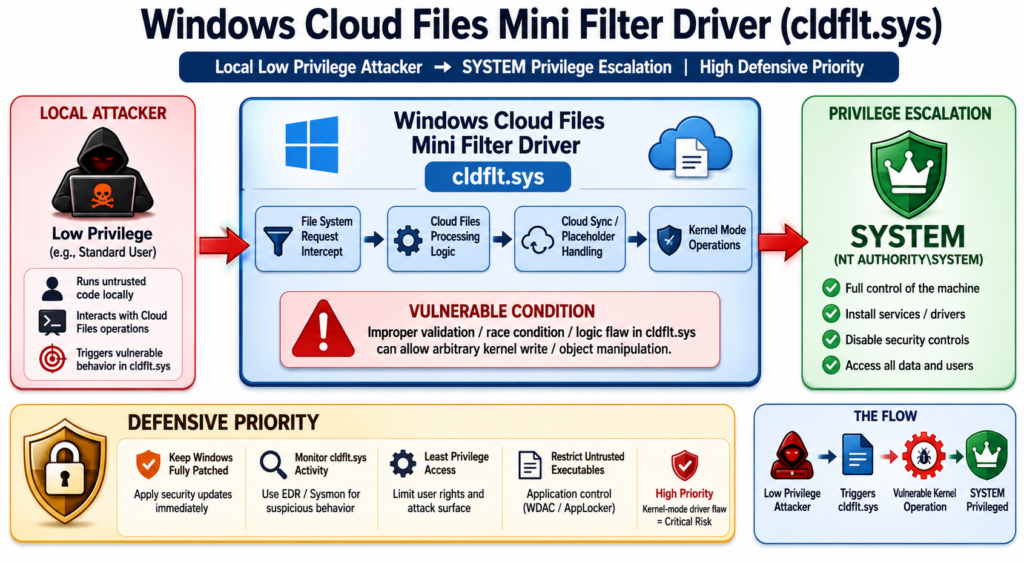
CVE-2020-17103 is not a new Exchange bug, not a browser exploit, and not a remote unauthenticated entry point. It is a Windows Cloud Files Mini Filter Driver elevation-of-privilege vulnerability, originally published in Microsoft’s December 2020 security cycle and tracked by NVD as a high-severity local privilege escalation issue. The reason it matters again is MiniPlasma, a 2026 public proof-of-concept that researchers say can turn a standard Windows user context into SYSTEM on fully patched Windows 11 systems. NVD describes CVE-2020-17103 as a Windows Cloud Files Mini Filter Driver elevation-of-privilege vulnerability and records a 7.8 High CVSS 3.1 score from NVD, while Microsoft’s CNA score is 7.0 High with higher assessed attack complexity. (NVD)
That distinction matters. A local privilege escalation does not usually start an intrusion by itself. It becomes dangerous after the first foothold. Once an attacker has low-privileged code execution through phishing, stolen credentials, RMM abuse, a malicious package, a compromised help desk tool, a weak service account, or a web shell, a working Windows local privilege escalation can be the step that changes “we have a user session” into “we control the machine.” In the MiniPlasma reporting, the relevant component is cldflt.sys, the Windows Cloud Files Mini Filter Driver, and the vulnerable routine discussed publicly is HsmOsBlockPlaceholderAccess. The researcher’s GitHub repository says the original Google Project Zero proof-of-concept reportedly worked without changes, while the weaponized version was altered to spawn a SYSTEM shell. (GitHub)
The responsible way to treat CVE-2020-17103 in 2026 is not panic and not dismissal. It is a structured response: identify where the Cloud Files driver exists, determine whether your Windows builds match systems confirmed by credible testing, monitor for the registry and process behaviors associated with MiniPlasma, avoid running public exploit code in production, and verify compensating controls such as application allowlisting and EDR tamper protection. Microsoft’s public Security Update Guide page for the CVE requires JavaScript in many environments, but NVD links the Microsoft advisory and preserves the key vendor reference for tracking official changes. (NVD)
What CVE-2020-17103 is
CVE-2020-17103 is a Windows elevation-of-privilege vulnerability in the Cloud Files Mini Filter Driver. NVD’s current description is concise, but concise does not mean low impact. The vulnerability is marked as distinct from CVE-2020-17134 and CVE-2020-17136, two other Windows Cloud Files Mini Filter Driver elevation-of-privilege issues from the same general 2020 patch period. (NVD)
| 필드 | Practical reading |
|---|---|
| CVE | CVE-2020-17103 |
| Vendor | Microsoft |
| 구성 요소 | Windows Cloud Files Mini Filter Driver, commonly discussed as cldflt.sys |
| 취약성 등급 | 권한 수준 향상 |
| 공격 벡터 | Local |
| Privileges required | Low privileges according to CVSS 3.x scoring |
| 사용자 상호 작용 | 없음 |
| 영향 | High confidentiality, integrity, and availability impact in both NVD and Microsoft CNA scoring |
| Original patch context | December 2020 Microsoft security updates |
| 2026 renewed name | MiniPlasma |
| 2026 public issue | Public PoC claims renewed exploitability on fully patched Windows systems |
| Defensive priority | High where untrusted or low-privileged local execution is plausible |
The phrase “local” should not make defenders relax. Most serious endpoint intrusions eventually become local. Malware runs locally. RMM tools run locally. Living-off-the-land activity runs locally. A malicious insider is local. A compromised developer workstation is local. A web server process running under a restricted identity is local. A VDI session belonging to a normal user is local. If a vulnerability takes that low-privileged context to SYSTEM, it can become the bridge between initial access and endpoint dominance.
The most important first correction is terminology. CVE-2020-17103 should be treated as an elevation-of-privilege issue, not a classic remote code execution bug. Some secondary writeups on the open web use sloppy RCE language, usually because the end state can involve code running as SYSTEM after local exploitation. That is not the same as remote unauthenticated code execution. NVD and Microsoft’s CVSS vectors both mark the attack vector as local, and the safest operational model is to treat it as post-compromise privilege escalation. (NVD)
Why MiniPlasma changed the risk conversation
MiniPlasma is the name used for the 2026 public exploit associated with the renewed CVE-2020-17103 discussion. The GitHub repository published by Nightmare-Eclipse describes MiniPlasma as a proof-of-concept for local privilege escalation in cldflt.sys and says CVE-2020-17103 was “apparently not patched or the patch was reversed.” The same README attributes the original vulnerability discovery to James Forshaw of Google Project Zero and says the original PoC worked without modification, while the new version was weaponized to spawn a SYSTEM shell. (GitHub)
That claim has been amplified because several credible security outlets and vendors reported practical validation or community confirmation. The Hacker News reported that MiniPlasma targets cldflt.sys, resides in HsmOsBlockPlaceholderAccess, and was said to grant SYSTEM privileges on fully patched Windows systems. SecurityWeek reported that Microsoft was investigating the report and that Will Dormann observed MiniPlasma working on Windows 11 systems with May 2026 security updates, while noting it did not appear to work on the latest Windows 11 Insider Preview Canary build. (해커 뉴스)
ThreatLocker reported that its researchers confirmed the publicly released MiniPlasma exploit could elevate a standard Windows 11 user to SYSTEM on systems running May 2026 updates. The same writeup said there was no official patch at the time of its May 19, 2026 publication and recommended default-deny application control and registry monitoring as mitigations while Microsoft investigated. (ThreatLocker)
Dark Reading placed MiniPlasma into a broader run of 2026 Windows disclosures by the same researcher, alongside YellowKey, GreenPlasma, BlueHammer, RedSun, and UnDefend. Its reporting is useful because it frames the issue as more than one exploit: defenders are being forced to handle public, fast-moving Windows privilege-boundary claims where patch status, exploitability, and official advisories may not line up neatly on the same day. (다크 리딩)
The right conclusion is narrow but serious. Public sources do not prove every Windows version is exploitable. They do not justify running public PoC code on production machines. They do show that CVE-2020-17103 can no longer be treated as a quiet 2020 entry in a vulnerability database. It has public exploit code, independent testing signals, and a plausible post-compromise role.
The Windows Cloud Files attack surface
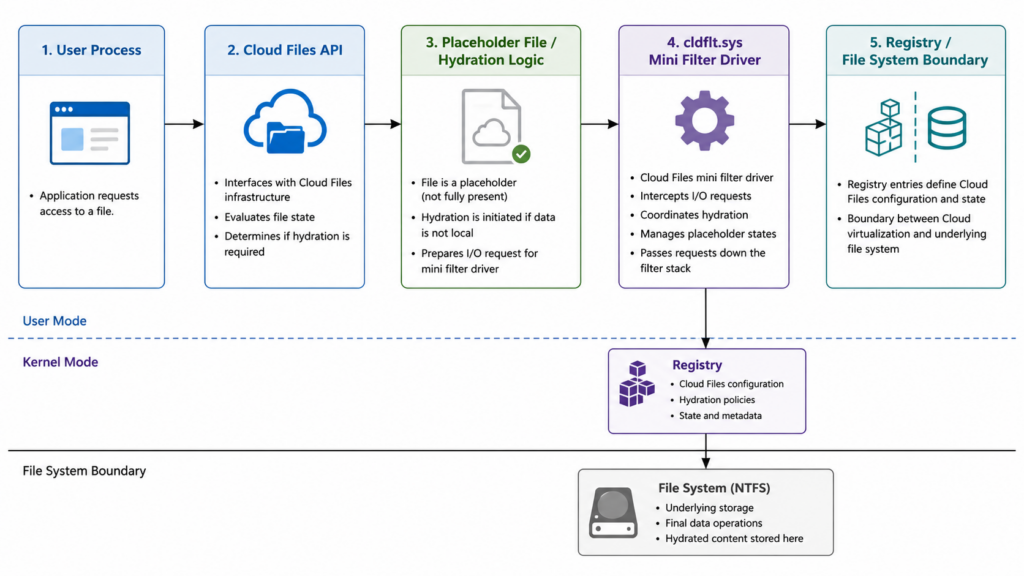
The Windows Cloud Files Mini Filter Driver exists because cloud-backed files need to behave like local files without always being fully present on disk. OneDrive Files On-Demand is the most familiar example. A file can appear in a directory, carry metadata, and hydrate only when needed. That experience depends on coordination between user-mode cloud file APIs, sync providers, file system state, and kernel-mode filtering.
At a high level, the Cloud Files stack has to answer questions like these:
| 질문 | Security significance |
|---|---|
| Is this file a placeholder or fully hydrated? | Placeholder state changes can trigger privileged file system logic. |
| Which sync root owns this file? | Sync providers need boundaries, and boundary confusion can become a security issue. |
| Who requested hydration, dehydration, or abort logic? | Caller identity matters when user-mode requests reach privileged driver paths. |
| What registry or policy state controls the operation? | Registry writes can cross user/profile boundaries if access checks are wrong. |
| Does the kernel trust a path, object, or state that user mode can race or change? | Race conditions and stale validation are common local privilege escalation patterns. |
The security problem is not that cloud sync exists. The problem is that cloud sync creates a complicated bridge between ordinary user actions and privileged file system machinery. Mini filter drivers sit close to the kernel’s file I/O path. When they mishandle object lifetime, registry access, user-controlled buffers, policy state, or time-of-check/time-of-use windows, a normal user can sometimes influence a privileged operation.
CVE-2020-17103 appears especially interesting because public writeups describe registry key manipulation through an undocumented Cloud Files API path. SecurityWeek summarized the Google Project Zero report as involving registry key manipulation via an undocumented API and said an attacker could create a key in the DEFAULT user hive without access checks, enabling privilege escalation and potentially system code execution. (보안 주간)
ThreatLocker’s writeup names CfAbortHydration and says the flaw allows registry key manipulation through that API path, with the exploit touching CloudFiles BlockedApps policy state and .DEFAULT\Volatile Environment. It also identifies HsmOsBlockPlaceholderAccess as the relevant routine inside the Cloud Filter driver. (ThreatLocker)
Those details are enough for defenders to build a mental model without turning the article into an exploit recipe. The unsafe pattern is a privileged driver operation that can be steered by a low-privileged user into writing or influencing registry state it should not control. If that state is later consumed by a SYSTEM-context process or logon-related behavior, privilege escalation becomes plausible.
The CVSS scores, and what they do not tell you
NVD and Microsoft do not score CVE-2020-17103 identically. NVD lists a CVSS 3.1 base score of 7.8 High with vector AV:L/AC:L/PR:L/UI:N/S:U/C:H/I:H/A:H. Microsoft’s CNA score is 7.0 High with vector AV:L/AC:H/PR:L/UI:N/S:U/C:H/I:H/A:H. The major difference is attack complexity: NVD marks it low, while Microsoft marks it high. (NVD)
| Scoring source | Base score | Attack complexity | What it means operationally |
|---|---|---|---|
| NVD | 7.8 High | 낮음 | NVD’s enrichment treats exploitation as a local, low-complexity path once the attacker has low privileges. |
| Microsoft CNA | 7.0 High | 높음 | Microsoft’s CNA scoring suggests exploitation may require more precise conditions, timing, or environmental control. |
| Both | High CIA impact | N/A | Both scoring sources agree successful exploitation can have high confidentiality, integrity, and availability impact. |
This is a good example of why CVSS is useful but incomplete. A local privilege escalation with high attack complexity may still be urgent if public exploit code exists and the exploit works reliably in common enterprise builds. A low-complexity score may still overstate risk if the vulnerable feature is absent, mitigations block execution, or the affected machines do not allow untrusted local code. The score starts triage; it does not finish it.
The 2026 MiniPlasma reporting shifts the practical interpretation because exploit availability changes defender behavior. Tenable’s MiniPlasma plugin says exploit code is available, marks exploit ease as “exploits are available,” and says the issue is once again exploitable on currently patched hosts as of May 2026, even though Microsoft originally addressed it in December 2020. (Tenable®)
What exploitation looks like in an attack chain
A Windows local privilege escalation rarely appears alone. It is usually stage two, three, or four. The attacker needs a foothold first, but footholds are not rare. In many intrusions, getting a standard user process is easier than getting administrative control. That is what makes a bug like CVE-2020-17103 valuable.
| Initial foothold | How the attacker gets local execution | Why CVE-2020-17103 matters after that |
|---|---|---|
| Phishing attachment or link | User runs a payload under a normal account | SYSTEM access can disable controls, steal credentials, and persist. |
| RMM abuse | Attacker tricks user or help desk into installing remote access tooling | The RMM session may start as user-level access, then escalate locally. |
| Stolen VPN or VDI credentials | Attacker logs into a remote desktop or virtual workstation | Shared and virtualized environments often contain sensitive internal access. |
| Malicious developer package | Build script or dependency runs during install or CI work | Developer machines often hold tokens, SSH keys, cloud credentials, and source access. |
| Web shell on Windows server | Code runs as an application pool or service identity | Local privilege escalation can move from restricted service context to machine control. |
| Insider or contractor account | User already has interactive local access | SYSTEM reduces auditability and enables credential theft or defense tampering. |
After SYSTEM, the attacker’s options expand. They can attempt credential dumping, tamper with endpoint security, create privileged services, inspect other users’ data, modify scheduled tasks, add persistence, pivot using cached credentials, or stage ransomware. Not every environment allows all of that. Credential Guard, LSASS protection, EDR tamper protection, WDAC, local admin restrictions, and network segmentation can reduce the blast radius. But the attacker’s position is materially better after SYSTEM.
Dark Reading quoted security practitioners warning that disclosures like MiniPlasma challenge the assumption that patching alone is enough, especially when combined with other Windows weaknesses affecting Defender, BitLocker, or privilege boundaries. Its reporting also captured a common real-world scenario: local privilege escalation can follow social engineering or RMM access, not just traditional malware execution. (다크 리딩)
Affected systems, confirmed claims, and open uncertainty
The hardest part of CVE-2020-17103 triage in 2026 is separating confirmed facts from broad claims. The original CVE is tied to Microsoft Windows Cloud Files Mini Filter Driver. NVD’s affected-product mapping and advisory references point to Microsoft Windows and Microsoft’s advisory, but NVD’s public summary does not by itself answer the 2026 question: which fully patched builds are still exploitable now? (NVD)
ThreatLocker reported that confirmed affected versions include Windows 11, Windows Server 2022, and Windows Server 2025, and that Windows 10 did not appear to be affected in its testing. It also noted that the researcher believed all Windows versions were affected, while saying that claim had not been independently verified. (ThreatLocker)
The Hacker News reported the researcher’s claim that all Windows versions were likely affected, while also reporting Will Dormann’s observation that the exploit did not appear to work on the latest Windows 11 Insider Preview Canary build. (해커 뉴스)
That creates a practical rule: do not write remediation tickets that say “all Windows is definitely vulnerable” unless your own evidence supports that. Write tickets that say the Cloud Files Mini Filter Driver exposure requires validation on your supported Windows builds, with priority on Windows 11 and Windows Server 2022/2025 where public testing has reported impact. For unsupported systems or systems with unusual cloud sync tooling, assume inventory uncertainty until proven otherwise.
Why patch trust is part of the story
CVE-2020-17103 is uncomfortable because it touches patch trust. The original issue was associated with Microsoft’s December 2020 security updates. BleepingComputer’s December 2020 Patch Tuesday coverage reported 58 vulnerabilities fixed that month and noted the Windows cumulative updates KB4592449 and KB4592438, while Tenable’s 2020 KB4592449 plugin listed CVE-2020-17103 among multiple elevation-of-privilege vulnerabilities addressed by that update for Windows 10 versions 1903 and 1909. (컴퓨터)
The 2026 MiniPlasma claim is that the same issue is still present or the fix regressed. The GitHub repository says the author is unsure whether Microsoft never patched the issue or later rolled back the patch, but claims the original Google Project Zero PoC worked without changes. (GitHub)
Security teams do not need to resolve Microsoft’s internal patch history to act. They need to recognize the operational lesson: a patch record is not the same as current exploit resistance. For high-impact local privilege escalation bugs, especially in kernel-adjacent drivers, mature programs need regression testing, build-level verification, and behavior-based detection. A ticket should not close forever because a CVE was marked patched five years ago. It should remain linked to asset evidence, fixed-build evidence, and detection coverage.
This is especially true for components like cldflt.sys that continue to evolve as Windows cloud storage behavior evolves. A regression or incomplete fix in such a component can re-open an old security assumption without producing a new product name, a new exposed port, or an obvious application version change.
Safe validation without running MiniPlasma in production
Running a public SYSTEM-shell exploit on a production endpoint is a bad validation strategy. It can change system state, trigger EDR containment, corrupt data, leave ambiguous forensic artifacts, or hand an unsafe binary to administrators who may reuse it incorrectly. It also creates legal and operational risk if the test scope is not explicit.
A safer validation plan starts with inventory and telemetry. The following PowerShell commands do not exploit the vulnerability. They help identify whether the Cloud Files driver exists, whether it is loaded, what version is present, and which Windows build is under review.
# Basic Windows build context
Get-ComputerInfo |
  Select-Object CsName, WindowsProductName, WindowsVersion, OsHardwareAbstractionLayer, OsBuildNumber

# Cloud Files Mini Filter Driver file metadata
$driverPath = "$env:windir\System32\drivers\cldflt.sys"

if (Test-Path $driverPath) {
    Get-Item $driverPath |
      Select-Object FullName, Length, LastWriteTime,
        @{Name="FileVersion"; Expression={$_.VersionInfo.FileVersion}},
        @{Name="ProductVersion"; Expression={$_.VersionInfo.ProductVersion}}
} else {
    Write-Host "cldflt.sys was not found at the expected path."
}

# Service state
Get-Service cldflt -ErrorAction SilentlyContinue |
  Select-Object Name, Status, StartType, ServiceType

# Filter Manager view
fltmc filters | findstr /i cldflt
For patch review, Get-HotFix can show installed hotfixes, but it is not a complete vulnerability validation engine. Windows cumulative updates supersede older updates, and the presence of a KB does not prove the current driver is safe against the 2026 MiniPlasma behavior. Treat hotfix output as one evidence source, not the final answer.
# Recent installed Windows hotfixes
Get-HotFix |
  Sort-Object InstalledOn -Descending |
  Select-Object -First 20 HotFixID, Description, InstalledOn, InstalledBy
A good lab validation plan should define:
| 요구 사항 | 중요한 이유 |
|---|---|
| Isolated test VM | Prevents production state changes and forensic confusion. |
| Snapshot before testing | Allows reliable rollback after driver, registry, or EDR events. |
| Representative Windows build | Avoids false comfort from testing the wrong release. |
| Standard user test account | Matches the low-privileged attacker precondition. |
| EDR telemetry enabled | Measures whether controls detect or block the behavior. |
| No production credentials | Prevents accidental exposure during SYSTEM-context testing. |
| Documented success criteria | Avoids vague “it worked” or “it failed” conclusions. |
For teams using AI-assisted validation workflows, the useful role of automation is not to run public exploit code blindly. It is to turn CVE context into scoped checks, collect host evidence, preserve command output, separate confirmed exposure from assumptions, and generate retestable remediation notes. Penligent describes an AI-powered penetration testing workflow with CVE scanning, guided execution, evidence-first findings, and reproducible proof under user-controlled agentic workflows; that type of workflow is relevant only when it stays inside authorized scope and keeps raw evidence available for human review. (펜리전트)
Detection strategy for MiniPlasma-style activity
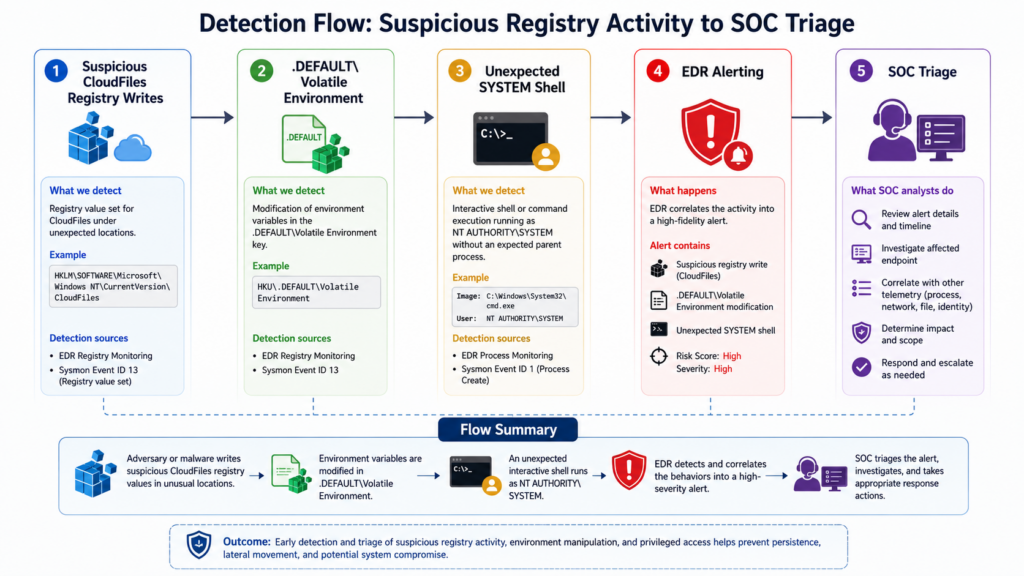
Detection should focus on behavior, not just the public repository name, compiled binary hash, or process filename. Public PoCs get renamed. Code gets recompiled. Timing changes. Operators wrap exploit steps in scripts, droppers, or RMM tooling. Behavior survives those edits.
ThreatLocker identified two registry areas worth monitoring for MiniPlasma activity: \Registry\User\Software\Policies\Microsoft\CloudFiles\BlockedApps* 그리고 \Registry\User\.DEFAULT\Volatile Environment*. It described these as locations manipulated during exploitation and recommended alerting on writes to either path. (ThreatLocker)
| 신호 | 중요한 이유 | False-positive notes |
|---|---|---|
Writes to CloudFiles BlockedApps policy keys | Public MiniPlasma reporting associates this path with exploitation behavior. | Legitimate policy management may touch CloudFiles policy state in managed environments. Baseline first. |
Writes to .DEFAULT\Volatile Environment | Unusual writes into DEFAULT hive environment state can indicate privilege-boundary manipulation. | Some system components may update environment-related values; correlate with process and user context. |
| Standard user process spawning elevated shell | 시스템 cmd.exe, powershell.exe, or script host from an unexpected parent is high risk. | Admin tools can spawn shells; context and parent process matter. |
| Low-privileged user followed by EDR tampering | Local privilege escalation is often used to disable defenses. | Some IT tools modify services; validate signer and management channel. |
| New service creation after suspicious registry writes | SYSTEM access often becomes persistence through services. | Deployment tools create services; correlate with user and time window. |
| LSASS access after privilege transition | Credential theft often follows SYSTEM. | Backup/security tools may inspect LSASS; require known allowlist. |
Microsoft Defender Advanced Hunting can be used to look for registry activity in the paths discussed publicly. The exact table names and schemas depend on licensing and telemetry configuration, but the structure below is a safe starting point.
DeviceRegistryEvents
| where Timestamp > ago(14d)
| where RegistryKey has_any (
    @"\Software\Policies\Microsoft\CloudFiles\BlockedApps",
    @"\.DEFAULT\Volatile Environment"
)
| project Timestamp, DeviceName, InitiatingProcessAccountName,
          InitiatingProcessFileName, InitiatingProcessCommandLine,
          RegistryKey, RegistryValueName, ActionType
| order by Timestamp desc
A second query can correlate suspicious registry writes with SYSTEM shell creation. This does not prove MiniPlasma by itself, but it helps find the pattern defenders care about: low-privileged activity followed by privileged execution.
let suspiciousRegistry =
    DeviceRegistryEvents
    | where Timestamp > ago(14d)
    | where RegistryKey has_any (
        @"\Software\Policies\Microsoft\CloudFiles\BlockedApps",
        @"\.DEFAULT\Volatile Environment"
    )
    | project DeviceId, DeviceName, RegTime=Timestamp,
              InitiatingProcessAccountName, InitiatingProcessFileName;

DeviceProcessEvents
| where Timestamp > ago(14d)
| where AccountName =~ "system"
| where FileName in~ ("cmd.exe", "powershell.exe", "pwsh.exe", "wscript.exe", "cscript.exe", "rundll32.exe")
| join kind=inner suspiciousRegistry on DeviceId
| where Timestamp between (RegTime .. RegTime + 30m)
| project Timestamp, DeviceName, FileName, ProcessCommandLine,
          InitiatingProcessFileName, InitiatingProcessCommandLine,
          RegTime, InitiatingProcessAccountName
| order by Timestamp desc
A Sigma-style rule can help teams translate the registry-monitoring idea across SIEMs. Field names will need adaptation for your logging pipeline.
title: Possible MiniPlasma Related CloudFiles Registry Manipulation
id: 7d713a0d-6b41-4f04-9e4d-miniplasma-registry-watch
status: experimental
description: Detects registry writes to CloudFiles and DEFAULT hive paths publicly associated with MiniPlasma activity.
references:
  - CVE-2020-17103
logsource:
  product: windows
  category: registry_set
detection:
  selection_cloudfiles:
    TargetObject|contains: '\Software\Policies\Microsoft\CloudFiles\BlockedApps'
  selection_default:
    TargetObject|contains: '\.DEFAULT\Volatile Environment'
  condition: selection_cloudfiles or selection_default
fields:
  - UtcTime
  - Computer
  - User
  - Image
  - TargetObject
  - Details
falsepositives:
  - Legitimate endpoint management or policy tooling changing Cloud Files policy state
  - System profile environment updates during managed configuration changes
level: high
Sysmon users can add registry include rules for those paths. Keep the rule narrow enough to avoid drowning the SOC, but do not make it so narrow that it only catches one PoC build.
<RuleGroup name="MiniPlasma related registry paths" groupRelation="or">
  <RegistryEvent onmatch="include">
    <TargetObject condition="contains">\Software\Policies\Microsoft\CloudFiles\BlockedApps</TargetObject>
    <TargetObject condition="contains">\.DEFAULT\Volatile Environment</TargetObject>
  </RegistryEvent>
</RuleGroup>
Registry monitoring is only one layer. Local privilege escalation often announces itself through what happens next. Hunt for new services, scheduled tasks, EDR service changes, suspicious LSASS access, process injection, unusual token privileges, and sudden execution from user-writable paths under SYSTEM.
DeviceProcessEvents
| where Timestamp > ago(14d)
| where AccountName =~ "system"
| where FolderPath has_any (
    @"\Users\",
    @"\ProgramData\",
    @"\Windows\Temp\",
    @"\AppData\Local\Temp\"
)
| project Timestamp, DeviceName, FileName, FolderPath, ProcessCommandLine,
          InitiatingProcessFileName, InitiatingProcessCommandLine
| order by Timestamp desc
The detection rule should not say “MiniPlasma confirmed” unless you have enough evidence. A better alert title is “Possible Cloud Files privilege escalation behavior.” That wording leaves room for triage, reduces false certainty, and prevents the team from overfitting one detection to one exploit name.
Immediate mitigation and hardening priorities
If Microsoft releases updated guidance or a new security update for CVE-2020-17103, that guidance should take priority. Until then, organizations should assume they need layered controls. ThreatLocker recommended default-deny application policy and registry monitoring because no official patch was available at the time of its writeup. SecurityWeek reported Microsoft’s statement that it was investigating and would take action to protect customers as soon as possible. (ThreatLocker)
| Timeframe | 액션 | 중요한 이유 |
|---|---|---|
| Same day | Review Microsoft advisory tracking for CVE-2020-17103 | Official guidance can change quickly during active investigation. |
| Same day | Inventory Windows 11, Windows Server 2022, and Windows Server 2025 endpoints | These versions were called out in public testing and reporting. |
| Same day | Add registry monitoring for CloudFiles BlockedApps 그리고 .DEFAULT\Volatile Environment | These paths are publicly associated with MiniPlasma activity. |
| Same week | Enforce application allowlisting or default-deny controls where feasible | Blocking unknown binaries can stop exploit execution before the vulnerable path is reached. |
| Same week | Review local admin membership and standard user execution paths | Local privilege escalation is less useful if initial local execution is tightly controlled. |
| Same week | Validate EDR tamper protection and service-change alerts | SYSTEM is often used to degrade security tooling. |
| Next cycle | Add regression validation for high-risk Windows LPE patches | Patch records should be backed by build and behavior evidence. |
| 진행 중 | Correlate local privilege escalation signals with initial access alerts | LPE often follows phishing, RMM abuse, or malware execution. |
Application control deserves special attention. Default-deny is not glamorous, but it directly targets a required step: the attacker has to run something. If unapproved executables and scripts cannot run from user-writable locations, many local privilege escalation exploits become much harder to operationalize. That does not fix the vulnerable driver. It reduces exploit reach.
Windows Defender Application Control, AppLocker, third-party application control, PowerShell Constrained Language Mode, script signing, and RMM governance can all help. The right mix depends on environment maturity. A heavily managed enterprise laptop fleet may be ready for WDAC policies. A smaller team may start by blocking execution from high-risk user-writable paths and tightening RMM approval.
Hardening also needs post-exploitation controls. Protect LSASS. Reduce cached credential exposure. Monitor service creation. Alert on Defender and EDR configuration changes. Restrict local administrator rights. Segment workstations from critical servers. Review whether VDI images and developer workstations have secrets that would make SYSTEM especially damaging.
Related CVEs that help explain the risk pattern
CVE-2020-17103 is part of a broader Windows local privilege escalation pattern, not an isolated curiosity. The closest comparison is CVE-2025-62221, another Windows Cloud Files Mini Filter Driver elevation-of-privilege issue. NVD describes CVE-2025-62221 as a use-after-free in the Windows Cloud Files Mini Filter Driver that allows an authorized attacker to elevate privileges locally, with CVSS vector AV:L/AC:L/PR:L/UI:N/S:U/C:H/I:H/A:H. (NVD)
CVE-2025-62221 is relevant because it affects the same component family and shows that Cloud Files driver bugs are not purely historical. Several public writeups reported that CVE-2025-62221 was actively exploited, and CISA KEV tracking is reflected in third-party aggregations and NVD-related reporting. The key point for defenders is not that the two bugs share the same root cause. They do not. CVE-2025-62221 is described as use-after-free, while MiniPlasma discussions around CVE-2020-17103 involve registry manipulation and a Cloud Files API path. The shared lesson is that cloud file abstraction layers can expose kernel-adjacent privilege boundaries. (SOC Prime)
CVE-2024-38106 is another useful comparison because NVD records it as a Windows Kernel privilege escalation issue in CISA’s Known Exploited Vulnerabilities catalog, with required action to apply mitigations per vendor instructions or discontinue use if mitigations are unavailable. Its relevance is the race-condition local privilege escalation pattern: local code execution plus a kernel bug can produce SYSTEM and become valuable in real intrusions. (NVD)
CVE-2024-30051, a Microsoft DWM Core Library privilege escalation vulnerability, is also listed by NVD as in CISA KEV. The lesson is similar: desktop and local Windows components that seem far from the perimeter can still be exploited in the wild because attackers routinely need privilege escalation after initial access. (NVD)
CVE-2023-29360, a Microsoft Streaming Service untrusted pointer dereference vulnerability, was added to CISA KEV in February 2024 with required action to apply vendor mitigations or discontinue use if mitigations are unavailable. It reinforces the same operational reality: local privilege escalation bugs in Windows subsystems can become active intrusion tools when they reliably produce elevated privileges. (NVD)
| CVE | 구성 요소 | Why it is relevant to CVE-2020-17103 |
|---|---|---|
| CVE-2025-62221 | Windows 클라우드 파일 미니 필터 드라이버 | Same driver family, different bug class, evidence that Cloud Files remains a live privilege boundary. |
| CVE-2024-38106 | Windows Kernel | Local race-condition privilege escalation in CISA KEV, useful comparison for post-compromise SYSTEM risk. |
| CVE-2024-30051 | Windows DWM Core Library | Exploited local privilege escalation in a Windows desktop component. |
| CVE-2023-29360 | Microsoft Streaming Service | Another exploited Windows local privilege escalation path with KEV tracking. |
These comparisons help teams avoid a common mistake: treating local privilege escalation as second-tier just because it is not internet-facing. Internet-facing remote code execution is urgent because it can start an intrusion. Local privilege escalation is urgent because it can finish one.
Common mistakes during CVE-2020-17103 response
The first mistake is assuming “patched in 2020” means “irrelevant in 2026.” MiniPlasma is a reminder that old CVEs can re-enter the active risk queue if exploitability changes, public code appears, or a regression is suspected. Vulnerability management systems should support reopening old issues when new evidence arrives.
The second mistake is treating a scanner result as proof of exploitability. A scanner can identify missing updates, affected components, or known vulnerability signatures. It usually cannot prove whether a public race-condition exploit succeeds under your EDR, application control policy, Windows build, cloud sync configuration, and user restrictions. Tenable’s 2026 plugin is useful because it explicitly tracks the MiniPlasma renewed exposure and references the GitHub PoC and Project Zero issue, but operational validation still requires environment-specific evidence. (Tenable®)
The third mistake is running public exploit code in production. That gives you a dramatic answer at the cost of system integrity, audit quality, and legal clarity. Use a lab. Use representative builds. Use vendor checks when available. Use registry and process telemetry in production.
The fourth mistake is detecting only filenames, hashes, or the string “MiniPlasma.” Public exploit code can be recompiled. Operators can rename files. Detection should focus on registry paths, driver-related behavior, privilege transition, child process anomalies, and post-exploitation actions.
The fifth mistake is overcorrecting in the other direction and claiming every Windows endpoint is confirmed vulnerable. Public testing has been strongest around fully patched Windows 11 and selected server versions. ThreatLocker reported Windows 10 did not appear affected in its testing, while the researcher claimed broad impact. Both points can be true in different evidence categories: confirmed test results versus unverified broader claim. (ThreatLocker)
A practical triage workflow for defenders
A defensible CVE-2020-17103 response should produce evidence, not just activity. The workflow below is designed for security teams that need to create tickets, answer management questions, and avoid unsafe testing.
| 단계 | Evidence to collect | Decision it supports |
|---|---|---|
| Identify assets | Windows version, build, role, exposure to untrusted users, VDI/shared status | Which systems need priority review |
| Check Cloud Files driver | cldflt.sys presence, file version, service/filter state | Whether the component exists and is active |
| Review patch state | Latest cumulative update, reboot status, update rings | Whether systems are current, even if current may not be sufficient |
| Add detection | Registry watch, SYSTEM shell correlation, service tamper alerts | Whether exploitation attempts can be seen |
| Test controls in lab | Standard user execution, application control, EDR response | Whether compensating controls block the chain |
| Document uncertainty | Confirmed affected builds, untested builds, vendor guidance status | What remains unknown |
| Retest after updates | Driver version, Windows build, detection silence, lab outcome | Whether remediation actually changed risk |
An example remediation ticket should be explicit:
Title:
Validate exposure and detection coverage for CVE-2020-17103 MiniPlasma on Windows 11 and Windows Server systems

Scope:
Windows 11 endpoints, Windows Server 2022, Windows Server 2025, VDI pools, shared workstations, and developer machines.

Required evidence:
1. Windows build and latest cumulative update status.
2. cldflt.sys presence, file version, and filter state.
3. Registry monitoring enabled for CloudFiles BlockedApps and .DEFAULT Volatile Environment paths.
4. EDR query results for suspicious SYSTEM shell creation from user-writable locations.
5. Lab validation outcome for application control and EDR containment.
6. Microsoft advisory review date and next review owner.

Do not:
Run public MiniPlasma PoC on production systems.
Close based only on "latest updates installed."
Close without detection coverage or documented compensating controls.
This kind of ticket avoids both panic and hand-waving. It gives IT, SOC, endpoint engineering, and security leadership a common object to work from.
Red team and pentest considerations
Authorized red teams should be careful with CVE-2020-17103. A public SYSTEM-shell exploit is tempting, but it can easily create unnecessary risk. The first question is not “Can we run MiniPlasma?” The first question is “What security question are we allowed to answer?”
Good red-team questions include:
| 질문 | Safer validation approach |
|---|---|
| Can a standard user execute unapproved binaries? | Test application control with benign payloads and approved harnesses. |
| Can endpoint controls detect Cloud Files registry manipulation? | Use controlled registry writes in a lab or approved simulation where possible. |
| Does SYSTEM execution lead to credential exposure? | Validate LSASS protection and credential guard using safe control checks. |
| Can EDR be disabled after privilege escalation? | Test tamper protection with vendor-supported procedures. |
| Are remediation reports reproducible? | Preserve commands, timestamps, screenshots, telemetry, and rollback state. |
Penetration testing should not become exploit theater. A useful finding is not “we ran a GitHub PoC and got a shell.” A useful finding explains the preconditions, the affected asset class, the control gap, the evidence, the impact, and the remediation path.
That is especially true for local privilege escalation. If the environment already allows untrusted users to run arbitrary unsigned code, the vulnerability is only one part of the risk. If application control blocks the exploit binary, EDR alerts on registry manipulation, and LSASS protection prevents credential theft, the residual risk is different. The report should show those differences clearly.
Penligent has a related Windows Cloud Files race-condition article on CVE-2025-55680 that frames Cloud Files bugs as a kernel-adjacent attack surface and discusses why AI-assisted pentesting is most useful when it helps teams move from “we have a CVE” to “we have proof this is or is not exploitable in our environment.” That framing applies to CVE-2020-17103 as well: the valuable output is scoped, repeatable evidence, not uncontrolled exploit execution. (펜리전트)
Defensive engineering beyond one CVE
CVE-2020-17103 should feed a broader endpoint hardening program. The best defenders will fix the immediate issue, then ask why a standard user process could become a launchpad for SYSTEM compromise in the first place.
Start with execution control. Many local privilege escalations require the attacker to run a binary or script. Blocking untrusted execution from %TEMP%, %APPDATA%, Downloads, removable media, and user-controlled project directories can reduce exploitability. Developer machines need a more nuanced policy, but they should not be exempt from monitoring.
Then review identity boundaries. Remove standing local admin where possible. Use just-in-time elevation. Separate admin accounts from daily accounts. Prevent help desk tools from becoming universal execution brokers. Audit who can deploy RMM agents and who can approve remote scripts.
Next, protect credentials. SYSTEM often becomes valuable because credentials are reachable. Enable Credential Guard where appropriate. Harden LSASS access. Reduce cached domain credentials. Use LAPS or Windows LAPS for local administrator passwords. Monitor credential dumping tools and suspicious handle access.
Finally, build patch regression checks into the vulnerability management cycle. For high-risk Windows privilege escalation issues, the ticket should include not only “KB installed” but also “driver version changed,” “behavior no longer reproduced in lab,” “detection still active,” and “no exploit-like telemetry observed after rollout.”
자주 묻는 질문
Is CVE-2020-17103 remotely exploitable?
- Public CVSS scoring records the attack vector as local, not network.
- Treat it as a post-compromise privilege escalation issue rather than an initial remote entry point.
- The risk is still serious because attackers often gain low-privileged local execution before escalating.
- A phishing payload, RMM session, compromised VDI account, malicious package, or web shell can provide the local execution needed for this class of vulnerability.
Why is MiniPlasma treated like a zero-day if CVE-2020-17103 is from 2020?
- The CVE identifier is old, but 2026 public reporting says a working exploit can still affect fully patched Windows systems.
- The MiniPlasma author claims the original Project Zero PoC still works and that the issue may never have been fully fixed or may have regressed.
- SecurityWeek reported Microsoft said it was investigating the report.
- Operationally, defenders should care about current exploitability, not only CVE publication year.
Does CVE-2020-17103 affect Windows 10?
- Public reporting is not fully uniform.
- ThreatLocker reported confirmed affected versions including Windows 11, Windows Server 2022, and Windows Server 2025, and said Windows 10 did not appear affected in its testing.
- The MiniPlasma researcher claimed broad Windows impact, but that broader claim should be treated as unverified unless supported by your own testing or vendor guidance.
- Enterprises should validate by Windows build, driver version, and control behavior rather than relying on a single public list.
Should defenders run the public MiniPlasma PoC to check exposure?
- Do not run public exploit code on production systems.
- Use isolated lab systems, snapshots, representative builds, and explicit authorization if exploit validation is required.
- In production, prefer inventory checks, driver version review, registry monitoring, EDR telemetry, application control validation, and vendor guidance.
- A production SYSTEM shell proves risk in the most dangerous way and may create unnecessary forensic and operational damage.
What are the best detection signals for MiniPlasma?
- Monitor writes to CloudFiles
BlockedAppspolicy paths and.DEFAULT\Volatile Environment, which ThreatLocker identified as relevant registry locations. - Correlate registry activity with unexpected SYSTEM shells, new services, scheduled tasks, EDR tampering, or execution from user-writable paths.
- Do not rely only on binary names, hashes, or the string “MiniPlasma.”
- Prioritize behavior-based detections that remain useful if the public PoC is renamed or recompiled.
How should teams prioritize this against remote code execution bugs?
- Internet-facing unauthenticated RCE usually remains higher immediate priority for initial access risk.
- CVE-2020-17103 deserves high priority on endpoints where local execution by untrusted users is plausible.
- VDI pools, developer machines, shared workstations, help desk environments, and exposed Windows servers with low-privileged service execution should move up the queue.
- Prioritization should combine exploit availability, asset criticality, user exposure, compensating controls, and detection coverage.
What should a defensible remediation ticket include?
- Affected asset list with Windows version, build, and role.
cldflt.syspresence, file version, and filter state.- Current Windows update status and reboot status.
- Detection coverage for the registry paths and post-exploitation behaviors.
- Lab validation notes for application control and EDR behavior.
- Clear statement of what is confirmed, what is untested, and what depends on future Microsoft guidance.
Useful primary sources
NVD’s CVE-2020-17103 entry is the best starting point for the official vulnerability description, CVSS vectors, Microsoft advisory reference, and the distinction from related 2020 Cloud Files Mini Filter Driver CVEs. (NVD)
The MiniPlasma GitHub repository is the primary public source for the 2026 researcher claim, including the assertion that the original Google Project Zero proof-of-concept still worked and that the weaponized version spawns a SYSTEM shell. Do not treat it as production validation guidance. (GitHub)
SecurityWeek’s reporting is useful for the Microsoft investigation statement, the Project Zero summary, and Will Dormann’s observation about Windows 11 May 2026 systems and Insider Preview Canary behavior. (보안 주간)
ThreatLocker’s writeup is useful for defender-facing details, especially the reported Windows 11 validation and the registry paths recommended for monitoring. (ThreatLocker)
Tenable’s MiniPlasma plugin is useful for vulnerability management teams because it turns the renewed CVE-2020-17103 concern into a scanner-tracked item with exploit availability, publication dates, and direct references. (Tenable®)
Closing judgment
CVE-2020-17103 matters because it sits at the intersection of three uncomfortable realities: local privilege escalation is still a core step in real intrusions, cloud-backed file systems create complex kernel-adjacent attack surfaces, and “patched” does not always mean “permanently gone.” MiniPlasma did not make every Windows machine automatically compromised. It did make an old Cloud Files driver CVE operationally relevant again.
The best response is evidence-driven. Confirm where cldflt.sys exists. Track Microsoft guidance. Monitor the registry and privilege-transition behaviors associated with the public exploit. Harden execution control. Validate in a lab, not on production endpoints. Close tickets only when patch status, detection coverage, compensating controls, and retest evidence all line up.
 Korean
  English
  German
  French
  Spanish
  Portuguese
  Japanese
  Hindi
Hindi  Arabic
  Turkish
  Hebrew