
CVE-2026-35385 is a narrow but important OpenSSH file-transfer flaw. It is not the same kind of issue as an unauthenticated sshd remote code execution bug. The exposed path is more specific: before OpenSSH 10.3, a file downloaded by scp could be installed with setuid or setgid bits when the download was performed by root, used legacy SCP protocol mode with -O, and did not use -p to preserve modes. That is the official core of the bug in the CVE record and NVD entry, and OpenSSH 10.3 release notes describe the same condition in the scp(1) security fixes.(CVE)
The practical risk is still real. A root-owned file that unexpectedly keeps setuid or setgid permissions is not just a copied artifact. Depending on where it lands, who can execute it, and what the file does, it can become a local privilege boundary failure. The attacker does not need the target to expose sshd in a vulnerable way. The more realistic failure mode is an administrator, deployment script, backup job, CI runner, or break-glass runbook that pulls files from a remote system as root and keeps an old scp -O compatibility flag because some legacy endpoint once required it.
That distinction matters for triage. Treating CVE-2026-35385 as “all OpenSSH servers are remotely exploitable” is too broad. Treating it as harmless because the trigger is unusual is also wrong. The right response is to find privileged legacy SCP download paths, patch OpenSSH through the operating system vendor, remove unnecessary -O usage, and verify that no automation is creating SUID or SGID files from remote-controlled sources.
What changed in OpenSSH 10.3
OpenSSH 10.3 was released on April 2, 2026. Its release notes describe several security fixes, including an scp(1) fix for downloads performed as root in legacy mode without -p. The release notes state that in that case scp did not clear setuid and setgid bits from downloaded files as users would typically expect, and that the bug dates back to the original Berkeley rcp program.(OpenSSH)
The upstream portable OpenSSH fix is small but security-significant. In commit 487e8ac에서 scp.c sink path was changed so that when preserve mode is not requested, the mask includes 07000, which covers the special permission bits that include setuid and setgid. In plain English, when the user has not asked to preserve remote file modes, the fixed client strips those high-risk mode bits during download.(GitHub)
That implementation detail explains the bug better than a generic “privilege escalation” label. The problem is not that OpenSSH turns an arbitrary file into root by itself. The problem is that the legacy SCP receive path allowed special permission bits from a remote file to survive a root-run download path where many administrators would expect normal file-creation masking to remove them. If the received file is executable and reachable by a lower-privileged user or by a later automation step, that mistake can become a privilege escalation primitive.
The fast exposure check
| 질문 | 중요한 이유 | Lower-risk answer | Higher-risk answer |
|---|---|---|---|
| Is the local OpenSSH client fixed by your vendor? | CVE-2026-35385 is fixed upstream in OpenSSH 10.3, but distributions often backport fixes without changing to upstream 10.3. | Vendor status shows a fixed OpenSSH package. | Package is still vulnerable or status is unknown. |
Do your scripts use scp -O? | -O forces legacy SCP protocol. Modern scp defaults to SFTP in current OpenSSH.(OpenBSD Manual Pages) | 아니요 -O usage found. | Root jobs or sudo runbooks still use scp -O. |
| Does root perform the download? | The documented trigger requires the download to be performed as root.(NVD) | Downloads run as an unprivileged service account into a controlled staging area. | Downloads run directly as root into deployment or shared paths. |
Is -p used? | The CVE condition specifically describes the vulnerable path as legacy mode without -p.(NVD) | No legacy mode, or vendor-patched client. | scp -O is used without -p. |
| Is the remote source fully trusted? | Legacy SCP allows the remote side to influence transfer metadata. | Internal artifact host with signed releases and access control. | Temporary host, vendor system, jump box, compromised build host, or user-controlled endpoint. |
| Where does the file land? | A setuid/setgid file is most dangerous when lower-privileged users or later automation can execute it. | Root-only staging path, fixed install mode, no direct execution. | Shared directories, deployment paths, writable service directories, or PATH-adjacent locations. |
Most organizations will not find dozens of exploitable paths. They may find a few old scripts that matter a lot. Those are the scripts worth fixing first.
Why legacy scp mode is the center of the issue
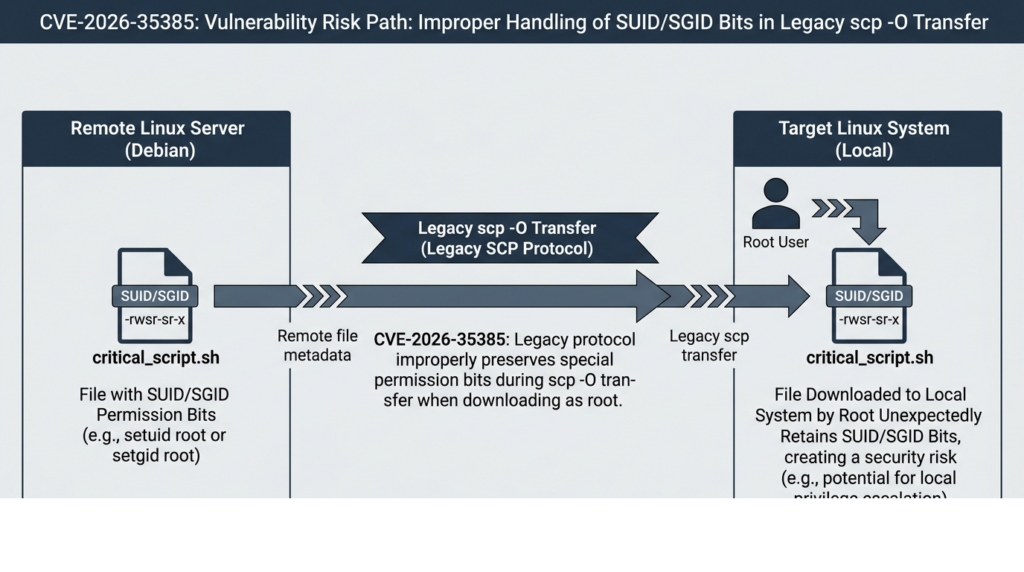
The word scp is now ambiguous. Many people still use it as a command name, but the command no longer necessarily means the old SCP/rcp wire protocol. The OpenBSD scp(1) manual states that scp uses the SFTP protocol over SSH for data transfer, and it documents -O as the option that forces legacy SCP protocol instead of SFTP. The manual also notes that forcing legacy protocol may be needed for servers without SFTP support, old wildcard behavior, or older path expansion behavior.(OpenBSD Manual Pages)
OpenSSH made that default switch in 9.0. The 9.0 release notes explain that scp(1) switched from the legacy scp/rcp protocol to SFTP by default, while allowing legacy behavior through -O for compatibility.(OpenSSH)
That history is the key to correct prioritization. If a system has a vulnerable OpenSSH package installed but never uses scp -O, the specific CVE-2026-35385 path may not be reachable in normal operation. If a patched package is installed but a script still uses scp -O for old devices, the immediate CVE may be fixed, but the script still deserves scrutiny because legacy SCP has a long history of surprising remote-side behavior. The best remediation is not only “upgrade OpenSSH.” It is “upgrade OpenSSH, then remove legacy protocol dependencies wherever possible.”
The legacy protocol also changes the trust model. In SFTP mode, file operations are expressed through a structured file-transfer protocol. In legacy SCP mode, behavior inherits assumptions from rcp-era file copying and remote shell handling. The scp(1) manual warns that legacy SCP requires execution of the remote user’s shell for glob pattern matching and requires careful quoting for shell-special characters.(OpenBSD Manual Pages) CVE-2026-35385 is a different issue from shell quoting, but both belong to the same operational lesson: compatibility flags preserve old semantics, and old semantics often carry old security assumptions.
The vulnerable condition in one sentence
The risky pattern is:
sudo scp -O remote-host:/path/to/file /local/path/
or:
scp -O remote-host:/path/to/file /local/path/
when that command is executed by root, does not use -p, and receives a remote file with setuid or setgid mode bits.
A patched client should clear those special bits when preserve mode is not requested. An unpatched client can create the downloaded file with those bits still present. The upstream fix adds 07000 to the mask in the non-preserve path, making the client strip special mode bits when it applies the file mode locally.(GitHub)
The important nuance is that exploitation still depends on the file and environment. A setuid bit on a non-executable data file is not the same as a setuid bit on an executable binary. A setuid root binary in a root-only directory is not the same as one in a directory a lower-privileged user can reach. A one-off manual transfer from a trusted host is not the same as a scheduled root job pulling artifacts from a system that many people can modify.
Why setuid and setgid bits are dangerous here
Unix permission bits do more than say who can read, write, or execute a file. The setuid bit can cause an executable file to run with the effective user ID of the file owner. The setgid bit can cause an executable file to run with the effective group ID of the file group. On directories, setgid has a different administrative use: newly created files may inherit the directory’s group.
CVE-2026-35385 matters because root-created files often become root-owned. If root downloads an executable file and the setuid bit survives unexpectedly, the local system may now contain a root-owned setuid executable that was supplied by the remote side. That does not automatically mean every system is compromised. It means the file transfer has crossed a privilege boundary in a way many operators would not expect.
| Permission state | Example mode | What it means | Why defenders should care |
|---|---|---|---|
| Normal executable | 0755 | Users can execute the file with their own privileges. | Usually expected for shared tools. |
| setuid executable | 4755 | The executable may run with the file owner’s effective UID. | Dangerous when owner is root and the file content is not fully trusted. |
| setgid executable | 2755 | The executable may run with the file group’s effective GID. | Can expose privileged group access, logs, devices, or service data. |
| setgid directory | 2775 | New files may inherit the directory group. | Common in shared project directories, but not the core CVE risk. |
| sticky directory | 1777 | Users cannot freely delete others’ files in shared directories. | Relevant to /tmp behavior, but not the main setuid/setgid issue. |
The vulnerable behavior sits at the intersection of file ownership, remote-supplied metadata, and privileged local execution. That is why a purely version-based scanner result is not enough. You need to know whether root-run legacy SCP downloads exist and whether downloaded files can later be executed by a less privileged actor.
How the bug works at the file-mode layer
The core bug is easier to understand if you separate file content from file metadata.
A file transfer moves bytes. It can also carry metadata, such as a filename, size, timestamp, and mode. A normal user downloading a file cannot usually create a root-owned setuid file because the local user is not root. Root is different. Root can create files owned by root and can apply special mode bits unless the program deliberately strips them or the filesystem/mount policy blocks their effect.
The patch tells the story. Before the fix, the scp receive path set a mask based on the process umask. After the fix, when preserve mode was not requested, OpenSSH adds 07000 to the mask before applying it. That causes the special mode bits to be removed in the non-preserve case.(GitHub)
The security expectation is reasonable: if an administrator does not use -p, they generally do not expect remote mode bits to be preserved in a way that creates a privileged local object. The bug violated that expectation only in a specific legacy path. OpenSSH 10.3 aligns behavior with what most administrators would assume: non-preserve mode should not preserve setuid and setgid.
왜 -p changes the interpretation but is not a mitigation strategy
The CVE description mentions “without -p” because -p means preserve modification times, access times, and file mode bits from the source file. The scp(1) manual documents -p in exactly that way.(OpenBSD Manual Pages)
That does not mean defenders should fix scripts by adding -p. For security hardening, preserving remote file mode is usually the wrong direction unless the workflow explicitly requires it and the source is strongly trusted. The safer path is to stop using legacy mode, avoid root downloads, download into a staging directory, verify content, and install with a known mode.
A better pattern looks like this:
# Safer pattern for a privileged install flow:
# 1. Download as an unprivileged user into a staging directory.
# 2. Verify the artifact.
# 3. Install with an explicit owner and mode.

install_user="deploy"
artifact="/tmp/staging/tool.tar.gz"
expected_sha256="REPLACE_WITH_APPROVED_HASH"

sudo -u "$install_user" scp build-host:/releases/tool.tar.gz "$artifact"

printf '%s  %s\n' "$expected_sha256" "$artifact" | sha256sum -c -

sudo install -o root -g root -m 0755 "$artifact" /usr/local/bin/tool
The key is not the exact script. The key is the sequence. Do not let remote file metadata decide the final privileged mode. Make the final mode an explicit local policy decision.
Realistic attack paths
CVE-2026-35385 is most interesting in environments where old compatibility flags meet privileged automation.
Root-run deployment scripts
A deployment script might copy a binary from a build box:
scp -O build01:/srv/releases/agent /usr/local/bin/agent
systemctl restart agent
If that script runs as root and the build host can be influenced by an attacker, the transfer path becomes risky. The downloaded file could arrive with special mode bits that the local operator did not intend. Even if the service restart is not immediately exploitable, the local filesystem now contains a privileged executable whose mode came from the remote side.
A safer version avoids legacy mode, stages the file, checks the artifact, and installs with a fixed mode:
set -euo pipefail

src="build01:/srv/releases/agent"
stage="/var/tmp/agent.download"
dest="/usr/local/bin/agent"
expected_sha256="REPLACE_WITH_RELEASE_HASH"

scp "$src" "$stage"
printf '%s  %s\n' "$expected_sha256" "$stage" | sha256sum -c -

install -o root -g root -m 0755 "$stage" "$dest"
rm -f "$stage"
systemctl restart agent
Legacy network devices
Some network appliances, old Unix systems, or embedded devices may not support modern SFTP behavior. That is one reason administrators keep -O in scripts. The risk is not that every old device is malicious. The risk is that a compatibility exception can survive for years and eventually be reused in a context where the remote endpoint is less trusted than the original author assumed.
For those environments, isolate the exception. Use a wrapper that is specific to that device class, log every execution, prohibit root downloads where possible, and force post-download mode normalization.
#!/usr/bin/env bash
set -euo pipefail

# /usr/local/sbin/legacy-scp-fetch
# Defensive wrapper for a tightly scoped legacy endpoint.
# It does not make legacy SCP safe; it reduces accidental misuse.

allowed_host="legacy-switch-01"
src="${1:-}"
dst="${2:-}"

case "$src" in
  "$allowed_host":*) ;;
  *)
    echo "Refusing legacy SCP from unapproved source: $src" >&2
    exit 1
    ;;
esac

scp -O "$src" "$dst"

# Defense-in-depth: remove special bits from the downloaded file.
chmod u-s,g-s "$dst"
chmod go-w "$dst"
This wrapper is not a substitute for patching. It is a way to stop a compatibility flag from spreading uncontrolled across scripts.
Backup and restore workflows
Restore workflows often run as root because they need to write system paths. If they pull files over legacy SCP, they deserve immediate review. A backup restore path is especially sensitive because it may copy entire directory trees, recreate ownership, or place files under directories that other users can later access.
A defensive restore flow should treat mode bits as untrusted unless the archive format, source, and restoration policy are all controlled. The safest approach is to restore into a quarantined path mounted with nosuid, inspect it, and then install only approved files with explicit modes.
mkdir -p /mnt/restore-staging

# Example fstab-style hardening for a staging filesystem:
# /dev/mapper/restore-stage /mnt/restore-staging ext4 defaults,nosuid,nodev,noexec 0 2
Mount options are not a complete fix. nosuid helps prevent setuid/setgid execution on that filesystem, but files can later be copied elsewhere. The durable control is explicit installation policy.
CI runners and image builds
Image build scripts often run as root inside containers or virtual machines. Teams may think the blast radius is small because the build environment is temporary. That is not always true. A compromised build step can bake a bad file into an image, artifact, appliance package, or golden VM template. CVE-2026-35385 is exactly the kind of issue that can move from a “temporary” root transfer into a persistent deliverable if nobody checks the resulting file modes.
CI pipelines should include a file-mode sanity check before packaging:
# Fail the build if unexpected SUID/SGID files appear under the image root.
image_root="${IMAGE_ROOT:-/build/rootfs}"

unexpected="$(find "$image_root" -xdev -type f \( -perm -4000 -o -perm -2000 \) -print)"

if [ -n "$unexpected" ]; then
  echo "Unexpected SUID/SGID files detected:" >&2
  printf '%s\n' "$unexpected" >&2
  exit 1
fi
That check is useful beyond this CVE. It catches accidental privilege artifacts from many sources.
Affected versions and vendor packaging reality
Upstream OpenSSH fixed the issue in 10.3. NVD lists affected OpenSSH versions up to but excluding 10.3 in its CPE configuration, and the CVE record was published on April 2, 2026.(NVD)
That does not mean every secure system must literally report OpenSSH_10.3. Enterprise Linux distributions routinely backport security fixes to older upstream version numbers. You should check your vendor’s advisory and package changelog, not only the string returned by ssh -V.
Ubuntu’s CVE page lists CVE-2026-35385 as published on April 2, 2026, last updated on April 29, 2026, and shows fixed packages for Ubuntu 26.04 LTS, 25.10, 24.04 LTS, and 22.04 LTS, while older releases on that page were marked as needing evaluation at the time shown.(우분투)
Debian’s security tracker lists fixed package versions across releases, including fixed entries for bullseye security, bookworm, trixie, forky, and sid, while also showing specific vulnerable package rows for some release/security combinations.(Debian Security Tracker)
Amazon Linux marks CVE-2026-35385 as Important, gives an Amazon Linux CVSS v3 score of 7.5, and lists Amazon Linux 2 and Amazon Linux 2023 OpenSSH packages as fixed through April 30, 2026 advisories.(Amazon Web Services Explorer)
IBM’s AIX advisory says multiple OpenSSH vulnerabilities, including CVE-2026-35385, affect AIX 7.2, AIX 7.3, and VIOS 4.1, and provides interim fixes for the relevant OpenSSH filesets.(IBM)
SUSE rates the issue Important and provides CVSS data that shows how different scoring sources assessed the same vulnerability differently.(SUSE)
The operational takeaway is simple: use vendor status for patch decisions. Use upstream 10.3 as the clean upstream reference. Use local workflow analysis to determine whether the bug is reachable in your environment.
Why the CVSS scores differ
CVE-2026-35385 is a good example of why CVSS should start a conversation, not end it.
NVD shows a CVSS 3.1 base score of 8.1 HIGH with vector AV:N/AC:H/PR:N/UI:N/S:U/C:H/I:H/A:H. The same NVD page also shows MITRE CNA and Red Hat ADP scores of 7.5 HIGH with UI:R in the vector.(NVD) SUSE’s CVE page similarly shows MITRE, NVD, and SUSE scoring differences, with NVD at 8.1 and SUSE/MITRE-style scoring at 7.5.(SUSE)
The main interpretive dispute is user interaction. One view treats the vulnerable action as requiring a user or administrator to initiate a download from a malicious or compromised remote endpoint. Another view focuses on the network-supplied metadata and the fact that the attacker does not need local privileges on the target. Both readings can be defended depending on how strictly the scoring model is applied.
For defenders, the practical severity depends on three environmental questions:
| Environmental factor | Why it changes priority |
|---|---|
| Root automation exists | Scheduled root transfers can turn a narrow bug into a repeatable exposure. |
| Remote source is weakly controlled | A compromised build host, partner server, or user-controlled endpoint increases attacker influence. |
| Destination path is executable or shared | The special mode bit matters most when someone or something can execute the file later. |
| Legacy SCP is required | 만약 -O is absent, the specific trigger path is much less likely. |
| File-mode controls exist | nosuid, post-download chmod, artifact signing, and explicit install -m reduce impact. |
| Package is vendor-fixed | A patched client should clear the relevant special bits in the non-preserve path. |
A high base score is enough to justify action. It is not enough to decide which server to fix first. Prioritize systems where root-run transfer scripts exist, especially production deployment hosts, CI builders, jump boxes, backup infrastructure, and shared administrative tool servers.
How to inventory exposure
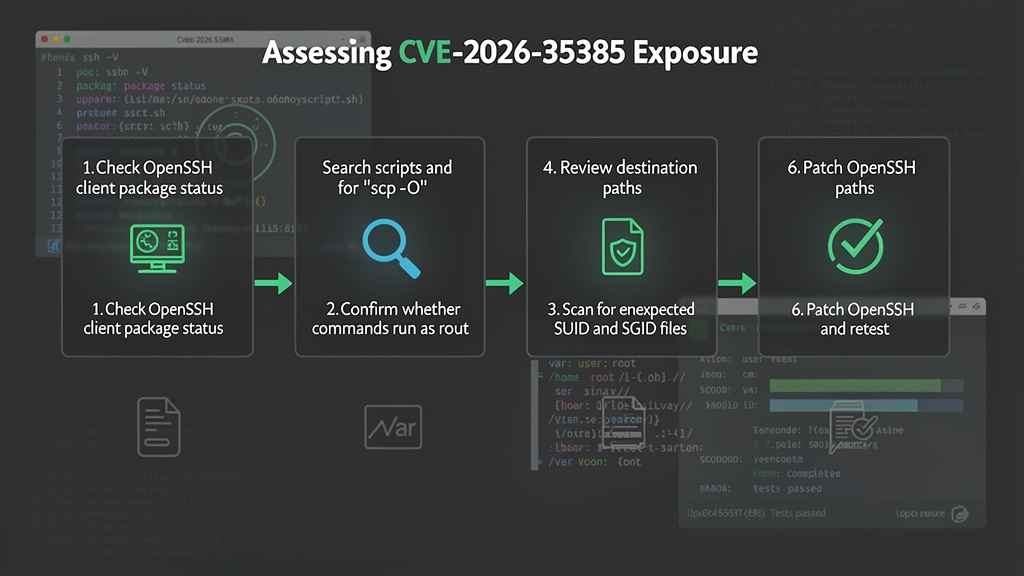
Start with the local OpenSSH client, not only the server daemon. CVE-2026-35385 is triggered by the scp client receive path. On many systems, scp is installed through an openssh-client 또는 openssh-clients package, while sshd may be packaged separately.
Check the runtime version:
ssh -V
scp -V 2>&1 || true
scp -V is not portable everywhere, so ssh -V and package metadata are more reliable.
On Debian and Ubuntu systems:
dpkg-query -W 'openssh-client' 'openssh-server' 2>/dev/null
apt-cache policy openssh-client openssh-server
On RHEL, Fedora, CentOS Stream, AlmaLinux, Rocky Linux, Amazon Linux, and similar RPM-based systems:
rpm -q openssh openssh-clients openssh-server
rpm -q --changelog openssh-clients | head -80
On SUSE systems:
rpm -q openssh
zypper info --provides openssh
On AIX, IBM’s advisory points administrators to fileset checks with lslpp, for example:
lslpp -L | grep -i openssh.base.client
lslpp -L | grep -i openssh.base.server
IBM’s advisory also provides AIX and VIOS-specific fix information and interim fix installation guidance.(IBM)
After package inventory, search for the actual trigger. The most valuable search is not “where is OpenSSH installed?” It is “where do privileged scripts call scp -O?”
# Search common administrative script locations.
grep -RIn --exclude-dir=.git --include='*' \
  -E '(^|[[:space:]])scp([[:space:]][^#]*)?[[:space:]]-O([[:space:]]|$)|(^|[[:space:]])scp[[:space:]].*-O' \
  /etc /usr/local /opt /srv 2>/dev/null
Search systemd units:
systemctl list-unit-files --type=service --no-pager | awk '{print $1}' |
while read -r unit; do
  systemctl cat "$unit" 2>/dev/null | grep -HnE 'scp .* -O|scp -O' && echo "unit=$unit"
done
Search cron:
grep -RInE 'scp .* -O|scp -O' \
  /etc/cron* /var/spool/cron /var/spool/cron/crontabs 2>/dev/null
Search root shell history where available:
for h in /root/.*history; do
  [ -f "$h" ] && grep -nE 'scp .* -O|scp -O' "$h"
done
Search CI and infrastructure-as-code repositories:
rg -n 'scp\s+.*\s-O|scp\s+-O' \
  .github .gitlab-ci.yml Jenkinsfile ansible terraform packer scripts deploy 2>/dev/null
Do not stop at exact string matching. Scripts may define variables:
SCP_FLAGS="-O -q"
scp $SCP_FLAGS "$src" "$dst"
The review step should include shell variables, wrapper functions, Ansible modules that call shell commands, and internal deployment tools that hide scp behind a function name.
Finding suspicious SUID and SGID files
Finding a SUID file does not prove CVE-2026-35385 exploitation. Linux systems legitimately contain SUID helpers. The goal is to identify new, unusual, or misplaced privileged files, especially under directories touched by deployment or transfer automation.
A baseline command:
find / -xdev -type f \( -perm -4000 -o -perm -2000 \) -printf '%m %u %g %p\n' 2>/dev/null | sort
For specific staging or deployment paths:
find /usr/local /opt /srv /var/tmp /tmp -xdev \
  -type f \( -perm -4000 -o -perm -2000 \) \
  -printf '%TY-%Tm-%Td %TH:%TM %m %u %g %s %p\n' 2>/dev/null | sort
For a recent-window investigation:
# Files with SUID/SGID modified in the last 14 days.
find / -xdev -type f \( -perm -4000 -o -perm -2000 \) -mtime -14 \
  -printf '%TY-%Tm-%Td %TH:%TM %m %u %g %s %p\n' 2>/dev/null | sort
A suspicious result should be triaged by owner, package ownership, file hash, path, modification time, and provenance. On Debian or Ubuntu:
dpkg -S /path/to/file 2>/dev/null || echo "No owning package"
On RPM-based systems:
rpm -qf /path/to/file 2>/dev/null || echo "No owning package"
rpm -V "$(rpm -qf /path/to/file 2>/dev/null)" 2>/dev/null
Files that are root-owned, executable, SUID/SGID, recently modified, and not owned by a package deserve immediate review.
Safe lab validation without publishing a weaponized exploit
A defensive validation should prove the file-mode behavior, not provide a privilege escalation payload. Use an isolated lab VM or container pair, not production. The remote host should be controlled by you. The file should be harmless.
A safe test can use an empty or text file to observe whether special bits survive. The exact behavior may vary by platform, filesystem, and package patch state, but the validation logic is straightforward:
# On a controlled remote test host:
mkdir -p /tmp/cve-2026-35385-lab
cd /tmp/cve-2026-35385-lab

printf 'mode test only\n' > harmless.txt
chmod 4755 harmless.txt
ls -l harmless.txt
Then, from the local lab client as root:
mkdir -p /tmp/cve-2026-35385-client
cd /tmp/cve-2026-35385-client

# Use only in an isolated lab.
scp -O remote-test-host:/tmp/cve-2026-35385-lab/harmless.txt .

ls -l harmless.txt
stat -c '%a %U %G %n' harmless.txt 2>/dev/null || stat -f '%Lp %Su %Sg %N' harmless.txt
On a vulnerable client path, the special mode may be preserved when it should not be. On a fixed client, the high special bits should be cleared in the non-preserve path. The upstream fix specifically masks 07000 when preserve mode is not set.(GitHub)
Do not validate with a root shell payload. Do not download unknown binaries as root. Do not run the received file. A file-mode test is enough to confirm whether the client behavior has changed.
Detection logic for defenders
The most valuable runtime signal is a root or sudo process executing scp 와 함께 -O. The second signal is creation of SUID/SGID files under unusual paths. The strongest signal is both events near each other.
Linux auditd can log root executions of scp:
# Path may differ by distribution.
which scp

# Example audit rule for root executing scp.
auditctl -a always,exit -F arch=b64 -S execve -F euid=0 -F exe=/usr/bin/scp -k root_scp_exec
auditctl -a always,exit -F arch=b32 -S execve -F euid=0 -F exe=/usr/bin/scp -k root_scp_exec
Then query:
ausearch -k root_scp_exec -i
Audit rules do not reliably express rich argument logic such as “contains -O but not -p” in a simple portable way. Capture the execution event, then parse the command-line arguments from audit logs or your EDR process telemetry.
If you have process command-line telemetry in a SIEM, the logic is roughly:
process.name == "scp"
AND effective_user == "root"
AND command_line contains " -O"
AND NOT command_line contains " -p"
A Sigma-style approximation:
title: Root scp Legacy Protocol Download
id: 8c5474f6-legacy-scp-root-cve-2026-35385
status: experimental
description: Detects root execution of scp with legacy SCP protocol mode, a risky condition for CVE-2026-35385 exposure on unpatched OpenSSH clients.
logsource:
  product: linux
  category: process_creation
detection:
  selection:
    Image|endswith: '/scp'
    User:
      - 'root'
  legacy_flag:
    CommandLine|contains: ' -O'
  filter_preserve:
    CommandLine|contains: ' -p'
  condition: selection and legacy_flag and not filter_preserve
fields:
  - UtcTime
  - Hostname
  - User
  - Image
  - CommandLine
falsepositives:
  - Legacy device transfers by approved administrative scripts
level: medium
Pair process detection with SUID/SGID file monitoring:
# Snapshot baseline.
find / -xdev -type f \( -perm -4000 -o -perm -2000 \) \
  -printf '%m %u %g %s %p\n' 2>/dev/null | sort > /var/lib/security/suid-sgid.baseline

# Later comparison.
find / -xdev -type f \( -perm -4000 -o -perm -2000 \) \
  -printf '%m %u %g %s %p\n' 2>/dev/null | sort > /var/lib/security/suid-sgid.current

diff -u /var/lib/security/suid-sgid.baseline /var/lib/security/suid-sgid.current
If file integrity monitoring is available, configure alerts for new or modified SUID/SGID files under /usr/local, /opt, /srv, application deployment directories, CI workspaces, and shared admin tool directories. Many legitimate SUID files live under /usr/bin, /bin, or vendor-managed paths. Unexpected SUID files under custom deployment paths are often more interesting.
Remediation that actually reduces risk
The best fix is to install the vendor-patched OpenSSH package. Upstream OpenSSH fixed the issue in 10.3, but enterprise distributions may backport the patch into older version strings. Ubuntu, Debian, Amazon Linux, SUSE, IBM AIX, Red Hat-family distributions, and other vendors should be checked through their own advisories and package metadata. Ubuntu, Debian, Amazon Linux, SUSE, and IBM had public status or advisory pages for this CVE by the time of review.(우분투)
Do not rely only on ssh -V. Use package changelogs and vendor CVE pages.
Then remove the risky workflow.
Replace legacy SCP where possible
Before:
scp -O oldhost:/path/file /usr/local/bin/file
After:
scp oldhost:/path/file /tmp/file.download
install -o root -g root -m 0755 /tmp/file.download /usr/local/bin/file
If the remote host supports SFTP, dropping -O should keep the command on the modern default path. The scp(1) manual states that current scp uses SFTP by default, while -O forces legacy SCP protocol.(OpenBSD Manual Pages)
Avoid root downloads
Before:
sudo scp -O build:/release/tool /usr/local/bin/tool
After:
scp build:/release/tool /tmp/tool.download
sha256sum -c tool.download.sha256
sudo install -o root -g root -m 0755 /tmp/tool.download /usr/local/bin/tool
Strip special bits after download as defense-in-depth
If a legacy path cannot be removed immediately:
scp -O legacy:/path/file /tmp/file.download
chmod u-s,g-s /tmp/file.download
chmod go-w /tmp/file.download
This is not as strong as patching because it depends on every script doing the right thing. It is still useful as a temporary compensating control.
사용 nosuid for staging areas
If administrative downloads land in a staging directory, mount that directory with nosuid where operationally possible:
/dev/mapper/stage /var/stage ext4 defaults,nosuid,nodev 0 2
nosuid is a control against execution from that mount. It does not erase the setuid bit from the file, and it does not protect you if the file is later copied into a normal executable path. Use it as a layer, not as the only fix.
Fail builds with unexpected SUID/SGID files
In build pipelines:
if find "$IMAGE_ROOT" -xdev -type f \( -perm -4000 -o -perm -2000 \) | grep -q .; then
  echo "Unexpected SUID/SGID file in build output" >&2
  find "$IMAGE_ROOT" -xdev -type f \( -perm -4000 -o -perm -2000 \) -ls >&2
  exit 1
fi
This catches more than CVE-2026-35385. It is a good general control for image, appliance, and package builds.
Patch first, but do not skip workflow cleanup
A patched scp client should close the specific file-mode handling bug. It does not answer a broader operational question: why is root pulling files over legacy SCP from a remote system in the first place?
That pattern is fragile even when patched. It combines privileged local writes, remote metadata, and old compatibility behavior. A mature remediation plan should include:
| 제어 | 목적 | 우선순위 |
|---|---|---|
| Vendor OpenSSH update | Fixes the known vulnerable behavior. | Immediate |
Search for scp -O | Finds reachable trigger paths. | Immediate |
| Remove root downloads | Reduces privilege boundary exposure. | 높음 |
| Replace legacy SCP with SFTP or artifact repositories | Removes old protocol semantics. | 높음 |
| Explicit install modes | Prevents remote metadata from deciding local privilege. | 높음 |
| SUID/SGID baseline monitoring | Detects unexpected privileged files. | Medium |
nosuid staging mounts | Limits execution from staging paths. | Medium |
| CI file-mode gates | Prevents privileged artifacts from entering images. | Medium |
| Retest after patch | Confirms the fixed behavior in your exact environment. | 높음 |
A team using automated validation should preserve evidence for each of those steps: package version before and after, scripts where scp -O was found, modified commands, SUID/SGID baseline diffs, and lab validation output. Tools that can organize scoped testing, command output, evidence, and retest notes are useful here because the hard part is not only finding the string scp -O; it is proving which paths were reachable, which were fixed, and which compensating controls remain. Penligent’s public material describes an authorized security-testing workflow built around CVE checks, evidence-first results, reproducible steps, and tool orchestration, which fits this kind of verification and reporting discipline when used within explicit authorization boundaries.(펜리전트)
Related OpenSSH 10.3 vulnerabilities
CVE-2026-35385 was not the only security-relevant issue addressed around OpenSSH 10.3. OpenSSH’s release notes list several fixes that deserve separate handling.(OpenSSH)
| CVE | 구성 요소 | Core issue | Why it is different from CVE-2026-35385 |
|---|---|---|---|
| CVE-2026-35385 | scp(1) | Legacy SCP downloads as root could keep setuid/setgid bits when -p was not used. | File-transfer metadata and local file mode issue. |
| CVE-2026-35386 | ssh(1) | Shell metacharacter validation in usernames supplied on command line happened too late for some % token expansion scenarios. | Command-line input and client configuration issue, not file permissions. |
| CVE-2026-35387 | sshd(8) | Some ECDSA algorithm configuration could be interpreted too broadly. | Algorithm policy enforcement issue. |
| CVE-2026-35388 | ssh(1) | Connection multiplexing confirmation was not applied for proxy-mode multiplexing sessions. | User confirmation and multiplexing behavior issue. |
| CVE-2026-35414 | sshd(8) | authorized_keys principals="" handling could match incorrectly in uncommon certificate principal scenarios involving commas. | Certificate principal matching issue. |
IBM’s AIX advisory also groups CVE-2026-35385 with CVE-2026-35386, CVE-2026-35387, CVE-2026-35388, and CVE-2026-35414 as OpenSSH vulnerabilities affecting AIX and VIOS, while describing each issue separately.(IBM)
The main triage mistake is to collapse these into a single generic “OpenSSH high” finding. They do not have the same prerequisites. CVE-2026-35385 requires a root-run legacy SCP download path. CVE-2026-35386 depends on untrusted username input reaching ssh command-line behavior in certain configurations. CVE-2026-35414 depends on uncommon certificate principal handling. The remediation may be the same package update, but exposure analysis and compensating controls are different.
How this compares with regreSSHion
CVE-2024-6387, widely known as regreSSHion, was a different class of OpenSSH bug. NVD describes it as a security regression in sshd involving unsafe signal handling, where an unauthenticated remote attacker may be able to trigger the issue by failing to authenticate within a set time period.(NVD) Qualys described regreSSHion as an unauthenticated remote code execution vulnerability in OpenSSH’s server on glibc-based Linux systems.(Qualys)
CVE-2026-35385 is not that. It is a client-side file-transfer behavior issue in scp legacy mode. The attacker model is closer to “a privileged user or job downloads a file from an attacker-controlled or compromised source” than “an attacker connects to sshd and wins remote code execution.” Both are serious, but the operational response is different.
| Issue | Primary component | Typical trigger | Main defender question |
|---|---|---|---|
| CVE-2024-6387 | sshd server | Remote unauthenticated connection timing against affected server builds | Is affected sshd exposed, patched, or mitigated? |
| CVE-2026-35385 | scp client | Root downloads with scp -O 없이 -p from a source carrying special mode bits | Do root-run legacy SCP download paths exist, and are clients patched? |
That comparison should prevent overreaction and underreaction. You do not need to treat every SSH listener as an immediate CVE-2026-35385 exploitation point. You do need to treat privileged legacy transfer automation as a real security boundary.
Common mistakes during remediation
Mistake 1, only checking sshd
Many teams inventory openssh-server because SSH exposure usually means the daemon. CVE-2026-35385 is about scp, so the client package matters. On Debian-family systems, that means openssh-client. On RPM-family systems, it often means openssh-clients.
Mistake 2, assuming upstream version strings tell the whole story
A distribution may ship OpenSSH_9.6p1 또는 OpenSSH_8.9p1 with a backported security fix. Ubuntu and Debian both list fixed versions that are not simply upstream 10.3 strings.(우분투) Use vendor advisories and package changelogs.
Mistake 3, replacing -O without testing legacy behavior
Some scripts use -O because an old endpoint did not support SFTP, relied on remote wildcard expansion, or required old ~user path behavior. Removing -O is usually right, but test the workflow. If the target cannot support SFTP, isolate and monitor the exception.
Mistake 4, adding -p as a “fix”
-p preserves file mode bits. That may be correct for a trusted backup restoration process, but it is not a general mitigation for a vulnerability involving unexpected setuid/setgid preservation. Prefer explicit local install modes.
Mistake 5, ignoring destination context
A setuid file under a private root-only staging directory is not the same risk as a setuid file under /usr/local/bin, /opt/tools, /srv/shared, or a CI image root. Remediation priority should reflect where downloads land.
Mistake 6, deleting all SUID files
Linux systems need some SUID helpers. Blindly removing all SUID bits can break authentication, privilege delegation, container tooling, or vendor software. Compare against package ownership and known-good baselines.
A practical response plan
Day 0, confirm package status
Use your vendor’s CVE status page or advisory. Confirm whether the OpenSSH client package is fixed. If it is not fixed, patch it. If it is fixed, record the package version and advisory reference for audit evidence.
Day 1, find trigger paths
Search for scp -O in:
- Root crontabs
/etc/cron*- systemd units
/usr/local/bin,/usr/local/sbin/opt그리고/srv- deployment repositories
- CI configuration
- Ansible, Packer, Terraform, and shell scripts
- internal runbooks and wiki snippets
Then classify each result:
| 클래스 | 의미 | 액션 |
|---|---|---|
| No root | Runs as unprivileged user | Lower priority, still remove legacy mode if possible. |
Root plus no -O | Uses modern default path | Confirm client package status, no specific CVE trigger. |
Root plus -O | Reachable risky pattern | Patch, remove or isolate -O, add monitoring. |
Root plus -O from untrusted host | Highest-risk pattern | Stop workflow until reviewed or add immediate compensating controls. |
Root plus -O into executable path | Highest operational impact | Fix immediately and scan destination for SUID/SGID files. |
Day 2, normalize scripts
For each high-risk script, change the workflow:
- Download without
-Oif possible. - Download as a non-root user when possible.
- Verify content with signatures or hashes.
- Install with explicit owner and mode.
- Strip special bits from staging artifacts.
- Log and alert on any remaining legacy exceptions.
Day 3, validate and document
Run a safe lab test on representative patched and unpatched systems if you need proof for internal stakeholders. Capture:
- OpenSSH package version
- Exact scp command used in the lab
- Remote file mode
- Local file mode before patch
- Local file mode after patch
- Script changes
- Remaining exceptions
- SUID/SGID baseline comparison
That evidence is more useful than a generic scanner screenshot. It shows whether your actual operating environment could reach the bug.
Example hardening checklist
[ ] Vendor OpenSSH client package is patched.
[ ] OpenSSH server package is patched where applicable.
[ ] No production root cron jobs use scp -O.
[ ] No deployment scripts use scp -O into executable paths.
[ ] Legacy SCP exceptions are documented with owner, host, reason, and expiry date.
[ ] Downloads use staging directories, not direct writes into final paths.
[ ] Final install step uses explicit owner and mode.
[ ] Artifact hashes or signatures are verified before installation.
[ ] Staging filesystems use nosuid where feasible.
[ ] SUID/SGID baseline monitoring is enabled on critical hosts.
[ ] CI image builds fail on unexpected SUID/SGID files.
[ ] Retest evidence is attached to the remediation ticket.
자주 묻는 질문
What is CVE-2026-35385?
- CVE-2026-35385 is an OpenSSH
scpvulnerability fixed in OpenSSH 10.3. - The issue affects legacy SCP protocol downloads performed as root without
-p. - In that condition, a downloaded file may keep setuid or setgid bits unexpectedly.
- The risk is highest when root-run scripts download files from a compromised or untrusted remote source into a path where the file can later be executed.(NVD)
Is CVE-2026-35385 an sshd remote code execution bug?
- No. It is not the same as an sshd unauthenticated RCE.
- The affected path is the
scpclient receiving a file in legacy protocol mode. - The victim-side action is a root-run download using
scp -O없이-p. - For sshd-style remote RCE concerns, CVE-2024-6387 is a better comparison, but it is a different vulnerability class.(NVD)
Does the bug affect default scp behavior?
- In current OpenSSH,
scpuses SFTP by default. - 그리고
-Oflag forces legacy SCP protocol. - CVE-2026-35385 is specifically tied to the legacy mode path.
- Older scripts may still use
-Ofor compatibility with systems that lack SFTP or depend on legacy wildcard behavior.(OpenBSD Manual Pages)
Why does running scp as root matter?
- Root can create root-owned files and apply privileged mode bits.
- If a remote file’s setuid or setgid bit survives a root-run download, the local file may become a privileged executable object.
- A non-root download usually cannot create a root-owned setuid-root file in the same way.
- The highest-risk cases are automated root jobs that download into shared or executable directories.
Should teams remove every use of scp?
- No. The command
scpis not automatically unsafe. - The urgent target is
scp -Oin privileged workflows. - Modern default
scpover SFTP is not the same as legacy SCP mode. - Teams should still prefer explicit artifact verification, staging directories, and fixed install modes for privileged deployment flows.
How can defenders check whether they are exposed?
- Confirm whether the OpenSSH client package is fixed by the operating system vendor.
- Search scripts, cron, systemd units, CI jobs, and runbooks for
scp -O. - Identify whether those commands run as root or through sudo.
- Review destination paths for SUID/SGID files created or modified recently.
- Retest representative systems after patching to confirm special mode bits are cleared in non-preserve legacy downloads.
What is the safest remediation path?
- Apply the vendor OpenSSH security update.
- Remove
-Ounless a specific legacy endpoint requires it. - Avoid root downloads where possible.
- Download into staging, verify artifacts, and install with explicit owner and mode.
- Add monitoring for root
scp -Oexecution and unexpected SUID/SGID files. - Document any remaining legacy exceptions with an owner and a removal plan.
Closing judgment
CVE-2026-35385 is dangerous because it hides inside a familiar administrative habit. A root scp command looks ordinary. A legacy compatibility flag looks harmless. A file mode bit looks like metadata. Put them together, and a remote source can influence whether a root-owned local file carries setuid or setgid permissions.
The fix is straightforward, but the cleanup is broader than a package update. Patch OpenSSH through the vendor. Find and remove privileged scp -O paths. Stop letting remote file metadata decide local privilege. Monitor for unexpected SUID and SGID files. For this CVE, the difference between a theoretical finding and a real exposure is not the OpenSSH brand name on the host. It is whether your environment still has root-run legacy file transfers that nobody has reviewed in years.


 Korean
  English
  German
  French
  Spanish
  Portuguese
  Japanese
  Hindi
Hindi  Arabic
  Turkish
  Hebrew