
CVE-2026-44815 is a Critical remote code execution vulnerability in the Windows DHCP Client. The public record describes it as a stack-based buffer overflow that can allow an unauthorized attacker to execute code over a network. Microsoft’s CNA entry gives it a CVSS 3.1 score of 9.8 with a network attack vector, low attack complexity, no privileges required, no user interaction required, unchanged scope, and high impact to confidentiality, integrity, and availability. NVD also maps the issue to CWE-121, stack-based buffer overflow. (NVD)
The part that should get a defender’s attention is not only the score. DHCP is a client-side network configuration protocol that runs before the endpoint has a fully trusted network context. A Windows machine can process DHCP traffic while joining a wired VLAN, a corporate Wi-Fi network, a branch office network, a lab segment, a hotel network, or a shared workspace. That makes a DHCP client memory safety bug different from a typical exposed service bug: the attacker may not need to reach an internet-facing port; the more realistic concern is a rogue DHCP server or malicious device on a local network segment.
Public reporting on CVE-2026-44815 points to a rogue DHCP server scenario. CrowdStrike’s June 2026 Patch Tuesday analysis described the exploitation path as an attacker operating a rogue DHCP server and responding to DHCP requests with specially crafted data. It also noted an important precondition: exploitation is contingent on the target calling the DhcpGetOriginalSubnetMask API. Outpost24 described the same practical risk: a malicious DHCP server on the same network could trigger the flaw on an affected system when applications use that API. (크라우드 스트라이크)
That API condition matters. It does not make the vulnerability harmless, and it does not justify delaying patches. It does mean defenders should avoid filling in unknown exploit mechanics with speculation. The available public evidence supports a serious Windows DHCP Client vulnerability, a critical CVSS score, a rogue DHCP threat model, and a specific API-related trigger condition. It does not support confident claims about public weaponization, exploit reliability, malware campaigns, or a universal “any DHCP packet equals code execution” scenario.
As of the public sources reviewed here, Rapid7 listed CVE-2026-44815 as not publicly disclosed and not known to be exploited at the time of Microsoft’s June 2026 Patch Tuesday coverage. CISA-ADP data added to the NVD change record marks exploitation as “none,” while also marking the issue as automatable with total technical impact. Those two ideas can both be true: there may be no confirmed exploitation in the wild, while the weakness still deserves urgent treatment because of its severity, network reachability, and potential impact. (Rapid7)
Quick facts for defenders
| 필드 | Current public information |
|---|---|
| CVE | CVE-2026-44815 |
| 영향을 받는 구성 요소 | Windows DHCP Client |
| 취약성 등급 | Stack-based buffer overflow |
| CWE | CWE-121 |
| 영향 | Remote code execution over a network |
| CVSS 3.1 | 9.8 크리티컬 |
| CVSS vector | AV:N/AC:L/PR:N/UI:N/S:U/C:H/I:H/A:H |
| Primary realistic threat model | Rogue DHCP server or malicious DHCP response path on a reachable network segment |
| Known trigger condition from public reporting | Target behavior involving DhcpGetOriginalSubnetMask |
| Public exploitation status in cited sources | Not confirmed as exploited in the wild |
| Public PoC status in cited sources | Not publicly disclosed in the cited Patch Tuesday coverage |
| Primary mitigation | Install the Microsoft security update for affected Windows versions |
| Network-side risk reduction | DHCP snooping, trusted DHCP server enforcement, VLAN segmentation, rogue DHCP detection |
| Safe validation focus | Patch state, DHCP-enabled assets, unauthorized DHCP offers, API usage, crash telemetry, network control coverage |
The most important operational conclusion is simple: patch affected Windows systems, then verify that local network controls would make a rogue DHCP server difficult to place on user and server segments. CVE-2026-44815 is not a vulnerability that should be triaged only through internet exposure management. It belongs in endpoint patching, network access control, switch security, wireless security, and incident detection workflows.
Why the public record deserves careful reading
NVD’s record gives the core vulnerability description, severity, vector, CWE, and Microsoft reference. The record also shows that the CVE was published on June 9, 2026 and last modified on June 17, 2026. Microsoft is listed as the source of the CVE record. (NVD)
The NVD change history includes affected Windows versions and CISA-ADP enrichment. The affected list includes multiple Windows client and server releases with fixed-version thresholds, including Windows 10, Windows 11, Windows Server 2012, Windows Server 2012 R2, Windows Server 2016, Windows Server 2019, Windows Server 2022, and Windows Server 2025 variants. (NVD)
There is one important wording issue defenders should not ignore. Zero Day Initiative highlighted a discrepancy between the severity vector and one description that suggested authentication. ZDI’s practical recommendation was to “err on the side of CVSS” and treat it as a remote, unauthenticated code execution risk that requires no user interaction. ZDI also emphasized that the DHCP client is present across Windows systems, making the component a high-value target if the bug is exploitable in practice. (제로 데이 이니셔티브)
That is the right risk posture for operations. When a Critical Windows client vulnerability has a network attack vector, no user interaction, a plausible rogue DHCP path, and a stack overflow root cause, defenders should not wait for exploit code to become easy to copy. At the same time, accurate writing should not claim active exploitation when public sources do not support that claim. The right position is disciplined urgency: treat the vulnerability as serious, patch quickly, improve local network controls, and avoid unsupported claims about live attacks.
Why DHCP client bugs are not ordinary client bugs
DHCP exists to solve a basic problem: a host joining a TCP/IP network needs configuration before it can operate normally. RFC 2131 defines DHCP as a framework for passing configuration information to hosts on a TCP/IP network, building on BOOTP and supporting automatic allocation of reusable network addresses. The protocol includes both a mechanism for allocating addresses and a way to deliver host-specific configuration parameters. (IETF 데이터트래커)
Microsoft’s own DHCP documentation describes the same function in practical enterprise terms. DHCP is a client-server protocol that automatically provides an IP host with an IP address and related configuration information, including the subnet mask and default gateway. (Microsoft Learn)
That automatic trust is exactly why a client-side DHCP bug deserves attention. A normal Windows endpoint may send DHCP Discover and DHCP Request messages while it is connecting to a network. A DHCP server then sends configuration details back to the client. RFC 2131 defines message types such as Discover, Offer, Request, Decline, ACK, NAK, Release, and Inform, and it defines options such as the Server Identifier option used in DHCPOFFER and DHCPREQUEST processing. (IETF 데이터트래커)
In a well-managed enterprise network, the DHCP server is known, authorized, and reachable through controlled switch paths. In the real world, many environments are messier. A user VLAN might include unmanaged switches. A lab network might allow engineers to attach devices freely. A meeting room port might be reachable by contractors. A branch office might run older switch configurations. A guest Wi-Fi network might have weak client isolation. A test bench might have a consumer router accidentally serving DHCP. In each case, the client’s first network conversation may include data from a source the security team did not intend to trust.
For a vulnerability like CVE-2026-44815, the phrase “network attack vector” should therefore be read through a local network lens. It does not necessarily mean any attacker anywhere on the internet can reach every Windows client. It means the vulnerable code can be reached through network-originated input. With DHCP, that input is often local broadcast or relay-mediated traffic, and the defensive boundary is frequently the switch port, VLAN, wireless controller, DHCP relay, and endpoint patch state rather than a public firewall rule.
The likely attack shape without pretending to have a PoC
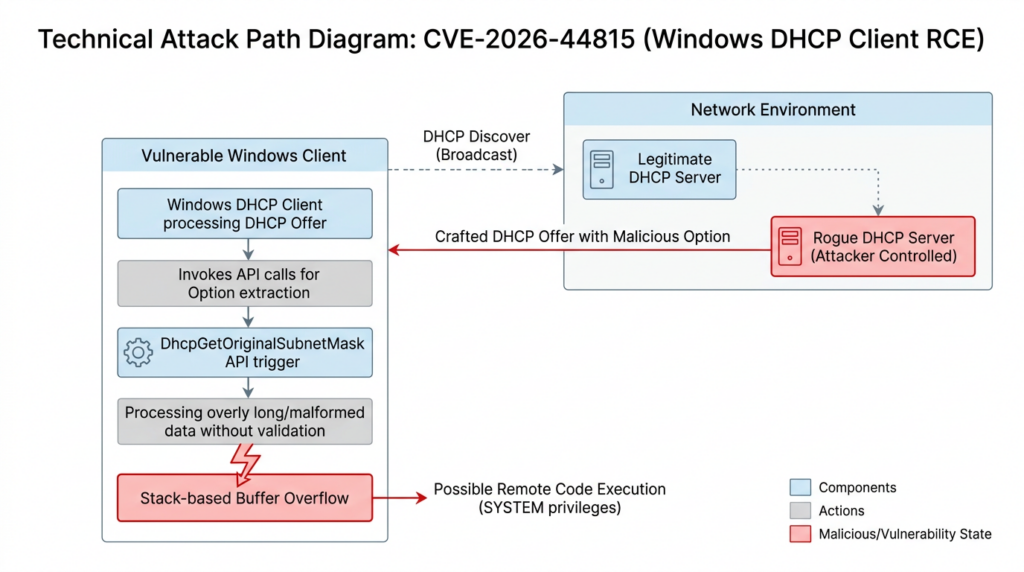
The public facts support a defensive model that looks like this:
| 스테이지 | Attacker objective | Defensive signal | Defensive control |
|---|---|---|---|
| 1. Network placement | Get a rogue DHCP server or malicious DHCP response path onto a segment used by Windows clients | Unknown MAC or IP sending DHCPOFFER or DHCPACK | DHCP snooping, NAC, switch port security, wireless client isolation |
| 2. Client solicitation | Wait for Windows clients to request DHCP configuration | DHCP Discover or Request from endpoints | Baseline DHCP traffic and server inventory |
| 3. Malicious response | Send crafted DHCP data to the client | Multiple offers for one transaction, unexpected Server Identifier, unusual option layout | Trusted DHCP server enforcement, DHCP relay controls |
| 4. Trigger condition | Reach code path associated with DhcpGetOriginalSubnetMask | Application inventory, API import or runtime telemetry | Patch, application review, endpoint detection |
| 5. Memory corruption | Cause stack-based buffer overflow in Windows DHCP Client | Crash, service restart, abnormal svchost.exe behavior | Patch, exploit mitigations, EDR, crash monitoring |
| 6. Worst-case outcome | Execute code with affected process context | Suspicious process behavior after DHCP lease activity | EDR containment, host isolation, incident response |
This is not an exploit recipe. It is a defender’s model for where to place controls and what evidence to collect. The most dangerous mistake is to treat the vulnerability as either “fully weaponized everywhere” or “not important because it requires local network access.” Local network access is not a small assumption in modern environments. Attackers get local network position through compromised laptops, malicious contractors, rogue access points, exposed switch ports, branch office footholds, lab devices, IoT compromises, and misconfigured virtual networks.
The second mistake is ignoring the API trigger condition. Public reporting specifically calls out DhcpGetOriginalSubnetMask. That suggests exposure may depend not only on the Windows build but also on local software behavior. In practice, that means security teams should patch first, then use application inventory and binary analysis to understand whether line-of-business tools, VPN clients, network management utilities, endpoint agents, or legacy applications call the relevant DHCP API. That should not become a reason to delay remediation. It should become a way to prioritize validation and hunt for higher-risk hosts.
Affected systems and practical prioritization
The NVD change record lists affected Windows versions with version thresholds. The affected range includes Windows 10, Windows 11, and multiple Windows Server releases, including Server Core variants. The list is long because the DHCP Client component exists broadly across Windows generations. (NVD)
A useful first pass is to divide systems by whether they are both technically affected and realistically exposed to untrusted DHCP traffic.
| Asset type | 중요한 이유 | 우선순위 |
|---|---|---|
| Corporate laptops on wired and Wi-Fi networks | They frequently join changing networks and use DHCP by default | 최고 |
| Developer workstations | Often connect to lab networks, test devices, VPNs, and virtual networks | 최고 |
| Branch office Windows clients | Local switching may be less tightly governed than headquarters | 최고 |
| Conference room and shared-space systems | Physical access and unmanaged ports are common weaknesses | 높음 |
| Windows servers using DHCP | Less common in mature environments, but high impact if present | 높음 |
| Domain controllers and identity servers | Usually static IP, but any DHCP use or adjacent rogue DHCP path should be investigated | 높음 |
| VDI and cloud Windows images | Risk depends on virtual network DHCP control and patch level | Medium to high |
| OT or lab Windows hosts | Often patch slowly and may sit on flat networks | High if DHCP is enabled |
| Isolated static-IP systems | Lower DHCP-triggered exposure, but still patch according to policy | Medium |
| Fully patched endpoints on managed VLANs with DHCP snooping | Reduced risk, but still monitor | Lower after validation |
There is no single universal priority order. A patched laptop on a well-controlled corporate VLAN is less concerning than an unpatched engineering workstation that frequently connects to unmanaged lab switches. A server using static IP on a locked-down segment is different from a Windows jump host that gets DHCP from a shared administrative network. A guest Wi-Fi endpoint is different from a domain controller. Good vulnerability management for CVE-2026-44815 should combine patch status, DHCP use, network segment trust, physical access, wireless exposure, and the presence of applications that may call the relevant API.
Safe verification without exploit code
Security teams do not need public exploit code to make progress. For CVE-2026-44815, the safest validation path is to answer five questions:
| 질문 | Evidence source |
|---|---|
| Is the host running an affected Windows version below the fixed threshold? | OS build, UBR, enterprise patch inventory |
| Does the host use DHCP on any active adapter? | Windows network adapter configuration |
| Which DHCP server is the host using? | Local adapter state, DHCP logs, packet capture |
| Could an unauthorized DHCP server answer on that segment? | Switch configuration, DHCP snooping status, passive monitoring |
| Are there applications likely to call the relevant DHCP API? | Software inventory, binary import scanning, EDR telemetry |
Check Windows build and update state
The affected-version list includes fixed build thresholds, but local checks must be treated as triage, not the only source of truth. Enterprise update platforms, Microsoft update compliance data, WSUS, Intune, EDR vulnerability modules, and Microsoft’s official security update metadata should remain authoritative.
A local PowerShell helper can still be useful for finding hosts that deserve closer review:
$cv = Get-ItemProperty 'HKLM:\SOFTWARE\Microsoft\Windows NT\CurrentVersion'

$product = $cv.ProductName
$displayVersion = $cv.DisplayVersion
$build = [int]$cv.CurrentBuildNumber
$ubr = [int]$cv.UBR

# Triage thresholds derived from public affected-version ranges.
# Always confirm with Microsoft update inventory for the exact product/SKU.
$threshold = $null

if ($product -like '*Server 2025*' -and $build -eq 26100) {
    $threshold = 32995
}
elseif ($build -eq 14393) { $threshold = 9234 }
elseif ($build -eq 17763) { $threshold = 8880 }
elseif ($build -eq 19044) { $threshold = 7417 }
elseif ($build -eq 19045) { $threshold = 7417 }
elseif ($build -eq 20348) { $threshold = 5256 }
elseif ($build -eq 22631) { $threshold = 7219 }
elseif ($build -eq 26100) { $threshold = 8655 }
elseif ($build -eq 26200) { $threshold = 8655 }
elseif ($build -eq 28000) { $threshold = 2269 }

[pscustomobject]@{
    ComputerName    = $env:COMPUTERNAME
    ProductName     = $product
    DisplayVersion  = $displayVersion
    Build           = $build
    UBR             = $ubr
    TriageThreshold = $threshold
    NeedsReview     = if ($threshold -eq $null) { 'Unknown product or build' }
                      elseif ($ubr -lt $threshold) { 'Yes, below public fixed threshold' }
                      else { 'No, appears at or above threshold' }
}
This script deliberately says “NeedsReview,” not “Vulnerable.” A Windows SKU can receive servicing updates in ways that require product-aware interpretation. The goal is to quickly flag machines for patch verification, not to replace Microsoft’s update logic.
For a quick view of installed updates, use standard local inventory:
Get-CimInstance Win32_QuickFixEngineering |
    Sort-Object InstalledOn -Descending |
    Select-Object -First 20 HotFixID, InstalledOn, Description, InstalledBy
In larger environments, query your endpoint management system rather than running ad hoc scripts host by host. The asset data should include OS version, build, update compliance, last check-in time, network segment, and owner. For CVE-2026-44815, network context is not optional metadata; it is part of exposure.
Find DHCP-enabled adapters
Many Windows hosts use DHCP by default. Servers should be checked rather than assumed static, especially in cloud, lab, test, and small-office environments.
Get-CimInstance Win32_NetworkAdapterConfiguration |
    Where-Object { $_.IPEnabled -eq $true } |
    Select-Object `
        Description,
        DHCPEnabled,
        DHCPServer,
        DHCPLeaseObtained,
        DHCPLeaseExpires,
        IPAddress,
        IPSubnet,
        DefaultIPGateway,
        DNSServerSearchOrder |
    Format-List
This output helps answer basic but important questions. Is the system using DHCP? Which server issued the lease? Did the lease change unexpectedly? Is the DHCP server in the expected subnet? Are DNS servers or gateways different from the baseline? If a host is unpatched and using DHCP on a network that lacks rogue DHCP protection, it should move up the remediation queue.
Inventory use of DhcpGetOriginalSubnetMask
Public reporting identifies DhcpGetOriginalSubnetMask as relevant to triggering the vulnerability. A complete runtime analysis may require EDR telemetry, ETW, application tracing, or vendor support. A simple static scan can still help defenders find binaries that import the function.
The following PowerShell example is a rough triage method. It searches selected directories for binaries containing the API name as a string. That can produce false positives and false negatives, but it can quickly identify software worth deeper review.
$needle = 'DhcpGetOriginalSubnetMask'
$roots = @(
    'C:\Program Files',
    'C:\Program Files (x86)',
    'C:\Windows\System32'
)

$results = foreach ($root in $roots) {
    Get-ChildItem $root -Recurse -File -Include *.exe,*.dll -ErrorAction SilentlyContinue |
        ForEach-Object {
            try {
                $bytes = [System.IO.File]::ReadAllBytes($_.FullName)
                $text = [System.Text.Encoding]::ASCII.GetString($bytes)
                if ($text -like "*$needle*") {
                    [pscustomobject]@{
                        Path = $_.FullName
                        Length = $_.Length
                        LastWriteTime = $_.LastWriteTime
                    }
                }
            }
            catch {
                # Ignore locked files and access-denied errors in triage mode.
            }
        }
}

$results | Sort-Object Path | Format-Table -AutoSize
For higher confidence, use import-table-aware tooling such as dumpbin, Dependencies, PE parsing tools, EDR software inventory, or a central binary analysis pipeline. The question is not only whether a binary contains a string. The real question is whether software on the host can call the relevant DHCP API in a way that reaches the vulnerable path before the patch is installed.
Capture DHCP traffic safely
Packet capture is useful because rogue DHCP is visible if you know what to look for. A normal client may send a DHCP Discover and receive one legitimate Offer. A suspicious network might show multiple Offers from different servers, unexpected Server Identifier values, unfamiliar MAC vendors, or lease parameters outside the expected range.
A simple tshark command can capture DHCP server responses:
sudo tshark -i eth0 -f "udp port 67 or udp port 68" \
  -Y "bootp.option.dhcp == 2 || bootp.option.dhcp == 5" \
  -T fields \
  -e frame.time \
  -e eth.src \
  -e ip.src \
  -e bootp.option.dhcp_server_id \
  -e bootp.option.subnet_mask \
  -e bootp.option.router \
  -e bootp.option.domain_name_server
Use this only on networks where you are authorized to capture traffic. Store captures carefully because DHCP packets can reveal internal addressing, DNS, gateway configuration, hostnames, and device behavior.
A Scapy-based DHCP discovery script can also help defenders identify active DHCP servers. Scapy’s own documentation includes a use case for identifying rogue DHCP servers on a LAN when an unauthorized server is suspected. (Scapy)
from scapy.all import Ether, IP, UDP, BOOTP, DHCP, srp, conf

conf.checkIPaddr = False

discover = (
    Ether(dst="ff:ff:ff:ff:ff:ff") /
    IP(src="0.0.0.0", dst="255.255.255.255") /
    UDP(sport=68, dport=67) /
    BOOTP(chaddr=b"\xaa\xbb\xcc\xdd\xee\xff") /
    DHCP(options=[
        ("message-type", "discover"),
        "end"
    ])
)

answers, _ = srp(discover, timeout=5, multi=True, verbose=False)

for _, response in answers:
    server_ip = response[IP].src if response.haslayer(IP) else "unknown"
    server_mac = response[Ether].src if response.haslayer(Ether) else "unknown"
    options = response[DHCP].options if response.haslayer(DHCP) else []
    print(f"DHCP offer from IP={server_ip} MAC={server_mac}")
    for option in options:
        if isinstance(option, tuple) and option[0] in ("server_id", "router", "subnet_mask", "name_server"):
            print(f"  {option[0]}: {option[1]}")
This script sends a DHCP Discover and prints the servers that answer. It is not an exploit and does not attempt to trigger CVE-2026-44815. Still, it can disrupt poorly designed networks if used carelessly or at scale, so run it only under authorization and preferably during a controlled validation window.
Detection signals that matter
CVE-2026-44815 detection should not begin with exploit signatures. Public exploit details are limited, and signature-only thinking is fragile. A better approach is to combine network-layer DHCP anomaly detection, endpoint crash telemetry, patch state, and asset context.
| 신호 | Data source | 중요한 이유 | Common false positives |
|---|---|---|---|
| Multiple DHCP Offers for one client request | Packet capture, Zeek, switch telemetry | May indicate rogue DHCP server or misconfigured relay | Redundant DHCP designs, migration windows |
| DHCPOFFER from unauthorized MAC or IP | DHCP monitoring, NAC, switch logs | Direct sign of unapproved DHCP source | New legitimate server not added to baseline |
| Server Identifier outside approved ranges | Packet capture, DHCP logs | DHCP option 54 should identify the selected server | Lab networks, test environments |
| Unexpected gateway or DNS in DHCP offer | DHCP option monitoring | Rogue DHCP often changes routing or DNS | Network readdressing, temporary failover |
| DHCP Client service crash or restart after lease activity | Windows Event Log, EDR | Could indicate malformed DHCP input reached vulnerable code | Driver issues, unstable endpoint software |
svchost.exe anomaly tied to DHCP Client service group | EDR process telemetry | Windows services run inside service host processes | Generic service crash noise |
| New local software using DHCP APIs | Software inventory, binary analysis | May satisfy the API-related trigger condition | Legitimate network management tools |
| Unpatched Windows host on unmanaged segment | Asset and patch inventory | High-risk combination | Stale asset data |
A SIEM detection should treat any single signal as context, not proof. For example, multiple DHCP offers may simply mean an engineer temporarily brought up a replacement DHCP server during maintenance. But multiple offers from an unknown MAC on a user VLAN, followed by Windows DHCP Client crashes on unpatched systems, should be escalated quickly.
A starter logic model might look like this:
DhcpNetworkEvents
| where EventType in ("DHCPOFFER", "DHCPACK")
| summarize
    OfferCount = count(),
    Servers = make_set(ServerIp),
    ServerMacs = make_set(ServerMac),
    Gateways = make_set(RouterOption),
    DnsServers = make_set(DnsOption)
  by ClientMac, TransactionId, bin(TimeGenerated, 2m), VlanId
| where OfferCount > 1 or array_length(Servers) > 1
| join kind=leftouter ApprovedDhcpServers on VlanId
| extend HasUnknownServer = set_difference(Servers, ApprovedServers)
| where array_length(HasUnknownServer) > 0
The exact schema will differ by SIEM, DHCP telemetry source, and network vendor. The detection principle is stable: identify DHCP server responses from places that should not be serving DHCP.
Endpoint-side logic should correlate patch state with service behavior:
title: Windows DHCP Client Instability After DHCP Lease Activity
status: experimental
description: Flags Windows DHCP Client crashes or restarts near DHCP lease activity on hosts that may require CVE-2026-44815 patch validation.
logsource:
  product: windows
detection:
  selection_service:
    Image|endswith: '\svchost.exe'
    ServiceName|contains: 'Dhcp'
  selection_crash:
    EventType:
      - 'ServiceCrash'
      - 'ApplicationError'
      - 'ServiceRestart'
  timeframe: 10m
condition: selection_service and selection_crash
fields:
  - ComputerName
  - Image
  - ServiceName
  - EventType
  - FaultingModule
  - TimeGenerated
falsepositives:
  - Network driver instability
  - VPN client behavior
  - Endpoint security agent conflicts
  - Routine service restarts during patching
level: medium
This is not a finished vendor-ready Sigma rule. It is a starting point for detection engineering. The higher-confidence alert comes from correlation: unpatched Windows host, DHCP-enabled adapter, unknown DHCP server on segment, unusual DHCP response, and DHCP Client instability.
Mitigation starts with patching, but it should not end there
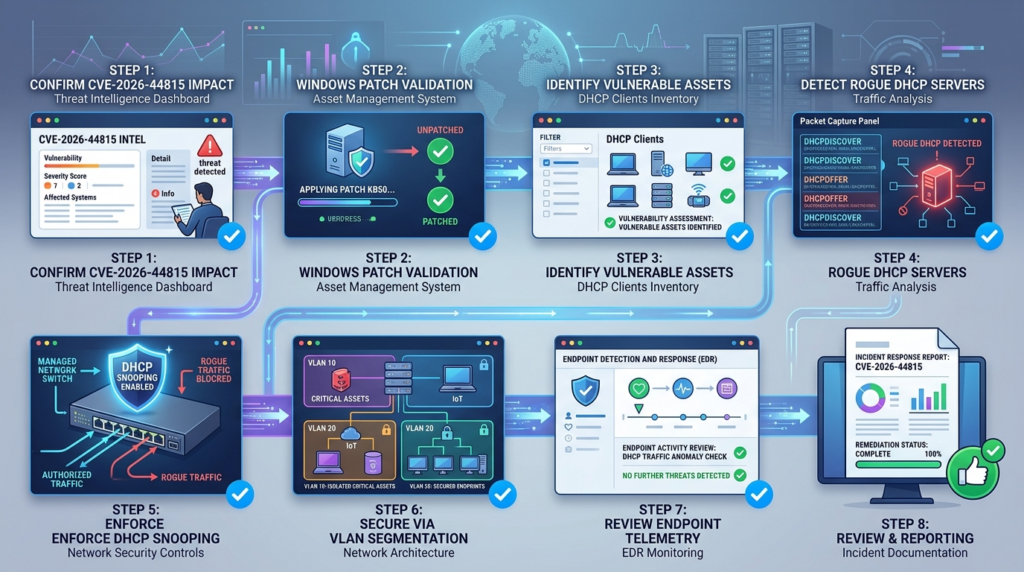
The primary fix for CVE-2026-44815 is to install the Microsoft security update for affected Windows versions. Network controls help reduce exposure and detect misuse, but they do not replace the vendor patch. The NVD record links the issue to Microsoft’s June 2026 security update process, and the affected-version ranges in the NVD change record identify the builds that require update validation. (NVD)
A practical remediation plan should include five parallel tracks.
Patch affected Windows systems
Start with endpoints and servers that meet any of these conditions:
| Condition | Why it increases urgency |
|---|---|
| DHCP enabled on active network adapters | The vulnerable component is reachable through DHCP processing |
| User or engineering VLAN | Higher chance of unmanaged devices and rogue DHCP |
| Wi-Fi networks with weak isolation | Attackers may get local adjacency more easily |
| Lab, test, or OT network | Patch lag and flat networks are common |
| Branch office network | Switch security may be inconsistent |
| Systems running network management, VPN, or legacy connectivity tools | Higher chance of DHCP API usage |
| Privileged admin workstations | High-value endpoint if compromised |
| Windows servers using DHCP | High operational impact if exploited |
Patch rollout should include reboot planning, failed-update tracking, and exception review. A “deployed” update is not the same as an installed update after reboot. For Windows cumulative updates, operational reporting should confirm install success, reboot completion, and updated build state.
Enforce authorized DHCP servers
DHCP snooping is one of the most important network-side controls for this class of issue. Cisco’s documentation describes DHCP snooping as a feature that builds a DHCP binding database and supports controls such as Dynamic ARP Inspection and IP Source Guard. The core configuration idea is to trust ports connected toward authorized DHCP servers and leave end-user ports untrusted. Cisco also documents commands such as enabling DHCP snooping, trusting server-facing interfaces, setting rate limits, and enabling DHCP snooping per VLAN. (Cisco)
A simplified Cisco-style example looks like this:
ip dhcp snooping
ip dhcp snooping vlan 10,20,30

interface TenGigabitEthernet1/0/48
 description Uplink toward authorized DHCP infrastructure
 ip dhcp snooping trust

interface range GigabitEthernet1/0/1-47
 description User access ports
 ip dhcp snooping limit rate 10
The exact syntax depends on the platform and vendor. The principle does not: authorized DHCP responses should come only from trusted network paths. User access ports should not be able to serve DHCP to other clients. Trunk ports, wireless controllers, hypervisor uplinks, lab switches, and branch-office gear must be included in the design. Many DHCP snooping deployments fail because they protect only the obvious access switches while leaving unmanaged segments, test networks, or wireless bridges outside the control boundary.
Segment networks where rogue DHCP would be damaging
Segmentation reduces the blast radius of local network attacks. For CVE-2026-44815, segmentation is useful because it limits where a rogue DHCP server can interact with vulnerable Windows clients. A malicious device plugged into a conference room port should not be able to influence DHCP traffic for admin workstations. A compromised IoT device should not share a flat segment with Windows engineering laptops. A lab router should not accidentally serve DHCP to production hosts.
Segmentation should be paired with monitoring. A VLAN with no DHCP snooping and no DHCP response monitoring may look segmented on a diagram but still permit rogue server behavior inside the segment. For high-risk networks, log DHCP server responses, maintain an approved DHCP server list, and alert when a new server appears.
Audit applications that may use the relevant API
그리고 DhcpGetOriginalSubnetMask trigger condition should guide deeper validation. Look for software that manages network configuration, monitors adapters, interacts with VPN or virtual network interfaces, performs inventory, or reads DHCP lease details. Examples may include endpoint management agents, legacy network utilities, VPN clients, hardware vendor tools, monitoring agents, and internally developed support tools.
The goal is not to accuse those applications of being vulnerable. The goal is to identify where vulnerable Windows builds plus relevant API usage plus untrusted DHCP exposure may combine into a higher-risk host. If a critical unpatched system runs a tool that calls the API and sits on an unmanaged network, it deserves immediate attention.
Prepare incident response for rogue DHCP
If a rogue DHCP server is detected, treat it as a network security incident, not a harmless misconfiguration, until proven otherwise. Response should include:
| Response step | 목적 |
|---|---|
| Identify the DHCP server MAC, switch port, SSID, VLAN, and physical location | Find and contain the source |
| Preserve packet captures and switch logs | Keep evidence for root cause and timeline |
| Compare DHCP options with baseline | Determine whether gateway, DNS, or routes were manipulated |
| Identify clients that accepted leases | Scope potentially affected endpoints |
| Check patch state of affected Windows hosts | Prioritize CVE-2026-44815 exposure review |
| Review endpoint crashes and EDR events | Look for signs of malformed input or follow-on behavior |
| Remove unauthorized server and clear bad leases where needed | Restore safe network configuration |
| Verify DHCP snooping and access controls | Prevent recurrence |
Rogue DHCP often gets dismissed as “someone plugged in a router.” Sometimes that is true. Sometimes it is a foothold for traffic interception, DNS manipulation, credential capture, or vulnerability exploitation. CVE-2026-44815 raises the stakes because malformed DHCP data may affect the client itself, not just its network configuration.
What not to do
Do not wait for public exploit code. Public exploit availability is a poor threshold for patching a Critical Windows networking bug. Once a reliable exploit exists, defenders lose the advantage of quiet remediation.
Do not test production networks with untrusted PoC code. DHCP is foundational. Breaking DHCP can disrupt entire floors, labs, branch offices, and wireless networks. A malicious or poorly written PoC can cause outages even if it does not exploit the vulnerability.
Do not assume server assets are irrelevant. Many Windows servers use static IP addresses, but not all do. Cloud images, test servers, jump hosts, developer-managed servers, and small-office systems may still use DHCP.
Do not rely on the endpoint firewall as the only protection. DHCP client traffic is part of basic network configuration, and the vulnerable processing path is not the same as a typical inbound application port. Network access control, switch security, and patching matter more.
Do not treat “not exploited in the wild” as “low priority.” Public sources did not confirm exploitation at the time of the cited Patch Tuesday coverage, but CISA-ADP still marked the issue automatable with total technical impact. (NVD)
Do not let exception lists grow silently. If a business unit cannot patch immediately, document why, reduce local network exposure, monitor DHCP anomalies, set an expiration date, and retest.
Related DHCP vulnerabilities that help explain the risk
CVE-2026-44815 is not the first Windows DHCP memory corruption issue defenders have had to understand. Historical DHCP-related CVEs show why protocol parsers and network configuration paths deserve serious treatment.
CVE-2019-0547 was a Windows DHCP client memory corruption vulnerability where an attacker could send specially crafted DHCP responses to a client. The NVD description states that successful exploitation could allow arbitrary code execution on the client machine. The relevant lesson is that DHCP client parsing has been a credible remote code execution surface before, and defensive models should include malicious DHCP responses, not only malicious servers exposed to the internet. (NVD)
CVE-2019-0736 was another Windows DHCP client memory corruption vulnerability involving specially crafted DHCP responses. NVD’s description states that successful exploitation could allow arbitrary code execution on the client, and that the update corrected how Windows DHCP clients handle certain responses. It shares the same broad pattern: client-side DHCP response handling can become a remote code execution path when memory safety fails. (NVD)
CVE-2019-0726, analyzed by Trend Micro’s Zero Day Initiative, involved a DHCP client bug tied to the Domain Search option. ZDI’s analysis described a zero-length heap buffer condition and out-of-bounds writes caused by malicious option content. The details differ from CVE-2026-44815, but the engineering lesson is close: DHCP options are attacker-controlled input when the server is malicious, and option parsing must be treated as an exposed parser. (제로 데이 이니셔티브)
There are also DHCP server-side vulnerabilities, such as CVE-2019-0725 in Windows DHCP Server. That class is different. A DHCP server vulnerability is triggered by malicious client input against a server role. A DHCP client vulnerability is triggered by malicious server or response input against endpoints. Both are DHCP-related, but the defensive posture is different. Server-side issues emphasize hardened DHCP infrastructure and server patching. Client-side issues emphasize endpoint patching, rogue DHCP prevention, and local network trust boundaries. (www.trendmicro.com)
This distinction matters for CVE-2026-44815. A team that searches only for exposed DHCP servers may miss the point. The vulnerable component is the Windows DHCP Client. The relevant question is not merely “Do we run DHCP servers?” It is “Which Windows systems process DHCP responses, and can untrusted systems influence those responses?”
Building a repeatable validation workflow
A strong CVE-2026-44815 workflow should produce evidence, not just a spreadsheet status. The minimum evidence package should include:
| 증거 | 중요한 이유 |
|---|---|
| Affected Windows asset list | Defines scope |
| Installed update state and reboot status | Confirms patch success |
| DHCP-enabled adapter inventory | Identifies reachable client-side exposure |
| Approved DHCP server inventory by VLAN | Supports rogue DHCP detection |
| DHCP snooping or equivalent control status | Shows network-side mitigation |
| API usage review for high-risk hosts | Addresses the public trigger condition |
| DHCP anomaly detections and recent alerts | Checks for suspicious activity |
| Exception list with expiration dates | Prevents permanent risk acceptance |
| Retest results after patching and control changes | Confirms remediation worked |
For teams that convert CVE advisories into authorized validation work, Penligent describes agentic penetration testing workflows for scoped testing, finding verification, and evidence-backed reporting on its main site. (펜리전트) In the same operational spirit, its discussion of moving from N-days to faster validation emphasizes proving whether exposed systems can create real impact and whether fixes actually work, rather than stopping at advisory tracking. (펜리전트) For CVE-2026-44815, that kind of workflow should remain tightly scoped: inventory, patch verification, rogue DHCP control checks, safe telemetry review, and reportable evidence, not live exploitation on production networks.
A repeatable workflow also helps separate urgent risk from noise. A vulnerability scanner may flag a Windows build. A network tool may detect two DHCP offers. An endpoint tool may report a service crash. Each signal is useful, but none is complete alone. The defender’s job is to connect them: unpatched host, DHCP-enabled adapter, network segment without DHCP snooping, unexpected DHCP server, relevant API usage, and suspicious endpoint behavior. That correlation is far more valuable than a raw CVE count.
A practical remediation checklist
Use the following checklist to drive action across endpoint, network, and detection teams.
Endpoint and patch management
- Confirm which Windows versions in your environment fall below the fixed build thresholds for CVE-2026-44815.
- Prioritize DHCP-enabled Windows clients on user, engineering, lab, wireless, and branch office networks.
- Include Windows servers in the query instead of assuming static IP means no exposure.
- Confirm update installation and reboot completion.
- Track failed installations separately from pending installations.
- Set expiration dates for any patch exceptions.
- For critical exceptions, reduce exposure through VLAN controls and rogue DHCP monitoring.
Network engineering
- Build or refresh the approved DHCP server inventory by VLAN and site.
- Validate DHCP snooping or equivalent controls on access switches.
- Confirm trusted ports are limited to uplinks or authorized DHCP infrastructure.
- Check wireless networks, guest networks, conference rooms, branch offices, labs, and unmanaged switches.
- Monitor for DHCP Offers and ACKs from unauthorized sources.
- Review DHCP relay configuration and relay paths.
- Investigate any unexpected DHCP server immediately.
Detection engineering
- Create detections for multiple DHCP offers to one transaction.
- Alert on DHCP Server Identifier values outside approved baselines.
- Correlate DHCP anomalies with Windows endpoint patch state.
- Watch for DHCP Client service instability on unpatched hosts.
- Review EDR telemetry for abnormal
svchost.exebehavior near DHCP lease activity. - Add DHCP anomaly dashboards for high-risk VLANs.
- Preserve packet captures during suspected rogue DHCP incidents.
Application and endpoint software review
- Identify binaries that import or reference
DhcpGetOriginalSubnetMask. - Prioritize review on unpatched hosts and high-risk network segments.
- Pay special attention to VPN clients, network utilities, endpoint management tools, inventory agents, and legacy software.
- Ask vendors whether their software calls the relevant DHCP API if internal analysis is inconclusive.
- Use runtime telemetry where available to confirm actual usage rather than relying only on static strings.
Incident response
- Treat rogue DHCP as a potential security incident.
- Identify the switch port, AP, SSID, VLAN, MAC address, and physical device.
- Determine which clients accepted leases from the unauthorized server.
- Check whether those clients were patched for CVE-2026-44815.
- Review DHCP options for gateway, DNS, route, and domain manipulation.
- Preserve DHCP packets, switch logs, NAC logs, and endpoint telemetry.
- Remove the rogue device and validate that controls prevent recurrence.
Example host triage workflow
A single Windows host triage can be performed without exploit code:
- Confirm OS build and cumulative update status.
- Check whether active adapters use DHCP.
- Record the DHCP server, lease times, gateway, DNS, and subnet mask.
- Compare the DHCP server with the approved server list for that VLAN.
- Check whether the host has software that references
DhcpGetOriginalSubnetMask. - Review Windows logs and EDR telemetry for DHCP Client crashes or unusual service behavior.
- If unpatched, patch and reboot.
- After patching, recheck build state and DHCP configuration.
- If an unknown DHCP server was observed, escalate to network incident response.
A concise PowerShell collection snippet can gather basic host context:
$os = Get-ItemProperty 'HKLM:\SOFTWARE\Microsoft\Windows NT\CurrentVersion'

$adapters = Get-CimInstance Win32_NetworkAdapterConfiguration |
    Where-Object { $_.IPEnabled -eq $true } |
    Select-Object Description, DHCPEnabled, DHCPServer, DHCPLeaseObtained,
                  DHCPLeaseExpires, IPAddress, IPSubnet, DefaultIPGateway,
                  DNSServerSearchOrder

$hotfixes = Get-CimInstance Win32_QuickFixEngineering |
    Sort-Object InstalledOn -Descending |
    Select-Object -First 10 HotFixID, InstalledOn, Description

[pscustomobject]@{
    ComputerName   = $env:COMPUTERNAME
    ProductName    = $os.ProductName
    DisplayVersion = $os.DisplayVersion
    Build          = $os.CurrentBuildNumber
    UBR            = $os.UBR
    Adapters       = $adapters
    RecentHotfixes = $hotfixes
} | ConvertTo-Json -Depth 5
In an enterprise, send this type of data to a central inventory system rather than storing scattered JSON files on analyst laptops. Vulnerability response becomes much easier when patch data, network segment, DHCP server, and endpoint ownership are already connected.
Example network validation workflow
For a site or VLAN, the network validation workflow should answer a different set of questions:
- Which DHCP servers are authorized for this VLAN?
- Which switch ports or uplinks are trusted for DHCP server responses?
- Are user access ports untrusted?
- Is DHCP snooping enabled for the VLAN?
- Are wireless clients isolated where appropriate?
- Are DHCP relay agents configured correctly?
- Are DHCP Offers logged or observable?
- Has any unauthorized server appeared in the last 30 days?
- Are unpatched Windows clients present on the VLAN?
A practical DHCP anomaly review might use packet capture during a controlled window:
sudo tcpdump -i eth0 -nn -vvv 'udp port 67 or udp port 68'
During analysis, focus on:
| DHCP field or behavior | What to verify |
|---|---|
| Source MAC | Should match approved DHCP infrastructure or relay path |
| Source IP | Should match approved DHCP server or relay |
| Server Identifier option | Should match the expected DHCP server |
| Router option | Should not redirect clients to unexpected gateways |
| DNS option | Should not point to unknown resolvers |
| Lease time | Should match policy or known exceptions |
| Multiple offers | Should be expected only in approved redundant designs |
| Option length anomalies | Should be investigated if unusual or malformed |
This is basic network hygiene, but CVE-2026-44815 makes it more urgent. Rogue DHCP is not only a configuration integrity problem. It can become a vulnerability delivery path when a client parser has a memory corruption flaw.
Handling uncertainty responsibly
Every serious CVE response has unknowns. For CVE-2026-44815, the key unknowns include exploit reliability, exact internal parsing behavior, whether any private exploit exists, and how often real-world applications call DhcpGetOriginalSubnetMask in vulnerable contexts. Those unknowns should shape communication.
A good internal advisory should say:
| Bad wording | Better wording |
|---|---|
| “This is being actively exploited everywhere.” | “Public sources cited here do not confirm active exploitation, but the vulnerability is Critical and should be patched urgently.” |
| “Any DHCP packet gets RCE.” | “Public reporting points to rogue DHCP response handling and a trigger condition involving DhcpGetOriginalSubnetMask." |
| “Only servers are affected.” | “The affected component is Windows DHCP Client, so client endpoints are central to exposure.” |
| “Local network means low risk.” | “Local network placement is a realistic attacker path in shared, wireless, branch, lab, and compromised internal environments.” |
| “We can ignore this because we have firewalls.” | “Endpoint patching and DHCP trust controls matter because DHCP is part of network configuration, not a normal inbound application service.” |
Clear language prevents both panic and complacency. Security teams need enough urgency to act, but enough precision to avoid wasting time on false assumptions.
자주 묻는 질문
What is CVE-2026-44815?
- CVE-2026-44815 is a Critical remote code execution vulnerability in the Windows DHCP Client.
- The public NVD record describes it as a stack-based buffer overflow that can allow an unauthorized attacker to execute code over a network.
- Microsoft’s CNA score is CVSS 3.1 9.8, with network attack vector, low attack complexity, no privileges required, and no user interaction required.
- The practical risk centers on malicious DHCP response handling, especially in networks where a rogue DHCP server can answer Windows clients.
Is CVE-2026-44815 being exploited in the wild?
- The cited public Patch Tuesday coverage did not confirm active exploitation in the wild at the time of publication.
- CISA-ADP enrichment in the NVD change record marked exploitation as “none.”
- Lack of confirmed exploitation does not make the issue low priority.
- The severity, DHCP client reachability, rogue DHCP scenario, and total technical impact justify fast patching and network control validation.
Does the vulnerability require authentication?
- Microsoft’s CVSS vector in the NVD record indicates no privileges required.
- ZDI noted a wording discrepancy in public descriptions and advised defenders to treat the issue according to the CVSS vector, meaning remote, unauthenticated code execution with no user interaction.
- In operations, the safer assumption is to prioritize it as an unauthenticated network-triggered client vulnerability.
- The attacker still needs a path to influence DHCP traffic, commonly modeled as rogue DHCP access on a relevant network segment.
Which Windows systems should be checked first?
- Check Windows clients and servers that are below the fixed build thresholds listed in the public affected-version data.
- Prioritize DHCP-enabled systems on user VLANs, Wi-Fi, branch offices, engineering networks, labs, shared workspaces, and unmanaged segments.
- Include Windows servers in scope if they use DHCP or sit on networks where DHCP traffic can be influenced.
- Give special attention to privileged workstations, jump hosts, developer machines, and systems running network management or VPN software.
Can a firewall block CVE-2026-44815?
- A normal perimeter firewall is not enough because DHCP is local network configuration traffic.
- Endpoint firewalls may not provide a reliable standalone mitigation for vulnerable DHCP client processing.
- The stronger controls are vendor patching, DHCP snooping, trusted DHCP server enforcement, VLAN segmentation, NAC, and rogue DHCP monitoring.
- Firewalls can still help reduce lateral movement after compromise, but they should not be treated as the primary fix.
How can defenders test safely without exploit code?
- Verify OS build and patch status against Microsoft’s fixed-version thresholds.
- Inventory DHCP-enabled adapters and identify the DHCP server each host uses.
- Monitor for unauthorized DHCP Offers and ACKs on each VLAN.
- Audit high-risk hosts for software that references
DhcpGetOriginalSubnetMask. - Correlate DHCP anomalies with Windows DHCP Client crashes or suspicious endpoint telemetry.
- Avoid running untrusted PoC code on production networks.
Why does DhcpGetOriginalSubnetMask matter?
- Public reporting states that exploitation is contingent on the target calling
DhcpGetOriginalSubnetMask. - That means risk may depend on both Windows patch state and local application behavior.
- Defenders should look for network tools, VPN clients, endpoint agents, inventory software, or legacy applications that may call DHCP APIs.
- The API condition should guide prioritization and validation, not delay patching.
What should be done after patching?
- Confirm the update installed successfully and the system rebooted.
- Recheck build and UBR values through enterprise inventory.
- Validate that DHCP snooping or equivalent protections are enabled on relevant VLANs.
- Review DHCP logs or packet captures for unauthorized servers.
- Close or renew patch exceptions with clear expiration dates.
- Preserve evidence in a remediation record so future audits can show both patching and control validation.
Closing judgment
CVE-2026-44815 should be handled as a high-priority Windows client vulnerability with a local network attack path. The strongest response is not complicated: patch affected systems, find DHCP-enabled Windows assets, enforce authorized DHCP servers, watch for rogue DHCP behavior, audit the API-related trigger condition where it matters, and retest until the evidence shows the risk has been reduced.
The vulnerability is serious because it sits at the intersection of memory safety, automatic network configuration, and local trust assumptions. Defenders do not need to overstate the facts to justify action. The public record already supports urgency: a Critical Windows DHCP Client stack overflow, a rogue DHCP scenario, broad Windows version coverage, and a component that many endpoints use by default.

 Korean
  English
  German
  French
  Spanish
  Portuguese
  Japanese
  Hindi
Hindi  Arabic
  Turkish
  Hebrew