
The most dangerous part of a credential-stealing package is not always the credential theft. In the TanStack npm compromise, the more disturbing lesson came from a reported dead man’s switch: malicious logic that could monitor a stolen GitHub token and punish the victim’s recovery step if that token was revoked too soon.
That changes the incident response problem. For years, the standard advice after a suspected token leak has been simple: revoke the token, rotate credentials, rebuild from a clean state. That advice is still correct in many incidents. But dead man’s switch malware introduces a hostile feedback loop. The attacker no longer treats token revocation only as containment. The malware can treat revocation as a signal.
The TanStack incident gives defenders a useful case study because the public record separates two important layers. TanStack’s own postmortem confirms the supply-chain attack path: on 2026-05-11 between 19:20 and 19:26 UTC, an attacker published 84 malicious versions across 42 @tanstack/* npm packages by chaining a pull_request_target Pwn Request pattern, GitHub Actions cache poisoning, and runtime extraction of an OIDC token from the GitHub Actions runner process. TanStack also states that no npm tokens were stolen and that the normal npm publish workflow itself was not compromised in the traditional sense. (tanstack.com)
The dead man’s switch details come mainly from third-party malware analysis. Snyk reported that the payload installed a gh-token-monitor service on Linux and macOS, polling api.github.com/user with a stolen GitHub token every 60 seconds and triggering destructive home-directory behavior if the token returned an HTTP 40x response. Mend reported the same broad pattern, including systemd or LaunchAgent persistence and a recommendation to check for and disable the switch before revoking tokens. (Snyk)
That distinction matters. The official incident record establishes the trusted publishing and package compromise. The reported dead man’s switch behavior explains why the response sequence needs to change. Together, they show where supply-chain malware is headed: not just toward stealing secrets, but toward manipulating the defender’s next move.
What a Dead Man’s Switch Means in Malware
A dead man’s switch is a conditional trigger designed to fire when a certain expected signal disappears. In physical security, the phrase often describes a mechanism that activates if an operator becomes incapacitated. In malware, the same pattern can be inverted: if the attacker’s access stops working, if a token is revoked, if a heartbeat fails, or if a monitoring condition changes, the implant executes a fallback action.
That fallback action can vary. It might delete files, encrypt data, destroy local evidence, leak stolen material, disable tools, or attempt re-propagation. The important point is not the exact action. The important point is the relationship between the trigger and the defender’s recovery step. Dead man’s switch malware is designed so that a normal cleanup action can become part of the attack surface.
A useful way to think about it is to separate four components:
| 구성 요소 | What it does | Defensive question |
|---|---|---|
| 지속성 | Keeps the monitor running after the initial install | Does anything survive package removal, shell restart, editor close, or reboot? |
| State check | Watches a token, process, file, network route, or remote endpoint | What condition is the malware using to decide whether the attacker still has access? |
| Trigger logic | Converts a state change into an action | What event could make the malware switch from quiet monitoring to destructive behavior? |
| Fallback action | Executes deletion, exfiltration, encryption, or further propagation | What damage happens if the trigger fires before containment is complete? |
Dead man’s switch malware should not be confused with a kill switch. A kill switch usually stops malware or lets someone disable it under certain conditions. A dead man’s switch does the opposite: it may activate when the attacker loses control, when a stolen token stops working, or when the victim starts cleaning up. A logic bomb may trigger at a time or date. Ransomware detonation may trigger when the operator starts encryption. A dead man’s switch is more about loss of access, loss of signal, or failed authentication.
| 메커니즘 | Typical trigger | Common attacker goal | Defensive trap |
|---|---|---|---|
| Kill switch | Specific domain, file, mutex, or remote command | Stop or disable malware under certain conditions | Assuming all conditional logic is destructive |
| Logic bomb | Time, user action, environment check, or hidden condition | Delay impact until a chosen moment | Missing dormant code because nothing happens during sandboxing |
| Ransomware detonator | Operator command or automated staging condition | Encrypt or destroy data after preparation | Detecting encryption too late instead of staging behavior |
| Dead man’s switch | Revoked token, missing heartbeat, failed auth, unreachable C2 | Punish cleanup, preserve leverage, or erase local assets | Rotating credentials before disabling local persistence |
In developer ecosystems, this pattern is especially damaging because developer machines are credential-rich. A single laptop can hold GitHub personal access tokens, npm automation tokens, SSH keys, cloud CLI sessions, Kubernetes contexts, Terraform state access, Vault tokens, and editor-integrated AI agent permissions. A CI runner can hold even more concentrated access for a short window. If malicious code can run during dependency installation, it may not need a browser exploit, kernel exploit, or phishing session. It only needs the build system to do what build systems already do: fetch and run code.
Why the TanStack Incident Was Not a Normal Bad Package
Many npm compromises follow a familiar pattern. An attacker compromises a maintainer account, publishes a malicious version, waits for downstream installs, steals secrets, and uses those secrets to pivot. The TanStack incident was more subtle because the malicious versions were published through a legitimate release path.
TanStack’s postmortem describes a sequence that began before the malicious packages appeared on npm. The attacker created a fork, opened PR #7378 against TanStack/router, and triggered pull_request_target workflows. A malicious commit was force-pushed into the PR head, and a workflow checked out the PR merge ref and ran build-related commands. A poisoned pnpm store cache was then saved under a key that the release workflow would later restore from the base repository context. (tanstack.com)
When a legitimate push later triggered TanStack’s release workflow, the poisoned cache was restored. The malicious code then used the workflow’s id-token: write capability to mint an OIDC token and publish directly to the npm registry. TanStack’s postmortem states that the malicious publishes arrived during failed workflow runs, and that the normal “Publish Packages” step was skipped because tests failed. (tanstack.com)
That is the core security lesson: the attacker did not need a traditional npm token if they could cause the trusted pipeline to issue the right short-lived identity at the wrong time. npm’s trusted publishing is designed to reduce the risk of long-lived tokens by using OIDC, and npm’s documentation still recommends trusted publishing over tokens where available. But trusted publishing assumes the authorized workflow identity is not being hijacked by malicious code inside the workflow execution path. npm’s own documentation says trusted publishers use short-lived, scoped credentials generated on demand during CI/CD workflows, and it recommends restricting traditional token-based publishing access after trusted publishing is configured. (docs.npmjs.com)
Trusted publishing is still a major improvement over long-lived publish tokens. The TanStack incident does not prove the opposite. It proves a narrower and more important point: short-lived identity reduces one class of credential theft, but it does not make a compromised workflow safe. If untrusted code can run in the release trust boundary, the pipeline itself becomes the attacker’s publishing tool.
The Pwn Request Pattern Was Already Known
The first link in the attack chain was not a mysterious zero-day. GitHub Security Lab has warned for years about dangerous misuse of pull_request_target. The risky pattern is simple: a workflow runs in the privileged context of the target repository, but explicitly checks out and executes code from an untrusted pull request. GitHub Security Lab’s guidance says combining pull_request_target with explicit checkout of untrusted PR code is dangerous and may let malicious PR authors steal repository secrets or obtain write permissions. (GitHub Security Lab)
The danger is not limited to an obvious npm build. Package installation can itself execute code. GitHub Security Lab specifically notes that npm packages can have custom preinstall 그리고 postinstall scripts, meaning npm install can trigger malicious code before the build even begins. (GitHub Security Lab)
That maps closely to the broader lesson from TanStack. A workflow author may think, “This job only checks bundle size,” or “This job only runs benchmarks,” or “This job has read-only permissions.” But if the workflow runs attacker-controlled code inside the base repository’s cache scope, with runner internals, tokens, or future release workflows reachable through shared state, then the practical boundary is not read-only. The attacker may not need to read a secret directly. They may only need to write something that a later trusted job will execute.
The GitHub Security Lab recommendation is to use pull_request for untrusted code and, when privileged follow-up is needed, pass passive artifacts to a separate workflow_run job. The privileged job should not execute PR-controlled code. It can comment, label, publish results, or update state based on artifacts that have been treated as data, not as code. (GitHub Security Lab)
That principle is easy to state and hard to maintain in real repositories. Build caches, package-manager stores, monorepo tooling, generated files, and reusable setup actions create hidden execution paths. A benchmark job can write a cache. A setup action can restore a cache. A release job can trust the cache because the key matches. The attacker’s job is to find where teams accidentally treat executable state as passive state.
npm Install Is an Execution Boundary
The phrase “install a package” sounds passive. In npm ecosystems, it is not passive enough to be treated as safe. Package installation can run lifecycle scripts, resolve Git URL dependencies, execute prepare, and pull code from places that are not obvious from a quick package.json review.
The GitHub Advisory for CVE-2026-45321 describes one of the TanStack package mechanisms: @tanstack/setup was not a real npm package. Instead, the specifier resolved to an orphan commit pushed to a fork in the tanstack/router GitHub fork network. GitHub served the commit across the fork network, so the attacker did not need write access to the real TanStack router repository to make that Git dependency resolvable. (GitHub)
TanStack’s postmortem says that when a developer or CI environment installed an affected version, npm resolved the malicious optional dependency, fetched the orphan payload commit, ran its prepare lifecycle script, and executed a roughly 2.3 MB obfuscated router_init.js payload. TanStack’s official guidance is blunt: anyone who installed an affected version on 2026-05-11 should treat the install host as potentially compromised. (tanstack.com)
That is the right mental model for malicious package response. Do not ask only whether the application imported the package at runtime. Ask whether the package was installed. Ask whether install scripts executed. Ask whether the install ran on a laptop, a CI runner, a release machine, a devcontainer, or a build image. Ask what credentials were reachable from that environment at install time.
The difference matters. A vulnerable runtime dependency may require application traffic to trigger. A malicious install-time dependency may execute before the application ever starts. In a CI job, that can happen while secrets, publish rights, cloud credentials, and repository tokens are loaded into the environment.
A defensive inspection should therefore start with lockfiles, installed package trees, package tarballs, and persistence artifacts. For example:
# Search common JavaScript lockfiles for TanStack packages.
grep -RInE '@tanstack/' \
  package-lock.json npm-shrinkwrap.json yarn.lock pnpm-lock.yaml 2>/dev/null

# Show installed TanStack packages in the current project.
npm ls --all 2>/dev/null | grep '@tanstack/' || true

# Look for the reported malicious payload filename in installed dependencies.
find node_modules -name 'router_init.js' -type f 2>/dev/null

# Look for suspicious optional dependency markers described in public advisories.
grep -RInE '@tanstack/setup|79ac49eedf|voicproducoes' \
  node_modules package-lock.json pnpm-lock.yaml yarn.lock 2>/dev/null
Those commands do not prove a machine is clean. They are triage commands. A serious investigation should preserve disk evidence, inspect shell history carefully, review CI logs, check outbound network records, and compare package versions against the official advisory. But quick triage still has value because dead man’s switch malware rewards speed and order. The first goal is not to prove perfect cleanliness. The first goal is to avoid triggering damage while you determine whether persistence exists.
The Reported Dead Man’s Switch Pattern
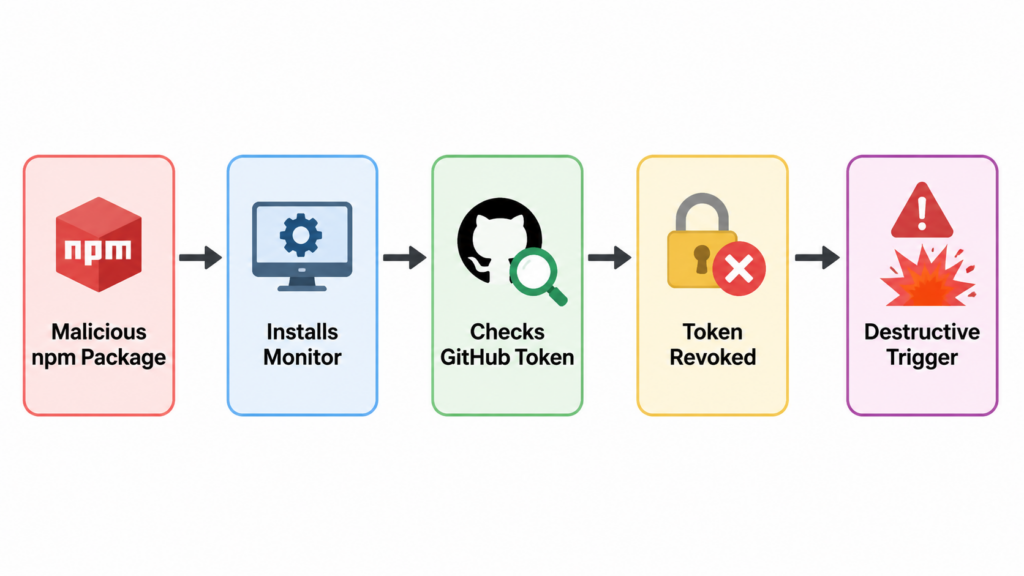
The reported gh-token-monitor behavior is technically simple and operationally nasty. The malware does not need to exploit GitHub. It only needs to use a stolen GitHub token as a heartbeat. If the token works, the malware knows the victim has not fully contained the incident. If the token stops working, the malware can infer that cleanup has started.
A safe conceptual model looks like this:
load stolen_token
install persistence as user-level service
repeat every 60 seconds:
    status = call_github_api_with(stolen_token)

    if status means token_is_still_valid:
        continue monitoring

    if status means token_was_revoked_or_blocked:
        destructive_action_placeholder()
        stop or clean up local traces
The real payload should not be copied or reused. The point of the pseudocode is to show the shape of the mechanism. The switch has three practical properties defenders must care about.
First, it runs outside the original package install. Removing the package or deleting node_modules may not remove a user service, LaunchAgent, editor hook, shell profile change, or injected workflow file. Snyk’s analysis lists system-level dead man’s switch artifacts including ~/.local/bin/gh-token-monitor.sh, ~/.config/systemd/user/gh-token-monitor.service및 ~/Library/LaunchAgents/com.user.gh-token-monitor.plist. (Snyk)
Second, the trigger can be a normal security action. In the reported behavior, the monitor polls api.github.com/user with the stolen token and reacts to HTTP 40x responses. That means revocation, expiration, permission removal, or account-level security controls could become observable to the malware before local persistence has been disabled. Snyk and Mend both advise checking for and disabling the monitor before revoking tokens. (Snyk)
Third, the switch attacks confidence. A security team may do the right thing in the wrong order and then misinterpret the result. If a developer’s home directory disappears after token revocation, the team may focus on data loss while missing the wider blast radius: stolen cloud keys, package publish rights, injected workflows, poisoned caches, and additional packages published by the worm.
The operational lesson is not “never revoke tokens.” That would be absurd. The lesson is “do not revoke from a potentially infected host before you understand whether local destructive persistence is active.” Credential rotation remains necessary. It just has to happen from a clean environment and after local triggers are contained.
Why Token Revocation Can Become the Trigger
Most incident response playbooks are optimized for credential theft without hostile local feedback. In that model, a token is an open door. Closing the door is the urgent first step. In dead man’s switch malware, the door may be wired to an alarm.
A normal credential-stealer response might look like this:
| 단계 | Ordinary credential stealer | Why it works |
|---|---|---|
| 1 | Revoke exposed tokens | Prevents continued remote access |
| 2 | Rotate related credentials | Reduces reuse and pivot risk |
| 3 | Rebuild affected hosts | Removes malware and persistence |
| 4 | Audit logs and repositories | Finds unauthorized actions |
| 5 | Improve controls | Prevents recurrence |
For dead man’s switch malware, the order changes:
| 단계 | Dead man’s switch malware | Why the order changes |
|---|---|---|
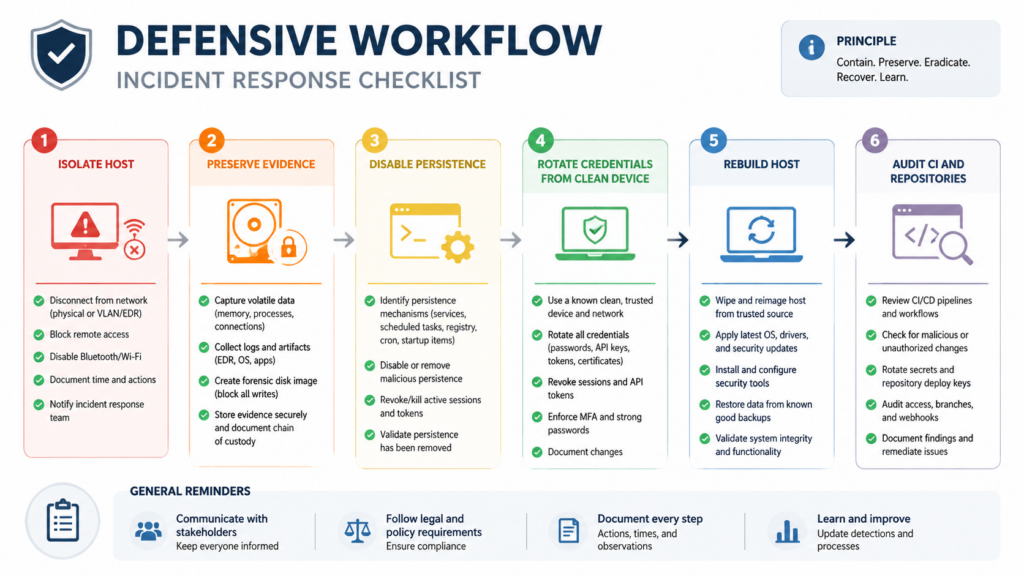
| 1 | Isolate the host from the network if possible | Prevents further exfiltration and remote interaction |
| 2 | Preserve evidence or snapshot the machine | Avoids destroying the only record of persistence and payload behavior |
| 3 | Check for local monitors and persistence | Finds triggers that may react to revocation |
| 4 | Disable the monitor safely | Prevents token revocation from becoming a destructive signal |
| 5 | Rotate credentials from a clean device | Contains the attacker without notifying local malware first |
| 6 | Rebuild or reimage affected systems | Restores trust in the endpoint or runner |
| 7 | Audit repositories, packages, and CI logs | Finds spread beyond the original machine |
The difference is subtle but critical. Credential revocation is still urgent, but the first irreversible action should not be performed inside a booby-trapped environment. A developer should not open a terminal on the suspected machine, log into GitHub, revoke tokens, and continue working. A CI administrator should not rotate secrets while the same runner fleet remains online and potentially executing the payload. A security team should not delete the suspicious files before understanding what they did.
Good response sequencing is especially important because attackers may design future payloads to trigger on more than token revocation. A dead man’s switch could watch for process termination, deletion of a file, loss of C2 connectivity, removal of a LaunchAgent, changes in DNS resolution, or disappearance of a GitHub Actions workflow. Token revocation is just the most visible trigger in this incident.
Detection, What to Check First
Detection should start with three questions:
- Did an affected package version reach this environment?
- Did install-time code execute?
- Did the payload establish persistence or steal reachable credentials?
Those questions should be answered separately. A lockfile hit means exposure. A payload file means stronger evidence. A systemd service, LaunchAgent, editor hook, or injected workflow means persistence. Network egress and credential misuse mean compromise has probably moved beyond the local machine.
A practical check on Linux and macOS can start here:
# Look for reported gh-token-monitor persistence.
find "$HOME/.local/bin" "$HOME/.config" "$HOME/Library/LaunchAgents" \
  -iname '*gh-token-monitor*' -print 2>/dev/null

# Check common reported paths directly.
ls -la "$HOME/.local/bin/gh-token-monitor.sh" 2>/dev/null
ls -la "$HOME/.config/systemd/user/gh-token-monitor.service" 2>/dev/null
ls -la "$HOME/Library/LaunchAgents/com.user.gh-token-monitor.plist" 2>/dev/null

# Check for suspicious running processes.
ps aux | grep -Ei 'gh-token-monitor|router_runtime|tanstack_runner|setup\.mjs|bun' | grep -v grep
If those commands return hits, do not assume that deleting one file is enough. A service can be loaded into a user session. A LaunchAgent can restart. Editor hooks can re-run when a workspace opens. An injected workflow can steal secrets after the local endpoint is clean. The correct next step is to move into containment mode.
# Linux, inspect service state.
systemctl --user status gh-token-monitor.service 2>/dev/null

# macOS, inspect the LaunchAgent label.
launchctl print "gui/$(id -u)/com.user.gh-token-monitor" 2>/dev/null

# Inspect editor and agent hooks reported in public analyses.
find "$HOME" -path '*/.claude/setup.mjs' -o \
             -path '*/.claude/router_runtime.js' -o \
             -path '*/.vscode/setup.mjs' -o \
             -path '*/.vscode/tasks.json' 2>/dev/null
If an organization has endpoint telemetry, the most valuable signals are not only filenames. Look for periodic calls to GitHub’s user API, unexpected Bun or Node execution from hidden project directories, user-level service creation, LaunchAgent writes, unexpected modifications to .vscode/tasks.json, and new .github/workflows/codeql_analysis.yml files that do not match the repository’s normal history. StepSecurity reported that the payload could write persistence files under .vscode 그리고 .claude, install a gh-token-monitor service, and inject GitHub Actions workflows disguised as CodeQL analysis. (stepsecurity.io)
Repository-level checks should include:
# Search GitHub Actions workflows for suspicious secret serialization patterns.
grep -RInE 'toJSON\(secrets\)|api\.masscan\.cloud|filev2\.getsession|upload-artifact' \
  .github/workflows 2>/dev/null

# Look for newly added or modified workflow files.
git log --name-status -- .github/workflows | head -200

# Search for dependency install scripts and package manager config changes.
grep -RInE 'preinstall|postinstall|prepare|ignore-scripts|enable-pre-post-scripts' \
  package.json .npmrc .yarnrc.yml pnpm-workspace.yaml 2>/dev/null
For package tarballs, use inspection methods that do not execute install scripts:
# Download a package tarball for inspection rather than installing it.
npm pack @tanstack/react-router@VERSION --dry-run

# If a tarball is already downloaded, inspect without running lifecycle scripts.
mkdir -p /tmp/pkg-inspect
tar -xzf package.tgz -C /tmp/pkg-inspect
find /tmp/pkg-inspect -maxdepth 3 -type f | sort | head -200
grep -RInE '@tanstack/setup|router_init\.js|optionalDependencies' /tmp/pkg-inspect 2>/dev/null
The key is to avoid turning investigation into execution. Do not run npm install on a suspected malicious package in a normal developer shell. Use an isolated disposable environment with no credentials, no mounted SSH keys, no cloud CLI config, no package publish tokens, and no access to production repositories.
Containment Order for a Suspected Host
If a developer machine or CI runner installed a compromised package, treat it as a credential-bearing host that may have executed attacker code. TanStack’s official guidance says anyone who installed an affected version on 2026-05-11 should treat the install host as potentially compromised and rotate AWS, GCP, Kubernetes, Vault, GitHub, npm, and SSH credentials reachable from that host. (tanstack.com)
For a possible dead man’s switch case, the sequence should be:
| 우선순위 | 액션 | 목적 | 일반적인 실수 |
|---|---|---|---|
| 1 | Disconnect or isolate the host | Stop further exfiltration and remote updates | Continuing normal work from the same machine |
| 2 | 증거 보존 | Keep payloads, logs, service files, and timestamps | Deleting node_modules immediately |
| 3 | Identify persistence | Find user services, LaunchAgents, editor hooks, injected workflows | Looking only at package files |
| 4 | Disable local triggers | Stop monitor services before token revocation | Revoking GitHub tokens first from the infected host |
| 5 | Rotate credentials from clean hardware | Remove attacker access safely | Logging into cloud consoles from the compromised machine |
| 6 | Rebuild the host or runner | Restore trust in execution environment | Trying to “clean” a high-risk developer workstation manually |
| 7 | Audit downstream systems | Find unauthorized publishes, commits, workflows, and cloud actions | Assuming the incident ended at the laptop |
A careful Linux cleanup step for the reported monitor might look like this after evidence has been preserved:
# Stop and disable the reported Linux user service if it exists.
systemctl --user stop gh-token-monitor.service 2>/dev/null
systemctl --user disable gh-token-monitor.service 2>/dev/null

# Remove reported artifacts after preservation.
rm -f "$HOME/.config/systemd/user/gh-token-monitor.service"
rm -f "$HOME/.local/bin/gh-token-monitor.sh"
rm -rf "$HOME/.config/gh-token-monitor"
On macOS, use the LaunchAgent system rather than just deleting the plist:
# Unload the reported LaunchAgent if it exists.
launchctl bootout "gui/$(id -u)" "$HOME/Library/LaunchAgents/com.user.gh-token-monitor.plist" 2>/dev/null

# Remove reported artifact after preservation.
rm -f "$HOME/Library/LaunchAgents/com.user.gh-token-monitor.plist"
Those commands are examples for the reported artifacts. They are not a complete incident response plan. If a laptop contains production cloud access, package publishing rights, or customer data, rebuilding from a clean image is usually safer than trying to prove every persistence path has been removed. For self-hosted CI runners, replacement is often the right answer. GitHub’s own secure-use documentation warns that self-hosted runners do not have the same clean ephemeral guarantees as GitHub-hosted runners and can be persistently compromised by untrusted workflow code. (GitHub Docs)
Credential Rotation Without Triggering More Damage
Credential rotation should happen, but it should happen from a clean environment. The rotation plan should cover every credential that was reachable from the host at the time of installation, not only the token mentioned in the public writeup.
That usually includes:
| Credential type | 중요한 이유 | What to check |
|---|---|---|
| GitHub PATs and OAuth sessions | Repository read/write, workflow changes, package publish chains | Token creation, use, scopes, unusual API activity |
| npm tokens | Package publish, organization access, automation | npm token list, publish history, new maintainers |
| SSH keys | Git access, server login, deploy keys | Known hosts, recent SSH auth logs, key reuse |
| Cloud CLI credentials | AWS, GCP, Azure, object storage, compute, IAM | CloudTrail or equivalent audit logs, new keys, policy changes |
| Kubernetes contexts | Cluster access and secrets | kubectl config, service account tokens, pod exec logs |
| Vault tokens | Secret retrieval and lateral movement | Token leases, access logs, policy use |
| Password manager sessions | Broader account takeover | Device sessions, emergency access, export logs |
| CI secrets | Build-time exfiltration and re-propagation | GitHub Actions secrets, environment secrets, org secrets |
Rotating only the obvious GitHub token is not enough. The TanStack payload was described as credential-stealing malware that targeted cloud credentials, GitHub tokens, npm tokens, SSH keys, Kubernetes tokens, Vault credentials, and other sensitive local material. TanStack’s postmortem explicitly recommends rotating several classes of credentials reachable from the install host. (tanstack.com)
Use a clean device or a known-clean admin workstation for rotation. If possible, revoke sessions and tokens through centralized identity controls. For cloud accounts, rotate access keys and review recent identity activity before deleting evidence. For GitHub organizations, audit recently created workflows, deploy keys, fine-grained tokens, Actions secrets, repository webhooks, branch protection changes, and package publish events.
For npm organizations, check:
# Run from a clean environment, not the suspected host.
npm whoami
npm token list

# Review package publish metadata for unexpected recent versions.
npm view @scope/package time --json
npm view @scope/package versions --json
For GitHub repositories, use the web UI, GitHub audit log, or gh CLI from a clean environment:
# Review recent workflow files.
gh api repos/OWNER/REPO/actions/workflows

# Review recent workflow runs.
gh run list --repo OWNER/REPO --limit 50

# Review repository deploy keys.
gh api repos/OWNER/REPO/keys
The exact commands will vary by organization. The principle does not: rotate from clean ground, then validate that no attacker-created automation remains.
SLSA Provenance Is Useful, but It Is Not a Malware Scanner
One of the uncomfortable lessons from the TanStack incident is that provenance can be true and still not mean what readers assume it means. SLSA provenance is verifiable metadata about where, when, and how a software artifact was produced. That is valuable because it gives consumers a way to trace artifacts back through a supply chain. (SLSA)
But provenance is not behavioral analysis. It does not guarantee that every process inside the pipeline behaved safely. StepSecurity reported that the compromised TanStack packages carried valid SLSA provenance attestations tied to the legitimate TanStack/router release workflow, and it emphasized the core limitation: SLSA provenance confirms which pipeline produced the artifact, not whether the pipeline was behaving as intended. (stepsecurity.io)
That distinction should change how teams present supply-chain controls internally. It is correct to say that trusted publishing and provenance reduce risk. It is wrong to say they prove a package is clean.
A better control stack looks like this:
| 제어 | What it proves | What it does not prove |
|---|---|---|
| Lockfile | Which versions were resolved | That those versions are benign |
| 서명 | Artifact integrity after signing | That the signer’s process was safe |
| Provenance | Where and how the artifact was built | That no malicious code ran during build |
| SCA | Known vulnerabilities and advisories | Unknown malicious behavior in new releases |
| Sandbox install | Runtime behavior during install | Behavior hidden behind environment checks |
| Egress monitoring | Network destinations and exfil attempts | Offline destructive logic |
| Endpoint telemetry | Persistence and process behavior | Registry-level compromise before install |
The answer is not to abandon provenance. The answer is to pair it with behavior. A package with valid provenance should still be scanned for unexpected files, lifecycle scripts, network behavior, high-entropy payloads, suspicious Git dependencies, and install-time execution.
Hardening GitHub Actions Against This Class of Attack
The first hardening step is to stop treating all workflow triggers as equivalent. A workflow triggered by a fork PR should not share the same execution privileges, cache trust boundary, token scope, or release identity as a workflow that publishes packages.
GitHub Security Lab’s guidance is clear: avoid using pull_request_target unless you actually need the privileged target repository context, and do not combine it with explicit handling of untrusted PR code in a way that can execute scripts. (GitHub Security Lab)
A safer pattern is:
name: PR checks

on:
  pull_request:

permissions:
  contents: read

jobs:
  test-untrusted-pr:
    runs-on: ubuntu-latest
    steps:
      - uses: actions/checkout@<FULL_LENGTH_COMMIT_SHA>
        with:
          persist-credentials: false

      - uses: actions/setup-node@<FULL_LENGTH_COMMIT_SHA>
        with:
          node-version: 22
          cache: ''

      - run: npm ci --ignore-scripts
      - run: npm test
That example does not solve every problem. Some projects need lifecycle scripts to build native modules. Some tests require generated code. But the baseline is safer: no target repository write token, no publish OIDC permission, no shared release cache, and no persisted checkout credentials.
A release workflow should be narrower:
name: Release

on:
  push:
    branches:
      - main

permissions:
  contents: read
  id-token: write

jobs:
  publish:
    runs-on: ubuntu-latest
    environment: npm-release

    steps:
      - uses: actions/checkout@<FULL_LENGTH_COMMIT_SHA>
        with:
          persist-credentials: false

      - uses: actions/setup-node@<FULL_LENGTH_COMMIT_SHA>
        with:
          node-version: 22
          registry-url: https://registry.npmjs.org
          package-manager-cache: false

      - run: npm ci --ignore-scripts
      - run: npm test
      - run: npm publish --provenance
In practice, many teams cannot simply add --ignore-scripts to all release builds. Some package ecosystems need scripts. If scripts are required, they should be reviewed, pinned, sandboxed, and run with minimal credentials. The release job should not restore caches written by PR jobs. Release cache keys should be separate, immutable where possible, or disabled for the publish path. npm’s own trusted publishing docs recommend disabling package-manager caching in an example for private dependency handling, with package-manager-cache: false. (docs.npmjs.com)
Third-party actions should be pinned to full-length commit SHAs. GitHub’s secure-use documentation says pinning to a full-length commit SHA is currently the only way to use an action as an immutable release, and warns that tags can be moved or deleted if an action repository is compromised. (GitHub Docs)
A good audit query for GitHub Actions repositories is:
# Find privileged triggers and release identity usage.
grep -RInE 'pull_request_target|id-token: write|actions/cache|cache:|restore-keys|npm publish|trusted-publisher' \
  .github/workflows 2>/dev/null

# Find actions that are not pinned to a full-length SHA.
grep -RInE 'uses: [^@]+@[^0-9a-f]' .github/workflows 2>/dev/null
This audit should not be a one-time cleanup. It should run in CI as a policy check. The workflows that publish packages, build containers, deploy infrastructure, or touch cloud environments should be reviewed as production systems. A release workflow is not a convenience script. It is a signing and distribution authority.
Developer Workstations Are Production Attack Surface
The TanStack incident also exposes a cultural problem. Many organizations treat production servers as sensitive, CI runners as moderately sensitive, and developer laptops as personal productivity devices. That model no longer matches the credential landscape.
A developer laptop may be able to:
| Local asset | Production consequence |
|---|---|
| GitHub token | Modify source, read private repositories, trigger workflows |
| npm token | Publish malicious packages |
| SSH private key | Access servers, Git remotes, bastion hosts |
| Cloud CLI profile | Create keys, access storage, read logs, change infrastructure |
| Kubernetes context | Read secrets, exec into pods, deploy workloads |
| Vault token | Retrieve database, cloud, and application secrets |
| Editor task or agent hook | Execute code automatically when a project opens |
| AI coding agent config | Bridge untrusted project content to privileged tools |
That is why install-time malware matters. It does not need to exploit the application. It exploits the developer workflow. The attacker knows that developers run npm install, open projects in VS Code, authenticate to GitHub, use cloud CLIs, and keep SSH keys nearby.
A mature workstation policy should include:
| 제어 | Practical implementation |
|---|---|
| Separate privilege tiers | Do not keep production cloud credentials on daily development machines |
| Short-lived credentials | Prefer SSO-backed short sessions over long-lived static keys |
| Package install isolation | Install new dependencies in devcontainers, disposable VMs, or sandboxed workspaces |
| Script restrictions | 사용 --ignore-scripts for inspection and only allow scripts in reviewed paths |
| Editor hook review | Audit .vscode/tasks.json, .claude/settings.json, shell profiles, and project hooks |
| User service monitoring | Alert on new LaunchAgents, user systemd services, and hidden background scripts |
| Egress controls | Monitor unusual calls to file upload networks, unknown C2, and credential APIs |
| Fast reimage path | Make rebuilding a developer machine operationally easy, not exceptional |
The hard part is not buying another scanner. The hard part is changing assumptions. A developer endpoint with publish rights is a production control plane. A CI runner with OIDC publish rights is a production control plane. An AI coding agent with tool access is a production control plane if it can execute commands with developer credentials.
CVE-2026-45321, What It Represents
CVE-2026-45321 is the central vulnerability record for the TanStack malicious package incident. NVD lists the GitHub CNA score as CVSS 9.6 Critical, with the NVD assessment not yet provided at the time of retrieval. (nvd.nist.gov)
The vulnerability is not a classic memory corruption bug. It is a malicious code and supply-chain compromise issue. The GitHub and GitLab advisory summaries describe the attacker chain as pull_request_target Pwn Request misconfiguration, GitHub Actions cache poisoning across the fork/base trust boundary, and runtime extraction of the OIDC token from the Actions runner process. (advisories.gitlab.com)
The exploitation condition is straightforward for downstream users: an affected package version must be installed in an environment where the malicious lifecycle behavior can execute. The highest-risk environments are developer laptops and CI runners with reachable secrets. The real-world risk includes credential theft, unauthorized package publishing, poisoned repositories, injected workflows, and local persistence. The reported dead man’s switch adds another layer: unsafe token revocation order may create local destructive risk.
The remediation pattern is not just “upgrade.” Teams should remove affected versions, reinstall clean dependencies, inspect for persistence, rotate reachable credentials from a clean environment, audit publish history, and review CI workflows that allowed untrusted code to influence release state.
CVE-2024-3094, Why XZ Still Matters Here
CVE-2024-3094 is not an npm incident and not a dead man’s switch case. It belongs in this discussion because it shows the same strategic failure mode: a trusted artifact path can diverge from what users believe they are building or installing.
NVD describes CVE-2024-3094 as malicious code discovered in upstream XZ tarballs starting with version 5.6.0. The malicious build process extracted a prebuilt object file from a disguised test file and used it to modify functions in liblzma, affecting software linked against that library. (nvd.nist.gov)
The exploitation condition was specific. The malicious code affected certain XZ Utils versions and depended on build and runtime conditions that could connect liblzma into the OpenSSH server path through distribution packaging. The broader lesson was not that every machine with XZ was equally exploitable. The lesson was that release artifacts, build scripts, maintainership trust, and downstream packaging can become the attack surface.
CVE-2024-3094 and CVE-2026-45321 share a supply-chain theme:
| Case | Ecosystem | Relevant trust failure | Defender lesson |
|---|---|---|---|
| CVE-2024-3094 | Linux distribution and compression library build path | Malicious code in upstream release tarballs and build process | Compare source, tarballs, build scripts, and binary behavior |
| CVE-2026-45321 | npm packages and GitHub Actions publishing | Trusted CI identity used to publish malicious packages | Treat workflow execution, cache, OIDC, and install behavior as security boundaries |
The connection is trust-path compromise. In both cases, defenders cannot stop at “the package came from the right place.” They have to ask how the artifact was produced, what executed during build or install, what credentials were present, and what behavior the artifact performed.
Supply-Chain Malware Is Moving Toward Coercion
Credential theft is useful to attackers, but it has a weakness: once defenders discover the theft, they revoke credentials. Dead man’s switch malware tries to raise the cost of that obvious response. It turns cleanup into a negotiation with hidden local state.
That is why the phrase “hostageware for developers” is not just rhetoric. In this model, the hostage may be a developer’s home directory, a package namespace, a repository’s secrets, or the continuity of a release pipeline. The attacker does not need to encrypt a production database to create leverage. They can threaten the systems that developers use to rebuild and respond.
The most concerning trend is the combination of four behaviors:
| Behavior | 중요한 이유 |
|---|---|
| Install-time execution | Runs before application runtime and often inside credential-rich contexts |
| Self-propagation | Uses stolen credentials to publish or modify additional packages |
| 지속성 | Survives removal of the original dependency |
| Dead man’s switch | Punishes or complicates normal incident response |
Any one of those behaviors is serious. Together, they make the incident nonlinear. A single compromised package may affect a laptop, which affects a GitHub token, which affects a workflow, which affects an npm namespace, which affects downstream users, which affects another organization’s CI runner.
That is why the first few hours matter. The goal is to prevent the incident from becoming a graph problem.
How to Build a Better Response Playbook
A strong response playbook for dead man’s switch malware should be written before the next incident. It should not rely on a developer improvising from a screenshot or social media post.
At minimum, the playbook should answer:
| 질문 | Required answer |
|---|---|
| Who can isolate developer endpoints quickly? | Endpoint team, IT admin, or security on-call with documented steps |
| Who can revoke GitHub and npm tokens from a clean device? | Platform owner or organization admin |
| Who can inspect CI workflow history? | DevOps or release engineering |
| Who can pause package publishing? | Package owners and registry admins |
| Who can rebuild runner fleets? | CI infrastructure owner |
| Who can approve emergency credential rotation? | Security and engineering leadership |
| Where is evidence stored? | Case management or forensic storage location |
| What gets communicated to developers? | Clear “do not revoke from infected host” instructions |
The playbook should also define risk tiers. A developer who installed an affected package in a toy project with no credentials exposed is not the same as a release engineer who installed it on a machine with npm publish rights and cloud admin access. A GitHub-hosted ephemeral runner has different persistence properties from a self-hosted runner. A personal laptop with a password manager session is different from a locked-down workstation with short-lived credentials.
Response should be proportional, but the initial triage should be conservative. Assume compromise until evidence says otherwise. Preserve logs. Disable persistence before revocation. Rotate from clean ground. Rebuild high-risk machines.
Preventing the Next Dead Man’s Switch
The controls that matter most are not exotic. They are the controls teams often postpone because they slow down developer convenience.
First, make dependency installation less privileged. New package installs should not run in a shell that has production cloud credentials, package publishing rights, and SSH access to everything. Use devcontainers, disposable VMs, or isolated workspaces. For risky packages, use npm pack, static inspection, or sandboxed install before normal development use.
Second, reduce long-lived local secrets. Prefer short-lived SSO-backed sessions, hardware-backed keys, scoped tokens, and separate privilege tiers. Do not let every developer workstation become a universal secret cache.
Third, treat user-level persistence as suspicious. Many endpoint controls focus on system daemons and admin-level services. Developer malware often prefers user-writable persistence: LaunchAgents, systemd user units, editor tasks, shell profiles, npm config, Git hooks, and AI agent settings. Monitor those paths.
Fourth, separate PR and release trust boundaries. Do not let a fork PR write executable state that a release workflow later restores. Do not share package-manager caches between untrusted and privileged jobs. Do not grant id-token: write outside the job that truly needs it. Disable caching in release builds unless there is a strong reason and a clear integrity model.
Fifth, validate behavior, not just metadata. Lockfiles, signatures, and provenance all matter. None of them replaces install-time behavioral analysis, endpoint telemetry, and CI egress monitoring.
In authorized security programs, teams also need repeatable validation after they change controls. If a workflow was vulnerable because PR jobs and release jobs shared a cache boundary, the fix should be tested. If a workstation policy claims production credentials are not reachable during package install, that should be verified. Agentic security workflows can help when they stay scoped and evidence-driven. For example, Penligent’s authorized AI-powered testing workflows focus on controlled attack-surface testing, verification, and reporting, while its prior writing on AI supply-chain security frames code, data, humans, workflows, and publication paths as part of the same trust system. (penligent.ai)
The important word is authorized. Supply-chain incident simulation should run only in owned environments, with explicit scope, clean test packages, and no real destructive payloads. The goal is not to reproduce malware. The goal is to prove that your controls would catch the behaviors that matter: unexpected install execution, credential access, persistence creation, suspicious egress, workflow injection, and unsafe token rotation order.
Practical Checks for Security Teams
A useful internal checklist can be short enough for a real incident channel.
| 면적 | 확인 | Evidence to collect |
|---|---|---|
| Dependency exposure | Did lockfiles or package manager logs include affected versions? | Lockfiles, CI logs, package install timestamps |
| Payload execution | Did router_init.js or related lifecycle scripts execute? | Shell history, process logs, EDR events, CI step logs |
| 지속성 | Did user services, LaunchAgents, editor hooks, or workflows appear? | File hashes, timestamps, service status, Git diffs |
| Credential access | Which secrets were reachable from the host? | Environment snapshots, CLI configs, token lists, cloud profiles |
| Network activity | Did the host contact suspicious upload or API endpoints? | DNS logs, proxy logs, firewall logs, EDR network events |
| Propagation | Were packages, repositories, or workflows modified? | npm publish history, GitHub audit logs, workflow runs |
| Recovery | Were credentials rotated from clean hardware? | Rotation records, token revocation logs, new key inventory |
| Rebuild | Was the host or runner replaced? | Asset ticket, image version, runner registration logs |
The checklist should be used with discipline. Do not let one negative check create false confidence. A missing router_init.js in node_modules does not prove the payload never ran. A deleted node_modules directory may remove evidence. A clean current workflow file does not prove there was no injected workflow that was later removed. A token with no recent obvious misuse may still have been copied.
The better question is always: what was reachable at the time of execution, and what independent evidence says it was not accessed?
자주 묻는 질문
What is dead man’s switch malware?
- Dead man’s switch malware is malicious code that triggers a fallback action when an expected signal disappears.
- In developer environments, that signal may be a working GitHub token, a reachable C2 endpoint, a running process, or a file that proves the attacker still has access.
- The risk is that a normal response action, such as revoking a token, may become the condition that activates destructive behavior.
- It is different from a kill switch because it usually punishes loss of attacker access rather than disabling malware.
Was the TanStack npm attack officially confirmed?
- Yes. TanStack published a postmortem confirming that 84 malicious versions across 42
@tanstack/*npm packages were published during a short window on 2026-05-11. - TanStack attributed the publishing path to a chain involving
pull_request_target, GitHub Actions cache poisoning, and OIDC token extraction from runner memory. - TanStack stated that no npm tokens were stolen and that the normal npm publish workflow itself was not directly compromised in the usual sense.
- The specific dead man’s switch details are primarily from third-party malware analyses by security researchers and vendors, not the central focus of TanStack’s official postmortem. (tanstack.com)
Should I revoke GitHub tokens immediately if I suspect this malware?
- Revoke compromised tokens, but do it in the right order.
- If the suspected host may contain dead man’s switch persistence, first isolate the host and check for reported monitor artifacts such as
gh-token-monitor. - Disable local persistence before revoking the token, using a clean device for account recovery and credential rotation.
- Do not log into GitHub, npm, cloud consoles, or password managers from the suspected machine.
How do I know if I installed a malicious TanStack package?
- Check lockfiles for
@tanstack/*package versions that match official affected-version lists. - Search
node_modulesand package tarballs for reported indicators such asrouter_init.js, suspicious optional dependencies, and Git URL dependency markers. - Review package manager logs, CI job logs, and install timestamps around the public compromise window.
- If an affected version was installed on a credential-bearing host, treat that host as potentially compromised even if you have not found persistence yet.
Is npm trusted publishing still safe?
- Trusted publishing is still safer than long-lived npm automation tokens in many workflows because it uses short-lived OIDC-based credentials.
- The TanStack incident shows that trusted publishing does not protect you if the authorized workflow execution path is hijacked.
- 제한
id-token: writeto the smallest possible release job. - Do not let untrusted PR code influence release caches, release artifacts, or publishing steps.
- Pair trusted publishing with workflow hardening, cache isolation, action pinning, and behavioral monitoring.
Does SLSA provenance mean a package is clean?
- No. SLSA provenance helps prove where, when, and how an artifact was produced.
- It does not prove that every process inside the pipeline was benign.
- A compromised pipeline can produce an artifact with valid provenance if the malicious behavior occurs inside the trusted build path.
- Use provenance as one control, not as a replacement for malware analysis, install sandboxing, egress monitoring, and endpoint telemetry.
What should security teams change after this incident?
- Treat dependency installation as code execution, especially in CI and on developer machines.
- Separate fork PR workflows from privileged release workflows.
- Disable or isolate package-manager caches in release paths.
- Monitor user-level persistence such as LaunchAgents, systemd user services, editor tasks, and AI agent hooks.
- Write incident playbooks that explicitly handle dead man’s switch malware and unsafe token revocation order.
- Rehearse credential rotation from clean devices before a real emergency.
닫기
Dead man’s switch malware changes the emotional rhythm of incident response. The obvious fix can become part of the trap. That does not mean defenders should hesitate forever, and it does not mean token rotation is wrong. It means recovery has to start with control of the local execution environment.
The TanStack npm attack is a warning about more than one package ecosystem. It shows that release workflows, build caches, trusted publishing, provenance, developer machines, and AI-assisted coding environments now belong to the same trust graph. A malicious package does not need to breach production directly if it can compromise the people and pipelines that create production.
The next supply-chain incident may not announce itself as a vulnerable library. It may arrive as a validly published package, installed by a normal command, signed by a real pipeline, and wired to react when defenders start pulling back access. The right response is not panic. It is ordered containment: isolate first, find persistence, disable the trigger, rotate from clean ground, rebuild, and then prove the path is closed.
 Korean
  English
  German
  French
  Spanish
  Portuguese
  Japanese
  Hindi
Hindi  Arabic
  Turkish
  Hebrew