
Drupal’s installer follow-up requires two different kinds of work: stopping further attacks and determining whether someone already took over the site. An updated codebase, a completed database update, and a blocked installer answer different questions. Treating any one of them as a clean bill of health can close an incident too early.
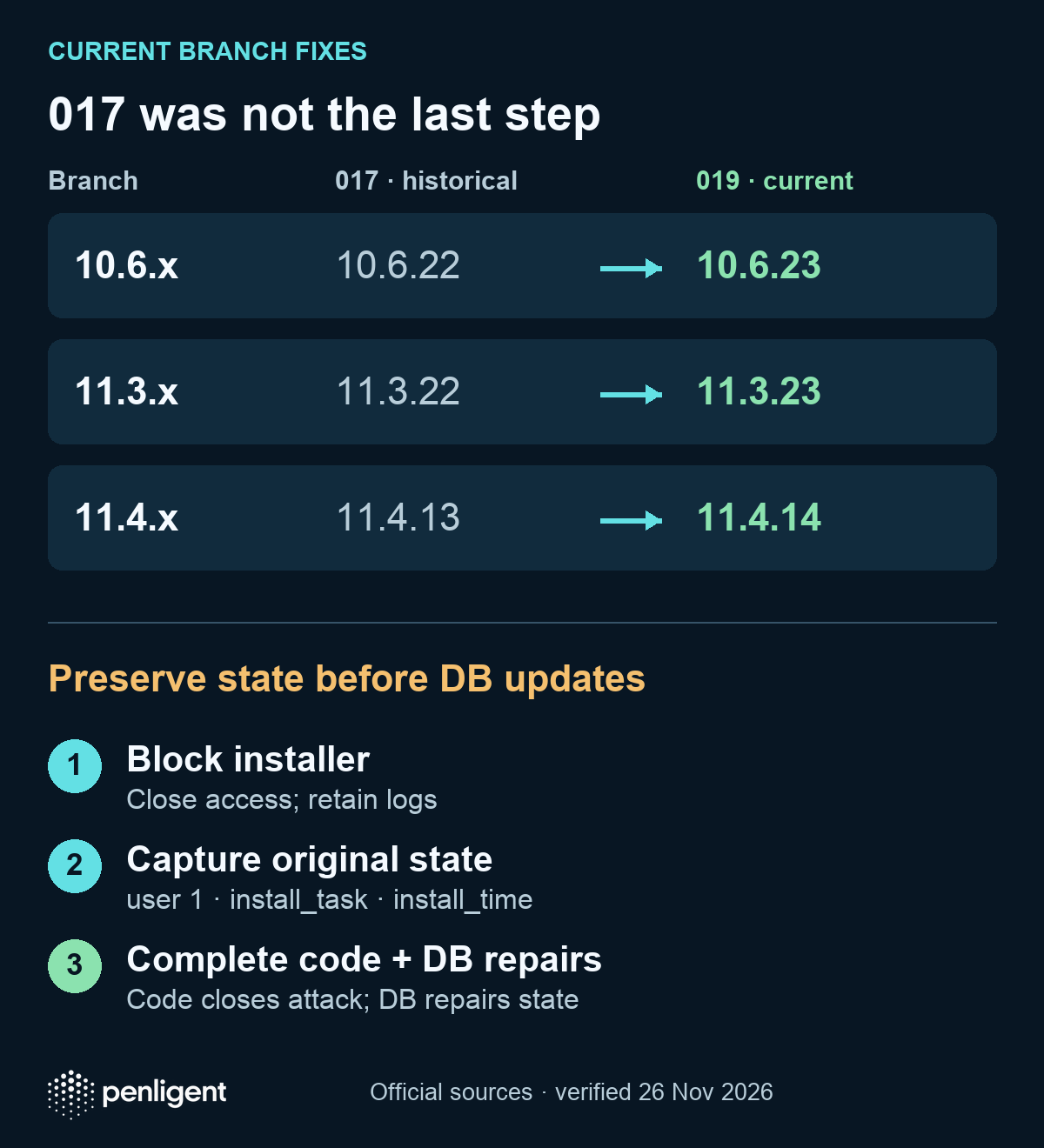
As of November 26, 2026, SA-CORE-2026-019 identifies CVE-2026-136716, an access bypass affecting certain unusual or incomplete installation states, including production sites. Drupal says it is being exploited in the wild. The advisory was published on November 25 UTC, which was early November 26 in Beijing. Drupal’s compromise-checking guide, updated November 26, adds a crucial sequence: block the installer, preserve and examine evidence before database updates change it, then complete the current code and database repairs.
What to do first
- Block the installer now. Follow Drupal’s server configuration guidance for
/core/install.php. If the site is already suspicious, preserve logs, database and files for investigation as well. - Capture the evidence that database updates can change. Review installer requests, user 1, administrator accounts and recorded installation state. Keep a copy of the original values and note the collection time.
- Deploy the current fix for the supported branch: Drupal 10.6.23, 11.3.23 or 11.4.14. Record which application instance and site received the code.
- Run database updates 통해
/update.php또는drush updatedb, record the completion time, and keep the installer restriction in place. - Escalate suspicious findings into incident response. Updating and changing user 1’s password do not remove an attacker’s other accounts, files or configuration changes.
These are coordinated actions, not a reason to delay containment for a lengthy investigation. The official guide states that applying the code update blocks this attack immediately, before database updates run. The database update repairs the recorded installation state. Both are required; capture the relevant state before running the database update whenever possible.
The November 18 patch is not the final stopping point
SA-CORE-2026-017, associated with CVE-2026-132165, addressed remote code execution issues in the installer. The November 25 follow-up describes remaining takeover exposure in unusual or incomplete installation states. The later advisory is classified as access bypass, not cross-site scripting. Its Highly critical 21/25 rating is Drupal’s advisory risk score; it is not a CVSS score.
| Installed branch | 017 release, now historical | 019 branch fix | Required follow-through |
|---|---|---|---|
| Drupal 10.6.x | 10.6.22 | 10.6.23 | Database updates, installer restriction and compromise review |
| Drupal 11.3.x | 11.3.22 | 11.3.23 | Database updates, installer restriction and compromise review |
| Drupal 11.4.x | 11.4.13 | 11.4.14 | Database updates, installer restriction and compromise review |
| Unsupported branches | No current security coverage | Move to a supported release | Keep the installer blocked during the upgrade |
These are the fixes listed by 019 at this article’s verification time. Drupal 10.5.x and earlier, 11.2.x and earlier, and Drupal 8 and 9 are outside current security coverage. Do not turn a successful 017 deployment into a claim that 019 was already addressed. Drupal also says its Steward recommended mitigations cover known attack vectors, while still directing protected sites to upgrade. Confirm the mitigation was active for the actual site rather than assuming a platform subscription establishes protection.
Use four evidence records to close the remediation task
The following is a recommended change-control framework built from Drupal’s advisories and operational guidance. It separates current remediation from the historical question of compromise; it is not a claim of independent exploit testing.
| Evidence record | What to retain | What it establishes | What it does not establish |
|---|---|---|---|
| Deployed code | Site or instance, branch, deployed core version and deployment time | The current branch fix reached that application | Database repair, every web node updated, or absence of earlier compromise |
| Database repair | Site-targeted update output and completion time | The required installation-state repair ran for that site | That pre-update state was always safe |
| Installer boundary | Effective server rule, path checks, relevant hostnames and deployment persistence | Tested installer entry paths are blocked at the checked time | That the installer was never reachable |
| Historical review | Retained logs, user and settings review, state snapshots, backups and incident disposition | The scope and limits of the investigation | Absolute certainty when evidence is missing or could have been altered |
A multisite installation needs a record for each site, not a single row for the shared code directory. Drupal’s guide instructs operators to run every check per site and use the relevant Drush URI option. A load-balanced deployment likewise needs an explicit inventory of the instances being checked; this is a deployment-verification recommendation, not a Drupal claim that one specific infrastructure pattern caused the vulnerability.
Preserve installation evidence before database updates
The required update, system_post_update_mark_installation_finished, sets install_task 에 done. If install_time was empty, it sets that value to the time the update ran. According to the official checking guide, Drupal does not log when this update ran. Keep your deployment output or shell-history context so later reviewers can distinguish a repair timestamp from a suspicious installation event.
On a site you administer or are authorized to assess, the following read-only commands can capture part of that context. Run them from the project root. For multisite, add the correct -l site argument to each command; do not assume the default site is the production database you intended.
drush status --fields=db-hostname,db-name,db-username
drush user:information --uid=1
drush state:get install_task
drush state:get install_time
drush state:get install_session_token
Keep the output in a controlled incident or change record rather than a public ticket. Record a timestamp with its timezone. An empty value should remain an observed empty value; do not rewrite it as evidence of safety.
- An
install_taskvalue other thandoneis an urgent signal under Drupal’s checking guidance. Block the installer and update. donedoes not rule out compromise. A successful attack can leave that value, and the database update sets it too.- A missing
install_timealone does not prove compromise. A recent timestamp needs comparison with the real install date and the database-update time. - A nonempty
install_session_tokencan indicate an unfinished installer session. Drupal treats it as a strong sign requiring investigation on a site not currently being installed. An empty token does not clear the site because a completed install clears it.
If database updates already ran, keep the fixes in place. Reconstruct the earlier state from retained deployment records and a backup from before November 18, 2026, rather than interpreting the newly repaired values as historical proof. The guide identifies an older backup with install_task=done and an expected installation time as strong evidence about the original state. Its separate discussion of earlier attacker access explains why database state alone cannot settle every incident.
Read the logs and user 1 changes together
Drupal directs operators to review sites whose installer was internet-reachable at any time since November 18, 2026, the date of 017. That is the review window, not an assertion that this follow-up issue was first exploited at that exact time. Preserve web server, hosting and CDN logs before short retention periods remove them. Include a timezone margin when selecting the start of the window.
For a conventional Nginx access-log location and format, Drupal supplies the following defensive summary. Adapt the file location and parser to your real log format, retaining the original logs:
zgrep -hE '"(GET|POST) /core/install\.php' /var/log/nginx/access.log* | \
  awk '{gsub(/"/,"",$6); print $6, $9, $10}' | \
  sort | uniq -c | sort -rn
그리고 official interpretation is more useful than a blanket “HTTP 200 means hacked” rule. An installed site can return 200 with a small, roughly 2 KB “already installed” response, including for POST requests. Installer POST requests with redirects, unusually large responses, concentrated requests, or pages showing that installation is running deserve investigation. Response sizes and status codes are triage context, not a complete detection rule.
Review user 1’s email address, username, password behavior and modification history. An old account-creation date is insufficient because the attack can change the account without changing its creation date. Check other privileged users as well, including custom roles with administrator-level permissions. Look for unexplained changes to the site name, site email, timezone and update-notification email addresses. The guide’s sample administrator-role query assumes a particular role machine name; copying it unchanged can miss custom privileged roles.
Suspicious findings should expand the investigation to settings.php, included settings files and writable directories. Do not classify every PHP file in Drupal’s files tree as a backdoor: the official guide treats the compiled Twig cache separately. It also warns against simply trusting everything inside that cache. Preserve evidence before performing cleanup or a cache rebuild that changes files.
Block the installer without breaking the update workflow
Drupal’s installer-hardening guide prefers server configuration because it survives core updates. The canonical installer path is /core/install.php. The database-update endpoint, /update.php, is separate; a broad rule that blocks both can obstruct the repair you still need to finish.
Nginx: use the documented prefix rule
location ^~ /core/install.php {
    return 404;
}
Drupal specifically warns against an exact-match rule such as location = /core/install.php: in some PHP PATH_INFO configurations a suffixed path such as /core/install.php/foo can still execute. The documented ^~ prefix covers the suffix and takes precedence over regex PHP locations. Adjust for subdirectory installations, check with nginx -t, and apply the change through your normal configuration process.
Apache: put Location in server or virtual-host configuration
<Location "/core/install.php">
    Require all denied
</Location>
The official guide says this 위치 form is not valid in .htaccess and causes an HTTP 500 there. Apply it to the relevant virtual hosts, including HTTPS, or at the appropriate global level; adjust the path for a subdirectory and run apachectl configtest. Drupal documents a separate Files rule for .htaccess, but manual changes to a scaffolded file need a deployment-persistent approach.
Removing the installer is also described in the guide, with a warning to make the removal persist through Composer deployments. A one-time file deletion can disappear on the next release. New browser-driven installations may need controlled temporary access; drush site:install does not use install.php. Keep the installation process private rather than leaving a partially completed install online.
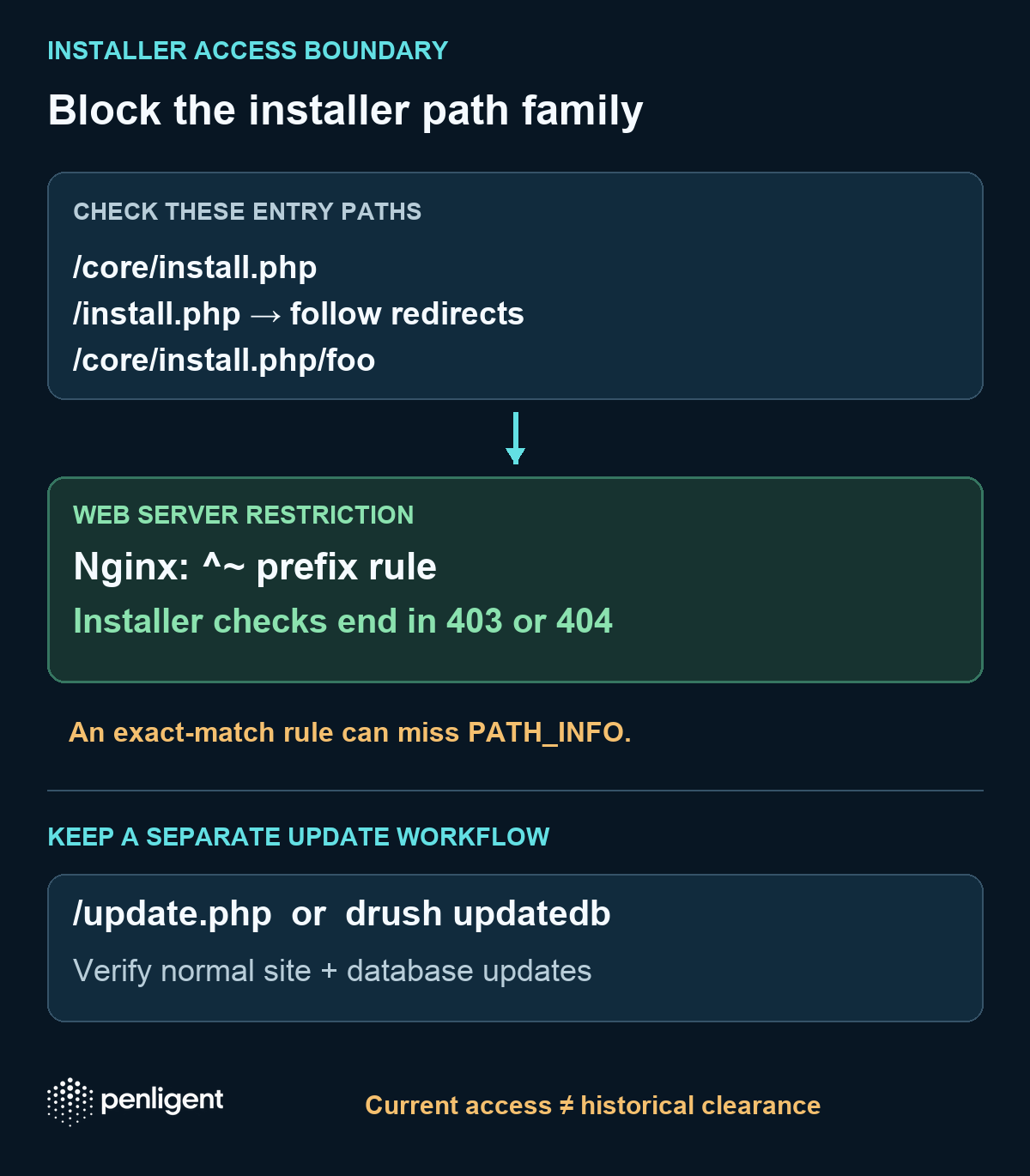
After applying the effective rule, Drupal recommends checking the canonical path, the alternative entry and its redirect chain, and a suffixed path on the authorized site:
curl -I https://example.com/core/install.php
curl -IL https://example.com/install.php
curl -I https://example.com/core/install.php/foo
Replace the example hostname with the approved site. The requests should end in 403 or 404. Check the normal site and the database-update workflow still function, and repeat the boundary checks after a deployment. This is an HTTP access check of the listed paths, not an exploit attempt or evidence that all historical traffic was blocked.
Decide whether this is remediation or incident recovery
Use the evidence to choose a disposition instead of forcing every site into “safe” or “unsafe.” The following labels are a recommended operational convention:
| Finding | Record the status as | Next action |
|---|---|---|
| Current code, database repair and installer restriction verified; no suspicious findings in retained evidence | Remediation complete; review scope recorded | Retain the evidence and describe any coverage gaps |
| Current fixes verified, but historical logs or original state are unavailable | Remediated; historical exposure unresolved | Seek older backups and provider records; do not claim “never compromised” |
| Unexplained user 1 changes, unexpected administrators, suspicious installer activity or file changes | Suspected compromise; incident response active | Preserve evidence and follow Drupal’s recovery guidance |
| Unsupported code or incomplete database updates | Remediation incomplete | Maintain containment and complete the supported upgrade and repair |
For suspected compromise, use Drupal’s hacked-site response guidance and the incident section of its installer-checking guide. The latter recommends preserving evidence, rebuilding code from a trusted source, restoring a database backup from before the earliest suspicious request where available, changing secrets, terminating sessions and completing the current updates. Recovery must cover the attacker’s changes rather than stopping at the entry point.
A practical closure record should identify the site, supported core branch, deployed version and time, database-update completion time, installer rule and path-check results, evidence-retention window, user 1 and administrator review, unresolved gaps, and the person or team owning the disposition. Keep “patched” separate from “incident cleared” in the ticket.
For teams using 펜리전트 in an authorized assessment workflow, the useful artifact is the same bounded record: which site and paths were checked, at what time, against which expected result. A present-day validation result should carry its scope and should not be presented as a historical guarantee.
The following Penligent 3.0 video is a general product demonstration. It does not demonstrate exploitation or remediation of this Drupal vulnerability.
Methodology: This article was prepared with AI assistance and checked against Drupal’s official advisories and operational documentation on November 26, 2026. The diagrams organize those sources into recommended verification records. We did not reproduce the vulnerability, test a production site, or independently validate Drupal’s exploitation reports.
 Korean
 English
 German
 French
 Spanish
 Portuguese
 Japanese
 Hindi
 Arabic
 Turkish
 Hebrew