
Optimizely has confirmed that an unauthorized party inserted malicious JavaScript into some Web Experimentation customer projects. Its incident notice, posted on November 17, 2026 at 01:02 UTC, says the vulnerability was fixed, the injected code removed, and additional account and delivery protections applied. The incident was marked Monitoring when checked. Website owners should now establish what their own visitors received and verify the current browser experience against the official Optimizely incident notice.
What is confirmed and what remains uncertain
The vendor identifies Web Experimentation snippet delivery as the affected service. Its public notice does not give a complete customer list, a precise exposure window for each project, or proof of data theft from every affected visitor. Treat those as investigation questions. A domain appearing in incident reporting is not, by itself, evidence that its application servers were breached.
The practical issue is the browser’s trust in executable dependencies. A website can serve its own application correctly while a third-party script changes what runs on the page. MDN’s Subresource Integrity documentation describes this supply-chain risk and the browser’s ability to check a resource against an expected cryptographic hash.
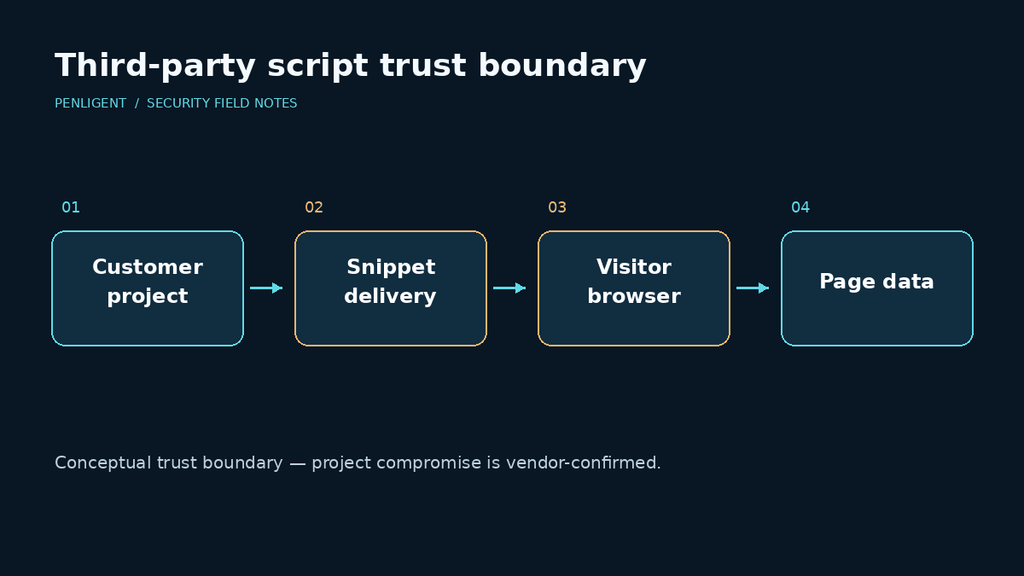
Four checks to start now
- Find actual usage. Review page templates, tag-manager configurations and browser network captures. Record project identifiers and the pages that load them. Prioritize checkout, sign-in and account-management journeys.
- Preserve available evidence. Save existing script captures, deployment records, tag changes and relevant application telemetry with timestamps. Preserve the original files before changing integrations. Missing historical captures should remain an explicit evidence gap.
- Coordinate containment. Ask the project owner and vendor to confirm whether your project was affected. If you suspend the integration, document the business impact and validate the affected journeys. Treat the vendor fix and your own deployment decision as separate records.
- Verify fresh sessions. Test supported browsers with synthetic accounts and payment test data. Record scripts loaded, unexpected requests and differences from a trusted baseline. Repeat after any tag-manager or CDN change.
Do not paste suspicious scripts into a browser console or open a payload destination to see what happens. Preserve the bytes for controlled analysis. If evidence indicates credential or session exposure, involve the incident owner in deciding which secrets and sessions to revoke; a blanket rotation without an exposure model can miss the relevant tokens.
IMAGE_2
A safe integrity demonstration
For a local training exercise, place two harmless copies of your own demo script in a temporary directory and compare their digests. Change a comment in one copy and run the command again:
python -c "import hashlib,pathlib; print({p.name:hashlib.sha256(p.read_bytes()).hexdigest() for p in pathlib.Path('.').glob('demo-*.js')})"This demonstrates byte-level change detection without downloading or executing incident malware. Different hashes prove that files differ, not that either file is malicious. Matching hashes are useful only when the baseline and its provenance are trustworthy.
For stable third-party assets, evaluate SRI with the application owner. The browser checks the configured hash before execution; cross-origin use also needs the appropriate CORS support. A dynamically changing experimentation snippet requires a compatible release process, so do not add a fixed hash blindly. These implementation constraints are described in MDN’s SRI guidance.
Questions website owners are asking
- Does every Optimizely customer need to assume confirmed compromise? No. Establish your project-specific exposure; the vendor notice says some projects.
- Is a clean server scan enough? It does not answer what third-party code executed in visitors’ browsers.
- Does a clean script today clear historical sessions? No. Keep the historical exposure question open until evidence supports a conclusion.
- Should we test with real payment details? Use synthetic data and approved test accounts.
- What closes the task? A recorded scope decision, containment evidence, verified current behavior and an owner for unresolved historical questions.
For an authorized validation exercise, retain the tested page, account role, timestamp and observable result together. That makes the follow-up test reproducible when the integration is restored.
 English
 German
 French
 Spanish
 Portuguese
 Japanese
 Korean
 Hindi
 Arabic
 Turkish
 Hebrew