
CVE-2026-16232 is an actively exploited authentication bypass in the Check Point SmartConsole login process. Under the exposed configuration described by Check Point, an unauthenticated remote attacker can obtain an application login token, authenticate with full administrative privileges, and modify security policies or security configurations.
That outcome makes CVE-2026-16232 more than an administrative-interface bug. A compromised management server can become a control point for the firewalls, objects, policies, administrators, and management domains that depend on it. The security gateways may remain online and appear operational while enforcing policy that an unauthorized administrator has changed.
Check Point says exploitation was observed among a small number of customers whose Management systems were directly exposed to the internet without IP restrictions. The vendor has released Jumbo Hotfix updates, published observed source IP addresses, and advised customers to restrict Trusted Clients and protect Management access with a firewall. CISA added the vulnerability to its Known Exploited Vulnerabilities Catalog on July 22, 2026. (Blog da Check Point)
The response priority should therefore be based on four facts:
- The vulnerability is remotely reachable under a documented exposure condition.
- No prior authentication or user interaction is required.
- Successful exploitation produces full administrative access.
- Exploitation has already occurred.
A safe response does not require running an exploit against a production management server. Version evidence, Jumbo Hotfix status, Trusted Clients configuration, network reachability, and audit records are sufficient to identify assets requiring urgent remediation and compromise review.
What defenders need to know now
| Campo | Current public information |
|---|---|
| CVE | CVE-2026-16232 |
| Vendor | Check Point |
| Classe de vulnerabilidade | Improper Authentication, CWE-287 |
| Área afetada | SmartConsole application-token login on Security Management and Multi-Domain Management |
| Attacker position | Remote and unauthenticated |
| Confirmed result | Application login token and full administrative privileges |
| Confirmed administrative impact | Modification of security policies and security configurations |
| Important exposure condition | Internet access to the Management Server IP and unrestricted Trusted Clients |
| Known exploitation | Sim |
| Check Point severity | CVSS 9.3 |
| CISA-ADP severity shown by NVD | CVSS 3.1 9.1 Critical |
| Primary remediation | Install the applicable July 22, 2026 Jumbo Hotfix |
| Immediate mitigation | Restrict Trusted Clients and firewall Management access |
| CISA KEV status | Added July 22, 2026 |
NVD describes the flaw as allowing an unauthenticated remote attacker to obtain an application login token and use it to authenticate with full administrative privileges. It also states that successful exploitation allows modification of security policies and configurations. The listed remote exploitation requirements are internet access to the Management Server IP and a Trusted Clients configuration that does not restrict access. (NVD)
Check Point assigns the vulnerability a 9.3 score. NVD had not completed its own enrichment at the time of publication, while the CISA-ADP information displayed on the NVD page gives it a CVSS 3.1 score of 9.1 with a network attack vector, low attack complexity, no required privileges, no user interaction, and high confidentiality and integrity impact. The numerical difference does not materially change the response decision. Active exploitation and complete management access are stronger prioritization signals than a two-tenths difference in base score. (NVD)
What Check Point has confirmed
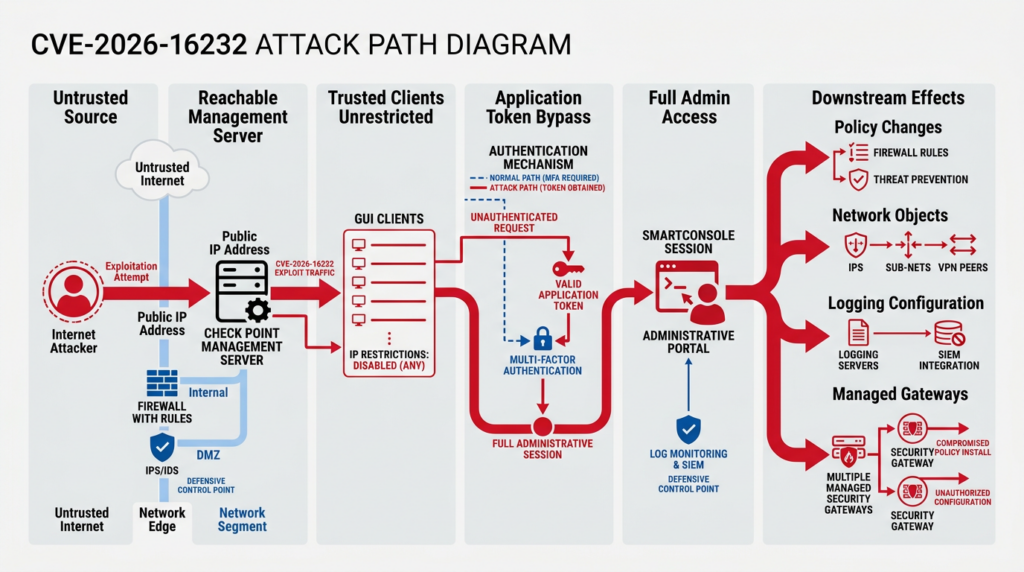
The most important public facts come directly from Check Point and the vendor-authored CVE record:
- The vulnerable process is SmartConsole login using an application token.
- An unauthenticated attacker can obtain such a token.
- The token can be used to authenticate with full administrative privileges.
- The attacker can modify security policies and security configurations.
- Remote exploitation requires network access to the Management Server IP.
- The relevant exposed configuration does not restrict Trusted Clients.
- Check Point observed exploitation among a very small number of customers.
- The affected products include Security Management and Multi-Domain Management.
- Check Point lists R81.10, R81.20, R82, and R82.10, while noting that older versions are also affected.
- Smart-1 Cloud customers are already protected, according to Check Point.
- A July 22 Jumbo Hotfix contains the remediation. (Blog da Check Point)
Those facts are enough to justify emergency action. They are not enough to support speculative descriptions of the vulnerable endpoint, token structure, request parameters, internal function names, or exact exploit sequence.
No authoritative public source currently provides the complete technical root cause. The phrase “application login token” does not prove that the bug is a cryptographic forgery, token prediction issue, signature-validation error, session fixation flaw, missing authorization check, or exposed token-generation endpoint. Any of those descriptions would go beyond the public evidence.
The defensible technical description is narrower: a failure in the SmartConsole application-token login process lets an unauthenticated remote attacker obtain and use a token that results in full administrative access.
That distinction matters for both defenders and researchers. Detection logic built around an invented endpoint or payload may miss the real behavior. Scanner checks based on assumptions about the internal implementation can produce false positives, false negatives, or unsafe interactions with a critical management server.
What remains unknown
Several questions have not been publicly answered in sufficient detail:
- Which exact network service receives the malicious request?
- Does token acquisition and token use occur through the same interface?
- Is the token generated by the Management Server or recovered from another process?
- Does exploitation create a named administrator, an application identity, or a transient administrative session?
- Which audit fields always appear during successful exploitation?
- When did the first known exploitation occur?
- Did the observed attackers modify policy, add administrators, access stored secrets, or perform another post-authentication action?
- Was the activity linked to a known intrusion group?
- Are any public exploit repositories accurate?
The absence of those details should not delay patching. It should change how compromise assessment is performed. Defenders should use multiple evidence sources rather than wait for a signature that matches a single request.
The investigation should combine application-token authentication records, source addresses, management sessions, administrator changes, object modifications, policy publication, policy installation, operating-system activity, and downstream gateway behavior.
Why the management plane changes the risk
A normal administrative web application controls one service. A firewall management plane may control the security decisions of an entire network.
Check Point’s hardening guidance states that the Management Server controls policy installation, Secure Internal Communication trust relationships, and administrator access. It recommends placing the server behind a firewall or protected segment and limiting inbound connections to required administrative sources. (Checkpoint)
That architecture creates concentration of authority. The management server may define:
- Network and service objects
- Access-control rules
- NAT policies
- Threat-prevention settings
- VPN communities and related configuration
- Logging behavior
- Administrator identities and permission profiles
- Gateway properties
- Policy packages
- Domain-level configuration in Multi-Domain deployments
- When and where policy is installed
An attacker with full SmartConsole administrative privileges may therefore be able to alter the rules that determine which traffic is allowed, denied, inspected, logged, translated, or routed through security controls.
The public advisory confirms policy and configuration modification. It does not claim that every exposed management feature was used by an attacker. The following consequences should be understood as plausible outcomes of full management authority rather than confirmed actions in the known incidents.
Policy weakening
An unauthorized administrator could attempt to add an allow rule, broaden a source network, change a destination, remove an inspection profile, or reposition a rule above a restrictive control.
A seemingly small change can have a large effect. Changing a source object from a jump-host subnet to Any, for example, can convert a narrow administrative path into a general network path. Moving a rule above a cleanup rule may expose services that were previously unreachable.
Security-object manipulation
Firewall policies depend heavily on objects. If an attacker changes an object’s address, group membership, service definition, or dynamic association, the visible rule name may remain unchanged while its real behavior changes.
This is one reason incident responders should not review only rule additions and deletions. They must also inspect changes to objects referenced by important rules.
Logging degradation
A malicious administrator may attempt to reduce evidence by changing logging settings, altering log destinations, modifying retention-related configuration, or creating traffic paths that are not logged as expected.
Whether a specific feature is reachable depends on product configuration and permissions, but external log retention is still important. Evidence stored only on the management infrastructure being investigated is less trustworthy than a copy already forwarded to a separate SIEM or immutable archive.
Policy installation to multiple gateways
Management access becomes more consequential when a single server controls many gateways. A published policy change has no enforcement effect until it is installed on the relevant targets, but a successful installation may distribute that change broadly.
Multi-Domain Management increases the need for domain-level review. Investigators should determine whether suspicious activity was confined to one domain, crossed domain boundaries, or involved a global administrator.
Creation of durable access
Full administrative access may enable changes intended to outlive the original session, such as adding an administrator, expanding a Trusted Clients range, enabling an integration, or modifying an existing automation identity.
Again, the public record does not say that observed attackers performed these exact actions. They are persistence hypotheses that should be checked because they follow logically from the confirmed privilege level.
Operational disruption
Bad security policy can cause an outage even without destructive code execution. An attacker could deploy a malformed, overly restrictive, or inconsistent policy that interrupts business traffic, administrative communication, logging, or gateway management.
The direct availability impact reflected in a CVSS vector does not capture every operational consequence of malicious policy control. A vulnerability can leave the management server running while causing serious disruption through the authorized functions it exposes.
SmartConsole, application tokens, and Trusted Clients
A secure administrative login flow normally depends on several separate decisions:
- Can the source network reach the management service?
- Is the connecting host permitted as a Trusted Client?
- Has the human or application identity authenticated correctly?
- Is the resulting token or session valid?
- What role and permissions does that identity receive?
- Can the session publish or install changes?
- Are those actions logged and reviewed?
CVE-2026-16232 crosses the authentication boundary at the application-token stage. The public description says an unauthenticated attacker can obtain the token and use it for full administrative authentication. (NVD)
Trusted Clients operate at a different layer. Check Point documentation allows administrators to define individual addresses, ranges, subnets, or broad access. Its Gaia documentation explicitly describes Any IP Address as allowing all clients to log in regardless of source IP. (Checkpoint)
A Trusted Clients rule is therefore best understood as a source-location gate. It is useful defense in depth, but it is not proof of identity. A connection from an allowed jump host still needs authentication. Conversely, an authentication bug becomes much harder to reach remotely when untrusted sources cannot contact the relevant management service.
Check Point’s Management API documentation also ties allowed API sources to addresses defined under Trusted Clients. That connection means a Trusted Clients review should include more than desktop SmartConsole usage. Teams should identify API scripts, Web SmartConsole access, management integrations, jump hosts, monitoring tools, and other systems that depend on the same administrative address policy. (Checkpoint)
An overly broad setting is often the result of convenience rather than an explicit risk decision. Administrators may use Any during deployment, troubleshooting, a migration, a managed-service handoff, or an emergency change and never narrow it afterward. The configuration can survive for years because normal authentication still appears to protect the server.
CVE-2026-16232 shows why both controls matter. Authentication should reject unauthorized identities, while network restrictions should prevent unnecessary sources from reaching the authentication surface at all.
The confirmed attack path
The publicly supported attack path can be expressed without inventing exploit details:
Untrusted remote source
        |
        v
Reachable Check Point Management Server IP
        |
        v
Trusted Clients do not restrict the source
        |
        v
Vulnerable SmartConsole application-token login process
        |
        v
Application login token obtained without prior authentication
        |
        v
Full administrative SmartConsole session
        |
        v
Security policies or configurations can be modified
Every arrow except the final operational choices is grounded in the vendor-authored description. What happens after administrative access depends on the attacker’s objectives and the functions available in the affected environment.
This model also identifies where defenders can break the chain:
- Remove untrusted network reachability.
- Restrict Trusted Clients.
- Install the fixed Jumbo Hotfix.
- Detect anomalous token authentication.
- Detect and review high-risk administrative changes.
- Require controlled pathways for policy publication and installation.
- Maintain independent logs and configuration backups.
Patching addresses the vulnerable software behavior. The other controls reduce exposure, improve detection, and limit the chance that a future management-plane vulnerability produces the same outcome.
Exploitation prerequisites
An asset should be treated as exposed to the documented remote attack condition when all of the following are true:
- It is an affected Quantum Security Management or Multi-Domain Security Management deployment.
- It does not have the applicable fixed Jumbo Hotfix.
- The Management Server IP is reachable from an attacker-controlled network.
- Trusted Clients do not restrict the connecting source to approved administrative addresses.
- The affected application-token login capability is present.
The phrase “internet access to the Management Server IP” should not be interpreted too narrowly. Direct public addressing is the clearest case, but effective reachability may also exist through:
- Port forwarding
- Static NAT
- Cloud load balancers
- Reverse proxies
- VPN address pools
- Partner networks
- Managed service provider connections
- Cloud interconnects
- Remote support tunnels
- Bastion hosts that permit uncontrolled forwarding
- Compromised systems inside a trusted management subnet
The vendor’s known exploitation statement focuses on direct internet exposure without IP restrictions. That is the confirmed highest-risk configuration. Broader reachability scenarios remain relevant for defensive review because an attacker who already controls a connected network may be able to satisfy the same network prerequisite.
Exposure and response matrix
| Version and access condition | Practical priority | Required action |
|---|---|---|
| Vulnerable Take, internet reachable, Trusted Clients set to Any or broad ranges | Emergency | Block exposure, preserve evidence, patch, and perform compromise assessment |
| Vulnerable Take, reachable from partner, MSP, or remote-access networks | Crítico | Restrict paths, verify source ownership, patch, and review logs |
| Vulnerable Take, reachable only from a large internal network | Alta | Patch quickly and assess lateral-movement exposure |
| Vulnerable Take, strict jump-host allowlist, no public path | Alta | Patch, verify allowlist, and review application-token logs |
| Fixed Take, formerly internet exposed | Investigation still required | Confirm installation date and hunt for activity before remediation |
| Fixed Take, never exposed, strict allowlist | Lower incident likelihood | Document evidence and maintain monitoring |
| Version unknown or owner unknown | Treat as potentially exposed | Establish ownership and collect evidence immediately |
| Smart-1 Cloud only | Vendor states customers are protected | Confirm there are no separate self-managed Management Servers |
A strict Trusted Clients allowlist reduces the documented remote exploit path, but it does not make an affected version acceptable indefinitely. Trusted sources can be compromised, network paths can change, and administrative allowlists can contain stale or overly broad entries.
Affected versions and fixed Jumbo Takes
Check Point’s July advisory lists Security Management and Multi-Domain Management on R81.10, R81.20, R82, and R82.10, while stating that older versions are affected as well. (Blog da Check Point)
The vendor’s SecureKnowledge record identifies the following fixed branch boundaries:
| Product branch | Vendor fix boundary | Release date shown by vendor |
|---|---|---|
| R82.10 | Jumbo Hotfix Take 36 or later | July 22, 2026 |
| R82 | Jumbo Hotfix Take 118 or later | July 22, 2026 |
| R81.20 | Jumbo Hotfix Take 158 or later | July 22, 2026 |
| R81.10 and older affected branches | Consult Check Point support and move to a supported fixed release | Depends on branch and support status |
Check Point’s SK185169 search record states that the fix begins with R82.10 Take 36, R82 Take 118, and R81.20 Take 158. The R82.10 resolved-issues page explicitly lists CVE-2026-16232 under Take 36. The R82 Take 118 release page likewise lists the authentication bypass as resolved. (Check Point Support)
R82 Take 118 was made available on July 22, 2026. The release includes fixes for CVE-2026-16232, CVE-2026-62144, and CVE-2026-62145, along with other hardening and product changes. (Checkpoint)
The R81.20 vendor record identifies Take 158 as the branch’s fix boundary for CVE-2026-16232. (Check Point Support)
The public Take-number discrepancy
There is an important inconsistency in the initial public data.
The current NVD affected-version field reproduces CVE data that labels the following as affected:
- R82.10 with Jumbo Hotfix Take 36 or below
- R82 with Jumbo Hotfix Take 118 or below
- R81.20 with Jumbo Hotfix Take 158 or below
That wording includes the same Take numbers that Check Point’s SK and resolved-issues pages identify as containing the fix. (NVD)
For operational remediation, the vendor’s product-specific fix statement and release notes are the better source for determining which package contains the correction. The reasonable current interpretation is:
- R82.10 Take 36 contains the fix.
- R82 Take 118 contains the fix.
- R81.20 Take 158 contains the fix.
- Earlier Takes remain vulnerable.
Because the records are newly published and may be corrected, teams should verify the latest SK185169 text, the applicable Jumbo Hotfix release page, and the package actually installed in their environment. A vulnerability scanner that parses the broad affected-version string may temporarily flag the fixed boundary Take. That alert should be investigated with vendor package evidence rather than dismissed or accepted automatically.
Do not equate branch name with remediation
A server reporting R82.10 is not necessarily fixed. The Jumbo Hotfix Take matters.
Likewise, the presence of a downloaded package does not prove that it was installed successfully. Closure evidence should show:
- Product branch
- Installed Jumbo Hotfix Take
- Package installation status
- Relevant service state
- Management high-availability synchronization state
- Installation timestamp
- Post-installation validation
- Network restrictions
- Audit review status
Older branches deserve special attention. A team may discover R81.10, R81, R80.x, or R77.30 systems that cannot simply consume one of the three current fixed Takes. Those systems should not be left exposed while an upgrade project is scheduled. Restrict network access immediately, contact Check Point support for supported remediation guidance, and establish a migration path to a maintained release.
Why CVE score debates should not delay action
Check Point publishes a CVSS score of 9.3. CISA-ADP’s CVSS 3.1 vector produces 9.1. NVD had not yet published its own assessment when the record was reviewed. (NVD)
The difference may result from scoring-system choices or differing interpretations of particular impact metrics. It does not change the four operational facts:
- The attack is remote.
- The attacker does not need existing privileges.
- No user interaction is required.
- Full management privileges are obtained.
CISA’s SSVC information marks exploitation as active, the vulnerability as automatable, and technical impact as total. CISA also added the issue to the KEV catalog with an accelerated remediation requirement for covered organizations. (NVD)
For a security team, a useful prioritization formula is:
Priority =
    confirmed exploitation
  + internet-accessible management plane
  + unauthenticated attack path
  + full administrative impact
  + broad downstream control
Any one of those factors would warrant serious attention. Together, they justify an emergency management-plane response.
Immediate response plan
The first response window should produce three results:
- Untrusted access to the management plane is blocked.
- Every potentially affected server has an owner and patch decision.
- Evidence is preserved before configuration and software changes obscure it.
Restrict the management plane first
Before beginning a lengthy inventory project, remove the clearest exposure condition.
Check Point recommends limiting Trusted Clients to trusted IP addresses or subnets, protecting Management access with a firewall, restricting access to trusted addresses, verifying implied rules for control connections, and installing the July 22 Jumbo Hotfix. (Blog da Check Point)
Practical emergency controls include:
- Remove direct public NAT to the Management Server.
- Restrict cloud security groups and network ACLs.
- Permit SmartConsole only from named jump hosts or a dedicated administrative subnet.
- Require administrators to enter through a controlled VPN or privileged-access workstation path.
- Replace
Any IP Addresswith explicit addresses, networks, or tightly defined ranges. - Review IPv4 and IPv6 separately.
- Remove stale MSP, contractor, migration, and temporary support ranges.
- Check whether a load balancer, proxy, or tunnel bypasses the intended firewall control.
- Confirm that a disaster-recovery or secondary Management Server is not separately exposed.
- Validate Multi-Domain Management and dedicated log infrastructure, not only the primary server.
Do not make emergency changes without preserving the current state. Record the old rule, the new rule, the change owner, and the exact time. That evidence may later explain whether a suspicious source could reach the server before containment.
Preserve evidence before patching
Patching is urgent, but it can restart services, update files, rotate logs, and change timestamps. Preserve the evidence that is practical to collect without delaying containment.
At minimum, capture:
- Full product and hotfix inventory
- Current Trusted Clients configuration
- Current firewall and cloud access rules protecting the management network
- Administrator and permission-profile inventory
- Application or API identities
- Active and recent management sessions
- Audit logs
- Authentication logs
- Recent object changes
- Recent policy publications
- Recent policy installations
- Recent administrator additions or modifications
- Management API access configuration
- System time and NTP status
- Relevant operating-system logs
- Management high-availability state
- Configuration backups and database revisions
- External SIEM records covering the same period
Store exported evidence outside the affected management server. If full administrative access may have been obtained, local logs and configuration cannot be treated as the only authoritative record.
The vendor has not published an earliest exploitation date for CVE-2026-16232. Begin with the longest practical retention window available, then prioritize the period preceding the July 22 disclosure and any earlier unexplained management activity. Document gaps where retention is insufficient.
Install the applicable Jumbo Hotfix
Use the fixed branch identified by Check Point:
- R82.10 Take 36 or later
- R82 Take 118 or later
- R81.20 Take 158 or later
For older versions, obtain vendor guidance and plan an upgrade. Apply exposure restrictions immediately rather than waiting for the full migration.
Check Point’s R82 installation guidance says Management High Availability deployments should be updated in an ordered sequence beginning with the primary Management Server, followed by the secondary and then dedicated Log Servers and SmartEvent Servers. The precise sequence and prerequisites must be checked against the instructions for the actual branch and architecture. (Checkpoint)
Before installation:
- Verify package compatibility.
- Confirm disk space and system health.
- Capture backups.
- Verify support entitlement and package integrity.
- Review the Take’s critical information.
- Establish rollback criteria.
- Notify network operations that management services may restart.
- Avoid unrelated policy changes during the response window.
After installation:
- Confirm the installed Take from the server, not only from a deployment task.
- Confirm management processes are healthy.
- Confirm HA synchronization.
- Confirm SmartConsole can connect from the approved jump host.
- Publish a controlled test change if organizational procedure permits.
- Install a known-good test policy to a noncritical gateway or approved test target.
- Confirm logs continue to arrive.
- Confirm untrusted sources cannot connect.
- Export closure evidence.
Building an accurate inventory
A common failure is to ask, “Do we run Check Point R82?” The useful question is more specific:
Which Management and Multi-Domain Management servers do we operate, which Take is installed on each, through which network paths can each be reached, and which source addresses are allowed as Trusted Clients?
Build an inventory with fields such as:
| Campo | Por que é importante |
|---|---|
| Hostname and management IP | Identifies the actual control point |
| Product role | Security Management, Multi-Domain Management, log server, or another component |
| Version branch | Determines applicable patch family |
| Jumbo Hotfix Take | Determines fix status |
| Primary, secondary, or disaster-recovery role | Prevents missing nonprimary systems |
| Public address or NAT mapping | Reveals direct exposure |
| Cloud security group or ACL | Reveals infrastructure-level exposure |
| Trusted Clients setting | Establishes source restriction |
| Administrative jump hosts | Defines expected source addresses |
| API integrations | Establishes legitimate application-token activity |
| Managed gateways and domains | Estimates blast radius |
| Business owner | Enables emergency decisions |
| Technical owner | Assigns remediation |
| Log destination and retention | Determines investigation capability |
| Patch timestamp | Defines pre-fix investigation window |
| Compromise-assessment status | Separates remediation from incident review |
Inventory should include dormant, standby, migration, lab, disaster-recovery, and MSP-operated systems. An unused secondary server may still be reachable and may still hold current management data.
Do not rely exclusively on configuration-management databases. Compare CMDB data with:
- DNS
- IP address management
- Cloud asset inventories
- Firewall NAT rules
- VPN routes
- Certificate inventories
- Endpoint-management records
- Check Point licensing records
- Support records
- Administrative workstation connection history
- SIEM logs
- Network flow records
Unknown assets should be treated as a process failure, not a low-priority category.
Safe version and hotfix verification
Check Point documents cpinfo -y all as a method for displaying installed hotfix information. Run it only on a Management Server you own or are authorized to administer. Preserve the complete output because formatting and package names can differ between branches. (Check Point Support)
cpinfo -y all
A local convenience filter can help locate Take-related lines, but it should not replace the complete record:
cpinfo -y all | egrep -i 'jumbo|hotfix|take|R81\.20|R82|R82\.10'
Additional verification may be performed through Gaia Portal, CPUSE, SmartConsole, or the branch-specific installation tooling. The objective is to prove the installed state, not merely to show that an update appears in an available-packages list.
A defensible evidence record might look like this:
Asset: mgmt-primary-01
Role: Security Management Primary
Branch: R82
Installed Jumbo Take: 118
Package status: Installed successfully
Install completed: 2026-07-23T02:14:36Z
Management services: Healthy
HA peer: Synchronized
Trusted Clients: 10.40.8.20/32, 10.40.8.21/32
Public NAT: None
External reachability test: Blocked
Audit review: In progress
Evidence owner: Network Security Engineering
Screenshots can support the record, but machine-readable exports and command output are easier to compare across many systems.
Validating reachability without exploiting the flaw
You do not need to request an application token or test an authentication bypass to determine whether the server was exposed.
Reachability can be validated from two controlled locations:
- An approved administrative jump host that should be able to connect.
- A test host in a network that should not be trusted.
Check Point’s management hardening documentation recommends restricting desktop SmartConsole, Web SmartConsole, SSH, and API access to internal administrative sources or jump hosts. It notes that Web SmartConsole uses TCP 443, while desktop SmartConsole workflows may use management-related ports including TCP 18190, 18264, and 19009. Exact requirements depend on architecture and enabled functions. (Checkpoint)
The following example checks a single documentation-only address. Replace it only with an explicitly authorized lab or organizational target:
TARGET="192.0.2.10"

for PORT in 443 18190 18264 19009; do
  nc -vz -w 3 "$TARGET" "$PORT"
done
Interpretation:
- From the approved jump host, required ports should behave according to the documented design.
- From an untrusted test network, the same ports should be blocked before authentication.
- A timeout, rejection, or successful connection should be correlated with firewall logs.
- The result does not prove or disprove application-token vulnerability.
- Alternate addresses, IPv6, NAT mappings, VPN paths, and secondary servers must be checked separately.
Avoid broad internet scanning. The objective is to validate your own access-control design, not discover third-party management servers.
Why a closed port may not close the case
A single external test can miss:
- An alternate public address
- IPv6 exposure
- A geographic load balancer
- A source-address exception
- A remote support tunnel
- A partner route
- A cloud peering path
- An MSP management network
- A disaster-recovery address
- A firewall rule active only at certain times
- A bastion host that forwards arbitrary traffic
Network evidence should include the intended design and the actual enforcement configuration.
Reviewing Trusted Clients correctly
Trusted Clients should be reviewed as an allowlist, not as a list of addresses that once needed access.
For every entry, determine:
- Who owns the source?
- Is it still active?
- Is it a single host, subnet, range, or Any?
- Can ordinary user endpoints obtain an address in that range?
- Does NAT cause many unrelated clients to appear from one trusted address?
- Is the source protected by EDR?
- Is it a privileged-access workstation or general-purpose server?
- Does it require MFA or VPN before reaching the management network?
- Can contractors or partners use it?
- Does the source permit port forwarding?
- Is IPv6 governed by an equivalent restriction?
- Is the same entry used for Management API access?
The strongest practical design uses a small number of hardened administrative endpoints or jump hosts. General office subnets, entire VPN pools, broad private ranges, and all cloud workload networks create too much implied trust.
Check Point’s hardening guide recommends dedicated management VLANs or subnets, firewall protection around the Management Server, and access limited to required administrative sources. It also recommends avoiding direct internet administration and using protected access mechanisms instead. (Checkpoint)
Do not lock out legitimate administrators blindly
Emergency restriction changes can cause an outage if the team does not understand:
- Which host installs policy
- Which API integrations publish objects
- Which SmartEvent or logging services communicate with management
- Which HA peer requires connectivity
- Which administrators use a managed jump host
- Which source address appears after NAT
Before replacing Any, observe legitimate source addresses, document dependencies, prepare console access, and stage a tested allowlist. Security improvement should not depend on leaving the server broadly reachable, but the transition should preserve control.
Detection and threat hunting
Detection should answer two questions:
- Was an unauthorized application-token login attempted or completed?
- Did any suspicious administrative session change the environment?
The first question focuses on authentication. The second focuses on impact.
Search the vendor-published IP addresses
Check Point published six IP addresses associated with observed activity:
151.241.99[.]207
151.241.99[.]233
158.62.198[.]182
192.142.10[.]99
139.28.37[.]250
194.213.18[.]137
These addresses should be searched across management audit logs, firewall logs, NetFlow, DNS, proxy records, VPN telemetry, cloud flow logs, and any upstream device that could observe connections to the management network. (Blog da Check Point)
A SmartConsole-style search expression can include both directions:
(src:151.241.99.207 OR dst:151.241.99.207 OR
 src:151.241.99.233 OR dst:151.241.99.233 OR
 src:158.62.198.182 OR dst:158.62.198.182 OR
 src:192.142.10.99 OR dst:192.142.10.99 OR
 src:139.28.37.250 OR dst:139.28.37.250 OR
 src:194.213.18.137 OR dst:194.213.18.137)
Use the syntax supported by the actual Check Point version and log view. A query copied from another environment may require field-name or parser changes.
An IOC match is significant but not self-explanatory. Determine:
- Was the address the source or destination?
- Did the traffic reach the Management Server?
- Which service and port were involved?
- Was the connection accepted?
- Was an authentication record created?
- Did a management session follow?
- Were any changes published or installed?
- Did the traffic occur before or after containment?
- Is there unrelated legitimate communication with that address?
An IOC miss does not prove the environment is clean. Attack infrastructure is replaceable, and the six addresses represent observed evidence rather than a complete detection signature.
Search for application-token authentication
Public reporting has highlighted the audit phrase:
Authentication method: application token
Defenders should search the relevant audit view for application-token authentication and compare each result with the organization’s inventory of authorized API and automation identities. (BleepingComputer)
Do not assume that every application-token login is malicious. Legitimate automation may use application identities or tokens. The high-value question is whether the event matches an expected combination of:
- Application identity
- Administrator or permission profile
- Source address
- Destination management server
- Time of day
- Session duration
- Management domain
- Commands or changes
- Publication activity
- Policy installation
- Change ticket
A token event from a known integration host performing its normal read-only task may be expected. A token event from an unknown external address followed by an administrator addition or policy publication should be treated as an incident.
Correlate authentication with administrative actions
Authentication is only the start of the timeline. Build a sequence for every suspicious session:
Network connection
    -> token authentication
    -> management session creation
    -> object or administrator change
    -> session publication
    -> policy installation
    -> gateway behavior change
High-signal changes include:
- New administrators
- Administrator role changes
- New permission profiles
- Password or certificate changes
- Trusted Clients expansion
- Management API access expansion
- New network or host objects
- Object IP address changes
- Group membership changes
- New services or service groups
- Access-rule changes
- NAT-rule changes
- VPN configuration changes
- Threat-prevention profile changes
- Logging changes
- Cleanup-rule changes
- Session publication
- Policy installation to unusual targets
- Failed or repeated policy installation
- Changes outside approved maintenance windows
A policy-change review should compare both the visible rulebase and referenced objects. A rule that appears unchanged may behave differently after an object modification.
Review sessions that were not published
An attacker may explore the management interface without publishing a session. Unpublished changes may still provide evidence of access, intent, or attempted persistence.
Revisão:
- Abandoned sessions
- Failed publications
- Reverted changes
- Login and logout records
- Session timeouts
- Read operations against sensitive objects
- Attempts to access multiple domains
- API command failures
- Permission errors
- Repeated token use
A failed malicious action is still relevant. It can reveal attacker capability and target selection.
Compare current policy with a known-good revision
Where Check Point revision history and organizational backups are available, compare:
- Current objects
- Current administrators
- Current Trusted Clients
- Current access policy
- Current NAT policy
- Current threat-prevention configuration
- Current VPN configuration
- Last known-good revision
- Revisions created during the exposure window
Do not restore a historical policy automatically before understanding legitimate changes that occurred afterward. First identify suspicious deltas, validate them with change owners, and create a controlled recovery plan.
Offline audit-log triage
The following Python script scans an exported CSV file for the six vendor-published IP addresses and the phrase application token. It does not connect to Check Point infrastructure, reproduce the vulnerability, or assume a specific CSV schema. It simply examines the text of each row.
#!/usr/bin/env python3
"""
Offline triage helper for exported management audit CSV files.

Safety properties:
- Reads a local CSV file only.
- Makes no network connections.
- Does not generate or use authentication tokens.
- Does not contain Check Point exploit logic.
- Treats matches as investigation leads, not proof of compromise.
"""

from __future__ import annotations

import csv
import sys
from pathlib import Path

OBSERVED_IPS = {
    "151.241.99.207",
    "151.241.99.233",
    "158.62.198.182",
    "192.142.10.99",
    "139.28.37.250",
    "194.213.18.137",
}

TOKEN_PHRASES = {
    "authentication method: application token",
    "application token",
}


def normalize_row(row: dict[str, str | None]) -> str:
    values = []
    for key, value in row.items():
        values.append(str(key or ""))
        values.append(str(value or ""))
    return " | ".join(values).lower()


def find_matches(text: str) -> list[str]:
    matches: list[str] = []

    for ip in sorted(OBSERVED_IPS):
        if ip in text:
            matches.append(f"observed-ip:{ip}")

    for phrase in sorted(TOKEN_PHRASES):
        if phrase in text:
            matches.append(f"token-phrase:{phrase}")

    return matches


def scan_csv(path: Path) -> int:
    if not path.exists() or not path.is_file():
        raise FileNotFoundError(f"CSV file not found: {path}")

    match_count = 0

    with path.open("r", encoding="utf-8-sig", newline="") as handle:
        reader = csv.DictReader(handle)

        if not reader.fieldnames:
            raise ValueError("The file does not appear to contain a CSV header.")

        for line_number, row in enumerate(reader, start=2):
            text = normalize_row(row)
            matches = find_matches(text)

            if matches:
                match_count += 1
                print(
                    f"[REVIEW] line={line_number} "
                    f"matches={','.join(matches)}"
                )
                print(f"         row={row}")

    print(f"\nCompleted. Rows requiring review: {match_count}")
    return match_count


def main() -> int:
    if len(sys.argv) != 2:
        print(f"Usage: {sys.argv[0]} <audit-export.csv>", file=sys.stderr)
        return 2

    try:
        return 1 if scan_csv(Path(sys.argv[1])) else 0
    except (OSError, ValueError) as exc:
        print(f"Error: {exc}", file=sys.stderr)
        return 2


if __name__ == "__main__":
    raise SystemExit(main())
Run it against an exported file:
python3 hunt_checkpoint_audit.py management-audit-export.csv
Interpret results carefully:
- An IOC match is a lead requiring timeline analysis.
- An application-token match may be legitimate.
- A zero-result scan does not establish absence of exploitation.
- Field normalization may be required for JSON, syslog, or proprietary exports.
- The longest available retention window should be searched.
- Preserve the original export and hash it before transformation.
A SHA-256 record can help demonstrate evidence integrity:
shasum -a 256 management-audit-export.csv \
  > management-audit-export.csv.sha256
Use organizational forensic procedures where formal evidence handling is required.
Safe educational PoC
The real vulnerability can produce full administrative access and has been exploited in the wild. A production-oriented exploit demonstration would create unnecessary risk and is not required for defensive validation.
The following localhost-only toy application demonstrates the underlying security principle: a privileged token must never be issued merely because a request reached a token endpoint. It uses invented routes, invented headers, documentation-only source addresses, and an arbitrary token format. It contains no Check Point protocol details.
Local token-issuance lab
Save the code as toy_management_token_lab.py:
#!/usr/bin/env python3
"""
Local educational model of unsafe and hardened token issuance.

This is NOT a Check Point exploit or product emulator.

Safety boundaries:
- Binds only to 127.0.0.1.
- Uses an invented /lab/token endpoint.
- Uses invented request headers.
- Uses documentation-only example addresses.
- Does not scan, contact, or authenticate to any external system.
"""

from __future__ import annotations

import json
import secrets
from http.server import BaseHTTPRequestHandler, HTTPServer

HOST = "127.0.0.1"
PORT = 8088

# Change to "hardened" after observing the vulnerable behavior.
MODE = "vulnerable"

TRUSTED_SOURCES = {
    "192.0.2.10",
    "192.0.2.11",
}


class LabHandler(BaseHTTPRequestHandler):
    server_version = "ToyManagementTokenLab/1.0"

    def send_json(self, status: int, payload: dict[str, object]) -> None:
        body = json.dumps(payload, indent=2).encode("utf-8")
        self.send_response(status)
        self.send_header("Content-Type", "application/json")
        self.send_header("Content-Length", str(len(body)))
        self.end_headers()
        self.wfile.write(body)

    def do_POST(self) -> None:
        if self.path != "/lab/token":
            self.send_json(404, {"error": "not found"})
            return

        claimed_source = self.headers.get(
            "X-Lab-Source",
            "203.0.113.50",
        )
        authenticated = (
            self.headers.get("X-Lab-Authenticated", "false").lower()
            == "true"
        )

        if MODE == "vulnerable":
            # Deliberately unsafe toy behavior:
            # privileged token issuance occurs without authentication
            # or a source allowlist check.
            self.send_json(
                200,
                {
                    "mode": MODE,
                    "token": f"toy-admin-{secrets.token_hex(8)}",
                    "role": "admin",
                    "warning": "unsafe token issuance simulated",
                },
            )
            return

        if claimed_source not in TRUSTED_SOURCES:
            self.send_json(
                403,
                {
                    "mode": MODE,
                    "error": "source is not trusted",
                },
            )
            return

        if not authenticated:
            self.send_json(
                401,
                {
                    "mode": MODE,
                    "error": "authentication required",
                },
            )
            return

        self.send_json(
            200,
            {
                "mode": MODE,
                "token": f"toy-admin-{secrets.token_hex(8)}",
                "role": "admin",
                "message": "token issued after both checks",
            },
        )

    def log_message(self, format: str, *args: object) -> None:
        print(
            f"client={self.client_address[0]} "
            f"event={format % args}"
        )


def main() -> None:
    print(f"Starting toy lab on http://{HOST}:{PORT}")
    print(f"Mode: {MODE}")
    HTTPServer((HOST, PORT), LabHandler).serve_forever()


if __name__ == "__main__":
    main()
Start the local service:
python3 toy_management_token_lab.py
In another terminal, send an unauthenticated request using a nontrusted documentation address:
curl -s \
  -X POST \
  http://127.0.0.1:8088/lab/token \
  -H 'X-Lab-Source: 203.0.113.50' \
  -H 'X-Lab-Authenticated: false'
Em vulnerable mode, the toy application returns an administrative token even though neither the source nor the identity passed a security check.
Stop the server, change:
MODE = "vulnerable"
para:
MODE = "hardened"
Restart it and repeat the request. The application now rejects the source.
A request that claims to come from an allowed address but remains unauthenticated is also denied:
curl -s \
  -X POST \
  http://127.0.0.1:8088/lab/token \
  -H 'X-Lab-Source: 192.0.2.10' \
  -H 'X-Lab-Authenticated: false'
Only the toy request satisfying both conditions receives a token:
curl -s \
  -X POST \
  http://127.0.0.1:8088/lab/token \
  -H 'X-Lab-Source: 192.0.2.10' \
  -H 'X-Lab-Authenticated: true'
What the toy model demonstrates
The example illustrates four defensive principles.
First, token issuance is itself a security boundary. If a privileged token is issued to an unauthenticated requester, downstream authorization may faithfully grant the privilege encoded in that token. The authorization component is behaving as designed, but the system is still compromised because the token was created incorrectly.
Second, network allowlisting and authentication solve different problems. The allowlist reduces who can reach the sensitive path. Authentication proves who is using it. Both checks should be present.
Third, an allowlist is not a software fix. In the toy example, vulnerable mode remains logically unsafe even if an external firewall happens to block the request. The application should still be corrected.
Fourth, defenders do not need to reproduce privileged token issuance on the real product. If the version is affected, the fixed Take is absent, and the management service was reachable without Trusted Clients restrictions, remediation and investigation are justified.
Patching without losing control of the environment
Emergency patching of a firewall management system must be fast and controlled. A rushed update that leaves management unavailable can delay containment, policy installation, and incident response.
Prepare a known-good recovery point
Before installation:
- Create a supported backup.
- Confirm where the backup is stored.
- Confirm that the backup repository is not available only through the affected server.
- Record the current management database revision.
- Export critical policies and objects where operationally appropriate.
- Record administrator and Trusted Clients settings.
- Confirm console or out-of-band recovery access.
- Verify secondary management health.
- Document the current Jumbo Take.
A backup should not be assumed clean merely because it completed successfully. If compromise is suspected, retain multiple historical recovery points and identify which predates the first suspicious activity.
Review package prerequisites
Use Check Point’s branch-specific release and installation documentation. A Jumbo Hotfix is cumulative, but a newer package can include behavior changes beyond the CVE fix.
Revisão:
- Required CPUSE agent version
- Package compatibility
- Available disk space
- Reboot requirements
- SmartConsole compatibility
- Known limitations
- Management HA instructions
- Multi-Domain instructions
- Dedicated log-server instructions
- Rollback support
- Critical information for the Take
Check Point’s CPUSE guidance includes package verification before installation and multiple supported import and deployment methods. (Checkpoint)
Separate installation success from security closure
A successful update task proves only that the package manager reported success. Security closure additionally requires:
- Installed Take confirmed
- Vulnerable service behavior replaced by fixed code
- All affected nodes updated
- Old public exposure removed
- Trusted Clients restricted
- Logs reviewed for pre-fix activity
- Suspicious changes investigated
- Administrative secrets rotated where warranted
- Post-patch access tests completed
- Evidence recorded
A server patched on July 23 may have been exposed on July 20. Remediation does not answer whether exploitation already occurred.
Management High Availability and Multi-Domain considerations
Complex Check Point deployments can contain more than one management surface.
Management High Availability
For primary and secondary Management Servers:
- Inventory both systems independently.
- Confirm the Take on both.
- Confirm whether both have public or partner reachability.
- Compare Trusted Clients settings.
- Preserve logs from both.
- Follow the branch-specific upgrade sequence.
- Verify database synchronization after the change.
- Confirm failover behavior.
- Test access to the active and standby roles as designed.
A protected primary does not compensate for an exposed secondary.
Multi-Domain Management
For Multi-Domain environments:
- Identify global administrators.
- Identify domain administrators.
- Review token authentication at the Multi-Domain Server and domain levels.
- Determine which domains a suspicious identity accessed.
- Compare changes within each domain.
- Review global objects and global policy.
- Identify policy installations initiated through suspicious sessions.
- Confirm that trusted-source assignments are appropriate for each management context.
A full administrative token may have a different effective blast radius depending on the identity, role mapping, and management context. The public CVE description supports full administrative privileges, so investigators should not assume compromise was limited to one low-value domain without evidence.
Dedicated log and SmartEvent infrastructure
Dedicated logging infrastructure may hold evidence that differs from the Management Server’s local records. Preserve it before broad remediation changes.
Verificar:
- Whether logs continued to arrive during the suspected period
- Whether log-export configuration changed
- Whether retention was altered
- Whether SmartEvent generated unusual administrative alerts
- Whether suspicious policy changes affected logging
- Whether any log server runs an affected management-related role
The July advisory lists different affected product sets for CVE-2026-16232 and the accompanying Gaia privilege-escalation issue. Do not assume every component has the same vulnerability, but include related infrastructure in the patch and hardening review. (Blog da Check Point)
Management-plane hardening after the emergency fix
The July Hotfix removes the immediate vulnerability. Long-term resilience requires reducing the number of ways an attacker can reach or abuse the management plane.
Place management behind a firewall
Check Point recommends deploying the Security Management Server behind a firewall or protected network segment and permitting inbound access only from required administrative sources. (Checkpoint)
A mature design typically includes:
Administrator workstation
        |
        v
Enterprise identity and MFA
        |
        v
Controlled VPN or zero-trust access
        |
        v
Privileged jump host or PAM session
        |
        v
Management firewall policy
        |
        v
Check Point Management Server
        |
        v
Security Gateways through required control channels
The jump host should not be an ordinary productivity workstation. It should have:
- Restricted software
- EDR
- Strong device identity
- Limited outbound access
- Session logging
- Administrative-user separation
- Regular patching
- No personal email or general browsing
- Controlled clipboard and file transfer where appropriate
Restrict every management protocol
Do not protect only desktop SmartConsole while leaving another interface broad.
Revisão:
- Desktop SmartConsole
- Web SmartConsole
- Gaia Portal
- SSH
- Management API
- Monitoring interfaces
- Backup services
- Support interfaces
- HA communication
- Log collection and export
- Third-party integrations
Every protocol should have an owner, required source list, authentication method, logging policy, and documented business purpose.
Enforce multifactor authentication
Check Point’s hardening documentation recommends stronger administrator identity controls and supports external identity-provider integrations for administrative authentication. (Checkpoint)
MFA reduces password theft and account takeover risk. It does not repair CVE-2026-16232 because the vulnerability is described as an unauthenticated application-token bypass. A pre-authentication token flaw may occur before a human MFA challenge is relevant.
MFA should therefore be implemented as a complementary control:
- Patch the vulnerability.
- Restrict network sources.
- Require MFA for human administrators.
- Use dedicated application identities for automation.
- Monitor token authentication independently.
- Apply least privilege.
Remove shared administrators
Shared accounts weaken attribution. If several engineers use the same administrator identity, an audit log cannot reliably establish which person made a change.
Use named accounts with:
- Individual authentication
- MFA
- Role-based permissions
- Documented ownership
- Employment lifecycle integration
- Periodic access review
- Immediate revocation on role change
- Separate emergency accounts
Emergency accounts should be protected, monitored, and tested. They should not become everyday convenience accounts.
Apply least privilege to automation
Automation often requires API access, but few integrations require unrestricted policy and administrator control.
For each application identity, document:
- Owner
- Finalidade
- Source host
- Allowed domains
- Permission profile
- Secret storage
- Ciclo de vida do token
- Normal commands
- Normal execution schedule
- Log destination
- Revocation procedure
Separate read-only inventory collection from write-capable automation. A monitoring integration should not share credentials with a deployment pipeline.
Least privilege does not neutralize a vulnerability that grants full administrative access, but it improves normal operations, reduces credential abuse, and makes anomalous privilege easier to identify.
Export logs outside the management plane
Forward relevant authentication and audit events to an independent SIEM or log archive.
Useful event categories include:
- Successful and failed administrator logins
- Authentication method
- Application-token usage
- Source address
- Session creation and termination
- Administrator creation and modification
- Permission-profile changes
- Trusted Clients changes
- API access-policy changes
- Object changes
- Rulebase changes
- Publication
- Policy installation
- Configuration export
- Backup activity
- Log configuration changes
External logging does not guarantee integrity, but it creates an evidence source that an attacker must compromise separately.
Alert on high-risk management actions
High-value alerts include:
- Application-token login from a new source
- Application-token login associated with a human administrator
- New administrator with broad privileges
- Trusted Clients changed to Any
- Large subnet added to Trusted Clients
- Policy published outside a change window
- Policy installed to many gateways unexpectedly
- Cleanup rule modified
- Logging disabled on a rule
- Management API opened to all addresses
- Multiple domain access by a new identity
- Repeated failed policy installation
- Administrator activity from a country or ASN inconsistent with operations
An alert should include enough context for rapid triage: identity, source, domain, session, affected objects, publication ID, policy targets, and related ticket.
Incident response when suspicious activity is found
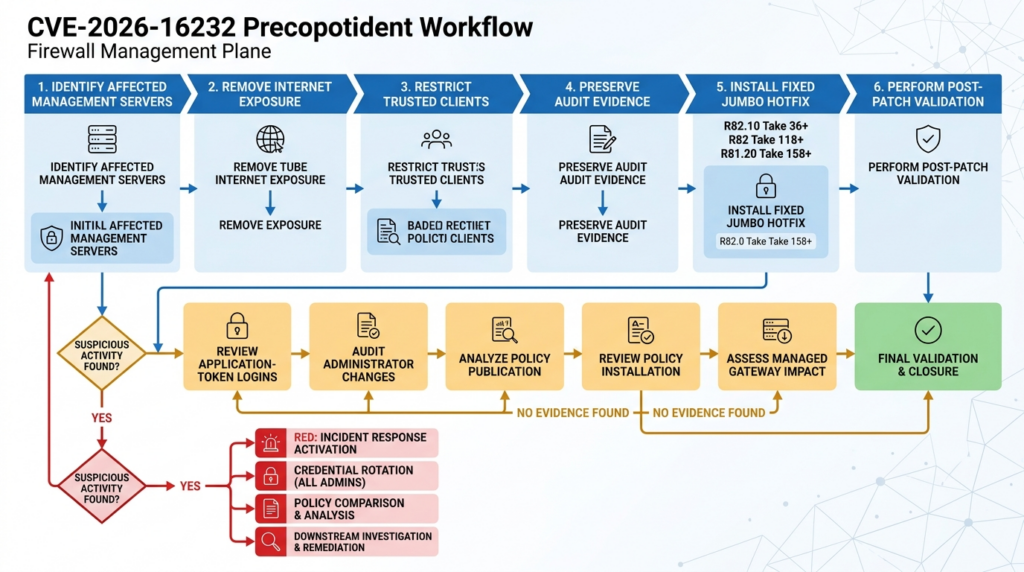
A suspicious application-token login, vendor IOC match, unauthorized administrator, or unexplained policy change should be treated as a potential management-plane compromise.
Contain without destroying evidence
Immediate actions may include:
- Block public and untrusted management access.
- Restrict Trusted Clients.
- Disable or isolate suspicious identities.
- Revoke known application tokens.
- Preserve active-session information.
- Export logs and configuration.
- Snapshot virtual infrastructure where supported.
- Preserve network telemetry.
- Prevent additional policy installations until reviewed.
- Contact Check Point support.
- Activate the incident-response process.
Do not begin by deleting every suspicious account and restoring the newest backup. That may destroy attribution evidence and may restore attacker-created configuration.
Determine the scope of administrative control
Identify:
- First suspicious connection
- Source infrastructure
- Authentication method
- Assigned privileges
- Management domains accessed
- Objects viewed or changed
- Administrators changed
- Trusted Clients changed
- Sessions published
- Policies installed
- Gateways receiving those policies
- Logs or backups accessed
- API credentials created
- Other systems reached from the management server
The public vulnerability produces full administrative privileges. The investigation should therefore begin with a broad hypothesis and narrow it through evidence, not assume the attacker performed only the first visible change.
Compare policy history
For every suspicious session:
- Identify the revision before the session.
- Identify the revision after publication.
- Export changed objects and rules.
- Confirm each change with its documented owner.
- Identify gateways receiving the policy.
- Determine how long the policy was active.
- Search traffic logs for flows enabled by the change.
- Restore a verified configuration through controlled procedure.
The impact of a malicious rule may continue after the attacker’s session ends. Traffic allowed during that period may have enabled access to other systems.
Rotate relevant secrets
Secret rotation should be driven by exposure and evidence.
Consider:
- Administrator passwords
- Application tokens
- API keys
- Certificates used for administrative access
- Secrets stored on or accessible from the management server
- Automation credentials
- Backup credentials
- Directory-service integration credentials
- Cloud credentials available to management integrations
Do not rotate secrets without mapping dependencies. Uncoordinated rotation can create outages and obscure which credential was abused. Prioritize credentials that were accessible to the compromised privilege level and record every change.
Investigate downstream systems
A management-plane compromise may create paths into other assets without executing malware on the management server itself.
Investigate:
- Gateways receiving suspicious policies
- Newly reachable services
- Administrative networks
- Identity infrastructure
- File servers
- Hypervisors
- Backup platforms
- Cloud management interfaces
- Monitoring systems
- Source-control and build systems
- Remote-access infrastructure
- Systems contacted through newly allowed flows
The firewall policy history can help define where access became possible and for how long.
Related Check Point vulnerabilities
CVE-2026-16232 was disclosed alongside two other Check Point vulnerabilities and follows recent exploitation of separate Check Point VPN flaws. They should not be conflated, but together they reveal several distinct security boundaries that require attention.
| CVE | Affected boundary | Publicly described result | Known exploitation status |
|---|---|---|---|
| CVE-2026-16232 | SmartConsole management authentication | Unauthenticated application-token login with full administrative privileges | Confirmado |
| CVE-2026-62144 | Security Management authentication and privilege | Management authentication bypass and privilege escalation | Not reported in the wild by Check Point |
| CVE-2026-62145 | Gaia Portal operating-system privilege | Authenticated low-privilege access can lead to root command execution | Not reported in the wild by Check Point |
| CVE-2026-50751 | Deprecated IKEv1 remote-access VPN authentication | Unauthorized VPN session without a valid password under affected conditions | Confirmado |
| CVE-2024-24919 | Internet-facing VPN and Mobile Access gateway | Potential reading of sensitive information | Exploitation was reported during the 2024 response |
CVE-2026-62144
Check Point describes CVE-2026-62144 as a Management authentication bypass and privilege-escalation vulnerability affecting Security Management and Multi-Domain Management. It received a 9.3 score in the July advisory, but the vendor did not report in-the-wild exploitation at publication. The same current Jumbo Hotfix releases that address CVE-2026-16232 also include the CVE-2026-62144 correction. (Blog da Check Point)
Its relevance is operational. Teams should install the complete vendor Take rather than attempt to isolate only one named fix. A management server exposed in the configuration relevant to CVE-2026-16232 also deserves review for every management-plane correction in that release.
CVE-2026-62145
CVE-2026-62145 concerns privilege escalation in Gaia Portal rather than unauthenticated SmartConsole token issuance. NVD describes an authenticated attacker with read-only Gaia Portal privileges being able to execute commands as root. (NVD)
The attack prerequisites differ:
- CVE-2026-16232 begins without authentication and reaches full management privileges.
- CVE-2026-62145 begins with an authenticated Gaia Portal identity and escalates to operating-system root.
Both matter because management and gateway appliances expose multiple privilege layers. Fixing a SmartConsole authentication bug does not eliminate Gaia administrator risk, and restricting Gaia Portal does not patch the SmartConsole path.
CVE-2026-50751
CVE-2026-50751 is a separate Check Point authentication bypass affecting vulnerable deprecated IKEv1 remote-access configurations. Under the affected conditions, an unauthenticated attacker can establish a VPN session without a valid user password. It targets the remote-access identity boundary rather than the firewall management plane. (Blog da Check Point)
The distinction is important:
- CVE-2026-50751 may place an unauthorized party onto a VPN-accessible network path.
- CVE-2026-16232 may place an unauthorized party inside the administrative control plane with full privileges.
- Neither should automatically be described as direct remote code execution.
- Both show how configuration-dependent authentication paths can become critical entry points.
A detailed analysis of the VPN-side issue is available in Penligent’s review of CVE-2026-50751. It should be read as a separate vulnerability with different prerequisites and remediation, not as the exploit chain for CVE-2026-16232. (Penligente)
CVE-2024-24919
CVE-2024-24919 affected certain Check Point Security Gateways connected to the internet with Remote Access VPN or Mobile Access enabled and could allow access to sensitive information. (NVD)
Its root cause and impact differ from CVE-2026-16232. The useful connection is architectural: security appliances and their management services are high-value targets. They hold policy, routing, authentication, trust, certificates, logs, and privileged network position.
The repeated lesson is not that all Check Point vulnerabilities form one campaign. It is that edge and management infrastructure must be inventoried, patched quickly, isolated from unnecessary networks, and monitored as closely as internet-facing applications.
Automating exposure validation safely
A large enterprise may operate many Management Servers, domains, cloud networks, administrative paths, and support relationships. Manual review can become slow and inconsistent.
Automation is appropriate for collecting and comparing evidence such as:
- Host and role inventory
- Software branch
- Jumbo Hotfix Take
- Trusted Clients entries
- Public and private addresses
- NAT mappings
- Cloud security-group rules
- Management API source restrictions
- Administrative identities
- Audit-log exports
- Publication and installation records
- Remediation timestamps
- Post-fix network tests
Automation is not appropriate for sending an unverified application-token exploit to production Management Servers.
A safe workflow can assign each asset a state:
UNKNOWN
  -> INVENTORIED
  -> VERSION_CONFIRMED
  -> EXPOSURE_CONFIRMED
  -> CONTAINED
  -> PATCHED
  -> RETESTED
  -> LOGS_REVIEWED
  -> CLOSED
Each transition should require evidence. For example:
PATCHEDrequires installed-Take output.CONTAINEDrequires firewall and Trusted Clients evidence.RETESTEDrequires approved and untrusted-path checks.LOGS_REVIEWEDrequires a defined search window and analyst sign-off.CLOSEDrequires no unresolved suspicious activity.
AI-assisted security workflows can help normalize version output, correlate network rules with management assets, summarize audit changes, and identify missing evidence. The useful role of a platform such as Penligente in this type of authorized validation is to keep scope, tool execution, evidence, and human approval connected. It should not convert an actively exploited management-plane vulnerability into an autonomous production exploitation exercise.
Example evidence schema
{
  "asset_id": "mgmt-primary-01",
  "product_role": "Security Management",
  "branch": "R82",
  "jumbo_take": 118,
  "fix_boundary": 118,
  "patch_state": "fixed",
  "internet_reachable_before_response": true,
  "internet_reachable_after_response": false,
  "trusted_clients_before": ["Any"],
  "trusted_clients_after": [
    "10.40.8.20/32",
    "10.40.8.21/32"
  ],
  "application_token_review": {
    "status": "completed",
    "unexpected_events": 0,
    "window_start": "earliest_available_log",
    "window_end": "2026-07-23T04:00:00Z"
  },
  "policy_diff_review": "completed",
  "retest": {
    "approved_jump_host": "allowed",
    "untrusted_test_network": "blocked"
  },
  "closure_owner": "Network Security Engineering"
}
This schema does not replace source evidence. It indexes where the evidence is stored and whether review has been completed.
Common response mistakes
Treating “a handful of customers” as a probability estimate
Check Point’s statement describes what the vendor observed, not the probability that a particular unreviewed organization is safe. (Blog da Check Point)
A deployment matching the documented exposure condition should be treated as high risk even if the known victim count is small.
Checking only internet search engines
A Management Server may be hidden from public indexing but reachable through NAT, a VPN, a partner network, a cloud route, or an MSP connection.
Internal routing and configuration evidence are more authoritative than absence from a public scanning database.
Assuming Trusted Clients is full authentication
Trusted Clients controls acceptable source addresses. It does not prove the identity of the user or application.
Use it with patched software, strong authentication, MFA for human administrators, dedicated application identities, and least privilege.
Relying on MFA as the fix
MFA protects human login flows. CVE-2026-16232 is publicly described as an unauthenticated application-token bypass.
MFA remains important but does not replace the Jumbo Hotfix.
Patching without hunting
Installing a fixed Take stops future exploitation through the corrected path. It does not remove malicious rules, unauthorized administrators, stolen secrets, or downstream access created before the patch.
Any formerly exposed system needs a compromise review.
Searching only the six IP addresses
The published IPs are valuable but incomplete. Attackers can change servers or route through other infrastructure.
Search behavioral evidence, especially unusual application-token authentication followed by administrative changes.
Treating every application token as malicious
Legitimate integrations may produce application-token events. Build an expected-usage inventory and identify deviations.
Disabling every token immediately can break automation and destroy useful context. Contain suspicious identities while preserving evidence.
Running an untrusted public PoC
A claimed exploit may contain destructive behavior, credential theft, persistence, or unrelated malware. It may also crash management services or make configuration changes that are difficult to reverse.
Version, Take, reachability, and Trusted Clients evidence are sufficient to determine remediation.
Reviewing only visible rules
Object changes can alter rule behavior without changing the rule’s text. Compare referenced objects, groups, services, and network definitions.
Missing secondary and disaster-recovery servers
Every Management Server is a potential administrative surface. Patch and review primaries, secondaries, Multi-Domain components, standby systems, and migration instances.
Trusting the package deployment status
Confirm the installed Take on the target and validate service health. A downloaded or scheduled update is not a completed remediation.
Closing the case after blocking internet access
Blocking exposure reduces immediate risk. The vulnerable code remains, prior exploitation remains possible, and connected internal networks may still reach the service.
Contain, patch, investigate, and retest.
Evidence required for closure
A vulnerability ticket should not close with the sentence “Hotfix applied.”
A stronger closure package contains:
| Evidências | Closure question answered |
|---|---|
| Product inventory | Did we find every affected management system? |
| Installed Take output | Is the fixed code present? |
| Package and service status | Did installation complete successfully? |
| Trusted Clients export | Are sources restricted? |
| Firewall, NAT, and cloud-rule evidence | Is direct exposure removed? |
| Authorized-source test | Can administrators still work? |
| Untrusted-source test | Is the management surface blocked? |
| Application-token audit review | Was suspicious token use found? |
| IOC search results | Did known infrastructure appear? |
| Administrator diff | Were unauthorized identities created? |
| Object and rulebase diff | Were security decisions modified? |
| Publication and installation history | Did suspicious policy reach gateways? |
| External log evidence | Is the timeline independently supported? |
| Incident-response disposition | Were anomalies investigated? |
| Owner approval | Is an accountable person accepting closure? |
Where evidence is unavailable, record the gap. “Logs not retained” is not evidence of no exploitation. It is an uncertainty that may justify stronger monitoring, credential rotation, or broader investigation.
PERGUNTAS FREQUENTES
What is CVE-2026-16232?
- CVE-2026-16232 is an improper-authentication vulnerability in the Check Point SmartConsole application-token login process.
- An unauthenticated remote attacker can obtain an application login token and use it to authenticate with full administrative privileges.
- Successful exploitation can allow modification of security policies and security configurations.
- The remote attack condition described publicly requires access to the Management Server IP and Trusted Clients that do not restrict the source.
- Check Point and CISA have confirmed active exploitation. (NVD)
Is CVE-2026-16232 being actively exploited?
- Yes. Check Point says it observed the vulnerability affecting a small number of customers with a specific exposed configuration.
- CISA added the vulnerability to the Known Exploited Vulnerabilities Catalog on July 22, 2026.
- The publicly confirmed highest-risk configuration is a Management system directly exposed to the internet without IP restrictions.
- The identity and objectives of the responsible attacker have not been established in authoritative public reporting.
- Organizations should not wait for a public exploit before patching. (Blog da Check Point)
Which Check Point versions need the hotfix?
- Check Point lists Security Management and Multi-Domain Management on R81.10, R81.20, R82, and R82.10, with older versions also affected.
- R82.10 is fixed beginning with Jumbo Hotfix Take 36.
- R82 is fixed beginning with Jumbo Hotfix Take 118.
- R81.20 is fixed beginning with Jumbo Hotfix Take 158.
- R81.10 and older affected branches should be reviewed with Check Point support and moved to an appropriate supported fixed release.
- Verify the installed Take on every primary, secondary, Multi-Domain, standby, and disaster-recovery system. (Blog da Check Point)
Why does NVD appear to include the fixed Takes in the affected range?
- The current public affected-version field says Take 36, Take 118, and Take 158 “or below” are affected.
- Check Point’s SK and branch release notes identify those same Takes as containing the fix.
- The records were published very recently and may be corrected or clarified.
- For remediation, use the latest Check Point SK185169 and branch-specific release notes as the package source of truth.
- Keep scanner findings open until the installed package and vendor fix boundary have been verified.
- Do not dismiss an alert solely because the server reports the boundary Take, and do not call the boundary Take vulnerable without checking the updated vendor record. (NVD)
How can I verify exposure without exploiting the vulnerability?
- Confirm the product role, version branch, and installed Jumbo Hotfix Take.
- Review whether the Management Server has a public IP, NAT rule, cloud load balancer, VPN route, partner route, or other untrusted path.
- Export the Trusted Clients configuration and look for
Any, broad subnets, stale ranges, or uncontrolled VPN pools. - Test required management ports from an approved jump host and a designated untrusted test network.
- Review Management API source restrictions because they can depend on Trusted Clients.
- Do not request an unauthorized application token or run an exploit against production.
- Combine version, patch, configuration, reachability, and log evidence before assigning a final status.
What logs should defenders review?
- SmartConsole audit logs
- Administrator authentication events
- Application-token authentication events
- Management-session creation and termination
- Administrator and permission-profile changes
- Trusted Clients changes
- Object and rulebase modifications
- Session publication
- Policy installation
- Management API activity
- Gaia operating-system logs
- Firewall and upstream network logs
- Cloud flow logs
- SIEM and external log-export records
- Search the six IP addresses published by Check Point, but do not treat an IOC miss as proof that no exploitation occurred. (Blog da Check Point)
Is restricting Trusted Clients enough?
- No. Restricting Trusted Clients breaks an important documented remote precondition and should be done immediately.
- It does not remove the vulnerable code.
- Trusted administrative hosts can still be compromised.
- Allowlist entries can become stale or overly broad.
- Internal, partner, VPN, or MSP paths may remain reachable.
- Install the fixed Jumbo Hotfix, retain the allowlist, protect Management with a firewall, and review past activity.
- Treat Trusted Clients as one layer in a defense-in-depth design. (Blog da Check Point)
Does MFA prevent CVE-2026-16232?
- MFA helps protect normal human administrator authentication.
- The vulnerability is publicly described as an unauthenticated application-token bypass.
- A pre-authentication token flaw may not invoke the human MFA process.
- MFA should remain enabled because it reduces password-based account takeover.
- It must be combined with the vendor Hotfix, Trusted Clients restrictions, network segmentation, dedicated application identities, and audit monitoring.
What should I do after finding a suspicious application-token login?
- Restrict external Management access immediately.
- Preserve the authentication record, full session timeline, audit logs, and network telemetry.
- Identify the token identity, source address, permissions, domains, and subsequent actions.
- Review administrator, Trusted Clients, object, rule, logging, VPN, and API changes.
- Determine whether the session published changes or installed policy to gateways.
- Revoke suspicious tokens and identities while preserving evidence.
- Rotate credentials and secrets that may have been exposed.
- Compare the current configuration with a known-good revision.
- Investigate downstream systems reachable through any suspicious policy changes.
- Engage Check Point support and the organization’s incident-response team.
Final assessment
CVE-2026-16232 crosses the most important boundary in a firewall management system: the boundary between an untrusted remote requester and an administrator authorized to define network security policy.
The vulnerability should be treated as an emergency when an affected Management Server was directly internet accessible and Trusted Clients were unrestricted. Those are the conditions Check Point associates with the small number of observed customer incidents. The same response model should also be applied cautiously to systems reachable from broad internal, partner, MSP, VPN, or cloud networks.
The required actions are concrete:
- Remove direct internet exposure.
- Restrict Trusted Clients to approved administrative sources.
- Install R82.10 Take 36, R82 Take 118, R81.20 Take 158, or a later vendor-approved fixed Take.
- Obtain vendor guidance for older affected branches.
- Search the published infrastructure indicators.
- Hunt for anomalous application-token authentication.
- Review administrator, object, rule, publication, and policy-installation history.
- Retest from both trusted and untrusted networks.
- Preserve enough evidence to prove both remediation and compromise assessment.
A firewall can remain powered on, pass health checks, and continue forwarding traffic after its management plane has been compromised. The danger is that it may now be enforcing decisions made by the wrong administrator. The response is complete only when the vulnerable path is fixed, management exposure is restricted, historical activity has been reviewed, and every important policy decision can be traced back to an authorized change.

 Portuguese
  English
  German
  French
  Spanish
  Japanese
  Korean
  Hindi
Hindi  Arabic
  Turkish
  Hebrew