
CVE-2026-11645 is not a routine Chrome bug buried inside a large browser update. Google’s June 8, 2026 Stable Channel release for desktop Chrome fixed 74 security issues and singled out CVE-2026-11645 as a high-severity V8 memory access flaw with an exploit already seen in the wild. The patched Stable versions are 149.0.7827.102/.103 for Windows and macOS and 149.0.7827.102 for Linux, with rollout over the following days and weeks. (Lançamentos do Chrome)
The public description is intentionally narrow. Google’s release note identifies CVE-2026-11645 as “out of bounds memory access in V8,” reported by 303f06e3 on April 27, 2026, with a $55,000 reward. OpenCVE’s surfaced record describes the issue more specifically as out-of-bounds read and write in V8 in Google Chrome before 149.0.7827.103, allowing a remote attacker to execute arbitrary code inside a sandbox through a crafted HTML page. Google also states that an exploit for CVE-2026-11645 exists in the wild. (Lançamentos do Chrome)
That set of facts is enough for emergency response. It is not enough to responsibly claim a specific attacker, campaign, payload, exploit primitive, target sector, sandbox escape, or final post-exploitation objective. Google’s advisory also notes that bug details and links may remain restricted until most users have received a fix, and may stay restricted longer if a third-party dependency is involved. That restriction is normal for browser zero-days and should not be read as a reason to delay patching. (Lançamentos do Chrome)
What defenders should do first
| Pergunta | Current public answer | Practical action |
|---|---|---|
| What is the vulnerable component? | V8, Chrome’s JavaScript and WebAssembly engine. | Treat web content as the likely trigger surface. |
| What kind of weakness is public? | Out-of-bounds read/write memory access in V8. | Prioritize memory-corruption response, not just crash triage. |
| Is exploitation confirmed? | Yes. Google says an exploit exists in the wild. | Patch before waiting for public PoC or IoCs. |
| What is the likely trigger? | Public records reference a crafted HTML page. | Prioritize browsers that process untrusted web content. |
| What is the stated impact? | Arbitrary code execution inside the Chrome sandbox. | Do not dismiss it as harmless because it is sandboxed. |
| What version fixes it? | Chrome Stable 149.0.7827.102/.103 on Windows and macOS, 149.0.7827.102 on Linux. | Verify installed and running versions after restart. |
| Are all technical details public? | No. Google is restricting bug details during patch rollout. | Avoid making exploit-chain claims that public data does not support. |
| Should downstream browsers be checked? | Yes, if they use Chromium/V8. | Track Microsoft Edge, Brave, Opera, Vivaldi, Electron, CEF, and embedded Chromium separately. |
The most important operational point is simple: a vendor patch is not the same as a protected fleet. Chrome can auto-update, but users may leave old processes running for days. Enterprise policies may pin versions. VDI images may lag. Headless Chrome inside CI can sit untouched. Electron applications may carry their own Chromium build. Any response that only checks the browser icon on employee laptops will miss real exposure.
What CVE-2026-11645 is, based on confirmed public facts
CVE-2026-11645 is a Chrome V8 memory safety vulnerability. Google’s primary advisory gives the component, severity, reporter, reward, and active exploitation status, but not the root-cause patch details or exploit mechanics. That means the safest technical language is precise but limited: it is an out-of-bounds memory access issue in V8, publicly described by vulnerability databases as out-of-bounds read and write, reachable through crafted HTML, with possible sandboxed code execution. (Lançamentos do Chrome)
BleepingComputer summarizes the impact as out-of-bounds read and write in V8 that remote attackers can exploit through crafted HTML pages to execute arbitrary code inside the browser sandbox. It also notes that this kind of memory access can expose sensitive information, trigger crashes, and help bypass protections such as ASLR when chained with another weakness. (BleepingComputer)
SecurityWeek reports that no attack details are available yet and says threat actors likely chained the bug with a sandbox escape flaw. That is a reasonable inference for many high-end browser intrusions, but it is still an inference. Publicly confirmed facts support “actively exploited V8 bug with sandboxed code execution potential.” They do not yet support naming a specific escape vulnerability or asserting full device compromise from CVE-2026-11645 alone. (SecurityWeek)
That distinction matters. Good vulnerability response separates confirmed facts, strong inferences, and unknowns. A bad write-up turns every browser memory bug into “full RCE on the host.” A useful one explains why sandboxed execution is still dangerous while preserving the boundary between renderer-level compromise and operating-system compromise.
Why V8 bugs keep mattering
V8 sits on one of the most hostile execution boundaries in modern computing. It accepts JavaScript and WebAssembly from websites, ads, SaaS applications, extensions, identity portals, file previewers, collaboration tools, and internal dashboards. It must execute that code fast enough for modern web apps while preserving isolation between mutually distrustful origins and between the browser and the operating system.
The hard part is performance. JavaScript engines do not merely interpret source code line by line. They parse, optimize, speculate, inline, deoptimize, collect garbage, track object shapes, compile hot paths, and constantly make assumptions about types, bounds, lifetimes, callbacks, and side effects. When one of those assumptions is wrong, a bug that looks like “just JavaScript behavior” can become memory corruption.
Google’s own V8 Sandbox write-up explains the core problem well: modern JavaScript engine vulnerabilities are often subtle logic issues that eventually produce memory corruption, not always classic direct C/C++ mistakes. It also says all Chrome exploits caught in the wild during 2021–2023 began with memory corruption in a Chrome renderer process, and 60% of those started in V8. (v8.dev)
That is why CVE-2026-11645 should be handled as a high-priority browser entry-point risk even before full technical details are public. V8 vulnerabilities are not interesting because every one of them immediately escapes the sandbox. They are interesting because they can provide the first reliable foothold in a browser process that handles tokens, session state, sensitive app data, user gestures, enterprise identity flows, and trusted workflows.
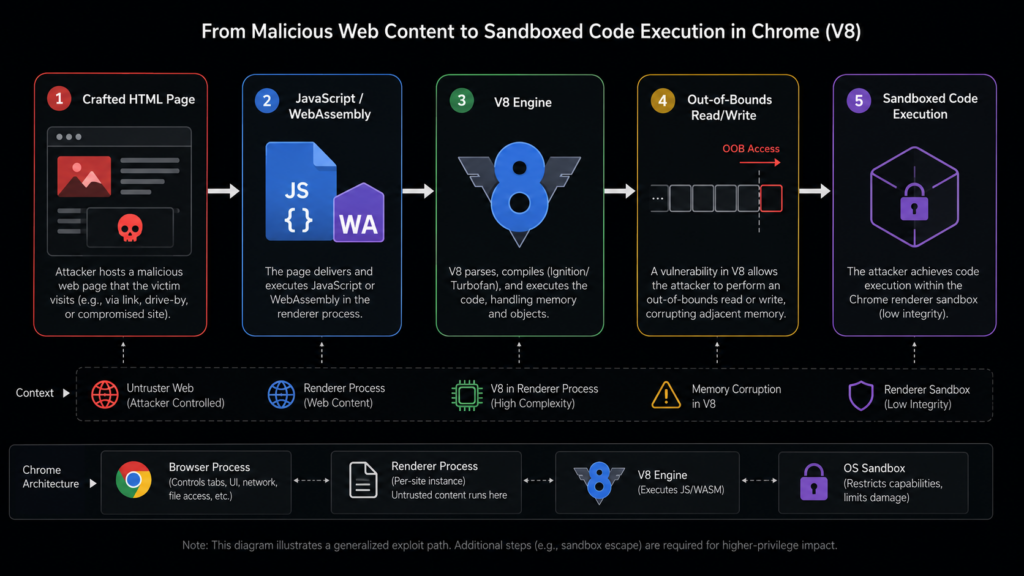
Out-of-bounds read and write, in plain technical terms
An out-of-bounds read means code reads memory outside the region it was supposed to access. An out-of-bounds write means code writes outside the intended region. The exact object, array, buffer, typed array, internal V8 structure, or optimized code path involved in CVE-2026-11645 has not been publicly disclosed at the time of writing, so any explanation must stay at the class level.
In JavaScript engines, an out-of-bounds read can matter because it may disclose memory layout, object addresses, pointer-like values, or data that helps defeat exploit mitigations. Even when the first visible symptom is a crash, an attacker may be using the read primitive to learn enough about heap layout to make a later write reliable.
An out-of-bounds write can be more directly dangerous. If an attacker can control what is written and where it lands, the bug may corrupt object metadata, array lengths, backing store references, maps, internal fields, or other data structures. In a V8 exploit chain, the goal is often to move from “we can trigger a crash” to “we can construct useful read/write primitives” and then to code execution inside the renderer sandbox.
A simplified model helps defenders understand the risk without pretending to reproduce CVE-2026-11645:
1. A crafted page reaches a vulnerable V8 code path.
2. V8 makes an incorrect assumption about bounds, type, lifetime, or side effects.
3. The engine reads or writes outside the intended memory region.
4. The attacker attempts to turn that memory error into a stable primitive.
5. The primitive may allow sandboxed code execution.
6. A separate step may be needed to escape the browser sandbox or steal useful session data.
The public record supports the first five steps at a high level. The sixth step is common in real browser operations but has not been specifically documented for this CVE in public sources.
Why “inside the sandbox” is not a comfort blanket
Some security teams underreact when they see “inside a sandbox.” That phrase does matter: Chrome’s sandbox is a real containment layer, and sandboxed code execution is not equivalent to arbitrary kernel-level execution. But “sandboxed” does not mean “safe.”
A browser sandbox is designed to constrain the damage from a compromised renderer or related process. It can prevent direct filesystem access, limit access to privileged OS APIs, and force the attacker to chain additional bugs or abuse allowed brokered interfaces. That is meaningful. It raises the cost of full device takeover.
But the browser is also where users authenticate, approve access, open documents, interact with cloud consoles, read email, manage SaaS applications, operate wallets, and administer infrastructure. A renderer-level foothold can be enough to steal data visible to the page, manipulate the user’s session, stage phishing inside a trusted origin, capture form inputs, interact with active web applications, or prepare a second-stage escape.
The V8 Sandbox is a newer in-process isolation mechanism aimed at preventing V8 heap corruption from spreading into the rest of the process memory. Its design converts raw pointers into sandbox-relative offsets or table indices, with the goal of stopping a V8 heap corruption primitive from directly corrupting arbitrary process memory. (Chromium Git Repositories)
Google’s V8 Sandbox blog is explicit that the sandbox is a step toward memory safety, not a magic guarantee that V8 bugs stop mattering. It says the sandbox aims to isolate V8 heap memory so corruption there cannot spread to other parts of the host process, and also notes that recent V8 exploits already had to work their way past the sandbox, providing security feedback. (v8.dev)
That is the right mental model for CVE-2026-11645. The sandbox may limit blast radius. The confirmed active exploitation means defenders should still treat the issue as urgent.
The likely attacker path, without inventing a PoC
No public PoC is needed to understand the defensive shape of the risk. The attack starts with content delivery. A target can be steered to a malicious page through spear phishing, malvertising, compromised websites, watering-hole placement, poisoned search results, abuse of collaboration links, or an embedded frame in a trusted workflow. The public description points to a crafted HTML page, not a downloaded executable. (app.opencve.io)
Once the page is loaded, V8 processes attacker-controlled JavaScript or WebAssembly. The exact code path is unknown, but the vulnerable class is memory access in V8. The exploit attempt then needs reliability work: heap shaping, triggering the vulnerable path, arranging object layout, surviving mitigations, and converting memory corruption into a useful primitive.
If the attacker only obtains a renderer-level foothold, the next choice depends on the mission. Some operations may not need a full sandbox escape if the browser context already exposes useful tokens or data. Others may combine the V8 bug with a sandbox escape, a GPU process bug, a broker interface issue, an OS local privilege escalation, or social-engineering steps. SecurityWeek’s assessment that CVE-2026-11645 was likely chained with a sandbox escape is plausible, but the public evidence does not identify that second component. (SecurityWeek)
A practical defender should therefore hunt for two categories of signals. The first is pre-compromise or trigger-adjacent behavior: browser crashes, suspicious browsing paths, visits to newly registered or compromised domains, and renderer instability. The second is post-compromise behavior: unusual child processes, credential access, token replay, suspicious cloud sessions, unexpected extension changes, abnormal downloads, or browser process interactions that do not match normal user behavior.
Affected versions and platforms
Google’s desktop Stable Channel update moved Chrome to 149.0.7827.102/.103 for Windows and macOS and 149.0.7827.102 for Linux. HKCERT’s bulletin lists Google Chrome prior to 149.0.7827.102 on Linux and prior to 149.0.7827.102/.103 on macOS and Windows as affected, and recommends updating to those versions or later. (Lançamentos do Chrome)
Google’s Chrome for Android update on June 8, 2026 released Chrome 149.0.7827.102 and states that Android releases contain the same security fixes as corresponding desktop releases unless otherwise noted. That makes Android Chrome part of the exposure conversation, even though enterprise patch operations often focus first on desktop endpoints. (Lançamentos do Chrome)
The browser ecosystem makes exposure broader than the official Chrome package. Chromium code underlies multiple browsers and application runtimes. Microsoft Edge, Brave, Opera, Vivaldi, Electron apps, CEF-based apps, kiosk browsers, test automation images, headless scraping environments, and embedded webviews may each have separate update timing. The right question is not “Do we use Chrome?” It is “Where do we run Chromium or V8 builds that process untrusted content?”
That includes environments that do not look like browsers to IT inventory teams:
| Meio ambiente | Por que é importante | Validation approach |
|---|---|---|
| Employee Chrome desktop | Primary web attack surface. | Check installed and running version after relaunch. |
| Chrome on Android | Same security fixes usually follow corresponding desktop releases unless noted. | Validate managed mobile browser version through MDM or Play Store state. |
| Microsoft Edge | Chromium-based but patched by Microsoft release cadence. | Track Edge Stable version separately. |
| Brave, Opera, Vivaldi | Chromium-based downstream browsers. | Check vendor release notes and deployed versions. |
| Electron apps | Bundle Chromium and V8 inside the app. | Inventory Electron runtime versions and app vendor patches. |
| CEF-based tools | Embedded Chromium may lag behind browser Stable. | Identify CEF build and Chromium base version. |
| CI with headless Chrome | Often pinned in Docker images. | Rebuild base images and check google-chrome --version. |
| VDI and golden images | Old browser builds can persist across non-persistent sessions. | Update the image, then validate inside live sessions. |
| Kiosk and shared devices | Auto-update may be delayed or blocked by maintenance windows. | Force update and restart outside business hours. |
Why waiting for public exploit details is the wrong move
A common mistake in browser zero-day response is waiting for the exploit to become understandable. That reverses the timeline defenders need. By the time a polished public PoC exists, attackers who already had access may have had days or weeks to adapt, while copycat activity becomes more likely.
Google’s decision to restrict bug details during rollout is a protection measure. It reduces the chance that vulnerability details help attackers while users remain unpatched. It does not mean exploitation is hypothetical. Google’s advisory says an exploit exists in the wild. (Lançamentos do Chrome)
For defenders, the absence of a public PoC should change detection expectations, not patch priority. You should not write brittle signatures for a payload nobody has published. You should not claim to detect “CVE-2026-11645 exploitation” from a generic JavaScript crash. You should patch, validate versions, prioritize high-risk users, and hunt for suspicious browser-adjacent activity.
CVE-2026-11645 in the 2026 Chrome zero-day pattern
CVE-2026-11645 is part of a larger 2026 pattern of actively exploited Chrome bugs across V8, Skia, CSS, and Dawn/WebGPU. SecurityWeek describes it as the fifth Chrome zero-day exploited in 2026, after CVE-2026-2441, CVE-2026-3909, CVE-2026-3910, and CVE-2026-5281. (SecurityWeek)
These related CVEs are not included as decoration. They help defenders understand how browser exploit chains and patch windows behave.
| CVE | Componente | Publicly described weakness | Why it helps explain CVE-2026-11645 |
|---|---|---|---|
| CVE-2026-2441 | CSS | NVD describes a use-after-free in Chrome CSS before 145.0.7632.75 that allowed sandboxed code execution via crafted HTML. | Shows that crafted HTML can reach non-V8 browser components and produce sandboxed execution. (NVD) |
| CVE-2026-3909 | Skia | Out-of-bounds write in Skia, exploited in the wild. | Shows graphics components can provide memory-corruption entry points alongside V8. (Notícias do Hacker) |
| CVE-2026-3910 | V8 | Inappropriate implementation in V8 allowing sandboxed code execution via crafted HTML. | Direct V8 sibling in the same year, also exploited in the wild. (Notícias do Hacker) |
| CVE-2026-5281 | Dawn/WebGPU | Use-after-free in Dawn before 146.0.7680.178, requiring a compromised renderer process and allowing code execution via crafted HTML. | Illustrates multi-stage browser exploitation where one bug may depend on a renderer compromise. (NVD) |
| CVE-2026-11645 | V8 | Out-of-bounds read/write in V8 before 149.0.7827.103, allowing sandboxed code execution via crafted HTML. | Current actively exploited V8 memory-corruption issue. (app.opencve.io) |
The pattern is operationally important. Browser emergency updates often arrive in clusters. Adjacent components can be patched across separate releases. Downstream browsers may lag. Security teams that close a ticket after seeing “Chrome auto-updated” may miss the actual requirement: every browser-like runtime that handles untrusted content must move to a fixed build and restart.
Patch priority by user and system type
Not every asset carries the same risk, but every vulnerable browser that processes untrusted content is in scope. Prioritization should start with people and systems where a browser compromise has disproportionate consequences.
High-priority groups include administrators, SSO owners, cloud console users, source-code maintainers, incident responders, finance staff, HR staff, legal teams, executives, cryptocurrency operators, and anyone who routinely opens untrusted links or attachments. A successful browser foothold on one of these systems can expose tokens, privileged SaaS sessions, sensitive documents, internal applications, and approval workflows.
Next come broad employee endpoints. Even if a user has no admin rights, browser compromise can still lead to account takeover, mailbox access, chat access, internal app access, data theft, and lateral movement through SaaS identity.
Shared systems, VDI environments, and kiosk devices deserve separate handling. They often operate under different update and restart rules. A kiosk browser left open for weeks can continue running vulnerable code even if the installed package has updated in the background.
CI/CD and automation environments are easy to forget. A headless Chrome image used for screenshots, scraping, end-to-end tests, or PDF rendering may process attacker-controlled or semi-trusted content. These environments often run inside containers pinned to old package repositories. They should be rebuilt and checked, not assumed safe.
Version validation commands
The following commands do not detect exploitation. They only help validate whether systems are running a patched or vulnerable browser build. For CVE-2026-11645, treat Chrome versions below the fixed desktop release as requiring urgent update. For downstream Chromium-based browsers, compare against each vendor’s fixed release, not Chrome’s version number.
Windows PowerShell
$paths = @(
  "$Env:ProgramFiles\Google\Chrome\Application\chrome.exe",
  "$Env:ProgramFiles(x86)\Google\Chrome\Application\chrome.exe",
  "$Env:LocalAppData\Google\Chrome\Application\chrome.exe"
)

foreach ($path in $paths) {
  if (Test-Path $path) {
    $version = (Get-Item $path).VersionInfo.ProductVersion
    [PSCustomObject]@{
      Path = $path
      Version = $version
    }
  }
}
For a quick local check:
(Get-Item "C:\Program Files\Google\Chrome\Application\chrome.exe").VersionInfo.ProductVersion
Also check running processes. Installed version and running version can diverge until Chrome restarts:
Get-Process chrome -ErrorAction SilentlyContinue |
  Select-Object Id, ProcessName, Path, StartTime
macOS
/Applications/Google\ Chrome.app/Contents/MacOS/Google\ Chrome --version
If Chrome is installed outside /Applications, find it first:
mdfind "kMDItemCFBundleIdentifier == 'com.google.Chrome'" |
while read app; do
  "$app/Contents/MacOS/Google Chrome" --version
done
Check running Chrome processes:
pgrep -fl "Google Chrome"
Linux
google-chrome --version 2>/dev/null || true
chromium --version 2>/dev/null || true
chromium-browser --version 2>/dev/null || true
Debian and Ubuntu package checks:
dpkg -l | egrep 'google-chrome|chromium'
apt-cache policy google-chrome-stable chromium chromium-browser
RHEL, Fedora, and similar systems:
rpm -qa | egrep 'google-chrome|chromium'
dnf info google-chrome-stable chromium 2>/dev/null
osquery examples
On macOS:
SELECT name, bundle_identifier, bundle_version, path
FROM apps
WHERE name LIKE '%Chrome%';
On Windows:
SELECT name, version, install_location
FROM programs
WHERE name LIKE '%Chrome%';
On Linux with Debian packages:
SELECT name, version, source
FROM deb_packages
WHERE name LIKE '%chrome%' OR name LIKE '%chromium%';
On Linux with RPM packages:
SELECT name, version, release
FROM rpm_packages
WHERE name LIKE '%chrome%' OR name LIKE '%chromium%';
The output should be stored with timestamp, hostname, user context, and collection method. That evidence matters during incident response and audit review because “the package manager said latest” is weaker than “we verified the installed and running browser version on these endpoints after restart.”
A small fleet triage script
For mixed Linux workstations and servers that may contain headless Chrome, a simple version collection script can help start triage. It is not a substitute for an endpoint management platform, but it is useful when CI workers, jump boxes, research machines, or unmanaged systems need fast inspection.
#!/usr/bin/env bash
set -euo pipefail

host="$(hostname -f 2>/dev/null || hostname)"
now="$(date -u +"%Y-%m-%dT%H:%M:%SZ")"

commands=(
  "google-chrome"
  "google-chrome-stable"
  "chromium"
  "chromium-browser"
)

echo "timestamp,host,binary,version,path"

for cmd in "${commands[@]}"; do
  if command -v "$cmd" >/dev/null 2>&1; then
    path="$(command -v "$cmd")"
    version="$("$cmd" --version 2>/dev/null | tr ',' ' ')"
    echo "$now,$host,$cmd,$version,$path"
  fi
done
Store the output centrally and compare versions against the fixed release. Be careful with string comparison. Chrome versions are dotted numeric values, so 149.0.7827.9 is not greater than 149.0.7827.102 even though a naïve string sort may say otherwise.
A safer Python comparator:
from packaging.version import Version

fixed_linux = Version("149.0.7827.102")
observed = Version("149.0.7827.101")

if observed < fixed_linux:
    print("vulnerable or below fixed Linux Chrome release")
else:
    print("at or above fixed Linux Chrome release")
In production, keep the version threshold platform-specific and browser-specific. Chrome, Edge, Brave, Opera, Vivaldi, Electron, and Chromium packages do not always share identical version strings or release timing.
Enterprise patching details that commonly break
Browser patching fails in boring ways. Those boring failures matter more than elegant exploit theory.
The first failure is leaving browsers open. Chrome may download an update while the old vulnerable process continues to run. Users with dozens of tabs may ignore relaunch prompts. VDI sessions may preserve long-lived browser processes. Kiosk systems may be designed not to restart during business hours. Any emergency response should include relaunch enforcement, not just update deployment.
The second failure is version pinning. Chrome Enterprise documentation recommends using the latest Chrome browser version for security updates and warns that running earlier versions exposes users to known security issues. It also documents target version controls, which are useful for rollback or version management but dangerous if they leave systems pinned below a security fix. (Google Help)
The third failure is assuming Stable and Extended Stable have identical timing. Google’s June 8 Chrome Releases page lists a desktop Stable update and a separate Extended Stable update. Enterprises using Extended Stable should verify whether the relevant security fix is included in their channel and version, not infer protection from the Stable announcement alone. (Lançamentos do Chrome)
The fourth failure is ignoring unmanaged installations. Developers may install Chrome under a user profile. Security researchers may run Canary, Dev, Chromium snapshots, or archived test builds. QA teams may pin browser drivers. SaaS support teams may use portable browsers. Asset inventory needs to include filesystem discovery and running processes, not only centrally installed packages.
The fifth failure is downstream lag. A Chromium-based browser is not patched merely because Chrome is patched. Each vendor must ship its own fixed build. During a live zero-day window, that delay can matter.
Temporary risk reduction while patching catches up
Patching is the fix. Temporary controls are only risk reducers for systems that cannot immediately update or restart.
For high-risk users, consider separating privileged workflows from general browsing. Admin consoles, cloud control planes, SSO administration, production dashboards, and finance approvals should not happen in the same browser profile used for random research, social media, webmail, and link-heavy workflows. A dedicated locked-down profile or separate managed browser for privileged work reduces session exposure.
Reduce extension risk. Extensions can widen the browser attack surface, access page content, inject scripts, and complicate incident response. Remove unnecessary extensions from high-value users. Block sideloaded extensions. Audit extensions that request broad host permissions. Pay special attention to AI-themed extensions and productivity add-ons that interact with many pages.
Use phishing-resistant MFA and short-lived sessions for critical applications. A browser exploit may still interact with an authenticated session, but strong authentication and conditional access reduce the chance that stolen credentials alone become durable access.
For especially sensitive groups, apply browser isolation or remote browsing for unknown sites. This is not a universal control, and it can break workflows, but it is defensible for executives, administrators, incident responders, and users under targeted threat.
Consider disabling or restricting high-risk browser features where business impact is acceptable. Some organizations restrict WebUSB, WebBluetooth, WebGPU, file URL access, or extension installation through policy. These controls should be tested carefully and should not be presented as a direct mitigation for CVE-2026-11645 unless a vendor explicitly says so. They reduce attack surface; they do not replace the Chrome fix.
Detection without fake IoCs
There are no reliable public IoCs that uniquely identify CVE-2026-11645 exploitation at the time of writing. That means defenders should avoid publishing or trusting invented domains, JavaScript snippets, YARA rules, or Sigma rules that claim precise detection without evidence.
Useful detection starts with behavior and correlation:
| Sinal | Por que é importante | Caveat |
|---|---|---|
| Sudden Chrome renderer crashes | Memory-corruption exploits often crash during failed attempts. | Crashes are noisy and not proof of exploitation. |
| Chrome crash followed by suspicious login | Browser compromise may precede token or session abuse. | Requires identity telemetry correlation. |
| Chrome spawning unusual child processes | A later-stage payload may attempt process creation. | Chrome legitimately spawns many helper processes. |
| Browser process touching unusual files | Post-exploitation may stage payloads or read local data. | Needs baseline per OS and user role. |
| Visits to new or rare domains before crash | Exploit delivery may use compromised or throwaway infrastructure. | Malvertising and redirects complicate attribution. |
| New extension installation after suspicious browsing | Attackers may persist or steal through extension abuse. | Users also install benign extensions. |
| Cloud session from new device or region soon after browser event | Token theft or session hijack may manifest outside endpoint logs. | Requires identity provider logs. |
A useful SIEM query does not need to say “detect CVE-2026-11645.” It should ask: did high-risk users experience browser instability, suspicious browsing, abnormal child processes, extension changes, or identity anomalies near the same time?
Example detection logic in pseudocode:
IF endpoint.role IN ["admin", "finance", "security", "executive"]
AND browser.name IN ["Chrome", "Chromium", "Edge", "Brave", "Opera", "Vivaldi"]
AND browser.version < fixed_version_for_vendor
AND (
  browser.crash_count_24h > user_baseline * 3
  OR suspicious_child_process_after_browser = true
  OR unusual_identity_session_after_browser_event = true
)
THEN raise priority for investigation
For EDR teams, focus on the post-exploitation edge. Browser memory exploitation often has few clean pre-execution indicators. You are more likely to catch what the attacker does next than the exact V8 trigger.
Incident response triage for suspected exploitation
When CVE-2026-11645 is suspected on an endpoint, the first step is containment without destroying evidence. Isolate the host from the network if policy allows. Preserve volatile data where possible. Collect browser version, running process list, command lines, loaded modules, crash reports, recent browsing history if legally and operationally permitted, extension list, downloads, identity provider logs, EDR timeline, and cloud application audit logs.
Triage should answer practical questions:
| Pergunta | Evidence to collect |
|---|---|
| Was the browser vulnerable at event time? | Installed version, running version, process start time, update logs. |
| Did the user visit suspicious content? | Browser history, DNS logs, proxy logs, secure web gateway logs. |
| Did Chrome crash or behave abnormally? | Crashpad reports, OS event logs, EDR crash telemetry. |
| Was there a follow-on action? | Child processes, file writes, downloads, new persistence, network connections. |
| Were credentials or sessions abused? | IdP sign-ins, SaaS audit logs, impossible travel, new OAuth grants. |
| Were extensions modified? | Extension install time, permissions, update history. |
| Is there lateral movement? | EDR alerts, internal authentication, remote admin tools, cloud API actions. |
Do not spend the first hours trying to reverse engineer a private exploit you do not have. Establish exposure, user risk, suspicious activity, and containment. If you later obtain samples or crash artifacts, reverse engineering becomes useful. At the start, response discipline beats curiosity.
Safe validation for red teams and security researchers
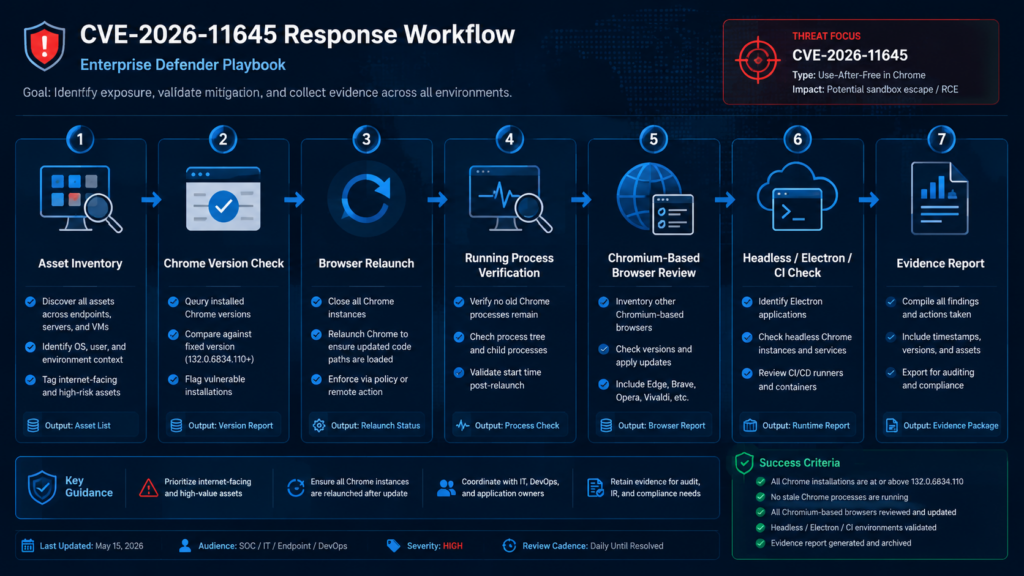
Authorized testers may be asked to validate whether an organization is exposed. That does not require exploit reproduction. In fact, for an actively exploited browser zero-day without public technical details, safe validation should not attempt to create an exploit from scratch on production systems.
A safe validation plan looks like this:
1. Confirm authorization and scope.
2. Inventory Chrome and Chromium-based browsers.
3. Verify installed versions and running process versions.
4. Identify pinned, unmanaged, and embedded Chromium runtimes.
5. Confirm update policy and restart enforcement.
6. Validate that high-risk users are patched first.
7. Document exceptions and compensating controls.
8. Retest after patch deployment and browser relaunch.
For application security teams, the browser component may appear outside normal web-app testing. But it still affects the way users interact with your application. If your SaaS product handles high-value data, your security team should understand whether support staff, administrators, and privileged users are exposed through vulnerable browsers.
For bug bounty hunters, the key boundary is authorization. Do not test browser zero-day behavior against random users, production employees, third-party sites, or vendor infrastructure without explicit permission. Safe work includes analyzing public patches when available, reproducing old fixed bugs in local lab builds, studying V8 internals, and helping organizations validate patch coverage.
In controlled security programs, AI-assisted workflows can help with the evidence-heavy parts of this response: asset enumeration, version checks, target scoping, validation notes, exception tracking, and retest documentation. Penligent’s public materials describe AI-assisted penetration testing around authorized scope, evidence capture, CVE-focused validation, and controlled agent workflows; that kind of workflow is relevant for organizing proof that a fleet or target environment was actually checked, not for inventing private exploit details. (Penligente)
Why browser exposure is bigger than browser inventory
Security programs often track applications, servers, cloud assets, and CVEs in deployed packages. Browsers cut across those categories. A browser is both user software and an execution environment for untrusted code. It has access to identity, SaaS, documents, chat, email, source code, dashboards, and internal tools.
That makes CVE-2026-11645 a user-risk and workflow-risk issue, not only a software inventory issue. A vulnerable browser on a helpdesk machine may expose customer tickets. A vulnerable browser on a developer workstation may expose source control tokens. A vulnerable browser on a finance workstation may expose invoice approvals. A vulnerable browser on a cloud administrator’s machine may expose management sessions.
The highest-risk environment is not necessarily the one with the most vulnerable browsers. It is the one where a browser compromise gives access to the most valuable live sessions.
Defenders should map browser exposure to business function:
| User group | Browser compromise impact | Extra control |
|---|---|---|
| Cloud admins | Control-plane access, secrets, infrastructure changes. | Dedicated admin browser, phishing-resistant MFA, session monitoring. |
| Developers | Source code, CI tokens, package publishing, internal docs. | Separate profiles, token scope limits, signed commits, package publish controls. |
| Finance | Payment approvals, invoice manipulation, bank portals. | Transaction verification, device trust, step-up authentication. |
| HR and legal | Sensitive documents, employee data, contracts. | DLP, restricted sharing, session anomaly alerts. |
| SOC analysts | Security tooling, EDR consoles, investigation data. | Privileged access workstations, console session logging. |
| Executives | Email, files, approvals, strategic data. | Browser isolation for unknown links, strict extension allowlist. |
| Support teams | Customer environments, impersonation tools, tickets. | Just-in-time access, audit logs, session recording where appropriate. |
Common mistakes during CVE-2026-11645 response
| Mistake | Why it is dangerous | Better approach |
|---|---|---|
| “Chrome updates automatically, so we are done.” | Auto-update may not relaunch the vulnerable process. | Validate installed and running versions after restart. |
| Only checking Google Chrome. | Chromium-based browsers and embedded runtimes may remain exposed. | Inventory Chrome, Edge, Brave, Opera, Vivaldi, Electron, CEF, and headless builds. |
| Waiting for exploit details. | Google already confirmed active exploitation. | Patch and hunt based on behavior, not public PoC availability. |
| Treating sandboxed execution as low severity. | Browser sessions and tokens may still be valuable. | Prioritize by user privilege and browser workflow. |
| Writing fake IoCs. | Bad indicators create false confidence. | Use behavior-based detection and cite evidence limits. |
| Relying on package version only. | Running processes may still be old. | Check process start time and force relaunch. |
| Ignoring mobile Chrome. | Android release notes say corresponding security fixes apply unless noted. | Validate managed mobile browser versions. |
| Forgetting CI and automation. | Headless Chrome can process untrusted content in pipelines. | Rebuild images and check browser binaries. |
| Treating all users equally. | Some sessions carry far higher risk. | Patch high-value users first, then complete fleet rollout. |
Practical hardening after the patch
CVE-2026-11645 will not be the last V8 zero-day. The strategic lesson is not “patch this one browser bug.” It is “make browser compromise less useful.”
Start with update hygiene. Chrome and downstream browsers should have managed update policies, relaunch enforcement, visibility into failed updates, and reporting on old versions. Any organization with thousands of endpoints should be able to answer, within hours, which systems are below a fixed version.
Next, control extensions. Browser extensions remain one of the easiest ways to turn a browser into a persistent data-access layer. Restrict broad host permissions, block sideloading, review extension updates, and remove abandoned extensions. This is especially important for users who handle source code, admin consoles, support tools, financial systems, or customer data.
Separate privilege. Use one browser profile for general browsing and another for privileged workflows, or use dedicated workstations for high-risk admin activity. The goal is not perfect isolation. The goal is to reduce the chance that a random website, ad, or link shares a process and session environment with your most sensitive work.
Strengthen identity controls. Phishing-resistant MFA, device posture checks, conditional access, short session lifetimes for critical applications, and token anomaly detection all reduce the value of browser-level access. A browser exploit should not automatically become durable cloud access.
Improve telemetry. Endpoint logs, browser crash data, proxy logs, DNS logs, secure web gateway telemetry, identity provider logs, SaaS audit logs, and EDR process trees need to be correlatable. Browser zero-day response fails when each team can only see its own slice.
Notes for software vendors and SaaS operators
If you operate a SaaS platform, CVE-2026-11645 is still relevant even though the bug is in Chrome. Customers may access your product through vulnerable browsers. Your support staff may use browsers to troubleshoot customer accounts. Your admin users may handle sensitive workflows through web consoles. Your application may be framed, linked, previewed, or opened from email clients and collaboration tools.
You cannot patch your customers’ browsers, but you can reduce the value of browser compromise inside your application. Use HttpOnly and Secure cookies. Keep session tokens short-lived where practical. Bind sensitive actions to step-up authentication. Monitor impossible travel and unusual device changes. Limit OAuth grants. Avoid exposing long-lived secrets in browser-accessible storage. Protect admin routes with stricter controls than ordinary user routes.
For high-risk actions, require fresh authentication and server-side authorization checks. A browser compromise may let an attacker act as a user, but strong server-side controls can still limit what a stolen session can do.
PERGUNTAS FREQUENTES
What is CVE-2026-11645?
- CVE-2026-11645 is a Google Chrome vulnerability in V8, the JavaScript and WebAssembly engine.
- Google describes it as out-of-bounds memory access in V8.
- Public vulnerability records describe it as out-of-bounds read and write before Chrome 149.0.7827.103.
- The publicly stated attack surface is a crafted HTML page.
- The stated impact is arbitrary code execution inside the browser sandbox. (Lançamentos do Chrome)
Is CVE-2026-11645 actively exploited?
- Yes. Google says an exploit for CVE-2026-11645 exists in the wild.
- Public sources do not yet identify the attacker, victims, delivery infrastructure, or complete exploit chain.
- The absence of public exploit details should not delay remediation.
- Treat the issue as an emergency patch-and-validate item. (Lançamentos do Chrome)
What Chrome version fixes CVE-2026-11645?
- Google’s desktop Stable Channel update lists 149.0.7827.102/.103 for Windows and macOS.
- The Linux Stable Channel version is 149.0.7827.102.
- HKCERT also lists Chrome before those versions as affected and recommends updating to those versions or later.
- After updating, relaunch Chrome and verify the running process version, not only the installed package version. (Lançamentos do Chrome)
Does sandboxed code execution mean the endpoint is safe?
- No. Sandboxing reduces impact, but it does not make the bug harmless.
- A browser sandbox may prevent direct system compromise, but a compromised browser context can still expose web sessions, page data, tokens, user actions, and sensitive workflows.
- High-end attacks may chain a renderer or V8 bug with a sandbox escape or another local vulnerability.
- Defenders should prioritize users whose browser sessions carry privileged access.
Are Edge, Brave, Opera, Vivaldi, Electron, and CEF affected?
- They may be exposed if they include the vulnerable Chromium or V8 code.
- Do not assume downstream browsers are fixed at the same time as Chrome.
- Track each vendor’s fixed version and release timing.
- Electron and CEF applications require separate inventory because they often bundle their own Chromium runtime.
Can defenders reliably detect CVE-2026-11645 exploitation?
- There are no public, reliable, CVE-specific IoCs at the time of writing.
- Browser crashes, suspicious browsing, abnormal child processes, token replay, extension changes, and identity anomalies can support investigation.
- A single Chrome crash is not proof of exploitation.
- Detection should focus on correlated behavior before and after suspected browser compromise.
Should teams wait for a public PoC before taking action?
- No. Google has already confirmed active exploitation.
- A public PoC would increase copycat risk, not reduce the need to patch.
- Patch validation, browser relaunch, downstream browser inventory, and high-risk user prioritization should happen immediately.
- PoC-driven testing should be restricted to authorized lab environments.
What should security teams document for audit and remediation?
- The affected product and fixed version thresholds.
- Asset inventory covering Chrome and Chromium-based runtimes.
- Update deployment time and relaunch enforcement.
- Version validation evidence after patching.
- Exceptions, business owners, compensating controls, and retest dates.
- Any suspicious endpoint or identity telemetry reviewed during response.
Julgamento final
CVE-2026-11645 deserves urgent handling because the confirmed facts are already serious: V8 memory corruption, crafted HTML attack surface, sandboxed code execution potential, and active exploitation acknowledged by Google. The missing details are also important. They mean defenders should not invent a campaign, payload, or escape chain. They do not mean the risk is theoretical.
The strongest response is disciplined and evidence-based: update Chrome, restart it, verify the running version, check downstream Chromium runtimes, prioritize high-value users, watch for browser-adjacent suspicious behavior, and preserve proof of remediation. Browser zero-days are rarely solved by one patch ticket. They are solved by knowing exactly where untrusted web code runs in your environment and proving that every important copy moved past the vulnerable build.

 Portuguese
  English
  German
  French
  Spanish
  Japanese
  Korean
  Hindi
Hindi  Arabic
  Turkish
  Hebrew