
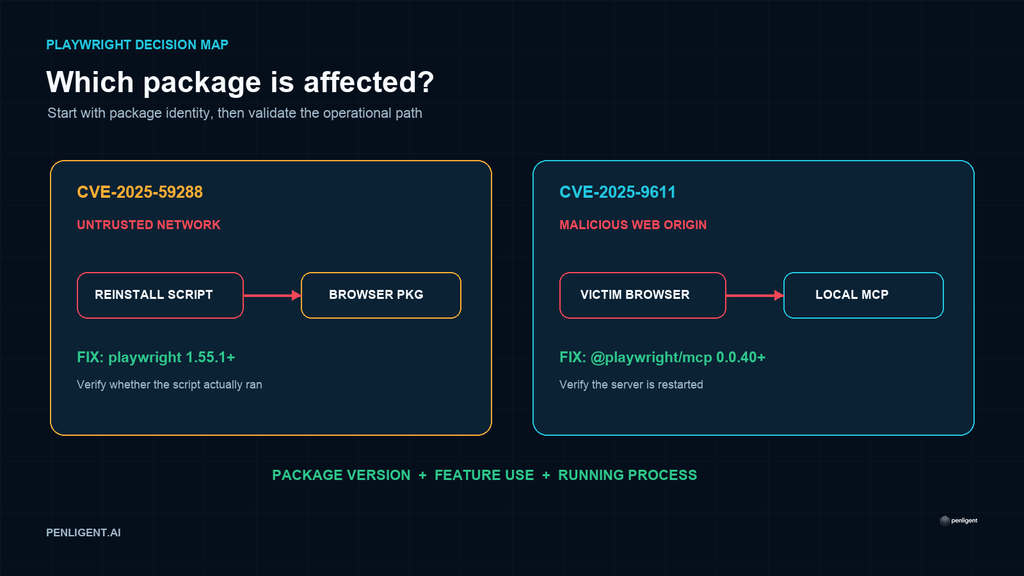
“Playwright CVE” does not identify one vulnerability. Two verified issues commonly associated with that search affect different packages and different trust boundaries: CVE-2025-59288 concerns browser reinstall scripts in Microsoft Playwright before version 1.55.1, while CVE-2025-9611 concerns DNS rebinding against the Playwright MCP server before version 0.0.40.
Neither issue should be summarized as a universal flaw in every Playwright test. Teams must first identify which package is present, whether the vulnerable feature or server is used, and which version is actually deployed.
Playwright vulnerability quick comparison
| Item | CVE-2025-59288 | CVE-2025-9611 |
|---|---|---|
| Componente | Microsoft Playwright browser reinstall scripts | Microsoft Playwright MCP server |
| npm package | playwright | @playwright/mcp |
| Versões afetadas | 1.0.0 through versions before 1.55.1 | Versions before 0.0.40 |
| First patched version | 1.55.1 | 0.0.40 |
| Required path | An affected reinstall script downloads and installs a browser package under an attacker-influenced network condition | A victim browser can reach a locally running MCP server through DNS rebinding because Origin was not validated |
| Primary boundary | Software-download authenticity | Browser-to-local-service request trust |
Explore Penligent for authorized security testing.
CVE-2025-59288: the vulnerable path is browser installation
CVE-2025-59288 is not a vulnerability in ordinary page automation logic. The reviewed GitHub advisory identifies macOS browser reinstall scripts that downloaded installer packages using an insecure TLS option and then installed the packages. Under a suitable man-in-the-middle position, an attacker could substitute content during that privileged software-installation workflow.
The version boundary in Microsoft’s CVE Record is Playwright before 1.55.1. Updating removes the known vulnerable script behavior. However, risk triage should also ask whether the affected reinstall scripts were ever executed. A repository can contain an affected dependency without having used that operational path, while a CI or developer host that ran such a script over an untrusted network deserves additional review.
Evidence to collect
- The resolved
playwrightversion in the lock file and installed dependency tree. - CI logs or shell history showing whether a browser reinstall script ran.
- The source and checksum of installed browser packages where historical evidence exists.
- Whether installation occurred on an untrusted, intercepted, or enterprise-proxied network.
- Whether the resulting installer executed with elevated privileges.
Absence of script execution is meaningful exposure evidence, but it is not a reason to retain an obsolete package. Upgrade to a supported Playwright release and rebuild the environment from trusted sources.
CVE-2025-9611: the vulnerable path is a local MCP service
CVE-2025-9611 affects @playwright/mcp antes de 0.0.40. The reviewed advisory states that the server failed to validate the Origin header on incoming connections. That omission allowed a malicious website, through DNS rebinding and passive user interaction, to send requests to a locally running Playwright MCP server and invoke exposed MCP tools.
This is a local-service trust-boundary problem. The browser is allowed to initiate network requests, DNS answers can change, and a service that trusts the destination address alone may mistake an untrusted web origin for an authorized local client. Origin validation adds an application-layer check that the vulnerable versions lacked.
The existence of playwright in a test project does not prove that Playwright MCP is installed or listening. Conversely, developers may run @playwright/mcp through an editor or agent configuration even when it is absent from the main application’s production dependency manifest. Inventory editor configuration, global npm installations, developer containers, agent launch files, and active processes.
Why the severity numbers differ
For CVE-2025-59288, Microsoft records a CVSS 3.1 score of 5.3 Medium for an adjacent-network spoofing scenario. GitHub’s reviewed advisory lists a CVSS 4.0 score of 8.7 High for its assessed installation consequences. These are not interchangeable numbers: they use different CVSS generations and scenario assumptions.
Do not average the scores or select the larger number without context. Prioritize based on whether the vulnerable script ran, whether privileged installation occurred, and whether the network path could have been influenced. For CVE-2025-9611, the public advisory assigns CVSS 4.0 score 7.2 High ; local server reachability and tool capability determine the practical impact.
Repository and runtime inventory
The following commands are read-only examples for projects and workstations you administer:
# Project dependency view
npm ls playwright @playwright/mcp

# Lock-file search across a repository
rg -n '"(playwright|@playwright/mcp)"|playwright@|@playwright/mcp@' \
  package-lock.json npm-shrinkwrap.json yarn.lock pnpm-lock.yaml

# Global npm installations on a developer host
npm ls -g --depth=0 playwright @playwright/mcp

# Look for MCP launch configuration
rg -n '@playwright/mcp|playwright-mcp' . \
  --glob '!node_modules/**' --glob '!dist/**'
Run package-manager commands inside the exact container, workspace, or CI image used for execution. A root lock file may not describe a nested workspace or globally installed MCP server. Record the image digest or workstation identity with the result.
Remediation decision matrix
| Observation | Decision | Required action |
|---|---|---|
playwright < 1.55.1, reinstall scripts used | CVE-2025-59288 operational path present | Upgrade, rebuild installed browsers from trusted sources, and review installation evidence |
playwright < 1.55.1, scripts not used | Affected dependency present; specific install path not established | Upgrade and retain negative execution evidence |
@playwright/mcp < 0.0.40 launched locally | CVE-2025-9611 exposure present | Upgrade immediately and restart the MCP process |
| MCP package installed but not configured or running | Vulnerable code present; reachable service not established | Upgrade or remove it and verify no stale process remains |
| Only current fixed packages are resolved and running | Version remediation present | Retain lock-file, image, and runtime evidence |
Verification after the update
- Update through the project’s normal package-management and review process.
- Regenerate the lock file and confirm the resolved version, not only the manifest range.
- Rebuild developer or CI containers so stale
módulos_nólayers are removed. - Restart any Playwright MCP process and confirm the running process comes from the corrected installation.
- For CVE-2025-59288, replace browsers installed through the affected script when provenance cannot be established.
- Test legitimate automation and MCP workflows after the change.
- Store the lock-file diff, image digest, process restart, and functional-test result.
Temporary controls
When an immediate MCP update is impossible, stop the server when it is not needed, restrict its listener and surrounding network access, and avoid exposing it through tunnels or broad interfaces. These measures reduce reachability but do not replace Origin validation. For the installer-script issue, do not run the affected scripts; obtain browser packages through a trusted, authenticated software-distribution path.
Conclusão
The useful answer to “Playwright CVE” starts with package identity. CVE-2025-59288 affects a browser-installation workflow in playwright before 1.55.1. CVE-2025-9611 affects the browser-to-local-service boundary in @playwright/mcp before 0.0.40. Treating them as one generic Playwright RCE hides the prerequisites that determine risk. Inventory the exact package and process, update the correct version line, rebuild stale environments, and retain runtime evidence.
Watch the Penligent workflow
This general product overview shows the Penligent workflow; it is not a demonstration of exploiting the vulnerabilities discussed above.
 Portuguese
 English
 German
 French
 Spanish
 Japanese
 Korean
 Hindi
 Arabic
 Turkish
 Hebrew