
CVE-2026-40933 is a critical Flowise vulnerability in the Custom MCP path where user-controlled stdio MCP configuration can reach operating-system command execution. The official GitHub advisory describes affected npm packages flowise ve flowise-components through version 3.0.13, with 3.1.0 listed as the patched version, and assigns the issue a CVSS 3.1 score of 9.9 with the vector AV:N/AC:L/PR:L/UI:N/S:C/C:H/I:H/A:H. NVD records the same core description and maps the weakness to CWE-78, OS command injection, while noting that NVD’s own assessment had not yet been provided at the time of its record update. (GitHub)
The short version for defenders is blunt: any self-hosted Flowise deployment that lets users create, edit, import, or test Custom MCP configurations should be treated as a high-priority execution surface. This is not only about whether a user can type a bad shell metacharacter. It is about whether a lower-trust user, imported chatflow, compromised account, or shared workflow artifact can influence what process a higher-trust server launches.
Flowise’s own documentation describes Custom MCP as a powerful feature that allows users to connect to any MCP server of their choice. The same documentation explains that MCP supports stdio and Streamable HTTP transports, that stdio is useful for local integrations and command-line tools, and that Flowise recommends Streamable HTTP for production use. It also documents CUSTOM_MCP_PROTOCOL, whose default is stdio, and says sse is recommended for production because it is more secure. (FlowiseAI)
That combination is why CVE-2026-40933 matters beyond a single product patch. Flowise sits in the middle of models, tools, API keys, workflow definitions, and user-uploaded configuration. If an attacker reaches server-side command execution there, the blast radius can include stored credentials, connected SaaS accounts, private data sources, internal APIs, and whatever network the Flowise process can reach.
What is known about CVE-2026-40933
| Saha | Current public information |
|---|---|
| CVE | CVE-2026-40933 |
| Ürün | Flowise, including flowise ve flowise-components npm packages |
| Etkilenen sürümler | GitHub lists versions <= 3.0.13 as affected |
| Patched version in official advisory | GitHub and GitLab list 3.1.0 |
| Zayıflık | CWE-78, Improper Neutralization of Special Elements used in an OS Command |
| Official severity | GitHub CNA score 9.9 Critical |
| Attack precondition | Low privileges according to the GitHub CVSS vector |
| User interaction | None in the official CVSS vector, though real-world paths may involve an authenticated user or imported workflow artifact |
| Core issue | Unsafe handling of stdio MCP configuration where command and argument fields can reach OS command execution |
| Key operational concern | Input validation alone may not be enough if users can still cause the server to launch attacker-controlled code |
The official advisory says the vulnerability lies in input sanitization around the Custom MCP configuration in the Flowise canvas. It specifically calls out that a user can add a new MCP using stdio and provide commands or arguments that lead to execution on the underlying OS, despite existing checks such as command-injection validation, local-file-access validation, and a list of allowed commands. (GitHub)
Snyk’s advisory describes the same issue as command injection through the Custom MCP configuration, where crafted komuta ve args fields can execute arbitrary commands on the operating system, and recommends upgrading flowise-components to 3.1.0 or higher. (VulnInfo Guide)
There is an important wrinkle. Obsidian Security later published a detailed analysis arguing that Flowise’s input-validation based fix does not fully solve the underlying execution-boundary problem and that self-hosted deployments remain risky when stdio MCP is enabled. Obsidian’s mitigation advice is to disable stdio MCP if it is not required by setting CUSTOM_MCP_PROTOCOL=sse, and to treat MCP server configurations as executable code when stdio remains enabled. (Obsidian Security)
That does not mean version updates are useless. Upgrading removes known vulnerable code paths and should still be the first step. It does mean that production guidance should not stop at “upgrade and move on.” For agent systems, the safer question is: can an untrusted or lower-trust input still decide what process the server launches?
Why stdio MCP changes the threat model
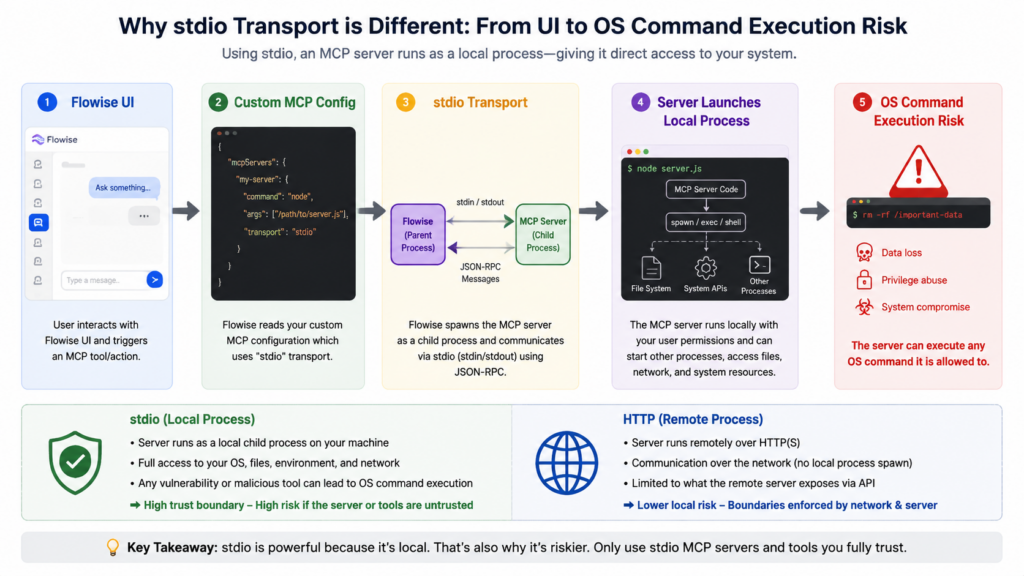
The Model Context Protocol defines two standard transports: stdio and Streamable HTTP. In stdio mode, the MCP client launches the MCP server as a subprocess, then exchanges JSON-RPC messages over standard input and standard output. In Streamable HTTP mode, the server runs as an independent process and communicates through HTTP POST and GET requests over an MCP endpoint. (Model Bağlam Protokolü)
That distinction is the center of CVE-2026-40933.
A remote HTTP tool endpoint can still be dangerous. It can expose data, mutate state, leak tokens, or be abused through SSRF and authorization bugs. But an HTTP MCP URL is not the same primitive as “start this local process with these arguments.” A stdio MCP configuration is closer to a launcher definition. It tells the host what binary or package runner to start, what arguments to pass, and sometimes what environment variables to attach.
A benign local developer configuration might look structurally like this:
{
  "command": "npx",
  "args": [
    "-y",
    "@modelcontextprotocol/server-filesystem",
    "/Users/alice/project"
  ],
  "env": {
    "MCP_LOG_LEVEL": "info"
  }
}
That shape is not automatically malicious. Local users run command-line tools all the time. The risk appears when that same shape crosses a trust boundary. If a web application allows a team member, imported JSON file, marketplace workflow, or compromised account to supply this configuration, the server is no longer merely parsing a tool definition. It may be launching code selected by someone the server should not fully trust.
The official MCP specification recognizes the security sensitivity of this model. It says MCP enables arbitrary data access and code execution paths, warns that tools must be treated with caution, and says hosts must obtain explicit user consent before invoking tools. (Model Bağlam Protokolü)
Flowise’s documentation also makes the production distinction visible. It says stdio transport is particularly useful for local integrations and command-line tools, says it should only be used when running Flowise locally rather than in cloud services, and lists Streamable HTTP as recommended. (FlowiseAI)
CVE-2026-40933 is what happens when that local-execution assumption collides with a hosted workflow builder.
The root cause in practical terms
At a software level, the vulnerability sits at the boundary between configuration and process creation. Flowise Custom MCP accepts configuration for an MCP server. For stdio, that configuration can include command-like fields. The backend may need to connect to the MCP server to list available tools or actions. Connecting to a stdio MCP server means launching a subprocess.
That creates a three-step chain:
| Adım | What the system thinks it is doing | What the attacker cares about |
|---|---|---|
| User or artifact provides MCP config | Connecting a tool to an agent workflow | Supplying process-start parameters |
| Flowise validates the config | Blocking obvious dangerous strings or paths | Finding allowed commands or argument shapes that still execute code |
| Backend enumerates or connects to the MCP server | Listing available actions for the canvas | Triggering server-side process creation |
The official advisory shows the high-level problem: an authenticated attacker can add an MCP stdio server with an arbitrary command and achieve command execution. It also notes that allowed commands such as npx can be combined with execution-oriented arguments. (GitHub)
OX Security frames the issue as part of a broader MCP stdio command-injection family. Their advisory says applications allowed user-controlled command fields to flow into MCP stdio execution, and that hardening bypasses could work even where products tried to restrict commands to approved entries such as Python, npm, or npx. (OX Security)
Obsidian’s later analysis makes the point more sharply: stdio MCP is a code execution primitive by design because the client spawns whatever the configuration points to. Their rule of thumb is practical: stdio MCP becomes a vulnerability when a lower-trust actor or untrusted artifact can influence what process a higher-trust environment launches without an authorization boundary, isolation boundary, or explicit user approval. (Obsidian Security)
That is the sentence security teams should carry into architecture review. The problem is not merely “bad input.” The problem is “untrusted configuration reached an execution primitive.”
Why allowlists are not enough
Allowlisting is better than accepting any command string. It blocks obvious payloads and reduces the accidental attack surface. Flowise documents CUSTOM_MCP_SECURITY_CHECK=true, enabled by default, with protections such as command allowlisting, argument validation, injection prevention, and environment protection. (FlowiseAI)
The weakness is that some allowed commands are interpreters, package runners, container launchers, or scripting gateways. A rule that allows node, npx, python, python3veya docker may still allow code execution through normal features of those programs. Attackers do not always need shell metacharacters if the allowed program can fetch, load, interpret, or run code as part of its intended behavior.
A safe review mindset is to classify allowed commands by what they can do:
| Allowed command type | Why teams allow it | Why it remains risky |
|---|---|---|
| Language runtime | Runs a local MCP server written in that language | Can execute scripts, import modules, read files, and access environment variables |
| Package runner | Conveniently starts community MCP servers | Can fetch remote packages or run package lifecycle code |
| Container runtime | Isolates MCP servers in containers | Can mount files, access networks, or run privileged containers if misconfigured |
| Shell wrapper | Flexible local integration | Turns argument validation into a losing game |
| Fixed binary with fixed path | Least flexible, easier to reason about | Still needs filesystem, argument, and permission controls |
The lesson is not that allowlists are pointless. The lesson is that allowlists must be paired with execution isolation, fixed server definitions, package pinning, approval flows, and logging. If users can supply both the executable and the arguments, the allowlist is only a speed bump.
How a malicious chatflow can become the delivery vehicle
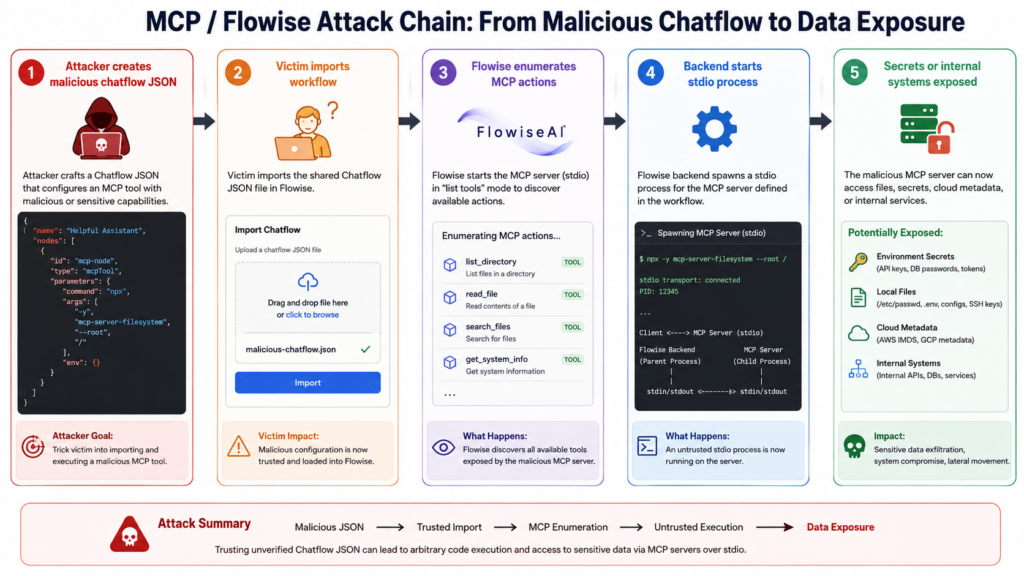
The official advisory focuses on authenticated addition of an MCP stdio server. Obsidian’s analysis adds a more operational path: a crafted shared chatflow. Flowise workflows can be exported and imported as JSON. A malicious workflow can carry a Custom MCP node. When the imported workflow renders, the Flowise canvas may populate the “Available Actions” dropdown by asking the backend to enumerate the MCP server’s tools. With stdio transport, that enumeration can start the configured command. Obsidian says import alone can trigger server-side execution before the user saves or runs the workflow. (Obsidian Security)
This is why the term “authenticated RCE” can understate the real-world risk. The attacker may not need their own valid account if they can persuade a valid user to import a workflow. The victim action can look like routine evaluation of a useful agent template. The execution occurs because the platform tries to make the workflow interactive by discovering tools.
The attack pattern looks like this:
| Sahne | Attacker move | Defender visibility |
|---|---|---|
| Packaging | Create a chatflow JSON with a Custom MCP node | Static workflow review can catch suspicious MCP config |
| Delivery | Share the workflow through a community channel, ticket, repo, email, or internal chat | Security controls may treat JSON as harmless |
| İthalat | Victim imports the chatflow into self-hosted Flowise | Application logs may show import or canvas activity |
| Numaralandırma | Backend lists available MCP actions | Child process creation may appear under the Flowise process |
| Post-execution | Payload accesses files, env vars, tokens, or network | EDR, container logs, DNS, egress, and audit logs become critical |
That sequence is common in agent tooling: a file that looks like configuration quietly becomes an execution request. Any organization running agent platforms should treat imported workflow definitions like source code, not like inert documents.
What an attacker gets after execution
The practical impact depends on how Flowise is deployed. In a weakly isolated container with no secrets, no internal network, no mounted host paths, and no privileged credentials, impact is limited. In many real deployments, Flowise is connected to LLM provider keys, vector databases, private documents, SaaS tools, cloud credentials, internal APIs, and user-uploaded files. Flowise’s documentation notes that credentials such as OpenAI or Pinecone API keys are stored as encrypted credentials and retrieved during chatflow interaction. (FlowiseAI)
A server-side execution path can therefore lead to:
| Asset | Why it may be exposed |
|---|---|
| Environment variables | API keys and database URLs are often injected into containers or process environments |
| Local credential files | Self-hosted services may store encryption keys, logs, uploaded files, and local database files |
| Flowise application data | Chatflows, credentials metadata, uploaded documents, and agent outputs may be reachable from the process context |
| Connected SaaS tools | MCP tools and Flowise integrations may contain tokens or account-level access |
| Internal network | A server inside a VPC or office network can reach services that are not internet-facing |
| Cloud metadata services | Poor egress controls can expose instance identity credentials |
| Build or automation systems | If Flowise is used in internal experimentation, CI secrets or developer machines may be nearby |
Obsidian describes the impact as OS-level execution with the Flowise process’s privileges and notes that production Flowise instances are often wired into databases, APIs, and cloud accounts. (Obsidian Security)
That is why incident response should include credential rotation when compromise is plausible. Patching the application does not revoke secrets that may already have been read.
Who should prioritize this first
Not every Flowise installation has the same risk. A local single-user experiment behind a laptop firewall is not the same as a team-hosted instance connected to production SaaS accounts. Use this table to rank urgency.
| Dağıtım modeli | Risk level | Neden |
|---|---|---|
| Self-hosted Flowise exposed to the internet | Kritik | Authenticated attack paths, account compromise, and imported workflows can reach server-side execution |
| Team-hosted Flowise behind SSO | Yüksek | Internal users, compromised accounts, and shared workflow artifacts remain realistic |
| Flowise connected to production data sources or SaaS tokens | Kritik | Execution can become credential theft and downstream compromise |
| Flowise running as root in Docker | Yüksek | Process compromise may have broader filesystem and container impact |
| Local single-user Flowise with no secrets | Orta | Still dangerous if untrusted workflows are imported, but blast radius is smaller |
| Flowise Cloud | Lower for this specific stdio path based on Obsidian’s report | Obsidian says Flowise Cloud disables stdio MCP, but customers should still review their own configuration and vendor guidance (Obsidian Security) |
The highest-risk combination is a self-hosted Flowise instance with stdio MCP enabled, multiple users, imported community chatflows, stored credentials, and broad outbound network access.
A safe validation workflow for defenders
The goal of validation is not to run a weaponized exploit. The goal is to answer four questions:
- Are affected versions present?
- Is stdio MCP enabled?
- Can users or imported artifacts define Custom MCP command fields?
- Is there evidence that suspicious MCP configurations or child processes already ran?
Start with version inventory.
# Inside the Flowise project directory or container
npm list flowise flowise-components --depth=0

# If using Docker, identify the running container first
docker ps --format 'table {{.Names}}\t{{.Image}}\t{{.Status}}'

# Then inspect installed package versions from the container
docker exec -it <flowise_container_name> sh -lc \
  'npm list flowise flowise-components --depth=0 || true'
If packages are older than 3.1.0, treat the instance as exposed based on the official advisory. If packages are newer, continue the configuration review anyway because the execution boundary remains important.
Check whether stdio remains the default.
# Show relevant environment variables in a running container
docker inspect <flowise_container_name> \
  | jq -r '.[0].Config.Env[] | select(test("CUSTOM_MCP|HTTP_SECURITY|PATH_TRAVERSAL|HTTP_DENY"))'

# Check a local .env file if Flowise is deployed from source or compose
grep -E 'CUSTOM_MCP|HTTP_SECURITY|PATH_TRAVERSAL|HTTP_DENY' .env docker/.env packages/server/.env 2>/dev/null
A production-oriented baseline should look closer to this:
CUSTOM_MCP_SECURITY_CHECK=true
CUSTOM_MCP_PROTOCOL=sse
HTTP_SECURITY_CHECK=true
PATH_TRAVERSAL_SAFETY=true
HTTP_DENY_LIST=localhost,127.0.0.1,169.254.169.254,metadata.google.internal,internal.company.local
Do not treat that snippet as a universal policy. The deny list must match your network. The point is to make unsafe defaults visible and explicit.
Next, inspect exported or stored chatflow definitions. The exact storage backend varies by deployment, but exported chatflows are JSON. Search for Custom MCP nodes and stdio-like command structures.
# Search exported chatflows or backup directories
grep -RIn --include='*.json' \
  -E '"Custom MCP"|"customMCP"|"mcpServerConfig"|"command"|"args"|"env"' \
  ./flowise-exports ./backups ./chatflows 2>/dev/null
For JSON files, use jq to highlight MCP server config strings and command-like fields.
find ./flowise-exports -name '*.json' -print0 2>/dev/null \
| xargs -0 jq -r '
  .. | objects
  | select(has("mcpServerConfig") or has("command") or has("args"))
  | .
' 2>/dev/null
Red flags include:
| Red flag | Neden önemli |
|---|---|
komuta fields in imported workflows | May define a local process launched by stdio MCP |
npx, node, python, python3, docker in MCP config | These are powerful execution gateways |
| Remote package URLs or Git URLs | May pull attacker-controlled code |
| Environment variables that change package-manager behavior | May bypass argument-level restrictions |
| Unexpected Custom MCP nodes in shared chatflows | Indicates imported artifacts are influencing execution |
| Workflows from untrusted community sources | Supply-chain delivery path |
These checks do not prove compromise. They identify attack surface and suspicious artifacts.
Runtime detection
CVE-2026-40933 creates a behavior defenders can hunt: a Flowise server process unexpectedly launching child processes for MCP activity. Depending on deployment, the parent process may appear as node, npm, or a Flowise container entrypoint. The children may be legitimate MCP servers, but they should be explainable.
A Linux auditd rule can capture process execution by common MCP launcher binaries:
# Watch process execution of common launcher binaries
sudo auditctl -a always,exit -F arch=b64 -S execve -k flowise-mcp-exec

# Review recent executions
sudo ausearch -k flowise-mcp-exec -i | grep -E 'node|npx|python|python3|docker|sh|bash|curl|wget'
A more targeted EDR or SIEM rule should look for process trees where Flowise or Node launches interpreters, package managers, shell tools, or network utilities soon after a chatflow import or Custom MCP action enumeration.
A Sigma-style starting point:
title: Flowise Process Launching Suspicious MCP Child Process
status: experimental
description: Detects Flowise or Node.js server processes launching child processes commonly used in stdio MCP execution or payload staging.
logsource:
  category: process_creation
  product: linux
detection:
  parent:
    ParentImage|endswith:
      - "/node"
      - "/npm"
      - "/pnpm"
      - "/yarn"
  child:
    Image|endswith:
      - "/npx"
      - "/node"
      - "/python"
      - "/python3"
      - "/docker"
      - "/sh"
      - "/bash"
      - "/curl"
      - "/wget"
  condition: parent and child
fields:
  - UtcTime
  - User
  - ParentImage
  - ParentCommandLine
  - Image
  - CommandLine
  - ContainerName
falsepositives:
  - Legitimate local MCP servers
  - Developer test environments
  - Approved Docker-based MCP integrations
level: high
For containerized deployments, enrich this with:
| Sinyal | Kaynak |
|---|---|
| Container process tree | Falco, eBPF, EDR, Kubernetes audit tooling |
| Unexpected outbound network | VPC flow logs, proxy logs, DNS logs |
| Package downloads | npm, PyPI, container registry, proxy logs |
| New files in temp directories | EDR file telemetry, auditd, container diff |
| Flowise import events | Application logs and reverse proxy logs |
| Credential access | Cloud audit logs, secret manager logs, database logs |
A Falco-style policy concept might watch for package managers or shells started inside the Flowise container:
- rule: Package Manager Or Shell Spawned In Flowise Container
  desc: Detect potentially unsafe process execution inside Flowise runtime
  condition: >
    spawned_process and container
    and container.name contains "flowise"
    and proc.name in (npx, npm, node, python, python3, sh, bash, docker, curl, wget)
  output: >
    Suspicious process in Flowise container
    user=%user.name command=%proc.cmdline container=%container.name image=%container.image.repository
  priority: WARNING
Expect false positives if stdio MCP is legitimately used. The purpose of detection is not to ban every child process blindly. The purpose is to force every execution path to have an owner, a reason, a pinned source, and an audit trail.
Immediate mitigation
The safest near-term mitigation is to disable stdio MCP in production if you do not need it.
CUSTOM_MCP_PROTOCOL=sse
CUSTOM_MCP_SECURITY_CHECK=true
Flowise documents CUSTOM_MCP_PROTOCOL=sse as using SSE protocol for better security and lists sse as recommended for production. It also warns that disabling CUSTOM_MCP_SECURITY_CHECK allows arbitrary command execution and poses significant production risk. (FlowiseAI)
Recommended emergency actions:
| Öncelik | Eylem | Reason |
|---|---|---|
| Hemen | Upgrade Flowise and flowise-components to 3.1.0 or higher | Official advisory and package databases list 3.1.0 as the fixed version (GitHub) |
| Hemen | Set CUSTOM_MCP_PROTOCOL=sse where stdio is not required | Removes the local process-launch path from Custom MCP |
| Hemen | Restrict who can create, edit, import, or test Custom MCP nodes | Low-privilege workflow access can become server execution |
| Hemen | Review recently imported chatflows | Shared JSON can carry execution-relevant MCP config |
| Hemen | Rotate exposed or high-value credentials if compromise is plausible | RCE may expose environment variables and stored integration secrets |
| Near-term | Add process and egress monitoring | Detect future execution attempts |
| Near-term | Run Flowise as a non-root user | Reduces impact of process compromise |
| Near-term | Block cloud metadata and internal-only endpoints from Flowise egress | Reduces credential theft and lateral movement |
Do not rely on CUSTOM_MCP_SECURITY_CHECK=true as the only control. It is useful, but the public research debate around CVE-2026-40933 is specifically about whether validation can ever fully protect a feature that still launches user-influenced processes. (Obsidian Security)
Safer architecture for MCP in Flowise-like platforms
A mature design treats MCP configuration as privileged code, not as ordinary user content.
| Kontrol | Good pattern | Weak pattern |
|---|---|---|
| Transport | Use Streamable HTTP or SSE for production integrations | Let users define arbitrary stdio commands |
| Server catalog | Pre-approved MCP servers with fixed definitions | Free-form JSON from users or imported artifacts |
| Package source | Pinned package versions and trusted registries | Floating latest versions from public packages |
| Yürütme | Isolated sandbox with no secrets and constrained egress | Same process context as the workflow server |
| Approval | Explicit review of exact command, args, env, mounts, and network | Hidden execution during import or tool enumeration |
| Credentials | Per-tool scoped secrets | Broad environment variables available to all child processes |
| Logs | Tool calls, process creation, network egress, and config diffs | Only application-level request logs |
| RBAC | Separate workflow editing from execution-capable tool registration | Any editor can create execution-capable tools |
The right standard is not “can we block the known bad string.” The right standard is “can this user or artifact cause the server to execute anything we did not explicitly approve.”
For teams that validate agent workflows at scale, the operational gap is often evidence. A reviewer needs to know which routes were tested, which tools were reachable, whether a dangerous MCP path was present, whether a fix actually removed it, and what proof supports the conclusion. In authorized testing workflows, Penligent can be used to structure discovery, verification, evidence capture, and report generation around agent and application security testing, while the underlying decision about what to test and what to approve remains with the security team. Penligent also has a relevant technical discussion of this failure class in its MCP-focused analysis of stdio RCE and agent execution boundaries. (Penligent)
Incident response checklist
If you operated a self-hosted Flowise instance with stdio MCP enabled, do not limit response to patch management.
| Question | Evidence to collect |
|---|---|
| Was an affected version running | Package versions, Docker image tags, deployment history |
| Was stdio MCP enabled | Environment variables, Flowise config, runtime inspection |
| Who could create or import chatflows | RBAC settings, SSO groups, audit logs |
| Were suspicious chatflows imported | Application logs, reverse proxy logs, database records, exported chatflow JSON |
| Did Flowise spawn unexpected child processes | EDR, auditd, container telemetry, shell history if applicable |
| Did the host make unusual outbound connections | DNS, proxy, firewall, VPC flow logs |
| Could secrets have been read | Environment variables, local credential stores, database records, secret manager access logs |
| What should be rotated | LLM provider keys, SaaS tokens, database credentials, cloud credentials, encryption keys if exposed |
| Was persistence created | New files, cron jobs, container changes, startup scripts, unknown users, unusual packages |
| Has the fix been verified | Version check, stdio disabled, process monitoring, controlled retest |
A conservative response plan:
- Snapshot logs and relevant containers before making destructive changes.
- Upgrade Flowise and related packages.
- Disable stdio MCP in production unless a documented exception exists.
- Export and review all chatflows containing Custom MCP.
- Rotate secrets available to the Flowise process.
- Add process and egress monitoring.
- Review user accounts and recent login events.
- Re-test the workflow import and MCP action enumeration paths in a safe staging environment.
- Document evidence and residual risk.
Related CVEs that explain the same failure class
CVE-2026-40933 is part of a broader pattern in AI agent infrastructure: configuration, prompt-influenced state, or tool metadata reaches execution without a strong boundary.
| CVE | Bileşen | Neden önemli | Fix direction |
|---|---|---|---|
| CVE-2025-49596 | MCP Inspector | Versions below 0.14.1 lacked authentication between the Inspector client and proxy, allowing unauthenticated requests to launch MCP commands over stdio. This shows that developer tooling can become an RCE surface when local proxy boundaries are weak. (NVD) | Upgrade to 0.14.1 or later, bind local tools safely, authenticate proxy calls |
| CVE-2026-30623 | LiteLLM | LiteLLM described authenticated command execution through MCP server creation and preview endpoints that accepted stdio komuta, argsve env fields. This shows that authentication alone does not make user-defined stdio safe. (docs.litellm.ai) | Restrict dangerous endpoints, validate at runtime, use pre-approved server definitions |
| CVE-2026-26015 | DocsGPT | NVD describes DocsGPT 0.15.0 through before 0.16.0 as vulnerable to an MCP test bypass enabling arbitrary RCE. This shows that hidden backend stdio handling can remain exploitable even when the UI appears safer. (NVD) | Patch to 0.16.0 or later, enforce server-side transport validation |
| CVE-2026-30615 | Windsurf | OX describes a path where prompt injection could modify MCP JSON configuration and register a malicious stdio server without further interaction. This connects prompt injection, config mutation, and local code execution. (OX Security) | Require explicit diff review, protect MCP config files, separate model output from execution approval |
The shared lesson is not “MCP is always a vulnerability.” The shared lesson is that agent systems need a real execution boundary. Local stdio may be acceptable in a single-user local setup where the same user explicitly chooses the tool. It becomes dangerous when a hosted system, team workflow, imported artifact, or model-influenced configuration can decide what gets launched.
Common mistakes during remediation
The most common mistake is to patch the package and leave the architecture unchanged. That may close the specific advisory path but leave the same class of risk alive.
Another mistake is to trust UI restrictions. If the UI hides stdio but the backend still accepts a transport type or command field through a modified request, the application is not protected. OX’s advisory describes a family of issues where backend STDIO logic could still be triggered by crafted network requests even when the visible UI did not expose the dangerous option. (OX Security)
A third mistake is to assume “authenticated” means low risk. CVE-2026-40933 has low privileges required in the GitHub CVSS vector. In collaborative workflow builders, low-privilege users often have enough rights to create, import, or edit workflows. If workflow editing can trigger server execution, ordinary collaboration rights become execution rights.
A fourth mistake is to run Flowise with broad secrets. If every workflow and child process can see the same high-value environment variables, a single RCE path becomes a credential theft event.
A fifth mistake is to ignore outbound network control. Many post-exploitation actions require egress: package download, payload retrieval, callback, data exfiltration, cloud metadata access, or internal service probing. Egress controls turn full compromise into a noisier and more limited event.
A practical hardening baseline
A safer production baseline should include these controls:
| Katman | Baseline |
|---|---|
| Versiyon | Flowise and flowise-components at or above patched versions |
| Transport | CUSTOM_MCP_PROTOCOL=sse unless stdio has a documented exception |
| Security checks | CUSTOM_MCP_SECURITY_CHECK=true, plus server-side validation |
| RBAC | Only trusted admins can add or modify Custom MCP definitions |
| Import control | Review chatflow JSON before import, especially Custom MCP nodes |
| Yürütme | Run Flowise as non-root, without privileged Docker socket access |
| Network | Deny metadata IPs, localhost abuse paths, and unnecessary internal destinations |
| Secrets | Use scoped credentials and rotate after suspected exposure |
| Logging | Record workflow imports, MCP config changes, tool enumeration, child processes, and egress |
| Review | Treat MCP server config as code requiring change control |
Example Docker Compose hardening direction:
services:
  flowise:
    image: flowiseai/flowise:3.1.0
    user: "10001:10001"
    read_only: true
    cap_drop:
      - ALL
    security_opt:
      - no-new-privileges:true
    environment:
      CUSTOM_MCP_SECURITY_CHECK: "true"
      CUSTOM_MCP_PROTOCOL: "sse"
      HTTP_SECURITY_CHECK: "true"
      PATH_TRAVERSAL_SAFETY: "true"
      HTTP_DENY_LIST: "localhost,127.0.0.1,169.254.169.254,metadata.google.internal"
    tmpfs:
      - /tmp:size=256m,noexec,nosuid,nodev
This is not a complete deployment file. It is a direction: reduce privileges, make dangerous features explicit, and stop treating a workflow server like a trusted developer shell.
Testing without creating more risk
Security teams often want to prove exposure. That is understandable, but running public exploit code in production is a bad validation method. Safer testing uses staged environments, benign canaries, and telemetry-first checks.
A clean validation plan:
- Clone production configuration into an isolated staging environment.
- Remove real credentials and replace them with canary tokens.
- Enable detailed process, file, DNS, and egress logging.
- Import known-good and suspicious chatflows.
- Confirm whether Custom MCP action enumeration starts child processes.
- Confirm that
CUSTOM_MCP_PROTOCOL=sseblocks stdio process launch paths. - Confirm that non-admin users cannot create or import execution-capable MCP configurations.
- Export evidence: version, config, logs, process tree, network activity, and final state.
A benign canary check might look for process creation rather than successful exploitation. For example, in staging only, monitor whether importing a workflow causes any child process to spawn under Flowise. If a process appears before explicit approval, the security boundary is still wrong even if the command itself is harmless.
The evidence matters because agent security bugs often hide behind complex UI behavior. A screenshot of a disabled toggle is not enough. You need proof from the runtime.
SSS
Is CVE-2026-40933 remotely exploitable?
- The official CVSS vector from GitHub lists network attack vector, low attack complexity, low privileges required, and no user interaction.
- In practical terms, many realistic paths involve an authenticated user, compromised account, malicious insider, or a victim importing a crafted chatflow.
- Self-hosted Flowise deployments with Custom MCP and stdio enabled deserve the highest priority.
Does upgrading Flowise to 3.1.0 fully fix the risk?
- Upgrading is necessary because GitHub, GitLab, and Snyk list 3.1.0 as the fixed version for the published advisory.
- Upgrading alone should not be treated as complete production hardening.
- Public follow-up research argues that input validation does not fully address the root issue when users can still influence stdio process execution.
- Disable stdio MCP in production unless you have a clear, reviewed need for it.
Is Flowise Cloud affected?
- Obsidian reports that Flowise Cloud is not affected by this specific stdio path because stdio MCP is disabled.
- The highest concern is self-hosted Flowise, including open-source and enterprise deployments.
- Customers should still verify their own tenant, configuration, and vendor guidance rather than relying only on general public reporting.
Why is stdio MCP riskier than Streamable HTTP?
- stdio MCP causes the client to launch a local subprocess and communicate over stdin/stdout.
- If an attacker controls the stdio configuration, they may control what the server launches.
- Streamable HTTP communicates with an already-running HTTP endpoint, so it does not require the Flowise server to spawn a local process from user-supplied command fields.
- HTTP MCP still needs authentication, authorization, Origin checks, SSRF controls, and audit logs.
How can I quickly check whether my Flowise instance is exposed?
- Check whether
flowiseveyaflowise-componentsis older than 3.1.0. - Check whether
CUSTOM_MCP_PROTOCOLis unset or set tostdio. - Search chatflow JSON for
customMCP,mcpServerConfig,komuta,argsveenv. - Review whether non-admin users can import or edit chatflows.
- Look for Flowise or Node processes spawning
npx,node,python,docker, shells, or network tools.
Should I rotate keys after patching?
- Rotate keys if suspicious Custom MCP configurations were present.
- Rotate keys if Flowise spawned unexpected child processes.
- Rotate keys if the Flowise process had access to LLM provider keys, SaaS tokens, database credentials, cloud credentials, or encryption keys.
- Prioritize credentials stored in environment variables or mounted files because they are easy to read after server-side execution.
Is MCP itself broken?
- Not every MCP deployment is vulnerable.
- Local stdio MCP can be acceptable when a single local user explicitly chooses trusted tools.
- The dangerous pattern is untrusted or lower-trust input influencing what a higher-trust runtime executes.
- MCP implementers still need consent, authorization, isolation, logging, and least privilege.
What should security teams monitor after mitigation?
- New or changed Custom MCP configurations.
- Chatflow imports from untrusted sources.
- Child processes spawned by Flowise or Node.
- Outbound connections to package registries, paste sites, unknown domains, or internal services.
- Access to secret stores, cloud metadata endpoints, and database credentials.
- Failed attempts to use stdio after it has been disabled.
CVE-2026-40933 is a useful warning because it exposes the exact place where AI agent platforms become dangerous: the boundary between configuration and execution. A workflow builder can look like a low-code interface while quietly holding the power to start processes, read secrets, call tools, and reach internal systems.
The right response is not panic, and it is not blind trust in a single validation layer. Upgrade Flowise. Disable stdio MCP where possible. Restrict Custom MCP creation. Treat imported chatflows like code. Watch child processes and egress. Rotate secrets when exposure is plausible. Most importantly, make the execution boundary explicit before the next agent feature turns another convenient configuration field into a server-side command path.
 Turkish
  English
  German
  French
  Spanish
  Portuguese
  Japanese
  Korean
  Hindi
Hindi  Arabic
  Hebrew