
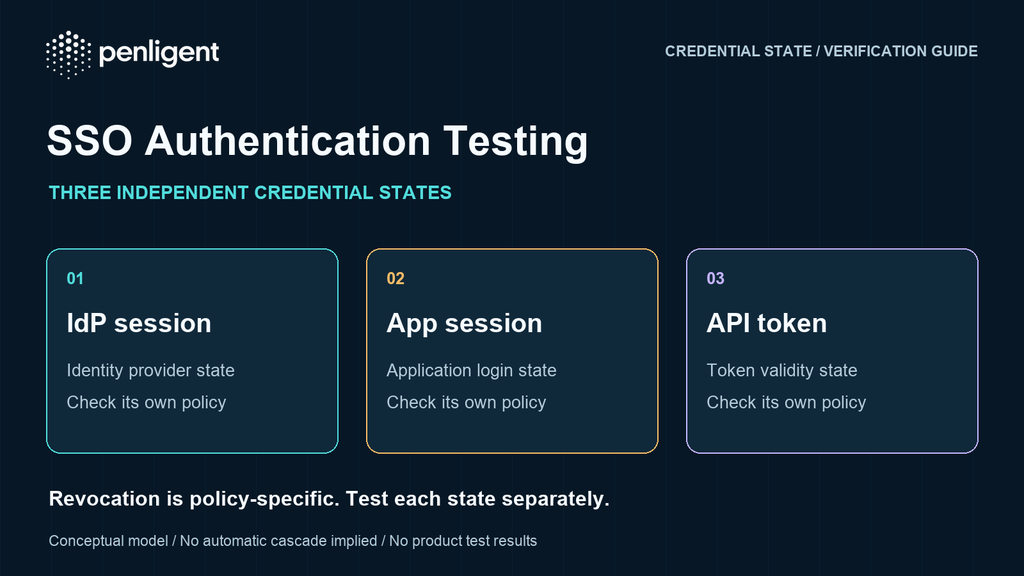
SSO penetration testing should answer a concrete question: after a user signs in, loses access, or disconnects an integration, what can their existing credentials still do? A successful login does not prove that tenant boundaries, application sessions, and downstream tokens enforce the same policy.
For a SaaS team, the useful result is a small set of reproducible authorization decisions: the intended account can access its own test resource; a different tenant cannot; a disabled identity cannot continue through a credential that policy says should have stopped working. This guide gives you a bounded test plan and an evidence format for checking those decisions in an application you own or are explicitly authorized to assess.
What GitBook’s incident tells SaaS teams to examine
In its postmortem dated November 4, 2026, GitBook describes an attack beginning November 2. A flaw in its SSO login flow enabled staff sessions. Access then extended through a misconfigured GitHub App integration to internal repositories, a Cloudflare API key, production secrets, and infrastructure access through a service account. GitBook reports rotating secrets and invalidating API tokens during containment. The lesson for your assessment is to trace separate trust boundaries, not to assume that your application shares GitBook’s undisclosed implementation flaw.
The test design below is an independent defensive method, not a reproduction of that incident. It does not establish which SSO protocol or validation error caused GitBook’s flaw, and it does not require testing GitBook, a customer’s production tenant, or a third-party identity provider.
Define the policy before you interpret a response
Start with two nonprivileged test accounts in different test tenants, one deliberately limited administrative test role, and harmless records containing unique synthetic markers. Write down which identity, tenant, role, resource, and operation are allowed. Use your application’s actual routes rather than invented endpoints. Keep the identity provider, application, API gateway, and integration owner in the scope document.
For each lifecycle event, specify the expected enforcement point and deadline. Does local logout end only this application’s session, or also request identity-provider logout? Does removing a user invalidate existing API tokens? Can a previously issued share link outlive membership? These are policy questions that must be answered before an observation can be classified as a defect.
OWASP’s logout testing guidance supports checking whether a captured session can still access protected functionality after logout. Keep the capture in a controlled test environment and redact it from shared evidence. A session identifier is a credential, not harmless debugging text.
| Credential or state | Question to settle | Evidence to retain |
|---|---|---|
| Identity-provider session | Can the provider authenticate this account again after your chosen event? | Account reference, event time, provider audit event, fresh login outcome. |
| Application session | Does the previously issued session still authorize a protected request? | Redacted session reference, application request ID, response and application audit event. |
| Access and refresh tokens | Which token is revoked, where is it enforced, and when should it stop working? | Token type, issuance/expiry metadata, revocation time, resource-server decision. |
| Integration credential | Can it still reach the explicitly approved test repository or service? | Integration installation, granted resource scope, read-only check and provider log. |
Do not collapse these rows into a single “logged out” checkbox. OpenID Connect has a separate RP-Initiated Logout specification; application-local logout and a request to end an identity-provider session are different operations. Likewise, OAuth token revocation has its own semantics. Neither a redirect to a login screen nor the disappearance of a browser cookie establishes the state of every downstream credential.
The distinction also matters for offline access. OpenID Connect Back-Channel Logout distinguishes refresh tokens associated with the logged-out session from tokens issued for offline access, which normally should not be revoked by that logout alone. Record the actual mechanism and policy; do not require a blanket token cascade that the deployment never promised.
Run a small SaaS authentication security testing matrix
Use separate browser profiles or isolated browser contexts for the two accounts. First demonstrate a permitted action on a known harmless object. Then perform the matching denied action against the other test tenant’s known object. Do not enumerate customer records, guess identifiers at scale, or expand scope because an initial check looks promising.
| Kontrol et | Controlled action | Expected property | What can mislead you |
|---|---|---|---|
| Tenant selection | Sign in as account A, then select only the known test tenant B where A has no membership. | No protected B data or operation is authorized. | A tenant name in navigation is not proof that its data was accessible. |
| Role reduction | Remove the limited administrative test role; repeat one previously permitted read-only administrative action with the old session. | The action follows the documented new role and enforcement deadline. | A refreshed menu can hide a still-authorized backend action. |
| Local logout | Log out of the application, then repeat the saved harmless protected request without initiating a new login. | The old application credential no longer grants the access that logout is meant to end. | An automatic SSO redirect can silently create a fresh session. |
| Offboarding | Disable the test user or remove its test membership, then check the old browser session and separately approved API credential. | Each credential behaves according to the offboarding policy. | Blocking new login is not evidence that an existing session ended. |
| Refresh-token revocation | Revoke a dedicated test refresh token through the documented mechanism, then check its refresh operation once within the authorized test. | A revoked refresh token does not issue a new access token. | An older access token may have a separate documented lifetime. |
| Integration removal | Disconnect a disposable integration and check its documented credential state and one approved read-only test resource. | The integration cannot exceed the post-removal access policy. | A removed UI tile alone says nothing about a provider-side token. |
For protocol-level SSO checks, identify your protocol and library first. For OpenID Connect, use the provider metadata and the OpenID Connect Core validation requirements to review issuer, audience, signature, time, and flow-specific checks, including nonce validation when applicable. A SAML deployment needs its own protocol-specific review; an OIDC checklist is not interchangeable with a SAML assessment. Do not modify assertions or production identity-provider configuration just to make a generic test fit.
Separate revocation from expiry and fresh authentication
A useful session invalidation test uses a timeline. Record when the credential was issued, when access was removed, when a check was sent, and whether that check caused new authentication. Use synchronized clocks and retain the request identifier. Test immediately after the event and again at the policy’s enforcement deadline, rather than continuously polling.
RFC 7009 says authorization servers must support refresh-token revocation and should support access-token revocation. It also recognizes propagation delays in some implementations and returns success for invalid tokens as well as successfully revoked ones. Consequently, a successful revocation endpoint response is not, by itself, evidence that a particular protected resource has stopped accepting the old credential. Validate the relevant resource-server behavior within the agreed window.
Any post-revocation credential check here is an explicitly authorized security verification, not normal client behavior. RFC 7009 tells ordinary clients not to continue using a token after successful revocation. The assessor and system owner must agree on the bounded read-only check and its timing beforehand.
Do not report every still-valid access token as an exploitable vulnerability. Compare its remaining lifetime, resource scope, accepted operation, documented revocation design, and business requirement. If the requirement is “terminate all access when a worker leaves” but the implementation intentionally allows another hour of privileged API access, the finding is the policy-control gap and its demonstrated consequence—not simply that a JWT exists.
Password changes and identity-provider account suspension also need explicit expectations. Different applications can apply different session and token policies. Label an unanswered requirement as a review item, not a fabricated failure. A test that never reached the intended application because of a gateway or connection error is inconclusive.
Audit integration scope without extending the attack chain
The GitBook example makes integration privileges worth examining, but an assessment does not need to extract secrets or reach infrastructure to be useful. Ask owners for the approved GitHub App permissions, installed repositories, credential lifetime, and rotation procedure. Compare those settings with the smallest set of resources the feature actually needs.
GitHub documents that installation access tokens can be scoped to particular repositories and permissions within the app’s granted access. Record which credential class you are reviewing; an app private key, an installation token, and an end-user token are not equivalent. Do not copy any of them into a report or ask an automated agent to discover credentials from unrelated repositories.
For Cloudflare, compare the service’s required resources and permissions against the documented Global API key ve scoped API token models. A configuration review can establish excessive scope without attempting a production write. Validate rotation only with an approved disposable credential and a harmless read operation; never revoke a production key as an improvised test.
Write findings that another engineer can verify
Record one row per identity, credential type, event, and operation. The accompanying worksheet is intentionally blank: it is a test plan, not a claim that Penligent or an assessor has already run it. A useful evidence bundle includes the application build, test tenant and role, synthetic resource marker, redacted request and response, event timestamps, expected policy, observed access decision, and server-side audit correlation where available.
An HTTP status alone is insufficient. A 200 response containing a login page is not protected access. A 403 produced by an unrelated edge rule is not proof that tenant authorization is fixed. Check the protected response content or state and establish that the intended application handled the request. Store only the minimum evidence needed; avoid personal data and keep live credentials outside the report.
After remediation, rerun the same negative check and the positive control. Verify that removing an unauthorized path did not break the intended user’s workflow. Reissue a fresh credential where the repaired design requires one, and distinguish the result from continued use of the old credential. Close the finding only when the policy, deadline, backend decision, and evidence agree.
Start with one authorized task, not a promise to test everything
If you are evaluating an AI-assisted workflow, download Penligent and start your first authorized test. Installation and account registration are required; prepare the two disposable accounts, permitted test tenant, and one harmless resource first. Begin with a single question such as whether removing a test membership ends access to that resource. Do not assume the client can automate your identity provider’s MFA, browser SSO, credential provisioning, or every lifecycle action. Confirm the available workflow before supplying credentials.
Bu documented project-creation process asks for a target and authorization. Put the exact allowlist, excluded systems, read-only limit, expected denial, and stop condition in your task context. The owner should perform account removal and credential revocation through approved administrative controls. If the testing workflow cannot maintain the required account separation, perform that portion manually and record the limitation instead of accepting an ambiguous automated result.
Watch the Penligent product demonstration before deciding whether the installation workflow suits your team. This is a general product video supplied by Penligent, not evidence that the SSO tests in this guide were executed. Review actual requests and results from your own bounded task before treating any alert as a verified finding.
Method: source-based research and an original defensive test design, prepared with AI assistance on November 6, 2026. No GitBook reproduction, production assessment, or Penligent execution is claimed.
 Turkish
 English
 German
 French
 Spanish
 Portuguese
 Japanese
 Korean
 Hindi
 Arabic
 Hebrew