
Vercel did not disclose a hypothetical risk in April 2026. It disclosed a real breach path that started outside its perimeter, moved through a third-party AI tool, crossed a Google Workspace trust boundary, and ended inside internal Vercel systems with access to customer environment variables. The company’s bulletin says a limited subset of customers had non-sensitive environment variables compromised, and it directly tied the incident to the compromise of Context.ai, a third-party AI tool used by a Vercel employee. Vercel also says it has no evidence that variables marked sensitive were accessed, and that its open-source npm supply chain, including packages published by Vercel, has not been compromised. (Vercel)
That combination matters because it changes how defenders should read the event. This was not publicly described as a Next.js code-execution flaw, an npm poisoning incident, or a browser exploit chain aimed at Vercel’s public edge. The damage came from identity and control-plane trust: a compromised external application, an enterprise OAuth relationship, an employee Workspace account, readable platform-side configuration, and whatever downstream access those values enabled. Context.ai’s own statement says the affected product was its deprecated AI Office Suite consumer offering, not its current enterprise Bedrock deployments, and that one compromised OAuth token was used to access Vercel’s Google Workspace. (Vercel)
For developers, platform teams, and security engineers, the right lesson is not “cloud platforms are unsafe.” The right lesson is that modern cloud incidents often begin in places security programs still treat as convenience features: shadow AI tools, overbroad third-party OAuth grants, default-readable secrets, preview environments, and automation bypass paths. Vercel’s April 2026 security incident is important because it makes those trust edges visible in one unusually clean case. (Vercel)
What happened in the Vercel April 2026 security incident
Vercel’s official bulletin, last updated April 21, 2026, says the company identified a security incident involving unauthorized access to certain internal Vercel systems. It says the company engaged incident response experts, notified law enforcement, and continued updating the bulletin as the investigation progressed. The same bulletin says Vercel initially identified a limited subset of customers whose non-sensitive environment variables stored on Vercel were compromised, and that those customers were contacted directly and advised to rotate credentials immediately. (Vercel)
Vercel’s factual core is compact and unusually direct. The company says the incident originated with a compromise of Context.ai, a third-party AI tool used by a Vercel employee. According to the bulletin, the attacker then used that access to take over the employee’s Vercel Google Workspace account, which enabled access to some Vercel environments and to environment variables that were not marked sensitive. The company says it currently has no evidence that values marked sensitive were accessed. (Vercel)
Context.ai’s statement fills in the next layer. It says the affected product was the deprecated Context AI Office Suite, a self-serve consumer-targeted workspace product released in June 2025, and not its current enterprise platform. Context says it independently identified and stopped unauthorized access to its AWS environment in March 2026, later learned that OAuth tokens belonging to some AI Office Suite users were compromised during that incident, and determined that one of those tokens was used to access Vercel’s Google Workspace. Context also says at least one Vercel employee had enabled “allow all” on all requested Google Workspace permissions using a Vercel Workspace account. (Bağlam)
External reporting adds two more important points, both of which need careful qualification. First, several outlets reported that a threat actor claimed to be selling Vercel data, including customer API keys, source code, and database data, on a cybercrime forum. Second, the actor claimed association with ShinyHunters. But neither claim is the same thing as a confirmed attribution, and Vercel has not publicly validated the claimed scope of all forum-posted data. BleepingComputer explicitly said it could not independently confirm the authenticity of the leaked data sample and also reported that actors linked to recent attacks attributed to ShinyHunters denied involvement. TechCrunch likewise reported that it was not clear who was behind the breach or whether the same actor was behind both the Context and Vercel intrusions. (BleepingComputer)
That distinction between confirmed and claimed is not pedantic. It is the difference between a useful incident briefing and a rumor thread.
What is confirmed, what is claimed, and what is still unknown
| Question | Mevcut durum | What the public record supports |
|---|---|---|
| Was there unauthorized access to internal Vercel systems | Confirmed | Vercel’s bulletin says certain internal systems were accessed without authorization |
| Did the incident originate with Context.ai | Confirmed | Vercel names Context.ai; Context says one compromised token was used to access Vercel’s Google Workspace |
| Was a Vercel employee’s Google Workspace account taken over | Confirmed | Vercel states that directly |
| Were customer environment variables exposed | Confirmed for a limited subset, but only non-sensitive variables per Vercel’s current findings | Vercel says a limited subset of customers had non-sensitive environment variables compromised |
| Were sensitive environment variables accessed | No public evidence so far | Vercel says it currently does not have evidence those values were accessed |
| Were Vercel npm packages, Next.js, or Turbopack compromised | No public evidence so far | Vercel says there is no evidence of tampering and that published npm packages remain safe |
| Was the actor ShinyHunters | Unconfirmed | The name was used in public claims, but attribution has not been confirmed and reported denials exist |
| Was there a real $2 million ransom or sale demand | Claimed publicly, not confirmed by Vercel | Security reporting says the actor claimed a $2 million demand, while TechCrunch said Vercel had not received communication from the threat actor |
The first operational lesson from that table is that the breach is serious even if the actor’s most dramatic claims turn out to be inflated. You do not need confirmed source-code theft or forum-level attribution to justify an urgent response. Vercel itself has already done the part that matters most for defenders: it confirmed internal unauthorized access, customer impact for a subset of non-sensitive variables, and a concrete attack chain through a third-party OAuth path. (Vercel)
The second lesson is that uncertainty cuts both ways. If the actor exaggerated the scope, panic-driven remediation can still waste time. But if defenders wait for every disputed detail to settle before acting, they burn the most valuable window for credential rotation, redeploys, token revocation, and identity hygiene. Incidents like this are won early by treating the confirmed blast radius as sufficient reason to move. (Vercel)
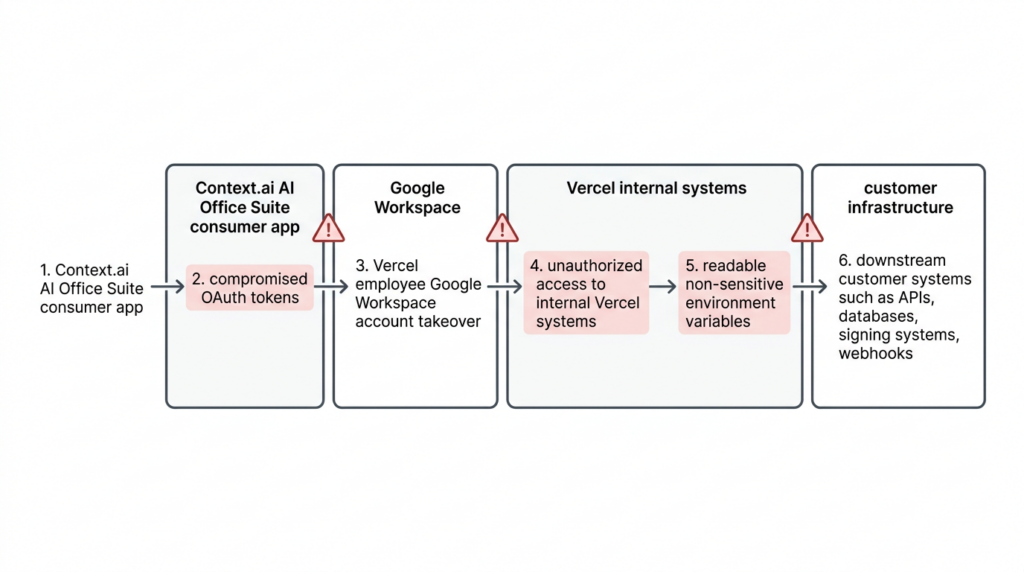
How Context.ai became the first broken trust boundary
The cleanest way to understand the Vercel incident is to stop imagining a direct attack on Vercel first. The first broken trust boundary was somewhere else. Context.ai says its AI Office Suite consumer product offered features that let AI agents perform actions across external applications. It also says the product was distinct from its current enterprise Bedrock platform and that the compromised environment has since been taken down along with the associated OAuth application. In other words, a side product with meaningful third-party access became the bridge into an enterprise environment that did not consider itself a customer of the breached company. (Bağlam)
That pattern is one of the most important security lessons in the entire event. Vercel was not a Context customer in the normal procurement sense. Context says a Vercel employee used the AI Office Suite with a Vercel enterprise account and enabled broad Google Workspace permissions. That means the real exposure path did not depend on a formal vendor rollout across Vercel, a contract, or a sanctioned platform integration review. It depended on a user-level authorization decision inside an enterprise identity system. (Bağlam)
This is why so many platform and SaaS incidents feel surprising after the fact. Security teams often ask whether a vendor is “in production,” whether an integration is “official,” or whether a system is “customer-facing.” But a third-party application with OAuth access to a managed Google Workspace domain can matter far more than an officially purchased tool with narrower scopes. The effective risk is defined by access and privilege, not by procurement category. Context’s statement and Vercel’s bulletin together make that painfully clear. (Vercel)
Google’s own admin guidance explains the relevant control surface. Workspace administrators can manage third-party app access and mark apps as Trusted, Specific Google data, Limited, or Blocked. They can also review app access requests and choose whether to approve or block them for organizational units. In practice, that means enterprises are not forced into an all-or-nothing posture. They can constrain access by app and by scope. If they do not, user-driven OAuth consent becomes a governance gap rather than just a login convenience. (Google Workspace Help)
How a compromised OAuth relationship turned into Vercel Workspace access
The public materials do not expose every forensic detail, but they reveal enough to understand the security model failure. Context says OAuth tokens belonging to some AI Office Suite users were compromised during the breach of its AWS environment and that one of those tokens was used to access Vercel’s Google Workspace. Vercel says the attacker used that access to take over the employee’s Workspace account, which then enabled access to some Vercel environments. That is the core chain: compromised third-party token, enterprise identity access, then platform-internal access. (Vercel)
Vercel’s bulletin also includes an IOC for the Google Workspace OAuth application involved in the wider incident and urges Google Workspace administrators and Google account owners to check for usage immediately. The published OAuth app identifier is 110671459871-30f1spbu0hptbs60cb4vsmv79i7bbvqj.apps.googleusercontent.com. That detail matters because this was not just a Vercel cleanup item. Vercel explicitly warned that the app’s compromise potentially affected hundreds of users across many organizations. (Vercel)
Trend Micro’s analysis frames the incident as an OAuth supply-chain problem rather than a perimeter problem, and that is a useful description. The firm argues that a single OAuth trust relationship cascaded from a compromised vendor into Vercel’s internal systems, exposing environment variables for customers who had no direct relationship with the breached vendor. Even if one does not adopt every part of Trend’s design critique, that attack-chain framing is solid. The risk came from transitive trust. (www.trendmicro.com)
That is also why standard “did we enable MFA on the target platform” thinking is incomplete. Vercel’s response includes new guidance to enable MFA and passkeys, which is sensible. But the more structural question is whether the enterprise had treated third-party OAuth applications with privileged Workspace scopes as part of the same risk tier as SSO apps, admin integrations, or IT-managed plugins. Many organizations still do not. This incident shows they should. (Vercel)
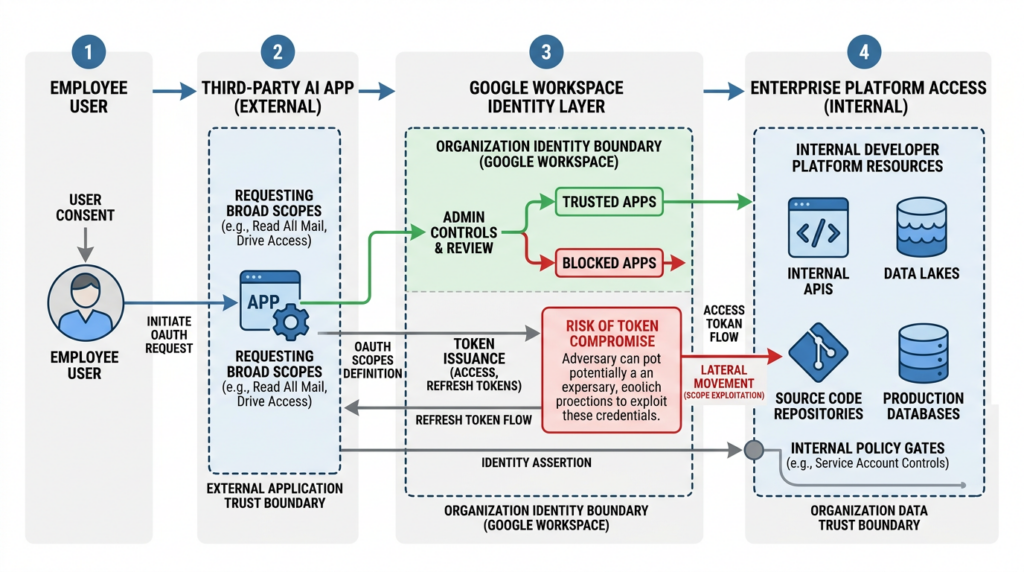
Why non-sensitive environment variables became the decisive failure point
The breach story could have stopped at “employee account takeover.” It did not. The decisive operational consequence was that the attacker reached environment variables Vercel says were not marked sensitive. Vercel’s bulletin says those non-sensitive variables were the compromised customer asset and recommends that users review and rotate them immediately. It lists API keys, tokens, database credentials, and signing keys as examples of values that should be treated as potentially exposed and rotated as a priority. (Vercel)
Vercel’s public documentation helps explain the distinction. The sensitive environment variables documentation says sensitive variables are non-readable once created, are stored in an unreadable format, and can only be created in preview and production environments. To mark an existing environment variable as sensitive, a user must remove it and re-add it with the Sensitive option enabled. Both project-level and shared environment variables can be marked sensitive, and team owners can enforce a policy that newly created variables in production and preview are sensitive by default. (Vercel)
The incident bulletin adds two details that matter more than the UI labels. First, Vercel says non-sensitive variables are those that decrypt to plaintext. Second, it says environment variables marked sensitive are stored in a way that prevents them from being read, and that Vercel has no evidence those values were accessed. Taken together, the operational conclusion is straightforward: after internal access was obtained, some customer secrets remained readable enough to continue the attack, while others did not. (Vercel)
There is one nuance worth handling carefully because public commentary has not been perfectly consistent. Vercel’s general documentation says environment variables are encrypted at rest. Vercel’s CEO also said Vercel stores all customer environment variables fully encrypted at rest, while noting that non-sensitive variables could still be designated in a way that let the attacker gain further access through enumeration. Trend Micro interprets the design more aggressively and argues that the “non-sensitive” path amounted to a default-readable secret model once an attacker reached internal APIs or privileged access. Because Vercel has not publicly documented every implementation detail of the storage path, the safest conclusion is practical rather than terminological: whatever the storage semantics were under the hood, non-sensitive variables were accessible enough to materially expand blast radius after internal compromise, and sensitive variables were not. (Vercel)
That practical conclusion is what defenders should carry forward. Secret safety is not just about whether bytes are encrypted somewhere on disk. It is about whether a value becomes directly readable after a given privilege boundary is crossed. If the answer is yes, the system behaves as a secret exposure layer in the scenario that matters most: post-compromise. That is exactly how many major platform incidents become customer incidents rather than purely internal incidents. (www.trendmicro.com)
Why this was a supply-chain and identity-control incident, not an npm incident
One of the first bad instincts in developer-platform incidents is to look only for code supply-chain tampering. That concern is rational. Vercel sits close to Next.js, Turbopack, developer deployment paths, and npm packages. But Vercel’s bulletin explicitly says that in collaboration with GitHub, Microsoft, npm, and Socket, the company confirmed that no npm packages published by Vercel were compromised. The bulletin also says there is no evidence of tampering and that the supply chain remains safe. BleepingComputer separately reported that Vercel’s investigation confirmed Next.js, Turbopack, and its other open-source projects remain safe. (Vercel)
That means the trust boundary that failed first was not package publication. It was application authorization inside a cloud identity domain. The second boundary that mattered was platform-internal readability of stored configuration. The third was whatever downstream systems trusted those configuration values. This is still a supply-chain story in the broader sense, because an external platform compromise became an internal enterprise compromise. But it is an identity and control-plane supply-chain story, not a malicious package story. (Vercel)
That distinction matters for remediation budgets. If a team responds by auditing package-lock files and misses OAuth app controls, Workspace trust, preview access, bypass secrets, or environment variable policy, it is spending effort in the wrong place. The most urgent response lives in identity governance, secret rotation, redeploy hygiene, and control-plane review. (Vercel)
What Vercel customers should do right now
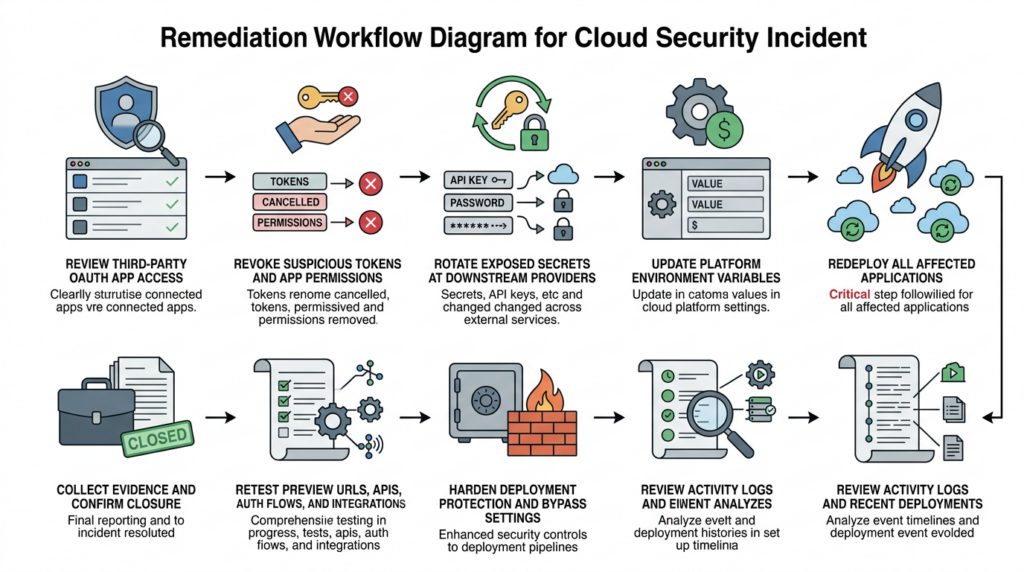
The most useful way to respond is to work in a strict order. Start with identity and third-party access, then rotate secrets, then redeploy, then audit activity and deployments, then tighten deployment access, then change the default secret model so the same class of mistake is harder to repeat.
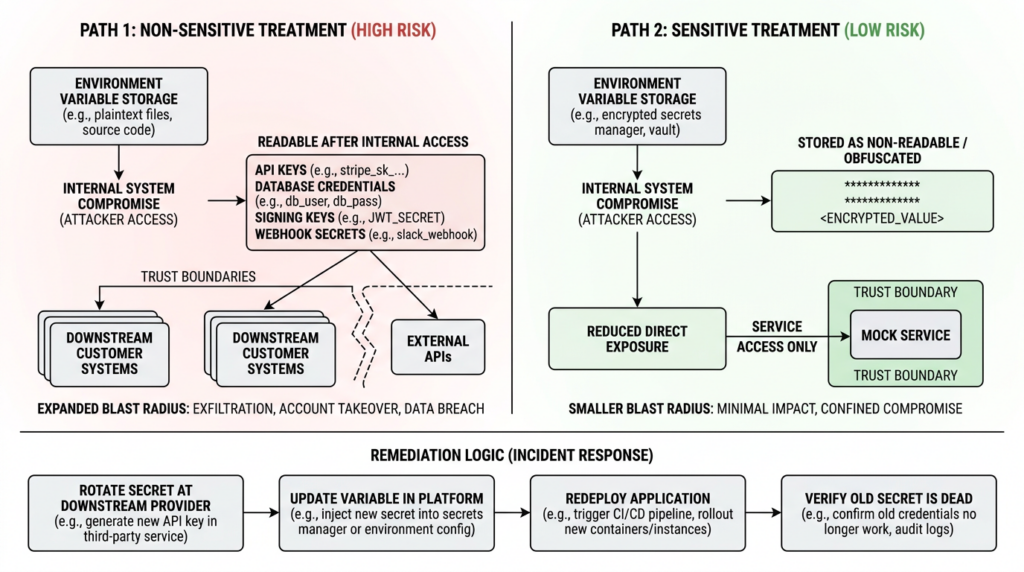
Step one, identify and contain the OAuth path
Vercel already published the relevant IOC for the Google Workspace OAuth application and recommended that Google Workspace administrators and Google account owners check for usage of the app immediately. If your organization has any evidence that the listed OAuth client ID was used, treat that as an incident-response trigger, not a curiosity. Revoke access, review whether the app had organization-wide or broad user scopes, and inspect which users and business units granted access. (Vercel)
Google Workspace gives admins the tooling to do this in a controlled way. Admins can manage app access and set an application to Trusted, Specific Google data, Limited, or Blocked. They can also review pending app access requests in the Admin console and explicitly configure or block apps for selected organizational units. That means teams can move from reactive cleanup to a durable policy: broad AI assistant apps should not sit in the same governance bucket as low-risk sign-in helpers. (Google Workspace Help)
A subtle but important point is timing. Google’s documentation says app access changes can take up to 24 hours, though they typically happen more quickly. In a live incident, that means you should not rely on policy cleanup alone. Combine policy changes with direct token revocation, account review, and immediate secret rotation downstream. Policy helps stop re-entry. It is not enough by itself to prove containment. (Google Workspace Help)
Step two, rotate all potentially exposed credentials
Vercel’s bulletin is explicit here. Teams should review and rotate environment variables that were not marked sensitive, and those values should be treated as potentially exposed. The company gives concrete examples: API keys, tokens, database credentials, and signing keys. It also says deleting a Vercel project or account is not sufficient to eliminate risk because compromised secrets may still provide access to production systems. Rotate first. Delete later if you still need to. (Vercel)
That advice should be read broadly, not narrowly. If a non-sensitive environment variable held a token for Stripe, GitHub, OpenAI, Anthropic, AWS, database access, webhook verification, internal APIs, or JWT signing, rotate it at the downstream provider, not only inside Vercel. The risk is not that the value lived on Vercel. The risk is that it may now function elsewhere. Rotation inside the hosting platform without revocation or replacement at the external service is not rotation in any meaningful incident-response sense. (Vercel)
Do not forget Deployment Protection tokens or other preview-access bypass values. Vercel’s bulletin specifically recommends rotating Deployment Protection tokens if they are set. The deployment protection documentation explains why: protection bypass for automation generates a secret that can be used as a system environment variable or a query parameter to bypass protection features for all deployments in a project. If that sort of secret was readable through the same control-plane path, an attacker may not need your main application key to reach sensitive preview content. (Vercel)
Step three, redeploy after rotation
This is where many incident responses quietly fail. Vercel’s environment variable management documentation says changes to environment variables are not applied to previous deployments and only apply to new deployments. You must redeploy the project to update the value of any variables you change in the deployment. If you rotate a secret in the dashboard or through the API and do not redeploy, your running deployment may still be using the old value. (Vercel)
That is not a product footnote. It changes how you should write your response runbook. Rotation and redeploy are one step, not two optional steps. For every affected project, you want a clear record of which variables were rotated, when the downstream secret was revoked or replaced, and which deployment first began using the new value. Without that chain, teams end up arguing from dashboards while production keeps running stale credentials. (Vercel)
Step four, review activity and recent deployments
Vercel’s official recommendations tell customers to review the activity log for suspicious activity and investigate recent deployments for anything unexpected or suspicious. The company notes that activity logs can be reviewed in the dashboard or via the CLI. Its documentation says the Activity Log is available on all plans and provides a chronological record of team events, while the vercel activity command lets users filter events by type, date range, and project or see all events across a team. (Vercel)
Here is the fastest Vercel-native starting point for teams that need a first-pass review:
# Review all recent team activity
vercel activity --all --since 7d

# Review one project more deeply
vercel activity --project my-app --since 30d

# Look for recent deployments or project changes
vercel activity --type deployment --since 7d
Those examples are straight from Vercel’s CLI usage patterns. The goal is not to produce forensic certainty from one terminal window. The goal is to quickly surface odd deployment timing, unexpected project changes, or changes that line up with the incident window so your team knows where to go deeper next. (Vercel)
Application-side logs matter too. Vercel’s vercel logs command can show recent request logs, filter by environment, and stream live runtime logs. For immediate review, production error spikes, weird request IDs, and branch-specific anomalies are the obvious first filters. (Vercel)
# Review recent production logs
vercel logs --project my-app --environment production --since 24h

# Narrow to errors during the response window
vercel logs --project my-app --environment production --level error --since 24h

# Stream the latest deployment while validating the fix
vercel logs --project my-app --follow
These commands are not a substitute for SIEM correlation or provider-side audit review, but they are often the fastest way to answer a brutally practical question during incident response: did anything about deployment behavior or request patterns change when we think it changed. (Vercel)
Step five, harden preview and deployment access
Vercel’s bulletin tells users to ensure Deployment Protection is set to Standard at a minimum and to rotate protection tokens if set. The deployment protection docs explain the access model in more detail: Standard Protection protects all deployments except production domains, while All Deployments covers production domains too and is available on Pro and Enterprise plans. The docs also explain that bypass mechanisms exist for testing, sharing, and automation, including Shareable Links, Protection Bypass for Automation, and Deployment Protection Exceptions. (Vercel)
That means incident responders should not treat deployment protection as a binary “on or off” control. They should ask a more exact question: which paths, domains, automation flows, or exceptions might still let a user or system reach content after the main control appears enabled. Protection Bypass for Automation is especially worth reviewing because the bypass secret can be passed in a header or query parameter and applies to all deployments in a project when enabled. If your team ever used that feature for testing or webhooks, it belongs in the same rotation window as app secrets. (Vercel)
For teams with public previews, shared branch deployments, or heavy webhook use, this review is one of the places where a “fix” often turns out to be partial. Teams rotate primary credentials but forget preview surfaces that still expose test data, internal admin behavior, or staging integrations that trust stale tokens. The incident showed that control-plane exposure and readable config can chain into downstream access. Preview and automation channels are where that chain often stays alive longest. (Vercel)
Step six, change secret handling so the same mistake is harder to repeat
Vercel’s bulletin says the company has already shipped several product enhancements in response to the incident, including environment variable creation defaulting to sensitive on, improved team-wide management of environment variables, a more usable activity log, and clearer team invite emails. That is good security engineering, but it does not retroactively harden older values already stored in projects. (Vercel)
The sensitive environment variables documentation is clear about the operational reality. Existing environment variables cannot simply be flipped to sensitive in place in the way many teams assume. To mark an existing variable as sensitive, you remove it and re-add it with the Sensitive option enabled. Sensitive variables are only available in preview and production, not development. Team owners can also enforce a policy so newly created preview and production variables are sensitive by default. (Vercel)
That creates a practical remediation checklist:
- inventory every existing project and shared variable that should be treated as a secret,
- rebuild those values as sensitive where supported,
- enable team-wide policies so new preview and production secrets default to sensitive,
- update runbooks so “new environment variable” and “secret” are treated as the same workflow by default,
- redeploy after the change. (Vercel)
If your organization lets engineers add variables freely during debugging, incident response, or third-party integration setup, you should assume some number of values were historically created under speed pressure rather than security discipline. The Vercel incident is a reminder that “we meant to clean that up later” becomes a customer-impacting sentence when platform control planes are breached. (Vercel)
A practical first 24 hours response matrix
| Rol | Immediate actions | Why it matters now |
|---|---|---|
| Google Workspace admin | Check the published OAuth app IOC, review app access, revoke or block suspicious apps, inspect broad-scope grants | The incident crossed into Vercel through Google Workspace OAuth access |
| Vercel platform owner | Inventory non-sensitive environment variables, rotate Deployment Protection tokens, review activity and deployments, enforce protection settings | This addresses the confirmed customer-impact path in Vercel’s bulletin |
| Application owner | Rotate downstream API keys, DB credentials, signing keys, webhook secrets, then redeploy | Secret rotation without downstream revocation and redeploy is incomplete |
| Security engineering | Correlate activity logs, deployment history, provider alerts, leaked-key notifications, and downstream audit logs | The real blast radius often sits outside the initial platform |
| Incident lead | Keep a single evidence ledger of revocations, redeploys, and validation results | Incidents become messy when teams “fix” the same asset twice and verify nothing |
That matrix looks almost boring, and that is a feature. Most real incident response failures happen because teams skip the boring part and reach for big narrative conclusions too early. In the Vercel case, the boring part is exactly where the value is: OAuth inventory, token revocation, secret rotation, redeploys, and evidence of closure. (Vercel)
How to verify that you actually closed the gap
The hardest truth in incident response is that action is not proof. A rotated secret is not proof until the old one is dead. A blocked app is not proof until the old token path is gone. A new deployment is not proof until the running application is actually using the new value and the old path no longer works. Everything after the first few hours should be organized around that standard. (Vercel)
Start with credential death, not credential replacement. For each secret you rotated, verify at the downstream service that the old key, token, signing secret, or database credential has been revoked, expired, or superseded. Then verify at the application layer that the service still functions on the new value. This sounds trivial until you encounter webhook retries, background jobs, stale workers, preview deployments, or long-lived integrations that still pull the old value from a place nobody rechecked. That is why the Vercel doc note about redeploys matters so much. (Vercel)
Next, verify externally reachable surfaces, not just dashboard state. Review preview URLs, production domains, admin panels, webhook endpoints, API auth flows, and any deployment protected by bypass tokens or exceptions. Teams often discover that their official configuration is now correct while a legacy preview domain or automation integration still creates a working path around it. Vercel’s deployment protection docs make clear that several selective bypass mechanisms exist precisely because real teams need them. Incident response has to revisit every one that was ever enabled. (Vercel)
Then verify detection and evidence. Activity logs show who changed what and when. Deployment history shows when code and configuration actually moved. Runtime or request logs show whether unexpected traffic patterns stopped or continued. Downstream providers may show whether stale keys are still being presented. Your goal is not an elegant report. Your goal is a chain of evidence another engineer can inspect and trust. (Vercel)
This is also the point where many teams discover a workflow gap. They know how to rotate credentials and patch settings, but they do not have a repeatable way to retest preview deployments, external attack paths, auth gates, and integration behavior after the changes land. That is where a system like Penligent can fit naturally into the workflow without becoming the story. Penligent’s public material on continuous red teaming, AI-assisted pentest workflows, and evidence-backed reporting is useful here because it focuses on replayable validation and proof trails rather than “AI wrote a report” theater. In a post-incident context, that is the right use of an offensive workflow tool: retest the changed surfaces, preserve evidence, and make closure reviewable. (penligent.ai)
The most mature teams treat post-incident validation as its own workstream with a named owner, not as the tail end of rotation. That workstream should end with a simple answer for every high-risk asset: the old path is dead, the new path is live, the exposed surface was retested, and the proof exists in one place. (Vercel)
What platform teams should learn from this incident
The Vercel incident is unusually useful because it collapses four separate security topics into one event. The first is OAuth governance. The second is shadow AI tooling. The third is readable secret handling inside platform control planes. The fourth is the operational gap between “we changed the setting” and “we verified attacker progress is no longer possible.” Those four topics are often owned by different teams. That fragmentation is part of the risk. (Vercel)
Start with OAuth governance. If users can connect broad third-party AI apps to enterprise Workspace accounts with little review, then your practical security boundary already includes those apps whether procurement has blessed them or not. Google Workspace gives administrators multiple ways to constrain or block this behavior. The hard part is not that the controls do not exist. The hard part is that many organizations still treat OAuth app governance as an identity admin hygiene task rather than a front-line incident-prevention control. This event shows that view is outdated. (Google Workspace Help)
Then look at secret models. A platform does not have to be “careless” for its secret handling to be dangerous under post-compromise conditions. It is enough for values to be readable once the wrong privilege boundary is crossed. That is why secure-by-default secret workflows matter so much. Vercel’s response to default new variables to sensitive is meaningful because it reduces the chance that future debugging shortcuts quietly create readable secrets in the same risk class. (Vercel)
The third lesson is governance for edge products and side integrations. Context says the affected product was a deprecated consumer-targeted office suite, not its current enterprise platform. That detail should make every security leader uncomfortable in a productive way. Many serious incidents do not start in the flagship product or the cleanest architecture diagram. They start in the legacy connector, the self-serve helper, the AI assistant added by one team, the preview environment, or the automation exception nobody revisits. (Bağlam)
The fourth lesson is that remediation must move beyond platform UI state. The breach hit a platform, but the real risk sits in all the other systems that trusted the exposed values. A clean Vercel dashboard after the fact is not the same thing as a secure environment. Your cloud providers, SaaS APIs, webhook verifiers, databases, CI jobs, preview environments, and admin surfaces all have to be revalidated on the new trust state. (Vercel)
What previous platform breaches reveal about the Vercel incident
Vercel’s April 2026 incident looks modern because it involves AI tooling and OAuth, but the deeper pattern is older and more familiar. A trust edge breaks. Internal access follows. Customer secrets become the prize. The platforms change. The logic does not.
Codecov in 2021
Codecov’s official security update said the company learned on April 1, 2021 that someone had gained unauthorized access to its Bash Uploader script and modified it without permission. The actor gained access because of an error in Codecov’s Docker image creation process that exposed the credential needed to modify the uploader. That compromise led to the exfiltration of environment variables from customer CI workflows. (Codecov)
The parallel to Vercel is not in the exact mechanics. Codecov was a tampered CI artifact. Vercel was an OAuth-driven control-plane compromise. The common lesson is that environment variables are not “secondary” data once a platform layer is breached. They are the bridge to everything else.
CircleCI in 2023
CircleCI’s January 2023 incident report and security alert said the company alerted customers to a security incident and advised them to rotate any secrets stored in CircleCI. The report described a compromise in which an actor stole an employee’s session token through malware on the employee’s machine and then used that token to access internal systems and customer secrets. (CircleCI)
The similarity to Vercel is sharper here. Both incidents follow a recognizably modern line: compromise tied to an employee endpoint or identity artifact, internal platform access, then customer secret exposure. If you only remember one previous incident while reading Vercel’s bulletin, CircleCI is probably the right one.
Okta support system in 2023
Okta’s November 2023 root-cause post says a threat actor gained unauthorized access to files inside its customer support system associated with 134 customers, including HAR files containing session tokens that could be used for session hijacking. Okta later disclosed that the incident had broader customer-contact impact than first understood. (sec.okta.com)
The common pattern with Vercel is platform-layer access to high-value customer material that many customers do not mentally classify as a front-line attack surface. In Okta’s case it was support artifacts. In Vercel’s case it was readable environment configuration. In both cases, the consequence was downstream access risk beyond the initial vendor boundary.
Snowflake customer attacks in 2024
Mandiant’s June 2024 report on UNC5537 said the actor targeted Snowflake customer instances for data theft and extortion using credentials obtained from infostealer malware, with a lack of MFA in many cases contributing to compromise. (Google Cloud)
That matters here not because Vercel’s exact path matched Snowflake’s, but because it reinforces the same uncomfortable truth: the modern breach path often starts with credentials or tokens stolen somewhere else, then lands in a platform where customers assumed someone else’s control plane or identity layer was already “secure enough.” Vercel’s own incident response guidance to enable MFA and passkeys fits squarely inside that lesson. (Vercel)
A pattern table for platform operators
| Incident | Initial trust edge that failed | Customer asset exposed | Most useful lesson |
|---|---|---|---|
| Codecov 2021 | CI uploader supply chain | Environment variables from CI workflows | Treat build and CI helpers as secret transit systems |
| CircleCI 2023 | Employee token theft | Customer secrets and keys | Internal access plus readable customer secrets is a crisis pattern |
| Okta 2023 | Support system access | HAR files and session-bearing artifacts | “Support data” can be authentication material |
| Snowflake 2024 | Stolen credentials and weak MFA posture | Customer database access and data | Credential hygiene and MFA are still decisive |
| Vercel 2026 | Third-party OAuth app compromise | Non-sensitive environment variables for a limited subset of customers | OAuth governance and secret readability are now core platform risks |
The point of that table is not that all platform incidents are the same. They are not. The point is that the same three conditions show up over and over: a transitive trust edge, privileged internal access, and customer material that becomes immediately useful after the first boundary falls. Vercel belongs squarely in that family. (Codecov)
One adjacent CVE every Next.js team should patch in the same response window
There is no public CVE for the Vercel April 2026 incident itself. That matters because defenders can waste time hunting for “the Vercel CVE” instead of fixing the confirmed exposure path. But there is one adjacent vulnerability that belongs in the same response window for many teams that deploy on Vercel or run Next.js elsewhere: CVE-2025-29927. (Vercel)
GitHub’s advisory for CVE-2025-29927 says it is possible to bypass authorization checks within a Next.js application if the authorization check occurs in middleware. NVD says affected versions include releases prior to 12.3.5, 13.5.9, 14.2.25, and 15.2.3, and recommends that if patching is infeasible, external requests containing the x-middleware-subrequest header should be prevented from reaching the application. (GitHub)
This CVE did not cause the Vercel incident. It is relevant for a different reason. During a platform-focused response, teams often rotate secrets and fix control-plane settings but leave adjacent application-layer auth issues untouched. If a Next.js application still depends on vulnerable middleware-based authorization, a team can exit the Vercel response window with a cleaner platform and a still-bypassable app. That is not a safe state. (GitHub)
So the disciplined posture is this: handle the incident as the platform-control event it is, but use the same maintenance window to verify that your application tier is not lagging on a critical auth bypass in the same ecosystem. Response windows are expensive. Good teams use them to close the nearby gaps that matter most. (GitHub)
What a mature post-incident workflow looks like
A mature workflow after a platform incident is not “rotate a few variables and move on.” It is revoke, rotate, redeploy, revalidate, and record. Revoke the third-party access path. Rotate every downstream value in the exposed class. Redeploy so the running system actually uses the new value. Revalidate the externally reachable surfaces and operational behavior. Record enough evidence that another team member could later prove what changed and when. That is the whole job. (Vercel)
This is also why secure defaults matter more than reassuring language after the fact. Vercel’s shift to default new environment variables to sensitive is more important than a generic promise to “take security seriously.” Security maturity shows up in defaults, not in adjectives. The same is true of Google Workspace OAuth governance. An organization that lets any managed user wire broad AI tools into its identity boundary by default is already writing the opening paragraph of its next postmortem. (Vercel)
For teams that want to go beyond containment and build a better ongoing program, the next step is not permanent crisis mode. It is disciplined recurring validation tied to change. The most relevant Penligent material here is its public writing on continuous red teaming, AI pentest workflows, and evidence-backed reporting, because those pieces focus on retest discipline and proof rather than hype. After a breach like this, that is the mindset that matters: not “what tool writes prettier English,” but “what workflow proves the old path is dead and captures the evidence cleanly.” (penligent.ai)
The real lesson from the Vercel April 2026 security incident
The real lesson is not “never use Vercel.” It is not even “never use third-party AI tools.” The real lesson is that any organization treating third-party OAuth grants, platform-readable secrets, preview access paths, and automation bypass channels as convenience layers rather than high-value attack surfaces is betting that an attacker will never chain them together fast enough to matter. Vercel just showed how wrong that bet can be. (Vercel)
Vercel’s bulletin gives defenders something useful that many vendors do not give them quickly enough: a concrete initial chain, a clear impacted asset class, a published IOC, and practical customer actions. Teams should take advantage of that clarity. Review the OAuth edge. Rotate the readable values. Redeploy. Audit activity. Lock down preview and bypass channels. Convert secrets to unreadable by default. Then verify the fix like an attacker would, not like a dashboard would. (Vercel)
If you do that, the incident becomes more than another breach headline. It becomes a useful forcing function for fixing the exact trust boundaries that modern cloud, AI, and platform engineering keep blurring together. (Bağlam)
Further reading and references
- Vercel security bulletin, the primary public source for the incident timeline, impacted asset class, recommendations, IOC, and product changes. (Vercel)
- Context.ai security update, the primary public source for the affected product, March AWS incident, compromised OAuth tokens, and the statement that one token was used to access Vercel’s Google Workspace. (Bağlam)
- The Verge coverage, useful for a concise external summary of the breach disclosure and Vercel’s public statements. (The Verge)
- TechCrunch reporting, useful for the unconfirmed actor-sale claims and the note that Vercel had not received communication from the threat actor. (TechCrunch)
- BleepingComputer reporting, useful for the distinction between actor claims, unverified leaked samples, and reported denials of ShinyHunters involvement. (BleepingComputer)
- Trend Micro analysis, useful for the OAuth supply-chain framing and the broader discussion of readable environment-variable design under internal compromise. (www.trendmicro.com)
- Google Workspace admin documentation on app access control and third-party app review, useful for remediating the identity side of this incident class. (Google Workspace Help)
- Vercel documentation on sensitive environment variables, activity log, deployment protection, environment variable management, and CLI commands used in this response workflow. (Vercel)
- GitHub advisory and NVD entry for CVE-2025-29927, which is not part of this incident but is a high-value adjacent Next.js auth issue for many teams to patch in the same window. (GitHub)
- Official and primary writeups on adjacent platform incidents used for comparison: Codecov 2021, CircleCI 2023, Okta 2023, and Mandiant’s Snowflake campaign analysis. (Codecov)
- Penligent homepage, relevant if your team is evaluating AI-assisted offensive workflows for retest and evidence capture after incident containment. (penligent.ai)
- Continuous Red Teaming With AI, Why the Six-Month Pentest Fails, relevant because this incident is a strong example of why point-in-time testing misses trust-edge changes between formal assessments. (penligent.ai)
- AI Pentest Tool, What Real Automated Offense Looks Like in 2026, relevant for teams comparing proof-oriented validation workflows rather than generic AI summaries. (penligent.ai)
- How to Get an AI Pentest Report, relevant for teams that need evidence-backed retest output instead of a chat transcript dressed up as a finding. (penligent.ai)

 Turkish
  English
  German
  French
  Spanish
  Portuguese
  Japanese
  Korean
  Hindi
Hindi  Arabic
  Hebrew