
WordPress vulnerabilities have always been part of operating one of the world’s largest open-source web ecosystems. What has changed in 2026 is the speed and shape of the risk.
The familiar WordPress security problem—an administrator leaving an old plugin installed for months—has not disappeared. But defenders now have to deal with a broader attack surface that includes critical vulnerabilities in WordPress Core, unauthenticated plugin flaws that provide administrator access, remote code execution through form-processing logic, malicious software delivered through trusted update infrastructure, compromised third-party JavaScript, and increasingly complex integrations between WordPress and AI systems.
The timeline has changed as well. A vulnerability can move from patch disclosure to internet-wide exploitation in hours rather than days.
That distinction matters when discussing the latest WordPress vulnerabilities. A CVE with a high CVSS score is not automatically equivalent to an actively exploited vulnerability, and a medium-severity primitive can become extremely dangerous when chained with another weakness. Defenders therefore need to evaluate not only severity, but authentication requirements, affected functionality, public exploitability, real-world attack activity, patch availability, and whether the vulnerable component is actually reachable.
As of August 10, 2026, WordPress 7.0.3 is the current stable security release. It was published on August 6 and contains 12 security fixes, only weeks after WordPress 7.0.2 addressed a critical WordPress Core vulnerability chain that was subsequently exploited at scale. (WordPress.org)
That sequence alone makes 2026 an important year for WordPress security.
WordPress Vulnerabilities in 2026 Are Mostly an Ecosystem Problem
When people search for “WordPress vulnerabilities,” they often assume that WordPress Core itself is constantly vulnerable.
That is not the most useful way to understand the attack surface.
A real WordPress installation normally consists of several security boundaries:
Internet
   |
   v
Web server / CDN / WAF
   |
   v
WordPress Core
   |
   +---- Theme
   |
   +---- Plugins
   |       |
   |       +---- REST routes
   |       +---- AJAX handlers
   |       +---- File uploads
   |       +---- Payment logic
   |       +---- Authentication integrations
   |       +---- Third-party APIs
   |
   +---- wp-content/uploads
   |
   +---- Database
   |
   +---- External JavaScript / CDNs
   |
   +---- Remote management systems
   |
   +---- AI / MCP integrations
Any one of those layers can introduce a vulnerability.
Patchstack’s current all-time WordPress vulnerability dataset illustrates how heavily the problem is concentrated in extensions: it lists 5,467 plugin vulnerabilities, 871 theme vulnerabilities, and only 17 WordPress Core entries. Patchstack also shows cross-site scripting and broken access control among the largest vulnerability categories in its database. These figures are database-wide totals rather than counts for 2026 alone, but they demonstrate why WordPress security cannot be reduced to checking the Core version. (Patchstack)
A site running a fully patched WordPress Core can still be completely compromised because of a single vulnerable plugin.
Conversely, a vulnerability with a CVSS score of 9.8 may be irrelevant to a particular site if the affected plugin is not installed.
Effective WordPress vulnerability management therefore begins with asset knowledge, not a vulnerability feed.
The Current WordPress Security Baseline: WordPress 7.0.3
The most immediate recommendation is straightforward:
Production WordPress sites should be updated to the latest supported stable security release.
WordPress 7.0.3 was released on August 6, 2026. The WordPress Security Team describes it as a security release and recommends updating sites immediately. The release addresses 12 distinct issues covering XSS, privilege escalation, information disclosure, CSS injection, email verification logic and SSRF. (WordPress.org)
The issues include:
| Security issue | Authentication | Primary risk |
|---|---|---|
| Reflected XSS on login screen | Unauthenticated, user interaction required | Administrator session abuse and potential PHP execution |
| Stored XSS via emoji settings | Contributor+ | Persistent script execution |
| Stored XSS in Post Content block | Contributor+ | Persistent script execution |
| Quick Edit stored XSS | Contributor+ | Administrative-browser compromise |
| Post Date block stored XSS | Contributor+ | Persistent script execution |
| Multisite privilege escalation | Registered user | Unauthorized site creation |
| Latest Comments disclosure | Unauthenticated context | Protected comment disclosure |
| Post slug enumeration | Unauthenticated context | Information disclosure |
| Comment-feed notes disclosure | Unauthenticated context | Private information leakage |
| Safe CSS filter bypass | Author+ | CSS injection |
| Email confirmation bypass | Authenticated context | Account-security weakness |
| URL-validation SSRF | Unauthenticated/reachable path dependent | Requests to link-local resources |
The WordPress announcement specifically identifies the login-screen XSS as CVE-2026-64638. (WordPress.org)
Some of the other fixes had not yet been assigned public CVE identifiers in the official release announcement, so security teams should avoid manufacturing or assuming CVE numbers simply because individual fixes exist.
That is particularly important for vulnerability intelligence pipelines: a security fix is not always synonymous with a CVE record being immediately available.
CVE-2026-64638: WordPress Login XSS With a Path to Code Execution
CVE-2026-64638 is one of the most important recent WordPress vulnerabilities because the headline can easily be misunderstood.
It is an unauthenticated reflected cross-site scripting vulnerability affecting WordPress Core through version 7.0.2 and fixed in 7.0.3. The vulnerability is associated with the WordPress login screen and can potentially be leveraged toward PHP code execution. (WordPress.org)
However, this is not equivalent to an attacker sending one anonymous HTTP request and immediately receiving a shell.
Patchstack’s analysis highlights the critical exploitation requirement: because the vulnerability is reflected XSS, an attacker needs to cause a victim to open the maliciously constructed URL. For the attack to progress toward full site compromise, the victim must have sufficiently privileged WordPress permissions—most importantly administrator-level capabilities. (Patchstack)
A simplified attack chain looks like this:
Attacker
   |
   | sends crafted WordPress login URL
   v
Administrator clicks link
   |
   v
JavaScript executes in WordPress origin
   |
   v
Administrator session becomes usable by attacker-controlled script
   |
   v
Privileged WordPress actions
   |
   v
Plugin/theme modification or malicious plugin installation
   |
   v
PHP code execution
This distinction matters enormously for risk prioritization.
The vulnerability is pre-authentication from the attacker’s perspective, but it still requires administrator interaction to achieve the most severe outcome.
That makes the exploitation model closer to targeted administrative phishing than a purely automated wormable RCE.
A site owner should still patch immediately, but defenders should describe the threat accurately.
Overstating every XSS as instant RCE creates security fatigue. Understating an XSS that can hijack an administrator context is equally dangerous.
The Most Important WordPress Exploit Chain of 2026
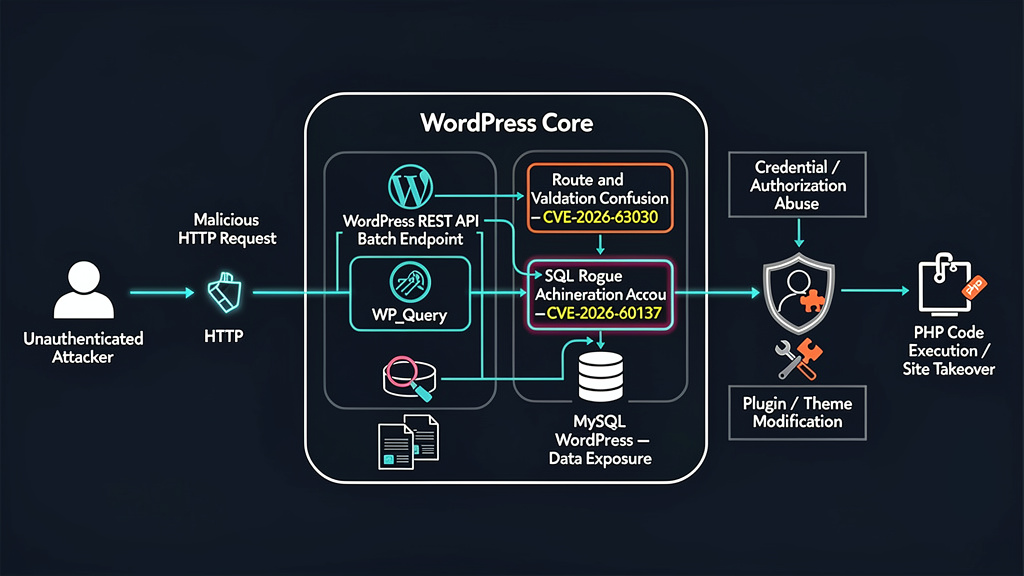
The WordPress 7.0.3 release is the newest development, but the most urgent WordPress vulnerability event of 2026 so far occurred only weeks earlier.
On July 17, WordPress released version 7.0.2 to address two vulnerabilities:
CVE-2026-60137 — a WordPress Core SQL injection issue.
CVE-2026-63030 — REST API batch-route confusion that can be chained with the SQL injection.
WordPress classified the release as addressing one critical and one high-severity issue and enabled forced automatic updates for affected installations because of the risk. (WordPress.org)
The vulnerabilities are particularly interesting because neither issue tells the full story by itself.
CVE-2026-60137
CVE-2026-60137 affects the handling of the author__not_in value used by WP_Query.
Affected WordPress branches included:
- WordPress 6.8 through 6.8.5
- WordPress 6.9 through 6.9.4
- WordPress 7.0 through 7.0.1
The fixes were shipped in:
- WordPress 6.8.6
- WordPress 6.9.5
- WordPress 7.0.2
NVD describes the weakness as insufficient sanitization of author__not_in, allowing SQL injection when untrusted input reaches the affected query path. (NVD)
On its own, the SQL injection primitive was constrained.
But WordPress 6.9 introduced another condition that dramatically changed the attack surface.
CVE-2026-63030
CVE-2026-63030 affects the WordPress REST API batch endpoint.
The issue involves route and validation desynchronization: a request can be validated against one interpretation of a route while ultimately being dispatched in a way that reaches another callback with attacker-controlled parameters.
When chained with CVE-2026-60137, that behavior gives an unauthenticated attacker a practical route to the vulnerable query logic. (Patchstack)
The attack chain can be summarized as:
Unauthenticated attacker
        |
        v
REST API batch endpoint
        |
        v
Route / validation confusion
        |
        v
Attacker-controlled query parameter reaches WP_Query
        |
        v
CVE-2026-60137 SQL injection
        |
        v
Sensitive WordPress database information
        |
        v
Authentication / authorization abuse
        |
        v
Administrator account creation
        |
        v
Administrator functionality
        |
        v
PHP code execution
This is a useful lesson for anyone evaluating WordPress CVEs.
Severity belongs to attack chains, not just individual functions.
A SQL injection primitive that appears limited in isolation can become a site-takeover vulnerability if another feature provides a reliable path into it.
CVE-2026-60137 Is a Known Exploited Vulnerability
The risk is no longer hypothetical.
CISA’s Known Exploited Vulnerabilities Catalog lists CVE-2026-60137, meaning exploitation evidence is strong enough for the vulnerability to enter the catalog used by defenders to prioritize remediation. (cisa.gov)
Wordfence separately reported real-world attacks against the WordPress Core vulnerability chain.
Its telemetry indicated that attackers began targeting the vulnerability on July 17, the same day the security release became public, with mass exploitation beginning shortly afterward. Wordfence reported blocking more than 11 million exploit attempts against protected customers. (Wordfence)
Patchstack observed the same underlying phenomenon from a different telemetry source.
It reported more than 65,000 exploitation attempts from more than 1,500 unique IP addresses against vulnerable installations and said its sensors began seeing real exploitation attempts roughly 90 minutes after WordPress 7.0.2 was released. (Patchstack)
Those numbers should not be interpreted as 11 million compromised sites or 65,000 successful compromises.
They are blocked attempts.
But they demonstrate something strategically important:
the exploitation window for major WordPress vulnerabilities is now extremely short.
The WordPress Patch Window Is Becoming an Hours Problem
Historically, many organizations treated WordPress patching like ordinary IT maintenance.
A security update appeared on Tuesday.
The operations team reviewed it on Wednesday.
A staging environment was tested on Thursday.
Production was updated during the weekend maintenance window.
That workflow becomes dangerous when the first automated exploitation begins within hours.
The July WordPress Core incident is a particularly clear example. Patchstack’s timeline found that the source-code fix became visible shortly before the release was tagged, and exploitation appeared only hours later. (Patchstack)
This is not unique to WordPress.
Modern attackers can monitor Git repositories, vulnerability databases, security advisories and package releases automatically.
A simplified modern exploit-development pipeline can look like:
Security patch published
       |
       v
Automated diffing
       |
       v
Changed security-sensitive function identified
       |
       v
Input/output conditions reconstructed
       |
       v
Candidate exploit generated
       |
       v
Internet scanning begins
       |
       v
Successful paths incorporated into attack tooling
Large language models and automated code-analysis systems can accelerate parts of this process further.
The operational implication is more important than whether a particular exploit was “AI generated.”
A defender should assume that once a high-impact patch becomes public, the patch itself may provide attackers with enough information to reconstruct the vulnerability.
The patch therefore starts a race.
Latest WordPress Vulnerabilities and CVEs
It helps to separate recent disclosures from confirmed active exploitation.
The following table summarizes several of the most important recent WordPress vulnerabilities as of August 10, 2026.
| CVE | Component | Vulnerability | Affected version | Fixed version | Exploitation status |
|---|---|---|---|---|---|
| CVE-2026-64638 | WordPress Core | Reflected XSS with potential path to PHP execution | <= 7.0.2 | 7.0.3 | Recently disclosed; no mass exploitation established in cited sources |
| CVE-2026-60137 | WordPress Core | SQL Injection | 6.8–7.0.1 depending branch | 6.8.6 / 6.9.5 / 7.0.2 | Confirmed exploitation / CISA KEV |
| CVE-2026-63030 | WordPress Core | REST batch route confusion / RCE chain | 6.9–7.0.1 | 6.9.5 / 7.0.2 | Exploited as part of core chain |
| CVE-2026-28139 | Ajax Search Lite | PHP Object Injection | <= 4.14.4 | 4.14.5 | Critical recent disclosure |
| CVE-2026-14364 | TrueBooker | Arbitrary password reset | <= 1.2.3 | 1.2.4 | Critical recent disclosure |
| CVE-2026-15015 | MountDev AI MCP Connector | Unauthenticated privilege escalation | <= 1.6.1 | 1.6.2 | Critical recent disclosure |
| CVE-2026-8181 | Burst Statistics | Authentication bypass | 3.4.0–3.4.1.1 | 3.4.2 | Confirmed active exploitation |
| CVE-2026-3844 | Breeze Cache | Arbitrary file upload | <= 2.4.4 | 2.4.5 | Confirmed active exploitation |
| CVE-2026-3300 | Everest Forms Pro | PHP code injection / RCE | <= 1.9.12 | 1.9.13 | Confirmed active exploitation |
| CVE-2026-3584 | Kali Forms | Remote code execution | <= 2.4.9 | 2.4.10 | Confirmed active exploitation |
| CVE-2026-0740 | Ninja Forms File Upload | Arbitrary file upload | <= 3.3.26 | 3.3.27 | Confirmed active exploitation |
The important word in that table is status.
A recently disclosed CVE should be patched according to its risk.
A vulnerability with confirmed exploitation deserves an entirely different operational response.
CVE-2026-28139: Ajax Search Lite PHP Object Injection
One of the newest critical WordPress plugin vulnerabilities disclosed in August is CVE-2026-28139.
The vulnerability affects Ajax Search Lite versions through 4.14.4 and was patched in version 4.14.5.
Patchstack assigns the vulnerability a CVSS score of 9.8 and describes it as an unauthenticated PHP Object Injection issue. It was published on August 4, 2026. (Patchstack)
PHP Object Injection deserves careful interpretation.
Deserialization or object-instantiation vulnerabilities do not always result directly in code execution. Their ultimate impact can depend on whether useful PHP “gadget” classes exist in the application or its dependencies.
But WordPress is exactly the kind of environment where this becomes dangerous because a production site may contain:
- WordPress Core classes
- dozens of plugin codebases
- theme code
- Composer dependencies
- third-party SDKs
- payment libraries
- email libraries
- caching systems
Each package can expand the set of potentially useful object behaviors.
For defenders, the appropriate response is not to attempt to determine whether their exact dependency combination contains a usable gadget chain before patching.
If Ajax Search Lite is installed at a vulnerable version, update it.
CVE-2026-14364: TrueBooker Arbitrary Password Reset
CVE-2026-14364 is another critical WordPress vulnerability disclosed in early August.
It affects TrueBooker – Appointment Booking and Scheduler System through version 1.2.3.
According to Wordfence, insufficient authorization checking allows an unauthenticated attacker to change the password of arbitrary WordPress user accounts, including administrators. Version 1.2.4 contains the fix. Wordfence rates the issue 9.8. (Wordfence)
The attack path is conceptually simple:
Unauthenticated request
      |
      v
Vulnerable password-management action
      |
      v
Attacker chooses victim WordPress user
      |
      v
Authorization not properly enforced
      |
      v
Password changed
      |
      v
Administrator login
      |
      v
Full WordPress administrative control
This class of vulnerability is particularly dangerous because the attacker does not necessarily need a PHP exploit.
WordPress administrators already possess capabilities that can frequently be turned into code execution.
Once an attacker controls an administrator account, they may be able to:
- install plugins;
- upload a malicious plugin;
- modify existing plugin code;
- modify a theme;
- create additional administrator accounts;
- steal WooCommerce or customer data;
- change redirect behavior;
- modify SEO content;
- inject JavaScript;
- create persistence.
That is why authentication-bypass and administrator-password-reset vulnerabilities deserve nearly the same operational urgency as direct RCE.
CVE-2026-15015: AI and MCP Reach the WordPress Attack Surface
WordPress security is also beginning to intersect directly with agent and AI infrastructure.
CVE-2026-15015 affects the MountDev AI MCP Connector for WordPress through version 1.6.1.
Patchstack describes it as an unauthenticated privilege-escalation vulnerability with a CVSS score of 9.8. Version 1.6.2 contains the patch. (Patchstack)
This vulnerability is notable beyond the individual plugin.
WordPress sites increasingly integrate with:
- AI content generators;
- autonomous publishing agents;
- Model Context Protocol connectors;
- customer-support agents;
- SEO automation;
- workflow orchestration;
- external model APIs.
Those integrations frequently need powerful application privileges.
An AI connector that can create posts, modify pages, manage media or execute workflows effectively creates another control plane around WordPress.
Security teams should therefore treat AI and agent plugins as privileged infrastructure rather than ordinary content extensions.
A useful review question is:
If this plugin’s authentication mechanism fails, what is the maximum WordPress capability an anonymous internet user could inherit?
That question often reveals more than the plugin’s marketing description.
The WordPress Vulnerabilities That Attackers Are Actually Exploiting
The most useful vulnerability list is not necessarily the one sorted by publication date.
Defenders should also ask:
What are attackers actually exploiting?
Several 2026 WordPress plugin vulnerabilities provide unusually clear telemetry.
CVE-2026-8181: Burst Statistics Authentication Bypass
CVE-2026-8181 affects Burst Statistics versions 3.4.0 through 3.4.1.1.
The vulnerability stems from incorrect authentication handling associated with its MainWP functionality. An unauthenticated attacker who knows an administrator username can cause the plugin to operate under that administrator context during the affected request.
The fully patched version is 3.4.2. (Wordfence)
Wordfence reported that attackers started targeting the vulnerability on the same day it became public.
The company observed attackers using the flaw to create administrator accounts and reported blocking more than 112,800 exploit attempts. (Wordfence)
The operational lesson is not unique to Burst Statistics.
Authentication integrations are highly sensitive code.
Whenever a WordPress plugin supports features such as:
- single sign-on;
- remote management;
- application passwords;
- API keys;
- signed requests;
- external dashboards;
- temporary login links;
security teams should treat that functionality as part of their authentication perimeter.
CVE-2026-3844: Breeze Cache Arbitrary File Upload
Caching plugins may appear less security-sensitive than login or backup plugins.
CVE-2026-3844 demonstrates why that assumption can fail.
The vulnerability affects Breeze Cache through version 2.4.4 and allows unauthenticated arbitrary file upload under a specific configuration condition: the plugin’s local Gravatar hosting functionality must be enabled. Version 2.4.5 contains the patch. (Wordfence)
Arbitrary file upload becomes especially dangerous on PHP hosting because an attacker may be able to place executable PHP code somewhere accessible by the web server.
Wordfence observed real attacks targeting the flaw, with more than 30,000 exploit attempts blocked. Its telemetry indicated exploitation began the same day the vulnerability was disclosed. (Wordfence)
This case also illustrates why configuration matters.
Two installations running the same vulnerable plugin version may have materially different exposure depending on whether the vulnerable feature is enabled.
Therefore:
Installed ≠ Automatically exploitable
Vulnerable version ≠ Same exposure everywhere
Disabled feature ≠ Reason to ignore patching
Configuration-aware vulnerability management is more accurate than simply matching software names and versions.
CVE-2026-3300: Everest Forms Pro PHP Code Injection
Forms are one of the most repeatedly exposed attack surfaces in WordPress because they intentionally accept unauthenticated input from the internet.
CVE-2026-3300 affects Everest Forms Pro through version 1.9.12.
The vulnerability occurs in the calculation functionality, where attacker-controlled form values can reach dynamically constructed PHP code that is evaluated. Version 1.9.13 contains the patch. (Wordfence)
This is a particularly dangerous architectural pattern.
Conceptually:
$formula = build_formula_from_user_values();
$result  = eval($formula);
The actual vulnerable implementation contained additional application logic, but the security problem is recognizable: data from an untrusted user crosses into a code execution context.
Sanitizing input as plain text does not necessarily make it safe inside PHP code.
Context matters.
HTML escaping protects HTML contexts.
SQL parameterization protects SQL contexts.
Shell escaping protects shell contexts.
A value inserted into PHP source code requires entirely different guarantees.
Wordfence observed attackers actively exploiting CVE-2026-3300 and reported more than 29,300 blocked attempts. Attackers were attempting to use the vulnerability to create administrator accounts on compromised sites. (Wordfence)
Once again, the attacker does not necessarily need to maintain a traditional reverse shell.
Creating a WordPress administrator account is already a powerful persistence mechanism.
CVE-2026-3584: Kali Forms Remote Code Execution
Kali Forms suffered another major WordPress vulnerability in 2026.
CVE-2026-3584 affects versions through 2.4.9.
Wordfence’s analysis attributes the problem to user-controlled values being mapped into internal placeholder functionality that ultimately reaches call_user_func, allowing unauthenticated attackers to influence callable behavior.
Version 2.4.10 patched the issue. (Wordfence)
The exploitation data is significant.
Wordfence reported more than 312,200 exploit attempts, with active attacks beginning on the same day the vulnerability became public. (Wordfence)
That is an important recurring pattern in 2026:
Disclosure
   ↓
Public technical details
   ↓
Exploit reconstruction
   ↓
Automated scanning
   ↓
Credential / administrator abuse
   ↓
Persistence
The “patch later” model provides attackers with exactly the window they need.
CVE-2026-0740: Ninja Forms File Upload to RCE
File-upload functionality remains one of the highest-risk features in WordPress plugins.
CVE-2026-0740 affects Ninja Forms – File Upload through version 3.3.26.
The vulnerability allows unauthenticated attackers to manipulate upload handling in a way that can result in arbitrary files—including PHP files—being written to dangerous locations. The vulnerability was fully fixed in version 3.3.27. (Wordfence)
Wordfence observed active attacks beginning the same day the vulnerability was publicly disclosed and reported more than 118,600 blocked attempts. (Wordfence)
This attack class is so dangerous because it can collapse several steps into one:
Anonymous HTTP request
       |
       v
Upload handler
       |
       v
Filename / extension validation bypass
       |
       v
PHP file written into executable directory
       |
       v
Attacker requests file
       |
       v
Remote code execution
Secure upload handling therefore requires more than MIME checking.
Defenses should consider:
- trusted server-side MIME detection;
- strict extension allowlists;
- filename normalization;
- randomized server-generated filenames;
- path traversal prevention;
- storage outside executable web paths;
- server configuration preventing script execution inside upload directories.
WordPress administrators should not assume that blocking .php at the frontend alone solves the problem.
WordPress Supply Chain Attacks Are a Different Category of Risk
CVEs describe software vulnerabilities.
Not every WordPress compromise begins with a software vulnerability.
2026 has also produced important supply-chain incidents.
That distinction matters because patching logic changes dramatically.
Smart Slider 3 Pro Compromise
In April 2026, Smart Slider 3 Pro suffered a supply-chain compromise.
According to Patchstack’s analysis, an unauthorized actor gained access to the vendor’s update infrastructure and distributed a malicious Smart Slider 3 Pro version, 3.5.1.35, through the legitimate update mechanism.
The compromised package was reportedly available for roughly six hours before detection and removal.
Sites that installed that version effectively installed attacker-controlled code while believing they were applying a trusted vendor update. (Patchstack)
A clean version, 3.5.1.36, was subsequently released.
But this is where supply-chain remediation differs from ordinary vulnerability remediation:
updating the malicious version does not prove the site is clean.
If the malicious update already executed, it may have installed persistent malware elsewhere.
The correct security assumption is:
Known malicious package executed
          ↓
Host should be treated as compromised
          ↓
Update package
          +
Search for persistence
          +
Rotate credentials
          +
Review administrator accounts
          +
Verify filesystem integrity
          +
Review logs
A normal CVE patch closes an attack path.
A supply-chain compromise may mean the attacker has already passed through that path.
Compromised JavaScript Can Abuse a Legitimate Administrator Session
Another 2026 incident affected WordPress marketing integrations including OptinMonster, TrustPulse and PushEngage.
Patchstack reported that malicious JavaScript was served through vendor-controlled CDN infrastructure.
Instead of exploiting a traditional PHP vulnerability, the injected JavaScript executed in the browser of logged-in administrators and used their legitimate authenticated WordPress sessions to perform privileged actions, including creating rogue administrator accounts and installing malicious code. (Patchstack)
This attack model is important:
Trusted WordPress site
        |
        v
Loads trusted vendor JavaScript
        |
        v
Vendor CDN compromised
        |
        v
Malicious JS executes in administrator browser
        |
        v
Browser already holds valid WordPress session
        |
        v
Malicious requests carry legitimate privileges
        |
        v
Rogue administrator / persistence
A network firewall has a difficult problem here.
The browser is talking to the legitimate WordPress application.
The user has valid credentials.
The requests may contain valid cookies and nonces.
The malicious behavior occurs inside the trust relationship.
Modern WordPress security therefore needs integrity and behavior monitoring, not simply signature matching at the perimeter.
Why WordPress Plugins Are Such Attractive Targets
Plugins combine several attacker-friendly characteristics.
First, many plugins intentionally expose functionality to anonymous users.
Examples include:
- contact forms;
- newsletter registration;
- file uploads;
- appointment booking;
- search;
- e-commerce checkout;
- comments;
- analytics;
- authentication;
- REST APIs.
Second, plugins frequently execute with the same PHP and database privileges as WordPress itself.
There is generally no strong process-level isolation between a plugin and WordPress Core.
If vulnerable plugin code executes:
update_option(...);
wp_create_user(...);
wp_insert_user(...);
file_put_contents(...);
$wpdb->query(...);
the consequences can immediately reach the rest of the application.
Third, many WordPress installations accumulate plugins over time.
An organization may know it has 15 “active” plugins while forgetting that another 20 inactive plugins remain present on disk.
Inactive plugins reduce some exposure because their normal hooks are not loaded, but abandoned code and directly reachable files can still complicate security posture.
The cleanest rule is:
If a plugin or theme is not needed, remove it rather than merely disabling it.
The Most Important WordPress Vulnerability Classes
Although individual CVEs change constantly, the underlying vulnerability classes repeat.
Understanding these classes makes vulnerability feeds easier to interpret.
1. Authentication Bypass
Authentication bypass allows an attacker to become a legitimate WordPress user without possessing the required credentials.
Potential outcomes include:
Anonymous user
   ↓
Authentication logic flaw
   ↓
Subscriber / Editor / Administrator session
   ↓
WordPress privileged functionality
Administrator-level authentication bypass should normally be treated as equivalent to full application compromise.
2. Broken Access Control
WordPress plugins often expose AJAX or REST API functions.
A vulnerable handler may correctly determine what action to perform while failing to verify whether the requesting user is authorized to perform it.
A secure pattern looks conceptually like:
if ( ! current_user_can( 'manage_options' ) ) {
    wp_die( 'Unauthorized' );
}
Nonce verification alone is not authorization.
A nonce can help protect against cross-site request forgery, but it should not replace capability checks.
This distinction has caused many WordPress vulnerabilities.
3. Arbitrary File Upload
Arbitrary upload is dangerous when an attacker can control:
- file contents;
- filename;
- destination path;
- extension;
- MIME interpretation.
If a PHP file can be placed in an executable directory, the result may become RCE.
4. PHP Code Injection
Functions such as eval() become extremely dangerous when dynamically constructed code contains user-controlled values.
Developers should avoid dynamic PHP execution whenever possible.
If an expression language is necessary, use a constrained parser rather than the PHP interpreter itself.
5. SQL Injection
WordPress provides $wpdb->prepare() and higher-level APIs specifically to reduce SQL injection risks.
The broader principle is consistent with other platforms:
data must remain data.
User input should never be concatenated into SQL syntax.
6. Cross-Site Scripting
XSS severity depends heavily on execution context.
An XSS running in an anonymous visitor’s browser may cause redirects or data theft.
The same vulnerability running in the browser of a WordPress administrator can potentially perform privileged actions with the administrator’s session.
Stored XSS is particularly dangerous because it can trigger automatically whenever the victim views the affected page.
7. SSRF
Server-side request forgery causes WordPress itself to make attacker-influenced requests.
This may expose:
- internal applications;
- private APIs;
- cloud metadata services;
- link-local resources;
- management interfaces.
The SSRF issue fixed in WordPress 7.0.3 is notable because WordPress specifically identified requests to link-local ranges as part of the vulnerability. (WordPress.org)
For cloud-hosted WordPress sites, SSRF defenses should therefore be considered part of infrastructure security, not merely application security.
8. Supply Chain Compromise
Supply-chain attacks bypass the traditional question:
Is this version vulnerable?
The package itself may be malicious.
Important controls include:
- update integrity;
- vendor security monitoring;
- filesystem monitoring;
- software provenance;
- post-update behavior analysis;
- credential rotation after confirmed compromise.
CVSS Alone Is Not Enough for WordPress Vulnerability Prioritization
Consider two hypothetical vulnerabilities.
Vulnerability A
CVSS 9.8.
Unauthenticated.
Plugin installed on 500 sites.
Affected functionality is disabled on your site.
No exploitation observed.
Vulnerability B
CVSS 7.5.
Unauthenticated.
Component installed on millions of sites.
Public exploit available.
CISA KEV.
Active scanning observed.
Your endpoint is internet accessible.
Which should be patched first?
Probably Vulnerability B.
A more useful WordPress prioritization model is:
Priority =
    exploitation evidence
  × reachability
  × authentication requirements
  × business impact
  × component exposure
  × patch availability
The practical hierarchy is often:
1. Confirmed active exploitation
2. Unauthenticated RCE or administrator takeover
3. Authentication bypass or arbitrary password reset
4. Arbitrary file upload
5. SQL injection affecting sensitive data
6. Privileged XSS or SSRF
7. Authenticated vulnerabilities requiring uncommon roles
8. Vulnerabilities in components not present or not reachable
CVSS remains useful.
It should simply be one input rather than the entire decision.
How to Check Whether Your WordPress Site Is Vulnerable
The first step is obtaining an accurate inventory.
For administrators with WP-CLI access:
wp core version

wp plugin list \
  --fields=name,status,version,update,update_version

wp theme list \
  --fields=name,status,version,update,update_version
Do not only record active plugins.
Record everything installed.
A clean inventory should tell you:
Component
Version
Active/inactive status
Latest available version
Security relevance
Internet-facing functionality
Business owner
Without that information, vulnerability intelligence cannot be converted into action.
Verify WordPress Core Integrity
A patched version does not prove the filesystem is trustworthy.
WordPress provides checksum verification through WP-CLI:
wp core verify-checksums
Unexpected modifications deserve investigation.
However, checksum verification only covers the files for which trusted checksums are available.
It should therefore be combined with plugin, theme and custom-code review.
For production incident response, treat unexpected file changes as evidence—not as files to delete immediately before collecting context.
Audit Administrator Accounts
Many current WordPress exploit campaigns do not leave a dramatic shell immediately.
They create an administrator.
Review WordPress users:
wp user list \
  --fields=ID,user_login,user_email,roles,user_registered
You can focus on administrators with:
wp user list \
  --role=administrator \
  --fields=ID,user_login,user_email,user_registered
Compare the result against an authoritative employee or service-account list.
Ask:
- Is every administrator expected?
- Was the account created at a suspicious time?
- Does its email belong to the organization?
- Does an automation account really need administrator privileges?
- Are old contractor accounts still active?
Removing a suspicious administrator is important, but not sufficient.
If an attacker had administrator access, assume they may have established additional persistence.
Search for Unexpected PHP Files
On a normal WordPress installation, PHP appears in many legitimate locations.
The useful question is not simply “does PHP exist?”
It is:
Does executable PHP exist somewhere it normally should not?
For example, examine upload and cache locations:
find wp-content/uploads \
  -type f \
  \( -name "*.php" -o -name "*.phtml" -o -name "*.phar" \) \
  -print

find wp-content/cache \
  -type f \
  \( -name "*.php" -o -name "*.phtml" \) \
  -print
PHP files inside user-upload directories are usually worth investigating.
Do not automatically assume every match is malicious; hosting products and plugins sometimes create unusual files.
Context matters.
Review MU Plugins
WordPress supports “must-use” plugins stored under:
wp-content/mu-plugins/
Attackers like persistence mechanisms that administrators may overlook.
Review this directory manually:
find wp-content/mu-plugins -type f -maxdepth 2 -print
If your organization does not intentionally use MU plugins, unexpected files there deserve immediate investigation.
Review Recently Modified Files
A simple modification-time review can be useful during incident response:
find wp-content \
  -type f \
  -mtime -14 \
  -print
This is not malware detection.
Legitimate plugin upgrades will modify many files.
But when correlated with the disclosure date of an exploited WordPress vulnerability, modification timestamps can help reconstruct a timeline.
Look at the Web Logs
The July 2026 WordPress Core attack chain makes REST API monitoring particularly important.
Defenders should review traffic targeting unusual REST batch behavior and correlate it with:
- unexpected administrator creation;
- failed or unusual login activity;
- plugin installation;
- PHP-file creation;
- outbound connections.
For Apache-style logs, basic defensive triage may include:
grep -F "/wp-json/" access.log | tail -n 500

grep -F "/wp-json/batch/v1" access.log

grep -F "/wp-admin/admin-ajax.php" access.log | tail -n 500
These commands do not identify exploitation by themselves.
Both REST API and admin-ajax.php traffic can be completely legitimate.
The value comes from correlation.
For example:
Suspicious REST request
        +
New administrator account
        +
Unexpected plugin installation
        +
New PHP file
        =
Much stronger compromise signal
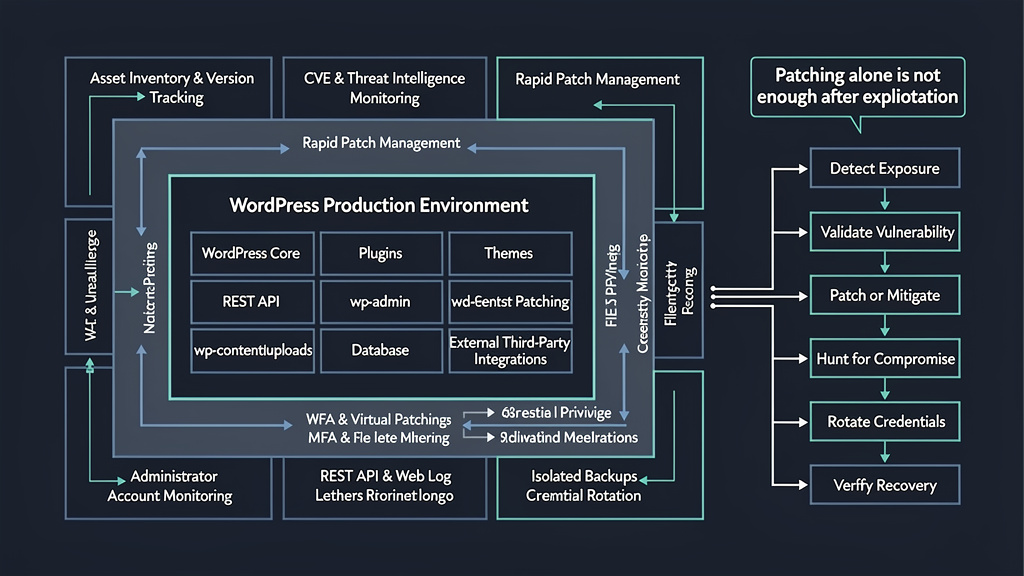
Patching Is Not Incident Response
This is one of the most important WordPress security principles.
Imagine that a vulnerable plugin was exploited yesterday.
Today you install the patched version.
The vulnerable code is gone.
But what about everything the attacker did yesterday?
Potential persistence may include:
- new administrator accounts;
- malicious plugins;
- modified legitimate plugins;
- theme modifications;
functions.phpinjections;- web shells;
- MU plugins;
- cron jobs;
- stolen database credentials;
- stolen API keys;
- stolen WordPress salts;
- changed payment information;
- injected JavaScript;
- SEO spam;
- modified
.htaccess; - database-resident payloads.
Therefore:
Vulnerable but not exploited
       → patch

Known or suspected exploitation
       → patch + incident response
Those are different workflows.
WordPress Incident Response After a Known Exploit
If evidence suggests that a WordPress vulnerability was successfully exploited, defenders should prioritize containment and evidence preservation.
The exact process depends on business requirements, but a typical workflow includes:
- Isolate or restrict the affected application where practical.
- Preserve relevant web, PHP, WAF and authentication logs.
- Record the current filesystem state.
- Identify the initial vulnerable component.
- Patch or remove the vulnerable component.
- Compare WordPress Core against trusted checksums.
- Compare plugins and themes against trusted packages.
- Audit all administrator and privileged accounts.
- Search upload, cache, theme and plugin directories for unexpected executable files.
- Review database options, users and scheduled tasks.
- Rotate WordPress credentials.
- Rotate database credentials if exposure is plausible.
- Rotate API keys and third-party service credentials reachable from WordPress.
- Invalidate active sessions.
- Review server-level persistence.
- Monitor the recovered environment for recurrent activity.
For severe compromises, rebuilding from a trusted baseline may provide more confidence than manually deleting known malware.
WordPress Backups Are a Security Control Only if They Are Recoverable
A backup system does not protect a WordPress site merely because backups exist.
Useful backups should be:
- isolated from the production application;
- protected by independent credentials where possible;
- versioned;
- regularly tested;
- retained long enough to predate compromise.
An attacker with WordPress administrator access should not automatically gain the ability to permanently delete every recovery point.
That is especially important when backup plugins themselves integrate with remote-management functions.
The 2026 UpdraftPlus vulnerability is a useful reminder. Wordfence disclosed CVE-2026-10795, an authentication-bypass weakness affecting UpdraftPlus remote communications that could allow forged privileged RPC actions and ultimately lead to code execution. (Wordfence)
Backup infrastructure is therefore part of the security perimeter.
Disable WordPress File Editing
WordPress administrators can normally modify theme and plugin files from the dashboard when the environment allows it.
Many production sites do not require that functionality.
Adding the following to wp-config.php disables the built-in file editors:
define( 'DISALLOW_FILE_EDIT', true );
Some environments go further:
define( 'DISALLOW_FILE_MODS', true );
That setting prevents plugin and theme installation or updating through the WordPress administration interface, so it should only be used where deployments and updates are managed through another trusted process.
The principle is simple:
remove capabilities production administrators do not need.
An attacker who steals an administrator session inherits the privileges of that administrator.
Reducing those privileges reduces post-authentication attack options.
Protect the Upload Directory From PHP Execution
A file-upload vulnerability becomes dramatically more dangerous when uploaded code can execute.
Infrastructure teams should configure their web server so normal user-upload directories cannot execute PHP or other server-side scripts.
The exact configuration depends on:
- Apache;
- Nginx;
- PHP-FPM;
- container architecture;
- managed WordPress hosting.
The security objective is the same:
User upload
    ↓
Stored as inert content
    ↓
Never interpreted as PHP
This is defense in depth.
A plugin should still validate uploads securely even if the server prevents PHP execution.
Use MFA for WordPress Administrators
Multi-factor authentication will not prevent every WordPress vulnerability.
It does, however, reduce the damage from:
- stolen passwords;
- credential stuffing;
- password reuse;
- phishing that captures only the password.
MFA is less helpful when an attacker exploits an application vulnerability that directly assumes an administrator context.
That is why authentication security cannot replace patching.
They protect different attack paths.
Restrict Administrator Population
Every administrator account expands the impact of:
- session theft;
- reflected XSS;
- compromised browsers;
- malicious extensions;
- third-party JavaScript compromise;
- password theft.
Organizations should periodically review WordPress roles and use the least privilege necessary.
A content writer usually does not require administrator access.
An SEO agency usually does not require plugin installation rights.
An analytics integration should not require the ability to create users unless that feature is genuinely necessary.
Role design is one of the cheapest WordPress security controls available.
Auto-Updates: Security Benefit With Operational Tradeoffs
Automatic security updates dramatically reduce exposure windows.
The WordPress Security Team itself used forced updates for affected versions during the July 2026 Core vulnerability incident because of the severity. (WordPress.org)
But plugin auto-updates introduce an operational tension.
Updating rapidly protects against known vulnerabilities.
At the same time, the Smart Slider 3 Pro incident demonstrates that a compromised update channel can deliver malicious code.
There is no universal answer.
Organizations should choose an update model based on risk.
A small marketing site may reasonably prioritize rapid automatic patching.
A highly sensitive enterprise environment may use:
Update published
      ↓
Package provenance / security review
      ↓
Automated staging
      ↓
Smoke tests
      ↓
Rapid production deployment
The goal should not be to delay updates for days.
It should be to make safe rapid deployment possible.
WAFs Help, but They Do Not Replace Patches
A web application firewall can reduce exploitability while an official patch is being deployed.
This is particularly useful during zero-day or one-day windows.
But a WAF should be considered a compensating control.
A vulnerability-specific application-layer rule can be valuable because it understands the vulnerable endpoint and parameters.
Generic network filtering may have difficulty distinguishing valid WordPress behavior from exploit behavior, especially for:
- legitimate REST API requests;
- authenticated administrator actions;
- complex nested JSON;
- application-specific AJAX handlers;
- compromised third-party JavaScript using valid sessions.
Patchstack’s telemetry from the July WordPress Core attack is particularly interesting because it reported exploitation requests reaching its application-layer mitigation on vulnerable sites after passing infrastructure in front of those applications. (Patchstack)
The preferred hierarchy remains:
Patch
   +
Application-aware mitigation
   +
Least privilege
   +
Monitoring
   +
Incident-response capability
not:
WAF
   =
No need to update
WordPress Security Monitoring Needs Application Context
Generic infrastructure monitoring may tell you:
HTTP POST /wp-admin/admin-ajax.php
Status: 200
That tells you very little.
WordPress-aware monitoring should understand:
- which AJAX action was called;
- whether the requester was authenticated;
- the requester’s WordPress role;
- which plugin registered the action;
- whether the action should be public;
- what files changed afterward;
- whether a new administrator appeared;
- whether the server initiated new outbound connections.
This is why application context matters so much for CMS security.
A legitimate POST and an exploit may look almost identical to a generic network appliance.
Why “My Site Is Too Small to Hack” Is a Dangerous Assumption
Most WordPress exploitation is not driven by the business value of an individual website.
Attackers can scan large address spaces for recognizable endpoints and plugin assets.
The economics favor automation.
A compromised small WordPress site may still be valuable for:
- SEO spam;
- phishing;
- malware delivery;
- redirect campaigns;
- credential harvesting;
- cryptomining;
- botnet infrastructure;
- proxying;
- further supply-chain compromise.
The attacker may know nothing about the organization when exploitation begins.
They know the software.
That is enough.
Plugin Popularity Does Not Equal Security
Popular plugins often benefit from:
- more researchers;
- larger security teams;
- vulnerability disclosure programs;
- faster updates.
But popularity also makes them attractive targets.
A vulnerability affecting a high-installation plugin provides attackers with a larger return on exploit-development effort.
Similarly, a niche plugin can be extremely dangerous to the organizations that use it if it performs highly privileged actions.
Therefore vulnerability priority should not be based exclusively on installation count.
A remote-management plugin with 10,000 installations may represent greater per-site risk than a visual styling plugin with one million installations.
AI Is Changing Both Sides of WordPress Security Research
One of the more interesting 2026 developments is the increasing involvement of AI-assisted vulnerability research.
Patchstack noted that the WordPress 7.0.2 vulnerability chain was discovered through AI-assisted security research, while security issues in 7.0.3 were credited to organizations including pwn.ai and Anthropic. (Patchstack)
The significance is not that AI suddenly eliminates human security research.
The more practical change is scale.
Automated systems can assist with:
- source-code review;
- data-flow tracing;
- dangerous API identification;
- patch diffing;
- test generation;
- exploit-condition reconstruction;
- regression testing.
Defenders can use exactly the same capabilities.
The real security competition is therefore moving toward:
How quickly can attackers understand a vulnerability?

versus

How quickly can defenders discover, prioritize,
validate and remediate exposure?
That gap matters more than the branding of the model being used.
AI WordPress Plugins Create Their Own New Trust Boundary
The emergence of vulnerabilities such as CVE-2026-15015 in an MCP-related WordPress plugin points toward a larger architectural concern. (Patchstack)
An AI-enabled WordPress environment might look like:
LLM / Agent
     |
     v
MCP / REST connector
     |
     v
WordPress plugin
     |
     +---- Create content
     +---- Upload media
     +---- Modify metadata
     +---- Read private content
     +---- Manage users
     +---- Trigger workflows
Every additional capability becomes part of the agent’s security boundary.
Defenders should ask:
- How is the AI connector authenticated?
- Can requests be replayed?
- Are signatures validated correctly?
- What happens when parsing fails?
- Which WordPress capabilities does the connector inherit?
- Can the model invoke arbitrary plugin actions?
- Are tool parameters independently authorized?
- Are secrets exposed to prompts?
- Can untrusted webpage content influence privileged agent actions?
WordPress security is gradually becoming agent security as well.
A Practical WordPress Vulnerability Prioritization Workflow
A mature security team does not need to panic every time a WordPress CVE appears.
It needs a repeatable process.
Step 1: Determine whether you use the component
Do not waste emergency time on plugins you do not run.
Maintain a continuous software inventory.
Step 2: Determine the exact version
Do not assume automatic updates succeeded.
Verify.
Step 3: Determine exploit prerequisites
Ask:
- unauthenticated?
- subscriber?
- contributor?
- author?
- administrator?
- user interaction?
- feature-specific?
- configuration-specific?
Step 4: Determine the impact
Possible impact includes:
- information disclosure;
- stored XSS;
- account takeover;
- administrator creation;
- SQL injection;
- arbitrary file upload;
- RCE.
Step 5: Check exploitation evidence
Prioritize:
- CISA KEV;
- vendor advisories;
- credible threat-intelligence telemetry;
- confirmed exploit attempts;
- public proof-of-concept availability.
Step 6: Patch
Where no patch exists, disable or remove the vulnerable component where practical.
Step 7: Decide whether incident response is required
If exploitation occurred before patching, do not stop at remediation.
Investigate compromise.
Recommended SLA for WordPress Vulnerabilities
Exact patch SLAs depend on the organization, but a risk-based model could look like this:
| Condition | Recommended response |
|---|---|
| Confirmed exploited + internet reachable | Emergency remediation |
| Unauthenticated RCE / admin takeover | Emergency remediation |
| Critical unauthenticated vulnerability | Same day |
| High-risk auth bypass / arbitrary file upload | Same day |
| High severity but requires privileged account | Accelerated scheduled patch |
| Medium severity with realistic exposure | Short remediation window |
| Low severity / non-reachable feature | Normal maintenance |
| Vulnerable unused plugin | Remove immediately |
The critical insight is that “critical CVSS” and “critical operational priority” overlap, but they are not identical.
WordPress Security Hardening Checklist for 2026
A resilient WordPress deployment should, at minimum:
- run a supported current WordPress Core release;
- rapidly deploy security updates;
- maintain an inventory of plugins and themes;
- remove unused plugins and themes;
- minimize administrator accounts;
- require MFA for privileged users;
- protect administrative interfaces against credential attacks;
- disable unnecessary dashboard file editing;
- prevent PHP execution inside user-upload directories;
- validate file integrity;
- monitor administrator creation;
- monitor plugin installation and activation;
- monitor changes to
wp-config.php; - monitor
functions.php; - inspect MU plugins;
- maintain isolated backups;
- test restoration regularly;
- protect database and API secrets;
- rotate secrets following compromise;
- deploy application-aware exploit mitigation where appropriate;
- maintain logs long enough for forensic investigation;
- monitor vendor security advisories;
- treat supply-chain incidents as potential compromises rather than ordinary update events.
None of these controls is sufficient alone.
Together they make exploitation more difficult and recovery much more reliable.
The Most Important WordPress Vulnerabilities to Patch Right Now
As of August 10, 2026, the highest-priority decision is to ensure WordPress Core is no longer running vulnerable builds.
Sites on the affected recent branches should already have moved beyond the versions vulnerable to CVE-2026-60137 and CVE-2026-63030, and the current stable WordPress 7 branch should be on 7.0.3 to receive the newest security fixes. (WordPress.org)
After Core, administrators should immediately inventory plugins.
Pay particular attention to any installations of recently affected components such as:
- Ajax Search Lite;
- TrueBooker;
- MountDev AI MCP Connector;
- Burst Statistics;
- Breeze Cache;
- Everest Forms Pro;
- Kali Forms;
- Ninja Forms – File Upload.
But do not turn that short list into a false sense of completeness.
New WordPress CVEs are continuously published.
The durable security capability is being able to answer, at any moment:
What do we run?
Which versions?
Which are internet reachable?
Which are vulnerable?
Which vulnerabilities are exploited?
Which sites were exposed before patching?
What evidence would indicate compromise?
If those questions can be answered quickly, vulnerability feeds become useful intelligence instead of noise.
WordPress Vulnerabilities Are Becoming a Continuous Security Problem
The WordPress threat model of 2026 is not simply “install updates.”
The ecosystem now has several parallel attack paths.
One path is the classic vulnerable plugin:
Old plugin → exploit → shell
Another is an authentication failure:
Plugin auth bug → administrator → code execution
Another is a chained WordPress Core vulnerability:
REST confusion → SQL injection → takeover
Another is supply chain:
Trusted update → malicious package → persistent compromise
Another is browser-side trust:
Compromised CDN JavaScript → administrator session abuse
And increasingly:
AI connector → excessive capability → WordPress compromise
Those attack paths require different defenses.
No single scanner, WAF, plugin or compliance checklist can fully cover them.
Final Thoughts
The phrase WordPress vulnerabilities covers a much larger security problem than a list of CVE numbers.
As of August 2026, the clearest evidence comes from the WordPress Core itself.
WordPress 7.0.2 was released on July 17 to patch CVE-2026-60137 and CVE-2026-63030. The vulnerabilities could be chained into an unauthenticated site-takeover path. Real exploitation followed rapidly, CVE-2026-60137 entered CISA’s Known Exploited Vulnerabilities Catalog, Wordfence observed millions of exploit attempts, and Patchstack reported seeing attacks roughly 90 minutes after release. (Wordfence)
Less than three weeks later, WordPress 7.0.3 arrived with another 12 security fixes, including CVE-2026-64638, a pre-auth reflected XSS vulnerability capable of becoming far more serious when an administrator is successfully targeted. (WordPress.org)
Meanwhile, plugins continue to produce critical vulnerabilities ranging from arbitrary password resets and PHP Object Injection to authentication bypass, arbitrary file upload and direct PHP code execution. Several have already been exploited at scale. (Patchstack)
And the Smart Slider 3 Pro and CDN-related incidents show that vulnerability management alone cannot solve WordPress supply-chain risk. Trusted software and trusted JavaScript can themselves become the delivery mechanism. (Patchstack)
The security objective should therefore move from periodically scanning WordPress for vulnerabilities to continuously knowing and validating the real attack surface.
That means knowing which components are deployed, monitoring vulnerability intelligence, prioritizing confirmed exploitation, patching internet-facing critical issues within hours rather than weeks, verifying that remediation actually removed exposure, and investigating systems that may have been vulnerable during an active exploitation window.
In 2026, the dangerous WordPress vulnerability is increasingly not the CVE you failed to hear about.
It is the CVE attackers started exploiting before your next maintenance window.

 English
  German
  French
  Spanish
  Portuguese
  Japanese
  Korean
  Hindi
Hindi  Arabic
  Turkish
  Hebrew