Penligent Logo
  • Pricing
  • Docs
  • AI Pentest
  • Pentest Report
service@penligent.ai

Product

  • Pricing
  • FAQ

Resources

  • Docs
  • Hacking Labs
  • Tech Support

Company

  • About

Legal

  • Terms
  • Security
  • Privacy
Language
English
English中文日本語한국어EspañolFrançaisPortuguês (Brasil)DeutschРусскийالعربية
© 2026 Future Share LLC.
Disclaimer: Penligent is for authorized security testing only. You must have explicit permission from the target owner. Unauthorized use is prohibited and solely your responsibility.

Penligent User Guide · Docs Overview

Quick Links
Quick Start
InstallConfigure the Python EnvironmentCreate a Penetration Testing ProjectInteract with a Task Using the Agent Console
Feature Guide

Penligent User Guide

Quick Start

Configure the Python Environment

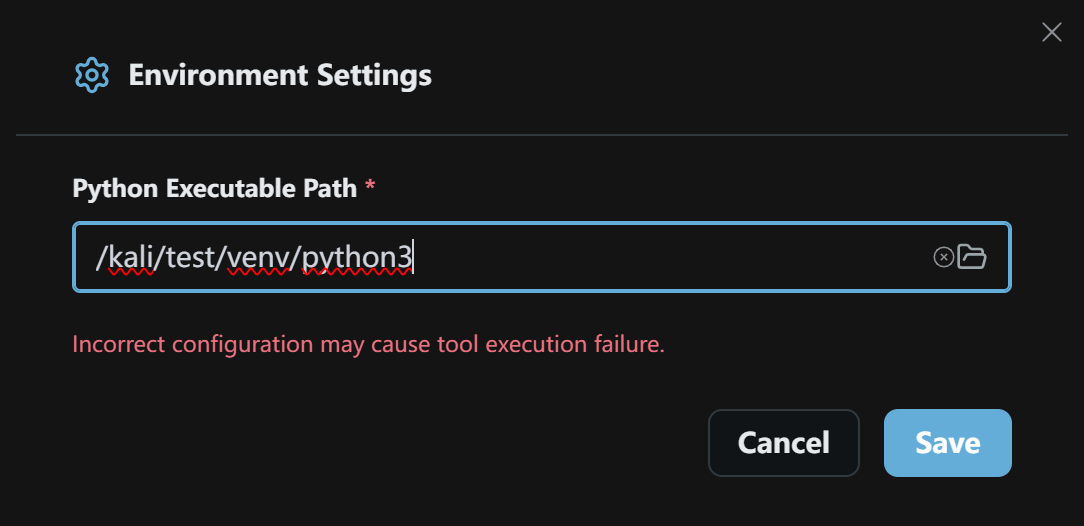
On first use, configure the Python environment Penligent uses to run tools.

Python environment settings
  1. Enter the full path to the Python executable in Python Executable Path, or click the folder icon to browse for it.
  2. Make sure the path points to the intended Python environment. An incorrect path may cause tool execution to fail.
  3. Click Save to apply the setting, or Cancel to discard your changes.