
CVE-2026-0740 is the kind of WordPress plugin vulnerability that should be handled as a potential site-takeover incident, not as a routine plugin update note. The affected component is Ninja Forms File Uploads, a WordPress add-on that lets site owners add file upload fields to Ninja Forms. NVD describes the flaw as an arbitrary file upload issue caused by missing file type validation in NF_FU_AJAX_Controllers_Uploads::handle_upload, affecting versions up to and including 3.3.26. Wordfence, the CNA source shown by NVD, assigns a CVSS 3.1 score of 9.8 Critical and maps the issue to CWE-434, unrestricted upload of a file with a dangerous type.(NVD)
The danger is straightforward: an unauthenticated attacker may be able to upload an arbitrary file to the affected server, and under the wrong server configuration that can become remote code execution. Wordfence’s public analysis says the attack requires a page that includes a Ninja Forms form with a file upload field. That detail matters because exposure is not defined only by whether the plugin is installed. Exposure depends on whether the vulnerable add-on is active, whether upload fields are reachable, how uploaded files are named, where they are stored, and whether the server can execute files placed in those locations.(Wordfence)
The safe response is not to test production sites with public exploit code. The safe response is to upgrade, identify exposed forms, inspect upload locations, review logs, preserve evidence, rotate secrets if compromise is plausible, and harden the server so uploads are treated as data rather than executable code. This article avoids weaponized payloads and direct exploit chains. It focuses on the technical mechanics, defensive validation, detection signals, and remediation decisions that security teams, WordPress operators, pentesters, and incident responders actually need.
Vulnerability snapshot
| Campo | Practical meaning |
|---|---|
| CVE | CVE-2026-0740 |
| Producto | Ninja Forms File Uploads for WordPress |
| Clase de vulnerabilidad | Unauthenticated arbitrary file upload |
| Debilidad | CWE-434, unrestricted upload of file with dangerous type |
| Versiones afectadas | Ninja Forms File Uploads up to and including 3.3.26 |
| Fully patched version | 3.3.27 or later |
| CNA CVSS 3.1 | 9.8 Critical, AV:N/AC:L/PR:N/UI:N/S:U/C:H/I:H/A:H |
| Primary attack condition | A reachable Ninja Forms form with a file upload field |
| Core impact | Arbitrary file upload that may lead to remote code execution |
| Acción inmediata | Upgrade, check exposed forms, inspect upload paths and webroot, review logs, and look for persistence |
NVD’s record notes that 3.3.25 partially patched the issue and 3.3.27 fully patched it. The Ninja Forms changelog lists security hardening across several nearby versions, including 3.3.25 changes for uploaded file paths and case-insensitive validation, 3.3.26 blocking executable file variants with an expanded extension blacklist, and 3.3.27 blocking a destination filename whitelist bypass in file upload.(NVD)
Wordfence’s timeline and the Ninja Forms changelog are close but not identical on dates. Wordfence says the developer released the first patch on February 10, 2026 and the second patch on March 19, 2026, while the Ninja Forms changelog page lists 3.3.27 as “16 March 2026.” The safer operational conclusion is not to dwell on the date difference. The reliable remediation point is that 3.3.27 is the first version identified as fully patched for CVE-2026-0740, and newer releases contain additional security enhancements that defenders should not ignore.(Wordfence)
Why Ninja Forms File Uploads is a sensitive attack surface
A WordPress file upload form is not just a user interface feature. It is a controlled path from an untrusted browser into the server’s filesystem, media library, email workflow, cloud storage workflow, or administrative review process. Ninja Forms documentation says the File Uploads add-on must be installed and activated before those upload features are available, and it documents settings such as “Save to Server,” “Save to Media Library,” file size controls, allowed file types, and integrations with services such as Dropbox, Google Drive, and Amazon S3.(Ninja Forms)
Those features are useful for real businesses. A recruiting site may accept resumes. A law firm may accept case documents. A clinic may collect intake forms. A B2B site may let prospects attach RFP materials. A support portal may accept screenshots. A school or course platform may accept assignments. The problem is that every one of those workflows invites untrusted bytes into an application stack that was built mostly to serve PHP, HTML, JavaScript, images, and media assets.
Security teams often think about file upload validation as a checklist: block .php, limit size, allow PDFs and images, and maybe check MIME type. CVE-2026-0740 is a reminder that the dangerous question is not only “what did the user upload?” It is also “what file name did the application ultimately write, what path did it write to, and what will the server do when someone requests that path?”
That distinction is central. A file may start its life as something that appears to be resume.pdf, pass a source filename check, and then be moved or renamed using attacker-influenced metadata. If the final destination filename is not independently validated before the move operation, the server may end up storing a dangerous file under a dangerous extension. If that destination is executable by the web server, file upload becomes code execution.
The root cause, source filename validation is not destination filename validation
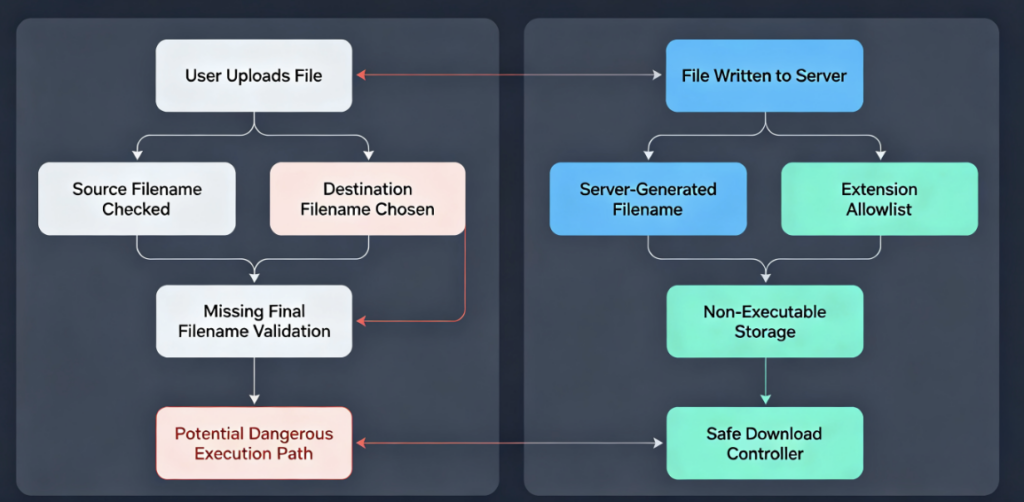
Wordfence’s technical analysis identifies NF_FU_AJAX_Controllers_Uploads::handle_upload as the upload handler involved in CVE-2026-0740. The handler receives upload data, validates pieces of the upload flow, prepares file metadata, and then reaches processing logic that moves the uploaded temporary file into a destination path. Wordfence’s analysis says the vulnerable versions checked file type based on the source filename, but did not apply sufficient file type or extension checks to the destination filename before the move operation.(Wordfence)
That is the kind of bug that can survive ordinary review because each individual control appears reasonable in isolation. The handler checks for a field ID. It checks a nonce. It verifies that file data exists. It invokes validation. It moves a temporary upload. None of those steps is wrong by itself. The flaw appears in the boundary between a source object and the final filesystem object.
The secure model is simple but strict: the final object written to disk must be validated as the final object written to disk. Any user-influenced filename, rename value, destination key, temporary key, path component, extension, or storage parameter has to be normalized and checked at the last responsible moment before write. The application must not assume that a check against the original upload name automatically applies to a later destination name.
CWE-434 describes the broader weakness: software that does not restrict dangerous file types can allow attackers to upload executable files or files containing malicious code. MITRE’s CWE entry also calls out a related pattern where untrusted filename data can lead to path traversal and writes outside the intended directory. That maps closely to the class of risk described in CVE-2026-0740, even though the exact implementation details belong to the Ninja Forms File Uploads plugin.(CWE)
OWASP’s unrestricted file upload page explains why uploaded files are high-risk: getting attacker-controlled code onto a target system is often the first step, and the impact depends heavily on where the file is stored and what interpreters or processing steps later touch it. OWASP also separates file metadata risks, such as path and filename, from content risks, such as file size and file body. That split is useful for understanding CVE-2026-0740 because the vulnerable path is not merely “bad content allowed.” It is also “dangerous destination metadata trusted.”(Fundación OWASP)
How the flaw can become remote code execution
Remote code execution does not magically appear from every arbitrary file upload bug. Several conditions must line up. The attacker needs a reachable upload path. The application must accept attacker-controlled file data. The final filename or location must allow a dangerous file type or executable behavior. The server must execute that file when requested or include it through some other server-side path. The attacker must then know or derive the URL or path needed to trigger the file.
CVE-2026-0740 is severe because those conditions are realistic in WordPress hosting environments. WordPress sites run on PHP. Webroots and plugin directories often contain executable PHP. Misconfigured uploads directories may execute PHP. Shared hosting accounts may host multiple WordPress installations under the same user. A plugin that writes a PHP file into an executable location can cross the boundary from “upload accepted” to “attacker code runs under the web server context.”
Wordfence says exploitation requires finding a page with a Ninja Forms file upload field. Its attack-data write-up also reports that attackers attempted to upload malicious PHP and .htaccess files and recommends reviewing the webroot and /wp-content/uploads directories for suspicious or unknown PHP files. It also names /wp-admin/admin-ajax.php?action=nf_fu_upload as a log pattern worth checking.(Wordfence)
En .htaccess angle is important. On Apache-based WordPress hosting, .htaccess can influence how files are interpreted. An attacker who can upload or modify configuration-like files may try to change file handling rules so that otherwise harmless-looking extensions become executable. Defenders should therefore avoid a narrow search for only obvious webshell names. They should also inspect configuration files, media-like files with embedded code, recently modified directories, unknown PHP under uploads, and unexpected changes near the webroot.
What attackers need before this becomes exploitable
The exploitability of CVE-2026-0740 depends on more than a version string. Version is the starting point, not the full risk model. A site running Ninja Forms File Uploads 3.3.26 or earlier deserves urgent attention, but defenders still need to answer exposure questions.
| Question | Por qué es importante | Defensive action |
|---|---|---|
| Is Ninja Forms File Uploads installed and active | Inactive or absent plugins reduce direct exposure, though old files may still matter | Confirm with WP-CLI, admin inventory, or filesystem review |
| Is the version 3.3.26 or older | NVD and Wordfence identify these versions as affected | Upgrade to 3.3.27 or newer |
| Does any public page expose a file upload field | Wordfence says the attacker needs a page with the file upload field | Crawl public forms and inspect form configuration |
| Are uploads saved to the local server | Local storage increases filesystem and execution risk | Review File Uploads settings and storage actions |
| Can PHP execute from upload locations | This is what turns many upload bugs into RCE | Deny PHP execution under uploads and temporary upload directories |
| Are there suspicious files already present | Patching does not remove compromise | Search for unknown PHP, .htaccess, modified plugins, and new admin users |
| Is the site on shared hosting | One compromised site may affect adjacent sites under weak isolation | Inspect all sites under the account and rotate shared credentials |
A page with a file upload field is a more concrete exposure condition than a generic “WordPress is vulnerable” statement. Sites that use Ninja Forms only for newsletter signups without file fields may have a different immediate risk from sites that expose resume uploads, quote attachments, evidence upload portals, homework submissions, or customer support attachments. The plugin version still matters, but the form inventory determines how easy it is for an attacker to reach the vulnerable path.
A mature response should also account for forgotten forms. WordPress sites accumulate old landing pages, private-but-indexable pages, draft campaign pages, legacy recruitment pages, and abandoned forms embedded by shortcodes. A site owner may believe file uploads are no longer used while an old page still exposes the field. That is why defenders should not rely only on memory or current navigation menus. They should search rendered pages, content blocks, shortcodes, and form configurations.
The disclosure and exploitation timeline
| Date or period | Event | Por qué es importante |
|---|---|---|
| January 8, 2026 | Wordfence received and validated a report through its bug bounty program | The issue was known privately before public disclosure |
| January 8, 2026 | Wordfence sent details to the vendor and provided firewall protection to paid Wordfence users | Some defensive controls existed before public disclosure |
| February 7, 2026 | Wordfence says free users received the same firewall rule | Firewall coverage widened before public disclosure |
| February 10, 2026 | Wordfence says the first patch was released | The first fix was partial according to NVD and Wordfence |
| March 2026 | Public sources identify 3.3.27 as the fully patched version | This is the key remediation version |
| April 6, 2026 | Wordfence publicly disclosed the vulnerability | Public exploit interest increased |
| April 7, 2026 | NVD published the CVE record | Vulnerability management systems began tracking the CVE |
| April 6 onward | Wordfence says attackers began exploiting the issue the same day it was disclosed | Unpatched exposed sites had little time after public disclosure |
| April 9 to 13, 2026 | Wordfence reported a large number of exploit attempts during this window | Incident responders should review logs around and after these dates |
Wordfence reported active exploitation and stated that its firewall had blocked more than 118,600 exploit attempts targeting the vulnerability by the time of its April 16 write-up. It also said attackers began targeting the issue on April 6, 2026, the day of public disclosure, with mass exploitation observed between April 9 and April 13.(Wordfence)
NVD’s change history includes a CISA-ADP SSVC entry with “exploitation” shown as “none” at an earlier timestamp, while Wordfence later reported observed active exploitation. That is not unusual in vulnerability operations. A structured record can lag or represent a point-in-time status, while telemetry from a security vendor may later show active attacks. For defensive priority, the practical signal is clear: Wordfence observed exploitation attempts, and exposed sites should be treated as at risk.(NVD)
Why CVE-2026-0740 is also a WordPress plugin exposure problem
WordPress security is often discussed as if there are only three layers: core, themes, and plugins. That model is too simple for modern WordPress operations. A plugin is not just code. It can be a public endpoint, a file writer, a REST route, an AJAX action, a media processor, a mail attachment handler, a payment integration, a cloud storage connector, a script loader, a scheduled task, a privilege boundary, and a source of credentials.
WordPress’s own hardening guidance emphasizes risk reduction rather than perfect security. It recommends keeping plugins updated, deleting plugins that are not in use, paying attention to plugins that require write access, using strict permissions, disabling dashboard file editing, and monitoring logs and file changes. Those controls are directly relevant to CVE-2026-0740 because the risk is not limited to the vulnerable upload handler. It includes what an attacker can do after a dangerous file lands on disk.(WordPress Developer Resources)
The plugin exposure lesson also applies beyond this single CVE. Penligent’s analysis of the 2026 OptinMonster supply chain incident framed WordPress plugin trust as a runtime security problem, not merely a local versioning problem. That incident involved trusted upstream JavaScript loaded by WordPress sites rather than the same upload bug, but the shared lesson is useful: defenders need inventories of plugin behavior, external scripts, sensitive pages, trust paths, and post-compromise artifacts, not only a list of installed plugin names.(Penligente)
CVE-2026-0740 is a conventional plugin vulnerability, not a JavaScript supply chain incident. Still, it belongs in the same operational category of “trusted WordPress extension becomes an attack path.” The business added the plugin for a legitimate reason. The attacker abuses that trusted functionality. The cleanup burden then expands from “update a plugin” to “prove the site was not modified while the plugin was vulnerable.”
Affected environments and priority ranking
Not every WordPress site running the vulnerable version has the same blast radius. The highest priority environments are those with public upload flows and server-side execution risk.
| Medio ambiente | Prioridad | Why it should move fast |
|---|---|---|
| Public recruiting site with resume upload | Crítica | Upload fields are intentionally exposed to unauthenticated users |
| Support portal accepting attachments | Crítica | Attackers can reach file upload workflow without deep discovery |
| WooCommerce or membership site with upload forms | Crítica | Admin sessions, payment settings, and customer data raise impact |
| Multi-tenant shared hosting account | Crítica | Compromise of one site may expose adjacent WordPress installs |
| Site with local server storage enabled | Alta | Uploaded files land on the web server rather than only external storage |
| Site using only external object storage | Medium to high | Local temp files and metadata still require review |
| Site with File Uploads installed but no reachable upload fields | Medio | Version is vulnerable, but trigger path may be absent |
| Site with inactive old plugin files | Low to medium | Direct exposure may be lower, but stale code should be removed |
| Fully updated site with no suspicious logs or files | Lower ongoing risk | Still needs baseline hardening and monitoring |
A key mistake is to rank this purely by site traffic. A low-traffic legal intake site or small clinic site may be more sensitive than a high-traffic brochure site because the upload form may handle confidential documents and the WordPress administrator may have access to email, CRM, payment, or storage integrations. Risk is a function of exploitability, data sensitivity, execution context, and cleanup cost.
Sites that cannot immediately update should be treated as operating under temporary containment, not as safely mitigated. A WAF rule, disabled form, or blocked endpoint may reduce exposure, but the official remediation remains upgrading to a fixed version. Temporary controls should have an owner, expiration date, validation evidence, and a follow-up ticket.
Safe validation workflow for defenders
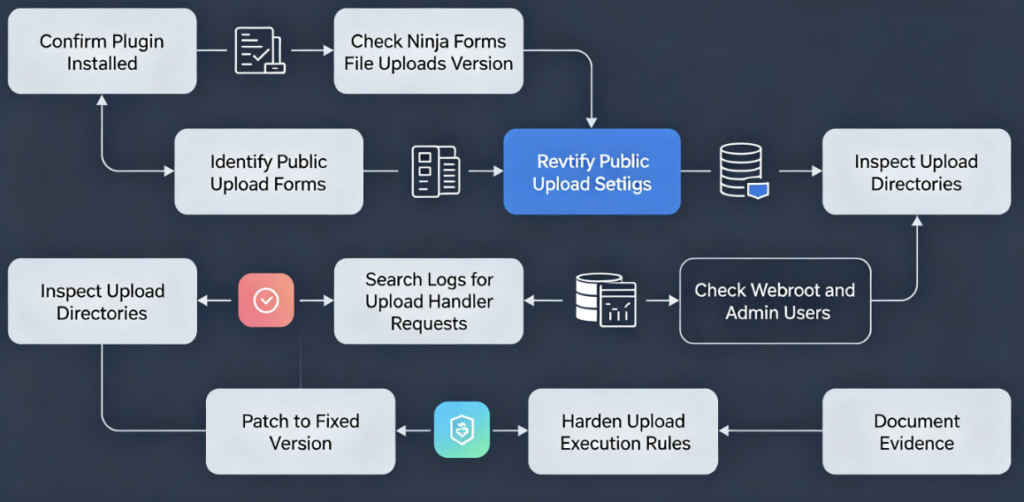
The goal of validation is to answer three questions without attacking the site: is the vulnerable code present, is the upload path exposed, and is there evidence that someone already abused it?
Start with plugin inventory. On systems where WP-CLI is available and you have authorization, use commands like these from the WordPress root:
wp plugin list --status=active | grep -i 'ninja'
wp plugin get ninja-forms-uploads --field=version
wp plugin status ninja-forms-uploads
If WP-CLI is not available, verify through the WordPress admin plugin screen, deployment inventory, filesystem review, or your hosting control panel. Paid add-ons may not always appear exactly the way public wordpress.org plugins do in every inventory tool, so compare multiple sources when the site is high risk.
Next, identify upload forms. Review Ninja Forms configuration and rendered pages. Search for pages that embed forms with file upload fields. Check public pages, old landing pages, draft pages that may still be accessible, campaign URLs, support pages, career pages, and membership pages.
# Run only on your own authorized WordPress files.
grep -RIn --exclude-dir=node_modules --exclude-dir=vendor \
  "ninja_form\|File Upload\|file_upload\|ninja-forms-uploads" \
  wp-content/themes wp-content/plugins wp-content/uploads 2>/dev/null
Then inspect logs for upload handler activity. Wordfence recommends looking for requests to /wp-admin/admin-ajax.php?action=nf_fu_upload, which is a useful starting point. Do not assume every hit is malicious. A legitimate user uploading a file through a form may also hit the same handler. The triage value comes from pairing the request with file writes, unusual filenames, response status, user agent, source IP, and subsequent requests to uploaded files.(Wordfence)
# Apache style logs, adjust path for your host.
grep -E "admin-ajax\.php.*nf_fu_upload|action=nf_fu_upload" /var/log/apache2/access.log* 2>/dev/null

# Nginx style logs, adjust path for your host.
grep -E "admin-ajax\.php.*nf_fu_upload|action=nf_fu_upload" /var/log/nginx/access.log* 2>/dev/null
Inspect upload directories and webroot for unexpected executable files. The following commands are defensive triage commands for authorized systems. They do not exploit anything.
# Look for executable files inside upload locations.
find wp-content/uploads -type f \( \
  -iname "*.php" -o -iname "*.phtml" -o -iname "*.phar" -o -iname "*.php5" -o -iname ".htaccess" \
\) -print

# Review recently modified PHP and htaccess files across the WordPress tree.
find . -type f \( -iname "*.php" -o -iname ".htaccess" \) -mtime -45 -print

# Focus on Ninja Forms temporary upload locations if present.
find wp-content/uploads -path "*ninja*" -type f -mtime -90 -print
Do not delete suspicious files before preserving evidence. At minimum, record the full path, file hash, owner, permissions, modification time, access time if available, and a copy in a quarantined evidence location. If the site may involve regulated data, customer data, or payment flows, coordinate with legal, compliance, and incident response leadership before making destructive changes.
What to inspect after a suspected compromise
Patching fixes the vulnerable code path. It does not remove files an attacker already uploaded. It does not remove a new administrator account. It does not rotate stolen SMTP credentials. It does not repair modified theme files. It does not prove a backup is clean. Treat CVE-2026-0740 as a possible initial access route.
| Artifact | En qué fijarse | Por qué es importante |
|---|---|---|
/wp-content/uploads | Unknown PHP, .phtml, .phar, .htaccess, executable-looking media files | Upload bugs often leave payloads under media paths |
| Webroot | New PHP files with generic names, cache-like names, or recent timestamps | Attackers may try to place files where direct execution is easy |
wp-content/plugins | Unknown plugins, recently modified plugin files, hidden plugin directories | Persistence often hides as a plugin |
wp-content/mu-plugins | Unfamiliar must-use plugins | MU plugins load automatically and may not appear in normal plugin lists |
| Themes | Modified functions.php, template files, footer or header injections | Themes are common persistence and redirect locations |
| WordPress users | New admins, changed emails, unknown application passwords | Site takeover often becomes admin persistence |
| Database options | Suspicious siteurl, home, cron, active plugins, autoloaded options | Attackers may persist through configuration |
| Logs | Upload handler requests followed by requests to new files | Links initial access to execution |
| Outbound traffic | Calls to unknown domains or IPs | Webshells and malware may beacon or fetch second-stage payloads |
| Backups | Backups created after compromise | Restoring a dirty backup can reintroduce persistence |
A clean homepage is not evidence of a clean site. Many attackers do not deface sites. They want persistence, redirects, SEO spam, credential theft, or a foothold for later monetization. A WordPress site may look normal while serving malicious code only to certain user agents, referrers, geographies, logged-in users, or search crawlers.
Safe PoC demonstration, why final filename validation matters
The following demonstration is intentionally safe and artificial. It does not use Ninja Forms. It does not target WordPress. It does not include a webshell. It does not send requests to a real site. It models the dangerous programming pattern behind many file upload flaws: validating one filename while writing another filename.
Run this only in a local isolated lab directory. The point is to help defenders and developers understand why file upload validation must happen on the final stored filename and path, not only the original client filename.
from pathlib import Path
import re
import uuid

LAB_ROOT = Path("./local_upload_lab").resolve()
LAB_ROOT.mkdir(exist_ok=True)

ALLOWED_EXTENSIONS = {".txt", ".pdf", ".png", ".jpg", ".jpeg"}

def extension_of(name: str) -> str:
    return Path(name).suffix.lower()

def looks_allowed_source_name(source_filename: str) -> bool:
    return extension_of(source_filename) in ALLOWED_EXTENSIONS

def unsafe_upload_demo(source_filename: str, destination_filename: str, body: bytes) -> Path:
    """
    Safe toy demonstration of a bad pattern.

    The function checks the source filename, then writes to a different
    destination filename without validating the final name. This is the
    mistake being demonstrated. Do not copy this pattern into production.
    """
    if not looks_allowed_source_name(source_filename):
        raise ValueError("source filename extension is not allowed")

    final_path = LAB_ROOT / destination_filename
    final_path.write_bytes(body)
    return final_path

def safe_upload(source_filename: str, body: bytes) -> Path:
    """
    Safer pattern for ordinary document-style uploads.

    It ignores user-provided destination names, checks an allowlist,
    generates a server-side filename, stores outside executable paths,
    and never trusts path separators from user input.
    """
    ext = extension_of(source_filename)
    if ext not in ALLOWED_EXTENSIONS:
        raise ValueError("file extension is not allowed")

    if len(body) > 2_000_000:
        raise ValueError("file too large for this lab")

    server_name = f"{uuid.uuid4().hex}{ext}"
    final_path = LAB_ROOT / server_name
    final_path.write_bytes(body)
    return final_path

if __name__ == "__main__":
    benign_body = b"local lab content only\n"

    written = unsafe_upload_demo(
        source_filename="resume.pdf",
        destination_filename="unexpected.php",
        body=benign_body,
    )
    print(f"Unsafe demo wrote: {written}")

    safe_written = safe_upload(
        source_filename="resume.pdf",
        body=benign_body,
    )
    print(f"Safe upload wrote: {safe_written}")
The unsafe function is not dangerous because the body is harmless and the lab directory is local. The bug pattern is still visible. It checks resume.pdf, then writes unexpected.php. In a real PHP webroot, that kind of disconnect can become serious if the destination file is executable. In a secure design, the application does not let the user choose the final server-side filename, does not trust directory separators, does not write into executable locations, and validates the final extension and storage path.
A production-grade upload pipeline should go further than the short demonstration. It should use server-generated names, store outside the webroot when possible, serve downloads through an authorization-aware controller, enforce allowlisted extensions, check MIME and content signatures as supporting signals rather than sole trust anchors, limit file size, scan content where appropriate, strip dangerous metadata when feasible, and deny script execution in upload directories at the web server layer.
Defensive detection logic
Detection should combine version state, exposed form state, web requests, file writes, and post-upload behavior. A single indicator can mislead. For example, a request to admin-ajax.php?action=nf_fu_upload may be legitimate if a real user submitted a file. A .php file under uploads may be legitimate in a poorly designed plugin, though it is still worth questioning. A suspicious IP list may age quickly. Stronger confidence comes from correlation.
| Señal | Por qué es importante | False positive risk | Suggested response |
|---|---|---|---|
| Vulnerable plugin version | Confirms the vulnerable code may exist | Inventory may miss paid add-ons or disabled copies | Verify through multiple sources and upgrade |
| Public page with upload field | Confirms reachable attack surface | Some forms require hidden workflow or membership access | Test visibility as anonymous and authenticated roles |
nf_fu_upload solicita | Matches the upload handler pattern Wordfence calls out | Legitimate uploads can use same route | Correlate with file writes and unusual parameters |
| New PHP under uploads | Strong suspicious file placement | Rare plugins may store PHP, but uploads should not execute code | Quarantine and investigate before deletion |
New .htaccess under uploads | May alter file handling | Some security plugins create .htaccess intentionally | Compare with known baseline and timestamps |
| Requests to newly written file | Suggests uploaded file was triggered | Normal downloads also create follow-up requests | Check extension, content, requester, and response |
| New admin user | Common persistence outcome | Admins may be added legitimately | Confirm owner, timestamp, source IP, and email changes |
| Modified theme or plugin files | Common persistence or redirect method | Normal updates modify files | Compare with release checksums and deployment logs |
| Outbound connection after upload | May indicate second-stage activity | Plugins also make legitimate outbound requests | Compare domain, timing, and process context |
For Apache logs, a useful first pass is a time-bounded search around public disclosure and any suspicious file modification times:
# Replace dates and paths with your environment.
zgrep -E "admin-ajax\.php.*nf_fu_upload|action=nf_fu_upload" /var/log/apache2/access.log* \
  | awk '{print $1, $4, $5, $6, $7, $9, $12}' \
  | head -200
For Nginx logs, the same idea applies:
zgrep -E "admin-ajax\.php.*nf_fu_upload|action=nf_fu_upload" /var/log/nginx/access.log* \
  | head -200
Then correlate with filesystem timestamps:
# Files modified since April 1, 2026, adjust for your investigation window.
find . -type f -newermt "2026-04-01" \
  \( -iname "*.php" -o -iname "*.phtml" -o -iname "*.phar" -o -iname ".htaccess" \) \
  -printf "%TY-%Tm-%Td %TH:%TM %u %g %m %p\n" 2>/dev/null \
  | sort
If you have file integrity monitoring, compare against the pre-disclosure baseline. WordPress’s hardening documentation recommends monitoring logs and file changes, and it explicitly notes that attacks leave traces in logs or on the filesystem. That advice is especially relevant for CVE-2026-0740 because the exploit path is expected to create or modify files.(WordPress Developer Resources)
Hardening uploads so one plugin bug does not become a shell
The most important remediation is upgrading Ninja Forms File Uploads to 3.3.27 or later. If a site is still on 3.3.26 or earlier and exposes a file upload field, treat the fix as urgent. Because later Ninja Forms File Uploads releases also include additional security enhancements, such as unauthenticated file upload protection, XSS fixes, debug log REST endpoint protection, and arbitrary file read hardening, most teams should update to the latest stable version rather than stopping at the minimum fixed version.(Ninja Forms)
Server-side hardening reduces blast radius. The uploads directory should not execute PHP. The exact configuration depends on hosting stack, control panel, PHP handler, and web server. Always test in staging before applying to production.
For Apache 2.4, a defensive .htaccess control inside wp-content/uploads may look like this:
# Place in wp-content/uploads/.htaccess only after testing on your host.
<FilesMatch "\.(php|phtml|php[0-9]?|phar)$">
    Require all denied
</FilesMatch>

Options -Indexes
For Nginx, a server block rule may look like this:
# Test in staging and reload Nginx only after config validation.
location ~* ^/wp-content/uploads/.*\.(php|phtml|php[0-9]?|phar)$ {
    return 403;
}
For PHP-FPM and Nginx configurations, make sure the PHP handling location does not accidentally match uploaded files before the deny rule. Nginx location precedence can surprise teams. A rule that looks correct but is placed in the wrong order may not protect anything. Confirm by requesting a harmless test PHP file in a staging uploads directory and verifying that it returns 403 rather than executing.
WordPress file permissions also matter. The official hardening guide recommends locking down file permissions as much as possible, keeping plugin files writable only by the user account where feasible, and avoiding broad write and execute permissions. It also provides common recursive permission examples for directories and files, while warning that permissions may depend on hosting setup.(WordPress Developer Resources)
Dashboard file editing should be disabled on production sites. WordPress documents the DISALLOW_FILE_EDIT constant, noting that the dashboard editor can be a first tool attackers use after login because it allows code execution. This control does not stop an arbitrary upload vulnerability by itself, but it reduces post-compromise convenience if an attacker gets administrator access.(WordPress Developer Resources)
// Add to wp-config.php above the final "stop editing" line.
define( 'DISALLOW_FILE_EDIT', true );
Do not rely on a single layer. A WAF rule may block known exploit shapes. Plugin updates remove the vulnerable code path. Server deny rules reduce execution risk. File integrity monitoring catches suspicious writes. Least-privilege filesystem ownership limits what the web server can modify. Backups support recovery. Admin account review catches persistence. These controls overlap because file upload vulnerabilities often become incidents through a chain, not one isolated mistake.
Incident response playbook for CVE-2026-0740
If the vulnerable version was present and a public upload field existed after disclosure, assume you need at least a lightweight compromise assessment. If logs show suspicious upload attempts, unknown PHP files, modified .htaccess, new administrators, or requests to newly uploaded files, escalate to full incident response.
| Fase | Acción | Notas |
|---|---|---|
| Stabilize | Temporarily disable exposed upload forms if update cannot happen immediately | Avoid deleting evidence |
| Preserve | Snapshot files, database, logs, and plugin inventory | Keep hashes and timestamps |
| Parche | Upgrade Ninja Forms File Uploads to a fixed current version | Retest form workflows |
| Caza | Search uploads, webroot, plugins, themes, and mu-plugins | Focus on executable files and recent changes |
| Review identity | Check admins, application passwords, sessions, and recent logins | Remove unknown accounts after preserving evidence |
| Review secrets | Rotate database, SMTP, SFTP, hosting, API, object storage, and WordPress salts where appropriate | Scope rotation to likely access |
| Clean | Remove malicious files only after evidence capture | Prefer restore from known-clean baseline |
| Harden | Disable PHP execution in uploads, restrict permissions, disable file editing, deploy monitoring | Test controls |
| Validar | Confirm vulnerable path is gone and uploaded files cannot execute | Use safe authorized testing |
| Document | Record version, evidence, actions, owners, and residual risk | Needed for customers, auditors, and internal review |
The order matters. If you delete files first, you may lose the ability to determine whether the site was actually compromised. If you patch but do not hunt, a backdoor may remain. If you clean but do not rotate credentials, the attacker may still have access. If you restore from an unknown backup, you may restore the compromise.
For teams that manage many WordPress sites, authorized automated validation and evidence collection can help standardize the process. A platform such as Penligent can be used in scoped security workflows to map exposed web surfaces, verify fixes, collect reproducible evidence, and produce remediation records, but it should not replace source-of-truth vendor advisories, manual incident judgment, or explicit authorization boundaries. Penligent’s own site describes agentic testing, verified findings, and report generation for security teams, with an explicit authorized-testing disclaimer.(Penligente)
Common mistakes that leave sites exposed
The first mistake is updating WordPress core but not the paid add-on. CVE-2026-0740 is not a WordPress core vulnerability. A site can run the latest WordPress core release and still have a vulnerable Ninja Forms File Uploads add-on. Plugin and add-on inventory must be separate from core inventory.
The second mistake is checking only the main plugin. Ninja Forms is the form builder, while File Uploads is an add-on. A site owner may see “Ninja Forms” updated and assume the upload add-on is also safe. Verify the add-on version explicitly.
The third mistake is assuming a WAF rule is the same as remediation. Wordfence reported firewall protection before public disclosure for its users, but its own guidance still urged users to update to a patched version. A WAF can be an important compensating control, but the vulnerable code remains until the plugin is fixed or removed.(Wordfence)
The fourth mistake is searching only for obvious filenames. Attackers often choose names that look like cache files, image processors, plugin helpers, or ordinary WordPress internals. Search by extension, timestamp, directory, entropy, owner, and content patterns rather than by a handful of expected names.
The fifth mistake is ignoring .htaccess. Wordfence’s attack-data post says attackers attempted to upload malicious .php y .htaccess files. A malicious or unexpected .htaccess file can change execution behavior, redirect traffic, alter access control, or hide malicious behavior.(Wordfence)
The sixth mistake is treating “no defacement” as “no compromise.” Many compromises are quiet. A site may be used for spam pages, malware staging, credential theft, redirects for selected visitors, or lateral movement without visibly changing the homepage.
The seventh mistake is restoring from a backup without timeline analysis. If the backup was taken after compromise, restoring it preserves the attacker’s files or accounts. If the vulnerable plugin is restored with the backup, the site may be immediately exploitable again.
The eighth mistake is leaving uploads executable after cleanup. Even if CVE-2026-0740 is patched, future plugin bugs can appear. Upload directories should be hardened so uploaded data cannot become server-executed PHP simply because one validation layer fails.
Related CVEs that explain the pattern
CVE-2026-0740 is not the first security issue involving Ninja Forms File Uploads. Wordfence’s vulnerability entry lists earlier issues in the same software family, including CVE-2019-10869, CVE-2022-0888, and CVE-2024-1596. That history does not mean every version is unsafe forever, but it does show why upload plugins deserve recurring scrutiny rather than one-time review.(Wordfence)
| CVE | Product relationship | Tipo de vulnerabilidad | Why it matters for CVE-2026-0740 |
|---|---|---|---|
| CVE-2019-10869 | Ninja Forms File Uploads | Unauthenticated arbitrary file upload in older versions | Shows the same functional area has historically carried high-impact risk |
| CVE-2022-0888 | Ninja Forms File Uploads | Unauthenticated arbitrary file upload in older versions | Reinforces that file upload validation failures can recur across implementation changes |
| CVE-2024-1596 | Ninja Forms File Uploads | Stored XSS via uploaded file in versions up to 3.3.16 | Shows uploads can create client-side impact as well as server-side risk |
| CVE-2026-0740 | Ninja Forms File Uploads | Unauthenticated arbitrary file upload that may lead to RCE | Current critical issue requiring urgent patching and compromise checks |
| CVE-2026-12557 | Ninja Forms File Uploads, listed by Wordfence as a later recent issue | Missing authorization to unauthenticated log disclosure and deletion via debug-log endpoints | Shows why later plugin releases should be reviewed, not only the minimum CVE fix |
| CVE-2026-13369 | Ninja Forms File Uploads, listed by Wordfence as a later recent issue | Unauthenticated arbitrary file read via file upload field parameter | Shows adjacent file-handling surfaces can expose sensitive data even when not RCE |
CVE-2024-1596 is a useful contrast. NVD describes it as stored cross-site scripting through uploaded files in Ninja Forms File Uploads up to and including 3.3.16, due to insufficient sanitization and output escaping. That is a different impact path from CVE-2026-0740. Instead of server-side code execution, the risk is attacker-controlled script execution in a user’s browser when an injected page is accessed. The shared theme is that upload handling is not safe merely because a file is accepted by a form. The application also needs safe storage, safe rendering, safe retrieval, and safe interpretation.(NVD)
CVE-2022-0888 and CVE-2019-10869 are useful because they show that arbitrary upload flaws in WordPress add-ons can be rediscovered across time. The lesson is not that defenders should distrust one vendor uniquely. The lesson is that any plugin responsible for accepting files from public users belongs in a higher-risk maintenance category. It needs tighter patch SLAs, stronger server-side containment, and periodic validation of real exposed forms.(Wordfence)
The later Ninja Forms File Uploads entries listed by Wordfence, including CVE-2026-12557 and CVE-2026-13369, also matter operationally. They are not the same as CVE-2026-0740, but they reinforce the need to keep tracking the add-on after the headline RCE issue is fixed. The vendor changelog for 3.3.29 and 3.3.30 includes additional security enhancements such as protection against unauthenticated file uploads, XSS hardening, debug log REST endpoint protection, and arbitrary file read hardening.(Wordfence)
Developer lessons from CVE-2026-0740
File upload security is not a single validation call. It is a pipeline. Each stage can invalidate assumptions made by the previous stage.
A safer upload pipeline should follow these principles:
| Controlar | Good practice | Por qué es importante |
|---|---|---|
| Authentication and authorization | Require the minimum privilege needed for sensitive upload flows | Anonymous upload should be intentional and heavily constrained |
| Form and nonce validation | Validate request context, but do not treat nonce as file safety | A nonce does not make a file safe |
| Final filename generation | Generate server-side names instead of trusting user-provided destination names | Prevents extension tricks and path manipulation |
| Extension allowlist | Allow only needed extensions and check after final name is known | Denylists miss variants |
| MIME and content checks | Use as supporting signals, not sole trust anchors | Client headers can lie |
| Storage location | Store outside webroot where possible | Prevents direct execution |
| Execution prevention | Deny PHP and script execution in upload paths | Contains future validation failures |
| Metadata stripping | Remove risky metadata when feasible | Reduces hidden payload and parser risk |
| Size and count limits | Limit file size, number, and rate | Reduces DoS and storage abuse |
| Malware scanning | Scan files based on business risk | Adds detection for known threats |
| Retrieval controller | Serve downloads through authorization-aware code | Prevents direct public access where inappropriate |
| Supervisión | Alert on executable files and .htaccess changes | Catches bypasses and post-compromise artifacts |
The most important engineering rule is that final storage decisions must be made by trusted server code. Let the user supply a display name if the business requires it, but do not let that display name become the filesystem path or executable extension. Store a random server-side object name, keep original names as escaped metadata, and serve the file through controlled download logic.
Developers should also avoid overconfidence in MIME checks. Tipo de contenido is client supplied. Magic-byte checks can be bypassed or can validate only the header while the rest of the file remains dangerous in another context. Extension allowlists can fail if the final filename changes after validation. Image processing can introduce parser risk. PDF handling can introduce active content concerns. The secure design is layered because each individual signal is imperfect.
OWASP’s Web Security Testing Guide recommends that applications accept and manipulate only files that the rest of the application is ready to handle, using mechanisms such as extension allowlists, header checks, or file type recognition. That guidance should be read as a layered recommendation, not as permission to pick one weak signal and stop.(Fundación OWASP)
Operational guidance for agencies, MSPs, and multi-site owners
Managed service providers and agencies should not handle CVE-2026-0740 one site at a time through memory and ad hoc admin clicks. The attack surface is discoverable, exploitation was observed, and the affected workflow is common. A structured response should create an inventory and produce evidence for each site.
A practical multi-site spreadsheet or ticket schema should include:
| Campo | Example value |
|---|---|
| Site | example-client.com |
| Owner | Client or internal business owner |
| Ninja Forms installed | Yes or No |
| File Uploads add-on installed | Yes or No |
| File Uploads version | 3.3.26, 3.3.27, or newer |
| Public upload fields | Careers resume form, support attachment form |
| Local server storage | Yes or No |
| External storage | S3, Dropbox, Google Drive, none |
| PHP execution blocked in uploads | Yes or No |
| Logs reviewed | Date range and analyst |
| Suspicious upload requests | Yes or No |
| Suspicious files found | Paths and hashes |
| Admin users reviewed | Yes or No |
| Secrets rotated | Which secrets and when |
| Final status | Patched, clean, monitored, escalated |
MSPs should prioritize clients with public upload fields, high-value data, eCommerce, membership portals, healthcare, legal, education, or shared hosting. They should also track clients with custom themes or custom plugins that may have similar upload anti-patterns. CVE-2026-0740 is a named issue, but the pattern is broader.
For agencies, the business risk includes client trust. If a site was vulnerable during active exploitation, the client will ask whether the site was patched, whether it was exploited, whether data was affected, whether credentials were rotated, and whether controls changed to reduce recurrence. A defensible answer needs evidence, not only “we clicked update.”
Verification after remediation
After upgrading, verify both version and behavior. Version verification confirms that the known vulnerable code should no longer be present. Behavioral verification confirms that the site still works and that hardening controls do not break legitimate business workflows.
Use a staged approach:
- Confirm File Uploads is updated to 3.3.27 or newer.
- Confirm forms still accept allowed business file types.
- Confirm disallowed dangerous extensions are rejected.
- Confirm uploaded files cannot execute as PHP.
- Confirm uploads are not publicly listable.
- Confirm suspicious files are absent or quarantined.
- Confirm logs show no continuing suspicious upload attempts.
- Confirm WAF or monitoring alerts are tuned and documented.
A safe staging test for PHP execution control does not require malicious code. In a staging uploads directory, create a harmless file with a .php extension that contains only a static string or no executable logic, then request it and confirm the server returns 403 or downloads it as inert text rather than executing PHP. Do not run this on a production site without a change window and authorization.
# Staging only.
printf '<?php echo "staging execution test"; ?>' > wp-content/uploads/php-execution-test.php

# Expected safe outcome after hardening: 403 Forbidden or non-executed content.
curl -i https://staging.example.test/wp-content/uploads/php-execution-test.php

# Remove the test file immediately after validation.
rm wp-content/uploads/php-execution-test.php
That staging test validates server hardening, not the CVE itself. It is intentionally not an exploit. It answers a containment question: if some future bug writes PHP under uploads, will the server execute it? The desired answer is no.
PREGUNTAS FRECUENTES
What is CVE-2026-0740 in Ninja Forms File Uploads?
- CVE-2026-0740 is an unauthenticated arbitrary file upload vulnerability in the Ninja Forms File Uploads add-on for WordPress.
- NVD states that the issue affects versions up to and including 3.3.26 and is tied to missing file type validation in
NF_FU_AJAX_Controllers_Uploads::handle_upload. - Wordfence assigns it a CVSS 3.1 score of 9.8 Critical and identifies 3.3.27 as the patched version.
- The risk is serious because arbitrary file upload can become remote code execution when dangerous files are written to executable server locations.(NVD)
Which Ninja Forms File Uploads versions are affected?
- Affected versions are Ninja Forms File Uploads 3.3.26 and earlier.
- NVD says 3.3.25 partially patched the issue and 3.3.27 fully patched it.
- Defenders should upgrade to 3.3.27 or newer, preferably the latest stable release after testing.
- Later versions include additional security enhancements, so stopping at the minimum fixed version may not be the best long-term maintenance choice.(NVD)
Does a site need a public upload form to be exploitable?
- Wordfence says an attacker needs to find a page containing a Ninja Forms form with a file upload field.
- A vulnerable plugin version without any reachable upload field may have lower immediate exploitability, but it should still be updated.
- Public resume forms, support attachment forms, quote forms, document submission forms, and membership upload flows deserve priority review.
- Old landing pages and forgotten embedded forms should be checked, not just current navigation menus.(Wordfence)
Is updating to 3.3.27 enough?
- Updating to 3.3.27 or newer addresses the known vulnerable code path.
- Updating does not prove the site was not already exploited.
- If the site exposed upload fields while vulnerable, review logs, upload directories, webroot files, admin users, plugins, themes, and
mu-plugins. - If suspicious files or requests are found, preserve evidence before cleanup and consider credential rotation.
How can defenders safely check for compromise?
- Search logs for
admin-ajax.phprequests containingaction=nf_fu_upload. - Inspect
/wp-content/uploads, Ninja Forms temporary upload paths, webroot, plugins, themes, andmu-pluginsfor unknown PHP,.phtml,.phary.htaccessfiles. - Review administrator accounts, application passwords, recently modified files, and outbound network activity.
- Correlate timestamps across upload requests, file writes, and follow-up requests to suspicious files.
- Avoid running public exploit scripts against production systems.
Why can a file upload bug become remote code execution?
- WordPress sites commonly run PHP, and PHP files placed in executable web paths may run when requested.
- If a plugin allows an attacker to control the final stored filename or path, a file that appears safe during initial validation may land as a dangerous executable file.
- If uploads directories allow PHP execution, the blast radius of upload validation mistakes becomes much larger.
- Denying script execution in upload directories is a critical containment control.
Should teams disable file uploads entirely?
- Not always. Many sites need file uploads for legitimate business workflows.
- Teams should remove unnecessary upload forms and restrict anonymous uploads where possible.
- Necessary upload flows should use allowlisted file types, server-generated filenames, non-executable storage, size limits, monitoring, and malware scanning where appropriate.
- High-risk forms should be reviewed regularly because upload workflows are recurring targets, not one-time configuration items.
Closing judgment
CVE-2026-0740 deserves urgent treatment because it combines three dangerous properties: unauthenticated reachability, file upload handling, and possible server-side code execution. The minimum fix is clear: upgrade Ninja Forms File Uploads to 3.3.27 or newer. The complete defensive response goes further: identify exposed upload forms, check whether exploitation already happened, harden upload directories against PHP execution, monitor file changes, review administrator persistence, and document the remediation evidence.
A WordPress upload plugin should never be treated as a passive feature. It is a public write path into the application environment. When that path fails, the difference between a blocked upload and a full compromise often comes down to the layers defenders already had in place before the CVE became public.

 Spanish
  English
  German
  French
  Portuguese
  Japanese
  Korean
  Hindi
Hindi  Arabic
  Turkish
  Hebrew