
CVE-2026-41089 is not just another Windows remote code execution bug in a long Patch Tuesday list. It targets Windows Netlogon, a component that sits close to the authentication and trust fabric of Active Directory. Microsoft describes the issue as a stack-based buffer overflow in Windows Netlogon that can allow an unauthorized attacker to execute code over a network. The Microsoft Security Response Center record assigns it a CVSS 3.1 base score of 9.8, marks the impact as Remote Code Execution, maps it to CWE-121, and states that customer action is required.(Microsoft Security Response Center)
The operational risk comes from the target. A vulnerable domain controller is not a normal server. It is part of the identity control plane. If an attacker reaches code execution on a domain controller, the next steps can move toward credential access, directory reconnaissance, policy abuse, lateral movement, ransomware staging, or full Active Directory compromise. That does not mean every environment is equally exposed, and it does not mean defenders should run untrusted exploit code against production DCs. It means the response has to be faster, cleaner, and better evidenced than a routine monthly patch cycle.
There is also a timeline detail that matters. Microsoft’s initial MSRC record for CVE-2026-41089 listed “publiclyDisclosed: No” and “exploited: No” at publication on May 12, 2026. The Centre for Cybersecurity Belgium later updated its May Patch Tuesday advisory on May 29, 2026, stating that CVE-2026-41089 was being actively exploited in the wild and recommending the highest-priority patching after testing. Those two statements are not necessarily contradictory; they describe different moments in time.(Microsoft Security Response Center)
The facts that matter first
| क्षेत्र | Detail |
|---|---|
| सीवीई | CVE-2026-41089 |
| अवयव | Windows Netlogon |
| Vendor title | Windows Netlogon Remote Code Execution Vulnerability |
| Weakness | CWE-121, stack-based buffer overflow |
| CVSS 3.1 | 9.8 Critical |
| Vector | एवी:नहीं/एसी:लंबा/पीआर:नहीं/यूआई:नहीं/एस:अनुपलब्ध/सी:ऊँचा/आई:ऊँचा/ए:ऊँचा |
| Privileges required | None |
| User interaction | None |
| Main target | Windows Server acting as a domain controller |
| Practical concern | Remote code execution against identity infrastructure |
| Fix status | Microsoft security updates are available |
| Exploitation status | Microsoft initially listed no known exploitation at release; CCB later reported active exploitation in the wild |
The most important phrase in Microsoft’s FAQ is “a Windows server that is acting as a domain controller.” Microsoft says an attacker could exploit the vulnerability by sending a specially crafted network request to a Windows server acting as a DC; if successful, Netlogon could mishandle the request and allow code to run on the affected system without the attacker signing in or having prior access.(Microsoft Security Response Center)
That framing should guide triage. The first question is not “Do we run Windows?” The first question is “Which systems are domain controllers, which versions are they running, have they received the May 2026 security update, and from which network segments can their Netlogon-related RPC surface be reached?”
Why Netlogon changes the severity calculation
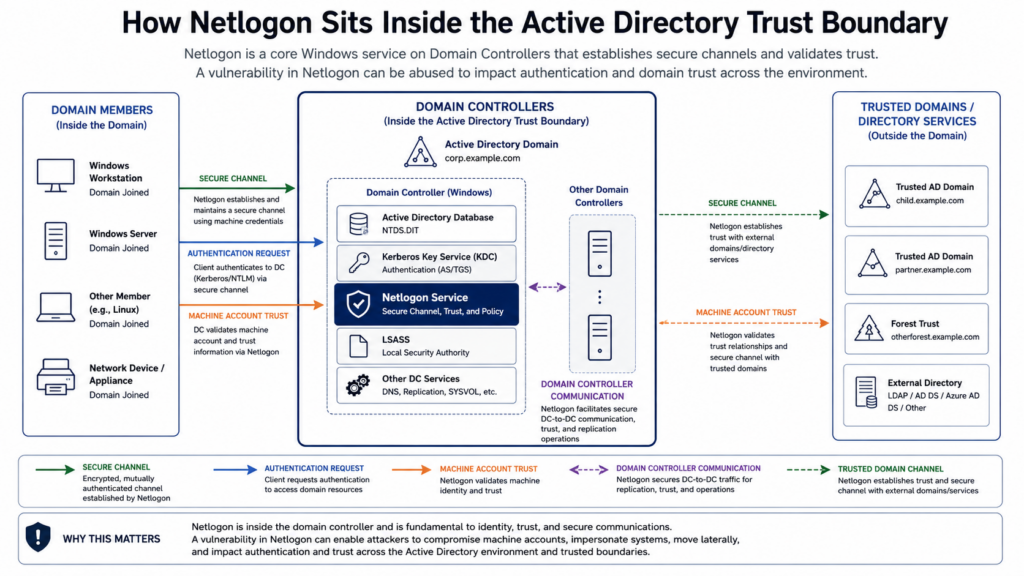
The Netlogon Remote Protocol is not a side feature. Microsoft’s protocol documentation says the Netlogon RPC interface is used primarily to maintain relationships between a machine and its domain, and relationships among domain controllers and domains. The same documentation lists responsibilities that include establishing and maintaining the secure channel used by domain members to communicate with a DC, transporting authentication requests from domain members to the DC and among DCs, and transmitting certain account changes such as password changes or lockout information.(माइक्रोसॉफ्ट लर्न)
That is why a Netlogon RCE has a different blast radius from a bug in a workstation application. The exposed component is part of how Windows domains maintain trust. A domain controller also carries high-value material and authority: account data, machine trust relationships, directory permissions, service principal mappings, group policy influence, and the ability to participate in domain authentication flows.
The danger is not only initial code execution. The danger is where the attacker lands. Code execution on a domain controller can give an intruder a path to dump secrets, manipulate directory objects, enumerate privileged accounts, abuse replication-related paths, or weaken recovery by tampering with backups and security tooling. In a flat network, that path can become extremely short.
This also explains why defenders should not wait for a polished public proof of concept before acting. A pre-authentication, network-reachable vulnerability in a domain controller service deserves urgent remediation even when exploit details are sparse. CCB’s later update that the vulnerability was actively exploited makes that posture even more important.(CCB Belgium)
What a stack-based buffer overflow means here
CVE-2026-41089 is mapped to CWE-121, stack-based buffer overflow. MITRE describes CWE-121 as a condition where the overwritten buffer is allocated on the stack, usually as a local variable or parameter. MITRE also notes that buffer overflows can lead to crashes, memory modification, bypass of protection mechanisms, or execution of unauthorized code, depending on exploitability and context.(cwe.mitre.org)
For defenders, the safe mental model is enough:
- A network request reaches the vulnerable Netlogon parsing or handling path.
- A malformed field, structure, length, or boundary condition is processed incorrectly.
- Data is written beyond the intended stack buffer.
- If the attacker can shape memory and control flow reliably enough, the overflow may become code execution.
- Because the target is a Windows service on a domain controller, the successful outcome is more severe than a crash on a low-value host.
The article does not need exploit code to be useful. In fact, exploit code is the wrong center of gravity for production defenders. The right center of gravity is exposure control, patch verification, service health, detection coverage, and evidence that another engineer can review.
Stack overflows also have an uncomfortable defensive property: mitigation layers matter, but they do not eliminate the need to patch. Compiler hardening, stack canaries, ASLR, DEP, and runtime protections can raise exploitation cost, and MITRE lists several of these as defense-in-depth measures for this weakness class. But the vendor fix is still the security boundary correction. If your DC is vulnerable, “modern Windows has mitigations” is not a remediation plan.(cwe.mitre.org)
Affected systems and the role question
Public advisories agree on the core point: the risk is tied to Windows Server domain controllers. CCB states that exploitation targets a Windows server acting as a domain controller and that patches are available for Windows Server versions from 2012 onward. Check Point’s IPS advisory lists vulnerable Netlogon targets across Windows Server 2012, 2012 R2, 2016, 2019, 2022, 2022 23H2, 2025, and corresponding Server Core installations.(CCB Belgium)
That is the practical asset inventory:
| Asset | How to treat it | Priority |
|---|---|---|
| Writable domain controller | Assume top priority until patched and verified | P0 |
| Read-only domain controller | Still a domain controller, still sensitive | P0 |
| Server Core domain controller | Do not ignore because there is no GUI | P0 |
| Lab or staging domain controller | Patch quickly, especially if routed to production networks | उच्च |
| Member Windows Server | Verify role and patch state, but the main CVE-2026-41089 risk is DC-focused | उच्च |
| Windows workstation | Not the main target for this CVE, but still subject to other May 2026 Windows vulnerabilities | Normal patch cycle plus risk-based exceptions |
A common mistake is to build the remediation list from endpoint management tags instead of directory reality. “Windows Server” is too broad. “Domain controller reachable from these source networks” is the unit that matters.
Use Active Directory itself to identify the DC population:
Import-Module ActiveDirectory

Get-ADDomainController -Filter * |
    Select-Object HostName, Site, IPv4Address, OperatingSystem, IsGlobalCatalog, IsReadOnly |
    Sort-Object Site, HostName |
    Export-Csv .\domain-controllers.csv -NoTypeInformation
That inventory should be compared with vulnerability management, EDR, CMDB, backup, and network firewall data. Any domain controller that appears in AD but not in your patch reporting is a gap. Any domain controller that appears in patch reporting but not in the CMDB is also a gap. Identity infrastructure often fails at the seams between teams.
Network reachability is the real exposure multiplier
CVE-2026-41089 is network exploitable, but “network” is not one thing. A domain controller reachable only from a tightly controlled management VLAN has a different exposure profile from a DC reachable from every workstation subnet, VPN address pool, server segment, and contractor network.
Netlogon does not map neatly to a single port in all environments. Microsoft’s service overview says the Net Logon service maintains a security channel between a computer and the domain controller to authenticate users and services. The same Microsoft documentation states that on domain controllers, Net Logon uses RPC over named pipes, RPC over TCP/IP, mail slots, and LDAP. It lists SMB TCP 445, LDAP UDP 389, RPC TCP 135, and dynamic ports in the 49152-65535 range among Net Logon-related communication paths.(माइक्रोसॉफ्ट लर्न)
Microsoft’s firewall guidance for Active Directory domains and trusts similarly lists RPC Endpoint Mapper on TCP 135, RPC for LSA/SAM/NetLogon, LDAP, DNS, Kerberos, SMB 445, and dynamic RPC ranges depending on Windows version and configuration.(माइक्रोसॉफ्ट लर्न)
That matters because a “port 445 scan” alone is not an exposure assessment. It is one useful check, not the full picture.
| Port or range | Protocol or service | यह क्यों मायने रखती है |
|---|---|---|
| TCP 135 | RPC Endpoint Mapper | Helps RPC clients locate service endpoints |
| TCP 445 | SMB and named pipes | Often relevant to Windows RPC paths and domain operations |
| TCP/UDP 389 | LDAP | Used heavily by domain services and discovery |
| TCP/UDP 88 | Kerberos | Core domain authentication path |
| TCP 49152-65535 | Dynamic RPC on modern Windows | Many AD RPC calls land here after endpoint mapping |
| TCP 139, UDP 137, UDP 138 | NetBIOS legacy paths | Still relevant in older or compatibility-heavy environments |
A strong response starts with a reachability matrix:
| Source segment | Should it reach DC RPC or SMB? | Action |
|---|---|---|
| Domain controllers to domain controllers | Usually yes, tightly documented | Allow only required flows |
| Admin jump hosts | Yes, but limited and monitored | Allow with identity and device controls |
| Workstation VLANs | Often too broad in legacy networks | Reduce to required authentication paths |
| Server VLANs | Case-by-case | Restrict by application need |
| VPN client pools | High risk if broad | Segment and restrict |
| Guest Wi-Fi | नहीं | Block |
| Contractor networks | Usually no direct DC RPC | Block or broker through managed access |
| Internet | नहीं | Block and investigate immediately if exposed |
The patch fixes the bug. Segmentation reduces the number of systems that can attempt to reach it before the patch, after the patch, or against the next identity-plane vulnerability.
A realistic attack path
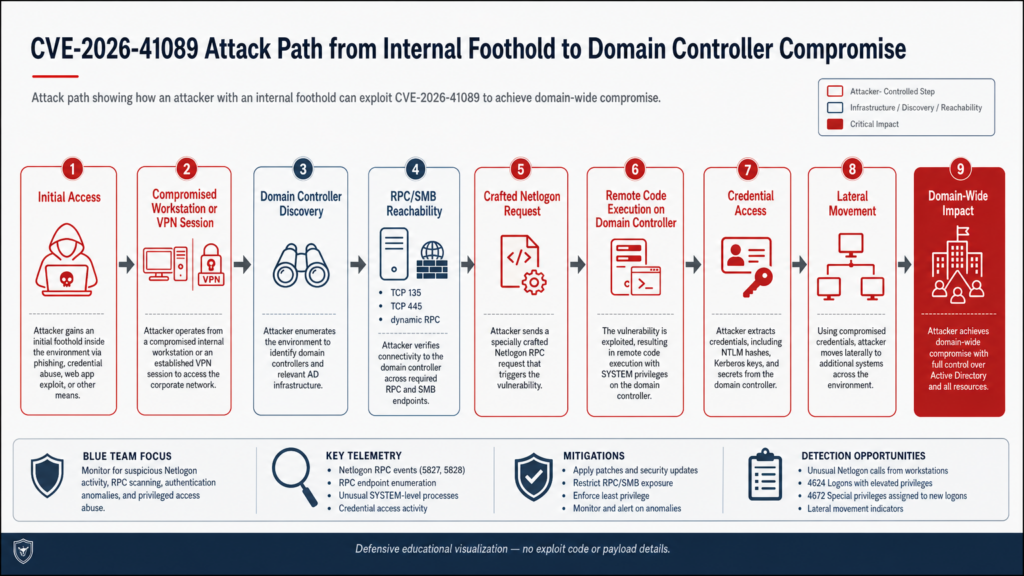
The shortest theoretical description is “send a crafted request to a vulnerable DC.” That is true but not enough for defenders. Most real organizations need to reason about how an attacker reaches that position.
A realistic chain looks like this:
| मंच | Attacker action | Defender question |
|---|---|---|
| Initial access | Compromise VPN, endpoint, exposed app, vendor account, or unmanaged server | Which entry points route toward DCs? |
| Internal discovery | Identify domain controllers through DNS, LDAP, environment variables, or Windows APIs | Do we alert on unusual DC discovery from non-admin systems? |
| Reachability testing | Probe RPC, SMB, LDAP, Kerberos, and dynamic RPC paths | Which segments can talk to DC management and RPC surfaces? |
| Exploit attempt | Send malformed Netlogon-related request | Do IPS, EDR, Windows logs, and NDR capture useful signals? |
| Post-exploitation | Run code, establish persistence, dump credentials, enumerate AD | Can we detect abnormal DC process behavior? |
| Domain operations | Abuse accounts, GPO, replication paths, or remote execution | Are Tier 0 controls enforced? |
| प्रभाव | Ransomware, data theft, identity takeover, recovery disruption | Are backups and break-glass accounts protected? |
This is why defenders should not treat CVE-2026-41089 as a pure vulnerability-management ticket. It touches network architecture, identity operations, endpoint detection, privileged access, backup integrity, and incident response.
Patch priority and change control
For CVE-2026-41089, “patch quickly” is correct but incomplete. Domain controllers need care because rushed maintenance can break authentication or replication if the environment is already fragile. The right approach is fast and disciplined, not reckless.
A practical sequence:
- Identify every writable DC and RODC.
- Confirm site placement and business-critical authentication dependencies.
- Review replication health before patching.
- Patch one DC per site or a controlled subset first where operationally required.
- Validate reboot, service health, replication, Kerberos, LDAP, DNS registration, and authentication.
- Roll through the remaining DCs quickly.
- Re-run exposure and patch verification.
- Keep monitoring elevated after patching because patching does not erase historical compromise.
The last point is important. CCB explicitly warns that while patching protects against future exploitation, it does not remediate historic compromise.(CCB Belgium)
A minimal pre-patch health check:
dcdiag /e /c /v /f:dcdiag-before-cve-2026-41089.txt
repadmin /replsummary > replsummary-before-cve-2026-41089.txt
repadmin /showrepl * /csv > showrepl-before-cve-2026-41089.csv
A minimal post-patch health check:
dcdiag /e /c /v /f:dcdiag-after-cve-2026-41089.txt
repadmin /replsummary > replsummary-after-cve-2026-41089.txt
repadmin /showrepl * /csv > showrepl-after-cve-2026-41089.csv
These commands do not prove the vulnerability is fixed by themselves. They prove that the domain controller fleet remains healthy before and after remediation. That matters because emergency patching should not blind the identity team to replication failures.
Safe patch verification with PowerShell
Do not validate this vulnerability by running exploit code against a production domain controller. Validate patch state, OS build, update recency, and network exposure.
Start with a local check on each DC:
$Computer = $env:COMPUTERNAME

$os = Get-CimInstance Win32_OperatingSystem
$hotfixes = Get-HotFix | Sort-Object InstalledOn -Descending | Select-Object -First 20

[PSCustomObject]@{
    ComputerName = $Computer
    Caption      = $os.Caption
    Version      = $os.Version
    BuildNumber  = $os.BuildNumber
    LastBoot     = $os.LastBootUpTime
    RecentHotfix = ($hotfixes | Select-Object -First 1).HotFixID
    HotfixDate   = ($hotfixes | Select-Object -First 1).InstalledOn
}
For remote collection from an admin host:
Import-Module ActiveDirectory

$DCs = Get-ADDomainController -Filter * | Select-Object -ExpandProperty HostName

Invoke-Command -ComputerName $DCs -ScriptBlock {
    $os = Get-CimInstance Win32_OperatingSystem
    $hotfixes = Get-HotFix | Sort-Object InstalledOn -Descending | Select-Object -First 10

    [PSCustomObject]@{
        ComputerName = $env:COMPUTERNAME
        OS           = $os.Caption
        Version      = $os.Version
        BuildNumber  = $os.BuildNumber
        LastBoot     = $os.LastBootUpTime
        LatestHotfix = ($hotfixes | Select-Object -First 1).HotFixID
        LatestDate   = ($hotfixes | Select-Object -First 1).InstalledOn
    }
} | Export-Csv .\cve-2026-41089-dc-patch-evidence.csv -NoTypeInformation
The output should be reviewed against Microsoft’s actual update guidance for the affected Windows Server versions in your environment. Do not assume a single KB number applies to every server generation, servicing channel, or cumulative update state.
A more useful reporting table for leadership looks like this:
| DC | OS | Site | Latest update date | Last boot | Network exposure | Status |
|---|---|---|---|---|---|---|
| dc01.example.com | Server 2022 | HQ | May 2026 CU installed | Rebooted | Restricted | Verified |
| dc02.example.com | Server 2019 | HQ | Missing May 2026 CU | Not rebooted | Broad workstation access | Emergency |
| rodc01.branch.example.com | Server Core | Branch | May 2026 CU installed | Rebooted | Branch-only | Verified |
| labdc01.example.com | Server 2016 | Lab | Unknown | Unknown | Routed to prod | Investigate |
The point is not to make a pretty spreadsheet. The point is to make hidden assumptions visible.
Safe network reachability checks
Reachability testing should answer a narrow question: which source networks can reach domain controller services that should be restricted?
From representative hosts in each segment:
$DomainControllers = @(
    "dc01.example.com",
    "dc02.example.com",
    "rodc01.branch.example.com"
)

$Ports = @(135, 445, 389, 88)

foreach ($dc in $DomainControllers) {
    foreach ($port in $Ports) {
        Test-NetConnection -ComputerName $dc -Port $port |
            Select-Object ComputerName, RemoteAddress, RemotePort, TcpTestSucceeded
    }
}
For a CSV report:
$DomainControllers = Get-Content .\domain-controllers.txt
$Ports = 135,445,389,88
$Results = @()

foreach ($dc in $DomainControllers) {
    foreach ($port in $Ports) {
        $test = Test-NetConnection -ComputerName $dc -Port $port -WarningAction SilentlyContinue
        $Results += [PSCustomObject]@{
            SourceHost       = $env:COMPUTERNAME
            TargetDC         = $dc
            Port             = $port
            RemoteAddress    = $test.RemoteAddress
            TcpTestSucceeded = $test.TcpTestSucceeded
        }
    }
}

$Results | Export-Csv .\dc-reachability-check.csv -NoTypeInformation
This still does not test dynamic RPC completely. It gives a first-pass view. For deeper validation, compare firewall policy, Windows Firewall rules, RPC endpoint restrictions, and actual flow logs from firewalls or NDR tools.
Avoid scanning domain controllers aggressively during emergency windows. A DC under stress can create a business incident even when the scanner is not exploiting anything. Rate-limit tests, coordinate with identity operations, and test from representative subnets rather than blasting every host.
Detection without pretending there is a perfect IoC
For CVE-2026-41089, defenders should be skeptical of anyone claiming a complete, universal IoC set unless it comes from a trustworthy vendor advisory, incident report, or telemetry-backed source. The public high-confidence facts are enough to build a detection strategy, but not enough to name one magic packet pattern in every environment.
CCB recommends increasing monitoring and detection to identify suspicious activity after its update on active exploitation.(CCB Belgium)
Use layered signals:
| Signal | Data source | यह क्यों मायने रखती है | False positive risk |
|---|---|---|---|
| Unexpected source hosts connecting to DC TCP 135 or 445 | Firewall, NDR, Zeek, Windows Firewall logs | May indicate discovery, lateral movement, or exploit staging | मध्यम |
| High-volume RPC attempts toward DCs | NDR, firewall, endpoint telemetry | May indicate probing or malformed request attempts | मध्यम |
| Netlogon service crash or restart | Windows System event logs, service monitoring | Memory corruption attempts may crash before code execution | Medium to high |
| Unusual process creation on DC | EDR, Sysmon, Windows Security logs | Post-exploitation behavior is often easier to detect than the initial exploit | Lower |
| LSASS access from unexpected process | EDR, Sysmon, Defender telemetry | Common credential theft step after DC compromise | मध्यम |
| New or modified privileged AD objects | Directory audit logs | Attackers may establish control through accounts or groups | मध्यम |
| GPO changes outside maintenance windows | AD audit, SIEM | Domain-wide control often uses policy paths | मध्यम |
| Replication or trust anomalies | AD health tooling, event logs | Domain-level manipulation can affect replication or trust | मध्यम |
A starting KQL-style idea for Microsoft Defender XDR environments:
DeviceNetworkEvents
| where RemotePort in (135, 445, 389, 88)
| where RemoteUrl has_any ("dc01", "dc02", "rodc")
   or RemoteIPType == "Private"
| summarize Connections=count(), FirstSeen=min(Timestamp), LastSeen=max(Timestamp)
    by DeviceName, InitiatingProcessFileName, RemoteIP, RemotePort
| where Connections > 50
| order by Connections desc
This is not a CVE-specific detector. It is a triage lens. Use it to find unexpected machines talking heavily to DC surfaces.
A process behavior query:
DeviceProcessEvents
| where DeviceName has_any ("dc01", "dc02", "rodc")
| where InitiatingProcessFileName in~ ("services.exe", "lsass.exe", "svchost.exe")
| where FileName in~ ("cmd.exe", "powershell.exe", "pwsh.exe", "rundll32.exe", "regsvr32.exe", "wscript.exe", "cscript.exe")
| project Timestamp, DeviceName, InitiatingProcessFileName, FileName, ProcessCommandLine, AccountName
| order by Timestamp desc
Tune this carefully. Domain controllers run management agents, backup tools, EDR sensors, and legitimate scripts. The purpose is to find abnormal execution paths, not to declare every script malicious.
A Windows event collection checklist:
| Area | What to collect |
|---|---|
| System logs | Service Control Manager events, unexpected service crashes, reboot timing |
| Security logs | Logon type anomalies, privileged group changes, account creation |
| Directory Service logs | Replication and directory operation anomalies |
| DNS logs | Unexpected domain discovery and query patterns |
| PowerShell logs | Script block logging, module logging, suspicious remote execution |
| EDR telemetry | Process creation, memory access, credential dumping behaviors |
| Firewall logs | Source-to-DC RPC and SMB flows |
For temporary Netlogon troubleshooting, Microsoft documents a debug logging method using Nltest /DBFlag:2080FFFF, with output written to %windir%\debug\netlogon.log. The same Microsoft article documents disabling it with Nltest /DBFlag:0x0. This is useful for troubleshooting, but it can be noisy and should not be treated as a long-term detection substitute.(माइक्रोसॉफ्ट लर्न)
Nltest /DBFlag:2080FFFF
After investigation:
Nltest /DBFlag:0x0
IPS and network protection
Network controls are not a replacement for patching, but they can reduce exposure during emergency remediation. Check Point published an IPS advisory for Microsoft Windows Netlogon Remote Code Execution, CVE-2026-41089, and states that its protection detects attempts to exploit the vulnerability. The advisory lists Security Gateway versions with protection and says logs include the attack information “Microsoft Windows Netlogon Remote Code Execution, CVE-2026-41089.”(Check Point Software)
That kind of control is useful, but only if deployed correctly. A signature sitting at the internet edge does not help if the realistic attack path is a compromised laptop on the internal LAN. A data center firewall does not help if workstation-to-DC traffic bypasses it. A monitor-only rule does not help if no one reviews the alert.
Ask these questions:
| Question | यह क्यों मायने रखती है |
|---|---|
| Where is the IPS sensor placed? | It must see the traffic path to DCs |
| Is the rule in prevent or detect mode? | Detect-only may be acceptable briefly, but not as a long-term control |
| Are DC-bound RPC and SMB flows inspected? | Some east-west flows bypass inspection |
| Is there an exception for domain traffic? | Broad exceptions can hide the most important traffic |
| Are alerts routed to the incident team? | A signature without response is log decoration |
| Has the control been tested safely? | Confirm visibility without exploit traffic |
Network controls should buy time and provide visibility. The permanent fix is to patch and reduce unnecessary reachability.
Why “no user interaction” matters
Many severe vulnerabilities still require a victim to open a document, click a link, join a meeting, or connect to a malicious server. CVE-2026-41089 is different. Its CVSS vector includes UI:N, meaning no user interaction. Microsoft’s FAQ also describes exploitation through a crafted network request to a domain controller, without signing in or having prior access.(Microsoft Security Response Center)
No user interaction changes the response model. Security awareness training will not stop this bug. Email filtering will not stop it. Browser isolation will not stop it. The relevant controls are network segmentation, patching, identity-plane monitoring, endpoint detection on DCs, and incident response readiness.
That does not make exploitation “automatic from anywhere.” The attacker still needs network reachability to the vulnerable service path. But once the attacker has an internal foothold, a VPN position, or a poorly segmented server, the lack of required credentials and user interaction is exactly what makes the vulnerability dangerous.
How CVE-2026-41089 compares with Zerologon
The obvious historical comparison is CVE-2020-1472, better known as Zerologon. Both involve Netlogon and domain controllers. They are not the same bug class.
NVD describes CVE-2020-1472 as an elevation of privilege vulnerability that exists when an attacker establishes a vulnerable Netlogon secure channel connection to a domain controller using MS-NRPC. Microsoft’s Zerologon guidance told organizations to update domain controllers, find devices making vulnerable connections, address non-compliant devices, and enable enforcement mode.(एनवीडी)
| आयाम | CVE-2020-1472 Zerologon | CVE-2026-41089 |
|---|---|---|
| अवयव | Netlogon Remote Protocol | Windows Netlogon |
| Main weakness | Secure channel and cryptographic authentication flaw | Stack-based buffer overflow |
| Impact type | Elevation of privilege | Remote code execution |
| Attacker position | Network access to a domain controller | Network access to a domain controller |
| Credentials | No prior credentials in key attack scenarios | No privileges required per CVSS |
| Lesson | Protocol trust failures can collapse domain security | Memory corruption in identity-plane services can become domain-level risk |
| Defense center | Patch, enforce secure RPC, handle non-compliant devices | Patch, restrict reachability, monitor DC behavior |
The shared lesson is not that every Netlogon bug behaves the same. The shared lesson is that domain controller vulnerabilities deserve a different tier of response. Active Directory is not just another application dependency. It is the system that decides who gets to become powerful elsewhere.
The May 2026 context, DNS Client and SSO plugin risks
CVE-2026-41089 was not the only high-priority Microsoft issue in May 2026. CrowdStrike’s May Patch Tuesday analysis listed CVE-2026-41089 as a critical Windows Netlogon RCE with CVSS 9.8 and also highlighted CVE-2026-41096, a critical Windows DNS Client RCE with CVSS 9.8. The Cyber Security Agency of Singapore’s May 2026 monthly patch alert also listed both CVEs at 9.8.(क्राउडस्ट्राइक)
CVE-2026-41096 is relevant because DNS is another foundational network component. It is not the same as a domain controller Netlogon flaw, but it belongs in the same emergency patch conversation because name resolution sits in the path of authentication, service discovery, browsing, software updates, and nearly every enterprise workflow.
CVE-2026-41103 is another useful comparison. CCB highlighted it as a Microsoft SSO Plugin for Jira and Confluence elevation of privilege issue, where exploitation involves a specially crafted SSO response that tricks the system into accepting a forged identity.(CCB Belgium)
Together, these issues show a pattern defenders already understand: the highest-impact bugs often sit in shared infrastructure, not in isolated apps. Identity, name resolution, SSO bridges, domain controllers, mail systems, VPNs, and management platforms create blast radius because many other systems trust them.
EternalBlue’s lesson still applies
EternalBlue is not a Netlogon vulnerability, but the operational lesson is relevant. The EternalBlue exploit used CVE-2017-0144 in the MS17-010 family, a Windows SMBv1 issue. The lasting lesson was not merely “patch SMB.” It was “do not trust patch dashboards until exposure has been verified.” A system can remain exploitable because it was missed by inventory, restored from an old image, isolated from WSUS, excluded for a legacy application, or reachable from a segment no one reviewed.
Penligent’s EternalBlue write-up makes that verification-first point in a Windows RCE context: the important question is not only whether a patch was once deployed, but whether the asset can produce evidence that the vulnerable condition is gone. That mindset maps well to CVE-2026-41089, even though the component and bug class are different.(पेनलिजेंट)
For authorized teams building repeatable validation workflows, an AI-assisted pentesting platform such as Penligent can be useful when it is used to organize asset mapping, safe checks, evidence capture, retesting, and reporting rather than to generate risky production exploit attempts. Penligent positions its product around authorized security testing, verification, and reporting, which is the correct lane for a domain-controller vulnerability response: prove patch state, prove exposure reduction, and preserve evidence that another engineer can audit.(पेनलिजेंट)
Remediation beyond installing the update
Patch deployment is the first fix. It is not the only fix.
A hardened response has four layers:
| परत | लक्ष्य | उदाहरण |
|---|---|---|
| पैच | Remove the vulnerable code path | Install Microsoft’s May 2026 security updates on DCs |
| Restrict | Reduce who can reach DC service surfaces | Limit RPC and SMB to required sources |
| Detect | Find exploit attempts and post-exploitation | Monitor DC RPC flows, service crashes, process behavior |
| Recover | Prepare for identity compromise | Protect backups, test AD recovery, secure break-glass accounts |
Patch every DC, including the awkward ones
The DCs that get missed are often the ones that matter later:
- Read-only domain controllers in branches.
- Server Core installations with weak management visibility.
- Lab domains with trust paths to production.
- Disaster recovery DCs powered off during routine patch windows.
- Recently promoted DCs not yet enrolled in patch management.
- Legacy DCs kept alive for application compatibility.
- Cloud-hosted DCs in IaaS environments managed by a different team.
Use at least two sources of truth: Active Directory enumeration and patch-management inventory. If they disagree, investigate before declaring the incident closed.
Reduce DC reachability
Microsoft’s own port documentation makes it clear that AD and Netlogon communication is broader than a single port. That does not mean every subnet should be able to reach every DC on every AD-related port.(माइक्रोसॉफ्ट लर्न)
A practical segmentation policy:
| स्रोत | DC access posture |
|---|---|
| Domain controllers | Required DC-to-DC flows only |
| Privileged admin workstations | Required management flows only |
| Application servers | Only documented domain dependencies |
| Workstations | Authentication paths, not broad management paths |
| VPN clients | Restricted and monitored |
| Guest and BYOD networks | No direct DC access |
| Internet | No direct DC access |
| Third-party networks | Brokered access only |
Blocking unnecessary RPC and SMB paths is not just for CVE-2026-41089. It reduces the blast radius of the next Windows identity-plane vulnerability.
Harden privileged access
If a DC exploit succeeds, the attacker’s next move is often privilege consolidation. Tier 0 controls matter:
- Use dedicated admin workstations for domain administration.
- Keep domain admin accounts out of email and web browsing.
- Protect break-glass accounts with strong monitoring.
- Monitor changes to privileged groups.
- Restrict who can log on locally or remotely to DCs.
- Prevent routine server admins from having DC privileges.
- Keep backup operators, identity admins, and virtualization admins in the same risk model.
Protect recovery
Active Directory recovery is not just a backup job. It is a security control. If attackers compromise DCs, they may target backups, snapshots, hypervisors, and recovery credentials.
Verify:
- System State backups exist and restore successfully.
- At least one backup path is isolated from domain admin compromise.
- Hypervisor admins are not casually equivalent to domain admins.
- Recovery procedures are documented and tested.
- Incident response can rebuild a clean DC if trust is lost.
- Golden image and promotion steps are current.
A patched but unrecoverable domain is still fragile.
Incident response when exploitation is suspected
If you have evidence of exploitation or credible signs of DC compromise, do not treat the situation as a normal patch ticket. Patch quickly, but preserve evidence and investigate.
A practical response sequence:
- Isolate the affected DC if doing so will not collapse authentication.
- Preserve volatile and relevant forensic evidence.
- Capture security, system, directory service, DNS, PowerShell, and EDR telemetry.
- Review recent privileged account activity.
- Review new services, scheduled tasks, startup items, and unusual binaries.
- Check for suspicious LSASS access, credential dumping behavior, and directory replication abuse.
- Rotate exposed credentials according to an identity incident plan.
- Validate replication health and trust relationships.
- Rebuild from known-good media if DC integrity cannot be trusted.
- Continue monitoring after patching.
A simple first-pass collection script for event exports:
$Out = "C:\IR-CVE-2026-41089"
New-Item -ItemType Directory -Path $Out -Force | Out-Null

wevtutil epl System "$Out\System.evtx"
wevtutil epl Security "$Out\Security.evtx"
wevtutil epl "Directory Service" "$Out\Directory-Service.evtx"
wevtutil epl "DNS Server" "$Out\DNS-Server.evtx"
wevtutil epl "Windows PowerShell" "$Out\Windows-PowerShell.evtx"
wevtutil epl "Microsoft-Windows-PowerShell/Operational" "$Out\PowerShell-Operational.evtx"

Get-Process | Sort-Object ProcessName | Export-Csv "$Out\process-list.csv" -NoTypeInformation
Get-Service | Sort-Object Name | Export-Csv "$Out\service-list.csv" -NoTypeInformation
Get-ScheduledTask | Export-Csv "$Out\scheduled-tasks.csv" -NoTypeInformation
This is not a full forensic workflow. It is a quick evidence-preservation step before logs roll over or emergency changes erase context. In a real domain-controller compromise, bring in your incident response team early.
Common mistakes during CVE-2026-41089 response
| Mistake | Why it is dangerous |
|---|---|
| Only checking internet exposure | Most realistic attacks begin after an internal foothold |
| Only scanning TCP 445 | Netlogon and AD communication involve RPC and other paths |
| Ignoring Server Core | Server Core DCs can be just as exposed |
| Patching only the “main” DC | Any vulnerable DC can become the attack target |
| Forgetting RODCs | RODCs still participate in domain authentication architecture |
| Trusting a dashboard without reboot evidence | Some updates do not fully apply until restart |
| Running exploit PoCs in production | You may crash or compromise the DC yourself |
| Treating patching as incident closure | Patching does not prove there was no prior compromise |
| Leaving VPN clients with broad DC access | A stolen VPN session can become an internal attack position |
| Assuming “no public PoC” means low risk | Private exploit development can move faster than public writeups |
The safest production test is not “can I exploit it?” The safest production test is “can I prove it is patched, can I prove unnecessary reachability is blocked, and can I prove monitoring would catch suspicious behavior?”
A practical 24-hour response plan
For organizations with exposed or broadly reachable domain controllers, a 24-hour plan should look like this.
Hours 0 to 2
- Name an incident owner.
- Freeze unrelated DC changes.
- Export the DC inventory from Active Directory.
- Pull patch status from endpoint management and PowerShell.
- Identify unpatched DCs.
- Identify network paths from VPN, workstation, server, and third-party segments to DCs.
- Increase monitoring for DC RPC, SMB, process creation, and privileged account changes.
Hours 2 to 8
- Patch the highest-risk DCs first.
- Validate reboot and replication health.
- Apply compensating network restrictions where immediate patching is blocked.
- Review IPS and firewall rules for DC-bound traffic.
- Check whether any DC has unexpected service crashes or unusual process activity.
- Start evidence collection for suspicious systems.
Hours 8 to 24
- Complete patch rollout across all DCs.
- Re-run patch and reachability evidence collection.
- Review privileged group changes and suspicious logons during the exposure window.
- Document exceptions and owners.
- Schedule follow-up segmentation changes.
- Prepare a short executive report that states what was vulnerable, what was patched, what remains exposed, and what evidence supports the conclusion.
A good executive report is plain:
| Question | Answer |
|---|---|
| How many DCs exist? | 18 |
| How many were vulnerable at start? | 7 unverified, 3 confirmed missing update |
| How many are now patched and rebooted? | 18 |
| Which segments can reach DC TCP 135 and 445? | Admin, server, limited workstation segments |
| Any evidence of exploitation? | No confirmed exploitation, two suspicious scans under investigation |
| Remaining risk | VPN segmentation exception until June 3 |
| Owner | Identity platform team and network security team |
Longer-term hardening after the emergency
After the patch window, do not let the domain return to its old shape.
Build a DC exposure baseline
Create a living record of:
- Every DC.
- Site and subnet.
- OS version and build.
- Patch group.
- Backup status.
- EDR status.
- Allowed inbound source segments.
- Required business exceptions.
- Last validation date.
Make DC reachability review routine
Every quarter, ask:
- Can normal workstations reach DC TCP 135?
- Can VPN clients reach DC TCP 445?
- Can server networks reach dynamic RPC ranges without justification?
- Are third-party networks routed to DCs?
- Are branch RODCs reachable from broader networks than intended?
- Do firewall logs match the written policy?
Monitor identity-plane behavior, not just malware
Domain-controller attacks often become identity operations. Build detections around:
- Privileged group changes.
- New delegation rights.
- Unusual service principal changes.
- Abnormal GPO edits.
- Suspicious replication activity.
- Unexpected remote execution.
- New scheduled tasks or services on DCs.
- Credential dumping behaviors.
- Backup tampering.
Practice recovery
A team that has never restored Active Directory under pressure does not have an AD recovery plan. It has a document.
Test:
- System State restore.
- Forest recovery decision-making.
- Break-glass credential access.
- Isolated recovery network.
- Clean DC promotion.
- Trust re-establishment.
- Backup integrity when domain admin is considered compromised.
अक्सर पूछे जाने वाले प्रश्न
What is CVE-2026-41089?
- CVE-2026-41089 is a critical Windows Netlogon Remote Code Execution vulnerability.
- Microsoft describes it as a stack-based buffer overflow in Windows Netlogon.
- The MSRC record gives it a CVSS 3.1 score of 9.8 and maps it to CWE-121.
- The main operational concern is a Windows Server acting as a domain controller.(Microsoft Security Response Center)
Is CVE-2026-41089 being exploited in the wild?
- Microsoft’s initial May 12, 2026 record listed the vulnerability as not publicly disclosed and not exploited at publication.
- The Centre for Cybersecurity Belgium updated its advisory on May 29, 2026 and stated that CVE-2026-41089 was actively exploited in the wild.
- Defenders should treat the later exploitation report as a reason to accelerate remediation and monitoring.(Microsoft Security Response Center)
Does CVE-2026-41089 affect Windows clients?
- The highest-risk public guidance centers on Windows Server systems acting as domain controllers.
- Do not build your response around Windows workstations for this CVE.
- Workstations still need May 2026 updates because other Windows vulnerabilities were patched in the same cycle.
- Your first inventory should be all writable DCs, RODCs, Server Core DCs, lab DCs, and recovery DCs.
How do I verify whether my domain controllers are patched?
- Enumerate domain controllers with
Get-ADDomainController -Filter *. - Collect OS version, build number, recent hotfixes, and last boot time.
- Compare results against Microsoft’s update guidance for each Windows Server version.
- Confirm the update was installed and the DC rebooted where required.
- Keep CSV or report evidence so another engineer can verify the conclusion.
Can I safely test CVE-2026-41089 with a scanner?
- You can safely test patch state and network reachability.
- You should not run untrusted exploit code against production domain controllers.
- If using a vulnerability scanner, confirm whether the check is authenticated and version-based or whether it sends malformed protocol traffic.
- Coordinate testing with the identity team and rate-limit scans against DCs.
- Treat crashes or service instability during testing as an incident signal.
What should I monitor after patching?
- Monitor DC-bound RPC and SMB connections from unexpected source networks.
- Watch for Netlogon service crashes or restarts.
- Review unusual process creation on DCs.
- Investigate LSASS access, credential dumping behaviors, new services, scheduled tasks, and privileged group changes.
- Review GPO changes, directory replication anomalies, and suspicious admin logons.
- Keep heightened monitoring after patching because patching does not rule out earlier compromise.
How is CVE-2026-41089 different from Zerologon?
- Zerologon, CVE-2020-1472, was a Netlogon secure channel elevation-of-privilege vulnerability.
- CVE-2026-41089 is a Windows Netlogon remote code execution vulnerability caused by a stack-based buffer overflow.
- Both are serious because they involve domain controllers and the Netlogon trust boundary.
- The remediation details differ, but the operational priority is similar: patch DCs quickly and verify the result.(एनवीडी)
What should be fixed first if I have many domain controllers?
- Prioritize internet-routed, VPN-reachable, broadly reachable, or high-authentication-volume DCs first.
- Patch writable DCs and RODCs; do not ignore branch or Server Core systems.
- If a DC cannot be patched immediately, restrict network reachability while preparing a maintenance window.
- Validate replication and authentication after each patch batch.
- Document every exception with an owner and expiration date.
Useful sources to keep open
Microsoft’s MSRC API record is the source of truth for the vendor description, CVSS vector, CWE mapping, and exploitability status at publication.(Microsoft Security Response Center)
The Centre for Cybersecurity Belgium advisory is important because it records the May 29 update that CVE-2026-41089 was actively exploited in the wild and recommends high-priority patching and monitoring.(CCB Belgium)
Microsoft’s Netlogon Remote Protocol documentation explains why this component matters to domain relationships, secure channels, authentication transport, and DC operations.(माइक्रोसॉफ्ट लर्न)
Microsoft’s Windows Server port documentation is useful when building segmentation and reachability checks for Netlogon, RPC, SMB, LDAP, and dynamic RPC ranges.(माइक्रोसॉफ्ट लर्न)
MITRE’s CWE-121 entry explains the stack-based buffer overflow weakness class and why memory corruption can lead to code execution or denial of service depending on exploitability.(cwe.mitre.org)
CVE-2026-41089 deserves emergency handling because it combines three traits defenders do not want near Active Directory: network reachability, no required user interaction, and a domain-controller service. The fix begins with Microsoft’s security update, but a credible response does not stop there. Identify every DC, patch and reboot, prove the patch state, restrict unnecessary RPC and SMB reachability, monitor for exploitation and post-exploitation behavior, and preserve enough evidence that the next engineer can validate your conclusion without trusting your memory.
The wrong response is panic testing with exploit code. The right response is controlled urgency: patch fast, verify safely, reduce blast radius, and assume identity infrastructure deserves stricter proof than ordinary servers.
 Hindi
Hindi  English
  German
  French
  Spanish
  Portuguese
  Japanese
  Korean
  Arabic
  Turkish
  Hebrew