
CVE-2026-20896 is a critical authentication bypass in Gitea Docker deployments where the official Docker image, up to and including version 1.26.2, used REVERSE_PROXY_TRUSTED_PROXIES = * by default. That setting matters only when reverse-proxy authentication is enabled, but when the vulnerable conditions line up, any source that can reach the Gitea container’s HTTP port may be able to supply a trusted identity header such as X-WEBAUTH-USER and be treated as another user. The Gitea GitHub advisory assigns the issue CVSS 3.1 score 9.8 and identifies 1.26.3 as the patched version; Gitea’s release announcement recommends upgrading directly to 1.26.4 because 1.26.4 followed immediately with a regression fix and an additional security fix. (गिटहब)
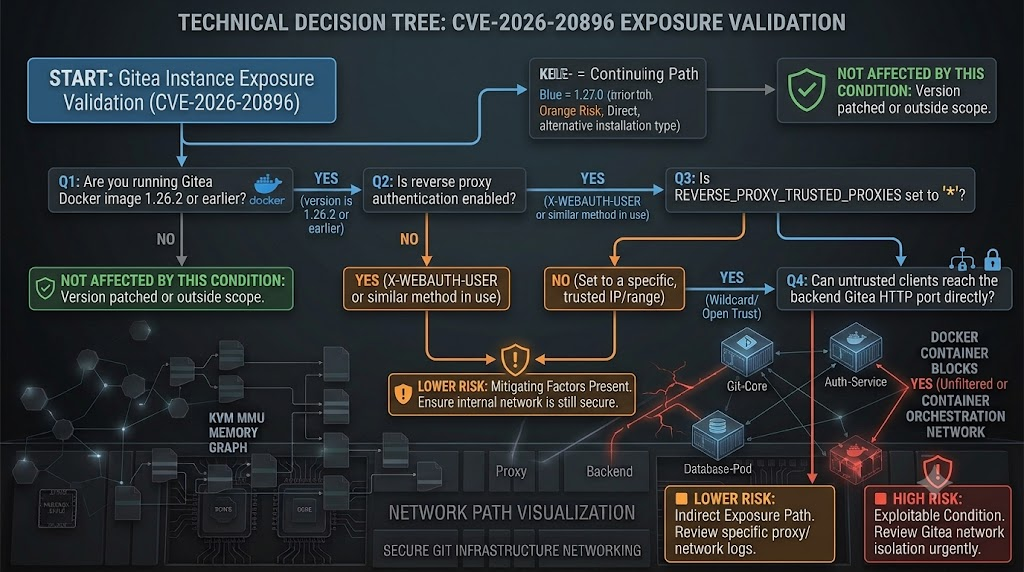
The short version for defenders is precise: do not assume every Gitea instance is exposed, and do not assume a private deployment is safe without checking the actual Docker image, reverse-proxy authentication setting, trusted-proxy allowlist, and network reachability of the backend container port. The dangerous combination is official Gitea Docker image version 1.26.2 or earlier, reverse-proxy authentication enabled, wildcard trusted proxies, and a route that allows an attacker or untrusted internal process to speak directly to the Gitea HTTP service instead of only through the intended authenticating proxy. NVD’s description tracks the same core issue and maps the weakness to CWE-284, Improper Access Control, while also noting that NVD itself had not provided its own independent CVSS enrichment at the time the record was viewed. (एनवीडी)
What CVE-2026-20896 really is
Gitea is a self-hosted, all-in-one software development service that includes Git hosting, code review, team collaboration, package registry, and CI/CD functionality. That makes a Gitea instance more than a web app login screen. It may hold source code, pull requests, issue history, release artifacts, package registry data, deployment workflows, webhooks, access tokens, SSH keys, and CI/CD integration points. Gitea’s own documentation describes it as a self-hosted development service with code hosting, package registry, and CI/CD; it also notes Gitea Actions compatibility with GitHub Actions-style workflows. (Gitea Documentation)
CVE-2026-20896 sits at the trust boundary between a reverse proxy and Gitea. Reverse-proxy header authentication is a common enterprise pattern: the proxy performs authentication, then forwards the authenticated username or email to the backend application using headers. In Gitea’s case, the default username header for that mode is X-WEBAUTH-USER, and reverse-proxy authentication is not enabled by default in the general documentation. Gitea’s authentication documentation says it can read reverse-proxy headers as a trusted login username or email address when the feature is enabled, and the configuration cheat sheet lists ENABLE_REVERSE_PROXY_AUTHENTICATION as false by default. (Gitea Documentation)
The header itself is not the real vulnerability. HTTP clients can send arbitrary headers all day. The security model depends on the backend accepting those identity headers only from a known proxy. That is why the trusted-proxy allowlist matters. Gitea’s documentation lists REVERSE_PROXY_TRUSTED_PROXIES as 127.0.0.0/8,::1/128 by default, and says * means trust all. The vulnerable Docker image template instead hard-coded REVERSE_PROXY_TRUSTED_PROXIES = *, so the control that should have limited trusted identity headers to loopback or specific proxy IP ranges became a global trust decision. (Gitea Documentation)
The official advisory makes the deployment distinction explicit. It says the affected path was in the Docker image templates, verified against gitea/gitea 1.26.2, and that binary distribution and self-built deployments that follow app.example.ini get the loopback-only default and are not affected by the Docker-image default mismatch. That distinction is important in incident response because a scanner or inventory system that simply says “Gitea <= 1.26.2” is not enough to prove exploitability. (गिटहब)
| Question | Accurate answer for CVE-2026-20896 |
|---|---|
| Affected product | Gitea Open Source Git Server, with the key exposure in official Docker images |
| प्रभावित संस्करण | Docker images up to and including 1.26.2 |
| Fixed version | 1.26.3 fixes this issue; Gitea recommends upgrading directly to 1.26.4 |
| Dangerous configuration | ENABLE_REVERSE_PROXY_AUTHENTICATION = true plus wildcard trusted proxies |
| Dangerous network condition | The Gitea HTTP port can be reached directly by an untrusted source, not only by the intended reverse proxy |
| Identity header involved | X-WEBAUTH-USER by default, with related reverse-proxy auth headers possible depending on configuration |
| गंभीरता | CNA CVSS 3.1 score 9.8 Critical |
| सामूहिक रूप से | CWE-284, Improper Access Control |
| Most serious impact | User impersonation, including administrator impersonation when the target username exists or is guessable |
| Main defensive action | Upgrade, remove wildcard trust, restrict backend reachability, strip external identity headers at the proxy, and review logs and credentials |

Why trusted proxy headers are fragile
Reverse-proxy authentication is not unusual. Many organizations use an upstream identity-aware proxy, SSO gateway, VPN portal, service mesh, or internal access platform to authenticate users before traffic reaches an application. The backend application then trusts identity metadata from that proxy. This model can be clean when the network path is clean: users can reach the proxy, the proxy can reach the backend, and the backend refuses identity headers from anywhere except the proxy.
The model breaks when the backend is reachable by another path. A client that bypasses the proxy can send the same header names the proxy would have sent. If the backend does not verify the source, the attacker’s header looks structurally identical to the proxy’s header. There is no cryptographic proof inside X-WEBAUTH-USER; it is just a string unless the receiving application ties it to a trusted source. CVE-2026-20896 is a sharp example because the vulnerable Docker template turned the trusted-proxy source check into “trust everyone.”
Gitea’s reverse-proxy documentation focuses on passing traffic correctly from a proxy to Gitea: set ROOT_URL, pass the right path, preserve escaped URI behavior, and forward headers such as Host, X-Real-IP, X-Forwarded-For, और X-Forwarded-Proto. Those are normal reverse-proxy deployment details, but reverse-proxy authentication adds a stronger requirement: identity headers must be created only after authentication and accepted only from the proxy. (Gitea Documentation)
The practical failure mode is easy to miss. A team may correctly configure the public domain to route through Nginx or Traefik, but still leave 3000:3000 published on the host, expose a Kubernetes Service as a NodePort, allow pod-to-pod traffic from broad namespaces, or leave a cloud security group permitting direct access to the backend port. In a diagram, the proxy looks like the only path. In the actual network, there may be a second path.
That is why the phrase “reachable Gitea Docker container” matters. If the only system allowed to speak to Gitea’s HTTP port is the trusted proxy, a remote client cannot simply inject a header into the backend. If a remote or internal untrusted client can bypass the proxy and reach Gitea, the backend has to decide whether to trust that client’s identity header. Under the vulnerable wildcard setting, it does.
Affected conditions, without overclaiming
CVE-2026-20896 should not be handled as “every Gitea instance is owned.” That framing is inaccurate and weakens remediation discipline. The right test is conditional.
A deployment is in the highest-risk group when all of these are true:
- It uses the official Gitea Docker image at version 1.26.2 or earlier.
- Reverse-proxy authentication is enabled for web requests.
- The effective trusted-proxy list is
*, or otherwise trusts a broad untrusted range. - The Gitea HTTP service can be reached directly by an attacker, by a compromised internal host, or by a container or workload outside the intended proxy path.
- The attacker can provide a valid or guessable username, especially an administrator username.
A deployment is lower risk when reverse-proxy authentication is not enabled, the backend HTTP port is reachable only from the reverse proxy, or the trusted-proxy list is explicitly constrained to the real proxy address or loopback. A non-Docker binary or self-built deployment that follows Gitea’s documented default is not the same exposure condition described in the Docker-image advisory. The official advisory states that binary distribution and self-built deployments following app.example.ini receive the loopback-only default. (गिटहब)
The auto-registration setting deserves separate treatment. Gitea’s authentication documentation states that if the user does not exist, automatic registration can be enabled with ENABLE_REVERSE_PROXY_AUTO_REGISTRATION=true. In the vulnerable trust model, auto-registration can turn a spoofed identity header into account creation behavior, which changes the risk from impersonating known accounts to creating arbitrary externally asserted identities. (Gitea Documentation)
| Deployment shape | Risk level | क्यों |
|---|---|---|
Gitea Docker <= 1.26.2, reverse-proxy auth enabled, REVERSE_PROXY_TRUSTED_PROXIES = *, backend port exposed | आलोचनात्मक | A direct client may be able to present an identity header and be accepted as a user |
| Gitea Docker <= 1.26.2, reverse-proxy auth enabled, backend port reachable only from the proxy | Material but constrained | The bad default exists, but network isolation may prevent direct header injection |
| Gitea Docker <= 1.26.2, reverse-proxy auth disabled | Lower for this CVE | The vulnerable trust decision is not used for login if reverse-proxy auth is off |
| Gitea binary or self-built deployment following loopback-only default | Not the same affected Docker default | The official advisory says those deployments receive the documented loopback-only default |
| Upgraded to 1.26.3 or 1.26.4 with explicit trusted proxies and restricted backend access | Remediated for this issue, subject to verification | Fix must be confirmed in the running container and live network path |
The root cause, as a trust-boundary bug
The root cause is not that Gitea supports reverse-proxy authentication. The root cause is that the Docker image default trusted every source IP for reverse-proxy identity headers. The official advisory says the Docker images shipped an app.ini template that hard-coded REVERSE_PROXY_TRUSTED_PROXIES = *, while the documented default in custom/conf/app.example.ini was loopback-only. (गिटहब)
Three settings define the dangerous edge:
[service]
ENABLE_REVERSE_PROXY_AUTHENTICATION = true
[security]
REVERSE_PROXY_AUTHENTICATION_USER = X-WEBAUTH-USER REVERSE_PROXY_TRUSTED_PROXIES = *
The first setting tells Gitea to use reverse-proxy authentication for web requests. The second tells Gitea which header carries the username. The third tells Gitea which source IPs are trusted to provide those headers. In a safe deployment, the third setting is narrow. In the vulnerable Docker image default, it was universal.
A useful mental model is a building badge system. The front desk verifies someone’s ID, prints a badge, and the internal office doors trust badges issued by the front desk. If the internal doors accept a badge printed by anyone standing on the sidewalk, the badge format is not the main issue. The issuing authority is. CVE-2026-20896 is that problem in HTTP form.
The attack primitive is simple because the application is doing exactly what it was configured to do: accept a reverse-proxy-supplied identity header. The bug is that “reverse proxy” was effectively defined as any source. That is why changing the header name alone is not a sufficient fix. If the backend still trusts all sources, a determined attacker who learns the configured header name can repeat the pattern. The durable fix is to constrain who can supply identity headers and prevent untrusted clients from reaching the backend.
Why the impact is bigger than a web login bypass
Gitea stores and orchestrates development workflows. User impersonation on a Git platform can affect confidentiality, integrity, and availability across software delivery. The GitHub advisory gives CVSS impact values of high confidentiality, high integrity, and high availability, which is consistent with the blast radius of an authentication bypass in a self-hosted code platform. (गिटहब)
A low-privileged user account may still expose private repositories, issues, pull requests, wiki pages, package artifacts, team membership, release notes, and project metadata. In many organizations, issue trackers and pull request discussions contain credentials, internal architecture details, URLs to staging systems, incident notes, database names, feature flags, or vendor information. Even read-only access can be enough to accelerate a later intrusion.
Administrator impersonation is more serious. An attacker who can act as an administrator may be able to change repository settings, invite users, alter organization membership, create or modify webhooks, add SSH keys, create access tokens, inspect package registry content, trigger CI/CD workflows, or change authentication settings. The exact capabilities depend on how the instance is configured, which integrations are enabled, and which permissions the impersonated user has.
CI/CD is the most overlooked part of the blast radius. Gitea Actions supports workflows compatible with GitHub Actions-style YAML, and Gitea also supports package registry functionality. A compromised account on a source platform can become a path into build systems, artifact publishing, deployment automation, or downstream consumers of private packages. The right post-exposure question is not only “was someone logged in?” It is “what could the impersonated account reach, change, trigger, publish, or exfiltrate?”
The same Gitea release cycle reinforces that Git platform security is full of subtle access-control boundaries. Gitea 1.26.3 fixed CVE-2026-27775 by re-checking branch write permission for every ref in a push, CVE-2026-24451 by blocking fork synchronization when the base repository is no longer readable, CVE-2026-20779 by enforcing single-use TOTP passcodes across multiple paths, and CVE-2026-25038 by enforcing organization visibility on label read endpoints. These are different bugs, but they point to the same broader lesson: source platforms are dense authorization systems, and small assumptions about identity, visibility, or state reuse can cross serious boundaries. (Gitea Blog)
What public reporting says about exploitation
Public reporting should be read carefully. The Hacker News reported on July 6, 2026 that threat actors had been observed attempting to exploit the Gitea Docker flaw, citing Sysdig, and described the first in-the-wild exploitation attempt as occurring 13 days after public disclosure. The same report quotes Sysdig’s Michael Clark saying the observed activity had so far been related to initial investigation and had not progressed to further attack activity in the observed case. (द हैकर न्यूज़)
SecurityWeek used stronger wording, saying threat actors were exploiting the vulnerability in internet-accessible instances by supplying a valid username. The more cautious operational reading is that defenders should assume probing can become real exploitation quickly, while avoiding unsupported claims about widespread successful compromise unless their own logs or a trusted incident report support that conclusion. (SecurityWeek)
The response priority does not require proof of mass compromise. A 9.8 authentication bypass affecting a code-hosting platform is urgent when your deployment meets the affected conditions. The decision tree should be based on exposure and impact, not on whether a public exploit has become fashionable.
Safe PoC, local toy model only
The following PoC is intentionally not a Gitea exploit. It is a local toy service that demonstrates the same broken trust pattern: a backend accepts X-WEBAUTH-USER as identity if the request appears to come from a trusted proxy. The unsafe setting trusts everyone. The safe setting trusts only loopback.
Run it only on your own machine. Do not point it at a real Gitea instance, a third-party host, or any production service. Its purpose is to help defenders understand why REVERSE_PROXY_TRUSTED_PROXIES = * is dangerous when reverse-proxy authentication is enabled.
# toy_trusted_proxy_demo.py
#
# Safe local demo for understanding CVE-2026-20896-style trust failure.
# This is not Gitea code and not an exploit for a real target.
#
# Run:
#   python3 toy_trusted_proxy_demo.py
#
# Test unsafe mode:
#   curl -H "X-WEBAUTH-USER: alice" http://127.0.0.1:5000/
#
# Test safe mode:
#   TRUSTED_PROXIES=10.10.10.10 python3 toy_trusted_proxy_demo.py
#   curl -H "X-WEBAUTH-USER: alice" http://127.0.0.1:5000/

import os
from flask import Flask, request, abort

app = Flask(__name__)

TRUSTED_PROXIES = os.getenv("TRUSTED_PROXIES", "*").split(",")

def source_is_trusted(remote_addr: str) -> bool:
    if "*" in TRUSTED_PROXIES:
        return True
    return remote_addr in TRUSTED_PROXIES

@app.route("/")
def index():
    remote_addr = request.remote_addr or "unknown"
    claimed_user = request.headers.get("X-WEBAUTH-USER")

    if claimed_user:
        if not source_is_trusted(remote_addr):
            abort(403, f"Rejected identity header from untrusted source {remote_addr}")
        return f"Authenticated as {claimed_user} because {remote_addr} was trusted\n"

    return "Anonymous request, no trusted identity header supplied\n"

if __name__ == "__main__":
    print(f"Trusted proxies: {TRUSTED_PROXIES}")
    app.run(host="127.0.0.1", port=5000)
The unsafe default in this toy model behaves like a backend that says: “If any client supplies X-WEBAUTH-USER, accept it.” The safer mode behaves like a backend that says: “Accept that header only from the proxy I explicitly trust.” That is the core lesson of CVE-2026-20896.
The toy model also shows why a proxy-only fix is incomplete if the backend is still reachable directly. A proxy can strip and re-add headers correctly, but if an attacker can bypass the proxy and connect to the backend, the backend must still reject identity headers from the wrong source. The control has to exist at both layers: network reachability and application trust.
How to verify exposure safely
The safest first checks are local and configuration-based. They do not require sending authentication-bypass requests to a live service.
Start by identifying running containers and image versions:
docker ps --format 'table {{.Names}}\t{{.Image}}\t{{.Ports}}'
If the image tag is gitea/gitea:1.26.2, older than 1.26.3, or a pinned digest built from an affected tag, treat it as suspect until proven otherwise. Do not rely only on a web banner. A reverse proxy, custom page, cache, or old container can hide the actual runtime version.
Check the effective configuration inside the container. The path may vary by deployment, but Docker deployments commonly persist Gitea configuration under a mounted data path:
docker exec -it <gitea_container_name> sh -lc '
  grep -R "ENABLE_REVERSE_PROXY_AUTHENTICATION\|REVERSE_PROXY_TRUSTED_PROXIES\|REVERSE_PROXY_AUTHENTICATION_USER" \
  /data/gitea/conf/app.ini /etc/gitea/conf/app.ini 2>/dev/null || true
'
The dangerous pattern is not the presence of X-WEBAUTH-USER alone. The dangerous pattern is reverse-proxy authentication enabled and trusted proxies set to * or to a range broader than the real proxy path.
Check whether the container port is published to interfaces that untrusted systems can reach:
docker port <gitea_container_name>
docker inspect <gitea_container_name> \
  --format '{{json .NetworkSettings.Ports}}' | jq .
A direct host binding such as 0.0.0.0:3000->3000/tcp deserves immediate attention. It may be intentional for a simple deployment, but if reverse-proxy authentication is enabled, it can create the exact bypass path this CVE depends on.
Check whether environment variables are setting or overriding Gitea configuration. Gitea’s configuration cheat sheet says Docker images can map environment variables of the form GITEA__<section>__<KEY> में app.ini automatically on container startup. That means the running configuration may come from Compose, Kubernetes, Helm, or an environment file rather than a hand-edited app.ini. (Gitea Documentation)
docker inspect <gitea_container_name> \
  --format '{{range .Config.Env}}{{println .}}{{end}}' \
  | grep -E 'GITEA__service__ENABLE_REVERSE_PROXY_AUTHENTICATION|GITEA__security__REVERSE_PROXY_TRUSTED_PROXIES|GITEA__security__REVERSE_PROXY_AUTHENTICATION_USER'
In Kubernetes, check Service, Ingress, and NetworkPolicy, not only the pod image:
kubectl get pods -A -o wide | grep -i gitea
kubectl get svc -A | grep -i gitea
kubectl get ingress -A | grep -i gitea
kubectl get networkpolicy -A
The key question is whether only the ingress controller or trusted proxy namespace can reach the Gitea service port. If any namespace can connect to the backend service, an internal compromised workload may become a viable source even if the service is not public.
Safe configuration examples
The exact proxy IPs depend on your environment. Do not copy these values blindly. Treat them as patterns.
A safer Gitea configuration keeps reverse-proxy authentication explicit and limits trusted proxies to the actual proxy path:
[service]
ENABLE_REVERSE_PROXY_AUTHENTICATION = true
ENABLE_REVERSE_PROXY_AUTO_REGISTRATION = false
[security]
REVERSE_PROXY_AUTHENTICATION_USER = X-WEBAUTH-USER REVERSE_PROXY_AUTHENTICATION_EMAIL = X-WEBAUTH-EMAIL REVERSE_PROXY_TRUSTED_PROXIES = 127.0.0.0/8,::1/128,172.18.0.2
If reverse-proxy authentication is not required, turn it off:
[service]
ENABLE_REVERSE_PROXY_AUTHENTICATION = false
ENABLE_REVERSE_PROXY_AUTHENTICATION_API = false
ENABLE_REVERSE_PROXY_AUTO_REGISTRATION = false
A reverse proxy should remove client-supplied identity headers before it performs its own authentication logic. After authentication, the proxy may set the identity header it wants the backend to trust. This example is intentionally generic because real deployments vary by SSO provider:
server {
    listen 443 ssl;
    server_name git.example.com;

    location / {
        # Drop identity headers supplied by external clients.
        proxy_set_header X-WEBAUTH-USER "";
        proxy_set_header X-WEBAUTH-EMAIL "";
        proxy_set_header X-WEBAUTH-FULLNAME "";

        # Authentication should happen here or in an auth_request location.
        # After successful authentication, set identity from the trusted auth layer.
        proxy_set_header X-WEBAUTH-USER $remote_user;

        proxy_set_header Host $host;
        proxy_set_header X-Real-IP $remote_addr;
        proxy_set_header X-Forwarded-For $proxy_add_x_forwarded_for;
        proxy_set_header X-Forwarded-Proto $scheme;

        proxy_pass http://gitea:3000;
    }
}
The backend should not be published directly to the internet. In Docker Compose, prefer an internal network and expose only the proxy publicly:
services:
  proxy:
    image: nginx:stable
    ports:
      - "443:443"
    depends_on:
      - gitea
    networks:
      - public
      - internal

  gitea:
    image: gitea/gitea:1.26.4
    expose:
      - "3000"
    environment:
      - GITEA__service__ENABLE_REVERSE_PROXY_AUTHENTICATION=true
      - GITEA__service__ENABLE_REVERSE_PROXY_AUTO_REGISTRATION=false
      - GITEA__security__REVERSE_PROXY_TRUSTED_PROXIES=172.20.0.2
    networks:
      - internal
    volumes:
      - gitea-data:/data

networks:
  public:
  internal:
    internal: true

volumes:
  gitea-data:
In Kubernetes, a NetworkPolicy can restrict Gitea ingress to the namespace or pod labels used by the ingress controller. The labels below are examples, not universal values:
apiVersion: networking.k8s.io/v1
kind: NetworkPolicy
metadata:
  name: gitea-only-from-ingress
  namespace: devtools
spec:
  podSelector:
    matchLabels:
      app: gitea
  policyTypes:
    - Ingress
  ingress:
    - from:
        - namespaceSelector:
            matchLabels:
              name: ingress-nginx
          podSelector:
            matchLabels:
              app.kubernetes.io/name: ingress-nginx
      ports:
        - protocol: TCP
          port: 3000
The important part is not the YAML itself. The important part is the invariant: untrusted clients must not be able to reach Gitea’s backend HTTP port and present identity headers.
Detection logic that does not depend on a public exploit
Detection should start with the behavior this vulnerability enables: a request carrying reverse-proxy identity headers from a source that is not the trusted proxy.
At the proxy layer, log and alert on external clients that send identity headers. A client-supplied X-WEBAUTH-USER should usually be stripped, but seeing those headers in raw access logs, WAF logs, or packet captures is useful. If the proxy logs request headers, query for:
grep -Ei 'X-WEBAUTH-USER|X-WEBAUTH-EMAIL|X-WEBAUTH-FULLNAME' /var/log/nginx/access.log*
At the host or container network layer, investigate direct traffic to the Gitea backend port from anything other than the proxy. For Docker hosts, look at firewall logs, reverse proxy logs, container runtime logs, and cloud flow logs. For Kubernetes, inspect ingress controller logs, service mesh telemetry, NetworkPolicy audit events if available, and pod-to-pod flow records.
At the application layer, focus on session creation and privileged actions. A successful bypass may look like normal activity by a real user because the application believes the user is authenticated. That makes “bad login password” alerts less useful. More useful signals include:
| Signal | यह क्यों मायने रखती है | False-positive notes |
|---|---|---|
Requests with X-WEBAUTH-USER from non-proxy IPs | Direct evidence of identity header injection attempts | Requires header visibility in logs |
| Admin session from unexpected source IP | Likely if an attacker guessed an admin username | Remote work, VPN, and proxy changes can create noise |
| Login-like session without normal SSO path | Suggests backend accepted identity outside expected proxy flow | Depends on authentication telemetry quality |
| New SSH key added to a user | Common persistence and code access path | Developers also add keys legitimately |
| New personal access token or OAuth token | Can preserve API access after initial entry | Token audit logs are essential |
| New or modified webhook | Can exfiltrate events or trigger downstream requests | Integrations change often in DevOps teams |
| New runner registration or workflow changes | Can affect CI/CD execution | Requires baseline of normal CI activity |
| Private repository clone spike | Suggests source-code harvesting | Batch jobs and migrations can look similar |
| Organization membership changes | Possible privilege expansion | Admin maintenance can overlap |
If you suspect exposure, preserve logs before rotating containers or truncating volumes. You want before-and-after evidence: affected configuration, container image digest, network reachability, proxy logs, Gitea application events, and any changes made by privileged accounts during the exposure window.
For security teams using AI-assisted validation, the useful workflow is controlled evidence collection, not blind payload firing. Penligent’s public material emphasizes authorized testing, verified findings, traceable evidence, and scope control for security engineers and red teams, while its related discussion of continuous AI pentesting frames CVE validation as the work of connecting vulnerability intelligence, asset context, safe validation, and retest evidence. That is the right posture for CVE-2026-20896: prove the affected conditions, remediate them, and preserve evidence that the dangerous path is closed. (पेनलिजेंट)
Remediation priority
The fastest reliable remediation is to upgrade the Gitea Docker image to 1.26.4, restart the running service, and verify the effective configuration afterward. Gitea 1.26.3 addressed CVE-2026-20896 by removing the wildcard Docker template behavior and making reverse-proxy authentication opt-in and administrator-configured; 1.26.4 followed immediately, and the release announcement recommends upgrading directly to 1.26.4. (Gitea Blog)
Do not stop at the image tag. Many failed remediations happen because the new image is pulled but the old container keeps running, a Compose file still pins an old digest, a Kubernetes deployment did not roll out, or a mounted app.ini preserves an unsafe setting. After upgrading, check the running container and live configuration.
A complete fix should include:
- Upgrade to Gitea 1.26.4 where possible.
- Restart or roll out every affected container.
- Confirm
ENABLE_REVERSE_PROXY_AUTHENTICATIONis enabled only if intentionally needed. - Confirm
REVERSE_PROXY_TRUSTED_PROXIESis not*. - Restrict the backend Gitea HTTP port so only the reverse proxy can reach it.
- Strip externally supplied identity headers at the proxy.
- Disable reverse-proxy auto-registration unless there is a documented need.
- Review users, admin accounts, SSH keys, tokens, webhooks, runners, and CI/CD secrets.
- Retain logs long enough to investigate suspicious access before and after remediation.
If immediate upgrade is blocked, compensating controls should focus on reachability and trust boundaries. Explicitly set trusted proxies to the real proxy IPs or CIDRs, remove wildcard trust, disable reverse-proxy authentication if it is not required, and block direct access to the container port. These mitigations reduce the exposed condition, but they should not become a permanent substitute for upgrading.
Incident response checklist
If your deployment matched the affected conditions, treat the event as a possible identity compromise until logs suggest otherwise.
First, freeze the evidence. Export the running container image ID, configuration, environment variables, proxy configuration, network bindings, Kubernetes Service definitions, and logs. Keep the data in a location that normal deployment automation will not overwrite.
Second, identify the exposure window. Use the earliest time the vulnerable image and configuration were active, not the public disclosure date. If the bad configuration existed before the advisory, the exposure existed before the advisory. Public exploitation attempts may have increased after disclosure, but internal exposure does not begin only when a CVE is published.
Third, enumerate privileged accounts and sensitive actions. Look for admin logins, organization owner activity, repository setting changes, SSH key additions, token creation, webhook changes, runner changes, package publishing, release artifact changes, and branch protection changes.
Fourth, review source and artifact access. A private repository clone from an unusual IP may matter even if no code was changed. Package downloads, release downloads, and repository archives can be as sensitive as Git clone events.
Fifth, rotate credentials based on evidence and risk. Do not rotate blindly in a way that breaks production without a plan, but do not ignore CI/CD secrets if an administrator or repository maintainer may have been impersonated. Prioritize personal access tokens, deploy keys, SSH keys, webhook secrets, runner registration tokens, package registry credentials, and cloud deployment credentials reachable through workflows.
Sixth, verify remediation from the attacker’s route, but do it safely. The best retest is often not an exploit request. It is proof that the backend port is unreachable from untrusted networks, trusted proxies are narrow, reverse-proxy authentication is intentionally configured, and external identity headers are stripped before reaching the backend.
Why Docker and proxy topology make this easy to miss
Docker makes services easy to expose. That convenience is exactly why proxy-auth bugs become operationally dangerous. A developer may publish port 3000 during setup, later add an authenticating proxy, and forget that the old port binding still exists. A cloud firewall may allow a broad office CIDR. A Kubernetes Service may remain reachable inside the cluster. A temporary port-forward may become a debugging habit. A service mesh may add another path. The security model becomes different from the architecture diagram.
Gitea’s own Docker image is widely used. Docker Hub shows gitea/gitea as the Gitea image and points users to Gitea’s Docker installation documentation; it also shows a large pull count for the repository, which is unsurprising for a popular self-hosted Git service. Pull count is not an exposure count, but it reinforces that Docker is a common deployment path for Gitea. (Docker Hub)
Proxy-auth deployments also tend to be installed by infrastructure teams, not application developers. The person who enables SSO or forward auth may not be the person who owns Docker networking. The person who owns Docker networking may not know that a backend header has become an authentication credential. The person who sees the CVE may own vulnerability management but not the reverse proxy. That handoff gap is where this class of issue survives.
The fix is to express the security invariant in multiple places:
- The proxy must authenticate users.
- The proxy must strip untrusted identity headers before adding trusted ones.
- Gitea must trust identity headers only from known proxy sources.
- The backend port must not be reachable except from that proxy.
- Logging must preserve enough evidence to prove whether those conditions held.
Common mistakes during remediation
The first mistake is upgrading only the package inventory. A team pulls gitea/gitea:1.26.4, but the running container still uses the old image. Always confirm the running image ID and container creation time.
The second mistake is assuming the mounted configuration changed automatically. If /data/gitea/conf/app.ini already contains REVERSE_PROXY_TRUSTED_PROXIES = *, upgrading the image may not rewrite your persisted config the way you expect. Confirm the effective file and environment variables.
The third mistake is treating private network exposure as harmless. A direct backend port reachable from a corporate network, VPN, developer subnet, or Kubernetes namespace is still reachable by compromised endpoints and malicious insiders. CVE-2026-20896 does not require the public internet if the attacker is already inside a network segment that can reach the backend.
The fourth mistake is stripping headers at the proxy but leaving wildcard trust in the backend. Header stripping helps only for traffic that actually goes through the proxy. It does not protect the bypass path where traffic reaches the backend directly.
The fifth mistake is disabling the public port but failing to review credentials. If the vulnerable path existed and logs suggest suspicious access, closing the path is necessary but not sufficient. Check what accounts could have been impersonated and what credentials or integrations they could modify.
The sixth mistake is relying on a single scanner finding. A version scan can suggest risk, but it cannot prove the dangerous conditions by itself. The real exposure depends on runtime configuration and network reachability.
Related Gitea vulnerabilities from the same release wave
Gitea 1.26.3 was not a one-bug security release. The release notes list several security fixes, and they help frame why source platform hardening has to be broader than CVE-2026-20896 alone. (Gitea Blog)
CVE-2026-22874 tightened the default allow-list filter used by webhooks and migrations to close incomplete SSRF protection that could reach internal addresses. This is relevant because source platforms often have legitimate outbound features: webhooks, repository migration, package fetches, and CI/CD integrations. If an attacker gains privileged Gitea access, outbound features can become useful for pivoting, metadata access, or internal service probing. The fix reinforces the need to treat Gitea as both an inbound web app and an outbound request initiator.
CVE-2026-27775 re-checked branch write permission for every ref in a push because the pre-receive hook had cached the first ref’s result. That bug is not the same as CVE-2026-20896, but it shows how repository authorization can fail when a permission decision is reused beyond its valid context. In Git systems, one request can contain many refs, branches, objects, or operations. Authorization has to be checked at the right granularity.
CVE-2026-24451 blocked fork synchronization when the base repository is no longer readable. The security lesson is about visibility transitions. A repository that was public yesterday and private today must not keep leaking new commits through old fork relationships. After an authentication bypass, defenders should review not only direct repository access but also forks, mirrors, sync jobs, and integrations.
CVE-2026-20779 enforced single-use TOTP passcodes across web login, password reset, and Basic-Auth X-Gitea-OTP surfaces. That is relevant because multi-factor authentication is not magic. MFA must be bound to server-side state, replay resistance, and the correct authentication path. In CVE-2026-20896, the dangerous path bypasses the ordinary password and token flow entirely when reverse-proxy authentication trusts a forged identity header.
CVE-2026-25038 enforced organization visibility on label read endpoints. That may sound less dramatic than an auth bypass, but metadata leaks can still matter. Organization labels, issue metadata, project structure, and repository names can reveal internal product plans, customer names, security work, or architecture.
These related CVEs do not prove a single combined exploit chain. They do show why Gitea administrators should treat the 1.26.3 and 1.26.4 upgrade as a broader security maintenance event, not merely a one-line proxy-header patch.
Practical hardening for Gitea behind a proxy
A hardened Gitea reverse-proxy deployment should make the backend boring. It should not be discoverable from the public internet. It should not accept identity headers from arbitrary internal clients. It should not auto-register users from untrusted headers. It should not allow a debugging path that bypasses the access gateway.
For a single-host deployment, bind the backend to loopback or an internal Docker network. Avoid publishing 3000:3000 to all interfaces if an external proxy is supposed to be the entry point. If local host access is required, prefer 127.0.0.1:3000:3000 over 0.0.0.0:3000:3000, and still confirm whether that matches your proxy topology.
For a cloud VM, enforce security groups or firewall rules so the Gitea backend port accepts traffic only from the proxy tier. If the proxy and Gitea run on the same host, avoid opening the backend port externally at all. If the proxy and Gitea run on different hosts, specify the proxy private IP or security group, not a broad VPC CIDR, unless there is a strong reason.
For Kubernetes, avoid exposing Gitea directly with LoadBalancer या NodePort when ingress should be the only entry path. Use ClusterIP for the backend and NetworkPolicy to limit ingress. Ingress alone does not prevent pod-to-pod access inside the cluster. A compromised workload in another namespace may still reach a ClusterIP service unless policies block it.
For service meshes, identity-aware proxies, and SSO gateways, document which layer owns authentication and which headers are authoritative. Then test that untrusted clients cannot supply those headers. If possible, use signed identity tokens or mTLS-bound headers rather than plain user strings, but do not treat cryptographic wrapping as a replacement for network isolation and source allowlists.
For API usage, be careful with reverse-proxy authentication for APIs. Gitea’s documentation notes that ENABLE_REVERSE_PROXY_AUTHENTICATION_API can enable this method for the API and that when enabled, the reverse proxy is responsible for CSRF protection. That setting should be intentional, reviewed, and logged. (Gitea Documentation)
Post-fix verification
A remediation ticket for CVE-2026-20896 should not close with “upgraded image.” It should close with evidence.
Good evidence includes:
- Running Gitea image version or digest after rollout.
- Running Gitea configuration showing no wildcard trusted proxies.
- Proof that reverse-proxy authentication is disabled if not needed, or explicitly configured if needed.
- Firewall, Docker, Kubernetes, or cloud network evidence showing backend port restriction.
- Proxy configuration showing external identity headers are stripped.
- A controlled internal test showing the backend is unreachable from non-proxy sources.
- Log review for suspicious identity headers, admin sessions, token changes, SSH key changes, webhook changes, and repository access during the exposure window.
- Retest notes after the change.
A useful validation command for backend reachability from an untrusted network segment is simply connection failure:
# Run only from an authorized host in your own environment.
# The expected secure result is connection refused, timeout, or blocked.
nc -vz git-backend.internal.example 3000
If that command succeeds from a place that should not reach the backend, you still have an architecture problem even if you upgraded Gitea.
A useful validation command from the proxy host is the opposite:
# Run only from the authorized proxy host.
# The expected result is that the proxy can reach Gitea.
nc -vz gitea.internal 3000
The secure state is not “nobody can reach Gitea.” The secure state is “only the intended proxy path can reach Gitea’s backend HTTP service.”
अक्सर पूछे जाने वाले प्रश्न
Which Gitea deployments are affected by CVE-2026-20896?
- The highest-risk deployments use official Gitea Docker images up to and including 1.26.2.
- The issue requires reverse-proxy authentication to be enabled.
- The dangerous default is
REVERSE_PROXY_TRUSTED_PROXIES = *, which trusts identity headers from any source IP. - The backend Gitea HTTP port must be reachable from an untrusted source for direct header injection to matter.
- Binary and self-built deployments that follow Gitea’s documented loopback-only default are not the same affected Docker-image condition described in the advisory.
Is every Gitea instance vulnerable?
- नहीं।
- A Gitea instance with reverse-proxy authentication disabled is not using the vulnerable login path.
- A deployment where only the trusted proxy can reach the backend is less exposed, although the wildcard configuration should still be fixed.
- A deployment upgraded to 1.26.3 or 1.26.4 and configured with explicit trusted proxies should be remediated for this issue.
- Defenders should verify runtime configuration and network paths, not rely only on version banners.
What makes X-WEBAUTH-USER dangerous in this case?
X-WEBAUTH-USERis meant to carry a username from a trusted authenticating proxy.- The header is dangerous only if the backend accepts it from untrusted sources.
- In the vulnerable Docker configuration,
REVERSE_PROXY_TRUSTED_PROXIES = *meant every source could be treated as trusted. - The correct fix is not merely renaming the header.
- The correct fix is to restrict trusted proxies, block direct backend access, and strip external identity headers at the proxy.
What should I check first if I run Gitea in Docker?
- Check whether your running image is
gitea/giteaversion 1.26.2 or earlier. - Check whether
ENABLE_REVERSE_PROXY_AUTHENTICATIONis true. - Check whether
REVERSE_PROXY_TRUSTED_PROXIESis*. - Check whether port 3000 or your configured Gitea HTTP port is published to untrusted networks.
- Check whether environment variables override
app.ini. - Check whether the reverse proxy strips client-supplied identity headers before forwarding requests.
Is upgrading enough?
- Upgrading to 1.26.4 is the best immediate step.
- It is not enough if a persisted configuration still contains wildcard trusted proxies.
- It is not enough if the backend port remains directly reachable from untrusted networks.
- It is not enough if reverse-proxy auto-registration remains enabled without a documented need.
- After upgrading, verify the live container, mounted config, environment variables, proxy rules, and network exposure.
How can defenders detect possible exploitation?
- Look for requests carrying
X-WEBAUTH-USER,X-WEBAUTH-EMAIL, or related identity headers from non-proxy IPs. - Review unusual admin sessions, especially from IPs that do not match the proxy or normal SSO path.
- Check for new SSH keys, personal access tokens, webhooks, runner registrations, and organization membership changes.
- Review private repository clone volume, package downloads, release downloads, and workflow changes.
- Preserve proxy, Gitea, firewall, cloud flow, and container logs before rotating or rebuilding systems.
What should be rotated or reviewed after exposure?
- Review administrator accounts first.
- Rotate personal access tokens, deploy keys, webhook secrets, runner tokens, and CI/CD credentials if logs suggest suspicious access.
- Review SSH keys added during the exposure window.
- Review repository and organization settings changed during the exposure window.
- Check package registry and release artifacts for unexpected publishing or modification.
- Treat source-code access as sensitive even when no code modification occurred.
Closing judgment
CVE-2026-20896 is dangerous because it turns a deployment assumption into an authentication boundary. The exploit primitive is not complex, but the real risk depends on runtime conditions: Docker image version, reverse-proxy authentication, trusted-proxy configuration, and whether the backend port can be reached outside the intended proxy path.
The right response is equally concrete. Upgrade to Gitea 1.26.4, remove wildcard trusted proxies, restrict backend reachability, strip untrusted identity headers, disable unnecessary auto-registration, and investigate the exposure window with attention to source code, credentials, webhooks, runners, package artifacts, and administrator activity. The highest-confidence closure is not a patched version number. It is evidence that the old identity path cannot be reached anymore.


 Hindi
Hindi  English
  German
  French
  Spanish
  Portuguese
  Japanese
  Korean
  Arabic
  Turkish
  Hebrew